Added a /disconnect client command, which disconnects you from the current game
Added a /hardDisconnect client command, which disconnects you from the current game without saving (if in a singleplayer game)
Automated weapons can no longer fire in a no-fire zone
PERFORMANCE & OPTIMIZATIONS
Optimized system saving
Reduced system save size for servers with many fleets
Made mission generation smarter in terms of checking what systems to load and when
MODDING
These changes were made by request to make modding / creating a server manager easier
Adjust construction of ghost client executable path so that the parent process is not required to be named IR.exe
Made GameServer public instead of internal
Added a UniverseController.IsInitialized boolean that is true while the universe is initialized
BUG FIXES
Removed non-existent highlight texture in Repair Drone UI
Fixed a server crash that could occur when teleporting
Fixed a client crash that could occur in the drone control terminal UI
Fixed a system update thread crash when storing a ship using an admin command
Fixed a desync related to crew membership
Fixed a crash that could occur when a monitor had a name with non-Latin alphabet characters
Trade data cartridge should no longer show tools on stations without a tool store, or resources without a resource store
Drones will no longer sell resources to stations without a resource store or tools to a station without a tool store
Fixed a client crash that could occur when on a ship with a shield generator and/or a power cell at the instant an upgrade cartridge was applied
Fixed a client crash that could occur when using a repair gun on a ship just as it was destroyed
Fixed tool manifest and engineering terminal showing the wrong name for player equipment
Removed "NAME" filter from holotable filter list
Fixed HSC Excavator Mk II having two vents and the armor generator in the wrong powergroup
Patch notes for Interstellar Rift 1.0.0.50
FEATURES
Added a finished loading galaxy log entry (Useful for server admins who want to know if the server is ready after booting)
Added outputToolRecipeList and outputResourceRecipeList commands which create a textfile in the AppData folder of Interstellar Rift with the currently available tool and resource recipes
BUG FIXES
Fixed prop previews not being removed on editor mode switch
Massively reduced CPU usage of system update threads
Fixed SolarSystemState SaveVersion not being set after upgrade
Fixed recipe of Coolant, no longer misses resources when making a full crate
Fixed a bug with drone fuel being consumed at a rate that was 1000 timer higher than it should be
Fixed a server crash that could occur when a player was somehow not in a system
Fixed bug where players could not teleport to hacked ships
Upgrades are now correctly carried over to new ship when another blueprint is loaded in the editor
Game now throws an error when explosion fails to spawn child explosion instead of crashing
Fixed a server crash that could occur when a fleet changed
NOTES
Servers need to be updated
Patch notes for Interstellar Rift 1.0.0.40
FEATURES
Servers without ping are now displayed as having "-" as ping instead of -1
Drones are now docked when a ship is stored by AutoShipStorage timers, server console commands, or admin grip commands
Added key prompts to warp popup button hovers in the cockpit
Nuclear reactor now shows temperatures in the selected temperature unit
Removed EnableMultiThreadedSystemUpdate server setting, multithreading is now always on
Added command line parameter -fullDump to tell the game to create a full memory dump on crash. This dump won't be submitted to the crash reporter but we can hopefully use user submitted ones to find out why some people seem to go out of memory really quickly after launching the game.
BALANCE
Weapons are now disabled when the ship is disabled
Rebalanced mass value of all wall, floor and ceiling props, are now always 20. (Previously default was 10, but most were 50)
Walkways and prop wall mass values rebalanced. Now scales properly with half/quarter props
Tweaked duration of research timer on upgrade cartridges, is now 10-20 minutes instead of 1-2 hours
These mass value changes result in ships losing, on average, 12-14% of their old mass values
BUG FIXES
Fixed bug where drones would not correctly find stations to buy their use resources
Fixed bug where delivery drone would not have a buy resources state, but still try to switch to it
Fixed bug where server would crash if an Acidium gas cloud would kill an alien
Fixed a crash that could occur when the server list refreshed
Added system save timeout timer to the server config
Server system save timeout timer increased to 120 seconds (from 60)
Fixed bug where teleporter would still teleport players who have no rights on the target teleporter
Fixed a bug with lingering screen effects
Fixed a client crash that could occur in the drone control terminal UI
Fixed a client crash that could occur when renaming a ship
Restored "Allow anonymous data gathering" option to options menu
Fixed a bug where warp popup would get stuck when not using the hotkeys and clicking the buttons too fast
Disabled a warning log for reputation changes in cases where it was expected
Temporarily disabled a warning log that was unnecessarily spamming logs
Ship validation no longer validates the interior while in exterior mode
Fixed ship validation triggering with every prop button
Fixed garbage collection being called on every selected prop
Fixed a server crash that could occur when MaxPlayers was set to an unsupported value
Fixed bug where editor would request props that didnt exist
Fixed a client crash that could occur when you were near a ship editor terminal when the ship was destroyed
Fixed a threading related client crash involving the resource inventory
Fixed a crash in the drone bay automation cartridge
Fixed an error related to crews that would cause ghost clients to shut down
Fixed an issue with first person guns jamming
Fixed a client crash that could occur when opening the GRIP just when your ship was destroyed
Fixed mouse clicks going through the background of the purchase ship popup on the Vend-O-Tron
Fixed graphical glitch with Rift shaders
Fixed tutorials not starting when a server password was set
Insurance terminal no longer displays an amount when the ship is already insured and has no changes
Fixed a client crash that could occur in the ship selling kiosk UI
Fixed bug where mail titles wouldn't show up in different languages
Fixed a crash that could occur on very high resolutions
NOTES
Servers need to be updated
Patch notes for Interstellar Rift 1.0.0.30
BUG FIXES
Fixed a bug with the refinery where all players in a system would get ghost resources when someone picked up crates from the refinery input slot
NOTES
Servers need to be updated
Patch notes for Interstellar Rift 1.0.0.20
FEATURES
Setting the amount to puchase on the faction desk no longer requires the player to press enter to confirm
Teleporters now only teleport people who have access
Added /c and /f commands for fleet/crew chat
Server admins are no longer counted towards the max server cap
Announce server to master server is now off by default
BALANCE
Rebalanced heat output for the shield generators so they have different values based on size
Rebalanced heat output of batteries (from 5 heat per tick for small to 2, and from 10 heat per tick for large to 5)
Thermal extractor can now hold twice as much Coolant and Heated Coolant
Increased thermal extractor cooling buffer
Tweaked demand and stock of Advanced missiles and nuclear fuel
BUG FIXES
Thermal Extractor now resets it's inventory when spawned
Fixed a bug where old saves that needed to be upgraded could not be deleted
Fixed a bug where screen effects would not be visible when the GRIP was active
Fixed a bug where the screen effects of heat/cold would persist on loading/joining different galaxies
Fixed a bug with unextinguishable fires
Fixed power groups on the S3 Reaper
Fixed being unable to scroll the list of ships in the Vend-O-Tron
Entities with an unknown behavior now only log this once, instead of every tick
Fixed ping only showing for one server if multiple servers were sharing the same IP
Fixed system views not working on the holotable (known issue - moons make planets hard to select)
Fixed a bug where small repair drones would mine iron by putting iron in a crate
Fixed a bug where crates would allways be completely filled up when a ACTR would teleport a resource to a refinery
Fixed a crash in the Ship Options UI
Fixed a bug where the admin models would not show up when enabled unless the game was restarted
Fixed a server crash on picking up items from the refinery output
Fixed a bug with editor hover labels
NOTES
Servers need to be updated
Patch notes for Interstellar Rift 1.0.0.10
BUG FIXES
Fixed heat increase per teleport on the ACTR, should now give the heatsinks about the same amoung of charges they had before the heat mechanics
Heatsinks now automatically fix themselves if they were made before the 1.0 version
Fixed a crash that could sometimes occur when changing the sound levels if there was a large drone bay on the ship
Fixed a crash in the tutorial UI when highlighting various buttons
Fixed crash that could occur when a device with a ship hologram was unloaded
Fixed a crash that could occur when we checked if a local server was already running (f.e. to decide if we could kill already running ghost clients)
Fixed a client crash that could occur when starting a game when ghost clients were still running from the last game that was played
System generator now ignores universe generation distance in tutorial
Attempt to fix weird screenshots in the workshop UI
Fixed a client crash that could occur when fire effects were unloaded
Fixed an exception when a player received incorrect projectile synchronization data
Fixed a client crash that would occur when another player would sit down on a bench or chair
Fixed bug where players would sometimes not be able to damage their own ships with repair gun
Cloaking device now damages the heat sink if its heat buffer is full instead of turning itself off
NOTES
Servers need to be updated
Build a custom ship and WIN amazing prizes!
Hello everyone!
We hope you've been enjoying Interstellar Rift 1.0. To celebrate the full release, we're doing another ship building contest! And this time, the prizes are on a whole other level. One might even say... out of this world.
As you can see in the image above, the prizes are as follows:
Grand prize: an Alienware Aurora Ryzen™ Edition R10 Gaming Desktop
2nd to 5th place: a LEGO NASA Apollo Saturn V set
6th to 8th place: a Star Wars: The Blueprints book
9th and 10th place: a Space Exploration Displate metal poster
Oh boy, those are some serious prizes! And that's not all -- we may add the winning ships to the game (depending on whether they fit thematically). And if your ship gets added to the game, we'll put your name in the credits, too!
Now, let's get into specifics.
ENTRY RULES
Contest starts on September 25th and will run until October 16th
You must be 18+ years old to enter (yes, we will check)
Must be an original creation, no Millennium Falcons allowed.
You enter the contest by creating a ship in Interstellar Rift and sharing it on the Steam Workshop. Make sure you add screenshots or videos of the ship’s exterior and interior!
You are only allowed ONE entry in the contest. If you share multiple designs in our Discord, we will count the newest as your final entry.
You are allowed to work in groups to create your ship, but there are no group prizes. Your group will have to decide amongst yourselves who will receive the prize.
SHIP REQUIREMENTS
At least 3 rooms.
At least 2 cargo pads (or a minimum of 16 cargo slots)
At least 1 locker (or a minimum of 8 tool slots)
The ship should function normally, no permissions have to be set on devices.
At least 1 teleporter
Ship mass can not be more than 300K.
Things not to do:
No admin models.
No holes or traps that can get players stuck.
NOTES
The jury will consist of the Interstellar Rift development team, and some of our publisher’s biggest sci-fi fans.
If any of the prizes are unavailable in your region, we will contact you to find a suitable and equivalent replacement prize.
There's no specific criteria that you will be judged on, though as stated above it should be functional and usable in game.
So flex your LEGO brick-building muscles and go create some great ships! Don't forget to join our Discord by clicking the button below.
1.0 is here, Interstellar Rift has left Early Access!
It has been quite a journey, from an idea in our head in 2012, to the Early Access release in 2015, to the 1.0 release today. The journey doesn’t end here, but we’re very happy to have reached this milestone in the development of Interstellar Rift.
What was...
First, let's look back at how the game has transformed over the years. We could talk at length about the features we’ve added during all those years, but sometimes it’s easier to just show it. So please enjoy this little video that takes us through all of the Steam updates in a little over one minute.
[previewyoutube="CCPJwJYb1Z4;full"]
What is...
Now that we’ve looked back, let’s look at the here and now, because there is a lot to unpack in the 1.0 release. Not only are there several new mechanics that will have to be taken into account, there’s also a whole bunch of new devices and resources that will interact with these mechanics in various ways. Since there’s quite a lot of new stuff to go over, we didn’t want to put all of the changes in this post, so we’ve written a detailed look at the new features which you can find by clicking here:
The following languages are brand new in the 1.0 release: German, Russian and Simplified Chinese. We made a last minute decision to also add Spanish, French and Japanese and these will be rolled out over the coming weeks.
The full release also includes an update to the game's price, we’ve looked at the value that we feel is being offered by Interstellar Rift, and raised the price a little to: $19.99 or your regional equivalent. To make this increase not too sudden, we’re offering a discount for the release of 20%.
What will come…
With the release it’s of course also time to look at what’s next for Interstellar Rift. We expect to be quite busy with post release work in the coming weeks, making sure that we have the time to address any feedback. We won’t return to our old update schedule of two weeks for content updates, as we will be aiming for larger patches. Any performance and stability patches will still be coming in as always.
Of course, we couldn’t have come so far without the support of all the players who have helped us steer and shape Interstellar Rift for the past 6 years. To those of you who played the pre-Steam version on our own launcher, and to those who have been giving us constant feedback on the Early Access version; thank you! We’re a pretty small team and the scope of the game has escaped our grasp at times, but the community has played a huge part in giving us the vision we needed to bring it together.
To celebrate the launch we'll have a special contest, more details about it will be coming soon!
Thanks again, and as always, see you star-side!
- The Split Polygon Team
Patch notes for Interstellar Rift 1.0.0.00
FEATURES
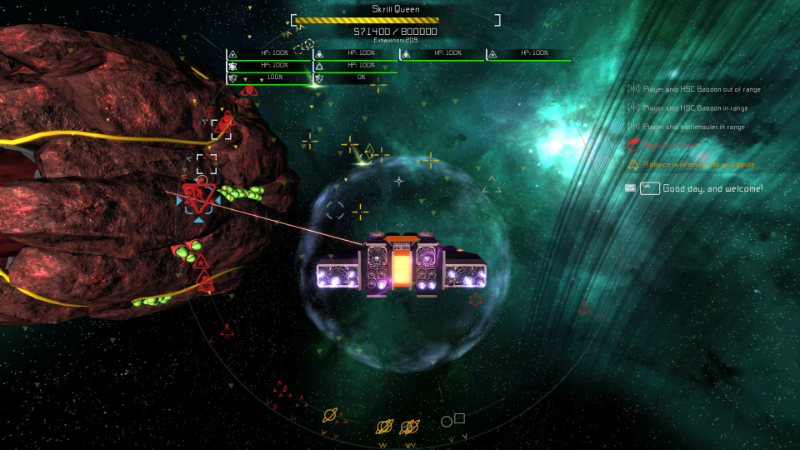
Added Skrill Queen
Large (2.5 km size) Skrill boss.
Spawns in Tier III star systems after 4-8 hours
Can be found using the scanner system, will display as an Anomaly, and Energy signature when closer to the player
Has 800,000 HP
Nodes
The Skrill Queen can spawn several different kind of nodes:
Turret Node
HP: 25,000
Will fire skrill bullets at player ships
Shield Node
HP: 25,000
Fires a beam which causes the Queen to become invulnerable
Laser Node
HP: 25,000
Fires green lasers at player ships
Hacking Node
HP: 25,000
Will randomly hack player ship’s systems
EMP Node
HP: 25,000
Will randomly fire pulses of EMP, damaging player ship’s shields
Gamma Node
HP: 25,000
Will fire 5 lasers simultaneously in a cone, causing massive damage
Gameplay
Slumbering phase
Once encountered, will be in a slumbering state
Can be awakened by ejecting a crate(s) of Queen Lure from a Disposal unit within 2 km
Will fire a beam at the dropped crates, and will awaken when health bar is 100%
Battle Phase I
Will spawn Shield and Turret nodes
Will spawn Skrill Grunts
Triggers when Queen is at 100% HP
Battle Phase II
Will spawn EMP nodes in addition to the Phase I nodes
Will spawn Skrill Hunters, in addition to Skrill Grunts
Triggers when Queen is at 75% HP
Battle Phase III
Will spawn Laser and Hacking nodes in addition to the Phase II nodes
Will spawn All types of Skrill except Disruptors
Triggers when Queen is at 50% HP
Battle Phase IV
Will spawn Gamma nodes in addition to the Phase III nodes
Will spawn All types of Skrill except Disruptors
Triggers when Queen is at 25% HP
Destroyed Phase
The Queen will remain in a dead state, allowing her corpse to be mined with a strip miner
<*> Added new resources
Vortium
Can be mined from a Skrill Queen corpse using a strip miner at a rate of 1 Vortium per 50 seconds, used to make Voranthium.
Disruptor Biomatter
Can be obtained by salvaging the debris field from destroying a skrill disruptor
Queen Lure
Can be produced in chunks of 100 in the Assembler using the following recipe:
600 Disruptor Biomatter
600 Skrill Biomatter
600 Hunter Biomatter
5 Manganese
Can be ejected from a Disposal unit near a dormant Skrill queen
A full crate is needed to awaken the Skrill queen
Voranthium
Can be produced in a refinery using the following recipe for 100 Voranthium:
100 Xanthium
1 Vortium
Can be used in a Small Rift Generator to double the max range of a rift
Di-Voranthium
Can be produced in a refinery using the following recipe for 100 Voranthium:
100 Di-Xanthium
10 Vortium
Can be used in a Medium Rift Generator to double the max range of a rift
Tetra-Voranthium
Can be produced in a refinery using the following recipe for 100 Voranthium:
100 Tetra-Xanthium
100 Vortium
Can be used in a Large Rift Generator to double the max range of a rift
Skrill Bomberling
Will sometimes spawn on your ships’ cargo pads when attacked by a Red Skrill Grunt
Will explode when a player has been near them for a short while
Can be picked up and stored, which will prevent them from exploding
Once placed will explode again after a short while
<*> Added Heat mechanics
Rooms now get hot and cold, depending on the devices in the rooms and the temperature of the ships’ hull
Ship hulls now get hot and cold, depending on the distance to the star of a solar system
Players now have an indicator that shows the temperature
Players now take damage when the temperature is either too hot or too cold
Room temperatures can be managed with a new device Thermal Extractor
Heat spreads from room to room when doors are open
<*> Added Fire mechanics
Devices that take damage can now cause a fire to be started
Fire spreads through a room
Fire needs oxygen, when a room has no more oxygen the fire goes out
Fire can be extinguisher by a new device Sprinklers, or by a new tool the Fire Extinguisher or “LogiCorp Flam-EX”
Players take damage from standing in fire, or from the temperature rise in the room the fire is in
<*> Added Radiation mechanic
Refined uranium and all nuclear fuels now emit radiation.
Radiation slowly decays in a room after the source is removed
Radiation is only emitted when a resource is placed on a cargo pad, or from the reactor when it melts down
Can be removed with RadEx, which can be used as an ammunition type for the fire extinguisher
Players will die from radiation poisoning when they stay in the radiation for too long
A radiation meter is added to the player HUD, which shows how much radiation is in a room
Radioactive resources can not be placed on indestructible stations (such as the starter stations)
<*> Added Thermal Extractor
New Tier 0 device
Resource Cost: 750 Iron, 250 Copper, 250 Steel
Uses a new resource Coolant, and heatsinks
Heatsinks absorb heat from the rooms
Coolant is used to cool the heatsinks
Depleted Coolant is created from coolant when it has run through the heatsinks
Vents are needed in rooms to take the heat out of rooms, in the same way that oxygen is spread through the ship
<*> Added Quantum Thermal Extractor
Same as Thermal Extractor, but cannot be damaged, requires no resources to function, and is an admin model
<*> Added Sprinklers
New Tier 0 device
Resource Cost: 50 Iron, 80 Copper
Takes water from any tanks on the same ship/station
Puts out fires like a champ in a 4x4x4 tile radius around the sprinkler.
<*> Added Fire Extinguisher
New Tier 0 tool
Resource Cost: 50 Iron, 25 Copper, 50 Carbon
Uses a LiquiPod as ammo
Fires a beam of fire repellant
<*> Added LiquiPod
New Tier 0 tool
Resource Cost: 50 Water, 50 Carbon
Can be used as ammo for a fire extinguisher
<*> Added Vend-O-Tron
New Admin device
Can be used by players to purchase ships from Faction, or other players
Players can put a ship up for sale by storing it in the Vend-O-Tron and setting a price, other players can browse and purchase these ships
Replaced the Store-O-Tron and Faction desk ship selling mechanic
Can be found on all faction headquarters
Updated tutorials to use this device
<*> Added LibraScan
New device that can read LibraCartridges
Players can collect and store these cartridges which have small snippets of flavour text. Added new hacking category “Onboard Defenses”
When this security risk is exploited, a ships’ onboard defenses will be disabled for a short while.
Will sometimes spawn on doors when your ship is attacked by a Green Skrill Grunt
Can be removed by shooting at them, or by using the damage beam from the Repair Gun
<*> Changed how we react to crashes and errors while saving to further reduce the chance of corrupted saves
<*> Added the /stopShip command to stop the specified ship
<*> Updated Faction Headquarters of Hurles Co., Sentinel Security Systems, Galactic Trade and The Drifters to have a Vend-O-Tron.
<*> Added Hazard protection gear
Full armor set will reduce damage from heat or radiation
Armor parts can be printed in the 3D printer
Chest - Oxygen 50, Steel 50, Carbon 50
Arm Left - Steel 25, Carbon 25
Arm Right - Steel 25, Carbon 25
Helmet - Steel 50, Carbon 50, Copper 25
Legs - Steel 10, Carbon 50
Feet - Steel 50, Carbon 50
<*>Added radiation reader
Can be printed in the 3D printer
Resources: 30 Iron, 25 Copper, 5 Iridium
Shows room radiation level by default, but shows specific value when aimed at a crate or device
<*> Players now also receive tools when starting the game
<*> Reworked faction select screen visuals
<*> Server list now shows a “refreshing” label, when refreshing
<*> Added moons to planets
<*>Reworked upgrade cartridges
No longer have two effects
Can no longer be crafted, have to be found on derelict ships or obtained from a mission reward
No longer have a duration
Need to be researched in a data core for X amount of time
Are now limited to 6 per ship
Are now used as a permanent upgrade to the ship, to allow more specialization
<*> Ship is no longer instantly vaporized when dropping in a planet, ship is now dropped out of warp on the outskirts of a planet and has 2 minutes to leave while taking percentage damage
<*> Chat now shows system name and PVE/PVP indicator on login
<*> Large asteroids can now be destroyed by shooting them
This will spawn smaller asteroids which have any of the non-rare resources in them that the large asteroid also had
<*> Improve handling of Steam workshop subscription changes while the game is running
<*> Extractor no longer sorts on distance, but on resource type + amount
<*> Props can now be moved in the editor with a new move tool
<*> Local server no longer visible in server list unless the server is running
<*> Room editing in prop mode is now off by default
<*> Chat history now carries over into the editor
<*> Added a claim all button to the advancements
<*> Added Iceberg and Aluna (game engine) splash screens to game startup
<*> Added tooltips to mission rewards listbox in mission terminal
<*> Added copy cartridge settings functionality to the data core terminal
<*> Holding down “CTRL” now prevents the inventory from scrolling
<*> Player stores now use the player access rights, and drones respect these rights
<*> Station shield no longer needs to be close to the sun, but in return can now not be activated in a no fire zone
<*> Prop floors can no longer be placed on top of normal floors in the editor
<*> Lithium ore, Manganese and Titanium can now only be found in large asteroids and need to be obtained via a strip miner
<*> Delivery drones now repair stations (but not Drifter stations) when idle
<*> Ships can now be renamed from the GRIP
<*> Added split crate button (Default T)
<*> Derelict ships now spawn with traps
<*> Added option to disable tutorial popup on startup
<*> Added prop version of the Sprinker, which lines up with the framework lights
<*> Added Steam Achievements
<*> Drones now have explosions when blown up
<*> Added scanner button to signatures screen
<*> Added button to scroll chat to bottom
<*> Chat now scrolls to bottom upon entering a message
<*> Main menu now has a popup when the save you want to open needs to be rebuild and will automatically rebuild when confirmed
<*> Added tooltip to switch inventories to the tutorials in various places
<*> Added Faction Tier increase advancements
<*> Added advancement for destroying the Skrill Queen
<*> Medium Power Cell is now a prop instead of a floor tile
<*> Drone and Skrill shields now behave similarly to ship shields (cooldown period, charge when back online)
<*> new /givetieredtoolinv command that does require a tier
<*> Ammo type now shows for devices in the editor tooltip
<*> Flammability and heat indicators in the ship editor
<*> Shadow options can now be set to Off/Low/Medium/High/Very High
<*> Added anisotropic filtering options
<*> Ship editor terminal now shows the upgrade state after upgrading the ship
<*> Added cargo counters to tooltip in editor
BALANCE
Repair gun now uses Carbon instead of Silicon in the recipe, so players can also craft it in T0 systems. Instead of just purchasing it.
Skrill drop less crystal vectronium and vectronium when killed.
Drones now drop less loot
BUGFIXES
Fixed desync issue where objects that were queued to be added to a solar system were not added in the same way on client and server on system load.
Cargo teleporter no longer resets using player ID when he leaves the ship
Reworked disposer so it doesn't freeze when it has no power anymore.
Fixed incorrect price of the disposable repair drone (was 10 times more expensive than intended)
Ship upgrades now also repair all devices on the ship at the cost of a fraction of the original cost based on the damage it had
The default state of an escape pod is now "On"
Ships with an active station shield now won't be considered for auto-storage anymore
Changed a lot of underlying systems to prevent too much memory from being allocated
Fixed bug where tradestats cartridge would not scan a system when it runs from an extension bay
Fixed issue where trade data cartridge would not display the correct data
Fixed bug where unreachable tile button would not be clickable
Fixed bug where unreachable tile validator would not work correctly
Unreachable tile validator now also takes local teleporters into account
Ship editor now shows stats based on server settings when upgrading
Fixed a desync when entities were queued to be added to the game state
Fixed a crash with the solar panels
Fixed a bug where components of entities with delayed spawning would be added twice
Fixed a crash in the PoI UI
Reduced memory allocations for drones checking if they need fuel
Reduced memory allocations for active ships
Fixed material of the lights on the nuclear reactor
Fixed user drone warp speed
Weapon groups now disable when a ship is in destruction state
Ship upgrade now aggressively replaces the device state during upgrades to prevent resource duping
Fixed mail sound being in the "SFX" group instead of the "UI" group
Fixed colored text not working in loading screen
Fixed a server side login error that could occur when reconnecting after disconnecting before finishing the previous login attempt
Fixed a client crash that could occur when opening the map on a terminal just when the ship was destroyed (This was worked around a while ago, but the added logging has now resulted in us being able to properly fix it)
Fixed a client crash that could occur when pressing the ship stats firewall overview button at the exact moment the ship was destroyed
Fixed a crash when an offline player would be sent a mail
Removed corrupt textures that would still try to load but were unused
Fixed a crash when upgrading ships
Fixed a bug where upgraded ships would not be sent to clients correctly
Fixed a case where we would fail to send a packet because compression would make it larger, this should fix some people not being able to log in
Fixed a client crash that could occur when teleporting off a ship while looking at a device that could be interacted with
Unload empty systems earlier when under high memory pressure, to reduce the likelihood of out of memory crashes on servers
Fixed a client crash that could occur when logging in on or near a ship with a ram scoop
Fixed bug where wall terminals could not be repaired or damaged using the repair gun
Fixed repair gun icons toggle hotkey toggling while chat was open
Fixed a server crash and desync that could occur when a ship was destroyed
Fixed a client crash that could occur when the used translation file had invalid strings for the new advancements UI
Fixed a client crash that could occur when completing a mission
Fixed some errors logged to the console
Avoid an out of memory crash on the client when trying to plot a rifting route to a far away system by limiting the maximum amount of stops to 25
Log an error when we can't find the attachment point of a terminal
Fixed a server crash that would occur when invoking /setSuperAdmin on an offline player
Fixed a server crash that could occur when a system was reloaded and MultithreadedSystemUpdate was enabled
Fixed a client crash that could occur when the ship you were on was destroyed
Fixed a client crash that could occur when pressing the inventory slot hotkeys while in the loading screen
Fixed a client crash that could occur when looping a sound failed
Fixed a client crash that could occur when calculating the available resources on a ship
Fixed a crash that could occur when the engine logged an empty message
Avoid a crash when failing to update display text of a textfield after deleting a character
Try to fix failing to load a texture because it's already being read by something else (an Antivirus solution for example)
Log when the default (yellow checkerboard) texture gets cached or retrieved from the cache
Log when failing to update display text of a textfield after deleting a character
Log when a character animation is somehow missing
Worked around running out of memory when baking ship exteriors by force invoking the garbage collector when this happens
Fixed a crash when the port set in the config is invalid
Fixed a server crash that could occur when a ship was spawned
Fixed a server crash that could occur during tile generation
Worked around a server crash that could occur when a ship that was somehow not in a system was being removed from a system
Fixed an editor crash that occurred when exporting a ship to the workshop while you were upgrading it
Fixed an editor crash that could occur when placing an exterior prop
Fixed an editor crash that could occur in the power editor
Fixed a client crash that could occur when a system event objective to construct a ship was completed
Fixed a client crash that could occur when handing in a system event while the ship got destroyed
Fixed a client crash that could occur during rendering
Fixed a client crash that could occur when caching textures. We'll now crash later if the storage device in question is having major problems, but will ignore minor problems that only pop up during the caching
Request the correct OpenGL version, this might fix crashes on old driver versions as we were using newer OpenGL functionality than we were telling the GPU driver
Fixed a client crash that occurred when cargo was teleported at the exact moment that the ship was destroyed
Fixed a rare hang on exit
Fixed a desync related to mining
Fixed a threading related server crash that could occur when a player logged in multiple times before their system would be loaded
Fixed a crash that could occur when loading a system
Fixed a client crash that could occur when adding rules in the drone bay enhancement cartridge UI
Fixed a client crash that could occur upon leaving the game
Fixed full rebuilds of saved world not working correctly (rebuildserver 2)
Improve memory efficiency of ship baking to avoid out of memory crashes
Fixed a threading related server crash that could occur when checking if a player had an illegal activity mission
Fixed a crash that could occur when trying to load corrupted save or ship metadata
Fixed a client crash that could occur when a single-player server instance crashed
Fixed a client crash that could occur when entering the cockpit with a mission that had a target entity
Fixed a desync that could occur when a ship was destroyed or would self destruct
Fixed a client crash that could occur when teleporting off a ship while looking at a device that could be interacted with
Fixed bug where benches would have the wrong hover text
Fixed player heat visual effects layering
Fixed hydropex service menu not showing the right prices
Fixed a bug where some tools would slow down the vault UI
Fixed icons for entities behind planets showing up twice
Fixed faction droids not responding to players by raising their signs
Removed menu button from devices
Fixed missing flight X and Y inversion options
Fixed cold effect not working properly on the player HUD
Fixed bug where player equipment icons would not show up in the vault
Fixed an issue where players could teleport to ships that were upgrading
Fixed a duping bug for resources on the refinery and cargo pads
Fixed not being able to place props in editor when room isn't selected (now auto selects when needed)
Warp charge now cancels when something else changes warp level
Fixed a memory leak on loading old saves
Fixed a memory leak when upgrading ships
Fixed a bug where negative resources could be added to large asteroids
Fixed some bugs with clicking on UIs through windows (should not be possible)
Fixed texture issue on double window
Fixed the length of main menu buttons (no longer overlap with the options windows)
Fixed bug in the main menu character options window where the character would turn when clicking the buttons
Fixed a bug where resources could show as 0 in the vault
Fixed bug where exterior devices and their blockers such as engines and cargo pods would be included in room size
Fixed a marshaling issue in our networking library
Fixed a crash in the Vault UI
Fixed resource scanner hotkey not returning to main screen properly
Fixed crash where devicestate would sometimes override device IDs
Fixed a server crash that could occur when a ship with players on it was just destroyed
Fixed a client crash that could occur while raycasting
Fixed a client crash that could occur when the server list refreshed
Fixed a threading related client crash in the ACTR UI
Fixed main menu not scaling correctly when minimizing while splash screens are popping up
Fixed tutorial Eggnite objective in the Repair Tutorial
Fixed the shader of the LogiCorp Tool Store Lettering
Fixed a memory leak in the UI
Fixed a memory leak in the Galaxy Controller
Fixed a memory leak when repeatedly exiting and entering games
Fixed terminals showing up in the weapon groups in the ship editor
Fixed extreme camera shake, now has a max value
Automatic weapons and drones no longer target entities owned by fleet/crew, even if those entities are attacking the owner
Fixed a texture path in the device editor permissions UI
Fixed missing texture in drone bay target popup
An attempt to fix a rare physics crash
Fixed workshop screenshots sometimes having weird artifacts
Fixed inability to update workshop screenshots
Fixed some issues with UI elements and overlays when taking screenshots for the Steam Workshop
Updated mesh of Small Rift Generator so you can now walk in between the monitors
Fixed supported resolution list for other screens than the currently selected one
Fixed a bunch of models which were missing cached versions
Fixed hand crate hologram sometimes not changing
Fixed hand animations sometimes not playing
Quantum Thermal Extractor now also counts for the ship validator in the editor
Fixed mouse mouse button handling when losing focus
Fixed a bug where terminals would not actually be disabled when a player went out of range
Fixed insurance terminal background image being overlayed on the popup
Fixed ammo loader showing as a requirement for rail guns
Fixed small missile launcher hover window in editor showing projectile ammo instead of missiles
Device state validate now puts all devices in the first weapon group (this does mean that profiles might get lost on very old ships), fixes the weapon groups on some older ships
Railgun now loses its charge when it loses CPU
Fixed bug where chat message would sometimes be scaled for longer messages
Players now respawn on the teleporter, a replacement station or starter station when their ship is removed by system rebuild
Fixed camera rotation when sitting in certain seats
Fixed gun reload sound still playing when you stop reloading
Fixed bug where player would be locked when editing chat options
Fixed bug where weapons would fire when adjusting chat options
Fixed loading screen tips key icons
Fixed bug where new players would start out dead if they joined a rebuild server they never joined before
NPC hacking entities now respect shields being up
Follow up advancements will now trigger if previous advancements have not been claimed
Fixed bug where you could snap your neck when looking around on benches
Fixed bug where you could not reach the rightmost edge of the terminal in the engineering chair of the bridge
Fixed bug where you could not reach the edges of the terminals on a captains chair
Fixed bug where gun would jam if the player would run during a reload
Fixed a bug where multiple build ship objectives could spawn on the same ship
Fixed a desync with asteroid cached positions
Fixed an exploit with player trade terminals
Fixed generating uncompletable trade network system event objectives
Fixed teleporting oxygen into life support always firing
Fixed flicker on focus change when using a borderless window
GRAPHICS
Editor preview prop ghost blocks now flashes red when it can’t be placed
Buy button on the trade station now greys out if there's no stock
Sell button on the trade station now greys out if there's no demand
Added cluster explosion for ships
Reworked warp popup in the cockpit
Reworked check list in editor
Updated main menu buttons
Updated cursor sprites
Updated exit game confirmation popup
Increased font size of mission bulletin
SOUND
Fixed volume of jump and landing sounds for players
Added pickup/drop sounds for resource crates
Added 3D printer sounds
Added various HUD interaction sounds
OPTIMIZATIONS
Overhauled exterior lighting to improve performance
Improved performance when encountering a drone for the first time in a session
Increased performance of ship baking (combining of all individual blocks into one object)
Improved how we check if a file exists on disk
Bullet materials no longer update every frame
Cache some components in bullets so we don't need to request them every frame
Optimized warp disrupt shaders
Fixed some bugs with engine particles which would slow down the game
Optimized engine particle loading/unloading
Fixed hanging while generating workshop screenshot preview
Experimental Endeavours - Interstellar Rift Development Update 163
Today we're launching the biggest experimental patch for Interstellar Rift ever. In this patch is almost all the content that we've been preparing for the release from Early Access. With this patch we hope to catch most of the bugs that slipped through our own testing, so we can have a stable launch in two weeks.
This experimental patch contains, among other things, temperature mechanics, radiation mechanics, fire mechanics, ship selling for players, onboard defenses, and a new end game boss called the Skrill Queen.
Enabling the experimental branch
To enable the experimental branch, right click on Interstellar Rift in Steam, go to the beta tab, and select the "experimental IR beta patches" option
Please note that galaxy files opened in the experimental build, may turn out to be broken when going back to the regular build. It is recommended to start a new save file when trying the experimental build.
We won’t go in depth for each of these mechanics in this post, but we’ll highlight a few of them.
Temperature
Each device on your ship will now emit heat, and your ship’s hull will warm up or cool down depending on how close your ship is to the star of a solar system. For small ships, this effect is negligible and they won’t need any changes. Larger ships however, will need to be actively managed with a device called the Thermal Extractor. This device will allow you to extract heat from the rooms on your ships and store that heat in heatsinks. With the help of coolant you can keep the temperature on your ships within reasonable levels. Heat is channeled from rooms to the thermal extractor via vents, the same vents that we use to provide oxygen to rooms. So you’ll probably have to update some of your designs to have plenty of vents in each room, and you will need to add a thermal extractor. To make this a little easier we’ve added a new checklist in the editor which shows you exactly how much vents each room needs.
Radiation
Radioactive materials will emit radiation from now on. We’ve made an exception for resources already on your ships and stations, but as soon as they are picked up and placed down again they too will begin to spread radiation. Radiation is harmful to you, so radioactive material will need to be separated from the rest of the ship. When radioactive material is in the Nuclear reactor, the vault, or your inventory it will not emit radiation. But as soon as it is stored on a cargo pad or in a cargo container it will start spreading. There are several ways around handling radioactive material, you could print protective gear, or you can use ACTRs or other devices to handle the transport without physical contact. To prevent griefing, you cannot place down radioactive material on the cargo pads on invulnerable stations, such as the starter stations.
Fire
Fire can now spread from damaged devices and can envelop entire rooms. Fire extinguishers and ammo for them are available from the faction desks and stores throughout the systems. Make sure you get your hands on them in time, before you are faced with an out of control inferno on your ships. Fire will consume oxygen in the room it is in, so cutting of oxygen will also work to smother the flames. Another way of putting out fire without using a fire extinguisher is by installing sprinklers in the rooms. These can be supplied with water by placing water in an empty fuel tank, which will convert it to a water tank that the sprinklers will be able to access from anywhere on the ship.
These three mechanics will need to be taken into account when you start playing on the experimental branch, there is much more to discover, but the other mechanics and content won’t impact your ship designs in the same way.
Please check out the experimental branch, it helps us to eliminate most of the bugs before the patch goes live, and a big thank you to everyone who has helped make the game what it is today by providing feedback and playing over the last couple of years, we would not have come so far without you!