
- Tweaked default overlook carpet colors
- Added camera speed indicator (when using mousewheel up/down in Free Camera Mode)
- Camera now moves to puzzle area and changes to top down camera every time a new puzzle is selected
- Fixed crash happening when two players grab a piece at the same time
- Fixed crash when player grabs piece of multi select of another player and they both pick it up at the same time
- Fixed crash that happens sometimes when joining game right after downloading host image
- Fixed issues causing some clients to have invisible pieces
- Fixed issue of puzzle desync when 2 players multi select pieces at the same time containing some of each selection
- Fixed issue where clicking to view workshop page of custom image did not load the page

Jigsaw Puzzle Dreams
1.3.1.1 Hotfix
Spooky Bonus + Update on Future Plans
New Free Carpet and Rug Design
It's that time of the year for spooky movies (and spooky puzzles!). To get in the spirit we have added a free bonus some of you might recognize from a certain hotel.
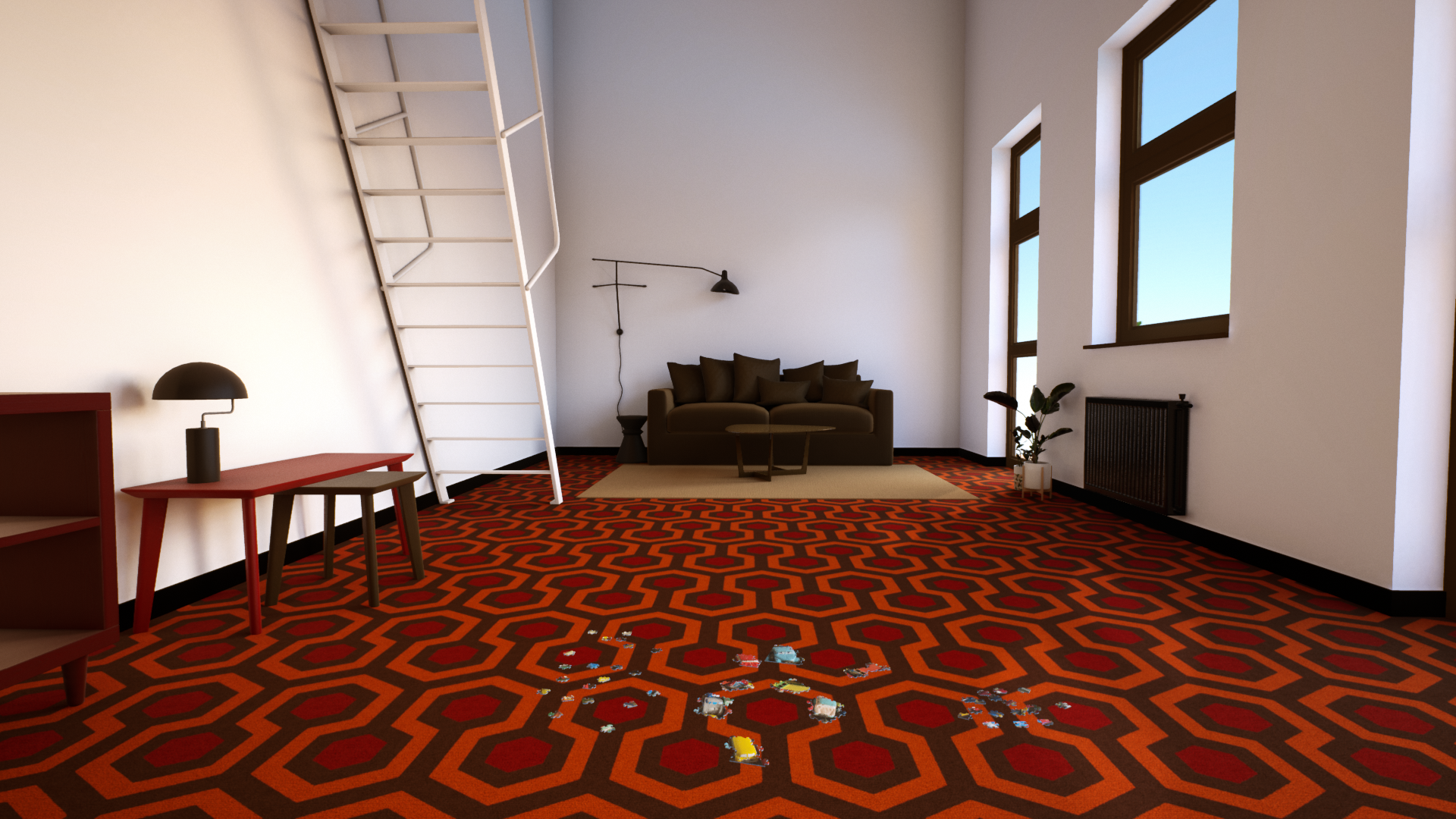
This new design is free for everyone and can be applied to the floors or rug!
To select it enter customize room, choose floors or rug, and select it from the drop-down menu at the top.

Like all of our materials you can change the color of everything to use in your room design in many different ways.


Future Plans: Supporter DLC
We have a lot of updates planned for the future. Improved lighting, variable sized rooms, multiple puzzles simultaneously, different piece cuts and more!
However to get to all of that we need more time. The game has been doing well, so well that we are close but not close enough to be able to spend more time working on the game and less time on our day jobs.
To push us over the hump we will be releasing a supporter DLC with lots of fun extras!
It will be available in the future for $9.99 for anyone that wants to help support further updates.
We have been having a lot of fun coming up with fun extras to include in the pack and will be posting updates as we work on it.
First up, stickers!

The pack will contain a bunch of stickers to choose from and place anywhere in the room!


Fully multiplayer compatible, players can stick them in rooms they visit where they will be saved with the room and remain even when you leave the game! (Host may choose to limit stickers at their discretion)
These are designed for minimal performance impact so you can sticker bomb the room!

Stickers shown are early tests and not necessarily what will be in the final release. We are creating many as we speak and have some extra surprises to show as well.
Lastly the previous update changed a lot with the underlying code and there have been some people with infrequent crashes.
I haven't been able to find the cause or duplicate on my end yet so I have uploaded a debug version that will give more information in the crash logs. If you are experiencing game crashes feel free to test with this version and post your crash log on the steam forum or our discord.
To access this version right click the game and select properties then select it from the Betas tab:

There is one caveat. Debug versions of Unreal do not save to the usual place but instead in the game directory. To change this and use your existing save games you must put "-INSTALLED" in the launch options in steam.

We have more to reveal and some surprises with the pack and stickers. I'll be posting updates as we work on it.
Happy Puzzling!
Quick Hotfix
- Fixed issue where stacked pieces were stacked in order of puzzle instead of random
- Fix for steam avatars sometimes not showing in multiplayer
- Added additional error info when not able to upload to workshop
- Fixed bug where show timer in game could sometimes be selected with record puzzle time off
Massive Update - 1.3
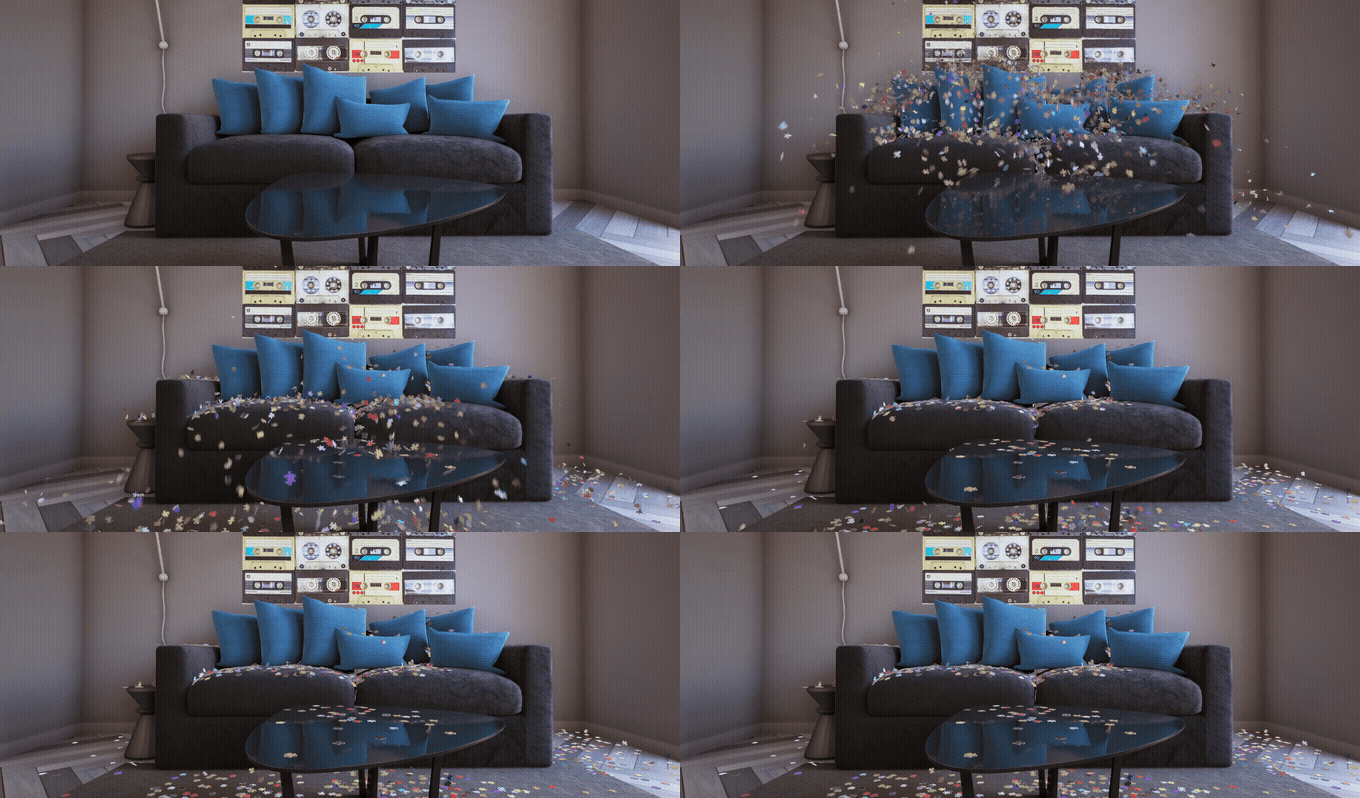
The 1.3 update is here! It's the biggest update we've put out so far. There's new puzzle interactions, new physics, huge performance optimizations, community requested features (ːLIS_pixel_heartː), and a whole lot more!
There's a lot of super cool stuff to check out, so let's get into it!
New Interaction Features
Piece Grouping
Press G after picking up a selection of pieces to group them together
Once grouped, use Shift-Mousewheel up/down to expand/contract the grouping
Widen or narrow a group with Ctrl-Mousewheel and Alt-Mousewheel
(Note: You must first pickup pieces and press G before being able to use the resizing tools)Add Single Pieces to Hand
Switch to Pickup Single Piece mode by pressing Shift-RightMouseButton.
Now each piece you click will be added to a stack in your hand!
Place Single Pieces from Hand
Switch to Drop Single Piece mode by again pressing Shift-RightMouseButton.
Now you can individually drop pieces from your stack:
Swapping Grab Modes
Pressing Shift-RightMouseButton with a selection of pieces held will toggle between Normal, Pickup Single Piece, and Drop Single Piece:
Overhauled Physics + Performance Boost
Two things needed to happen for our new grouping features to work smoothly. Physics needed improvement, and optimizations needed to be made. So, we completely reworked the physics, and majorly optimized areas all throughout the game.
The result is the game now runs better than ever, the physics behave fluidly, 1000s of pieces can be dropped at once (it used to be 50 at a time!) and,
well,
this is all I want to do now:


(That last one is ~2.5-3k pieces)
Stats & Puzzle Timer
Puzzle Stats
We've made it more convenient to see puzzle stats while playing by adding a new panel into the main ESC menu. This will show you puzzle size, completion %, and optionally a puzzle timer.
(Note: the second number for puzzle size is the 'actual' piece count, whereas the first number is what you selected. Piece counts can vary, just as they do IRL puzzles, because of the need to match the aspect ratio of the puzzle image.)
Puzzle Timer
A much requested feature, puzzle time tracking has been added!
To enable toggle on Show Puzzle Time in the Settings menu. This will display the timer in the Puzzle Stats panel, the panels for Load Puzzle, and will give a final time on the Puzzle Complete screen.
Additionally you can toggle on Show Timer In Game to display in the upper corner while you puzzle.
(Note: If you're playing solo the timer will pause if you open the main ESC menu.)
Random Mystery Puzzles
Can't decide which puzzle to pick? Looking for a bit of mystery? This new feature is for you!
- A new panel for Random Puzzle is now displayed at the top when choosing a puzzle:

- Increase the puzzle pool by toggling on collection packs. Options are also available to choose if puzzles you've already completed will be included:

- A new option allows you to go full mystery mode and hide the preview image:

More Graphics Options
New graphics settings have been added to adjust the quality for Reflections, Ambient Occlusion, and Anti-aliasing. In addition to all of the optimizations included in this update, tweaking these settings can provide improved performance for an even wider range of hardware configurations.
We've also included the ability to tweak settings while viewing the room, allowing you to see the visual changes in real-time.

And More!
- Puzzle Previews are now resizable.
Use Shift-Mousewheel up/down to resize preview while held:
- Setting up custom key binds has been improved. You now get an overlay with options to Cancel, Clear, Set Default, and the ability to use key modifiers with your mouse has been added (for example: Ctrl-Shift-Mousebutton).

- Improved loading bars & added Cancel Button:

- Improved material and rendering for puzzle backing:

- And...well...even more! See full patch notes below:
Full Patch Notes:
- Added new Grouping features when selecting pieces
- Added new feature to add one piece at a time to your hand into a stack, and to place one at a time from the stack
- Added stats display to main menu (% complete, puzzle size, optional timer). These are also displayed to clients joined in multiplayer.
- Added option to show timer for puzzles (hours, minutes, seconds). Can be displayed in-game, on main menu stats panel, and will show in the save file info panel
- Overhauled puzzle physics and geometry. Results in performance boost as well as ability to move/drop large amounts of pieces at once.
- Major improvements in performance for multi-select, significant improvements using multi-select with larger puzzles
- Significant general performance improvements
- Added ability to select a random "mystery" puzzle!
- Can choose puzzle packs (including custom images) to include in the random selection pool
- Options to not include already finished puzzles or only include puzzles finished below a certain size
- Can choose puzzle packs (including custom images) to include in the random selection pool
- Added ability to increase/decrease size of preview image (Shift-mousewheel when held)
- Default preview image size improved for extra wide puzzles
- Added more graphics options (Ambient Occlusion, Reflections, Post-Process, Anti-Aliasing)
- Added ability to preview room/game while making adjustments to graphics options
- Improved custom key binds & Controls
- Now supports key modifiers with mouse clicks (shift-click etc.)
- Updated interface for editing binds. Clicking to edit one now brings up an overlay prompting you to press the key, and adds options to clear/set default/or cancel.
- Setting Zoom In/Out to a key (instead of scroll wheel) now works properly. Holding down a set key will now smoothly zoom.
- Added option to invert camera controls
- Now supports key modifiers with mouse clicks (shift-click etc.)
- Added option to hide preview image when starting a new puzzle
- Optimized textures for hanging completed Custom Puzzles on walls. Toggling off Original Resolution Wall Hangings in Settings will now also optimize Custom Puzzles (recommended!). This vastly improves VRAM usage for hanging many custom puzzles on the wall.
- Improved behavior when deselecting Randomize Rotation for pieces. Pieces will now strictly keep their orientation and will no longer rotate when colliding with other objects.
- When hosting a multiplayer room the custom DLC materials used in a room will now sync/display for players joining that don't own the DLC (previously only synced colors for non-owners).
- Saved camera positions are now stored per puzzle save. Each puzzle can have it's own unique camera positions set.
- Saved camera positions now also work with the numpad (previously only top number row worked)
- New & improved texture mapping and rendering technique for back of puzzle pieces
- Fixed calculation error for checking if a puzzle can fit in chosen Play Area (it was only accurate in Dreams Pack, now accurate for any puzzle)
- Added improved calculation if puzzle can fit in Play Area: If Randomize Rotation is selected it now checks if it can fit sideways as well
- Added optional text indicator when changing camera modes (Free Camera, Top Down)
- Added Cancel button to Loading/Creating puzzle screen
- Fixed issue with loading bar being incorrect
- Fixed issue where typing in certain dialog boxes would trigger shortcuts buttons
- Fixed bug causing certain custom room materials with multiple colors not applying changes correctly
- Fixed bug with multi-select making it not possible to highlight a piece that had just been deselected
- Fixed: toggling Original Resolution Wall Hangings on/off no longer requires restarting game
- Multiplayer clients can no longer disconnect pieces after puzzle is complete
- Refactored code areas that could be cause for random crashes
- Fixed some menu animation issues
We hope you all enjoy the update!
If you wanna find some puzzle partners be sure to join our friendly discord.

Steam Points Shop Launch
Click Here to check it out!
Animated Mini-Profile Backgrounds
Puzzle Drop - Available in 10 colors


Animated Profile Backgrounds
Puzzle Hover - Available in 10 colors


What's the Steam Points Shop?
If you've not used it before basically Steam gives you Points when you make purchases, as well as when someone gives you an award for community activity (screenshots, posts, etc.). You can then use these Steam Points to get items to customize your Steam profile. See more details here.
We've got some big updates to the game coming very soon, so stay tuned! Until then, happy puzzling!
New Feature: In-game Chat
Hello! The latest update is here with a new feature: In-game Chat for multiplayer!

- Press ENTER to open chat and send messages
- Previous messages can be scrolled through while chat is open
- Chat includes multi-language support
- We also updated the Player List Names for multi-language support
- We also updated the Player List Names for multi-language support
- Chat is enabled by default, but the multiplayer Host may choose to disable it by toggling it off in the Multiplayer Menu

Speaking of multiplayer:
Looking for friendly folks to puzzle with? Join our Discord and check out the Looking for Players channel!

We have more updates on the way so stay tuned!
[table noborder="1"]
[tr]
[td]Happy Puzzling![/td]
[td]
[/td][/tr]
[/table]
Hotfix Update 1.2.0.3
- Moved locked pieces button from esc menu to in game menu.
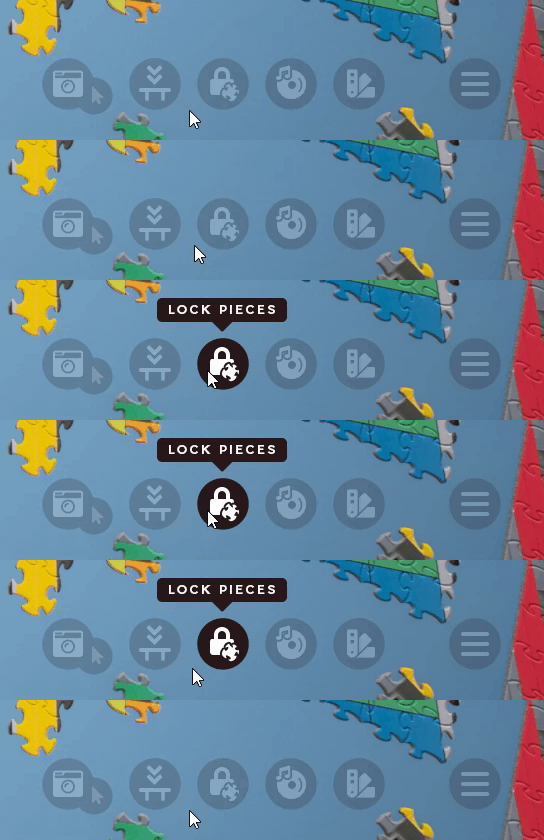
- Revisited highlighting for multi-selected pieces once again. Created a new shader that hopefully finds the right balance between visibility of highlight and still being able to see the pieces.
- Changed lock pieces key shortcut (CTRL+L) to toggle the lock pieces mode on/off.
Hotfix Update 1.2.0.2
- Fixed issue with black screen when showing Custom Puzzle browse images dialog
- Fixed issue with resolution in windowed sometimes displaying incorrectly
- Fixed issue with join code and extra space at end of string
- Added toggle button to lock pieces (ctrl-L by default)
- Adjusted multi-select highlight to be more visible
Update 1.2
We had been working on some major code rewrites and changes to the engine leading up to this update, which were necessary to do first, but were a big reason for the gap in time since the last update. With that work out of the way we'll be in a good position to update more frequently now, so expect more to come in the near future!
Until then, see below for patch notes as well as a little overview of how Lock Pieces works:
Updates
- New feature added that allows player to lock pieces in place
- Fixed multiplayer issue causing client to sometimes get desynced with players which could cause players to be mismatched on piece connections/placements
- Fixed multiplayer Join Code issue that caused some players to not be able to connect (long distance connections were especially prone to this issue)
- Fixed multiplayer issue that sometimes caused host's main table color to not sync with joining players
- Fixed "Return pieces to table" issues (Updated "return boundaries" to prevent stuck pieces)
- Updated the visual feedback for the Select Multiple Pieces function
- Major code rewrite on how the jigsaw puzzle and multiplayer works
- This improves/changes a lot of things behind the scenes, but a big takeaway is that it'll make future updates much easier to implement.
New Feature: Lock Pieces
This new feature allows players to lock a piece or section of pieces in place. After locking a piece or section any pieces connected to them will also become locked. This is especially useful for locking the edges/border in place, and will prevent players from accidentally "picking up the whole puzzle".
- With an active puzzle loaded go to the main menu (ESC) and you'll find a new Lock Pieces button. (In multiplayer games only the room host will have this)
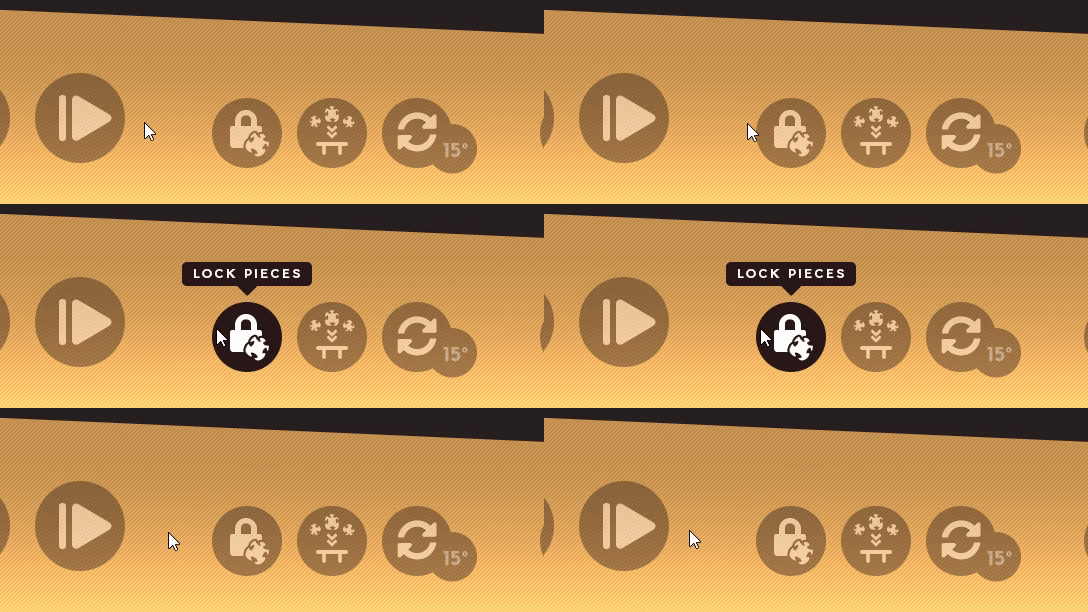
- This will bring you into the Lock Pieces mode. You can now click any piece or chunks of pieces (like the edge) to toggle the locked status on/off. Locked pieces will be marked with a red border.

- Any piece connected to a locked piece will also become locked.
- Clicking locked pieces will flash red to let players know they can't be moved.
- In Multiplayer games only the host can lock pieces, but the locked status applies to all other players.
Feedback? Questions? Looking for players? Join our Discord or pop over to the Steam Community!
[table noborder="1"]
[tr]
[td]Happy Puzzling![/td]
[td]
[/td][/tr]
[/table]
Steam Puzzle Fest Sale
DLC SALE
Save 61% on our ultimate bundle which includes 190 high res puzzles, a massive collection of room customization materials, and access to the Custom Puzzles feature!
https://store.steampowered.com/bundle/23957/Ultimate_Jiggin_Pack/
Alternatively pick and choose DLC for 35% off! Each pack contains 38 high res puzzles, room customization materials, and access to Custom Puzzles.
https://store.steampowered.com/app/1832730/Jigsaw_Puzzle_Dreams__Serene_Pack/?curator_clanid=41066295
https://store.steampowered.com/app/1832731/Jigsaw_Puzzle_Dreams__Tranquil_Pack/?curator_clanid=41066295
https://store.steampowered.com/app/1832732/Jigsaw_Puzzle_Dreams__Idyllic_Pack/?curator_clanid=41066295
https://store.steampowered.com/app/1832733/Jigsaw_Puzzle_Dreams__Radiant_Pack/?curator_clanid=41066295
https://store.steampowered.com/app/1832734/Jigsaw_Puzzle_Dreams__Scenic_Pack/?curator_clanid=41066295
Steam Puzzle Fest sale ends May 1st @ 10am Pacific
Looking for friends to share some puzzle time with? Join our discord!
https://discord.gg/fJwHDT2Cxg

Happy Puzzling! ːLIS_pixel_heartː