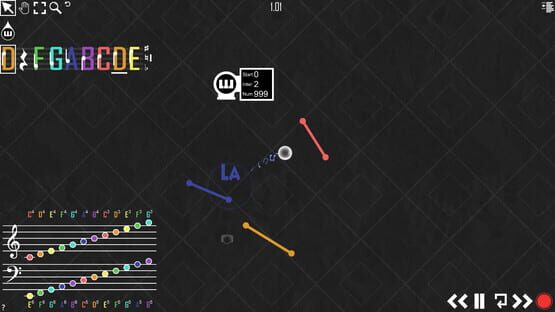
[Update & Sale] 2.6 Improved Sheet Music Helper & 90% Off Sale!
New Features
We’ve updated the Sheet Music Help Button (bottom left question mark) to now include different keys. This should make reading and translating sheet music notes into Kinacoustic notes much easier. This feature will make creating songs based on sheet music much easier, especially for players who claim they aren’t musically inclined.
Reworks
This update is also going to be trying to fix some of the issues brought up by the image sequence renderer introduced in 2.5. This new improvement should make the disk space required to record an image sequence much less. This utility still isn’t in its final form so don’t expect perfection out of it. Like I said in the 2.5 update, this feature is for the people who have very slow computers and can’t afford the CPU required to use external recording software.
90% Off Sale March 14 – 23
This is the biggest sale ever and will likely never happen again. The primary purpose of this sale is to encourage players, both old and new, to stay home and play games amid the Covid-19 pandemic. Staying home and staying physically away from other people will help this pandemic become more manageable for healthcare specialists and ultimately save lives. I’m happy to do my part the only way I know how, and I hope this sale will contribute to people staying entertained during their solitude. Stay safe.
Todays update is version 2.5. Some of the features to come from this update have been proven tremendously troublesome in the past. However, this time around I think I’ve got something extremely solid.
New Features
-Export to Image Sequence Render. This one will need some explaining. One of the core ideas for Kinacoustic was to have people record their songs and share them over the internet. Initially we figured users could use a screen capture program. This has worked for a while however this method has its problems especially with larger songs. This feature will give players the option to “render” gameplay as an image sequence and export into their “Exports” folder (much like the “Record Audio” feature). So, what happens is when you decide to render a song to an image sequence you set the time you want to end the song and the FPS (frames per second) you want to record at (either 30 or 60). After you click to begin the image sequence the game will run at an extremely slow frame rate and render each frame individually and put them in the folder you designated. Because the images have no compression the finished image sequence folder will be very large (several gigabytes per minute of footage). Because of this, we anticipate this feature will be rarely used for only the very large CPU intensive songs. After you get you image sequence rendered, you can import the image sequence into video editing software and re-render the video as a video file, ie: MP4, AVI. I found Adobe Premier to work well for importing image sequences. After this you will need to record the audio separately and combine it with your video. Here’s an example of what this feature can accomplish: https://www.youtube.com/watch?v=OBBnRL8BoEY
-Loading screen. For some, this update might seem extremely trivial. But to people with huge projects, I believe this feature will help them tremendously. Now when loading a song either from the main menu or from inside the game there will be two stages of loading. “Initializing” Where the load initializes. After the load initializes a value will display the progress in a numerical value from 0-100%.
Bug Fixes / Reworks
-Reworked the Record Button Menu to account for the new export to image sequence feature.
-Added a “Time to Stop Recording” input field for both audio and image sequence recording.
-Fixed some issues with Rest Lines not displaying their correct platformer mode value.
If you’re reading this, thanks for the continued support of Kinacoustic. If you find any bugs feel free to post about them on the “Bug Reports” community forum.
[Update] 2.4.4 Improved Line Animations, Optimizations, and Bug Fixes
The recent 2.4.3 update added a few new features but there was a few problems I initially missed while testing it. 2.4.4 aims to improve those small glitches and deliver some of the other updates I had been working on in the meantime.
Bug Fixes / Reworks
-Improved the Line bounce animations to be much more pleasing to look at from both close and far. You can still disable line animations in the options if you don’t like how they look, but they don’t impact fps much if at all.
-Made the Alt-tracking camera much more optimized with large songs. Before 2.4.4, Alt-tracking camera would have a noticeable impact on large songs, now the impact from the feature is less then half of what it used to be.
-Made the Alt-tracking camera not activatable when using the Drag Selection Tool.
-Made the Drag Selection Tool interrupt the Alt-tracking camera.
-Fixed a bug with zooming in or out causing lag on large songs.
-Fixed a bug with Rest Lines not showing their Platformer Mode value properly.
-Fixed a Pause Menu panel from clipping out of the screen on some resolutions.
-Fixed a bug with the Number of Drops not being infinite when set to 999 after skipping beyond a specific time.
-Fixed a bug with objects being created via Drops hitting Rest Lines not bieng properly re-pooled.
As usual, thanks for the continued support. If you find any bugs feel free to post about them on the "Bug Reports" community forum.
[Update] 2.4.3 New Right-Click Options, Optimizations and small Bug Fixes.
Hi there. Version 2.4.3 brings a couple of quality of life improvements mixed with a 10% FPS increase for large projects. Coupled with those things, I've fixed some tiny bugs.
New Features
The big news of the 2.4.3 update is the quality of life changes. This update adds some more functionality when Right-Clicking objects.
Now when you Right-Click either Lines or Sustain Orbs, a "Change Value Panel" appears on the left below the Line Selection Panel. What this does is let you type in the volume of the line (value between 1-100) or the value of the sustain for the Sustain Orb (value between 0.10-2.75). You can of course still Right-Click and drag if you wish to change the values the old way.
When you highlight a Drop Emitter it the UI focuses on the "Start" Value as an alternate way to select that input field for typing.
In addition to this, I looked back at some old code and managed to add a 10% FPS increase for larger songs.
Another small change, is I changed the "Start", "Inter", and "Num" text on the Drop Emitters to be italicized.
Finally, I added a version number at then bottom of the pause menu that can be use to differentiate iterations of the game in the future.
Bug Fixes
Fixed a bug with objects not being properly un-highlighted when selecting a different panel from the highlighted object.
Made the Line wiggle animations more optimized.
Thanks to everyone who supports the game enjoy Kina-Composing! :piano:
[Update] 2.4.2 Small Bug Fixes
Hi guys it's been a while since an update. This is a small one.
I've updated the Kinacoustic Instruction Manual PDF a to include some of the keybinds that were added to the game but not ever updated to the PDF. Such as F11 to enter safemode, and the Ctrl+Z and Ctrl+Y commands. I also made the PDF locally stored. This removes the need of having an internet connection and access to kinacoustic.com to view the PDF.
I also fixed a bug that rarely occurred where old notes would play when a Drop hits a Rest Line.
[Update] 2.4 New Timeline Feature + Bug Fixes
Todays update brings a feature I’ve been wanting to implement for a while but have had some problems with so it kept getting placed on the sidelines. Today that feature is finally going to be released. I’m calling it the Metronome Timeline.
New Features
The Metronome Timeline is feature that will help Kina-Musicians keep better control of their rhythm. The way it works is when you set the (BPM) Beats Per Minute to anything besides 0 (in the settings menu) it will create the Metronome Timeline in the bottom right corner (above the Clock Controls). Lets say for instance you set the BPM to 60. That means every minute there will be 60 beats so one beat every second. The Metronome Timeline in the bottom left will move one segment (node) every second and sync up with the Clock. By default there is 4 segments in a measure. You will be able to choose how many segments you want there to be in a measure. You will also be given the option to enable or disable the Metronome’s audio.
With the addition of the Metronome Timeline, I also added a mode called Beat-to-Beat mode. When holding Ctrl (Control) and pressing Play, the song will go until the next node and pause on it (within the closest frame). This will be used to better time collisions and further help with rhythm.
Bug Fixes
Tweaked Drop Collisions - This shouldn’t mess up any songs. But make it more consistent.
Fixed Solfege Animation Anomalies - Due to different framerates the Solfege (Do-Re-Mi-Fa-Sol-La-Ti) would fade out too fast or too slow. This should now not be a problem.
Fixed Solfege Sometimes Displaying Placeholder Text - Rarely when hitting a Rest Line the text “Hey” would appear.
As usual if you find any bugs please email us at: contactus@kinacoustic.com or create a post on the Report A Bug Forum Directory
Happy Kina-Composing!
[Update] 2.3.4 Bug Fixes + Small Tutorial Video
Todays update brings you some small fixes that should make accessing sound packs from the Steam Workshop easier.
Workshop SoundPack Fix - When doing the Workshop rework in v2.3.3. I overlooked adjusting loading the soundpack names. After updating to v2.3.3 if you tried loading a soundpack it would be called something like 79889282, rather then the actual name of the soundpack. This has now been fixed. However due to this fix soundpacks are handled a bit differently. Prior to todays updates soundpacks had an .jpg file inside them called "icon.jpg". Now the soundpack will be named after the picture used for the soundpack. For instance there's some new soundpacks up today one is called Acoustic Guitar. It has a file named "AcousticGuitar.jpg".
Fixed Space Bar Metronome Input - Accidentally left this feature in for several patches. I've now removed it.
Thanks for the continued support of Kinacoustic. As usual if you find any bugs please email us at: contactus@kinacoustic.com or create a post on the Report A Bug Forum Directory
Happy Kina-Composing!
Steam Trading Cards Now Live!
Today we are releasing Kinacoustic Steam Trading Cards. These cards are unlocked while playing Kinacoustic and can be used to earn Kinacoustic themed badges, emojis, and profile backgrounds. If none of these things strike your fancy then you can trade them to unlock trading cards for other games or sell them for Steam wallet funds. We at Maithonis Studios worked very hard to bring you these Steam Trading Cards and unlockables so we hope you enjoy them :sustainguy:
[Update] 2.3.3 Quality Of Life Improvements + Bug Fixes
Hello Kinamusicians,
Todays update brings you many new features and bug fixes that Maithonis Studios has been working on for a while.
New Features or Reworks
Workshop Subscribing Rework - This update brings some small changes to the way you see items you’ve subscribed to in the Steam Workshop. Prior to this update what would happen is the game would copy over items from the workshop folder into the KSaves folder. This worked fine for the most part but some people were getting confused when they tried deleting a workshop item and it wouldn’t delete. The reason for this is once it was deleted it would recopy the deleted file from the workshop folder back into the KSaves folder. Now, Kinacoustic will differentiate files from the KSaves folder and from the Workshop folder. To remove a workshop item from the Load List, you must go into the Steam Client and un-subscribe from it. This will delete it from the workshop folder and it will no longer show up on the Load List. This update also correlates to SoundPacks.
UI Interaction Sounds - Now when in Sandbox Mode, interacting with the UI will make subtle sounds to help with feedback and give a better tactile feel for the game.
Reworked Pause Menu Sounds - Changed the Pause Menu sounds to sound more like the new UI sounds.
Main Menu Options Update - Now the Main Menu Options are identical to the Sandbox Mode Options
New Cheatcode to change all Drop Emitters in a song - If you type in “allemittersto0“ without the parentheses all Drop Emitters in the loaded song will be changed to Piano Drop Emitters. Alternatively if you type in “allemittersto1“, “allemittersto2“, “allemittersto3“ or “allemittersto4“, this will change all Drop Emitters to the corresponding Sound Pack.
“Basic Mode” startup option - Some people have crashes when trying to load the 3D models in the non-Basic Mode version of the Main Menu. Now, if you press or hold the Delete Key during the splash screen it will automatically change to Basic Mode hopefully avoiding the rare crash some users experience.
Changed the saving tint to green - When saving a song the screen will now flash green instead of yellow.
Changed Text - Exit to Exit To Main Menu in the Pause Menu.
Changed Text - New Game to New Song in the Pause Menu.
Bug Fixes
Fixed - Recording bug that caused the recording process to never start.
Fixed - Small Featured Spotlight bug.
Thanks for the continued support of Kinacoustic. As usual if you find any bugs please email us at: contactus@kinacoustic.com or create a post on the Report A Bug Forum Directory
Happy Kina-Composing!
[Update] 2.2 Platformer Mode + Smaller Updates and Bug Fixes
Howdy Kinamusicians,
I'm very proud to announce the addition of new features in todays update. Today's update brings a large new feature called "Platformer Mode" as well as many other updates and fixes to already existing content.
Platformer Mode
The biggest of this update is without a doubt the addition of Platformer Mode. This will allow players to draw lines and have a “Sustain Guy” Character run around on the lines. I’ve made it completely compatible with songs but you don’t necessarily need Emitters and Drops to use the Platformer Mode. In Platformer Mode many things are different. Firstly the camera will always try to focus on the Sustain Guy player. Secondly many of the objects change to other objects. Note however song’s will play exactly the same in Platformer Mode. And lastly the major difference in platformer mode is you don't have access to any of the clock controls other then the Reset Button. This is to give a timer to the stage as well as setup traps with Drops Emitters you want to trigger from a certain time in the progress of the level.
The changing objects I mentioned earlier are:
Drops turn into Fireballs that kill the player when touched.
Rest Line 1 turns into a One Way Line. These are used for making areas enter-able but not exit-able.
Rest Line 2 turns into a Fan Line. This will creates an area where the sustain guy will be propelled in the direction the Fan Line is pointed
Rest Line 3 turns into Spikes Line. These will instantly kill the player upon touching them.
Rest Line 4 turns into Rubber Line. This line functions a bit like a trampoline. They will bounce Sustain Guy a lot like how Drops bounce normally.
Rest Line 5 turns into Goo Line. Goo Line’s are very high friction surfaces.
Rest Line 6 turns into Conveyor Belt Line. These lines move the player when they are on top of them. Note: You can place these upside down to make the player go the other way.
Rest Line 7 turns into Ice Line. Ice Line’s are a very low friction surfaces.
Camera Center Point turns into the Spawn Point for the Sustain Guy when you toggle Platformer Mode or press Clock Reset.
To access Platformer Mode there is a new button on the Tool Panel right next to the Magnifying Button. This button will turn the level into Platformer Mode and spawn a Sustain Guy (player) on the Camera Center Point It will also turn the current time of the stage to 0.00 as well as resume the game if it is paused. The best part of this, is that songs made with Platformer Mode features can be uploaded to the Steam Workshop just like any other songs and all past workshop songs support Platformer Mode.
Bug Fixes and Tweaks:
Bug Fixed - Exports folder will now be created upon trying to record the game audio to wav.
Tweaked - Can no longer save or upload blank songs.
Bug Fixed - Songs being deleted and sent to the Recycling Bin now overwrite songs in the Recycling Bin with the same name.
Bug Fixed - Undo / Redo logic failing when trying to delete a line by making it’s length 0 is no longer a problem.
Tweaked - Main menu now fades in from Maithonis splash screen.
Bug Fixed - Some serializing problems regarding saving the center point’s position.
Bug Fixed - Drop’s particle trail artifacting.
Bug Fixed - Some more Drag Box problems.
Bug Fixed - Zooming in/out with Magnifying Glass Tool didn't clamp the zoom in/out so it went indefinately. This was expecially a problem when zooming in. Note: cameraclamp cheatcode still works.
Thanks for the continued support of Kinacoustic. We would really like to hear what you guys have to say about this update in particular. If you would like leave some feedback on the Kinacoustic Steam forums
As usual if you find any bugs please email us at: contactus@kinacoustic.com or create a post on the Report A Bug Forum Directory