Access to the Grafter update is now available through the InDev branch on Steam. Details below.
Grafter update enters InDev
The second tier tenant and furniture pack awaits with our next major update, the Grafter Update. Now available for testing through the InDev Branch!
What is InDev?
InDev is a separate branch on Steam that gives players access to updates earlier while they are still in development. It's a great way to try out new features early whilst also helping to make updates release as polished as possible. Whilst InDev contains the majority of the content available in the upcoming Free Build update, players who opt-in should expect bugs, performance issues and some missing features.
What's in the Grafter Update?
The Grafter Update adds the mid tier tenant, the Grafter. The Grafter is a cleaner and higher paying tenant, but requires a better quality of house to live in.
Adding value to your property is easier now with the introduction of an entirely new catalogue of furniture. Players can unlock this catalogue by having a fully satisfied Lout tenant stay at their property.
Renting mechanics have also been enhanced. Players can now pick between 3 separate tenants to move into their property each day. This is the first step towards us implementing multiple tenants and properties further down the line.
Grafter Patch Notes
Added Agoost furniture catalogue
Agoost catalogue adds 100s of new furniture pieces, unlocked after hosting 1 fully satisfied Lout tenant
Added Grafter tenants voiced by Lewis of the Yogscast!
Grafter tenants are the mid tier tenant, providing a balance between expectations, negligence and rental income
Added Skirting Boards
Finally, players can fit skirting boards and crown mouldings to the plasterboard walls in their properties
Added ability to sleep more than 1 day
It's now much more user-friendly for players to sleep through tenancy periods if they wish
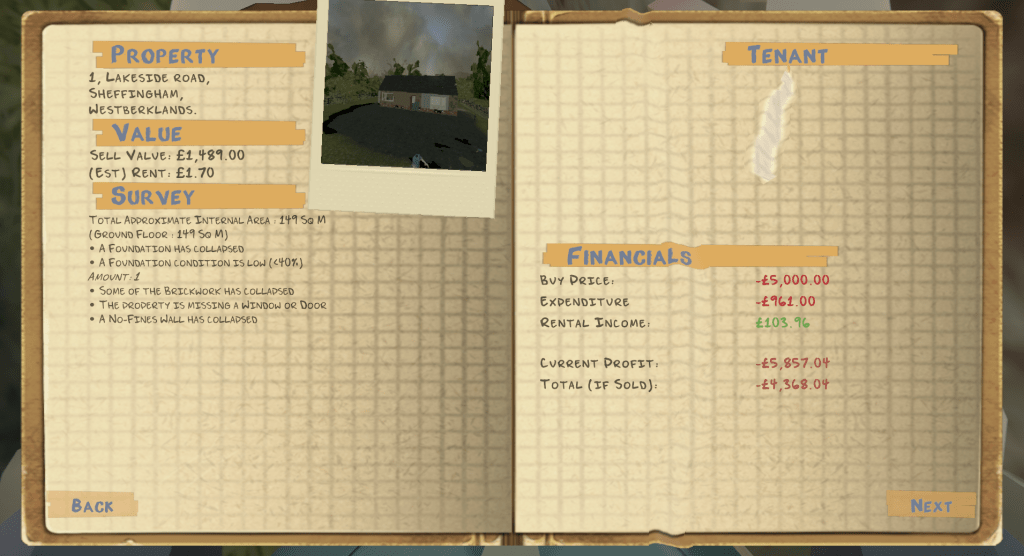
Added property Surveys and new Build tasks to the notebook
The notebook now provides details about what's wrong and what's adding value to the property, and also introduces new build tasks explaining how to get the Grafter tenant
Aggressive optimisation pass and many, many bug fixes
More details on all fixes to come when the update hits the main branch
Debug features are enabled in this build! Q = free fly N = add energy M = add money Additionally, the trowel will never run out of mortar / no-fines
How to Access InDev
1. Right Click on your Landlord’s Super install in Steam and select “properties” 2. Click the Betas tab and then select InDev In development access 3. The InDev build should start to download on steam! Note: Steam may require a restart after stage 2 for the InDev to download.
Thank you all for the help, all your support, and all your patience during this period.
Thanks, Greg
May Dev Log (Grafter Tenants, Building Surveys, Rental Changes)
The following post is taken from our blog. For previous updates, please visit our website.
April
Month 24 of Landlord’s Super Early Access.
We’re close to finishing up the next update for Landlord’s Super, the Grafter update. This update will contain new furniture, a new class of tenant, and a whole bunch of rental gameplay changes to make the game even more engaging.
Grafter Tenant
Last month we took a sneak peak at the new furniture coming with the Grafter update. This month we’d like to showcase the new class of tenant players will be able to interact with.
The Grafter is the mid-tier tenant that provides a balance between medium negligence, medium expectations and a medium rental income. Grafters are no-nonsense folk who would rather stay in for their Sunday roast rather than host guests with a lavish party.
To unlock Grafter tenants, players will need to first successfully complete a 100% satisfaction tenancy of the Lout tenant. Players will then receive a congratulation through the post, with information on the new Furniture catalogue unlock and instructions on how to attract Grafter tenants. Players will then need to complete the Grafter Build Requirement checklist, in order to make the house viable for Grafter tenants. Instructions on how to complete these tasks are – as before – provided by our good friend Jimmy at the Anchor Tavern.
Surveys
With the Grafter Update, we’ll be adding the ability for the Notebook to provide building Surveys.
Surveys will provide detailed information on the property, better inform players of any potential issues or simply providing them with the square meter size of their property.
Changes to the Rental System
We’ve started to work through much needed changes to the rental system in Landlord’s Super.
Previously, players would be given one randomly generated tenant, once per day. The new system will now allow for three randomly generated tenants per day. This allows players more agency over their tenancy agreements.
This also leads into the work we want to do for External Rental properties. Which we hope will allow players to have multiple properties (out of environment) that they can rent out and maintain in unison. More on this in the future.
MEBLIQ’ERE’S Mod Loader
MeblIQ’ERE has created a mod loader for Landlord’s Super. More from the man himself below:
Hi everyone, I updated Water Launcher! (mods-manager). Here is a small changelogs: —FEATURES—
New name & logo! UI rework Now, you'll know when there is a new update! —FIXES—
exit() was not recognised by py-to-exe, and that causes huge problems (so I just change it by sys.exit()) The button for going to @Moojuiceman-LSMods repo wasn't working (just a mistake in the keys) When you remove a mod, it was always showed as install on the list (because it wasn't updated) Here is the main page link: https://github.com/MeblIkea/Water-Launcher I hope you would like the new version, and the last bugs wasn’t too annoying, Have a nice week! ^^ Edit: I have to build it again, for having exit totally fixed (if you read this, I didn’t do it for the moment)
New Discord Emojis
Ruta made some more Emojis for Discord. This time they’re developer focused! Be sure to join the Minskworks Discord here.
All the best, Greg
April Dev Log (Furniture, Mods, GDC)
The following post is taken from our blog. For previous updates, please visit our website.
April
Month 23 of Landlord’s Super Early Access.
After hitting our latest milestone, we spent the past month between working on the Traditional Furniture & Tenant Update, and attending the Game Developer Conference in San Francisco. Let’s take a look at what we’ve worked on and what we’ve learned.
New Furniture
We’re well into Phase 1 of the current roadmap, meaning work on the Traditional Furniture & Tenant Update is underway.
Most of the traditional furniture has been modelled, textured and hooked up into the game. Though we still need to set up the new furniture catalogue, create the new tenant and design and implement logic regarding furniture unlocks, and tenant tiers.
No dates as for when this stuff hits either InDev or Main Branch yet, but we’re excited to get more build freedom into players hands soon!
Mods!?
Yes, Landlord’s Super now has Mods!
All credit goes to Moojuiceman over on the Minskworks Discord for these. Details from them below:
How to install mods: You will need BepInEx 5, which you can get from github. Here is a direct link to the 64-bit version of 5.4.19 which works with the game https://github.com/BepInEx/BepInEx/releases/download/v5.4.19/BepInEx_x64_5.4.19.0.zip Unzip the contents into your Landlord’s Super game folder, next to the LandlordsSuper.exe. You can find it via Steam by right clicking the game > Manage > Browse local files, or by clicking “Streaming Assets” from the game’s main menu then going up a folder. Start the game once so BepInEx creates all the necessary files and folders. You can then download any of these mods and put the .dll file into the BepInEx\plugins folder. Some mods have configurable options, these are stored in BepInEx\config\.cfg IMPORTANT: Since the game is still in development, some mods might change or break with updates. Also since these alter how the game works, any bugs might be due to the mods and shouldn’t be reported to bug-reports unless confirmed to also be present when playing without mods. You can report suspected mod bugs over on the discord.
None of my mods should affect save files, but as a precaution it’s wise to backup your save files anyway. They can also be useful for developers to debug issues, both with mods and the main game. To backup saves: From inside the main menu of the game, click “Save Data” to open the save folder. Make a copy of the “LandlordsSuper” folder, either to another location or as a new folder name in the same place.
To backup saves: From inside the main menu of the game, click “Save Data” to open the save folder. Make a copy of the “LandlordsSuper” folder, either to another location or as a new folder name in the same place.
Name: Better Wheel Barrow Functions: While moving the wheelbarrow, you can hold the alt fire button (default right mouse) to dump the contents. This restores physics to the cargo (like when you stop moving it), and tilts the front down a lot. You can then walk backwards to remove the wheelbarrow and leave the contents there. You can also pick up multi-stack items (bricks/shingles/tarred roof planks) from the barrow by holding the run button (default Shift). If you don’t hold it, the default behaviour of re-placing the item you just picked up remains. With it held, the hovering blue indicator won’t appear and you can take multiple items like you can from the ground.
Name: Strongman Functions: Allows you to increase the amount of multi-stack items (bricks/shingles/tarred roof planks) you can hold, and the amount of weight you can carry without losing your ability to sprint and jump, or losing hygiene when picking/placing heavy items. Config options: Max Shingles (also used by tarred roof planks), Max Bricks, Weight Limit
Name: Site Cleaner Functions: Adds keybinds for cleaning tools and materials from the build site, as happens when someone moves in. Config options: Clean Tools Key, Clean Materials Key
Name: Xray Functions: Adds a keybind to toggle visibility of the currently held item. Useful to see where you’re going when carrying large items. Config options: Toggle Key
Name: Express Delivery Functions: Makes Winston teleport from the store to your house and back again instead of driving. No more waiting for items to arrive or being able to use the shop again (and no more driving mishaps)
Name: Shifty Shingles Functions: Adds a “left align” option to shingles. When placing shingles, right click to toggle between centre, right align, and left align
Remember! Join the discord to support Moojuiceman’s work, report any issues and follow all the new mods and updates.
GDC
We spent a significant portion of last month over at the Game Developer Conference in San Francisco.
We spoke to many other developers and publishers trying to learn as much as we could about how to make and sell games in 2022. Our goal was to try to understand what we could be doing better to extend the dev life of Landlord’s Super, and how we could get better awareness of the game. We really think the game deserves the moniker of being the Quintessential Construction Simulator, and we’re committed to building a game to reflect that.
Expect to see us trying new things, and asking our communities input on this in the near future. This is going to be a big year for the game, our studio and the community.
Community Highlights
Special thanks to Moojuiceman for the modding support, but also shout outs to Dialupdude showing us the way Landlord’s was meant to be played (Check out dialupdude on twitch for more https://twitch.tv/dialupdude ) and Cleetus for showing us how the soundtrack was meant to be heard.
All the best, Greg
Hot Fix - Save Corruption
Fixed bathtubs causing save corruption.
Cheers, Greg
Patch 0.06.23
Fixed a bunch of furniture with drawers using the wrong audios Furniture should now all display the correct tool tips upon pickup Fixed Bathtubs causing load issues
Important to get this fix uploaded as the bathtub loading issue could be quite severe.
Cheers, Greg
Ceiling Lights & Shower Curtains.
Ceiling lights and shower curtains have now been added to the main branch. Enjoy!
Full patch notes :
0.06.22 Fixed Mitchell demolish action breaking tenant logic This should also fix issues for players with previously broken tenant logic Mortar can now be placed atop window lintels that aren’t set at the correct height (This should fix any brick only build issues players were having - the issue was caused by windows not being placed at their intended height) 0.06.21 Fixed save corruption caused by new shower additions Showering visuals improved 0.06.2 Better holding sledge hammer animation Improved tool visuals Added ceiling lights Added shower curtains Roof planks ignore clipping with other roof planks, allowing cross-gable roof placement.
Changes available in InDev only for the time being.
Cheers, Greg
HotFix 0.06.15
0.06.15 Fixed lintels for Post-Modern windows Fixed Windows not completing Window & Door task
Important fix for windows & door task. Hopefully I've got all issues associated with it this time.
Cheers, Greg
March Dev Log
The following post is taken from our blog. For previous updates, please visit our website.
February
Month 22 of Landlord’s Super Early Access.
With the Free Build update released and behind us, it’s time to take a look at what’s next for Landlord’s Super.
New Roadmap
With the Free Build update released, the 2021 / 2022 roadmap is now complete. Though Early Access isn’t over yet. Let’s see what the road towards 1.0 looks like, with the new Early Access Roadmap for 2022.
Phase 1 will see us adding in additional furniture and tenant classes. These tenant classes will provide better rental income, be less raucous and also provide access to additional furniture catalogues.
Phase 2 will see the introduction of power tools and better energy management. Allowing players to get much more done throughout the day.
Phase 3 will then focus on introducing all the elements we need to get the game into full release. This includes an end-game state, localisation, achievements and accessibility options.
Please keep in mind that once we hit 1.0, we may continue to update the game with additional features but that this will be entirely dependent on the sales life of the game.
All the best, Greg
Patch 0.06.14
Fixed issue where loading into the game wouldn’t correctly tick off the Windows / Doors task Fixed issue where couldn’t place bricks in “soldier” formation Fixed lintels on Doors / Windows not working after being delivered Fixed some mesh issues tied to certain Functional Windows