Logic World cover
Logic World screenshot
Linux PC Mac Steam
Genre: Simulator, Indie

Logic World

Logic World v0.91.3 is now available!

Hello gamers. It is time for another radical new Logic World update! Version 0.91.3 is out now, and you can get it right here on Steam.

This is a nice juicy update filled with dozens of improvements and bug fixes. As usual, for all the thrilling details, you can read the full changelog below.

But the highlight of this update is the new features for downloading Creations. We've added a new menu to the game for downloading Creations from the Creation Hub, so exploring the community's builds is easier than ever.
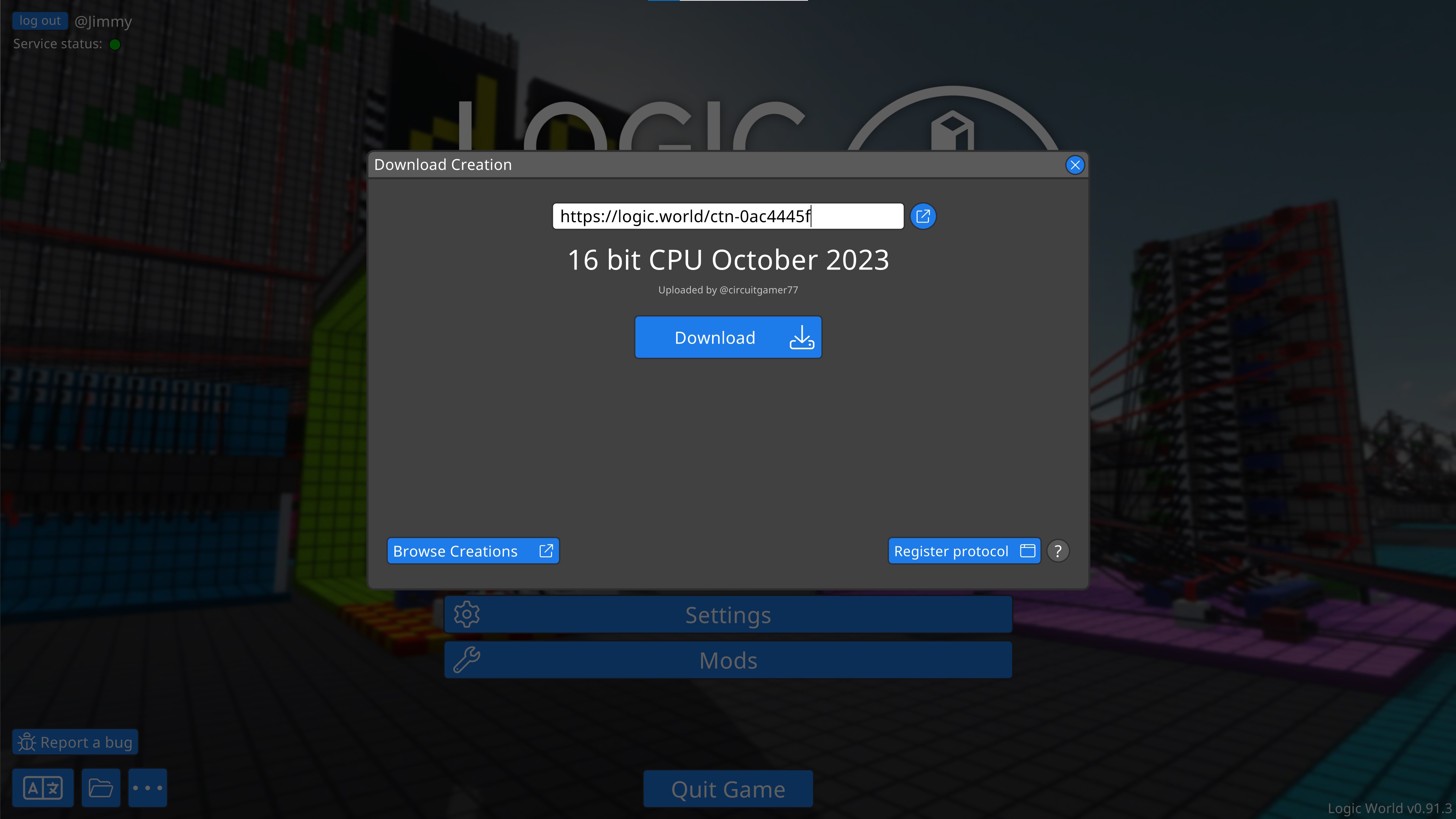


And you don't even have to copy-and-paste a link to do this. If you browse the Hub, you'll notice some new "Open in-game" buttons. Pressing one of these buttons will now open Logic World directly to the new menu, and you'll be playing on the world seconds later!


The "Open in-game" links use our new URL protocol, logicworld://. It's supported on all three of our platforms -- Windows, Linux, and MacOS. You just need to register the protocol first: for more information, check out this post.

So have fun browsing and exploring the Hub! There's a ton of really cool builds already on there, and it's now almost completely frictionless to check them out.

And if you've got a cool build that you haven't shared on the Hub yet, please upload it so we can all check out your work. Uploads are just as easy as downloads: while in-game, open the pause menu with the Escape key, and click on "Upload this sandbox".


Enjoy the update. See you soon :)


0.91.3 Changelog


Creation Downloading

  • Added an in-game menu for downloading Creations from the Creation Hub. It can be accessed via a new button in the main menu.
  • Added a protocol handler: `logicworld://` links now get opened by the game, allowing quick and easy downloading of Creations. For this to work, you first need to click the "Register Protocol" button in the Download Creation Menu.
  • Added command: `OpenDownloadCreationMenu [creation ID or URL]`
  • Added secret setting: `MHG.Protocol.EnableProtocolListeningOnUDP`
  • Added secret setting: `MHG.Protocol.ListeningUdpPort`


Building

  • When Grabbing or Cloning on a smooth surface like Grasslands, you can now hold the Mod key (by default left ctrl) to rotate the object freely.
  • Pick Component will now try to match the full detail of the component, if possible. For example, if you have both a red and blue circuit board in your hotbar and you use Pick on a red board, the red board in your hotbar will now be selected.
  • Fixed several exceptions with Grabbing that could happen if you tried to grab an object before the server finished confirming a previous building operation. In these cases, the Grab operation will fail now (and you can try again a second later).
  • Fixed exception when canceling a Resize operation if another player has moved or resized that component while you were resizing it.
  • Fixed Resizing still moving child components around in a few edge cases.
  • Fixed Resizing an object with wires attached without changing the component size causing wire ghosts to remain.


Undo/Redo

  • If an undo or redo fails, a message will now be printed to the debug console.
  • Fixed server exception when undoing the creation of a component that another player deleted.
  • Fixed undo history becoming corrupted when server is very busy (frozen) and applying multiple multi-build-request operations in that time.
  • Fixed redo crashing the client if an undo operation previously failed.
  • Fixed redo silently failing when trying to delete wires that were already deleted as a side effect of a component deletion.
  • Fixed missing wires after undoing and then redoing a Clone operation with internal wires.


UI

  • Added a "Report a Bug" button on the Main Menu, Pause Menu, and Error Screen. Pressing this button brings up instructions for how to report a bug or issue with the game.
  • In the Singleplayer menu, the Details pane for a saved game will now show which mods are in that save's registry.
  • Fixed various issues with hotbar item management.
  • Fixed the volume sliders in the Edit Singer and Edit Drum menus having an incorrect maximum value.
  • Fixed the color chooser in the Edit Label menu not properly showing the correct selected color about 50% of the time.
  • Fixed the Help menu flickering for a frame when you start placing an item on the hotbar.


Modding

  • Added an experimental "Component Action" API. It allows sending custom bytes to a component between server and client.
  • Added new manifest property `IncludeModInfoInSave`, which allows mods to control when their info (ID and version) are stored in save files.
  • Cache folders will now be automatically deleted when switching/updating to different game version. This triggers a mod recompilation.
  • Modders can now create and inject undo history entries.
  • Multi-Undo build request sending now allows callbacks. (#398)
  • Improved "mod has no mod type" exception messages to mention the issues with inheriting Server/ClientMod class.
  • Mod compilation errors are now shown on the error screen, so you don't need to check the logs to see these errors.
  • Fixed (new) mod instance creation failure detection hiding some other common exceptions (e.g. "Mod has no mod-type").
  • Fixed a game crash in multiplayer when your game has modded components that the server does not have and a component deletion is undone.


Error Screen

  • If there is an error with starting up the game, the error screen will now be properly shown with information about that error, instead of an empty black screen.
  • Added a "Copy Error" button to the error screen. Please make use of it when reporting issues :)
  • The error screen can now show stacktraces and other details in an expandable info box.
  • Added secret setting: `MHG.UI.ErrorScreen.OpenErrorDetailsByDefault`


Logging

  • Everything you see in server or client console will now be added to the log files.
  • Log files will now contain stacktraces for exceptions.
  • Command executions by player or console or LSF will now be logged in the log files.
  • Improved logging throughout the program.


Server

  • Added server command-line argument: `--ansi-rgb`. This will make the server use Ansi RGB color codes in the plain text console. If the terminal supports RGB, colors will be accurate.
  • Removed server LICC log file (log.txt).


Save Files

  • Unused components will no longer be added to world or subassembly save's component registry.
  • Mods which provide components placed in the world will now be automatically included in the save's mod registry.


Teleporting

  • When teleporting to another player, you no longer teleport inside them: instead you teleport next to them, looking at them. This is similar to how teleporting to Flags works.
  • Fixed the `tp ` command not working.


Command Line Arguments

  • Added command-line startup option: `-open-save `
  • Added command-line startup option: `-join-server [-server-password ]`
  • Added command-line startup option: `-open-url `
  • The new command-line startup options take precedence over equivalent startup secret settings.
  • Added command: `debug.printcommandlinearguments`


Localization

  • Added WIP translations for Pirate Speak.
  • Updated translations and translator credits for Czech, Estonian, Finnish, French, German, Hungarian, Japanese, Korean, Polish, Portuguese (Brazil), Russian, Slovenian, Spanish (Spain), and Swedish.


Miscellaneous

  • Enabling or disabling noclip will now only print a message to the debug console if you do it via the `noclip` command. This prevents the console being spammed with messages if you use the secret setting `MHG.Flying.Secret.AutoEnterNoclipOnStartFlying`.
  • Fixed copying messages from the client console sometimes copying rich text tags.
  • Fixed a server memory leak on game save when no players are online.
  • Fixed a rare case where the client and server failed to properly exchange component CustomData, leading to mess and disaster.
  • Fixed the "Upload this sandbox" button sometimes not working.
  • Fixed typos in several secret settings and server config values: `Nolcip` was fixed to `Noclip`, `Recieve` has been fixed to `Receive`, and `TimeOut` has been fixed to `Timeout`.
  • Fixed the Crash of Doom, which made the whole world disappear except some floating disembodied wires.
  • We now properly handle several situations where a crash could become even crashier when trying to remove outlines.
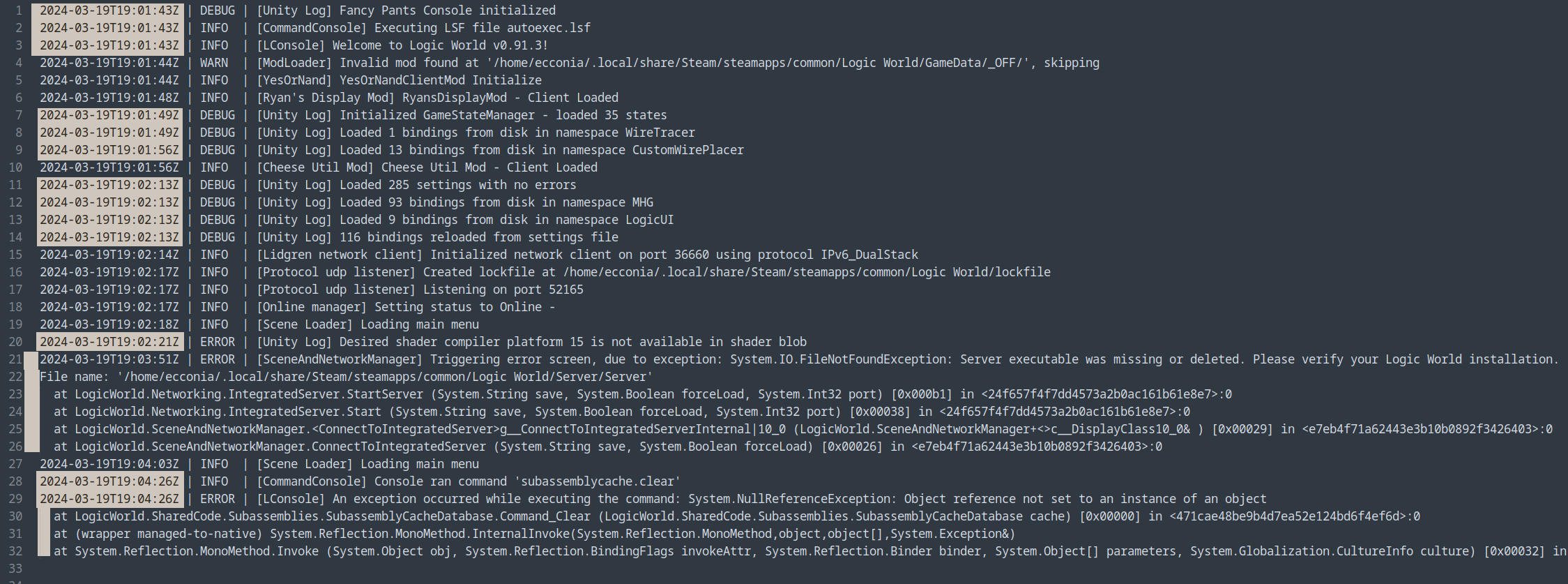
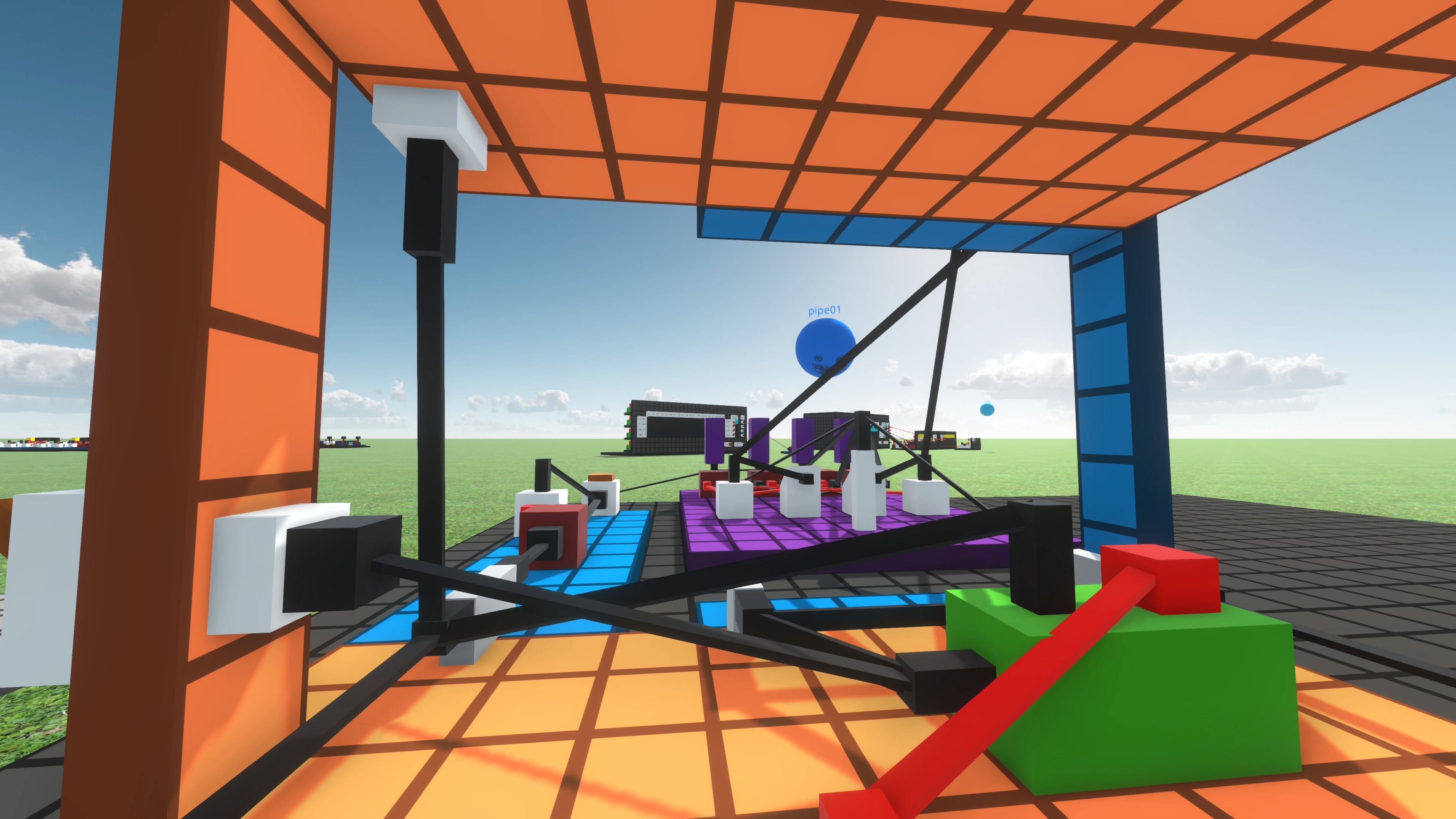
Logic World Wednesdays: The Well-Logged Edition

Hello! As we discussed last week, we’re working on a new game update, and it will be out in a few days. In the meantime, here’s a little blogging from Ecconia on one of the changes coming soon – our new logging system.


You can check out the full blog here on logicworld.net :)

Logic World development check-in: game update coming next week!

Hey everyone! We’ve been hard at work on Logic World, and we thought it was about time we gave you an update on how things are going.

As we announced in a previous post, we’re working on switching Logic World’s game engine from Unity to Godot. This process is going to take a while; we’ll discuss it in more detail in future blogs. In the meantime, we decided to do another update in the Unity engine to fix some more things and add some new features.

Logic World v0.91.3 is coming out next week. We’re excited to get it out to you!

If you want to know more, Ecconia has written on our blog about some of the changes coming in v0.91.3, particularly those relevant to mods and modders. If you like juicy technical details, click here to check out that blog.

See you soon for the game update!

Logic World v0.91.2 is now available!

Salutations, gamers!

Logic World update v0.91.2 is now available for download! You can get it right here on Steam. This update contains numerous large performance improvements, some upgrades to the building mechanics, and a veritable plethora of tweaks, improvements, and bugfixes across many areas of the game. As usual, the full list of changes can be found below.

This is the first Logic World update that contains work from all five of us in the newly expanded core development team: Jimmy, Felipe, Zoey, Ecconia, and GHXX. We're very proud of this update we've made together and we really hope you enjoy it.


If you haven't yet, you may want to read last week's State of the Logic World blog post, which goes into detail about the status of this project. You may also want to join our vibrant Discord community and subscribe to our very cool newsletter.

Thanks for playing. Much more will follow. We'll see you soon :)

0.91.2 Changelog


Performance

  • Significantly improved loading times for larger worlds (>100,000 components) by batching collider instantiations.
  • Fixed an issue that made hot-loads slower than cold-loads for larger worlds. All worlds now load faster hot than cold.
  • Limited the maximum physics delta time to prevent physics death spirals. This should significantly improve framerates in large worlds for most cases.
  • Sockets find their connections faster now. This means that initial world loading times are faster in worlds with lots of Sockets, and furthermore, placing or moving a lot of sockets at the same time will create less severe lag spikes.
  • Server tick scheduling has been improved to reduce the amount of time the server can spend idle and not simulating the circuitry. Faster simulation speeds can now be accessed before the server starts skipping simulation time.
  • The simulation now tries to catch up lost time over multiple server ticks, and only begins skipping simulation time once the simulation tick debt crosses a configurable threshold.
  • Removed the server config value `MaxAllowedTimeStepSeconds`, and replaced with with the new server config value `MaxAllowedSimulationTickDebtSeconds`, due to the new simulation catch-up system described above.
  • Assorted additional optimizations.


Building

  • Improved item movement during Multi-Grab and Multi-Clone operations. Items are much better at finding nearby valid placements, have a far greater tolerance for vertical displacement, and conform more strictly to their target rotations.
  • Added secret setting: `MHG.Placing.Secret.MultiPlacementMaxVerticalVariance`
  • Added secret setting: `MHG.Placing.Secret.MultiPlacementCastHeightIncrement`
  • Edge extensions are now only enabled during fine placement, so it's easier to place circuit boards into tight spaces.
  • Fixed false-negatives when detecting valid placements; you should now never be erroneously prevented from placing objects next to each other.


Server

  • By default, servers will no longer automatically save the game or make auto-backups while no players are connected. However, these behaviors can be restored by enabling the new server config values `DoAutosaveWhileServerIsEmpty` and `DoAutoBackupsWhileServerIsEmpty`.
  • If the server is started with the command-line argument `--help`, it will now print a help text with available command-line arguments, and then shut down.
  • If the server is started with invalid command-line arguments, it will now display an error message followed by the `--help` text, and then shut down.
  • Disabled terminal prompt prefix `>` when the `--plain-text` server argument is set.
  • The server console no longer waits for input before closing if there is an error on startup.
  • Fixed exception on server shutdown if `AnnounceOnLocalNetwork` is turned off. (#484)


Save Files

  • New format for save files, Blotter v7, with minor binary formatting tweaks.
  • Added save converter from v6 to v7 (Blotter v6 was used from Logic World v0.91.0 to v0.91.1).
  • Added save converter from v5 to v7 (Blotter v5 was used from Logic World v0.90.0 to v0.90.3).
  • The game will now automatically back up a save before converting it to a new save format version.
  • When you create multiple saves with the same title, the on-disk filenames will now use an incrementing counter (i.e. `world`, `world (1)`, `world (2)`) instead of appended dashes (i.e. `world`, `world-`, `world--`).


UI

  • Hotbar title text now fades out after a short time with the same slot selected.
  • Added secret setting: `MHG.UI.Hotbar.FullTextDuration`
  • Added secret setting: `MHG.UI.Hotbar.FadeTextDuration`
  • Fixed some glitches and inconsistent behavior with hotbar item management.
  • Fixed base building UI rendering behind world geometry when another menu is open.


Localization

  • Updated translations and translator credits for Bulgarian, Croatian, Czech, Dutch, Estonian, Finnish, French, German, Hebrew, Hungarian, Korean, Polish, Portuguese (Brazil), Romanian, Russian, Spanish (Spain), Swedish, Turkish, and Ukrainian.


Modding

  • Added preprocessor symbols `LW_SIDE_SERVER` and `LW_SIDE_CLIENT` for compiling a section of mod code only the server or only on the client. (#489)
  • Added a hook for post-parse save transformation to `SaveReader`, which mods can use to update their components.
  • If a server-side mod fails to compile, the server will now immediately shut down instead of continuing to load the save with a mod missing.
  • Client-side mod compilation errors now get printed at INFO log level. (#310)
  • When a mod instance fails to load, the error message is now more helpful, and instructs you to try deleting the cache folders.
  • Fixed CS1701 warning spam on client compilation error.


Miscellaneous

  • Improved handling of exceptions during application initialization to prevent outrageous error spam.
  • Fixed some exceptions being logged twice.
  • Fixed the client being spammed with exceptions if another player joins or leaves near a barrier.
  • Fixed exceptions when disconnecting from a server.
  • Fixed a crash that could occur with a particular easter egg that pops up on Markku's birthday.
  • Fixed not being able to join singleplayer games when UsePassword is enabled in `config.succ`. (#400)
  • Fixed occasional erroneous floating wires not being removed when the game is reloaded. (#482)
  • Fixed client crash to error screen on server rejoin when the server's simulation is struggling if the Simulation Speed Menu was not previously opened.

State of the Logic World: December 2023

Hello, it's me, Jimmy from Mouse Hat Games. If you're reading this, you've probably been following Logic World for some time, and you've probably noticed that for the past year, there's been very little official communication about Logic World. I'm truly sorry for the silence. It ends now.

Beginning in January, a number of things began falling apart in my life. Throughout this year I've suffered a host of physical health problems, mental health problems, and other personal issues. I wanted desperately to be working on this game that means so much to me, but I just wasn't capable of it. I felt embarrassed and ashamed of that, so I just disappeared from our community. (One of many things I've learned about myself this year is that I have avoidant tendencies. I'm working on it.)

The good news is that, since June, I have been laser-focused on fixing my life, and I've been extremely successful. May 2023 was perhaps the worst month of my life. November 2023 was the best so far.

I'm able to work again, and to love working, so I've been working a lot. Much has been happening recently and the future of Logic World has never looked so bright.

It's good to be back. Let me tell you a bit about what's been happening, and what's next.


A New Team


For the first year of this project's history, I was the only programmer working on Logic World. Felipe, an exemplary modder of the early prototypes I had released, joined the team in 2018. For the following years up through the Early Access launch of Logic World in 2021, Felipe and I developed the game together as a tight two-person team.

I'm pleased to announce that, for the first time in five years, we've gained another programmer. And another. And another. The core Logic World development team is now five coders strong: joining myself and Felipe are Zoey, Ecconia, and GHXX.

I LOVE working in this new expanded team. Everyone is so passionate and so capable. The skillsets and perspectives that each team member brings are diverse and complementary; we bring out strengths in each other, and truly I believe we are greater than the sum of our parts. The development velocity is amazing -- stuff gets done way faster than it ever did when we were less than half this size.

It has been an intimidating challenge to step into my new leadership role, overseeing so many people and moving parts, but I'm learning fast and I think I'm really growing into it. Managing people is hard, much harder than I thought it would be, but it's also profoundly rewarding. I'm thrilled and honored to be at the helm of this metaphorical ship.

You'll see the new developers around in devblogs, youtube videos, and hanging around in community spaces like our discord. I'll take a moment now to introduce our three new team members, and give them each a space to say hello in their own words.

Please give a warm welcome to:

Zoey


Zoey is maybe the smartest person I've ever met. It's quite a common occurrence that we'll be discussing architecture & design for some incredibly complex system, and with a sinking feeling of dread, I'll realize that there's a terribly hard problem with it, the kind of problem that takes me days of thinking and researching before I start to feel like I might be approaching a good solution. I'll vocalize this problem to Zoey and ask her thoughts on it. "Oh, that's easy. We don't need to worry about that," she'll say, and then she'll describe a brilliant, perfect, ingenious solution that not only solves the problem I brought up but also five others I hadn't yet realized were there.

Zoey sees computers and code with a clarity of thought I've never encountered before. The experience and expertise she brings to the team is invaluable.

Hello! I'm Zoey, a self taught software engineer from England.

So what's my story? Well, let's start at the beginning.

13.8 billion years ago there was nothing, and then, there wasn't. A short while later, I was born. Ever since then I've had a fascination for technology, an unquenchable thirst for knowledge, and a passion to create. As a result, I have worked on hundreds of random personal projects over the years, from terrain generators and physics engines to robots and computer vision.

The full list of projects would be too much to put here, and frankly, I doubt I could remember them all, but here are a couple of my favourites:

Sparse Voxel Octree Ray Tracer (SVORT).
Voxels are fun, and ray tracing is fun, so why not combine the two? Standard voxels use too much ram, and are slow to traverse, so let's use a Sparse Voxel Octree, and write it all in CUDA!
To create my SVORT I began by designing a custom SVO data format, allowing for a compact data representation and efficient traversal. After that, I needed something to actually render, so I wrote a 3D model to SVO converter, allowing me to convert textured 3D models to my custom SVO format. Once all of that was done, it was time for the ray tracer itself. The most complex part of the ray tracer was figuring out a way to efficiently traverse the SVO on a GPU, but in the end I got everything working smoothly, and was able to render scenes at a scale of 4096^3 voxels with 24 bit colour (192GB without compression) in real time on a card with 8GB of VRAM.

Custom CPU Design.
Another subject that I enjoy is custom CPU design. Whether it is in Minecraft or a logic simulator, I have always found this area fascinating. The project I took the furthest started with designing my own Instruction Set Architecture. Though next, rather than stepping into a logic simulator, this time I wrote an emulator with an output terminal, along with some initial bytecode for testing. Once I had verified that it was working, I proceeded to write an assembler to ease the process of writing code for the CPU. That was all well and good, but for this one I decided to take it one step further. Buying a cheap FPGA development kit, I decided to bring my CPU into the real world. Writing the implementation for the CPU out in Verilog, along with an interface for the UART transceiver, I managed to get my custom CPU running and communicating with a terminal on my computer, bringing the project to a satisfying conclusion.

Throughout all that I've worked on, computer science has always held a special place in my heart, and when I came across Logic World, I knew I had found something I just had to be a part of.

As part of the Logic World team, my primary contributions will be improving performance and efficiency, and the occasional fancy algorithm to add a new feature.


Ecconia


Ecconia is the biggest superfan of Logic World there ever was. For years he's been building incredible machines in the game, creating dozens of spectacular, joyful mods (not to mention creating modding tools and frameworks), hosting servers, helping newbies get on their feet, and one time even re-coding the whole game from scratch in Java. The years-long dedication he's had to Logic World is awe-inspiring, and it's only natural that he now joins the dev team to drive the game's success in the most direct way possible.

Ecconia understands deeply what makes Logic World good, where exactly it's lacking, and just what needs to happen for it to fulfill its potential and be the best it can be.

Heya, I am Ecconia.

I live in Germany, studying Computer Science. My primary hobby is ice skating. I like to write big messages.

I started doing boolean logic circuits as a young boy on the playground, drawing a Full Adder circuit into the sand. Eventually that led me to Redstone, but I never felt happy there. There were many inconsistencies and weird unintentional behaviors.

But being active in such a community brought my attention to [code single]Logic World

: a boolean logic simulator, which did not give me nightmares. Being fascinated with the game and waiting for the Early Access release, I consumed all information about the game there is -- reading all LWW posts, watching all related videos -- which gave me a lot of insight.

During the long time of waiting, I started the OpenTUNG project, which basically is a rewrite of LW's alpha version without the bugs. But now that LW is released, we're all using LW, so I'm no longer working on OpenTUNG.

Being a programmer and gamer/modder, after some time I got annoyed by a certain bug in Logic World: it was not possible to automatically noclip when flying without freezing the game. I wrote a mod which fixed this bug, making it possible for me to enjoy LW more. If you've ever done game modding, you know it's a dangerous rabbithole. Once you start ... there is no going back.

At first I made simple mods like DisableCollision, but I soon moved onto really ambitious mods like CustomWirePlacer -- a mod that fully replaces the vanilla wire drawing to add 2D wire placement support and much more. In my eagerness to explore all the possibilities and features of modding I got to know all core code of the game.

Btw, my ultimate goal in LW is to build a computer which I can write programs for from inside the game. Starting with a capable typewriter to input assembly code...

As part of the Logic World developer team I am going to squish bugs and enhance the moddability of the game. I am excited to be part of the team and to discuss and develop things together, to make solutions even better. Let me be a gateway for modders to suggest API features. Happy :)


GHXX


GHXX is a brilliant engineer, both within Logic World and beyond it, who pushes the boundaries of this game like nobody else. He has an incredible amount of skill and knowledge across technical domains, and he applies it to this project with invigorating fervor. In-game, he creates intricate yet expansive machines that I adore -- so much so that I used screenshots of them in the 0.91 release blog.

GHXX's excellence and passion are constantly pushing me to be a better developer, and shaping Logic World into a better game.

Hi, I'm GHXX, a self-taught programmer, with around 10 years of experience in C# (the language that Logic World is primarily written in) and a varying, but smaller amount of experience in a plethora of other languages. I also like to reverse-engineer code, even on the assembly level and, of course, play modded games.

Over the course of this timespan I have written many mods/tools for several games (Rimworld, KTaNE, Cookie Clicker, Garrys Mod, Factorio, Logic World and others), and even some modloaders/tools that make modding a whole lot easier for some games.

My most intensive reverse-engineering project to date is my modding interface for a very nice chess-spinoff game called *5D Chess With Multiverse Time Travel*. My interface adds a bunch of features to that game and enables easy modding of it, with zero modifications to game files, by patching the code at runtime -- and it's even quite stable. I'm proud of this project but it came at the cost of spending well over one hundred hours digging through compiled C++ code.

I have also created a few Logic World mods and personal dll patches back in the day for 0.90.3 which addressed a few problems when playing on pretty large worlds. In fact, all of those mods/patches, with the exception of my TCP Bridge mod (which I should probably update at some point as it is currently sitting on 0.90.3, despite likely working for 0.91.1 anyway), were actually just created so that a dear friend of mine, known as 00asdf, and I could continue extending our gigantic world, containing just under 2 million components, which we have been building ever since we purchased Logic World on Steam.

Generally, what would happen is that we would play, then face some kind of performance roadblock, at which point I would leave the server and investigate and mod around the issue, so that we could continue expanding. The ability to add fixes directly to the game, rather than having to cook up a modified dll or a harmony mod is the main thing that got me interested in helping out with Logic World.

I am very grateful to be part of the dev team, as the collaboration between all of us will hopefully lead to a much much more performant version which enables everyone, including myself, to create ever bigger and more ambitious builds.


I love this freaking team. What an amazing group of humans.


A New Update


We've been cooking up a new game update for you! Logic World v0.91.2 will be dropping next Wednesday, December 20 on Steam and Itch.io. This is a jolly little update containing large performance improvements, some better building mechanics, tons of bug fixes, and a whole bunch of other miscellaneous goodies. It's the first update that all five of us in the new core dev team have worked on.

As usual, the full detailed changelog for v0.91.2 will be posted here on this blog when the update comes out. To make sure you don't miss it, sign up for our fabulous newsletter.


A New Engine


Unity just kind of sucks in general and it keeps getting worse and we all hate working with it and recent events have made it clear that as an organization Unity cannot be counted on to not do terrible awful horrible crap that completely screws us over. We want Logic World to be built on a tech stack that we love and have confidence in; we want the future of our game to be secure and within our control; maybe most importantly, we want our experience of working on our game to be as pleasant as possible, so that we feel joy when we open the project, rather than dread as we are forced to wait for ten minutes for Unity's goddamn progress bar to do god-knows-what.

With all this in mind: update 0.91.2, coming next week, will be the last version of Logic World built on the Unity engine (unless we need to push a hotfix). Once 0.91.2 is out, we'll be devoting ourselves to porting Logic World from Unity to Godot: an open-source, community-driven game engine with a bright and gleaming future.

We evaluated many options for the new engine before settling on this one. There are a lot of reasons I love Godot, and we'll probably do a full development blog dedicated to the upsides of this engine, but in short, Godot is:


  • fun to work with,
  • NOT UNITY, and
  • free and open source software, so once we've moved our game to Godot we will truly own it and have control over it.

The work to port things will not be fast or easy, but it's the best move for our long-term future. I've been looking for years for an opportunity to get away from Unity, and now is finally the right time.


---------------------------------------


I love Logic World so much. I'm excited every single day to wake up and work on it.

We'll see you next week for update 0.91.2. We'll see you in 2024 for many exciting development blogs and huge new game updates on our glorious new game engine.

We are Mouse Hat Games, we are stronger than we've ever been, and we are going to build the greatest circuit simulation video game ever made.

Thanks for reading. It's the privilege of a lifetime to make this thing for you.

Jimmy Cushnie
Creator of Logic World

Logic World v0.91.1 is now available!

What's up gamers,

The minor update v0.91.1 is now available for download! You can get it right here on Steam. This update contains a ton of bugfixes and lots of minor improvements/tweaks/polish. Read on below for the full list of changes.

More big Logic World news is coming soon, so make sure you're subscribed to our newsletter and following Logic World on Steam. Enjoy the update!


(Artwork by Cady | @​pink_3d:matrix​.org)


0.91.1 Changelog


Building


  • Multi-Placement systems have been drastically improved. It should now be much easier to place multiple items where you want them to be, and items should always have the correct starting placement when you begin moving them now.
  • The system for determining the rotation of items being Grabbed or Cloned has been reworked. These items should never change rotation unexpectedly now when you move them to a surface with a different orientation.
  • Added secret setting: `MHG.Placing.Secret.MaxOffsetVariantAttemptsPerItemPerFrame`
  • Fixed a crash to error screen that could occur when grabbing or cloning multiple components (#475)
  • Fixed a crash to error screen when undoing some custom-data-changing operations (#469)
  • Fixed a crash to error screen, and occasionally other weird errors, when undoing a multi-clone operation that placed a cloned object on top of a source object (#466)
  • Fixed not being able to resize components when they're placed in very specific locations (#471)
  • Fixed cloned objects sometimes containing input pegs that remain On without being connected to any outputs
  • Fixed using Offset Hold on a Flipped component resulting in a mirrored X offset value


Components


  • Fixed inputs on Through Pegs and Sockets sometimes erroneously starting Off instead of On after loading a save
  • Fixed Delayers' internal counter state not being saved, and resetting to 0 on save load (#473)


Servers and Multiplayer


  • FOR REAL THIS TIME, fixed the infamous "cuddle bug", where you'd sometimes be shoved around by other players while someone was in the process of joining the server (#474)
  • Fixed visual glitches for a short time after someone joins or leaves the server where other players would appear to move around very far and fast
  • Fixed connected clients sometimes erroneously seeing the default server closing message when the server is closed with a custom message
  • Fixed missing server console message to confirm the world has been saved to disk when the server is closed and `SaveOnClose` is enabled
  • Improved the phrasing of various messages printed to the server console


Music


  • Finding Parcels: tweaked the color of some sounds and fixed some audio artifacts
  • Time and Science: fixed the ending note being cut off abruptly. It now fades out fully to silence.


Localization


  • Translations for WIP languages now include non-approved Google Translate suggestions
  • Updated translations and translator credits for Bulgarian, Chinese (Simplified), Croatian, Czech, Dutch, Estonian, Finnish, French, German, Hebrew, Hungarian, Japanese, Korean, Polish, Portuguese (Brazil), Romanian, Russian, Slovenian, Spanish (Spain), Swedish, Turkish, and Ukrainian 🇺🇦


OBJ Export


  • Fixed OBJ export not working at all lmao
  • Added command: `objexport.currentworld [int textResolution]`
  • OBJ exports should have much less texture duplication compared to 0.90.3. Textures are now reused where possible.
  • Exported .obj and .mtl files are more human-readable compared to 0.90.3 thanks to added whitespace between objects, better organization of the data, and a few other improvements


Authentication


  • `token.dat` is now stored in the game install directory, next to the executable. This means your login is now specific to your installation of the game, instead of being shared by all installations on your machine.
  • `token.dat` is now stored encrypted, with an encryption key and IV stored in a separate location on your machine. This means that in order to impersonate you, an attacker would now need access to two files instead of just one.
  • Fixed the `LogicWorld.Online.Auth.ClearedToken` event never being invoked (#476)
  • Added a smiley face when you log in using the browser


Miscellaneous


  • Fixed incorrect integrated server paths on the Itch.io version, which prevented Itch.io players from loading singleplayer worlds
  • The game handles input much better now if your binding for Multi-Select overlaps with your binding for a Build Action
  • Fixed a crash to error screen when the main menu loads if you have a corrupted save file
  • Added a check on application startup for whether the environment supports compute shaders, which are required to draw component/wire geometry since 0.91. If not, an appropriate error message will be displayed.
  • Removed OpenGL support on MacOS, since OpenGL on MacOS does not support compute shaders
  • Enabled Graphics Jobs and GPU Skinning in the player, which should provide a modest rendering performance boost

Logic World v0.91 is now available!

Greetings, gamers!

We are finally ready to release our biggest update yet! Introducing Logic World v0.91: The Less Buggy Update. This update is now available, for free, to everyone who owns the game.


0.91 is a massive update that touches every area of the game, drastically improving performance, majorly improving stability, adding dozens upon dozens of little quality-of-life improvements and tweaks, and introducing a few radical new features. For this update, we've changed or added over 69,000 lines of code since 0.90.3 across over 1,000 files. It's been a big effort, but it's just the start of what's to come.

We're very happy with Logic World v0.91. It's the best version of Logic World yet, and it's an excellent foundation for the really ambitious updates we'll be doing next.

Thank you for playing our video game. Enjoy the update. From everyone at Mouse Hat Games, please have a happy holidays, and a wonderful new year!


0.91 Changelog


This update will reset your settings!

Building

  • Multi-Clone now supports cloning wires that connect the different selected objects (#73)
  • Multi-Grab and Multi-Clone handle a bunch of placement edge cases much better, particularly related to circuit boards
  • You can now configure the size of the Action Wheel
  • Added a button in the Action Wheel configuration screen to reset to the default Action Wheel configuration
  • Multi-Wire Placement is now treated as a single action in the undo/redo history, instead of one action per wire placed (#318)
  • Multi-Wire Placements with only one peg in the first selection now work properly
  • Wires can be slightly shorter now
  • During Grab, Clone, and Resize operations, the placing ghost will now update its circuit states instead of being frozen
  • Added secret setting: `MHG.Secret.Building.PlacingGhostsRecieveCircuitStateUpdates`
  • Various improvements to Multi-Edit, especially with regards to colorable components
  • During a Multi-Select pass, components which are a child or parent of the initially-selected component will no longer be added to the selection
  • Added secret setting: `MHG.Secret.Building.MultiSelector.AllowSelectingChildrenOfFirstComponentInPass`
  • Added secret setting: `MHG.Secret.Building.MultiSelector.AllowSelectingParentsOfFirstComponentInPass`
  • You are now always allowed to proceed with a deleting operation when multiple components are selected (the previous rule was that you had to select all the children of a component)
  • Fixed sometimes not being able to rotate Switches, Buttons and Keys without grabbing them first (#206)
  • Fixed undo/redo stack breaking and causing errors sometimes (#396, #281)
  • Fixed undoing build actions that deleted wires breaking the undo stack (#399)
  • Fixed some issues with components moving around upon completing a multi-resize (among them #266)
  • Fixed canceling multi-wire placement not removing the outlines of the selected pegs (#233)
  • Fixed board drawing sometimes not properly snapping to a square size when holding shift (#203)
  • Fixed flip state not always being correctly detected for Grab/Clone operations (#351)
  • Fixed rotations getting out of sync during Multi-Clone if you try to rotate before the first successful placement (#268)
  • Fixed not being able to resize short Flags
  • Fixed warnings and errors in the console when grabbing and resizing Flags
  • Fixed log spam with “Look viewing rotation vector is zero” during some edge cases with grabbing
  • Fixed hovered colors in the Quick Color Chooser being persistently applied when the operation is canceled (#71)


Components

  • Added an option to Keys to only allow pressing them while in a Chair
  • Added a “reset” button to the Edit Delayer menu, to reset it to the default delay of 10 ticks
  • If you hold the Mod key while flipping a row of switches, they will all be set to the same state as the first switch flipped (#60)
  • Added secret setting: `MHG.Secret.InvertMultiSwitchInteractionModKeyBehavior`
  • The input pegs on XOR Gates, AND Gates, D-Latches, Oracles, and Relays are now slightly longer
  • Fixed some unintuitive Delayer behavior that could, among other anomalies, allow one-tick pulses to go through a two-tick Delayer (#183)
  • Fixed Delayers getting out of sync after being cloned
  • Fixed Chairs sometimes erroneously complaining that they are occupied (#223)
  • Chairs will no longer be outlined if you look at them while they are occupied


Simulation

  • Added Simulation Speed menu. It can be accessed through a new button in the pause menu or with a hotkey, bound by default to `F9`
  • Added a hotkey to pause or resume the simulation, bound by default to `F10`
  • Added a hotkey to step one tick forward through the simulation (when the simulation is paused), bound by default to `Shift+F10`
  • Added secret setting: `MHG.Secret.SimulationSpeedMenu.ShowRemoveFromListButtonsOnHover`
  • Added secret setting: `MHG.Secret.SimulationSpeedMenu.SavedSpeedWiggleData`
  • Added secret setting: `MHG.Secret.SimulationSpeedMenu.AutoResumeSimulationWhenChangingSpeed`
  • Added server config value: `DefaultSimulationTPS`
  • Added server config value: `MaximumSimulationTPS`
  • Removed the server config value `SimulationTPS` as this is now configured per-save in ExtraData
  • Renamed the server command `step` to `simulation.step` for consistency
  • Fixed the simulation unpausing in multiplayer when a new player joins the server even if the players currently on the server have paused it (#347)
  • Fixed the simulation unpausing in singleplayer when accessing a sub-menu of the Pause menu


Circuitry

  • Outputs that should start on (such as the outputs of newly placed Inverters) now start on in the simulation
  • Fixed Clone operations not properly copying the circuit states of the original objects, which would often result in flickers and broken feedback loops (#116)
  • Fixed component outputs sometimes erroneously changing state when the number of inputs is changed
  • Fixed weird simulation glitches (and occasionally server crashes) that would occur when changing the number of pegs on a component that has connected output pegs (#104, #250)


Optimization

  • Significantly improved loading times, especially for large worlds
  • Improved game framerates for most scenarios, particularly for large worlds, and particularly if post-processing or shadow cascades are disabled
  • Component/wire geometry is now rendered with GPU instancing instead of in combined mesh chunks
  • Colliders are instantiated more efficiently
  • Improved performance and reduced allocations when grabbing or cloning stuff
  • Improved performance of checking Socket connections
  • The game now logs how long it takes the client to load a save
  • Removed the secret settings `MHG.Graphics.RenderDistance.Secret.IdealFramesBetweenRecalculations` and `MHG.Graphics.RenderDistance.Secret.MaxTimeBetweenRecalculationsSeconds`. Render distance is now recalculated when the player has moved to a new chunk, not on a time interval.
  • Improvements to physics performance
  • Added secret setting: `MHG.Secret.UnityFixedDeltaTime`. Increasing this value can massively increase the framerate in very large worlds (with a very large number of colliders), but will reduce the accuracy of game physics.
  • Added secret setting: `MHG.Secret.UnityMaximumDeltaTime`


Fixy Pointy

  • Component positions are now stored as fixed point rather than floating point
  • Component world positions are now calculated in the reference frame of the stack root component
  • Rounding of component rotations is smarter and more consistent
  • Due to these changes, components now stay perfectly aligned up to an arbitrary nesting depth (#269, #273) and no longer cause tiny erroneous intersections (#123)


Save Files

  • Upgraded to Blotter File Format v6, to store positions in the new way (fixed point rather than floating point)
  • Blotter v6 also has support for multi-root subassemblies, in preparation for some 0.92 features
  • Added save converter from v5 to v6
  • The game no longer considers a save to be “corrupted” if it uses a previous blotter format version; instead, a helpful save converter UI is offered
  • Fixed missing translation string for the file corruption state “unknown save type”
  • Fixed sandbox list displaying an empty info box for saves with an outdated format version


UI

  • The About menu, Languages menu, and Teleport menu can now be accessed from the Pause menu
  • The in-game changelog is much prettier, and the changelogs for each update can now be individually collapsed and expanded
  • The in-game changelog now automatically generates and displays links for mentioned issues
  • If another player edits the properties of a Flag (i.e. name, color, aspect ratio) while you have the Teleport Menu open, the Teleport Menu will now update to reflect those changes
  • By default, the Edit Flag menu will no longer close immediately when you select a new color
  • Added secret setting: `MHG.Secret.UI.EditFlagMenu.CloseImmediatelyWhenBigColorClicked`
  • Added secret setting: `MHG.Secret.UI.EditColorableComponentsMenu.CloseImmediatelyWhenBigColorClicked`
  • The markdown renderer does a better job of rendering lists and headers
  • The markdown renderer now supports superscript. This is disabled everywhere by default, but it can be enabled for chat via a new `Superscript` section in the secret setting `MHG.Chat.Secret.ChatMarkdownSettings`
  • Added command: `UI.Debug.LogObjectsUnderCursor`
  • Enabled smooth scrolling for the Settings Menu sidebar
  • Fixed setting descriptions being cut off in the Settings Menu sidebar if the description is sufficiently long (#342)
  • Fixed some visual issues with the Settings Menu sidebar for settings with names long enough to span multiple lines
  • Fixed some inconsistencies with UI text boxes
  • Fixed some visual issues with the custom avatar preview (under settings -> multiplayer)
  • Fixed some resizing arrows not being properly disabled on configurable menus that are not supposed to be resizable, such as the Edit Delayer Menu (#377)
  • Fixed the binding prompts in the Action Wheel not updating to show the new bindings if you change them
  • Fixed jankiness when using the scroll wheel in the debug console
  • Fixed some issues with UI usability when running the game at extremely wide aspect ratios
  • Fixed the debug console window rendering in front of its hover tags
  • Fixed hover tags sometimes not disappearing when they’re supposed to
  • Fixed console error spam if you have the Help menu open and you switch game states on two consecutive frames (#395)


Thumbnails

  • Thumbnails are now anti-aliased
  • Thumbnail lighting is now independent of environment lighting, so thumbnails will now always look consistent
  • When a single component has an output that is supposed to start on, such as the output of an Inverter, the output is now properly rendered as on in the thumbnail
  • Added command: `ExportThumbnailCache`
  • Added command: `RegenerateThumbnailCache`
  • Added secret setting: `MHG.Secret.Thumbnails.ThumbnailAmbientLighting`
  • Added secret setting: `MHG.Secret.Thumbnails.ThumbnailDirectLighting`
  • Added secret setting: `MHG.Secret.Thumbnails.ThumbnailRenderSizeFactor`
  • Added secret setting: `MHG.Secret.Thumbnails.ThumbnailAntiAliasing`
  • Renamed the secret setting `MHG.Secret.ComponentDisplayRotation` to `MHG.Secret.Thumbnails.ThumbnailModelRotation`
  • Renamed the secret setting `MHG.Secret.ComponentDisplayRenderSize` to `MHG.Secret.Thumbnails.ThumbnailRenderResolution` and changed the default value from 256 to 128
  • Due to a limitation of the new rendering tech, new thumbnails will now be blank for a single frame after creation. To avoid this, thumbnails are pre-cached as much as possible.
  • Fixed visual artifacts when geometry intersects the edge of the thumbnail render


Text rendering

  • Added support for emojis (i.e. 🍆😆🐢🥗)
  • Added support for music symbols (i.e. 𝄞𝄿𝅘𝅥𝄇)
  • Added support for additional math symbols (i.e. 𝞉𝞩ϵϕ𝚤)
  • Added Hong Kong style option for CJK characters. Currently only accessible by setting the secret setting `LogicUI.Secret.CjkDefaultFontStyle` to `Hong_Kong`
  • All characters in the Adlam script are now displayed in the joined style (previously some were in an unjoined style)
  • All characters in the Arabic script are now displayed in a neutral Arabic style (previous some were in a Kufi style, and some were in a Naskh style)
  • Added support for the following scripts: Bassa Vah, Bhaiksuki, Caucasian Albanian, Duployan, Elbasan, Elymaic, Grantha, Gunjala Gondi, Hatran, Indic Siyaq Numbers, Khojki, Khudawadi, Linear A, Mahajani, Manichaean, Marchen, Masaram Gondi, Mayan Numerals, Medefaidrin, Meroitic, Miao, Modi, Mro, Multani, Nabataean, Newa, Nüshu, Old Hungarian, Old North Arabian, Old Permic, Old Sogdian, Pahawh Hmong, Palmyrene, Pau Cin Hau, Psalter Pahlavi, Sharada, Siddham, Sogdian, Sora Sompeng, Soyombo, Syriac, Takri, Tirhuta, Wancho, Warang Citi, and Zanabazar Square. PHEW
  • Updated Noto fonts
  • Updated Font Awesome to 6.1.2, with over 7,000 new icons!


Localization

  • Added WIP translations for Korean, Spanish (Spain), and Turkish
  • Updated translations and translator credits for Chinese (Simplified), Croatian, Czech, Dutch, Estonian, Finnish, French, German, Hebrew, Hungarian, Japanese, Polish, Portuguese (Brazil), Romanian, Russian, Slovenian, Swedish, and Ukrainian 🇺🇦 Thank you from the bottom of our hearts to all the volunteer translators! Because of your hard work, people from around the world can enjoy Logic World in their native language 💖


Movement

  • Fixed flying speed being non-configurable (and way too slow) when the setting “Lock Flight Y Axis” is disabled (#370)
  • Fixed the secret setting `MHG.Flying.Secret.AutoEnterNoclipOnStartFlying` not even working, and breaking the game in various ways when set to `true` (#279)
  • Fixed errors in the console when a player is standing on a component decoration (such as a Chair or the clicky part of a Button) and that component gets destroyed
  • Fixed incorrect footstep sounds being played in some situations
  • Fixed new player positions not being applied until all overlay UI is closed


Interactables

  • Added support for outlining Interactables that are not part of components. This is used for the big clicky button in the test world, which is now outlined when you look at it.
  • Interaction-dragging behavior is now consistent between chairs and standing: when the cursor is moved to be looking at a non-interactable, the interaction ends
  • Added secret setting: `MHG.Secret.Interactables.StopInteractionIfLookingAtNonInteractable`
  • You can now interact with the same Switch multiple times during one interaction
  • When interacting with a Chair to sit in it, the interaction will now immediately end, instead of continuing while you sit in the chair. Fixes #103


Music

  • Added a “Never” option to the Music Frequency setting
  • Changing Music Frequency will no longer cause music to stop playing (except when setting it to “Never”)
  • Reloading the settings (i.e. by switching settings profiles) no longer causes the music to stop playing
  • Tweaked the default parameters for the fancy pause menu music effects
  • Music is loaded from disk more reliably; fixed music playback issues on some systems (#422)


Modding

  • Fixed shared mod `.cs` files being in `shared/` instead of `src/shared/` (#341)
  • Fixed mod compilation failing when a mod assembly does not have a path, i.e. when using Harmony mods (#308)
  • Fixed exception when increasing the number of outputs on a component (#457)
  • Fixed `InputPeg.AddPhasicLinkWith` throwing a `NullReferenceException` in many cases


Server

  • Dedicated server binaries are now placed in a sub-folder, to keep the root directory clean
  • Periodic server tasks no longer cause a server death spiral if they take too long. This was often presenting when autosave was enabled on a very large world.
  • If the server fails to broadcast its existence on the local network, it will now disable local network broadcasting instead of just crashing
  • Reduced the minimum time between connections to a server from a single IP from 30 seconds to 3 seconds
  • Messages in the server console announcing player leaves/joins are prettier
  • Fixed the server always saving on close even if the server config value `SaveOnClose` is set to `false`


SUCC and settings files

  • Error messages about parsing SUCC files are much more helpful, and now contain the file path & line number
  • Various SUCC files, such as `settings_master.succ`, will now be automatically reloaded and their changes applied when the file is changed on disk
  • Configurable menu data is now stored in the profiled settings files instead of in a separate file for every menu. This means menu configurations now properly work with the settings profile system.
  • The game now updates `___LastLoadedGameVersion` in `settings_master.succ` with the most recently loaded game version every time the game starts
  • Removed `config_override` files. All server config values are now stored only in `config.succ`
  • There are far fewer disk writes related to game settings, especially on startup, which should improve startup performance


Technical

  • Fixed the game not properly detecting supported network protocols, which was causing various nasty bugs that made the game unplayable in certain network setups or when no external network interfaces are available (#204, #333, #229)
  • Updated Unity version from 2019.4.17f1 to 2019.4.40f1
  • Upgraded server runtime from .NET Core 3.1 to .NET 7.0. For now, .NET 6.0 binaries are also included with the dedicated server.
  • Fixed there being an omega (Ω) in the name of a dll, which prevented the game from working properly in some environments. This also accidentally prevented the game from working if you got it from a particular game pirating service, so uh, you’re welcome, pirates. YAARRRRRR
  • All error messages and APIs are now PG-13
  • Added a system for updating CustomData in saves when the layout for a component’s CustomData changes between versions
  • More kinds of errors in the game loop are now caught and trigger an error screen
  • The `PrintUnityEnvironmentInfo` command now reports much more information, especially about the system hardware and the graphics API. The information is also now formatted much more nicely.
  • Added command: `runtimeinfo`
  • Added command: `input.ExportSystemKeyNames`
  • The Resolution setting is now properly saved as a Vector2Int instead of a string with extraneous data
  • Custom MessagePack formatters now use MessagePack best practices (#259)
  • Fixed the integrated server process not being killed in some cases where it should be (#401)
  • The server now explicitly rejects wire requests between two outputs (previously, it would throw an error if sent one)


Graphics APIs

  • Added OpenGL as an optional graphics API on Windows and MacOS (used with the command-line argument `-force-glcore`)
  • Added Vulkan as an optional graphics API on Windows and Linux (used with the command-line argument `-force-vulkan`). Vulkan still has issues on some systems, but once we work those out it will become the default graphics API on Windows & Linux.


Platforms

  • Linux: fixed mouse button presses sometimes registering as phantom scroll wheel events (#146)
  • Linux: fixed the camera moving when the game window does not have focus and the cursor moves into the game window area (#148)
  • Linux: fixed Action Wheel segments being invisible on Linux OpenGL (#41)
  • MacOS: fixed keybindings in the UI sometimes displaying as empty/blank


Miscellaneous

  • Changed default offline player names from “Citizen [random number]” to “Bobby #[random number]”, and reduced the max size of the random numbers
  • When taking a screenshot, the screen now flashes grey for one frame (this is a necessary temporary limitation and will be removed in a future release)
  • Added secret setting: `MHG.Secret.ScreenshotFlashColor`
  • The FPS counter no longer erroneously reports 60FPS for the first second it is enabled (#350)
  • The Resolution setting is now disabled while the game is running in windowed mode, and in general windowed mode is handled much better
  • The 4D option for barrier shader quality is not displayed anymore because it is too slow; however, it can still be used if you enable the secret setting `LogicSettings.Secret.ShowHiddenDropdownValues`
  • Updated the “Performance Impact” displayed in the settings menu for various graphics settings to be more accurate to the new rendering tech
  • Fixed sometimes not being able to delete sandboxes using the UI (#101)
  • Added a new setting: “Pause on Defocus”. Disabled by default. (#191)
  • Removed intro screen in non-preview versions
  • Added secret setting: `MHG.Secret.PreviewsOnly_SkipIntroScreen`
  • Added Herobrine


Logic World v0.91 coming soon; previews available now

Greetings, gamers!

After many months of very hard work, Logic World's first major update is almost ready. v0.91 has some major performance upgrades, countless bug fixes and stability improvements, a few juicy new features like the Simulation Controls, and many smaller tweaks focused on improving quality-of-life like Chair-only Keys.

We hope you enjoy the update! If you're eager to try it out right away, follow the instructions below to check out the Preview versions. Once we've fixed all the nasty little bugs that the Preview People will surely find, the update will be fully released.

Help us localize the new features


If you speak a non-English language, we'd love your help translating Logic World to that language! All the new translation strings in 0.91 are ready for you to translate. Head over to https://logicworld.net/translate to get started.

Notification of upcoming price increase


Simultaneously with the full release of update 0.91, we're going to raise the price of Logic World from USD$12 to USD$15 (and regional equivalents). It has always been the plan to increase the price throughout Early Access, and this new price point reflects that 0.91 is a more polished and more valuable product. There will be several more price increases before we get to 1.0.

We are currently planning to never have a discount on Logic World, so the current price point is the lowest it will ever be. If you haven't bought Logic World yet, now would be a savvy time to do so :)

Get access to the 0.91 previews


Note: preview versions might be unstable and buggy. Consider waiting for the full release before trying the update.

To get access to the 0.91 previews:


  1. Back up your saves. We're pretty sure there are no giant horrible save-destroying bugs in the previews, but hey we're not omniscient, so be cautious and back up your saves! 0.91 saves are not backwards-compatible with 0.90; upgrading is a one-way process.
  2. In your Steam library, right click Logic World and click "Properties..."
  3. Select the "BETAS" tab, and choose the "public-previews" branch.


Steam will now download the latest preview version. The same instructions work for the dedicated server.

If you find a bug in the previews, please report it on the Logic World Issue Tracker, and specifically mention which preview you discovered it on.

Please leave feedback on the new features and changes in The Big 0.91 Feedback Thread.

Known issues


This is a list of problems with the previews that we're aware of, and which we will fix before the full 0.91 release.


  • When moving around large worlds, there are occasional lag spikes. Framerate is stable when standing still.


Changelog


Here is the full list of changes in the 0.91 previews! This post will be updated every time a new preview is published, and we'll also post a notification in the #news channel of the Logic World Discord server.

v0.91 Preview 451


Building


  • Multi-wire placement is now treated as a single action in the undo/redo history, instead of one action per wire placed (#318)
  • Wires can be slightly shorter now
  • You can now configure the size of the Action Wheel
  • Added a button in the Action Wheel configuration screen to reset to the default Action Wheel configuration
  • Fixed undo/redo stack breaking and causing errors sometimes (#396, #281)
  • Fixed log spam with "Look viewing rotation vector is zero" during some edge cases with grabbing
  • Fixed a few issues with multi-edit
  • Fixed some issues with components moving around upon completing a multi-resize (among them #266)
  • Fixed board drawing sometimes not properly snapping to a square size when holding shift (#203)
  • Fixed canceling multi-wire placement not removing the outlines of the selected pegs (#233)


Components


  • Added an option to Keys to only allow pressing them while in a Chair
  • Added a "reset" button to the Edit Delayer menu, to reset it to the default delay of 10 ticks
  • If you hold to Mod key while flipping a row of switches, they will all be set to the same state as the first switch flipped (#60)
  • Added secret setting: `MHG.Secret.InvertMultiSwitchInteractionModKeyBehavior`
  • The input pegs on XOR Gates, AND Gates, D-Latches, Oracles, and Relays are now slightly longer
  • Fixed some unintuitive Delayer behavior that could, among other anomalies, allow one-tick pulses to go through a two-tick Delayer (#183)
  • Fixed Chairs sometimes erroneously complaining that they are occupied (#223)
  • Chairs will no longer be outlined if you look at them while they are occupied


Simulation Speed


  • Added Simulation Speed menu. It can be accessed through a new button in the pause menu or with a hotkey, bound by default to `F9`
  • Added a hotkey to pause or resume the simulation, bound by default to `F10`
  • Added a hotkey to step one tick forward through the simulation (when the simulation is paused), bound by default to `Shift+F10`
  • Added secret setting: `MHG.Secret.SimulationSpeedMenu.ShowRemoveFromListButtonsOnHover`
  • Added secret setting: `MHG.Secret.SimulationSpeedMenu.SavedSpeedWiggleData`
  • Added secret setting: `MHG.Secret.SimulationSpeedMenu.AutoResumeSimulationWhenChangingSpeed`
  • Added server config value: `DefaultSimulationTPS`
  • Added server config value: `MaximumSimulationTPS`
  • Removed the server config value `SimulationTPS` as this is now configured per-save in ExtraData
  • Renamed the server command `step` to `simulation.step` for consistency
  • Fixed the simulation unpausing when a new player joins the server even if the players currently on the server have paused it (#347)


Circuitry


  • Outputs that should start on (such as the outputs of newly placed Inverters) now start on in the simulation
  • Fixed component outputs sometimes changing state when the number of inputs is changed
  • Fixed weird simulation glitches (and occasionally server crashes) that would occur when changing the number of pegs on a component that has connected output pegs (#104, #250)


Optimization


  • Significantly improved loading times, especially for large worlds
  • Improved game framerates for most scenarios, particularly for large worlds, and particularly if post-processing or shadow cascades are disabled
  • Component/wire geometry is now rendered with GPU instancing instead of in combined mesh chunks
  • Colliders are instantiated more efficiently
  • The game now logs how long it takes the client to load a save
  • Removed the secret settings `MHG.Graphics.RenderDistance.Secret.IdealFramesBetweenRecalculations` and `MHG.Graphics.RenderDistance.Secret.MaxTimeBetweenRecalculationsSeconds`. Render distance is now recalculated when the player has moved to a new chunk, not on a time interval.
  • Added secret setting: `MHG.Secret.LimitColliderDistance`


Fixy Pointy


  • Component positions are now stored as fixed point rather than floating point
  • Component world positions are now calculated in the reference frame of the stack root component
  • Rounding of component rotations is smarter and more consistent
  • Due to these changes, components now stay perfectly aligned up to an arbitrary nesting depth (#269, #273) and no longer cause tiny erroneous intersections (#123)


Save Files


  • Upgraded to Blotter File Format v6, to store positions in the new way (fixed point rather than floating point)
  • Blotter v6 also has support for multi-root subassemblies, in preparation for some 0.92 features
  • Added save converter from v5 to v6
  • The game no longer considers a save to be "corrupted" if the saved blotter format version doesn't match the current blotter format version
  • Fixed missing translation string for the file corruption state "unknown save type"
  • Fixed sandbox list displaying an empty info box for saves with an outdated format version


UI


  • The in-game changelog is much prettier, and the changelogs for each update can now be individually collapsed and expanded
  • The in-game changelog now automatically generates and displays links for mentioned issues
  • The About menu, Languages menu, and Teleport menu can now be accessed from the Pause menu
  • The markdown renderer does a better job of rendering lists and headers
  • The markdown renderer now supports superscript. This is disabled everywhere by default, but it can be enabled for chat via a new `Superscript` section in the secret setting `MHG.Chat.Secret.ChatMarkdownSettings`
  • Enabled smooth scrolling for the Settings Menu sidebar
  • Fixed some visual issues with the Settings Menu sidebar for settings with names long enough to span multiple lines
  • Fixed some inconsistencies with UI text boxes
  • Fixed the game being unpaused in singleplayer when accessing a sub-menu of the Pause menu
  • Fixed some visual issues with the custom avatar preview (under settings -> multiplayer)
  • Fixed some resizing arrows not being properly disabled on configurable menus that are not supposed to be resizable, such as the Edit Delayer Menu (#377)
  • Fixed the binding prompts in the Action Wheel not updating to show the new bindings if you change them


Thumbnails


  • Thumbnails are now be anti-aliased
  • Thumbnail lighting is now independent of environment lighting, so thumbnails will now always look consistent
  • Thumbnails for single components where the output is supposed to start on, such as Inverters, now properly appear on in the thumbnail
  • Added command: `ExportThumbnailCache`
  • Added command: `RegenerateThumbnailCache`
  • Added secret setting: `MHG.Secret.Thumbnails.ThumbnailAmbientLighting`
  • Added secret setting: `MHG.Secret.Thumbnails.ThumbnailDirectLighting`
  • Added secret setting: `MHG.Secret.Thumbnails.ThumbnailRenderSizeFactor`
  • Added secret setting: `MHG.Secret.Thumbnails.ThumbnailAntiAliasing`
  • Renamed the secret setting `MHG.Secret.ComponentDisplayRotation` to `MHG.Secret.Thumbnails.ThumbnailModelRotation`
  • Renamed the secret setting `MHG.Secret.ComponentDisplayRenderSize` to `MHG.Secret.Thumbnails.ThumbnailRenderResolution` and changed the default value from 256 to 128
  • Due to a limitation of the new rendering tech, new thumbnails will now be blank for a single frame after creation. To avoid this, thumbnails are pre-cached as much as possible.
  • Fixed visual artifacts that appeared wherever geometry intersected the edge of the thumbnail render


Text rendering


  • Added support for emojis (i.e. 🍆😆🐢🥗)
  • Added support for music symbols (i.e. 𝄞𝄿𝅘𝅥𝄇)
  • Added support for additional math symbols (i.e. 𝞉𝞩ϵϕ𝚤)
  • Added Hong Kong style option for CJK characters. Currently only accessible by setting the secret setting `LogicUI.Secret.CjkDefaultFontStyle` to `Hong_Kong`
  • All characters in the Adlam script are now displayed in the joined style (previously some were in an unjoined style)
  • All characters in the Arabic script are now displayed in a neutral arabic style (previous some were in a Kufi style, and some were in a Naskh style)
  • Added support for the following scripts: Bassa Vah, Bhaiksuki, Caucasian Albanian, Duployan, Elbasan, Elymaic, Grantha, Gunjala Gondi, Hatran, Indic Siyaq Numbers, Khojki, Khudawadi, Linear A, Mahajani, Manichaean, Marchen, Masaram Gondi, Mayan Numerals, Medefaidrin, Meroitic, Miao, Modi, Mro, Multani, Nabataean, Newa, Nüshu, Old Hungarian, Old North Arabian, Old Permic, Old Sogdian, Pahawh Hmong, Palmyrene, Pau Cin Hau, Psalter Pahlavi, Sharada, Siddham, Sogdian, Sora Sompeng, Soyombo, Syriac, Takri, Tirhuta, Wancho, Warang Citi, and Zanabazar Square. PHEW
  • Updated Noto fonts
  • Updated Font Awesome to 6.1.2, with over 7,000 new icons!


Movement


  • Fixed the secret setting `MHG.Flying.Secret.AutoEnterNoclipOnStartFlying` not even working, and breaking the game in various ways when set to `true` (#279)
  • Fixed errors in the console when a player is standing on a component decoration (such as a Chair or the clicky part of a Button) and that component gets destroyed
  • Fixed incorrect footstep sounds being played in some situations


Interactables


  • Added support for outlining Interactables that are not part of components. This is used for the big clicky button in the test world, which is now outlined when you look at it
  • Interaction-dragging behavior is now consistent between chairs and standing: when the cursor is moved to be looking at a non-interactable, the interaction ends
  • Added secret setting: `MHG.Secret.Interactables.StopInteractionIfLookingAtNonInteractable`
  • You can now interact with the same Switch multiple times during one interaction
  • When interacting with a Chair to sit in it, the interaction will now immediately end, instead of continuing while you sit in the chair. Fixes #103


Music


  • Added a "Never" option to the Music Frequency setting
  • Changing Music Frequency will no longer cause music to stop playing (except when setting it to "Never")
  • Fixed reloading the settings causing music to stop playing (i.e. by switching settings profiles)
  • The fancy music effects in the pause menu are now a bit more subtle by default


Modding


  • Fixed InputPeg.AddPhasicLinkWith throwing a NullReferenceException in many cases


Server


  • Periodic server tasks can no longer cause a server death spiral if they take too long. This was often presenting when autosave was enabled on a very large world.
  • If the server fails to broadcast its existence on the local network, it will now disable local network broadcasting instead of just crashing
  • Reduced the minimum time between connections to a server from a single IP from 30 seconds to 3 seconds
  • Messages in the server console announcing player leaves/joins are prettier


Technical


  • Fixed the game not properly detecting supported network protocols, which was causing various nasty bugs that made the game unplayable in certain network setups or when no external network interfaces are available (#204, #333, #229)
  • Updated Unity version to 2019.4.40f1
  • Upgraded server runtime from .NET Core 3.1 to .NET 6.0
  • Fixed there being an omega (Ω) in the name of a dll, which prevented the game from working properly in some environments
  • All error messages and APIs are now PG-13
  • The server now explicitly rejects wire requests between two outputs (previously, it would throw an error if sent one)
  • The game now updates `___LastLoadedGameVersion` in `settings_master.succ` with the most recently loaded game version every time the game starts
  • Error messages about parsing SUCC files are much more helpful, and now contain the file path & line number
  • Various SUCC files, such as `settings_master.succ`, will now be automatically reloaded and their changes applied when the file is changed on disk.
  • Configurable menu data is now stored in the profiled settings files instead of in a separate file for every menu. This means menu configurations now properly work with the settings profile system.
  • Removed `config_override` files. All server config values are now stored only in `config.succ`
  • Added a system for updating CustomData in saves when the layout for a component's CustomData changes between versions


Miscellaneous


  • Removed startup screen in non-preview versions
  • Added secret setting: `MHG.Secret.PreviewsOnly_SkipIntroScreen`
  • Changed default offline player names from "Citizen [random number]" to "Bobby #[random number]", and reduced the max size of the random numbers
  • The 4D option for barrier shader quality is not displayed anymore because it is too slow; however, it can still be used if you enable the secret setting `LogicSettings.Secret.ShowHiddenDropdownValues`
  • When taking a screenshot, the screen now flashes white
  • The FPS counter no longer erroneously reports 60FPS for the first second it is enabled (#350)

Logic World Wednesdays: The Even Clickier Edition

Chair-only Keys - Jimmy


I added a much-requested option to Keys that only allows them to be pressed while sitting in a Chair.


Even More Configurable Action Wheel - Jimmy


I added a slider to the Action Wheel to change its size, as well as a button to reset the Action Wheel to its default configuration.


I'm planning to add even more customization options to the Action Wheel later, like changing the inner radius of the segments and the opacity.

Even Clickier Switches - Jimmy


I added a nifty little feature that lets you quickly set a whole line of switches to a single state.


Web Request Tracing - Felipe


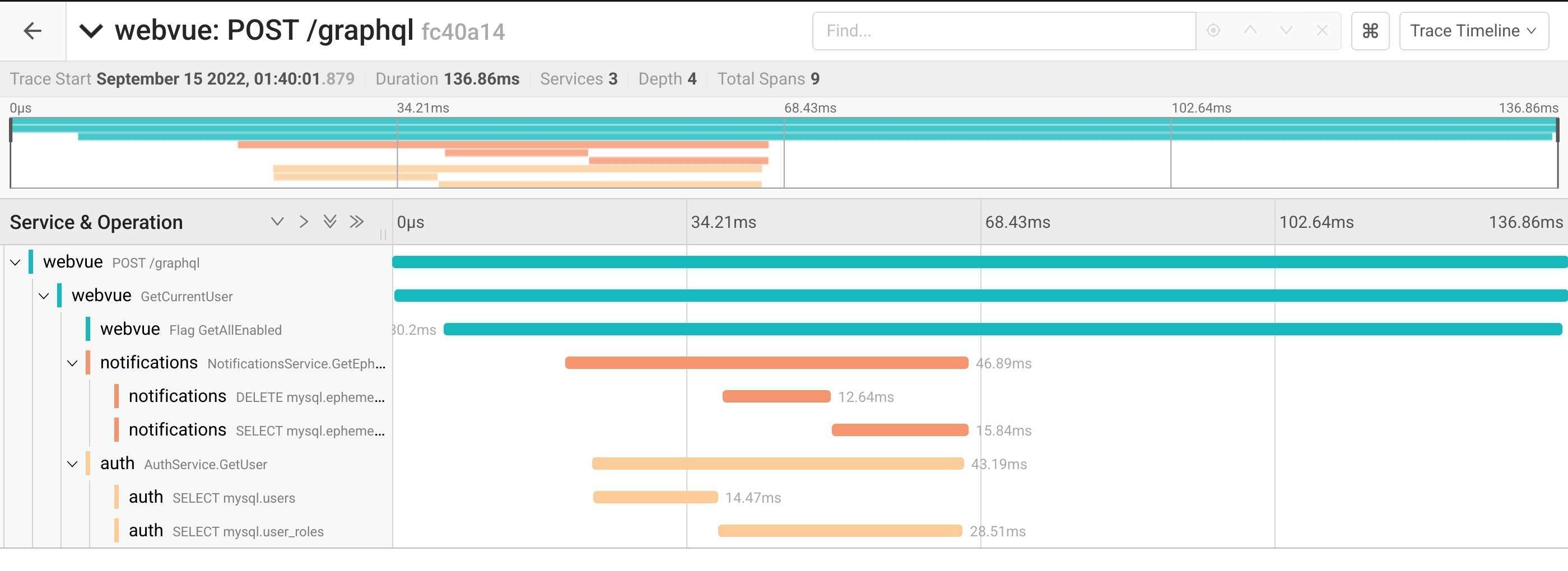
As you know from previous LWWs, the logicworld.net website's backend is made up of many individual services, each responsible of a number of tasks. When you make a request to the website, the main web service calls all of the necessary services, which in turn can call other services. This can make it difficult to know what actually happens when a request is made, since there is no way to know how the service calls are related to one another.

To remedy this, there is a thing known as tracing. When implemented in a system such as ours, tracing adds metadata to each call that associates it with the top level call, allowing us to know why and when a service is called. This also makes it easy to identify performance bottlenecks, since we can know what took the longest time.

I've now implemented tracing for all of logicworld.net's services. This will make the web services easier to debug and to optimize.


0.91 previews coming very soon


We are almost done with 0.91, the first major update for Logic World. It is on track to be fully released later this month. Before that, though, we'll be releasing it "in preview". This means you'll be able to opt-in to downloading the update early, but it isn't guaranteed to be 100% stable. The primary purpose of the preview releases is to get more people and systems hunting for bugs, so that the full release can be as bug-free as possible.

If all continues to go well, public 0.91 previews will begin later this week :)


---------------------------------------------

To make sure you don't miss the next blog post, you can sign up for our newsletter. Be sure also to wishlist Logic World on Steam and join the official Discord.

See you next Wednesday!

View this post on logicworld.net

More Logic World Wednesdays

Logic World Wednesdays: The Advancedly Queryable Edition

Super Sortable Issues - Felipe


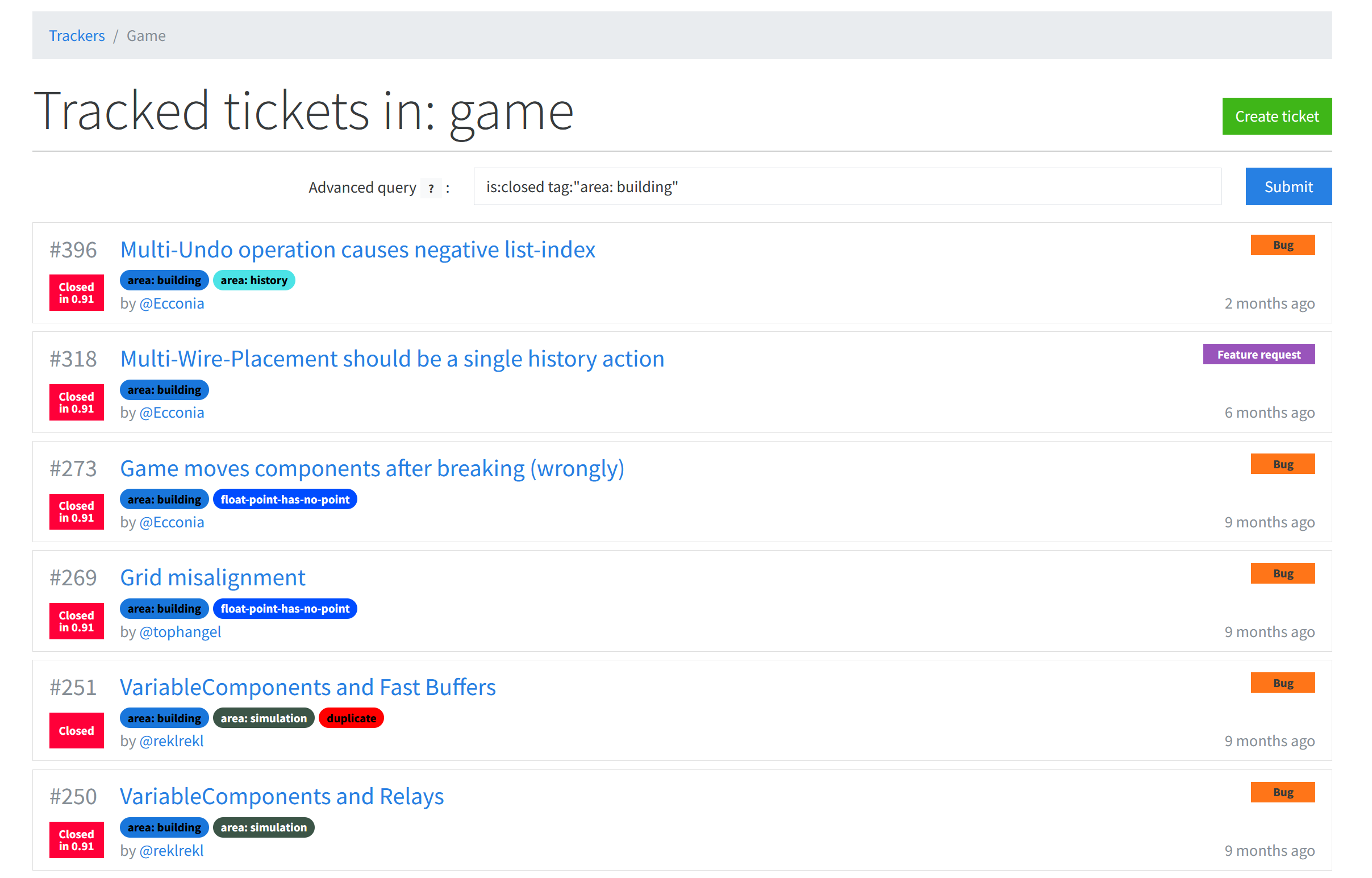
I've been working on improvements to the Logic World issue tracker that make it easier to navigate the growing list of tracked issues. You can now input an advanced query that sorts issues based on their status, type, tags, title, and body contents.


The '|' and '&' characters can be used, respectively, as "or" and "and" operators. When querying issue title and body contents, regex is supported.

This new querying helps us immensely in finding specific issues, viewing issues in a specific category, and determining what issues to work on next. In the future I plan to add a UI for generating these advanced queries, similar to what Github has for issue sorting.

Status Shenanigans - Felipe


I created a new status page at https://status.logicworld.net/. This page monitors for outages in the Logic World services, and provides a place for us to announce any planned downtime.


There's also a feed in the Logic World discord server that automatically posts status updates using webhooks.

As Logic World grows, we will have more services, and more people will rely on them, making it important to have this status page.

Less Forgettable Image Attachments - Felipe


The logicworld.net system for including images in forum posts or tracker issues requires you to first upload an image, then insert that image into the body of the post. However, many users did not immediately understand this flow, and assumed that once they'd uploaded an image, it was already part of the post. The users were confused when they made the post and the image was not included with it.

To help users understand the flow better, I've added a little warning when an image has been uploaded but not included in the post.


Beating Up Bugs like they Owe me Money - Jimmy


In preparation for the release of update 0.91 -- which I think I'm going to christen "The Less Buggy Update" -- I've been hammering away on more bugs and stability fixes. This has been made much easier thanks to Felipe's work on improving the issue tracker, thank you Felipe!

Notably, this week I fixed some nasty simulation glitches that were plagueing Dynamic Components (components with a variable number of input/output pegs, such as AND gates). #104 and #250 are no more (#104 had a pretty interesting cause, click to read my comment about it). And I also fixed the game not properly detecting supported network protocols, which was causing various nasty bugs that made the game unplayable in certain network setups or when no external network interfaces are available (#204, #333, #229, and others). I'm VERY sorry those issues were in the game for so long, I know they've caused a lot of frustration :(

We are on track for a 0.91 release in late September, and I expect we'll start public previews of the update next week.


---------------------------------------------

To make sure you don't miss the next blog post, you can sign up for our newsletter. Be sure also to wishlist Logic World on Steam and join the official Discord.

See you next Wednesday!

View this post on logicworld.net

More Logic World Wednesdays