Logic World Wednesdays on a Tuesday? What is the world coming to?
If you haven’t already heard, Logic World’s release has sadly been postponed to October.
Board Sharing - Felipe
As you may remember from last LWW, I have been working on a way to easily share your creations with the world in logicworld.net. This week I’ve been working on the board details page, which is the page that people will see when you upload something, like adding the model preview and a picture carousel. I’ve also contracted a zombie to record a video showing the whole process in action:
https://www.youtube.com/watch?v=7kkl7cVSchg
I have also made a little demo demonstrating what the board model in each board page will look like.
Comment rating - Felipe
A bit of a small one, but now you’re able to like comments like you can do with posts! This is how it looks like:
In the future expect a way to sort comments by score and date.
Singer Polish - Jimmy
I’ve made many improvements to Singers since you saw them last week.
Pitch Correction
If you have a keen ear, you might have noticed last week that the pitch of Singer notes was off by a little. Pachelbel’s Canon in D was actually Pachelbel’s Canon in D Sharp Plus 0.6 Semitones. This was caused by an oversight on my part: I was generating the audio at 44100Hz, but playing it at 48000Hz, meaning it was being played slightly faster than intended. This discrepancy has been fixed and Singers are pitch-perfect now.
Wave Instruments
In addition to high-level instruments like Violin or Piano, Singers now have access to the following simple mathematical waves:
Singers (and now Drums) have access to a number of “instruments”. Each instrument is a set of rules for how to generate sounds. Previously, instruments were hardcoded into the game, but now they’re loaded from the game data folder and so mods can add instruments. Presently we support SFZ, Frequency Modulation, as well as the aforementioned mathematical waves. In the future I’d also like to support Sound Font.
Better Instrument Selection
Previously the list of instruments was all in one giant scroll view. Now - much like the Selection Menu for components - the instruments are divided into several scroll views, and further divided into categories within those. It’s much easier to find the kind of sound you’re looking for now.
Instrument Ranges
Previously the Piano menu for selecting the note of a Singer was static, ranging from C2 to C6. Now, the piano menu will dynamically resize to reflect the range of the selected instrument. The range of a violin is higher than the range of a cello, for instance.
3D Sound
Previously, a Singer would sing to you equally wherever you are in the world. Now they have proper 3D sound: as you get farther away, they get quieter, and they play more in the left or right speaker depending on where they are relative to you. Singer sound is significantly less 3D than other sounds in the game, though, so you can still build large, spread-out music contraptions that sound good.
Welcome to another Logic World Wednesday! This week, logicworld.net passed 10,000 unique page views. Woohoo!!!
Singers - Jimmy
Digital logic is great, but it’s only useful when it can control devices. Before today, the only output we had in Logic World was displays, which change color when you power them. Introducing Singers!
https://www.youtube.com/watch?v=H7_rAxlIOEk
I may have gotten a little carried away with the demo for these. That’s the main reason this post is so late. I hope you think it’s as cool as I do :)
Board uploading - Felipe
Once Logic World is released you’ll be able to upload your boards to logicworld.net and browse everyone else’s, and this week I’ve been working on the system that will allow you to do this straight from in-game.
As you may remember from previous LWWs, the game utilises an RPC connection to logicworld.net in order to do stuff like logging in and interacting with friends, which means that I’ve already got a connection to the logicworld.net server through which I can send the board file. The game will split up the board file in 10kB chunks, export the board’s model as a .obj file and calculate the hash of the entire file, all of which will get sent to the server as soon as you press “Upload” on a board. Once the server has received all the data and has checked that the hash matches, you’ll be directed to logicworld.net/Upload, where you’ll be able to adjust your board’s title and description and upload some good-looking pictures.
You may have noticed that when you press the Upload button on the client you’re not obligated to follow up and publish the board on the site, in which case the server will keep the board file indefinitely while not being public. This is less than ideal, as over time the disk would be full of forgotten board files that never ended up being published. To overcome this, each board you upload will be assigned an ID as soon as you press the button, which will be stored in the database along with the time at which you started the upload. Every hour we check for uploaded board files that are older than 4 hours, which will be deleted from disk and from the database.
My goal with this system was to make it easy and quick to share your boards from inside the game, while being flexible by completing the publication from the website so that I can expand it to allow for the uploading of worlds as well.
UI Refactoring - Jimmy
I spent a lot of time this week going over the code for the various menus in the game. I’ve been cleaning it up and abstracting the systems so they’re easy to use in future menus. I’ve also made significant performance improvements to a lot of our UI.
This stuff isn’t super fun to talk about, but it’s a necessary part of the process of making a game.
Logic World Wednesdays: Board Models & Component Resizing
Welcome back to another Logic World Wednesday! This week, Logic World surpassed 3,000 wishlists on Steam. Thank you to everyone for your support!
Board Models - Jimmy
I added interactable 3D models to the board menu! Now you can see what your saved circuits look like before you load them.
https://www.youtube.com/watch?v=igAYHnccKnY
Sometime in the future I'd like to let you 3D print these models. I would love to have a little circuit for my desk, that would just be so cool.
Resizable Components - Jimmy
I’ve been working on a system for resizing components in the same way you can resize boards. This will eliminate the need for having many different components that are just the same component resized.
Labels are blocks with editable text on them. I added them to Logic World a while ago, but there hasn’t been an in-game way of editing them. This week I finally added that menu, as well as the ability to change the labels’ color!
https://www.youtube.com/watch?v=VHx5iKpETR4
Grid Placing - Jimmy
Grid Placing is a new feature that lets you quickly place many components in a grid.
https://www.youtube.com/watch?v=-HISkMNYbK4
One of my goals with Logic World is to make the building mechanics fast and easy to use, and Grid Placing is a big part of that!
C# to JS - Felipe
I'm finally back from vacation! Unfortunately I'm going to have less time for LW stuff as I'll be busy with school, however this week I did have time to add something to my vue-aspvalidate library: as you may remember from my last LWW section in order to, say, validate an email there has to be a snippet of C# code that validates it in the back-end and a snippet of JS that validates it on the front end, which meant writing duplicate code for each kind of validation. This is obviously less than ideal as you’re writing everything twice, so I set on to find a way to take C# code and translate and send it to the client.
I arrived at a solution using the wonderful LINQ Expressions API in C# that lets you pass a method a lambda (i.e.value => value.Length > 10) and then go through it using an ExpressionVisitor, which lets you see the lambda as a regular C# object of a type derived from Expression. For example, the previous example would call the VisitBinary method on your visitor, which in turn lets you visit the left and right sides of the > operator and so on.
This means that a single-line validator like value => value[2] == ‘@’ && value.StartsWith(“lol”) || Regex.IsMatch(value, “.*?%$”) gets translated to the JS code value => value[2] == “@” && value.startsWith(“lol”) || new RegExp(“.*?%$”).test(value). As you can see, some BCL methods get translated to their JS counterparts, allowing me to write complex validators without worrying about writing any JS code!
By popular and passionate request, I’ve added D-Latches to the game!
https://www.youtube.com/watch?v=3yc_-BV-tc0
The D-Latch is the first of many new logic components we will be adding to Logic World. Stay tuned :)
Board Saving Menu - Jimmy
Last week I showed off Board Saving, but it didn’t have a menu yet. I’ve been working on the user interface for that feature.
https://www.youtube.com/watch?v=_1xZnSnmKTo
This is the most complicated user interface I’ve ever programmed. It was definitely worth my effort, though: I expect many people will have hundreds of saved boards, and they need to have a good way of organizing them.
Form validation - Felipe
If there’s something that’s annoying to both users and web developers, it’s form validation. Most if not all user input needs to be checked, for example to make sure a user’s email is a valid email address.
Every form in our website corresponds to a class in the server, for example the login page gets transformed into an object with two fields: string Username and string Password (this will be relevant later). In this case there’s not much to verify, other than that neither fields are empty, but in more complex forms like the register form you may have to verify the email format, the username length, the password complexity, etc. These requirements have to be verified with the same criteria on the front end (for a smooth and instant response), and on the back end (in case the client fails to verify the data).
As you may or may not already know, the website is made of different technologies for the front and back side, each with their respective languages (C# and Typescript in this case). This means that validation criteria have to be defined on both the back and the front end and in ways appropriate to each language.
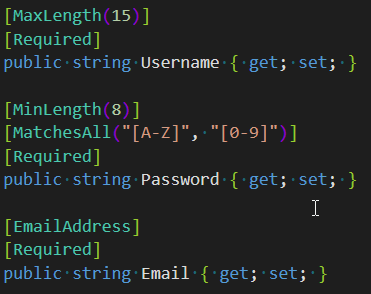
ASP.NET Core (the technology used in the back-end) has support for decorating the members of the aforementioned data class with attributes, which makes for a smooth and clear indication of the requirements of the form’s inputs. For example, this is how a register form could look like:
The problem is that in order to enforce these same rules on the client, you’d have to manually check the username’s length, use a regex for the email, etc. Ideally these same rules would be transferred to the client and automatically applied, so that you’d only have to specify the requirements once. This is exactly what my new library vue-aspvalidate does! It allows you to validate inputs on the client and the server while only writing the requirements a single time on the server class.
This will save you a lot of time since you won’t be writing duplicate code, while also making it less buggy and, perhaps most importantly, making sure that the server and client agree on their requirements. It’s also very extensible, letting you define your own rules with client and server logic.
Board Save Format - Jimmy
Last week when I showed off Board Saving, saved boards and saved worlds used a different file format. This week I’ve unified the systems so that boards and worlds are saved with the same logic. This means less code, which is always a good thing!
There is also now a debug option to save boards as text data instead of binary data, in case you need to edit the files manually.
We’ve decided we want to sell Logic World on our own store in addition to third party stores like Itch. When you buy through logicworld.net, you’ll be able to download the game completely DRM-free and straight from our website. Additionally, 100% of your money will go to us. We are planning to support payments through PayPal, Stripe, and PaySafeCard. In the future we might also sell physical merchandise on our store.
I’ve been working on a system to save circuit boards you’ve built stuff on. Often in Logic World you need to use a circuit many different times, so now you can save your circuits and load them again whenever you need them.
https://www.youtube.com/watch?v=Hw8QMKr0C9k
In the future you’ll be able to upload and share your saved boards on logicworld.net.
This week I’ve improved a few details on the website. First of all, I fixed the annoying newline formatting, now you can insert more newlines after a paragraph using tags. Also, now you can see each post’s score when browsing a forum, along with the existing comment count. I’ve also fixed a couple of issues involving comment deletion, as well as added the possibility to edit comments!
Here’s a picture showing the forum details:
Configurable Displays - Jimmy
The main output component in Logic World is the Display. Displays change color based on the state of their inputs. Previously, these colors were predefined, but this week I’ve added the ability to change them.
https://www.youtube.com/watch?v=jqNI9Nek8AA
This feature was suggested by @TheWildJarvi. Thanks, Jarvi!
Details
Every week we’re adding small details and polish to Logic World. Individually, these are too small to get mentioned on Wednesdays, but from now on we’ll be doing compilation videos that show them off.
https://www.youtube.com/watch?v=u5TI6OQoU8Q
The difference between a game that’s pretty good and a game that’s fantastic is the attention to detail. We want every single part of Logic World to be a smooth and polished experience.
Logic World Wednesdays: The Even More Colorful Edition
Color Picker v2 - Jimmy
Last week I showed you an early version of the Color Picker menu. I’ve spent a lot of time this week polishing and improving the color picker and it’s now my favourite piece of UI in the game.
https://www.youtube.com/watch?v=WpFBcw5cb3A
The color picker now has:
Profile Pages - Felipe
I’ve done quite a bit of work this week on the logicworld.net user profile pages, which were quite lackluster before.
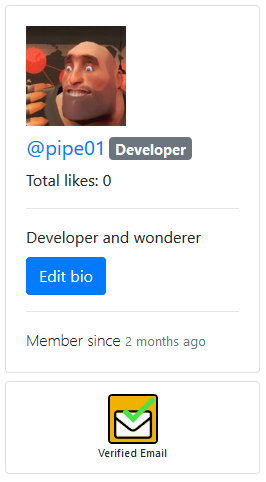
The first thing I did was to add a badge system, which are shown in the bottom part of the sidebar in your profile page. Right now the only earnable badge is the ‘Verified email’ one, which you can of course earn by verifying your email address (if you signed up using a Google account you won’t need to), so go ahead and try it! In the future we will be adding more badges that you’ll be able to earn by for example purchasing the game in stores, winning contests or participating in events.
I have also added a customizable bio to your profile, which is a short paragraph of text in which you can talk a little about yourself or link to your social media (remember, Markdown is supported!)
Here’s a picture showing these two features:
You may also have noticed that there’s a number indicating the total amount of likes your posts have gotten. In the future you'll be able to like comments as well, and those likes will contribute to your total.
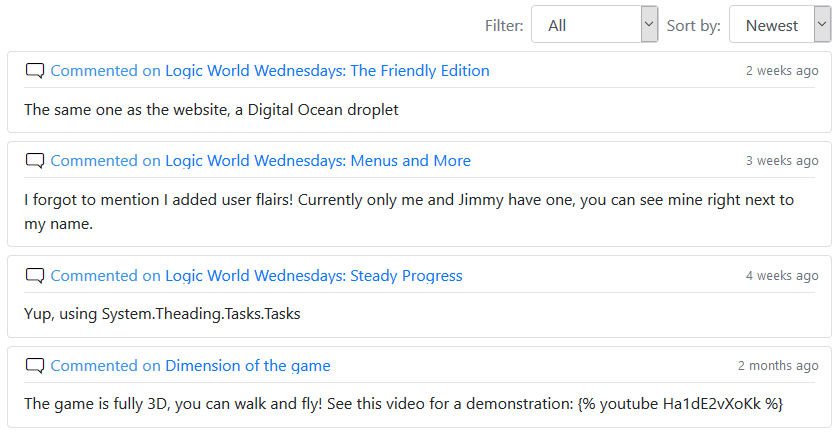
In the right side of the page you’ll now also see a feed of the user’s activity, i.e. posts and comments, which you can filter and sort!
Configurable Menus - Jimmy
I’ve been working on a system that lets you adjust menus to your liking.
https://www.youtube.com/watch?v=m2T1fEJ_8aM
All Configurable Menus allow you to adjust their size, shape, and position on the screen. In the future, some menus will have additional control panel options that are specific to them. I want Logic World’s interface to be as customizable as possible, so everyone can have the menus set up how they want or need.
Welcome back to another Logic World Wednesday! Before we begin, we’d like to share that this week Logic World surpassed 2,000 wishlists on Steam. Thanks everybody!
Colors! - Jimmy
This week I’ve been working on a menu that lets you choose colors! It will be a sub-menu in many different higher-level menus. Currently you can use it to change the color of circuit boards, buttons, and switches. Check it out:
https://www.youtube.com/watch?v=aYP0pURAjFs
Graphics Improvements - Jimmy
This week I’ve been making improvements to Logic World’s graphics. The game now not only looks better, but it runs faster as well.
Lightweight Render Pipeline
Logic World is a 3D game, but its 3D world is displayed on your 2D screen. A “Render Pipeline” is a library of code which takes that 3D data about the world and converts it to a 2D image to be displayed on your screen.
Previously, Logic World was using Unity’s built-in render pipeline, but this week I’ve ported it to a new pipeline called the Lightweight Render Pipeline or LWRP. I did this for two reasons:
It was a lot of work to move everything over to the new system, but I’m glad I did it.
Ambient Lighting
I’ve added omnipresent soft lighting to the world, so you can see what you’re doing even in shadow. In the future, the amount of ambient lighting will most likely be configurable.
New Outline Tech
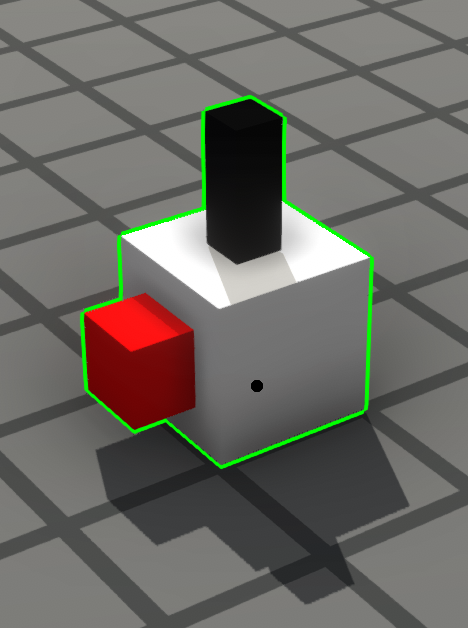
In Logic World we use “outlines” to highlight objects in 3D. This is most often used to show which object you’re looking at or which object you have selected. Our old outline system doesn’t work with LWRP, so I took this opportunity to upgrade it.
Not only do the new outlines look better, but they can also be any color now. The previous system was limited to only three colors. Now that that restriction has been lifted, we have much more freedom, and can communicate the meaning of an outline with more flexibility.
Video
I’ve made a short video that shows off our new rendering setup and what each layer of the rendering stack adds.
https://www.youtube.com/watch?v=Z2qQ596gM7s
Web notifications - Felipe
Now there’s a bell in the top right side of the navbar in logicworld.net. It will light up whenever you get a notification! You’ll also be able to see the details of each notification if you click on it! This bell will only be visible when you’re logged in.
Currently you only get notifications when someone replies to your post or comment, but in the future you’ll get a notification when someone @mentions you in a comment or post, and you’ll be able to subscribe to a thread and get a notification when a new comment is posted!
Better notification settings - Felipe
Previously, you’d get an email whenever someone replied to your post or comment. This is great except for the fact that you can’t choose whether or not to receive them, that’s why now there’s another column in the Account Settings page that allows you to enable and disable web and email notifications for each type of notification (currently only replies).
Big Component Rotation - Jimmy
I’ve made rotating big components more fluid and intuitive. Previously they would always be rotated around their corners, but now they are rotated around whichever point you’re looking at. This is kind of hard to describe with words, so here’s a video:
https://www.youtube.com/watch?v=D1MocWQzV4s
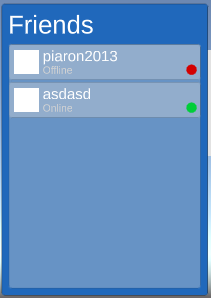
Friends List- Felipe
I’ve finally added a friends list to the game, which will show you the name of every one of your friends, as well as their profile picture and their current status!
Here’s what it looks like currently:
Keep in mind this is really WIP as of now (as can be seen by the white profile picture).
This menu will be used for various things related to multiplayer games, like inviting people to your singleplayer game and playing challenge packs with friends.
One problem of releasing Logic World on multiple platforms is not having a way to easily connect with your friends that have bought the game on a different shop. Thus, I set on to build a friends system, akin to that of steam (although much more barebones). This means that you’ll be able to chat with your friends and join their games, no matter where they got their copy of the game from, be it Steam, Itch.io or Gamejolt!
The system is powered by a gRPC server running on the cloud, to which clients will connect to in order to send and receive messages in real time. This whole system is completely opt-in, meaning that we won’t bother you at all if you choose not to create an account.
Game ownership verification - Felipe
To access the friends system, we must verify that you’ve successfully bought the game, which you can prove through your linked Steam account or by authenticating on itch.io. You only have to do this once, and you’ll be able to add your friends!
Component Flipping - Jimmy
A number of components in Logic World have parts on both sides of circuit boards. This week I’ve added a building mechanic that lets you flip these components upside down, either before or after you place them.
https://www.youtube.com/watch?v=KnnBNeEzD5I
Remote World Downloads - Jimmy
In Logic World, the client and the server use the same code to store their internal physical models of the world, and this model is synchronized between the server and all the clients that are connected to it. Previously, only the server had access to the code that generates save files from this model of the world. I’ve modified the save code to work without the server, only that shared physical model of the world. This means that when you’re connected to a server, you now have the ability to download that server’s world.
Save Options - Jimmy
Logic World has two methods of saving your progress. First, it will save your game to the current save file. Second, it will automatically backup your save file, just in case. This week I’ve been working on making these two systems more configurable, and you now have the following options:
Image Embeds - Felipe
Currently, if you want to upload an image to a post on the forum you’d have to previously upload it to an image uploading site (we were using Imgur), and then insert the image using Markdown notation. However, now you can directly upload images to logicworld.net and insert them into your post by writing {{!N}}, where N is the index of the image you’re referencing. Here’s how the UI looks like at the moment:
I do want to make it prettier but this works for now, even if it’s not the best UI.
Search Shortcuts - Jimmy
Last week @woox2k left a comment suggesting a keyboard shortcut for the search function in the selection menu, and this week I’ve added it. When you run a search, you can now press enter to add the first search result to the end of your hotbar. It also selects the entire search box so you can immediately begin searching for another item without having to use backspace. There are a few more advanced shortcuts as well:
I’ve found that these become muscle memory quite quickly, and they allow experienced players to edit their hotbar without ever using the mouse.