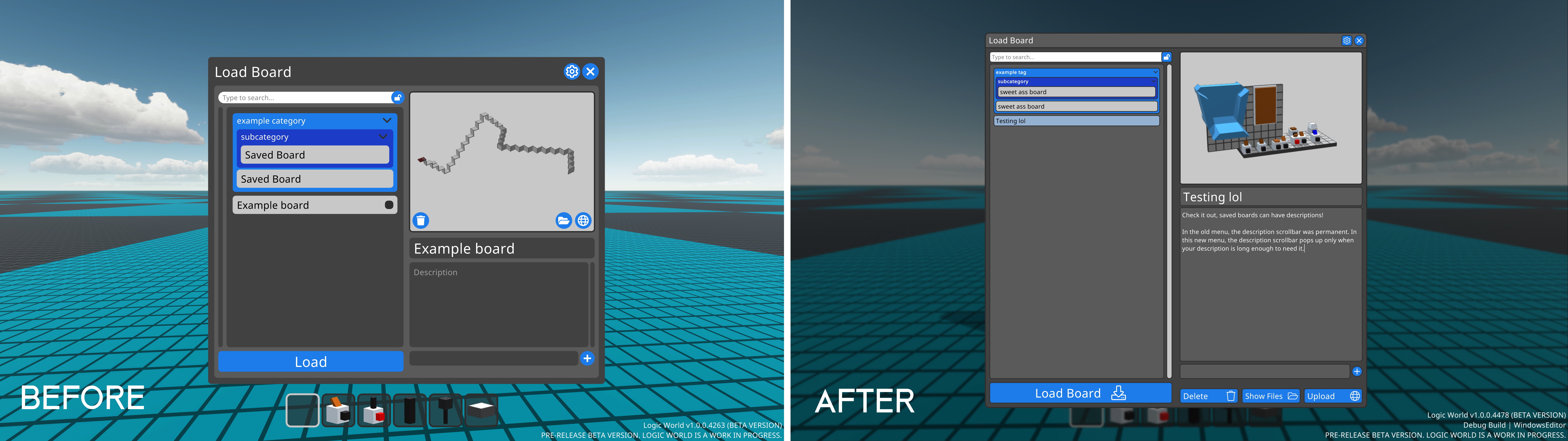
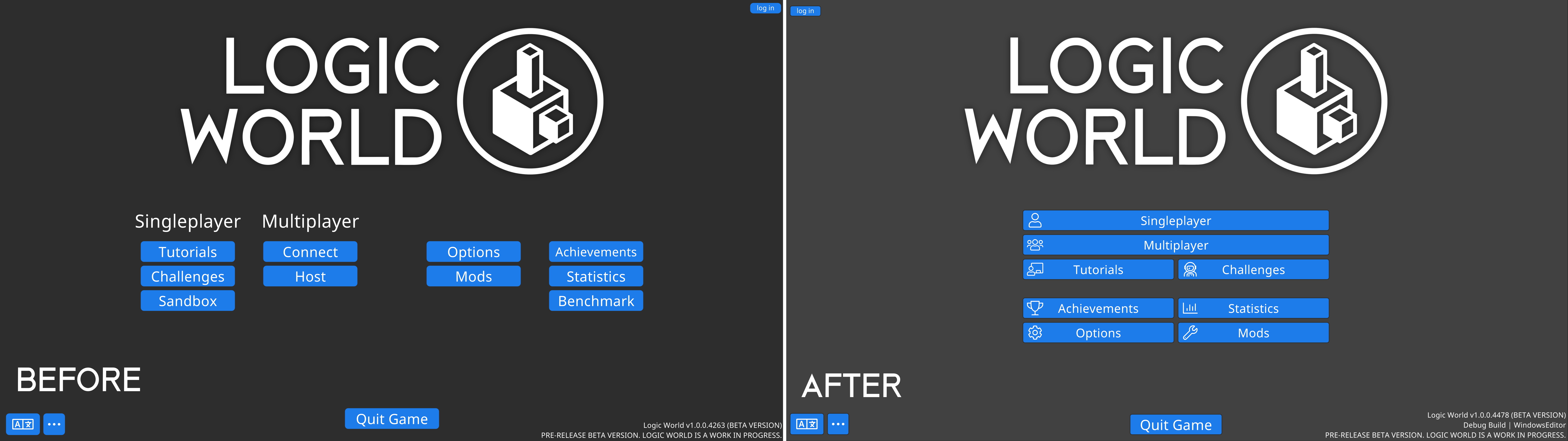
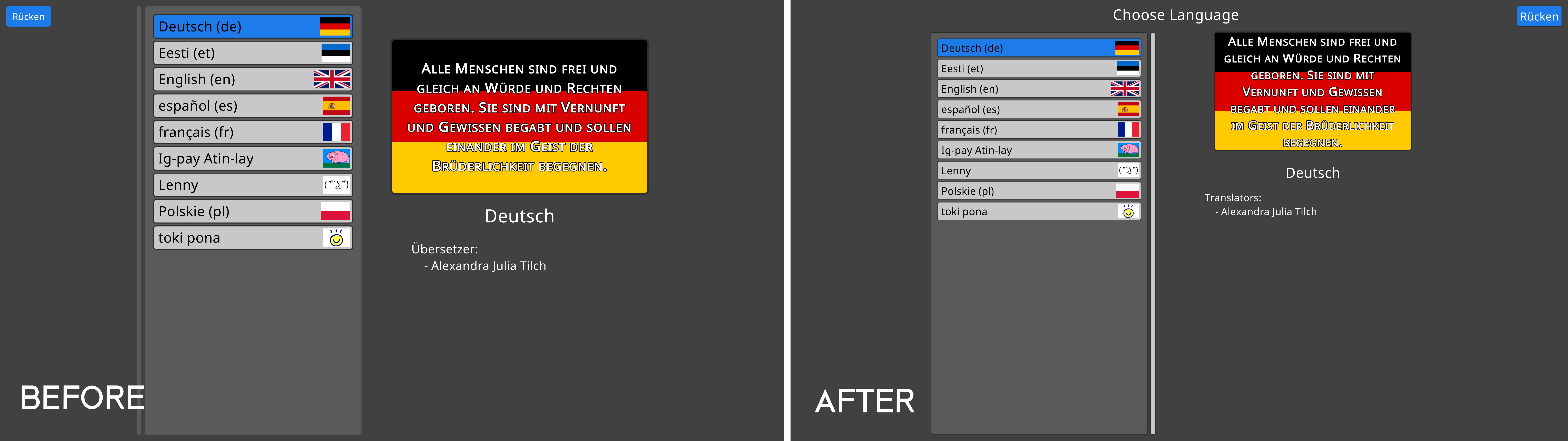
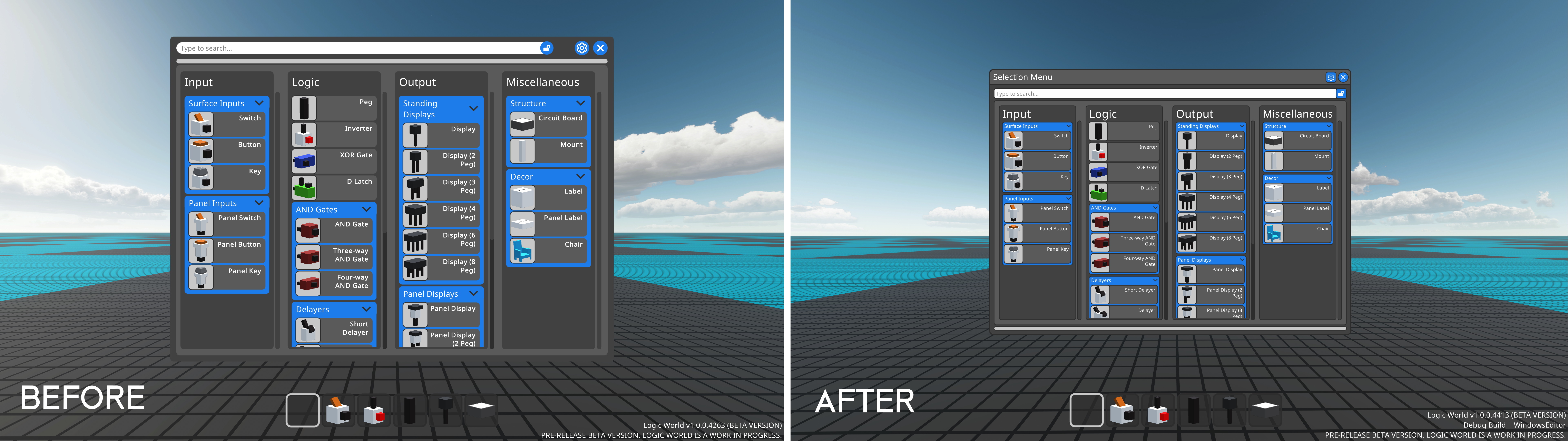
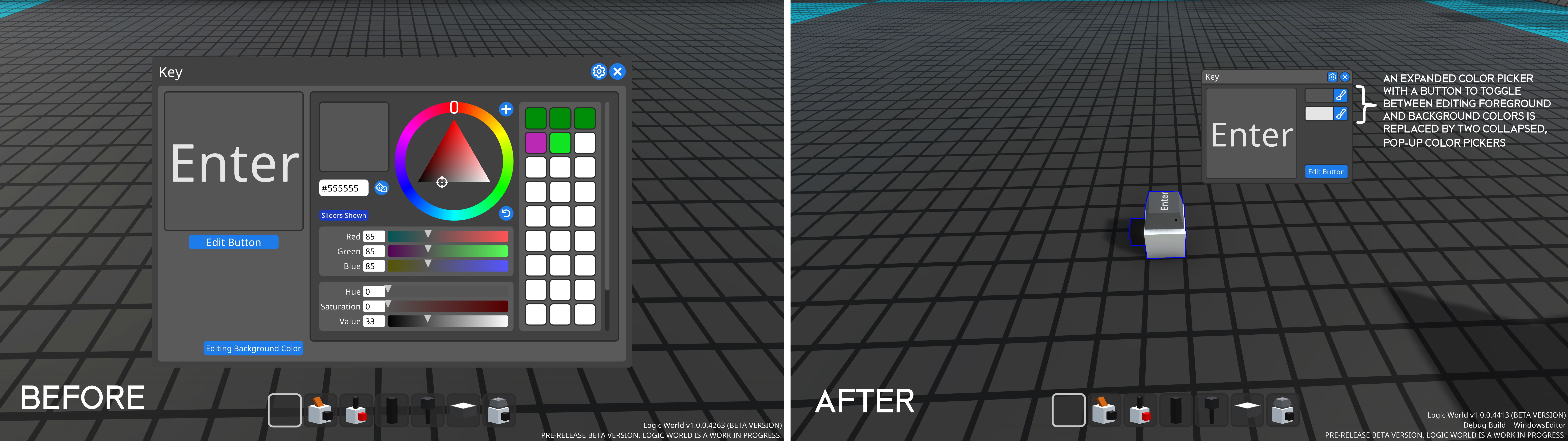
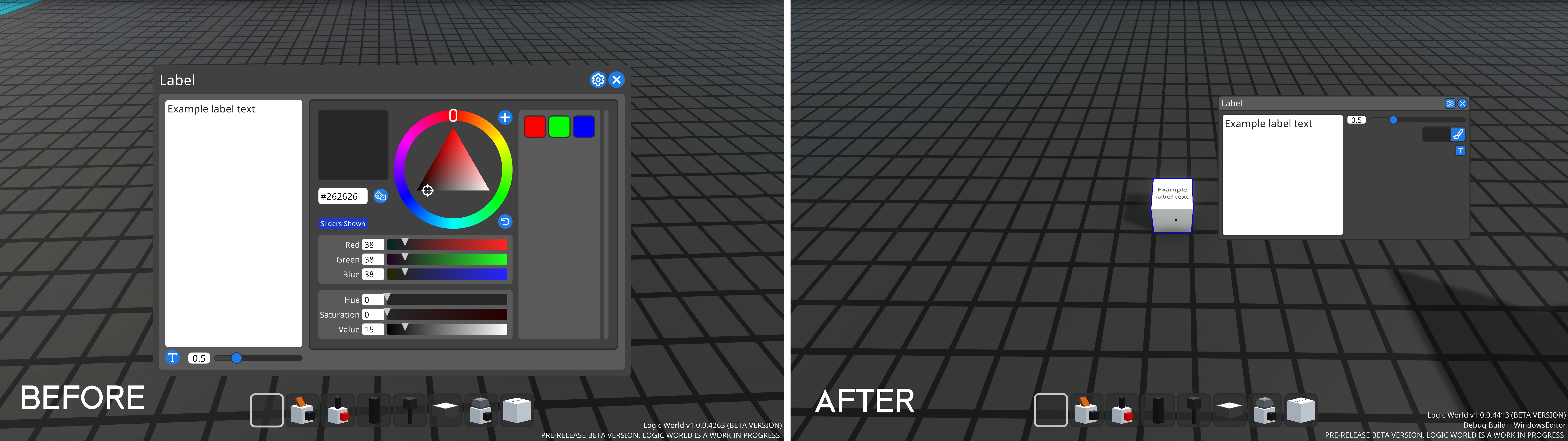
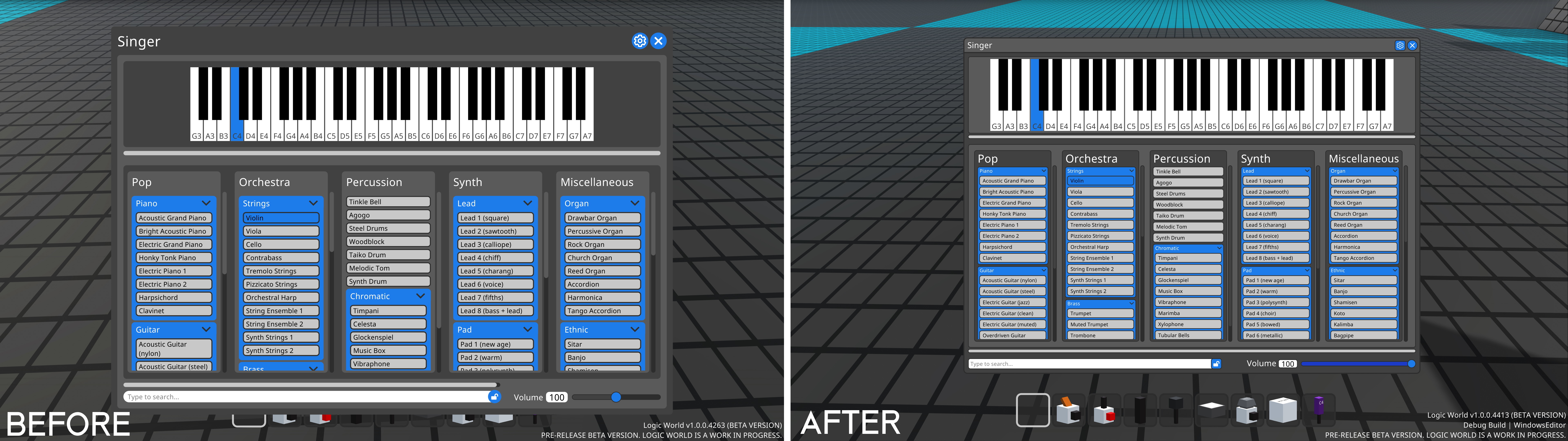
The enthusiasm of the translators has been absolutely staggering. It’s been less than a day since translations began, and already we have thousands of translation suggestions, seven languages with at least one suggestion for each translation, and several dozen individual contributors.
Thank you to everyone who has so far helped translate, and thank you in advance to everyone who is going to. We want folks to enjoy Logic World in whichever language they wish, and thanks to you, they will!
Component Resizing: Endgame - Jimmy
At the suggestion of the thoughtful @tokumei, I’ve made some awesome changes to the Component Resizing interface!
[previewyoutube="We-MVkT-TFA;full"]
This particular UI, I realize now, was a big blind spot of mine. For most of this game’s history, you couldn’t resize things at all, and it was a big missing feature. Because of this, I saw any form of resizing as “really good”; I didn’t realize how poor the interface was in comparison to what it could be.
That’s why I’m so grateful to this community and all the additional eyes it puts on the project. To Tokumei, and to everyone else who has suggested features for Logic World: thank you!
In-game logins - Felipe
This week I’ve been working on making the game connect to our servers, and the first step of that is to let users log in using their logicworld.net account. To do this, all they will have to do is press a “login” button in the main menu, and their browser will open with the login page. Once you enter your credentials and submit, you will be authenticated in-game!
We also considered having the login fields directly in-game. However, the login process is very complicated: it has to support creating a new account, resetting your password if you forgot it, sign-ins with external providers like Google, ect. It would be a lot of work to duplicate all this UI in both the browser and in-game, so we’re just using the browser login for both.
This menu will show you a list of your friends, including the profile picture they set on logicworld.net, their username and their current status (online or offline). I also want to make this status reflect what they’re currently doing, for example “Playing with 5 people” or “Playing by themselves” (this could of course be disabled in the settings). And, probably the best feature, you’ll also be able to join other people’s games through this menu (if they have enabled it).
Color picker square - Jimmy
I love triangle color pickers. I think they are completely and objectively better than square color pickers in every metric. That’s why, when I added a color picker to Logic World, I made the picker a triangle.
To my utter shock and disbelief, this week I had a few people tell me that they prefer the square color picker. These people are, obviously, completely wrong. But nevertheless I have added an option to use a square picker.
We’ve talked before on this blog about our Cloud Build system: we write some code, we press a button, and a server somewhere automatically builds the game for each operating system and uploads the builds. Until now, we’ve been using a server that we rented from a company. But this had two problems:
Companies charge hella cash for high-performance server rental
Not having physical access to the machine made troubleshooting and problem-solving more difficult than it should be
So this week, Jimmy built a new server for us. And if you’re gonna build a server, why not make a vlog about building a server :)
[previewyoutube="sPnkxg4gOeo;full"]
But building the hardware is only half the battle. We’re still working on the software part: we’ve got the operating system installed, we’ve got all the networking configured, and we’ve successfully activated a Unity Plus license on the server (something we were never able to do on a machine we couldn’t physically access). The next step is to set up all of Felipe’s fancy build software on Bob.
Once that’s complete, we’ll finally be able to build Logic World quickly, reliably and cheaply. Any disasters notwithstanding, you’ll be hearing about the completion of this project next week :)
Bugs Fixed This Week
Fixed 'Tried to add entity at invalid circuit state index' error, requiring a game restart, if you built a world with more than 10,000 concurrent circuit states
Fixed errors when you tried to resize a component with wires directly attached to it (Panel Displays)
Fixed board hitboxes becoming squished when you moved or placed a board on their edge
Fixed sometimes not being able to resize objects for no reason
Fixed being able to interact with Interactables that are behind players
Fixed various crazy visual errors when cancelling Multi-Wire Placing at stage 0
Fixed in-game changelog not rendering
Fixed the `MissingLocalizations` command incorrectly stating that present localizations were missing
Fixed the Configurable Menu scale slider label having an incorrect localization key
Fixed Resizable Menus always starting in fullscreen when the game is played in Europe
Wait a second, did I read that last bug correctly?
Yes you did! This is one of the most interesting bugs we’ve ever had in Logic World. Can you guess what caused it? We sure couldn’t for several hours!
Pause reading here if you want to think about it and try to solve the puzzle yourself :)
We were going absolutely mad trying to figure out this bug. We each did the same thing, but got different results. Who could have guessed that the difference in our digital setups was the physical location?
It turns out the culprit was… different regions using a different character for the decimal indicator! The resizable menus save their size to a SUCC file. In North America, the menus were saving their size as something like 205.872. But in Europe, they were saving their size as something like 205,872. You can probably see where this is going: the numbers were saved using the local culture, but they were loaded as a global culture. So all of the values were being blown up by 3+ orders of magnitude!
Sometimes, bugfixing can be delightful. When the symptoms are bewildering and random, but the cause (and fix!) turns out to be simple and logical… that’s one of the finest feelings in programming.
Regular Logic World Streams!
The lovely @Daniel, a beta tester for Logic World, is now doing regular streams of the game! So far on-stream he’s built a Nintendo CIC), a binary adder, a tic-tac-toe machine and more; right now he’s working on a playable game of Battleship).
In our biased opinion, Daniel’s streams are always tons of fun, and you should check them out! Follow him on Twitch and Twitter to be notified when he goes live.
---------------------------------------------
We'll keep releasing these weekly updates right up until the game comes out. To make sure you don't miss them, you can sign up for our newsletter or join the official Discord, and of course you can wishlist and follow the game right here on Steam.
You can now easily move objects around, and their rotations are all handled properly.
[previewyoutube="fxMjvSb0QtA;full"]
This is part 1 of 2 in my Grand Plan to Make Rotating Boards Less Awful and Difficult. You should be seeing part two next week.
Generalized Packet System - Felipe
To send data between the client and server, we use packets. These are small bits of data that the game uses for communicating things like when a player has placed a component. Previously, these packets were hard-coded, meaning that whenever we wanted to add a new packet type we needed to manually register it.
A big issue with this approach is that mods were not able to add their own packet types. For this reason, I’ve made this system more expandable: instead of packets having their own hard-coded ID they will be assigned an ID when the game starts. This will be very helpful for mods, as they will be able to send and receive their own data, independent from the rest of the game.
Fancy Circuit Optimizations - Felipe
This week I’ve also been working on optimizing the code that does all the circuit simulation, namely the clusters system and the circuit states system. The most interesting one is probably the clusters one, since it involved more thinking rather than coding.
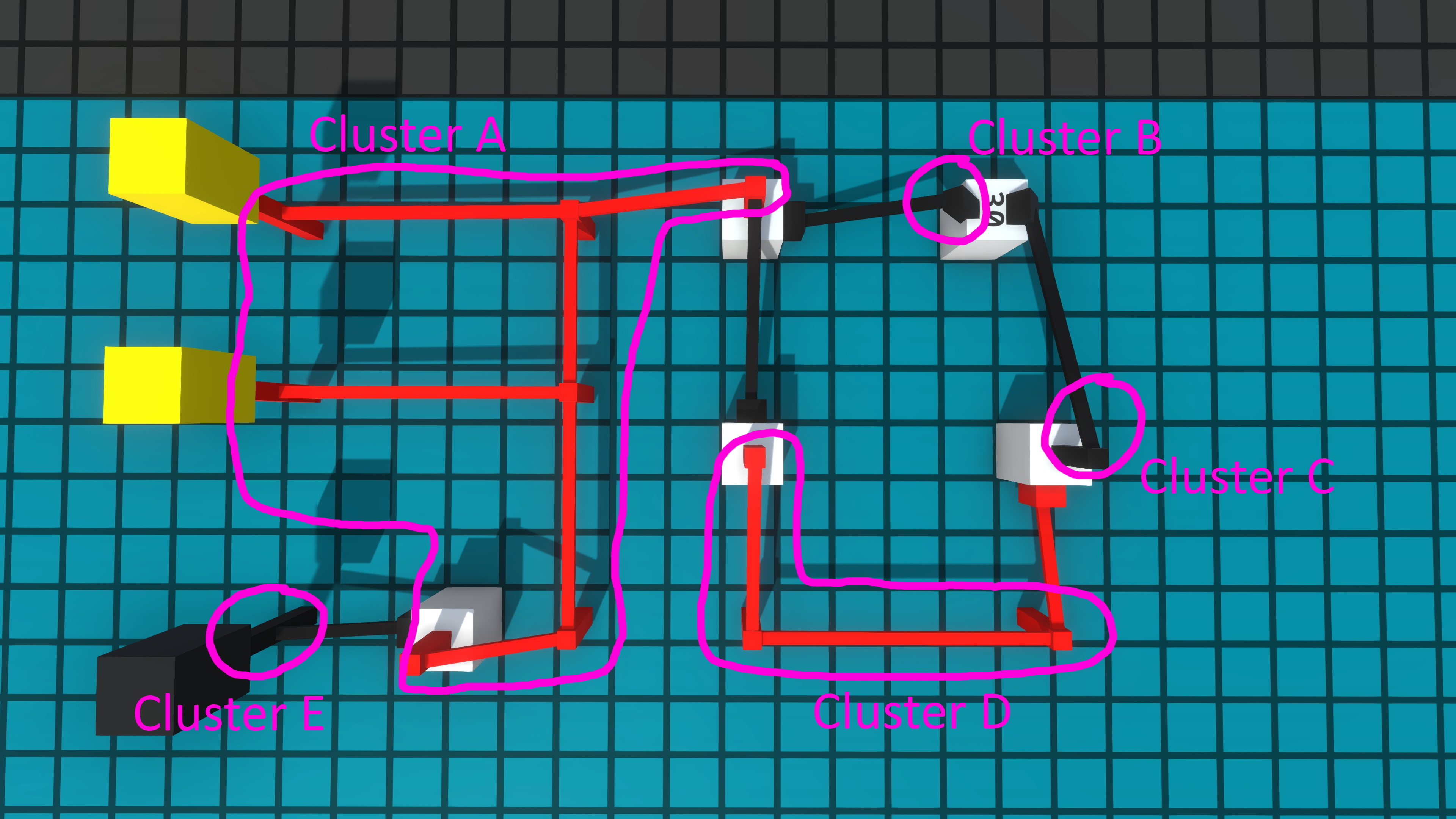
Clusters are an internal structure we have within the simulation. A single cluster represents a group of pegs and wires all connected together. Since everything in the group will turn on and off at the same time, they can be treated as one object rather than several.
Previously the clusters that needed to be updated were stored on a simple list, which stored references to all of those clusters. This worked just fine, however it wasn’t the most efficient approach.
Since we only ever iterate through the clusters one after the other, we do not need the ability to get, for example, the fifth cluster in the list. Instead, we only really need to know which cluster is updating first, and which one is updating after it. This is very similar to the concept of a linked list, since each cluster just has to store a reference to the next cluster. This is much more efficient than using a list, since all the operations we need are O(1) (which basically means it always takes the same amount of time, no matter how many clusters there are) on a linked list.
There’s also a distinction between a doubly linked list and a singly linked list: an item in a singly linked list only stores the reference to the next item, while a doubly linked list’s item also stores a reference to the previous item. In theory we would need a singly linked list since we only ever go forward when updating, however using one would mean that we wouldn’t be able to remove an item that’s not the first or the last one (for example when you remove a component and we need to remove it from the list, it’s very likely it’s in the middle). For this reason, we need to go with a doubly linked list.
We could use C#’s generic LinkedList class, however it could introduce more overhead with unnecessary features and end up actually being slower than our old way of doing it. For this reason, clusters will instead build their own linked list of sorts, manually storing the previous and next clusters that are updating. When we want to update all of them we simply get the first one, update it, then check which cluster is next and repeat until we’ve reached the end.
I was going to make a cool graphic diagram to demonstrate the concept, but unfortunately I’m far from a graphics designer so if you’re interested I’ve made a text document detailing what happens when you add or remove a cluster.
This should also drastically improve the performance of Relays, as those components work by creating and destroying clusters. However, we haven't been able to get numbers on that yet.
Bugs Fixed This Week
Fixed vertical flying controls getting "stuck" when Lock Flight Y Axis is off
Fixed Color Picker often opening by default to a white color
Fixed Gridlands worlds by default being created as pure white
Fixed boards flying away like a butterfly if you grabbed them at an angle that didn't immediately provide a reference location
Fixed crazy errors next time you load a save if you quit to main menu while placing a component
Fixed Edit Label Menu not doing "select all" when it's opened
Fixed fatal error when spamming the rotation key on buttons and keys
PLUSHIE BOBBY
The amazing @Marutzo -- whom some of you might know as NITRO -- has made a gosh darn plushie of Bobby, Logic World’s beloved protagonist and mascot.
This is pretty much the best thing ever and it has absolutely made our week!
---------------------------------------------
We'll keep releasing these weekly updates right up until the game comes out. To make sure you don't miss them, you can sign up for our newsletter or join the official Discord, and of course you can wishlist and follow the game right here on Steam.
It’s been one of those weeks where I’ve combed through the game and added tons of small details and polish. I felt it was time for another video compilation of these :) [previewyoutube="lwhjQLhvCgs;full"]
Benchmarks - Felipe
This week I’ve been working on some performance improvements in the circuit code, but quickly I realised that I had no proper way of testing whether or not my changes actually made a speed difference. For this reason I’ve made a simple framework for us and mods to add different benchmark cases. A single case is an interface with a method in it that does a single “iteration” of work (for example, creating a component), and the framework takes care of running a ton of iterations and measuring how long each one takes, then reporting that to the user.
This framework is accessed by the user through two commands: 'benchmark' and 'stress'. The first command will run iterations in about 1 second “groups”, then average the time each group took and calculate the time each single iteration takes. This is fine for long jobs, but for jobs that are very quick to finish (like changing the state of a wire), the time per iteration is so small that it becomes cumbersome to measure and compare. That’s why there’s the second command, which will instead run as many iterations as it can in 5 seconds and report how many iterations per second it achieved.
These benchmarking tools will be invaluable in the coming weeks as we get serious about speeding up Logic World.
Jarvi Makes a Mandelbrot, LIVE
Our brilliant and very handsome beta tester @TheWildJarvi has embarked on an epic quest: to build hardware for rendering the Mandelbrot set in Logic World.
Jarvi is livestreaming most of this process. If you’d like to see hours and hours of unedited Logic World gameplay from someone who knows a heck of a lot about digital logic, you should check out his streams! The first few are already up on youtube, and you should subscribe to his channel so you’re alerted of his future streams.
Bugs Fixed This Week
A member of our community recently suggested that we start including a list of bugs fixed each week in these blog posts. This week has been particularly bug-fix-filled, so it seems like a good time to try out the idea!
Bugs with components
Fixed Oracles generating a new value when their circuit network is updated, i.e. by adding or removing a connection to their input
Fixed "ghost" display configurations on picked-up Displays with deleted configurations
Fixed Buttons and Switches making extra sounds when they are placed, rotated, moved, and when the sandbox loads
Fixed Buttons and Keys getting stuck on if they are rotated or flipped while being pressed
Fixed held-down Buttons and Keys going up if another player joins the game while they're being pressed
Fixed being able to press Keys when you couldn't see the actual key part
Fixed Keys turning on but not moving and not making sound when a different player presses them
Fixed being able to press Keys when they are visible only via their reflection in SHINY BOBBY
Bugs with building
Resizing components: fixed holding shift to snap to square size not working properly\
Fixed wire ghosts sometimes having a different rotation from the wires they create
Fixed multi-wire placing outlines sometimes being the wrong color
Bugs with the player controller
Fixed player jump sounds always coming from the world origin, rather than the position the player jumped from
Fixed players sticking to the ceiling when they jump into one
Fixed players falling at an inconsistent, and usually too fast, speed when walking off the edge of a platform
Fixed players decelerating in the direction they're facing instead of the direction they're moving
Fixed players accelerating too slowly when the game is lagging
Bugs with the user interface
Fixed hover tags rendering behind popups
Fixed visual artifact on settings sliders when set to minimum value
Fixed terrible glitchy behavior when clicking on scroll bars
Fixed incorrect hover tag text localization key on "Add New Tag" button
Linux: fixed resizable menu custom cursors being gigantic and taking up half the screen
Other bugs
Fixed positional sounds not getting quieter with distance
Fixed client's 'quit' command hard locking the application
Fixed component registry not properly detecting the error when a mod adds duplicate component IDs
Please let us know what you think: is this list interesting to you? Would you like to see it return next week?
---------------------------------------------
We'll keep releasing these weekly updates right up until the game comes out. To make sure you don't miss them, you can sign up for our newsletter or join the official Discord, and of course you can wishlist and follow the game right here on Steam.
Logic World Wednesdays: Loggy Loggy Log Log Log Glog Glog
Time and Science - Markku
Hello everyone! I hope you enjoy my piece for the Logic World OST called 'Time and Science'.
[previewyoutube="E2vEyGRL-tI;full"]
In addition to writing new music, I've recently been working on polishing some of my previous pieces for this soundtrack. I'm now completely done with 20 minutes of music for Logic World. The full soundtrack will be 40 minutes, so we're officially halfway finished! I'm looking forward to the next half and I hope that you're there with me on Logic World Wednesdays to hear some new tunes!
Loggy Loggy Log Log Log Log that’s fun to say out loud - Felipe
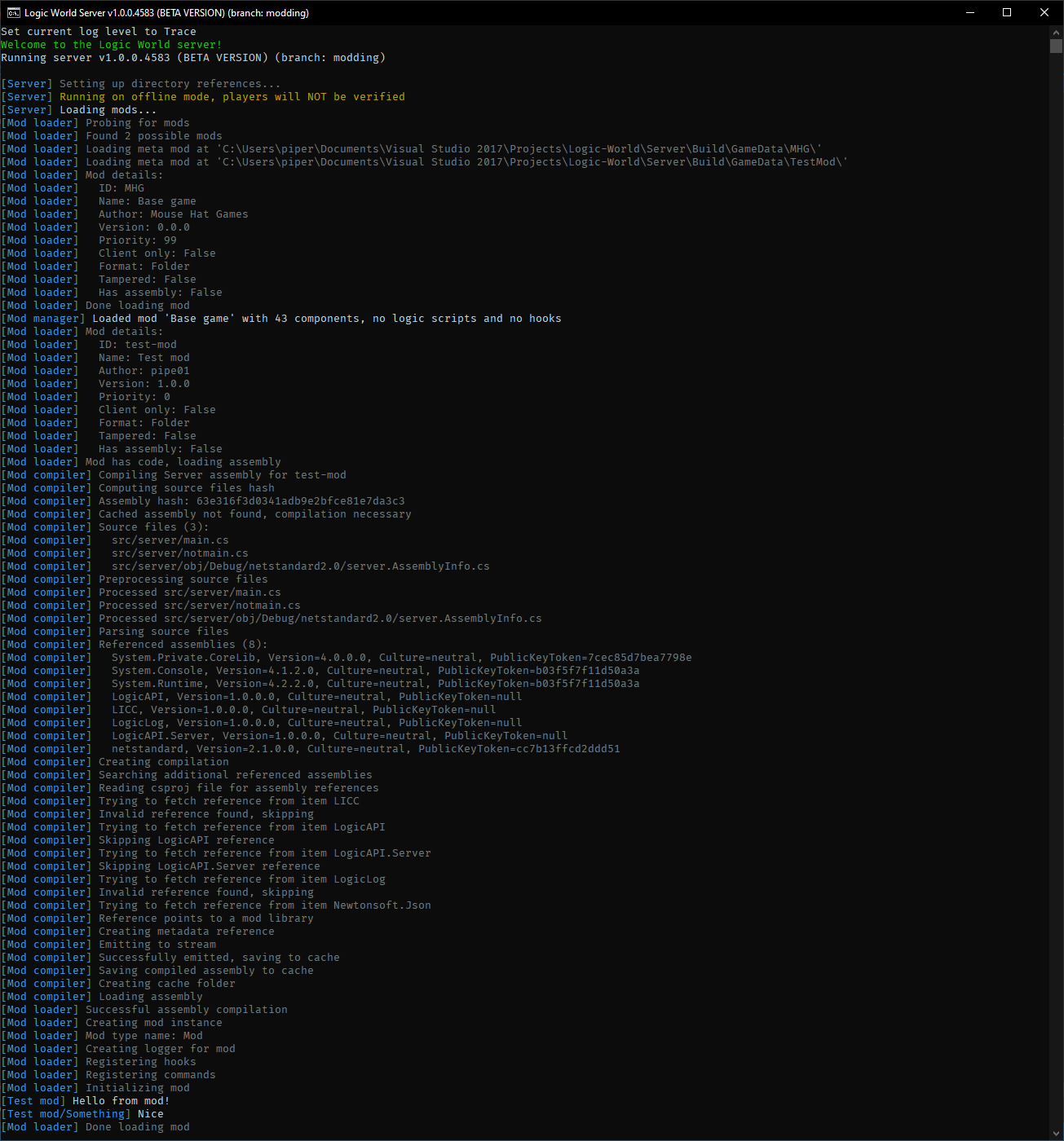
This week I’ve been working on making the game log the stuff it’s doing. Right now all the game’s output is printed directly to the in-game console (or the server console), meaning that if you, for example, wanted to print an error, you’d have to explicitly specify the message’s color every time you print it. I’ve been working on a system that abstracts this, instead it lets you say “print an error”, and it will automatically print it to the console with the appropriate color, as well as to a file on disk. Mods will get their own dedicated logger, which means that it will be easy to distinguish between mods’ log messages. This is what the logs in the server look like:
Knowing the message’s “importance” level (trace, debug, information, warning, error or fatal) also lets us write some pretty logs to a file:
I’ve added a command that lets you change the log level (which by default is the information level), so that you can see the tracing messages that are hidden by default.
Now that we have a proper logging system, it will be much easier to diagnose and fix bugs and crashes. Logs should also be a big help to modders who are trying to fix their mods.
In-game mods menu - Felipe
I’ve also been working on a menu that shows all loaded mods. It’s not complete yet, currently it shows you some details about the mod like its name, ID, version and priority:
(The artifacts you see in the details panel are just some Unity Editor shenanigans)
Logic Maker progress - Felipe
I’ve also been progressing on Logic Maker, the tool you will be able to use when working on your own mods. I’ve decided to drop the GUI option (at least for 1.0 release), since I think it won’t be necessary as the CLI app is very easy to use.
I spent a while looking for a library for parsing command line arguments, but none managed to quite convince me. The closest one was Fluent Command Line Parser, however it still doesn’t fully support subcommands (like [code single]git fetch -a, for example). This is the reason I am developing Yaclip (Yet Another Command LIne Parser), a library for parsing arguments with a completely fluent interface. It’s also able to automatically generate pretty help messages, this is Logic Maker’s help message (so far):
Currently, Logic Maker allows you to create new mod projects from templates that you will be able to provide, as well as a default template that allows you to configure what you want and don’t want to include in the mod. You’ll also be able to add new components to your existing mod, although this will probably be overkill for simple components.
Editable Display Configurations - Jimmy
Building on last week’s work on Global Display Configurations, this week I’ve added some fancy menus for editing those configurations!
[previewyoutube="7fZ8kq5JGcE;full"]
---------------------------------------------
We'll keep releasing these weekly updates right up until the game comes out. To make sure you don't miss them, you can sign up for our newsletter or join the official Discord, and of course you can wishlist and follow the game right here on Steam.
[previewyoutube="MiOyHekWejA;full"] I felt it was appropriate to make a video about this rather than just writing a blog post. This is a major bummer, but it’s what’s necessary for the game.
Amazing New Displays - Jimmy
I’ve been working on an overhaul of Displays, to make them faster and easier to use. It’s not quite done yet, but I wanted to show it off in a video anyways. [previewyoutube="eXonfiKGxoM;full"] These new displays use the Extra Data system I described last week, and indeed they are the main reason for that system existing.
Cloud metrics - Felipe
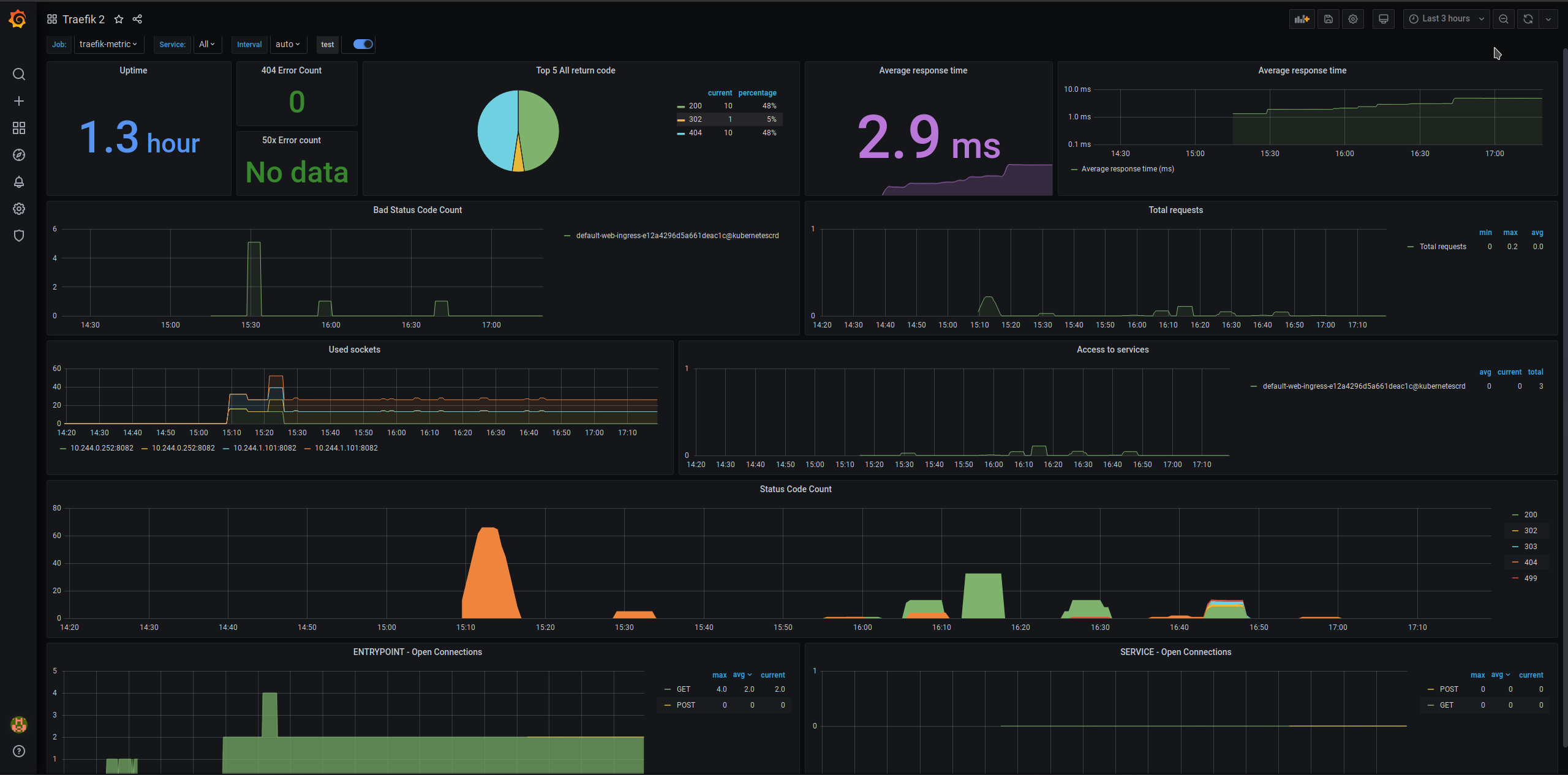
This week I’ve been working on adding some metrics to our cloud architecture. Metrics is a generic word for anything that gives us information, which in our case is a set of applications.
First we have Traefik, which is the application that you connect to when you go to logicworld.net and that routes your connection to the back-end services. Traefik can produce some metrics, which Prometheus collects. Prometheus can be considered as sort of a metrics database, which stores the data it collects from the various sources and allows you to query it. Finally, we have Grafana, which is the front-end for all of this and allows us to create cool dashboards like these: I’m also working on adding metrics tailored to the site itself, like comment count, post count, etc.
Extensible Menu Settings - Jimmy
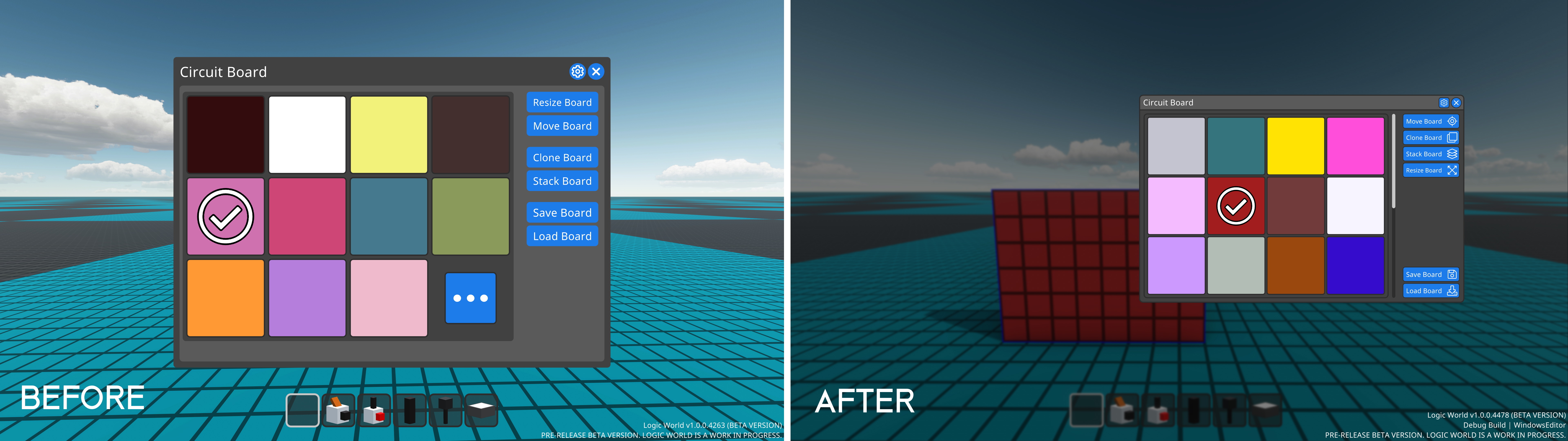
Many menus in Logic World have a popup window to edit menu settings; you can see it in this recent video. Previously, all menus only had one setting, the scale slider, and the menu settings system was tightly coupled to the menu resizing system.
This week I’ve overhauled Menu Settings so that they’re more independent and open to extension. Any menu can add custom settings now.
Currently Menu Settings still aren’t being used for anything besides the Scale sliders, but I have plans for a few custom menu settings. You’ll likely see those next week :)
---------------------------------------------
We'll keep releasing these weekly updates right up until the game comes out. To make sure you don't miss them, you can sign up for our newsletter or join the official Discord, and of course you can wishlist and follow the game right here on Steam.
Hello everyone, I'm glad to be back for another LWW music update. I hope you enjoy this OST sample and that it finds you in good health. This piece is called 'And So We Danced'. Talk to you all again soon! [previewyoutube="rCpTQbp94SE;full"]
Sandbox Menus & World Types - Jimmy
I’ve finally added a big missing feature: menus to create sandboxes and load your existing sandboxes! Each sandbox has a description box where you can write notes about it, and you can organize your sandboxes by tagging them.
Additionally, when you create a sandbox, you now have the ability to choose its world type, and to edit settings about that world type.
[previewyoutube="Ecn3CUqHmGw;full"]
New Epic Website - Felipe
As I mentioned on a previous LWW, I’ve been working on redesigning all the cloud infrastructure, including the main site. The current Logic World website is a Single-Page Application or SPA. This means that the site exists only on a single page, and the contents are updated using JavaScript. The new site, however, is being built to use JS as little as possible, and the entire site is guaranteed to work even when disabling JavaScript on your browser. If you do disable JS, you will only lose some QoL features, but the site will still be 100% usable.
You can try out the work-in-progress new site at https://logic.world/. Please let me know what you like and don’t like about it :)
LogicScript: Ludicrous Speed - Felipe
As I was adding features to LogicScript, its performance kept going down. Previously LogicScript was an interpreted language, meaning that scripts didn’t get compiled beforehand and were instead parsed and run. This has a high performance overhead, since we need C# code that’s reading the script and executing the instructions. For this reason, this week I’ve been working on making LogicScript code compile to CIL, which is the same kind of code C# runs as after being compiled. This means that when you load a script it first gets compiled in-memory, and when it gets run it is much, much faster (about 30 times so!).
Extra Data - Jimmy
This week I’ve added a very fancy and versatile system to Logic World, which I call Extra Data. Extra Data is a set of arbitrarily-typed data that is stored with each save file. Currently it is used to store world settings -- see above -- and I'm working on a few more exciting applications for it.
Extra Data is easy to use from code, but under the hood it’s enormously complex. Anybody connected to the server, as well as code running on the server itself, can update the Extra Data. When this happens, it has to be synchronized between all of the connected clients, as well as the server’s master copy saved to disk. The primary source of complexity is the fact that the data can be of any type: the system has to work for numbers, text, colors, lists of lists of six-dimensional vectors -- whatever you throw at it, Extra Data can handle it.
Extra Data is stored on disk as SUCC, so it’s all very nicely formatted and easy to edit if you’re the kind of person to muck about with save files.
Extra Data is fully accessible to mods.
This system was far more difficult to program than I anticipated. I initially budgeted six hours, but it ended up taking three very long and stressful days. This is the cause of this week’s record-settingly-late Wednesday. Sorry about that 😬
---------------------------------------------
We'll keep releasing these weekly updates right up until the game comes out. To make sure you don't miss them, you can sign up for our newsletter or join the official Discord, and of course you can wishlist and follow the game right here on Steam.
I like my menu backgrounds how I like my coffee: dark, blurry, and with four or five different settings to configure how they look.
[previewyoutube="SgKcL3T6FOE;full"]
More Menu Updates - Jimmy
I’ve completed my quest to update all of Logic World’s user interface! This week I tacked some more complicated menus compared to last week’s updates.
You can click on each of these images to view them in 4k.
When I updated the console, I fixed a longstanding and very annoying issue with resizing it. Resizing the console is now very satisfying:
[previewyoutube="AmvuJKYUh50;full"]
I am happy to announce that 100% of Logic World’s UI now meets my standards for quality and usability. In my opinion, these last few weeks have seen the UI go from passable to pretty good. I am pleased.
All of the code and assets used to make the game’s menus are part of a package called LogicUI, which we will release for free sometime after Logic World launches. We’ve spent a lot of time and effort developing these systems, and we hope they’ll help others make great UI for other games.
---------------------------------------------
Bit of a short update this week, but we’ve got some exciting things cooking for you. Stay tuned for a very awesome next Wednesday!
We'll keep releasing these weekly updates right up until the game comes out. To make sure you don't miss them, you can sign up for our newsletter or join the official Discord, and of course you can wishlist and follow the game right here on Steam.
Recently I added Sockets to Logic World. This week I’ve improved their logic for connection detection, and I’ve started experimenting with bigger socket sizes.
[previewyoutube="DhmtM7Z0sj4;full"]
As shown in the video, Sockets can now detect whether two world-space squares, both with arbitrary rotations, are overlapping. This is the hardest math I’ve had to use in a while, and I’m very happy I got it to work so well :)
Modding Documentation - Felipe
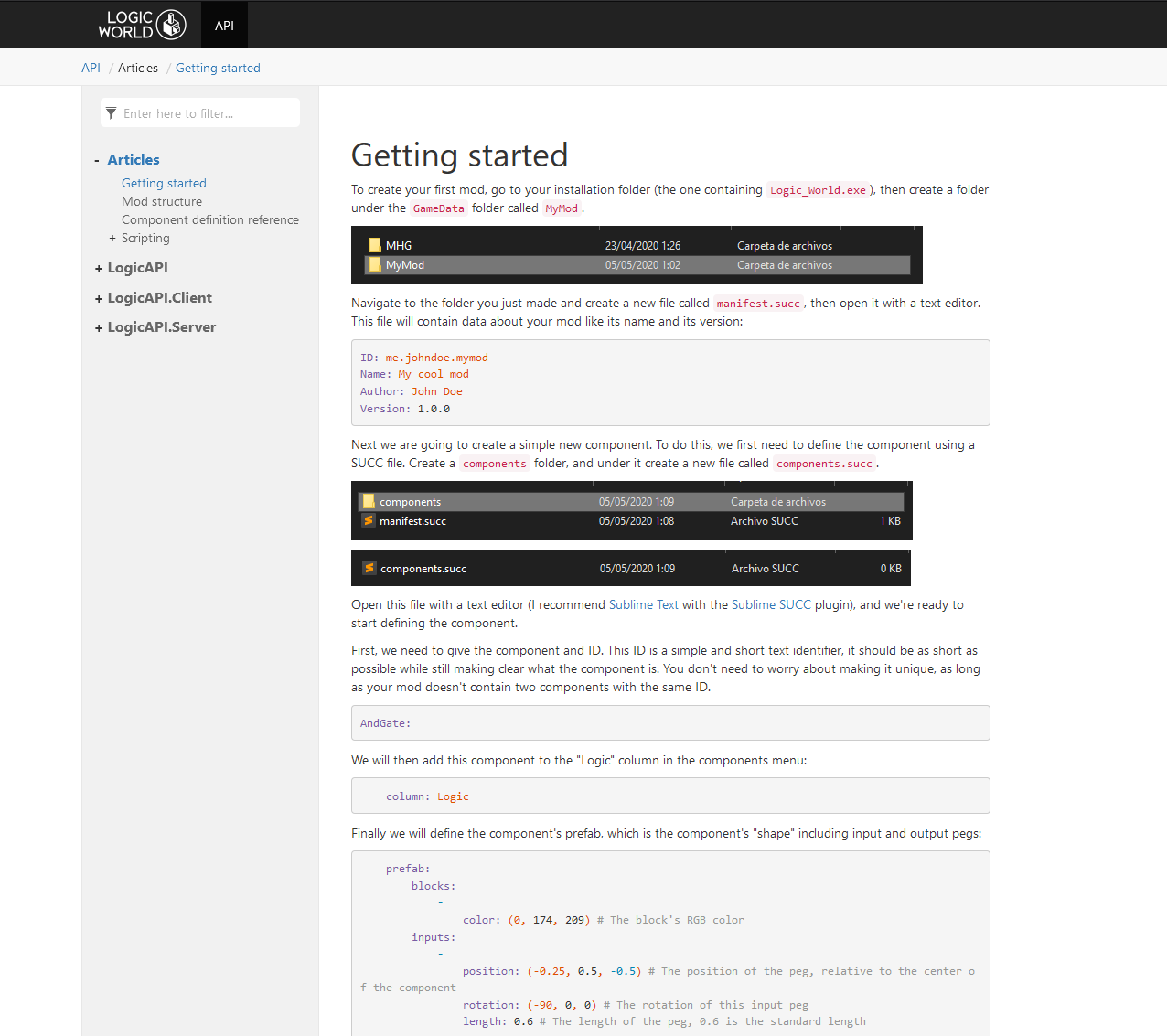
This week I’ve worked more on the modding documentation, and it’s now public at docs.logicworld.net!
The docs aren’t finished yet, but they do have a “Getting started” tutorial to give you an idea of how mods will work, as well as all the reference documentation for the LogicAPI assemblies, which mod code will use to interact with the game.
Right now the docs only briefly mention C# scripting, and in the coming days I want to write some tutorials and other reference documentation about the different systems that make up Logic World.
UI Themes - Jimmy
A little over a year ago, I showed you a system for switching the palette of colors Logic World uses in its menus. This system exists by necessity; we need an easy way to ensure all of the menu elements use the same color, and that same ability lets us switch those colors whenever we want.
This week I’ve finally added the in-game option for switching the UI theme! Now, you can customize the menus to look however you want.
[previewyoutube="s0OZCcQNzn8;full"]
Themes are stored in simple text files like this, and mods can easily add custom themes.
Menu Redesigns - Jimmy
I’ve continued my work from last week in redesigning game menus. Some of these old designs were over a year old, and I’ve learned a lot in that time about UI design and programming. It's been very satisfying to apply that knowledge and bring old work up to my new standard.
You can click on each of these images to view them in 4k.
---------------------------------------------
We'll keep releasing these weekly updates right up until the game comes out. To make sure you don't miss them, you can sign up for our newsletter or join the official Discord, and of course you can wishlist and follow the game right here on Steam.
This blog was originally posted last week, but I forgot to post it here on Steam. This week's Logic World Wednesday will be coming tomorrow, on Thursday.
Traveler’s Peak - Markku
Hello everyone. This week's piece is called 'Traveler's Peak'. It is one of my favourites so far in this soundtrack. I look forward to chatting with you all on Discord, and I hope you enjoy my piece. [previewyoutube="17YJoAuT9_c;full"]
Sexy sexy menus - Jimmy
I’ve spent most of this week working on Logic World’s UI. Since I started designing it over a year ago, I’ve learned a ton about UI programming and design, and I’m now going over all the existing UI to apply those lessons.
Logic World’s UI is now better-looking and easier to use. It’s also, in general, much smaller. One of my major mistakes early on was designing the UI in a non-fullscreen environment, which meant that once it was expanded to fullscreen, it was much too big.
One particularly delightful upgrade is the new Edit Component menus. They can now be moved and resized just like windows in your operating system. [previewyoutube="Z0Abnjcjzr4;full"]
Web Services Overhaul - Felipe
I’ve started rewriting our cloud architecture, getting rid of the main and bulky web service and migrating to a completely microservice oriented architecture using Go, Micro and Kubernetes. We’re also using DigitalOcean’s managed Kubernetes service for this, which abstracts away the concept of individual machines for the most part. This means that our services will be able to automatically scale up and down depending on our needs.
I’ve decided to do this rewrite because right now we have a single monolithic service (the one that serves the logicworld.net page), which is hard to scale since it’s got a lot of functionality. The switch to Kubernetes from Docker Swarm also means using a newer technology that’s been built from the ground up to support the microservice architecture, and while it’s a lot harder to learn at first, it’s also a lot more powerful and flexible.
Modding Updates & Documentation - Felipe
This week I’ve been working on making the game files themselves a mod. This helps us ensure that the mechanisms we use for loading mods work properly and have all the required functionality. I’ve also been improving the modding documentation, I’m in the process of documenting all the SUCC files that mods can have. This includes files to add components, settings, instruments, game translations and more.
We’ll be releasing modding documentation as soon as it’s ready, but I’m not yet sure when that will be.
Beam Me In A Given Arbitrary Direction, Bobby - Jimmy
Last week I added teleports to Logic World. Once our beta testers got to try the feature, they told me they wanted a more fluid and simple way to teleport, one which doesn’t require someone to manually type in coordinates.
This week I’ve added just such a teleport, which takes you to whichever point you’re looking at.
[previewyoutube="vVkXW42TK0g;full"]
---------------------------------------------
We'll keep releasing these weekly updates right up until the game comes out. To make sure you don't miss them, you can sign up for our newsletter or join the official Discord, and of course you can wishlist and follow the game right here on Steam.
This week we have made the unfortunate decision to postpone the release of Logic World… again. The new, and with any luck final, launch day is June 12. Read more in the official announcement.
Player Positions - Jimmy
This week I finally added a big missing feature to Logic World: when you exit a world and then enter it again, you will now be in the same location you were when you left. This also extends to other player position values like the direction you’re looking in, whether you’re crouching, and whether you’re flying. Each player now has their own file within a world folder where their data is saved. This opens the door to persisting more player values, such as which items you have on your hotbar.
I also added save-dependent world spawn points, which is the location a player will be in the first time they join a world.
Finally, I added commands for teleporting players to different positions. I couldn’t resist the opportunity to do something fun with that...
[previewyoutube="zRsy3D2ne3E;full"]
I’ve open sourced one of the tools I used to make the teleport effect.
Build pipeline - Felipe
This week I’ve been working on finally finishing the build pipeline, it can now successfully build the Unity game and publish it to Steam!
Fun Spinny Triangle - Jimmy
By popular request last week, I added a setting to choose the open state of the Quick Color Chooser. This new setting was all by itself in the “Color Choosing” settings heading, and I decided it needed a friend.
Enter Fun Spinny Triangle, the best setting ever added to Logic World.
[previewyoutube="UNcJzYnmPvI;full"]
---------------------------------------------
We'll keep releasing these weekly updates right up until the game comes out. To make sure you don't miss them, you can sign up for our newsletter or join the official Discord, and of course you can wishlist and follow the game right here on Steam.