Ticket #1460 Auto button not refreshing in build queue is empty fix
Ticket #1481 Building scrapping behavior fix
Ticket #1474 Tutorial - Camera movement behavior when fleet module opens after system view fix
Ticket #1483 Housing buildings doubling on build slots fix
Ticket #1176 Event ticker fix for detected ships
Ticket #1477 Low fighter FPS in tactical fix
Ticket #1476 Tactical unit selection optimization
Ticket #1486 Build queue UI anchoring fix
Ticket #1485 Pleasure dome not buildable fix
Notes: Saved games from prior versions will not work.
Lord of Rigel - Roundup #21
Greetings Lords of Rigel,
This week has been more under the hood bug fixes and quality of life changes and optimizations but some of the major ones are:
This Patch:
• Empire, Fleets, Diplomacy, Planets, and Ship Designer menu optimizations and visual enhancements on the sort menus. Menus and filters should be faster for slower systems. There is also smart filtering added on categories. (ex. Filtering out asteroids when sorting by gravity or minerals in Planets menu) • Tutorial menu anchor and render order fixes and adjustments to match with new menu features in New Game, Ship Designer, and Build Queue. • Autoturn stop trigger adjustments- Turns off when hostile fleets are approaching your systems instead of detecting fleets in general
Still coming down the pipeline for EA1 are:
• Auto ship design generator: With the optimizations done on ship designer we’ll be adding in an “auto” button to have the AI generate a design of your selected size class. • Loading and saving build queues: You’ll be able to select various buildings and items to set up a build queue order. Unavailable items will be filtered out. These queues will be tied to your user settings and should be able to be shared between games. Along with the existing auto construction tool this should provide a lot of control for automation for players
As for another deep dive this week:
Selach Ships!
The aquatic traders, the Selach, have been a fan favorite. Selach ships are meant to be sleek and aquatic, with flowing forms similar to marine mammals and fish. Their ships are large due to the size of the Selach but have smaller crews. The ships are also massive as they have open spaces containing seawater and have large engines to counter the mass. Selach starbases have radial symmetry and a central “fishbowl” with docking ports and utility arms that have the weaponry. The large docking areas also fit with their role as traders. The reactor cores are also typically at the base. Texture wise Selach ships have a slight water caustics styling, and this is also seen on their ground units like the hovertanks.
Selach ships also have a separate animated material for the fluid inside. There is a slight emissive glow and fluid flow animation. Finally, the smooth lines on their ships are visible in the normal maps and parallax occlusion maps that help details pop out more on their ships.
Image 1. Selach Cruiser
Image 2. Selach Starbase
Image 3. Selach Heavy Assault Vehicle (Hovertank)
Image 4. Selach Window Material
Image 5. Selach Frigate Normal and Parallax Occlusion Maps
Let us know what further changes you would like to see or if you have encountered any technical issues. Please post on the forums, reach out to us via Discord or send an email: contact@rhombus-studios.net Saved games and clear steps to reproduce the bug are critical. It helps us more quickly track down the bug and get it fixed. Additional information on bug reporting tips can be found here: https://steamcommunity.com/app/437440/discussions/.
As always, we appreciate the feedback, conversations, and support from all of you!
Early Access 1 Patch 2023.7
Ticket #1455 Tutorial popup UI dismissal fix
Ticket #1457 Empire, Fleet, Planet, Diplomacy menu optimizations
Ticket #1446 Random event label consistency pass
Ticket #1455 GNN Event turn count fix
Ticket #1451 QOL – Menu sort arrows highlight synced with selection
Ticket #1005 AI Research Treaty ask fix
Ticket #980 AI outpost in my home system fix
Ticket #1311 Turn sync for diplomacy and espionage fix
Ticket #1461 Homeworld materials used in tactical
Ticket #1302 QOL – Reduced omniscient species and auto turn stop events on fleet movement
Ticket #1463 Buy button and cancel functionality rule change
Ticket #1465 Troop transports show as outpost ships in victory screen fix
Lord of Rigel Spring Sale
🚀🌌 Blast off into spring with the Lord of Rigel Spring Sale!🌷
Explore the depths of space and shape the galaxy. 👽
With so many updates made and more on the way, don't miss out on this limited-time offer and buy today!
And while you are at it, make sure to join our Discord community⬇️
Lord of Rigel - Roundup #20
Greetings Lords of Rigel,
Another week and more bug fixes and quality of life enhancements:
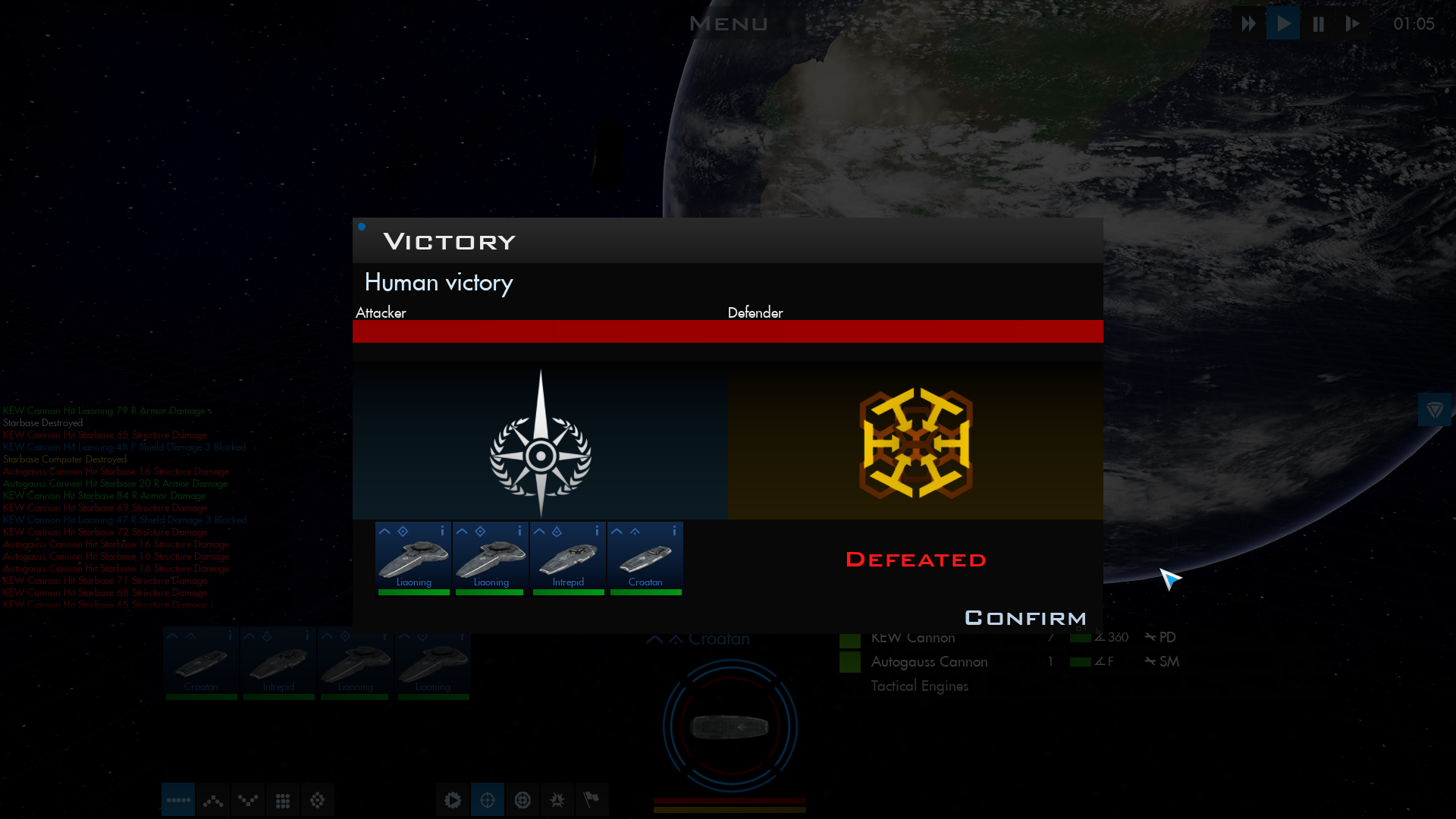
This Patch: • Autocombat report: We’ve added a post-combat breakdown for autoresolve and tactical showing the outcome balance of power bar and status of individual ships. • Simple mouse input: As some users have reported not having middle mouse buttons or mouse wheels another quality of life feature will be an alternative control scheme that can be toggled. Players can currently change these bindings in settings but this will provide another accessibility option.
We’ve also finished the build queue refactor, which has optimized construction displays and rounding displays for various items in the build queue.
In terms of quality of life features coming next: • Auto ship design generator: With the optimizations done on ship designer we’ll be adding in an “auto” button to have the AI generate a design of your selected size class. • Loading and saving build queues: You’ll be able to select various buildings and items to set up a build queue order. Unavailable items will be filtered out. These queues will be tied to your user settings and should be able to be shared between games. Along with the existing auto construction tool this should provide a lot of control for automation for players
As for another deep dive this week: Planet scenes.
We’ll likely do a few on some specific ones that had their own challenges or some interesting pieces. But for this week the often-overlooked swamp planet.
Having planetary scenes was a decision we made very early on in development, as it adds a personal touch to each of your worlds. Over development we had some different versions including 2D backgrounds with 2D images, and a version with 3d buildings over 2D images. When we began the work for the current version of LoR in late 2019, we transitioned to full 3D planet scenes for colony view and ground combat. Each planet needed to keep to a color palette that would match what is seen in orbital view.
Each planet has a 2km x 2km terrain to allow for a horizon. More habitable planets use foliage and instanced meshes to allow for vegetation. These were kept lower detail than you’d see in say a first person shooter since they’re for adding scale in the background for planet buildings. The skyboxes also use a mix of textures and volumetric particles to create fog and clouds. So why pick a swamp as an example? It shows off foliage and the moving mist is also tied to the particle system effects using noise. These effects combined with the ambient sounds on the planet surfaces should all help add little bits of immersion to LoR.
Image 1. Post Combat Summary Display
Image 2. Simplified Mouse Support Option
Image 3. Swamp Planet Matte Image
Image 4. Overview of a swamp planet scene
Image 5. Ground level view of a swamp showing foliage meshes
Image 6. Swamp planet in game
Let us know what further changes you would like to see or if you have encountered any technical issues. Please post on the forums, reach out to us via Discord or send an email: contact@rhombus-studios.net Saved games and clear steps to reproduce the bug are critical. It helps us more quickly track down the bug and get it fixed. Additional information on bug reporting tips can be found here: https://steamcommunity.com/app/437440/discussions/.
As always, we appreciate the feedback, conversations, and support from all of you!
Early Access 1 Patch 2023.6
Ticket #1438 QOL – Fleet control vertically scales with content
Ticket #1435 Invalid weapon in Skirmish mode Ship Designer fix
Ticket #1442 Fleet tooltip after scrapping a ship fix
Ticket #1441 Nanophage bomb categorization fix
Ticket #1443 Colony ship not colonizing Artificial planet fix
Ticket #1368 Dyson sphere and ringworld first construction GNN fixes
Ticket #1439 QOL – Anomaly icon added to empire colonies with temporal events
Ticket #1434 Von Neumann Probe GNN Events fix
Ticket #750 QOL = Tactical combat battle outcome screen implemented
Ticket #1445 Colonize cutscene causes black screen and hard lock
Ticket #1363 Sending colony ship from within Planets menu causes resorting fix
Ticket #1444 QOL - Shift click allows for multiple buildings entries in Build Queue menu
Ticket #1406 Empire, Fleet, and Planets menu resorting on click fix
Ticket #1020 Empire, Fleets, and Planets menu remember sort settings
Ticket #1260 Production number display fix for build queue
Ticket #1293 Starvation alert for colonies importing food fix
Ticket #1440 End of Temporal Anomaly not triggering GNN event fix
Ticket #1452 Firing Arc display update in Weapon Designer fix
Ticket #1450 Spy assignment fix
Ticket #1449 AI Expansion fleet “yoyo” after broken alliance fix
Ticket #985 Diplomacy and combat order of operations fix
Ticket #1447 Any planetary shields stop Advanced Terraforming fix
Ticket #1108 Adjusted Hotkeys to support default configurations without middle mouse wheel or button
Ticket #1454 Hotkey tooltip updated
Patch Notes: This patch adjusts settings and keybindings to support simplified mouse options. This may cause issues on some systems with previously saved keybindings.
If you encounter issues with Settings or Keybinding, please try the following steps: Go to the Settings Menu press reset and close the menu. If this does not work, close the game reopen it and follow the same step in the main menu. If that does not resolve the issue, close the game and delete the PersistentSettings and InputMappings save files found in:
We’re plugging away at reported issues and making headway on our Early Access 1 milestones.
In terms of quality of life features coming down the pipeline:
• Auto ship design generator: With the optimizations done on ship designer we’ll be adding in an “auto” button to have the AI generate a design of your selected size class. • Loading and saving build queues: You’ll be able to select various buildings and items to set up a build queue order. Unavailable items will be filtered out. These queues will be tied to your user settings and should be able to be shared between games. Along with the existing auto construction tool this should provide a lot of control for automation for players • Autocombat report: In addition to the existing event ticker we’ll be adding a post-combat breakdown for autoresolve and tactical showing the outcome balance of power bar and status of individual ships. • Simple mouse input: As some users have reported not having middle mouse buttons or mouse wheels another quality of life feature will be an alternative control scheme that can be toggled. Players can currently change these bindings in settings but this will provide another accessibility option.
There’s also been a number of under-the-hood adjustment to economy and a pass on data fed to the AI. That being said, our emphasis on looking at AI behaviors will be during the next stage of EA to fine tune issues of it either being too aggressive or being too passive depending on the game.
This week we also wanted to give a deep dive on one part of the game: how planet effects are generated.
In Lord of Rigel galaxies can have up to 10,240 individual planets or objects in the largest galaxy sizes. They also need to be distinguishable by climate type but look somewhat unique. To do this we relied on developing master materials for stars and planets that could be adjusted by each type and by lighting.
Stars have colors based on their temperature and other details such as the amount of sunspots is determined by stellar type. Smaller, cooler stars as in real life have more sunspots and more activity. Stars also adjust the lighting in system view so yellow stars have a more natural white light while blue stars or red dwarves tint their systems a particular color.
Planets have set color palettes and detail textures based on their climate type. Some details such as continent layouts are procedural and set during galaxy generation. Other features such as icecaps are determined by if a planet climate has water and distance from the parent star. Planets further out will have larger ice caps, while ones close to the star will have small polar caps or none at all. Other planet types like Toxic worlds and Gas Giants also have lightning storms on their night sides. Planetary rings also have a few base materials, but are also adjusted procedurally so each looks unique. Additionally, planets have city lights with patterns set by where continents are located and height and the amount of cities is scaled by the population amount on your planet. Planets also have cloud shadows that help add more depth. Many of these effects are a bit more subtle than other games to try to aim for a more naturalistic look.
We believe our mix of procedural details, lighting, and planet type detail textures creates a believable and diverse universe.
Image 1. Binary system with sunspots
Image 2. Ocean planet with icecaps
Image 3. Example of Planet Material
Let us know what further changes you would like to see or if you have encountered any technical issues. Please post on the forums, reach out to us via Discord or send an email: contact@rhombus-studios.net Saved games and clear steps to reproduce the bug are critical. It helps us more quickly track down the bug and get it fixed. Additional information on bug reporting tips can be found here: https://steamcommunity.com/app/437440/discussions/.
As always, we appreciate the feedback, conversations, and support from all of you!
Early Access 1 Patch 2023.5
Early Access 1 Patch 2023.5
Ticket #1287 QOL - Galaxy camera position saved/restored when entering and existing system view
Ticket #1430 Applying settings in galaxy menu creates blank ticker event fix
Ticket #1429 QOL – Gamma correction and sharpness controls added to settings menu
Ticket #1425 Building destroyed miscount after auto combat fix
Ticket #1215 Diplomacy menu hot key fix
Ticket #1419 Event ticker star date fix
Ticket #1416 Multiple protomatter devices built during same turn fix
Ticket #1422 Softlock with multiple event cutscenes during the same turn fix
Ticket #1421 & 949 Expansion ship sent from Planet Menu disappear after cancel fix
Ticket #1417 Ringworld research data missing fix
Ticket #1415 Empty player fleet on tactical exit after loss fix
Ticket #1433 Comet not disappearing after destruction fix
Ticket #1423 Multiple artificial planets in a system fix
Ticket #1427 Modified auto ship designs not saving fix
Ticket #1426 Opening modified ship designs in Ship Designer results in fighter design being loaded fix
Ticket #1432 GNN Events and Event ticker name fixes
Ticket #1428 QOL – Weapon Designer remembers firing arc for normal and heavy mounts
Ticket #1436 Random events diplomacy check fix
Additional Fixes:
Additional Tooltip fixes and text centralization/cleanup
Possible issues:
Build queue menu current production/selection area does will not display correct production/cost/maintenance data in new UI area. Players can use existing data location in current building image.
Lord of Rigel - Roundup #18
Hello Lords of Rigel,
We’ve continued work on refactoring the ship designer and economy systems, adding performance optimizations as we move through Early Access.
The 26th of February is a bit of a special day, as the 4x game we’ve aimed to make a spiritual successor of came out in 1998. Its sequels came out in 2003 and 2016 on that day as well. One big area we wanted to change in Lord of Rigel compared to those later games was having an engaging tactical combat system. Early Access gives us an opportunity to engage with the community on what they want to see and not see in areas like tactical combat and the user interface.
We’ll be working more in tactical during EA2, but what are the main things you want to see in tactical combat out of a 4x game?
Switching over to another area we want to hear more back from you on, more UI improvements, we will be adding a post combat UI screen in this phase of EA that will provide a better summary of tactical combat. Being able to save and load build queues is another request we’re working on. We’re also working on some additional quality of life tweaks with hotkeys and behavior adjustments to make sure they consistently work for all users.
But what do you want to see most in UI improvements? We’ve added in the ship info indicator, auto build, tactical combat log, diplomacy personality breakdowns, and tactical autofire toggle based on your feedback. Additionally, another request auto ship designs will be coming with our last pass on ship designer. With other UI improvements are there color scheme adjustments or options you would like to see? What other changes do you want to see and how?
Please post on the forums, reach out to us via Discord or send an email: contact@rhombus-studios.net Saved games and clear steps to reproduce the bug are critical. It helps us more quickly track down the bug and get it fixed. Additional information on bug reporting tips can be found here: https://steamcommunity.com/app/437440/discussions/.
As always, we appreciate the feedback, conversations, and support from all of you!
Lord of Rigel - Roundup #17
Hello Lords of Rigel,
A new week and a new patch. We are getting lower on reported bugs which is letting us focus on continued refactoring, feature implementation, and planning that we have around Early Access 1. This patch brings numerous fixes and a final wave of revisions to Ship Designer. Additionally, a lot of back-end work has been done to streamline fleet movement and research code, improve tooltips, and other general bug fixes.
That being said, code refactoring can introduce unexpected results, and as such we look forward to feedback from players about bugs, quirks, and overall gameplay. This coming week will bring changes to automated ship design creation, which completes the refactor of this significant system. With that completed, we will have updated the system to include several pieces of player feedback including relative weapon range data, ability to access multiple designs in the designer, and the addition of automated ship design generation from within the designer (should be coming in the next week or so).
We also wanted to use this developer update to address a few negative reviews we have received recently on the Steam page. We recognize that A) Lord of Rigel isn’t for everyone even in a future finished state, and B) the game in its current form has numerous bugs that we are addressing. This leads to players being frustrated and angry. We encourage players to provide us with actionable feedback – things they don’t like such as features that don’t work, bugs that need to be fixed, UI elements that aren’t intuitive, etc. This feedback can come in many forms including a list, a rant, or a single suggestion and can be submitted to us via Steam, Discord, or email. Our skins are pretty thick, so we are OK with getting critical feedback. Actionable feedback gives us an opportunity to make changes. As a development team we strive to listen, discuss, and work with the community to build a better product. Since October we have closed 450 tickets including bug fixes and numerous quality of life improvements suggested by players. Feedback and conversation about gameplay is what will lead to a better experience for everyone.
Please post on the forums, reach out to us via Discord or send an email to contact@rhombus-studios.net. With these reports a saved game or clear steps to reproduce the bug are critical. It helps us more quickly track down the bug and get it fixed. Additional information on bug reporting tips can be found here: https://steamcommunity.com/app/437440/discussions/.
As always, we appreciate the feedback, conversations, and support from all of you. Until next time!