Devlog # 49 - Creating Connection Overlays for Puzzle Guidance
Hey everyone! We’re back with another devlog update.. In our puzzle game, each level features three distinct blocks, each with its own unique environment, obstacles, and pathways. Each block has doorways on both the left and right sides that are meant to connect to doorways on other blocks. During playtesting, we noticed that players were having trouble figuring out which doorways connect between blocks in our puzzle game, leading to some head-scratching moments. So, we set out to create a simple, effective way to help players navigate these connections without feeling lost. Here’s how we tackled it!
Step 1: Designing the Overlay in Photoshop
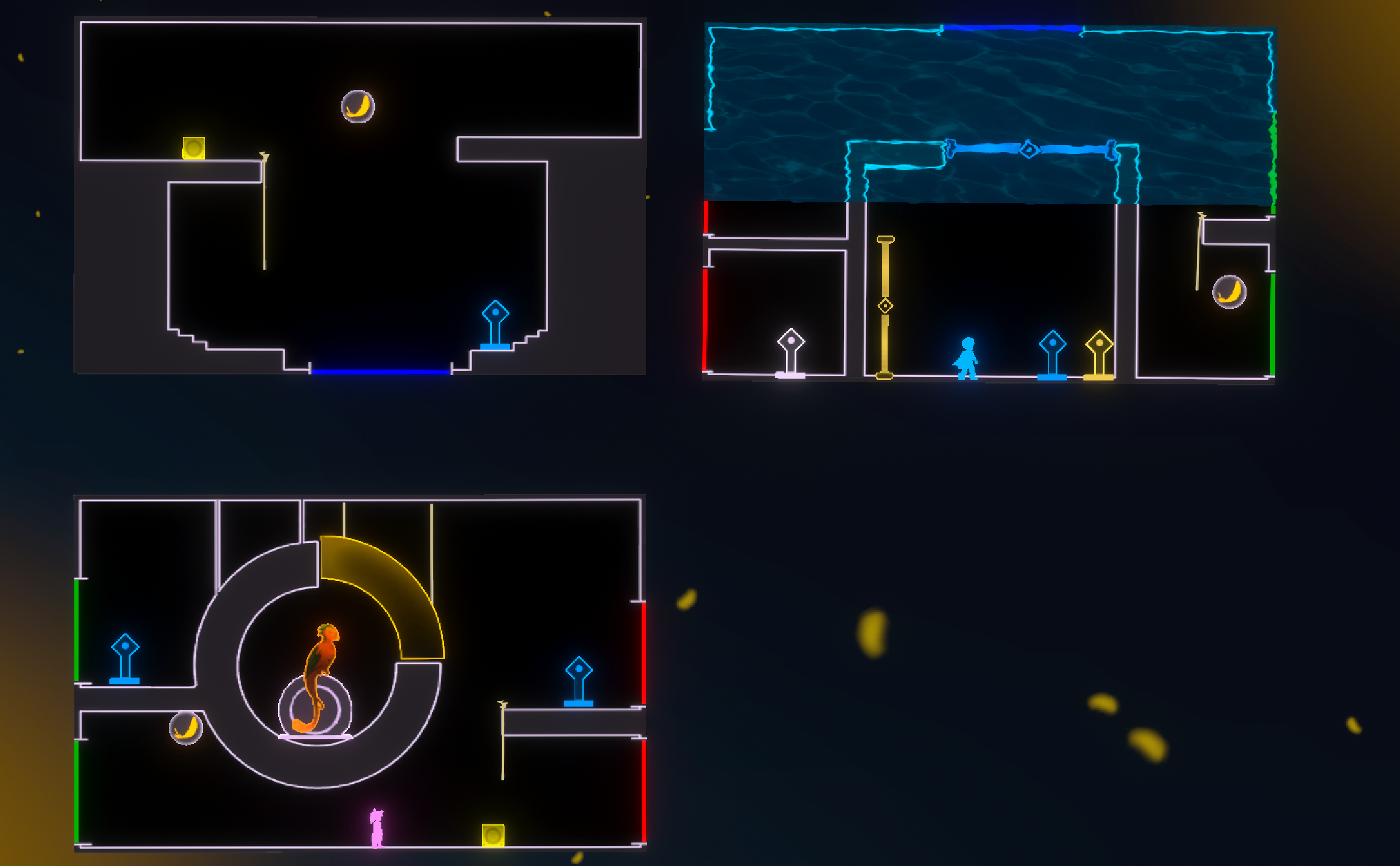
The first step was creating a visual map for each block. Using Photoshop, we traced the layout of each block, focusing on key elements:
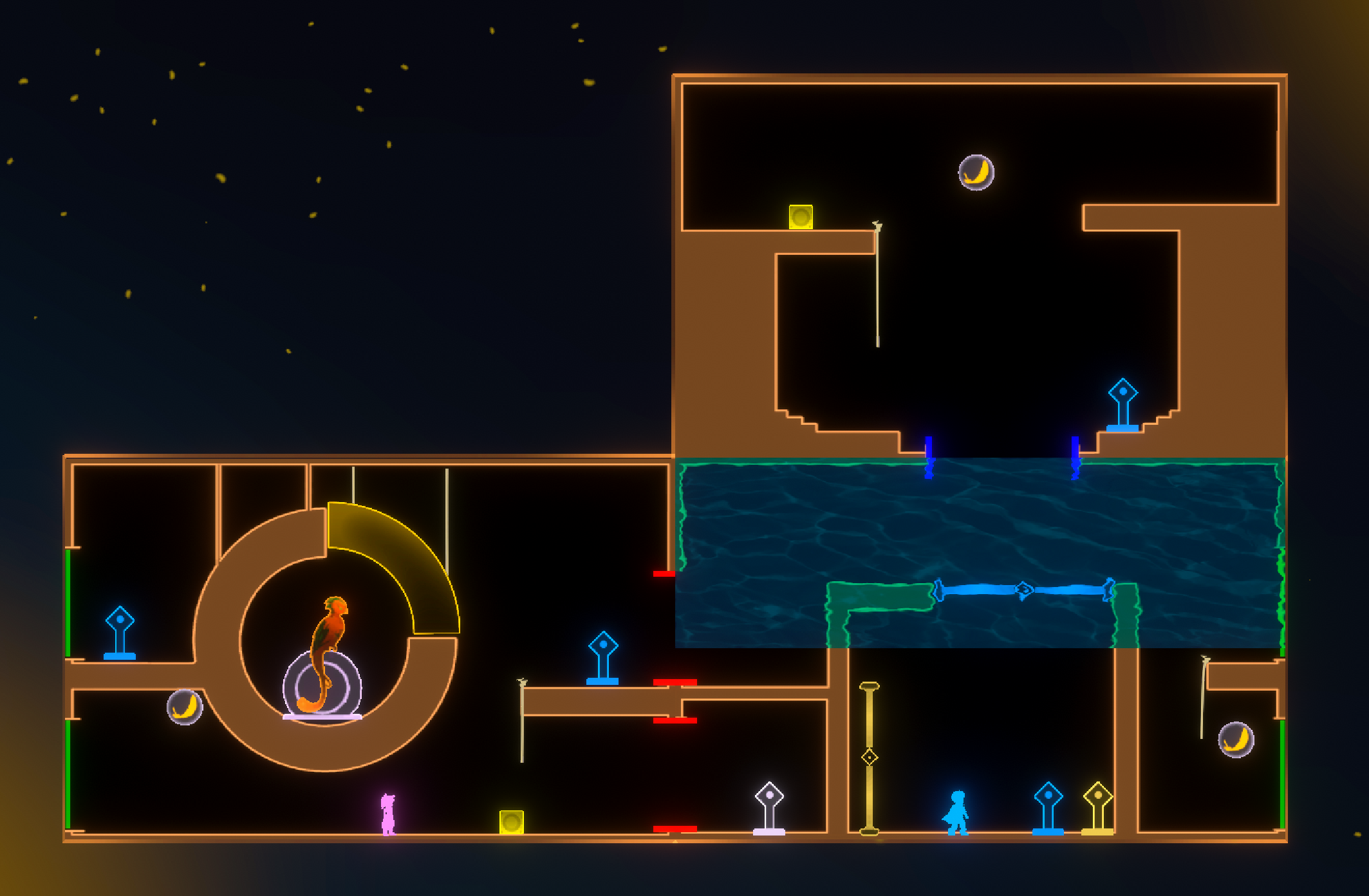
Floors, Obstacles, and Platforms: These were outlined to show where characters can move and where they cannot, helping players visualize possible paths. Doorway Connections: a color-coded system to indicate potential connections Red: Doorways that cannot connect to the current block. Green: Doorways that can connect to the side doorways of the block in focus. Blue: Doorways that can connect to the bottom doorways of the block in focus.
This tracing process created a simplified, visual guide for each block, making it easier for players to understand the connection possibilities at a glance.
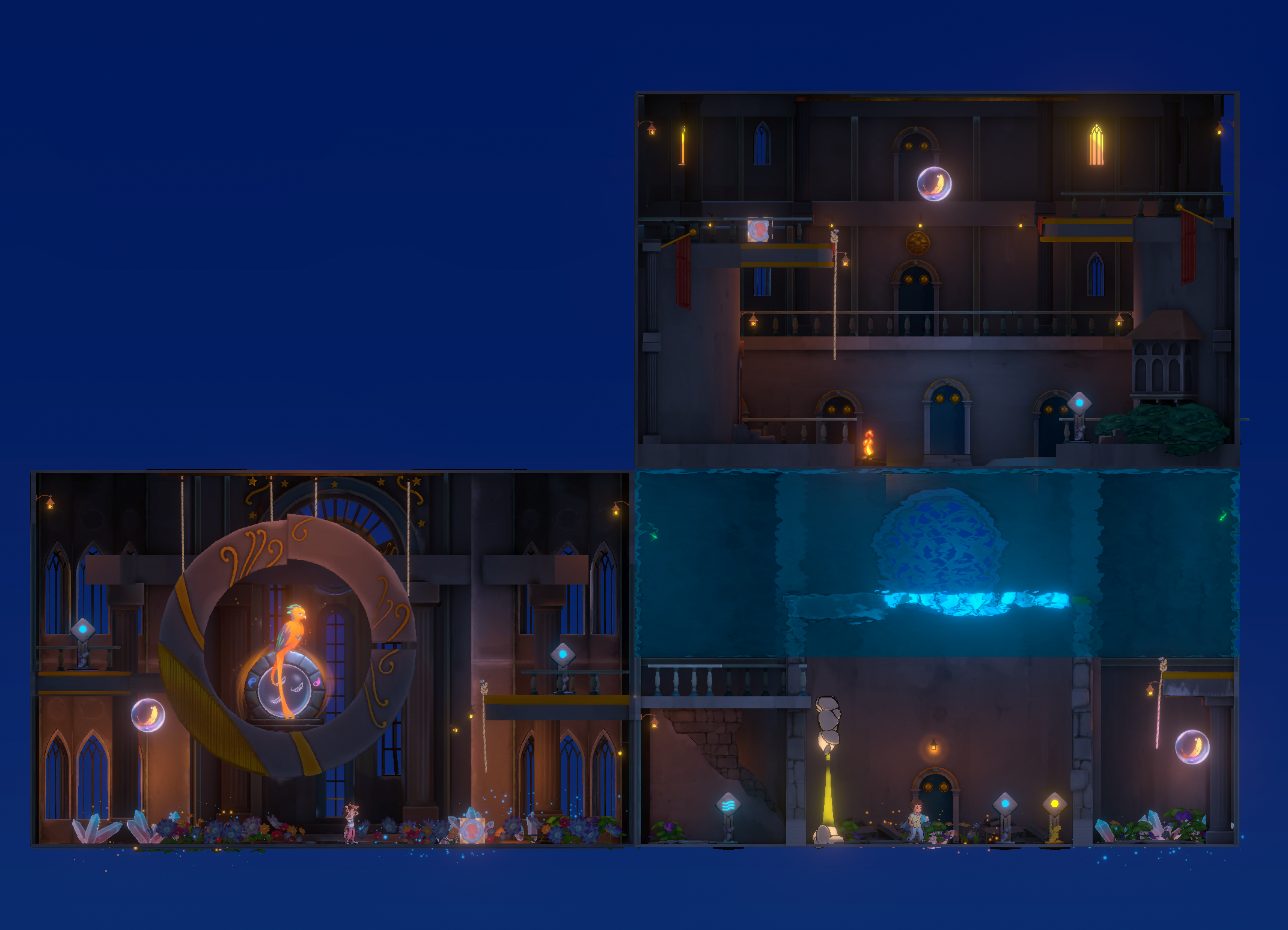
WITHOUT OVERLAYS
WITH OVERLAYS
Step 2: Enhancing the Overlay in Unity
After completing the tracings,we imported the Photoshop files into Unity and worked on integrating them into the game. To make the overlays more effective, we developed a custom shader that adds a subtle glow effect. This glow highlights the overlays without being too intrusive, making them stand out even when players zoom out to view the entire level. The shader’s effect directs players’ attention to key areas without overwhelming the visual experience, providing a clean, intuitive map.
Outcome: The introduction of the Connection Overlay system has significantly improved the player experience. The overlays offer clear visual guidance on how blocks can connect, reducing confusion and helping players solve puzzles faster. This feature has now become a core component of our game’s user experience, offering an engaging way to assist players without breaking immersion.
By simplifying the connection process, we’ve been able to enhance the overall gameplay flow, making the puzzle-solving experience more enjoyable and less frustrating. We look forward to sharing more updates as we continue refining the game!
Hi guys! This week, we focused on enhancing the water flow mechanics with a dynamic cutscene that highlights the water filling and emptying containers. To achieve a more engaging visual experience, we needed a smooth camera system that follows the movement of the water seamlessly, giving players a clear and immersive view of the process. Here’s a deep dive into how we tackled this challenge.
To showcase the water flow mechanics effectively, we needed smooth camera movement that follows the water filling and emptying process. This way, players can fully observe the changes as they happen in real time. We added a top boundary to the water prefab, which tracks the water’s height dynamically as it moves. This boundary’s position is stored in a `targetPositionEndOffset` variable.
The top bound stops moving when it aligns with the water surface. However, when the water fills another container below, the camera needs to follow the action seamlessly. To make this happen, we introduced an additional Y-axis offset, allowing the camera’s target position to update frame by frame. The duration of this movement is calculated based on the Y-axis distance of the water from top to bottom.
To enhance the visual experience, we applied Robert Penner’s Quart-Ease-In-Out easing function. This easing starts slowly, accelerates in the middle, and decelerates at the end, creating a natural and fluid camera movement.
As a result, the camera smoothly tracks the water’s flow, providing players with a seamless viewing experience.
Check out the code snippet implementing this logic below:
This new camera system not only adds polish to the cutscene but also helps players appreciate the fluid dynamics at play, making the entire experience more satisfying. We’re excited to see how this feature elevates the gameplay, and we can’t wait to hear your feedback. Stay tuned for more updates as we continue to refine the mechanics and visuals of our game!
In our latest development update, we’re diving into the process behind our level-building approach and the tools we’ve crafted to streamline it. From a library of modular assets to precise layout techniques, our goal is to ensure each environment is visually cohesive and optimized for performance.
We’ve developed a modular asset library specifically for streamlined level building, with unique sets of assets tailored to each zone. Leveraging this asset library,we construct each area on a 1x1m grid—marked by green boxes—to maintain consistency and precise alignment. Using a kitbashing approach, we combined different assets to craft the desired layout, refining architectural details along the way. Once the layout is set,we added foundational lighting. We’re using baked lighting for optimal quality, with each block assigned a dedicated 1k lightmap to preserve detail and ensure high visual fidelity.
Thanks for tuning into this devlog! Our level-building journey is all about refining each space to create an immersive and visually stunning experience. Stay connected for more updates as we continue crafting each unique zone. Feel free to share your thoughts and questions—we’d love to hear from you!
Hi guys! We’re thrilled to announce a major update to our game! Originally designed as a single-player experience, we’re now expanding into co-op gameplay. With two unique characters already at the core of our levels—each with their own abilities and challenges—it felt like a natural progression to explore the possibilities of cooperative play.
Why Co-op? As we played through the game ourselves, the synergy between the two characters sparked an idea: what if players could work together, each controlling a character, to solve puzzles and tackle obstacles as a team? We wanted to create a fresh, collaborative experience that amplifies the sense of accomplishment and opens up opportunities for players to bond through teamwork. This shift brings a new dimension to the game, making it more dynamic and memorable as you share these moments with a friend. The Challenges Of course, introducing co-op mode hasn’t been without its hurdles! One of the biggest challenges was rethinking our level design to ensure cooperation is essential. We wanted to make sure that each character contributes meaningfully and that players must strategize together to overcome obstacles. We’ve also introduced new mechanics to foster communication and coordination, ensuring that teamwork is at the heart of this new mode.
What’s Next? We’re currently in the testing phase, gathering feedback to fine-tune the co-op experience. Our primary goal is to make sure that co-op mode feels seamless, intuitive, and above all—fun! We’re dedicated to preserving the core essence of the game while giving players an exciting new way to play.
Stay tuned for more updates as we continue to develop this feature! We can’t wait for you and a friend to dive in and see how co-op mode transforms the game. Thanks for your continued support—it’s what keeps us going!
Welcome to this week’s devlog! We’ve been hard at work refining key aspects of the game, particularly as we gear up for the launch. Our goal is to create a fun, immersive experience for both single-player and co-op players, and today we want to share an important update about a recent puzzle redesign that will do just that.
After an in-depth review of the game, we identified areas for improvement to ensure a more engaging and balanced experience. Our goal has always been to deliver top-quality gameplay, so we decided to redesign a key level to make it more interactive and enjoyable.
The Challenge: Ben’s limited involvement
One of the key issues we encountered was Ben's limited involvement in solving puzzles throughout the level, leaving most tasks to Abi. While this worked in single-player mode, it created an imbalance in co-op mode, where both players needed to rely on each character equally to progress.
Our Solution: Collaborative Puzzle Redesign
To address this, we completely reworked the puzzle mechanics. The portal, which was previously static on the ground, is now positioned on a moving platform. This platform’s movement is controlled by two pressure buttons that require both characters to work together. The only way to lower the platform and access the portal is through coordinated efforts between Ben and Abi.
After several brainstorming sessions and strategic adjustments, we successfully freed Ben from his stationary role, allowing players to utilize both characters in tandem to solve puzzles. This redesign not only creates a more engaging experience but also enhances the teamwork dynamic that co-op mode thrives on.
We’re excited about these changes and can’t wait for players to experience the new dynamic between Ben and Abi. Your feedback has been invaluable in helping us create a more balanced and engaging game, so keep sharing your thoughts. Stay tuned for more updates in the coming weeks as we continue to make improvements!
Dev log 44 - Creating the Skybox and Clouds for the Trailer Scene
Welcome to our latest devlog! Today, we’re excited to dive into the creative and technical process behind crafting the cloudscapes that set the atmospheric tone in our trailer. From initial design to final integration, we leveraged a combination of art and code to create a dynamic sky environment that enhances the visual storytelling of our game.
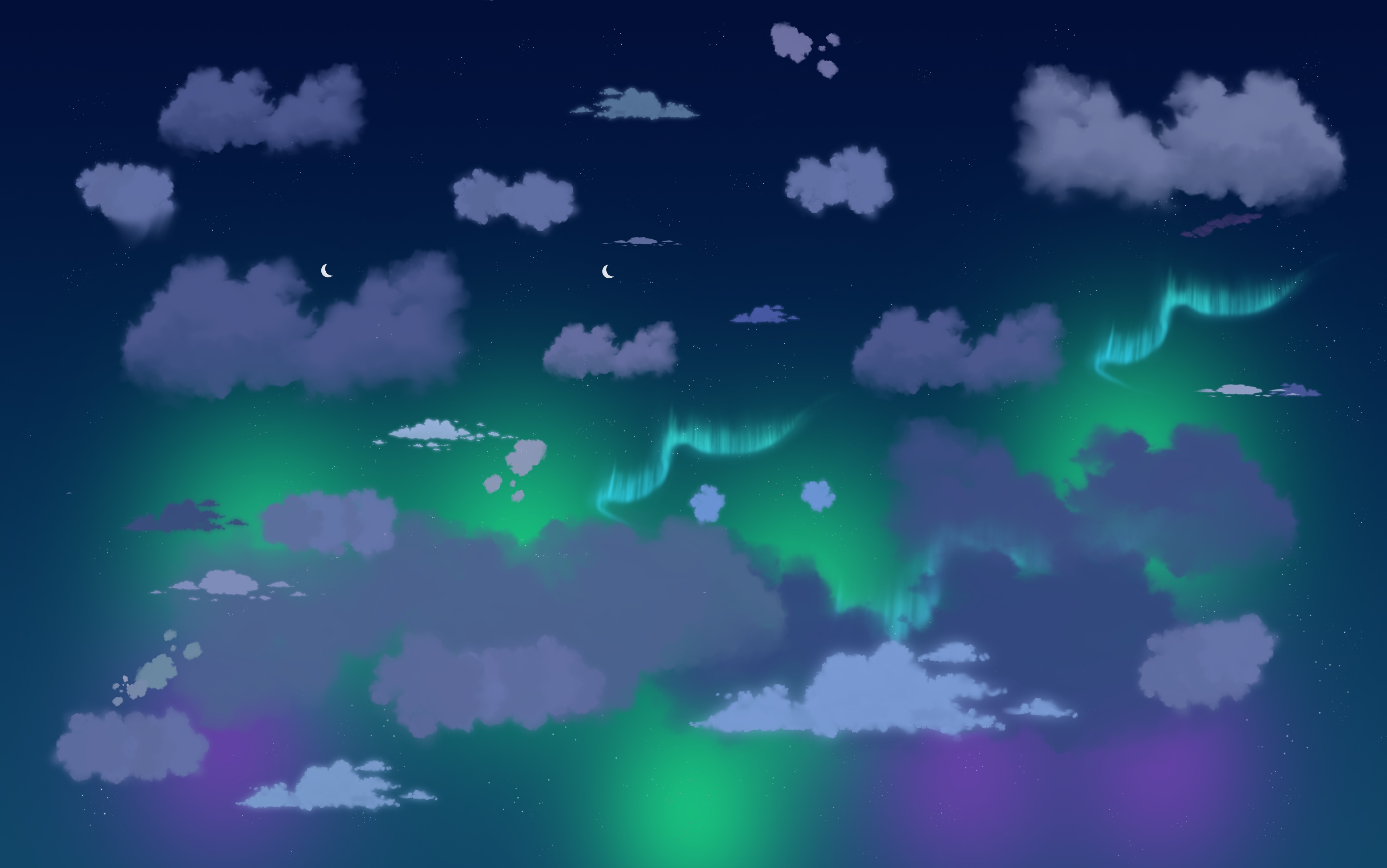
To bring our clouds to life, we started by designing various cloud shapes in Photoshop, ensuring they had transparent backgrounds for seamless integration. These cloud images were then placed on 2D planes within our game engine, utilizing a technique known as the "billboard effect." This method ensures that the clouds always face the camera, creating the illusion of depth while keeping the geometry lightweight. By implementing a custom script, we guaranteed that the clouds would consistently orient toward the viewer, achieving a sense of depth without compromising performance—crucial for maintaining smooth real-time rendering in our trailer.
A key element in achieving the desired aesthetic was our shader control. By fine-tuning parameters like brightness, rotation, and saturation, we crafted a cloud effect reminiscent of HDR photography. This approach allowed us to imbue the scene with a soft, ambient quality, adapting the clouds to different lighting conditions and moods effortlessly. Our experimentation with varying levels of translucency enabled us to create a range of cloud types, from soft and fluffy to dense and stormy, adding depth and versatility to our environments.
In addition to the clouds, we hand-painted soft fog elements and applied subtle shader animations to them. This technique gave the fog a gentle, animated presence, ensuring it never felt static or out of place.
The final touch was the seamless integration of our skybox with the 2D cloud planes, resulting in a cohesive and immersive sky environment. This careful blending enhanced the overall visual impact of the trailer's background, allowing us to push the boundaries of what's possible with relatively simple techniques to achieve high-quality results. The process was both fun and creatively fulfilling, and we're thrilled with the atmospheric depth we've added to our scenes.
We're incredibly proud of the end result we've created, a vital element in conveying the mood and atmosphere of our game. As we continue to refine and expand our visual toolkit, we’re excited to see how these techniques will further enhance our worlds. Stay tuned for more updates as we push the boundaries of what's possible with our visuals!
Welcome to our latest game development progress! In this devlog, we'll take you through the creative and technical steps in making our trailer scene. From the initial storyboard to the final touches in Unity, each stage of the process has been crucial in crafting the immersive experience we envision.
Storyboard and Concept Art
Our journey began with the storyboard, which laid the foundation for the trailer scene. This initial step was crucial for mapping out the sequence of events and setting the tone for the visual narrative. From there, we moved on to concept art, where we visualized the look and feel of the final scene. This stage was essential for refining the overall aesthetic and ensuring that every element aligned with our creative vision.
Base Models and Blockout Animation
Once the concepts were finalized, we transitioned to creating base 3D models. These models were the building blocks for our scene and helped establish scale and proportions. Afterward, we imported them into Unity to test basic camera movements and animations. This blockout phase allowed us to refine the scene’s flow and make adjustments early in the process. Once we were satisfied with the animation and layout, we proceeded to more detailed modeling.
3D Modeling
For the final models, we focused on sculpting and texturing. Using ZBrush, I sculpted intricate details to bring the environment and characters to life. After sculpting, I created low-poly versions of the models and baked the high-resolution details into normal maps using Substance Painter. Texturing was a key part of this process, as it allowed us to match the models closely with our concept art. These fully detailed and textured models were then integrated back into Unity, replacing the blockout versions.
Lighting and Skybox
The lighting setup was designed to enhance the mood and guide the player's focus. We used a combination of spotlights and point lights to highlight key areas of the scene. The skybox played a dual role: not only did it serve as the backdrop, but it also contributed to the ambient lighting, enriching the atmosphere. I created the skybox using a custom cubemap in Photoshop and incorporated Shader tools in Unity to dynamically adjust the sky's color as needed.
After all the hard work, the scene came together beautifully, with the detailed models, dynamic lighting, and custom skybox creating an immersive atmosphere.
That wraps up our devlog for today! We’re thrilled with how this scene is shaping up and can’t wait to show you more as development continues. If you have any questions or feedback, feel free to drop a comment—we’d love to hear your thoughts. Stay tuned for more updates, and thanks for joining us on this journey!
Hey everyone! Today, we're excited to share our progress on creating a magical fire effect for our phoenix. In many movies and games, “magical fire” refers to a fire with supernatural or enchanted properties. Unlike ordinary fire, magical fire might exhibit unusual colors, produce no heat, or possess unique abilities such as creating illusions or serving as a portal to another realm.
For our project, we aimed to capture the essence of the phoenix's lore, where it emerges majestically from the ashes of its predecessor. Using the Unity Particle System and a custom phoenix mesh, we set out to craft an effect that not only looks visually stunning but also embodies the mystical rebirth of the phoenix. Here's how we did it!
We used the Unity Particle System to achieve the effect. To simulate the fire-like effect, we adjusted various properties of the particle system, including Emission, Size over Lifetime, Color over Lifetime, Simulation Speed, Gravity Modifier, and more.
To form the shape of the phoenix, we created a phoenix mesh in Maya and applied it to the Renderer property of the Particle System. After tweaking the values for each component, we produced this stunning magical fire effect.
This effect adds a layer of enchantment and depth to our project, and we can't wait for you all to experience it in the game. As always, we appreciate your support and feedback. Stay tuned for more updates as we continue to develop and enhance our game!
Welcome back to our devlog! Today, we’re excited to share our process for creating the unique zone shapes that form the backbone of our game environments. From initial sketches to the final assembly in Unity, we'll walk you through the steps we take to bring our interior and exterior designs to life.
Concept Art:
Creating a unique and stunning environment starts with concept art. We gather a variety of references to inspire the design, then create something distinct. The process begins with quick sketches to visualize the exterior and interior. After finalizing the concept art, we break down the shapes into modular components, making it easier to manage during the modeling phase.
Modeling:
Using 3ds Max, we begin the modeling phase by quickly blocking out the required modules. This initial blocking phase is crucial as it helps establish the basic structure and scale of the environment. By focusing on modular design, we can create individual pieces that can be easily repeated and combined in various ways to construct the entire environment. This approach not only ensures consistency and efficiency but also allows for greater flexibility in design.
Texturing:
For the texturing phase, we utilize Substance Painter, a powerful tool that allows for detailed and realistic texture creation. This software enables painting directly onto the 3D models, giving precise control over the appearance of each surface. The process begins with creating base materials, such as wood, metal, or stone, which are then applied to the models.
One of the key techniques we employed was baking unlit lighting into the textures. By doing this, we could achieve a more realistic and visually appealing look without relying solely on real-time lighting, which can be computationally expensive.
Unity Setup:
With the level design as guide, we carefully assemble each module into its designated place within Unity. This step involves positioning and orienting the modular pieces to construct a coherent and visually appealing environment. The modular approach allows for quick adjustments and iterations, ensuring the layout aligns perfectly with the intended design.
Once the modules are in place, we move on to lighting the scene. Lighting plays a crucial role in setting the mood and enhancing the overall atmosphere of the environment. We used a combination of directional light and point lights to achieve the desired effect. By carefully balancing these lighting elements, we could create a realistic and immersive atmosphere that enhances the player's experience.
Thank you for following along with our devlog! We hope you found this behind-the-scenes look at our development process insightful and inspiring. Stay tuned for more updates!
Hi gamers! Today, we're diving into the intricacies of sound design, focusing on the audio experience of a box falling from various heights. Crafting the right sounds for this seemingly simple action is crucial for creating an immersive and realistic game environment.
Box plays a crucial role as one of the key objects used by the twins to solve the puzzles and navigate through the levels so its sound was an important factor in the gameplay experience. We wanted distinct and realistic sounds for a box dragging, falling from varying heights, and our sound artist did an amazing job in achieving this. We wanted to achieve realism by accurately representing the impact and material properties of the box and the landing surface, ensuring variety by creating noticeable differences between low and high-height falls, and maintaining consistency so that the sounds seamlessly fit within the game's overall audio environment.
For low-distance drops, we wanted to focus on the initial contact sound, slight rebound, and any secondary movements while for high-distance drops, the focus was on the dramatic impact by dropping the boxes to capture the build-up of velocity and significant impact upon landing. For the dragging sound, we wanted interactions between the box and the ground, capturing the subtle details of friction.
With meticulous attention to detail and a deep understanding of sound dynamics, our sound artist crafted a rich auditory landscape that perfectly complements every gameplay moment. From the delicate subtleties of a gentle drop to the thunderous impact of a high fall, achieved the perfect balance of realism and emotional impact. The final sounds were integrated into the game, with different audio triggers based on the height from which the box falls. Extensive in-game testing ensured the sounds matched the visual experience and player expectations, and adjustments were made based on feedback, refining the audio to achieve the perfect balance.
We hope you enjoyed this deep dive into the sound design process for our game. We're thrilled with how these sounds turned out and believe they will significantly enhance your gameplay experience. Thank you for following along with our development journey. Your support and feedback are invaluable to us. Stay tuned for more updates and behind-the-scenes looks at our development process.