

MasterPlan
Whoops! The menu issue should be fixed on WIndows now.
I thought I resolved the issue previously, but it clearly was not resolved. Things should be good on Windows now; thank you for your patience!
Hotfix Alpha 8.1
- QoL: Adding more audio playback buffer size options.
- QoL: Dropped files onto MasterPlan now create cards in the center of the window, rather than the mouse last was prior to exiting the window.
- FIX: Menus no longer disappear when the MasterPlan window is minimized on Windows.
- FIX: Swapping rows and columns in Tables now works properly (previously, swapping rows and columns had pressing a cell correspond to the transposed cell in the table).
- FIX: Tooltip bounds are sized properly now.
Alpha 8 Is Here!
Hello!
It's been awhile since the last time I released an update - sorry about that! I wanted to get this out before 2023 started, but that didn't end up happening... In any case, here's another MasterPlan update! This one brings a few bigger improvements!
NOTE: Please be sure to backup your projects before you update and load them into the next version - better safe than sorry!
Tables!
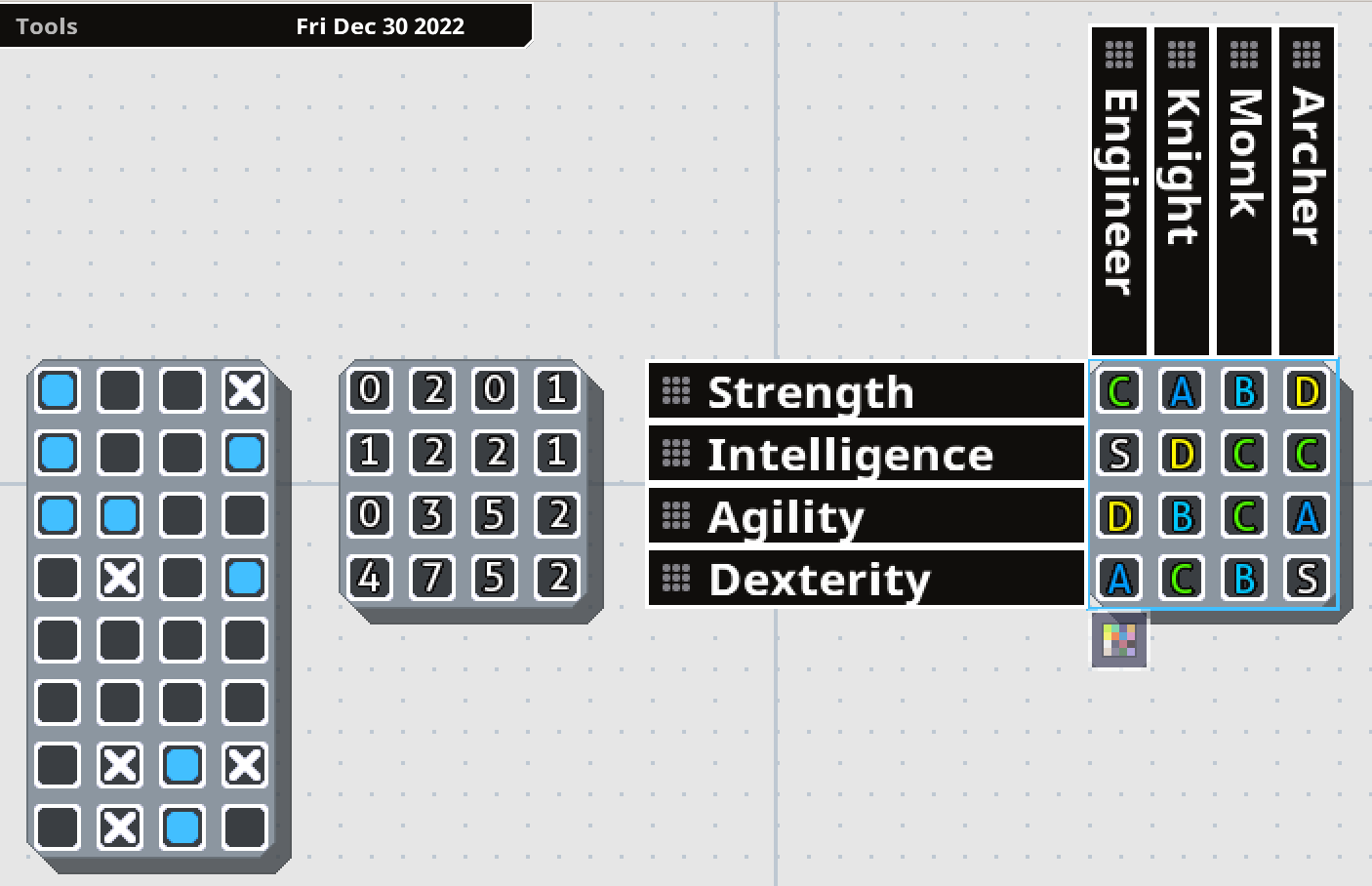
Tables have been re-implemented into MasterPlan! Tables represent grids of information, which can hold one value each. They're primarily useful for repeatable tasks or relative statistics. However, now they're even better than their previous incarnation.
In v0.7, Tables' row and column names were editable from another screen. Now, all that can be edited right from the project overview. You just double-click on a row or column heading to rename the column or row, and you can click and drag the dotted areas on the headers to rearrange the order. Expanding or shrinking the card adds or removes cards as necessary. Left-clicking cycles through the possible values, while right-clicking cycles in the opposite direction.
Previously, Tables also only worked as checkboxes to indicate repetitive tasks that needed to be completed. Now, Tables have different modes of representing their information, accessible from a menu (the button being visible at the bottom of the Table when it's selected). Rather than just serving as checkboxes, they can also show grades (S, A, B, C, D, E, F), or numbers (going from 0 to 10). This way, you can use tables to cleanly and easily represent a variety of relevant information for your project.
By laying out information in a Table, it makes it simpler to compare and contrast information. For example, in the above example, the right-most table represents a series of stats for four classes (Engineer, Knight, Monk, and Archer). By easily laying this information out in a table, you can see at a glance that the Monk and Knight have no S-rank stats, which might indicate an balancing issue.
Multi-Card Editing

Multiple Cards can now be edited at the same time. This is now as easy as holding the multi-card edit key (left shift, by default), and making the change you want to a card. The same property on other selected cards will also be changed to the same value. So you can, for example, select a group of Checkbox cards and edit them all at the same time, or write some common text on all cards at the same time.

For editable text, hold the multi-edit key and double-click to edit the text. As you type, the text will update on all related cards as well. Note that while this isn't perfect in its current incarnation, it does mean a huge usability boost. I'll keep working on it over time to improve things!
As an aside, while editing text in a card in a stack, you can now press tab or shift+tab (by default) to head to the next or previous card and start editing text there as well.
Text Wrapping Modes
This isn't a huge deal, but I've added a new text wrapping system for writing text in MasterPlan. Previously, when writing text and the text became too long for the card, the card would grow vertically - now you can press a key shortcut (Ctrl+W, by default) or press the text wrapping button to switch the text wrapping mode to Horizontal Overflow mode. In this mode, Cards expand horizontally while typing, only growing vertically when you manually add new lines.
Mac Support
I've looked into M1 Mac support in the meantime between the previous update and this one. I still don't have an M1 Mac, so I have no method to test it myself, but this update may also add support for the M1 chip through Rosetta. Please test out the Mac build if you have an M1 Mac and let me know if it at least boots properly now.
Well, that's it for the big stuff; to follow is the detailed changelog, which is also mirrored in the wiki.. Thanks a lot for your support, and I hope to keep working on MasterPlan into 2023!
____
- RE-IMPLEMENTATION: Adding tables back in.
Tables are useful to outline data in a matrix field, represented as an intersection of rows and columns. Rows and columns can be freely resized by clicking and dragging a row or column to rearrange. Double-clicking on the text allows you to edit that text. Tables can be visualized in a few different ways currently: as checkmarks, numbers, or grades (S - F). You can press tab and shift-tab to cycle between editing text for each element.
- QoL: Adding tooltip buttons to help explain unclear settings or options.
- QoL: Adding ability to edit multiple cards at the same time by holding the "Mulitple" key, (aka the "Add to Selection" key, which defaults to left shift).
- When selecting / operating on multiple cards with the left-shift key, a + will appear next to the mouse cursor to indicate this.
- Editing text is done by holding the multi-edit key and double-clicking on the text to edit. All selected cards will have their relevant text field updated by typing.
- QoL: Adding ability to move to next or previous card in stack by pressing "Next Card / Prev. Card" shortcuts (defaulting to Tab or Left Shift+Tab, respectively). Doing this while editing text will move to the next editable text in the next card up or down in the stack.
- QoL: Editing text or collapsing Cards now adjusts the rest of the stack. This isn't perfect, and I still have a lot more I want to do with stacks to improve usability and make them even more fun to work with.
- QoL: Adding a toggle-able text editing wrapping mode. The menu that displays this will appear at the top-right when editing text on a Card. You can press the button or press the keyboard shortcut to toggle between text wrapping modes (Ctrl+W when editing text).
- There are two wrapping modes currently: Wrap, and Expand. Wrap will have cards grow downwards vertically, gaining more lines as you type beyond their borders. Expand will have cards grow horizontally when necessary.
- QoL: Adding name of project to loading prompt when you decide to load a project.
- QoL: Adding setting to change how numbered cards are displayed (either as percentage or current amount out of maximum).
- QoL: Numbered Cards now allow negative numbers.
- QoL: Numbered Cards now allow the current value to surpass the maximum.
- QoL: Highlighting text should be slightly more efficient than previously (though work still remains in this regard, and for optimization in general).
- FIX: Collapsing cards is now properly undo-able.
- FIX: Icons for applying colors to cards no longer change color depending on theme.
- FIX: When render textures are recreated (primarily done on Windows when the window is resized or altered), ensure they are never too small (0x0 in size). This might fix a crashing issue for Windows users.
- FIX: If a path cannot be made relative (on Windows, for example, if a piece of media points to an external drive), the path is saved and loaded unaltered. Note that this change might mean images don't save or load properly between the previous version and this one, so double-check when upgrading to ensure things work properly.
- Contribution by Peter0x44: Improve HOME/END text selection when editing text (previously this would only expand the selection, rather than select from the original position to the caret's new position).
10/5/22 Hot-fix
Alpha 7.3 Update!
It's been awhile, but here's another update for MasterPlan! This one is mainly a maintenance release, but there's some nice quality-of-life features in here as well. I'll go over the main ones to follow here.
(As always, make sure to back up your work frequently, particularly around times like this where the program undergoes an update. Thanks!)
External Media Cache
Previously, when linking to media on the Internet like images or sounds, MasterPlan would only download that media to your computer's temporary directory, deleting the media when MasterPlan closes. While this works perfectly fine, it can make loading projects slow as it has to resolve a connection to each of these media sources before downloading them.
This can now be sidestepped by specifying a per-project cache location to store your media downloads. If a cache location is specified in MasterPlan's settings, then MasterPlan will check the cache directory first to see if the file exists already - if so, then it will use that file, rather than downloading it again.
Icons
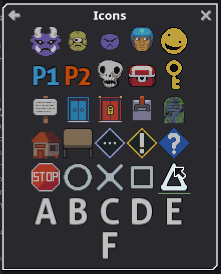
Prepackaged icons have been added to allow you to easily indicate positions or characters of interest in your project. Icons added are always sized at one cell large by default to serve their purpose well in usage on maps, for example. While the current set of icons is kinda bad (by my own estimation), they will be improved as time passes, and more icons will be added. I believe it would also be nice to add the ability to easily use external and custom icons, as well, for even more extensibility.
Various Other Additions

You can now freely color the contents of cards, not just their backgrounds. This should be good to help identify high-priority Cards and to help certain color combinations look more readable with any given theme.
You can now customize the audio playback buffer size and sample rate. This is particularly of note if audio plays back through MasterPlan and sounds crackly or otherwise low-quality. MasterPlan should also no longer crash when starting if there is an issue initializing the audio system - if there is an issue, it might be due to the currently selected audio settings, so check those out if you get a warning message.
Mac M1 Support + Testing
I've been looking into M1 Mac support, and so far it's not been too easy without access to a device myself. As far as I understand it, M1 Macs can run applications built for Intel Macs just fine through Rosetta, but MasterPlan doesn't currently work through Rosetta for reasons unknown to me. This being the case, it would be helpful to get some M1 users to test some things out with, so if you'd like to try testing various builds of MasterPlan (or anything else I work on) to help with Mac M1 compatibility, please join the official SolarLune Games Discord server here! Thank you very much!
Oh, and the next major update will probably include Tables, so feel free to give me some feedback on what you think would make for a good Table in MasterPlan. Thanks!
______
Anyway, those are the cliffnotes. The full changelog on Github is available there, and here's the changelog for this version specifically:
- QoL: Mouse wheel scrolling is now more sensitive and tied to the Mouse Wheel Sensitivity Input setting.
- QoL: Adding ability to cache downloaded resources. Caching downloaded resources works by specifying the per-project cache folder in Settings > General Settings. Any downloaded images, sounds, etc. will be stored here, instead of being placed in the temporary directory. When loading a project, these same locations will be used to load the images, meaning that downloaded resources will only be downloaded once; after that, they'll be pulled from the cache directory. If the cache directory doesn't exist, then it will work as it normally does (downloading to the temporary directory).
- QoL: Pasting text into MasterPlan now creates a more logically sized card, rather than a super wide one.
- QoL: Double-clicking to edit labels no longer adjusts the caret position.
- QoL: Page Up and Page Down now advance 5 lines when editing text.
- QoL: Adding icons, accessible through a menu in the View menu. Icons are automatically packaged with MasterPlan and serve to allow you to easily add images that represent characters, locations, ideas, etc. to your project for visual representation. The packaged icon set will be improved and expanded upon as time passes, and it may even be possible to easily add user-created icons in the future.
- QoL: Make left/right arrow keys move the cursor to the start/end of a selection.
- QoL: Don't draw caret if a selection is open.
- QoL: Arrows are outlined now.
- QoL: Adding ability to delete the last word with Left Ctrl + Backspace.
- QoL: Adding ability to select all text before or after the caret with Left Shift + Home or End.
- QoL: Multi-line log messages now are indented on the following lines for better readability.
- QoL: Adding option to disable grid disappearing on zoom out.
- QoL: Adding ability to color card contents, just like card backgrounds can be colored.
- QoL: Adding settings to change audio playback buffer size and audio sample-rate. These settings can be useful if the default audio playback settings don't allow you to play audio back, or if sounds sound bad when played back. Note that changing these settings take effect only after restarting MasterPlan.
- QoL: Adding broken image icon for images that have invalid filepaths.
- OPTIMIZATION: Cards won't draw the card or shadow if they're not at least partially onscreen.
- FIX: Saving screenshots to a project now properly loads them back.
- FIX: When editing a map, holding the color pick key now will pick a color only if a tool is selected, making it easier to deselect cards if that is the same key (which it is by default - Left Alt).
- FIX: Lines / links now draw on top of other cards.
- FIX?: MasterPlan will no longer attempt to create a larger render texture than the graphics card can support (this might happen when updating text).
- FIX: Deadlines are now included in exports.
- FIX: You can now click buttons that are over a Map while editing.
- FIX: Being unable to create sounds due to sound files not being compatible with MasterPlan no longer crashes MasterPlan, but rather displays a warning log message.
- FIX: Toggling debug mode is disabled in non-development versions of MasterPlan.
- FIX: Starting MasterPlan no longer crashes if the audio system cannot be initialized.
Thank you very much for reading these notes and for the continued support for MasterPlan - I really do appreciate everybody's help to make this a great piece of software for productivity, note-taking, and project / long-term planning.
Regards, once again! - SolarLune
Alpha 7.2 Release
- QoL: Adding jump button next to pages in hierarchy view.
- QoL: Orphaned page names are now darker than normal page names.
- FIX: Cards are now again placed in the center of the screen if the option to place new cards in a stack is disabled.
- FIX: When cards automatically resize when typing text, other cards that move to make room now properly are moved when undoing / redoing.
- FIX: Exporting now only exports pages that have not been deleted.
- FIX: Menu to go up from a sub-page now appears again if opening a project from within a subpage (specifically, the last subpage in the project).
- FIX: If a page has no accessible path to the route, it is now considered deleted (if in a normal project) or orphaned (if in a project that already contains orphaned pages).
Note: When loading a project with orphaned pages, deleted / inaccessible pages will show up in the Hierarchy view as "orphans" - this allows you to get at their contents. When saving a project with orphan pages, as long as they have no contents, they will be deleted. The change here is that if a project has no orphans, deleted pages will not be accessible from the hierarchy.
___
That's it; thanks a lot for your support and patience!
- SolarLune
Image Loading Fix Quick Update
Just wanted to fix an issue with images not loading properly in the last hotfix update, as some filepaths were detected to be URLs. No version bump for this update.
Have a good one, and see you with some more fixes and improvements soon~
0.8 Alpha 7 Hotfix 1
Here's a quick hotfix release to help resolve some issues and improve some things with Alpha 7!
To run through the changes real quick-like:
- RE-IMPLEMENTATION: Adding option to place newly created cards in a stack if a card is selected (this setting defaults to off). If the option is enabled, Cards created through keybindings or through the Create menu will be inserted into the stack underneath the currently selected Card.
- OPTIMIZATION: Resizing images no longer unnecessarily uses additional VRAM. (Internally, resizing images doesn't need to recreate the owning Card as the image doesn't show the card in the first place.)
- FIX: Images and sounds should no longer cause crashes when linked from a drive apart from the one MasterPlan starts on - this means that if a path cannot be made relative, it will be stored as absolute.
- FIX: Images and sounds with relative filepaths should link relative to the project file again (previously it was linking relative to MasterPlan's installation folder - whoops!).
- FIX: Crashes should actually write vital information to the log file again, rather than inexplicably cutting that part out.
- FIX: MP should no longer crash when selecting non-existing cards in a direction (i.e. pressing right with no card to the right).
- FIX: Creating a new project while in a subpage will no longer have the "exit subpage" window stuck onscreen.
- QoL: More efforts to improve memory usage / free memory more aggressively, particularly when creating new projects / loading other projects in sequence. Please let me know if this doesn't work!
- QoL: Adding maximum image size buffer with customizeable size. Images that are larger than this buffer size will be scaled down to fit in this size when added to a project. The size will be capped to a maximum value of whatever your graphics card will support. The smaller the image buffer size, the smaller the images will be scaled when loading (meaning less fine details when zooming in on your project), and so the less VRAM they will consume. This setting takes effect on newly loaded resources (so change the option and then reload the project or restart MasterPlan to see the effect).
- QoL: MasterPlan now saves which page you're on when you save the project.
- QoL: Keybindings to select top or bottom card in Stack now default to Home / End, rather than Page Up / Page Down.
- QoL: Adding keybindings to select top or bottom card in the selected Card's indentation group (Page Up / Page Down).
- QoL: Adding keybinding to select all cards in indentation group or below. (Left Ctrl+Space). - For previous users, with these added keybinding changes in mind, please look over the shortcuts to ensure there are no keybinding conflicts (or reset the keybindings to default to avoid having conflicts).
- QoL: MasterPlan should now prefer using the dedicated GPU over the integrated GPU on Windows for computers that have the option.
- QoL: Disabled buttons are now darker, and button choices for button groups are now slightly lighter (60% > 70% brightness).
_____
Welp, that's it! Thanks a lot for your support and patience, again!
Alpha 7 Release!
So this is a bit of a chonky update - there's quite a few nice, new features included here. I'll go into a couple of them right here!
0.7 Project Loading
Well this might be a bit of a surprise, but I've added the ability to load projects made in MasterPlan v0.7. Note that 0.8 still isn't at feature parity with v0.7 (lines don't exist in the same way, tables and whiteboards aren't re-implemented yet), but this should at least make transferring your projects to v0.8 a little smoother. Please let me know if a project doesn't load correctly!
Deadlines
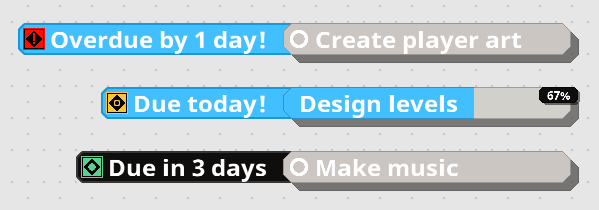
Deadlines have been reimplemented into MasterPlan v0.8! While crushing deadlines are, indeed, a quick way to feel like you're dying inside and out, they can also be a good tool to get you off your butt to finish stuff. Be responsible with them! Each completable Card (checkboxes or numbered cards), can have a deadline associated with it, and the icons for Deadlines change depending on whether they have time left on the clock, are due today, are overdue, or are already completed.

Deadlines can be set using the new Set Deadline tool. With this tool (available from the Edit menu), you can see both what the current deadlines for selected Cards are (notated above by the small diamond next to June 27th), as well as set and clear any deadlines from selected Cards. The UI is rather straightforward and simple, while also being clean and easy to use, in my opinion, though there's still room for improvement!
Once you've set your deadline, it will appear next to the card, as shown above. You can also see all deadlines available in your project from the new Deadlines view.

As you can see in the above example, the "Write Plot" task has been completed, while I still had five other tasks to complete. One is overdue (the red one), one is due today (the yellow one), and the other three are due in some time. (Of course, these due dates and statuses are according to the date I took this screenshot, haha).
Please feel free to use deadlines to impose a greater sense of responsibility and timing to your projects!
Exporting Projects

Projects can now be exported to two visual formats - a single document PDF file, and multiple PNG files. When exporting projects, the result will be created into a directory of your choosing. The exported result will cover the entirety of your project, generating a 1:1 view of the current state of your entire project, allowing you to easily share it with others.
Note: Please ensure there's no files you'd like to keep named after the project + "_Export.pdf" / + "_Export_PageName.png" when you do this, as it will overwrite any existing files when exporting. In the near future, I suppose I'll need to add a prompt indicating files may exist with these filenames, and asking if you'd like to overwrite them. In the meantime, be careful with any existing files' filenames.
Documentation Update
Documentation has been updated with some more information over on GitHub, containing this information you're reading, as well as much more. Please feel free to check it out if you want to look over the changes in more detail.
Various Quality of Life features
Along with the previous updates, there's some more quality of life improvements shipping in this build as well. For example, when editing text on cards, the card will now fully resize vertically automatically - that means that if you add new lines, then the card will expand, and if you delete those lines, the card will shrink. This makes the flow of editing text much simpler, since you don't need to resize Cards if you want to delete lines. You can still manually resize cards as desired, of course. You can also now easily copy card colors in the Set Color menu, making it even easier to Custom Color Cards Consistently. Cool!
MasterPlan now uses less memory at a baseline if pages are largely unused / keep towards the center. Previously a large amount of data was preallocated unnecessarily. And some other stuff - check out the detailed changelog below for more info.
___
Welp, that's the update! Here's the detailed changelog:
RE-IMPLEMENTATION: Deadlines have now been reimplemented. Deadlines are set from the Edit menu, and following the philosophy of new MasterPlan, multiple Cards can have their deadlines set at a time. In the View > Deadlines menu, you can also see the currently active and completed deadlines in your project, sorted in order of urgency.
RE-IMPLEMENTATION: Image, Sound, and Link file paths are now saved in relative path notation (i.e. "../icon.png" for a file named "icon.png" in the folder above MasterPlan's executable). This should play more nicely when loading projects from different locations as long as its resources are in the same locations relative to the project. Note that this relativity doesn't apply for the arguments section of a Link Card set File Mode.
RE-IMPLEMENTATION: The Home and End keys now once again jump to the beginning or end of editable text.
QoL: Implementing v0.7 project loading. Note that 0.8 still does not have all features of 0.7, so some features (standalone lines, whiteboards, tables, among possibly others I haven't foreseen) are going to be missing. Otherwise, MasterPlan v0.8 will let you know when you load a v0.7 project through a message at the bottom-left. After loading it, you'll need to save manually in a location - it would probably be best NOT to save over your original v0.7 project. Please do feel free to let me know if any v0.7 projects don't load in v0.8!
QoL: Adding ability to export projects to PDF / PNG. Exporting allows you to export your project to either a series of PNG files (one for each page) or a PDF file (one PDF file, but one page in the PDF file per page in MasterPlan). The Export option is visible in the Tools menu.
QoL: Lowering MasterPlan's memory usage floor by ~60% in cases where a project's pages are largely empty. (Internally, this is done by making it so the backing collision grid is only 1x1 and grows as necessary, rather than starting out at 1000x1000 and growing from there.)
QoL: Editing text on cards now will automatically resize the card vertically when necessary.
QoL: When editing text on a Card, the camera will move to focus more on the text editing caret if the caret gets too close to the edge of the window.
QoL: Adding ability to grab color from the first selected card when coloring Cards in the Set Color menu.
QoL: Adding Tools menu, moving Flatten Project to Tools menu.
QoL: Adding Take Screenshot menu entry to Tools menu. (It has always been possible to take a screenshot, it's just been only accessible via a keybinding until now.)
QoL: Adding project settings option to zoom to cursor when zooming in or out - note that this does not take effect when setting the zoom level directly using the number keys.
QoL: Adding project settings option to enable / disable shadows
QoL: The grid now will disappear if you zoom out beyond 100%, rather than only beyond the previous zoom level (50%).
QoL: Starting MasterPlan on a Linux distribution without qarma, matedialog, or zenity will inform you to install one of these missing dependencies (sorry KDE users, I'll need to address this somehow!).
QoL: Renaming arrow connection shortcuts to "Connect Cards" and "Disconnect All Links".
QoL: Renaming "Smooth movement" to "Smooth panning + zoom" in settings.
QoL: Minor graphical tweaks to UI to improve visibility.
CHANGE: "Stack lines" are now outlined.
CHANGE: Making shadows slightly darker and partially transparent.
FIX: Setting color using hex string no longer has an inaccurate value / brightness - this was noticeable when setting the color using a hex string, but with a darker than 100% value.
FIX: Cards now correctly set their undo state regardless of if they're onscreen or not. (Previously, this wasn't the case, and Cards being offscreen would cause them to not update their undo state when doing things that affect them, like changing their color, for example.)
FIX: Deleting sub-page cards no longer creates orphan pages.
FIX: GIFs linked from the internet should now load properly when loading the project.
FIX: Dropdown menus now extend downwards into space properly depending on the currently selected (multiline) option, rather than there being a massive space at the bottom when they're open (this can be seen specifically in the "Transparency Mode" menu).
FIX: Custom fonts with empty glyphs no longer crash MasterPlan.
FIX: Foreign / non-English latin characters (like Ç) no longer create a blank line in editable text. They also are now properly stepped through with the keyboard arrow keys / word jumping.
Thanks a lot for all of your support over the past year and some change that MasterPlan's been rolling; really appreciate your patience and expressions of "I love your app", haha. I'll catch you guys soon with some more improvements and new features!
Alpha 6.1 Hotfix
Here's the quick rundown:
- QoL / FIX: Cards now only update if they are on the current page, unless they are timers (as timers still have to tick). This is an optimization, and also a fix for an issue where double-clicking causes seemingly random sub-pages to open (in truth, this is because they were still being updated and "existing" in their original location on the project, despite the user not being on their page).
- QoL: Editing the filepath of image and sound cards now automatically highlights the filepath text to edit. Note that this is not done for Link cards linking to programs because you may wish to edit the arguments instead of the filepath, so you can choose.
- QoL: Adding keyboard shortcuts to edit the description text of Checkbox, Note, Numbered, Timer, Sub-Page and Link Cards (defaulting to Enter).
- QoL: Orphaned pages (pages that you can't reach from an existing Sub-page Card) are named as such in the Hierarchy menu.
- QoL: MasterPlan will let you know if you attempt to paste something from your system clipboard and it's empty.
- QoL: MasterPlan will let you know if you attempt to paste filepaths that it can't automatically detect.
- QoL: Adding a new "Spearmint" theme.
- QoL: Reworking empty image graphic to be visually clearer.
- FIX: Saving a screenshot to the project no longer causes a message indicating a temporary already exists to pop up.
- FIX: Canceling browsing for a file for cards (i.e. for Image, Sound, and Link cards) no longer causes a message indicating the user canceled it to pop up.
- FIX: Cards that have been saved from the clipboard to the project can no longer be edited to point to other images (since this would cause those other images to also be saved).
- FIX: Images that are downloaded from the internet are no longer attempted to save directly in the project.
- FIX: Orphaned pages (pages that aren't pointed to from an existing Sub-page Card) are no longer saved if they have no cards in them when saving the project.
- FIX?: Images linked from the internet should properly display after loading the project now?
Anyway, that's it - be sure to make backups of your projects, just in case. Thanks a lot for your patience, again~!