Here comes our new release version 2018.0.6865 which is focused around the Halloween event we announced a couple of days ago. Apart from that it also comes with a few bug-fixes and general improvements to the game. Let's check them out:
Gameplay: Added new Game Event System which will take care of keeping track of your progress in the currently active event as well as reward you with any limited achievements unlocked during that period
Interface: Added new active event widget to the main menu screen that will display your current progress in the event
Interface: Changed the overall layout of the authentication GUI to make it more compact and unobtrusive
Framework: Recreated all game shaders using a new plugin which is compatible with Unity 2018.3. While doing this we also upgraded and changed some textures and materials for better visuals
Framework: Restricted all saved games to the player who's created them, so you won't be able to load someone else's saved game. This is to ensure that there is no achievement trading behind the scenes
Bugfix: Fixed a bug with the puzzle tile containers, where they would either catch or scatter puzzle tiles while being moved around
Bugfix: Fixed a bug with the puzzle tile containers, where they would spawn over existing puzzle tiles thus scattering them or otherwise disturbing their position
You can find the full release notes on our website here.
The Event Widget
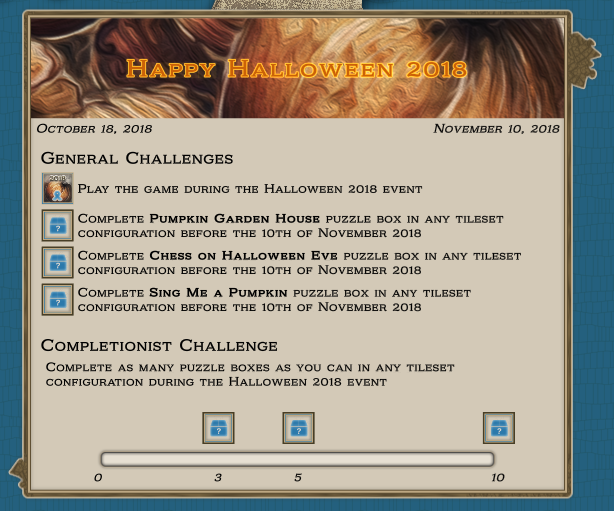
The new event widget will display all necessary information related to the currently active event (if there is one). It will show you the event duration, the different challenges you can complete during that time, their status, and anything else relevant at a glance. As we move forward with the game and since there will be more events at regular intervals, we certainly plan to improve it so it can best serve you, our players. You will be able to see it in the game soon enough, but it the meantime take a sneak peek at it here:
We hope you like the concept of game events and will enjoy participating in them. Make sure to share your feedback with us regarding its existing features, what you like and don't like, and whether you want to see something else added to it.
Known Issues
The game might not be able to initialize the playroom on some PCs! It will either remain on a black screen doing nothing or will not be able to generate the playing surface and puzzle objects resulting in an empty playroom. Unfortunately, this has been impossible to reproduce on our hardware and we are trying to isolate the issue by indirect means. Nevertheless, we are working on this problem at highest priority and will apply hot-fix as soon as we are able.
- If you are affected by this, then just in case this is caused by older drivers, please update your system to the latest NVidia or AMD drivers and see if the problem is resolved.
- If you were affected by this, but the issue was resolved with this release please let us know as well.
The puzzle model inspections lens can get its parts detached if you move it too fast around the model. This should not prevent you from using it, but if you want to reassemble it simply save and load the current game.
If you are loading a very old saved game (especially the Belfast puzzle) the puzzle tiles might "explode" in a shower. This is due to the changed size of the puzzle tiles in the recent builds which causes them to appear in overlapping positions when you load old saved games and thus forcing the physics engine to push them apart. This should happen only the first time you load such a game. Just wait for the tiles to get to rest then save and re-load the game. Any tiles that might have accidentally left the game board will be returned back into the puzzle box.
Don't forget to follow our social channels for regular news and some exclusive information about the game:
Halloween is coming and with it nears our first special event. We are releasing our first purchasable puzzle boxes in a special edition format. All such DLCs are and will be made with illustrations by talented modern artists in a variety of styles. As we promised before, we will try to expand our selection of puzzles with images for different tastes. One thing will remain a constant though - you will see only high quality and unique content in Masters of Puzzle.
Halloween 2018 Event
The special event will start on 18th of October with the release of the first puzzle box Pumpkin Garden House and will end on 10th of November. During that time enter the game and play your favorites or any of the new puzzles in order to earn special rewards. In addition, for the first time since we launched, you will be able to play the new 1500 and 2000 tilesets for a greater challenge (available only for purchasable puzzle boxes). For your convenience, there will be a new widget in the game's dashboard that will allow you to keep track of the remaining event time and how many challenges you have completed so far. While currently these are only displayed in Steam, once we roll out the room customization upgrade you will also gain special trophies that you will be able to display there. Start gathering the limited achievements now because you are going to regret missing the opportunity later! ːsteammockingː
For the full list of challenges in this event see the list at the end of this post.
Achievements, Achievements, Achievements
As you've probably noticed, recently we started to roll out the finished achievement icons in Steam. It's been longer than we anticipated, but now we are finally ready with this task and we are also equipped to create icons for the new ones much faster. Apart from new icons, we've also added over 50 new achievements, including an increased number of puzzle box completions in all tileset variations and the full range of completions for the new 1500 and 2000 tile tiers. The locked achievements will always display a closed box with a question mark on it. Once you achieve it, the icon will change to display its actual image. While this is not the traditional approach used by Steam, we feel that it makes for a much more interesting and engaging mini-game while hunting for our achievements.
The achievement icons are divided into 3 types:
Brown ones are the regular ones which you can get at any time while also knowing what exactly you need to do to unlock them.
Orange icons signify hidden achievements and while you can also get these at any time, you are not exactly aware of how to unlock them.
Blue icons represent the new special form of limited time achievements or challenges. These you can get only under special circumstances and usually only inside a limited timeframe (like events). Once the opportunity to get such an achievement passes, it might not come again for a long time or ever! We will announce all such new achievements early on so you have time to prepare your strategy to get as many of them as you can. Keep an eye on the updates and the game news in order to stay informed.
For those of you, who have already completed one or more of the old puzzle boxes which did not have corresponding achievements at the time, don't worry. As long as you keep a saved game from that playthrough, you only need to load it once and the game will reward you with the new achievement.
Event Challenges
These are only obtainable from 18th of October until the 10th of November.
Play the game during the Halloween 2018 event
Complete Pumpkin Garden House puzzle box in any tileset configuration before the 10th of November 2018
Complete Chess on Halloween Eve puzzle box in any tileset configuration before the 10th of November 2018
Complete Sing Me a Pumpkin puzzle box in any tileset configuration before the 10th of November 2018
Complete any 3 puzzle boxes during the Halloween 2018 event
Complete any 5 puzzle boxes during the Halloween 2018 event
Complete any 10 puzzle boxes during the Halloween 2018 event
We wish you the best of luck in chasing these!
This is it for today. Don't forget to follow our social channels for regular news and some exclusive information about the game:
It seems that with the migration to Unity 2018.3 our old shaders became incompatible with certain video cards and/or drivers. This caused the game to crash or produce various strange bugs related to visuals. Therefore in 2018.0.6862 hotfix we've recreated all the shaders in the game to make certain they are compatible with the new version of the engine. Our preliminary tests on several different machines show a much stabler behavior, which leads us to believe that the problem has been solved. If, however, you continue to encounter such issues don't hesitate to let us know either here or via email to contact@bellealgames.com at your earliest convenience.
We wish you a pleasant and trouble-free play.
Release Version 2018.0.6856
It's time for a new major release of Masters of Puzzle designated as 2018.0.6856. This time we focus on performance and quality improvements rather than big new features. While the importance of new additions to the game cannot be denied, performance is also a very critical aspect and we plan to work on it on a regular basis. That being said, this release also prepares the way for our Halloween 2018 event which will start in the next few weeks.
We will talk in greater detail about the major improvements below, but before that let's take a look at the summary of new features:
Framework: Added support for Post-Processing effects to the game
Framework: Added framework and GUI support for purchasable puzzle boxes
Framework: Migrated to Unity 2018.3. This comes with a huge number of engine improvements so make sure to check the official Unity site for more information
Gameplay: Changed the Physics engine settings in order to improve performance especially with a higher number of puzzle tiles. Note that this is still a very much work in progress and we will do further improvements in future releases
Visuals: Added anti-aliasing and ambient occlusion post-processing effects with more to come in later releases
Interface: Improved quite a lot the carousel widget in the game selection GUI. This is now used by both collections and their puzzle boxes as well as by the saved games selection
Interface: Implemented functionality for dragging and resizing GUI panels. This is currently used by the image preview panels during the creation of a new game
You can find the full release notes on our website here.
New Artists & Purchasable Content
We are happy to share that recently we started work with several talented artists who are creating illustrations for brand new puzzle boxes in a variety of styles. You will see the first of these during the Halloween event but more will become available after that as well. These puzzle boxes will not be available for free though and you will have the option to acquire them for a modest amount both from within the game and the Steam store. The purchasable puzzle boxes also come with some additional benefits. While we are not ready to discuss all of them just yet, one of these will be the unlocked puzzle tilesets of 1500 and 2000 tiles.
Post-Processing Effects
Improving the visual quality of the game is currently a side task, but not without its own importance. Therefore we decided to spend some effort in that direction. In this release, provided you have the proper hardware for it, you will see the new anti-aliasing and ambient occlusion effects. Both of these are currently bound to the quality settings you pick at the start of the game and cannot be adjusted directly but in the next release, we will provide you with specialized video options where you will be able to customize your desired video quality. For now, this is the relationship chart of the new effects:
Medium quality: anti-aliasing disabled, ambient occlusion disabled
High quality: anti-aliasing set to FXAA, ambient occlusion disabled
Very high quality: anti-aliasing set to SMAA, ambient occlusion enabled
Ultra quality: anti-aliasing set to TAA, ambient occlusion enabled
Future work in this area includes the addition of more post-processing effects, improved and more realistic lighting, improved shaders using the new Unity Shader Graph, and more.
Known Issues
The puzzle model inspections lens can get its parts detached if you move it too fast around the model. This should not prevent you from using it, but if you want to reassemble it simply save and load the current game.
If you are loading a very old saved game (especially the Belfast puzzle) the puzzle tiles might "explode" in a shower. This is due to the changed size of the puzzle tiles in the recent builds which causes them to appear in overlapping positions when you load old saved games and thus forcing the physics engine to push them apart. This should happen only the first time you load such a game. Just wait for the tiles to get to rest then save and re-load the game. Any tiles that might have accidentally left the game board will be returned back into the puzzle box.
Don't forget to follow our social channels for regular news and some exclusive information about the game:
A new free puzzle box Manhood by Thomas Cole is now available in Masters of Puzzle. This is the third box in the collection The Voyage of Life and it will certainly challenge your skills, even if you're a veteran puzzle builder. Make sure to let us know of your successes when you complete it. We will be glad to see your screenshots and videos... and maybe your time scores ːsteammockingː
As usual, you can pre-download the DLC from the Steam client or directly in-game while starting a new game.
Don't forget to follow our social channels for regular news and some exclusive information about the game:
This is a small update for Masters of Puzzle that focuses on some improvements to the puzzle tile containers. When starting a new game you will no longer have any containers spawned by default. Instead, there is now a new GUI that will allow you to spawn the containers on demand with a current limit of 2. You will also be able to remove spawned containers from the game board using the corresponding buttons on the container GUI. Any puzzle tiles that were inside a container you removed will be dropped on the game board in a pile. Existing games will not be modified, so when you load a game you will find your containers exactly where you left them.
What's Next
Right now we are working on a tutorial scene that will help new players get familiar faster with the game. The tutorial will use a unique image that will not be available as a standard puzzle box, but more on that on a later update. Along with the tutorial, we are preparing a special surprise for the coming Halloween, so stay tuned for more news in the following weeks.
Known Issues
The puzzle model inspections lens can get its parts detached if you move it too fast around the model. This should not prevent you from using it, but if you want to reassemble it simply save and load the current game.
If you are loading a very old saved game (especially the Belfast puzzle) the puzzle tiles might "explode" in a shower. This is due to the changed size of the puzzle tiles in the recent builds which causes them to appear in overlapping positions when you load old saved games and thus forcing the physics engine to push them apart. This should happen only the first time you load such a game. Just wait for the tiles to get to rest then save and re-load the game. Any tiles that might have accidentally left the game board will be returned back into the puzzle box.
Don't forget to follow our social channels for regular news and some exclusive information about the game:
The summer holidays are getting to an end and it's finally time for a new release 2018.0.6817 of Masters of Puzzle. There are quite a lot of new features we're introducing with this one and we really hope you're going to like them. As usual, we will be happy to hear your thoughts and impressions about it either here or in the community hub.
Let's take a look at what's new or changed in this release:
Gameplay: Added Puzzle Tile Containers to the game. These allow you to sort the puzzle tiles in a convenient way and come with a lot of gameplay functionality. Make sure to check out the help pages for detailed information on how to use them
Gameplay: Added full localization in German to the game
Gameplay: Added in-game Hints System. Helpful hints will be displayed to the player at appropriate times. The hint system can be disabled completely (recommended only for veteran players) and each hint can also be disabled individually
Interface: Applied the new GUI v2.2 to all game interfaces
Interface: Added new game mouse cursors. The mouse cursor is now contextual and will change based on the current action attempted by the player
Interface: Added new Pause Game Menu that is accessible by pressing the F10 key on your keyboard or by clicking on the new button with a cog icon located on the action bar on the top left
Interface: The Save & Exit button has been moved from the action bar to the new pause game menu
You can find the full release notes on our website here.
Puzzle Tile Containers
The major new feature of this release is, of course, the puzzle tile containers. In the future, these will be obtainable in various shapes and colors only from the in-game store, but in Early Access, each player has been granted 2 basic containers for free. Please keep in mind that the containers will not appear in games saved with a previous version of the game. To get them you will need to start a new game.
For each container you have, there will be a horizontal ribbon in the new GUI controls located on the left side of the screen just below the action bar. Each ribbon will display several important things - the container label-modifier, the current number of puzzle tiles in it, the keyboard shortcut for sending puzzle tiles to it, and a button used to empty the container. You can change the label of each container with the label-modifier and most containers will also be able to display their label on their physical object located on the game board.
You can put a puzzle tile inside a container in two ways - you can just drop it inside by using the standard controls for puzzle tile manipulation, or you can throw it in the container by using that container's keyboard shortcut. You can see each container's shortcut key on the corresponding ribbon in the GUI, but it's always a key from 1 to 6, where 1 would be the first container in the list, 2 will be the second, and so on. Using the shortcuts is a much faster way of sorting the puzzle tiles especially at the beginning of the game. Make sure to prepare your containers accordingly by labeling them and moving them to convenient locations on the game board. These two approaches also work, when you have grabbed multiple puzzle tiles in your fist.
When you want to remove puzzle tiles from a container, you can simply pick them up or grab them using the standard controls for puzzle tile manipulation. If you want to empty the entire container on the game board, you need to use the corresponding Empty Container button located on that container's ribbon. When you have activated the button, you will have to click with the Middle Mouse Button anywhere on the game board. This will move all the puzzle tiles from the container to that spot. You can also cancel this operation by clicking the Esc key.
You can also move the puzzle tile containers anywhere on the game board regardless if they are full or empty. To do that, click with the Left Mouse Button anywhere on the container (be careful not to click on a puzzle tile inside it). This will pick the container up and then you can move it around with the mouse. To put it down click with the Left Mouse Button again. Just keep in mind that you won't be able to drop the container if it intersects any other game object, so you will have to select a good empty location. While you're holding a container, you can also rotate it clockwise and counterclockwise.
The full information on working with puzzle tile containers can be found in the game help menu. Additionally, we will be releasing a short guide video in the next few days for your convenience.
Known Issues
The puzzle model inspections lens can get its parts detached if you move it too fast around the model. This should not prevent you from using it, but if you want to reassemble it simply save and load the current game.
If you are loading a very old saved game (especially the Belfast puzzle) the puzzle tiles might "explode" in a shower. This is due to the changed size of the puzzle tiles in the recent builds which causes them to appear in overlapping positions when you load old saved games and thus forcing the physics engine to push them apart. This should happen only the first time you load such a game. Just wait for the tiles to get to rest then save and re-load the game. Any tiles that might have accidentally left the game board will be returned back into the puzzle box.
New interface labels in localized languages that have not yet been translated will be displayed in English. This will be resolved once we have received the proper translations for each individual language.
Don't forget to follow our social channels for regular news and some exclusive information about the game:
A new free puzzle box Youth by Thomas Cole is now available for everyone. As usual, you can pre-download the DLC from the Steam client or directly in-game while starting a new game. This puzzle is part of the new collection The Voyage of Life which we announced some time ago. We hope you'll enjoy it as much as we do.
On a side note, the Summer holidays are coming to their conclusion and with that, we are getting ever closer to the next major release update for Masters of Puzzle. It's currently in testing and baring few minor polish tasks it's ready to hit Steam. We are not going to share yet its contents, but we are sure you will be delighted to see it. Stay tuned for our next update.
Don't forget to follow our social channels for regular news and some exclusive information about the game:
Here comes a brand new release 2018.0.6785 of Masters of Puzzle right in the middle of the holiday season. To get it, simply restart the Steam client and let it update. The major focus of this version is the game localization into more than one language.
Localization
Nowadays localization is expected to be part of any decent game (and software for that matter). It's a seemingly small thing that actually takes quite a lot to implement and not only in terms of software design, but also to translate all these texts into the many different and often incompatible languages. We are happy to share that this journey is on to a successful start for Masters of Puzzle. As of this release, the functionality has been finalized and 4 languages have been made available for our players - English, Bulgarian, Russian, and Portuguese. We also have several others currently in progress and each of them will be released as soon as the translations have been completed.
We would like to thank warmly some of our amazing players, who aided us in this effort by verifying the texts in their native languages and providing much-needed corrections. It was greatly appreciated.
To change your language in the game, simply go to the Options menu and you will find an appropriate setting at the top of the general section. Select the language you prefer from the dropdown and it will be applied immediately to all interfaces.
And before you go to the game, don't forget to take a look at all the changes coming with this new release:
Gameplay: Added fully functional localization framework in the game starting with 4 languages (with more to come)
Interface: Added a new general option that allows changing the language of the game instantly
Interface: Replaced all previous fonts used in the game with the Kelvingrove font
Framework: Puzzle tiles have been made 25% thinner for greater realism
Framework: Implemented new puzzle generator setting for using fixed sizes for the puzzle tiles based on the tileset. This will make all puzzle boxes uniform in size regardless of the varying dimensions of the puzzle images. This setting is ON by default and cannot be changed (might be exposed in the future)
Bugfix: Fixed a bug with the puzzle box container packing algorithm that caused rows of tiles to overlap. That was causing some in-box "explosions" of puzzle tiles and was also impacting performance at game startup
You can find the full release notes on our website here.
Don't forget to follow our social channels for regular news and some exclusive information about the game:
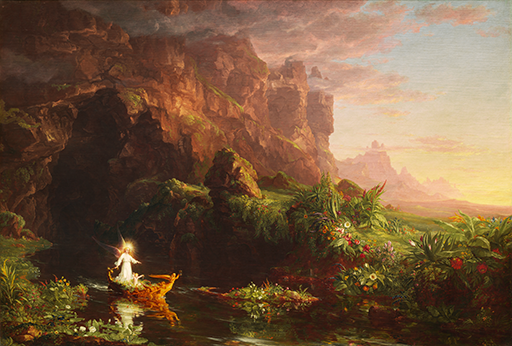
We just finished the work on a new puzzle collection containing 4 beautiful puzzle boxes. It is based on our favorite classical painter Thomas Cole and his wonderful series The Voyage of Life. The puzzle boxes in this collection will be completely free and we will start releasing them as soon as next week for your enjoyment. Until then take a sneak peek of what they look like:
Childhood
Youth
Manhood
Old Age
While classical art is wonderful for puzzles, we realize that it might not be the perfect match for everybody's taste. Therefore we've already started work on the next collection which will be in a completely different artistic branch. We won't reveal yet what it is, instead, we would like to surprise you. Be sure though that it will be adhering to the same quality standards as all the previous works we've been using.
Don't forget to follow our social channels for regular news and some exclusive information about the game: