

Mechanic Miner
Patch v.1.0.1 (27.02.2020)
• Changed the visual indicators for the repair-tool. *When the repair tool is active (press “R”) and the cursor is over a contraption, broken areas will now be highlighted in red.*
• Changed the visual damage-indicator on blocks and parts. They now need to be at least 20% destroyed before showing signs of damage.
• Fixed a crash occurring when quitting the game while the repair-tool is causing a contraption to be lifted.
• Fixed a crash sometimes occurring when switching instances with the repair tool active.
• Fixed a crash occurring when the Wrot would try to grab a bomb.
• Fixed a crash occurring when recycling a the second aether propeller after it has been unloaded
• Fixed a bug preventing the player from completing the achievement for killing all types of enemies.
• Fixed a bug where it was possible to blueprint aether propellers in Story Mode
• Fixed a bug where achievement progress would be shown when launching the game.
• Fixed a bug where the clouds from the Dweller cutscene would float around in the overworld forever in Story Mode.
• Fixed a bug where closing doors and hatches while the player was inside them, could cause the player to fly to space.
• Fixed a bug where it was possible to use portal up to the overworld directly after, but before the cutscene, after killing the Dweller in Story Mode.
• Fixed a bug where it was possible to make two propellers appear the first time Jones digs up a propeller.
Patch v.1.0.0b (Hotfix) (25.02.2020)
• Increased repair speed by 150%.
• Fixed a bug where the player would spawn in the ceiling of The Dweller Arena if the vehicle they entered with was too tall.
• Fixed a bug where the Critter would never spawn.
• Fixed a duplication bug where it was possible to duplicate programs using the inventory.
• Fixed a crash occurring when saving at a checkpoint with some specific parts.
• Fixed a crash occurring if a player having the Twitch integration running would receive Twitch-bits.
• Fixed a crash occurring if a plumbing would be restored using the repair tool the same frame as it was destroyed.
• Fixed a crash occurring in some cases if a part moved by the booster would get deleted.
• Fixed a crash occurring when an aether propeller piece is in the world and ready to be recycled.
• Fixed a crash where systems supporting OpenGL 2.0, but not OpenGL 3.0, would crash without reporting it.
• Fixed a rare crash which could occur when placing connectors on a machine with constraints.
• Fixed a rare crash which could occur when the Dweller attacked.
• Fixed a rare crash which could occur when swapping items in the inventory.
Patch v.1.0.0a (Hotfix) (21.02.2020)
• Fixed a rare crash that could happen when placing blocks in the world.
• Fixed a rare crash that could happen when repairing a block/part that is taking damage.
• Fixed a rare crash that could happen when starting a new game or launching the game.
• Fixed a bug where a plumbing or weapon would continue acting on the input after being disconnected with the dislodge tool.
• Fixed a bug where the first 2 Deep Cave achievement where first unlocked at depth level 11 (should be 5 and 10 respectively).
• Fixed a bug where the Survive an Aether Storm achievement didn’t work in Story Mode.
• Fixed a bug where Hologram John sometimes would not appear after defeating The Dweller.
• Fixed a bug where the Aether Storm would never end in Story Mode.
• Fixed a bug where you would never complete the “Tunnel Dweller” quest.
• Fixed a bug where on-screen text would disappear if the player would hover over a corpse nearby the text.
• Added more Copper in the second tutorial cave.
MECHANIC MINER FULL RELEASE! 👏
We couldn’t be more excited! Mechanic Miner has just been fully released. Enjoy new machine-parts like the Booster, adventure into the new reworked Story Mode, fight new mobs and bosses and much more!
Take a look at some of the new stuff in our Launch Trailer:
https://youtu.be/r0cWZ0k4epk You can also enjoy 14 tracks, including 1 special track that is not in-game, in the Mechanic Miner OST that we just released! Be a champ and support our banjo-flicking sound-magician Josef Aarskov as all revenue from the OST goes to him!
Let us know what you think about Mechanic Miner, join our Discord, leave a review, share your contraptions on the Steam Workshop and remember to pet Jones!
Happy constructing!
Greetings
Team Mechanic miner.
Mechanic Miner Original Soundtrack 🎵
As a special treat for you, you can listen to one of the tracks in its entirety here:
https://youtu.be/RNyTX_hYSho
When full release hits, you’ll be able to purchase the OST for $5.99 // €4.99 or in a bundle including the Full Version of Mechanic Miner with a discount.
The Mechanic Miner OST is created by the one and only Josef Aarskov, and all sales from the OST (also through the bundle) will go directly to Josef. So if you want to support our banjo-flicking sound-magician, this is your chance!
Happy bopping!
Cheers
Team Mechanic Miner

Prepare your contraptions + Blueprint Competition!
Consequently, with the new connector system, it’s very likely that the current Blueprints in the Steam Workshop are not going to work once we hit full release. So, to make sure the Steam Workshop is not full of dysfunctional contraptions we’re going to mark all Early Access Blueprints as incompatible just before release.
Update your Blueprints
Don’t worry, we’re giving you a chance to update your Blueprints to the new connector system already now. We just released a new special experimental build that includes the new upcoming connector system.
From the new experimental build you’ll be able to upload Blueprints and these Blueprints will be automatically tagged as ‘new’ blueprints when uploaded to the Steam Workshop, meaning they will NOT be turned incompatible when full release hits (although they will be incompatible until full release).
So head over to the experimental build to try out the new connectors and to prepare your favorite Blueprints for full release!
If you want to know how to enter the experimental build, you can read more here
If you want to know how the (new) connector-system works, you can read a guide here
Blueprint Competition!
As a small bonus, the new experimental build includes the new upcoming Main Menu. The new Main Menu has the ability to showcase different contraptions/vehicles in action, but currently it’s only showing a few developer-made constructions, like the walking spider:
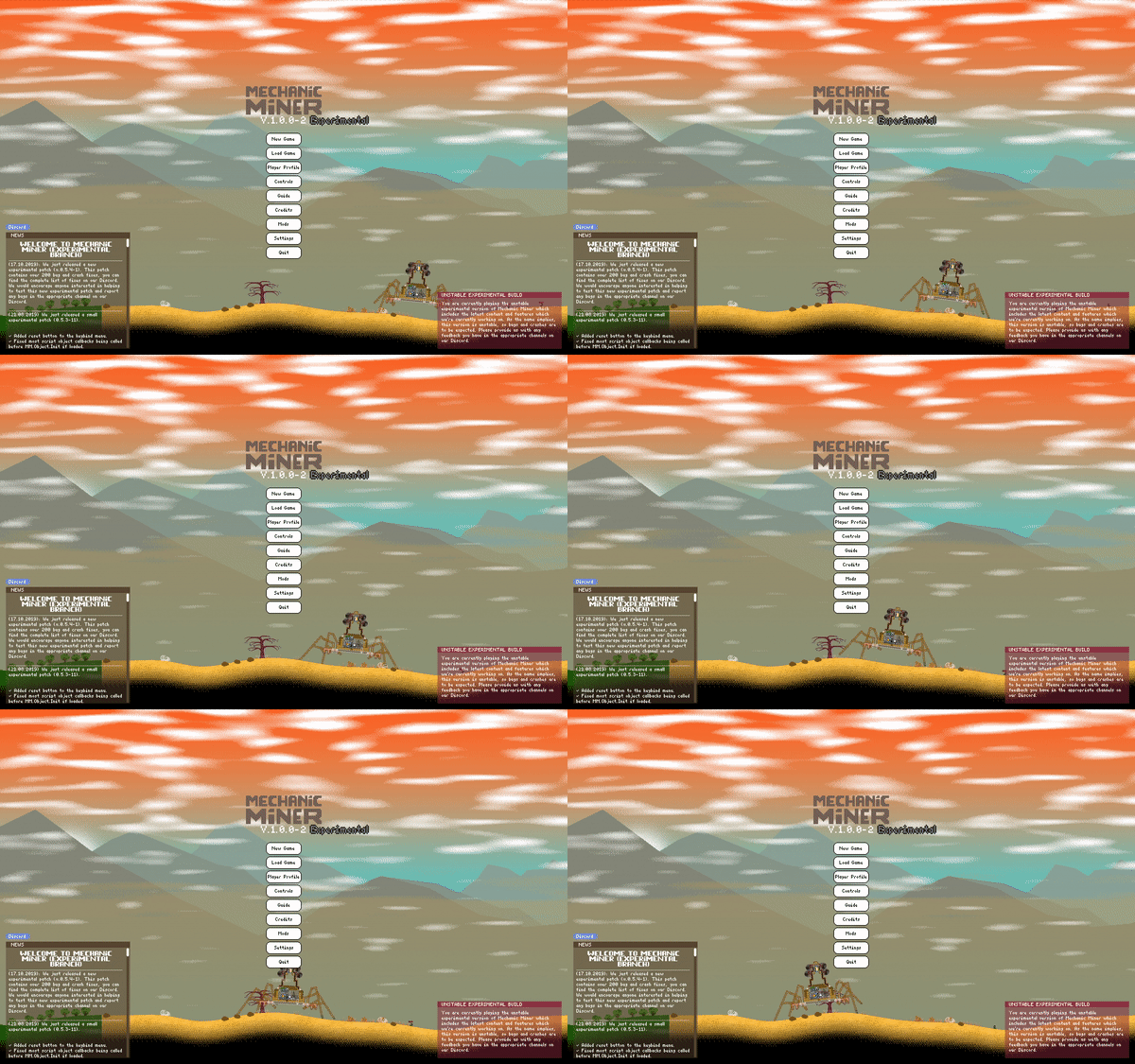
But wouldn’t it be cool if it were YOUR contraption traversing the Main Menu screen!? We want to add a bunch of community made contraptions to the Main Menu so we’re going to have a little Blueprint Competition. The Mechanic Miner team is going to pick our favorite community made contraptions and add them permanently to the Main Menu in Mechanic Miner!
If you want to submit your Blueprint to the competition, read more here!
Happy constructing everyone!
Greetings
Team Mechanic Miner

Mechanic Miner Full Release announcement!
We are pleased to announce that Mechanic Miner is leaving Early Access! In a month (on February 20), we’ll be pushing the big red button that sends Version 1.0 out into the world!
We’ve been teasing new content to the game for the past few months, and it’s great to finally be able to share our full release announcement with you all! If you want to know more about what we’ve done and what we have in store for full release, check out the infographic below.
Our main reason for pushing the game to version 1.0 is that with all the new content and gameplay changes, the game is finally in a state where we’re comfortable releasing it. The difference between what has been available in the public (and even the experimental) build and what is coming next month is so big, we felt like it merited a full release.
When Mechanic Miner leaves Early Access, it’ll have been 274 days since we entered Early Access (and even longer since our first alpha and beta tests!). We would like to thank our alpha, beta and Early Access community for all their help; whether you reported a lot of bugs, suggested changes to the game, made fanart or video content or something else entirely. We’re proud of our game’s community, and hope that you’ll continue to be a part of our journey after we leave Early Access.
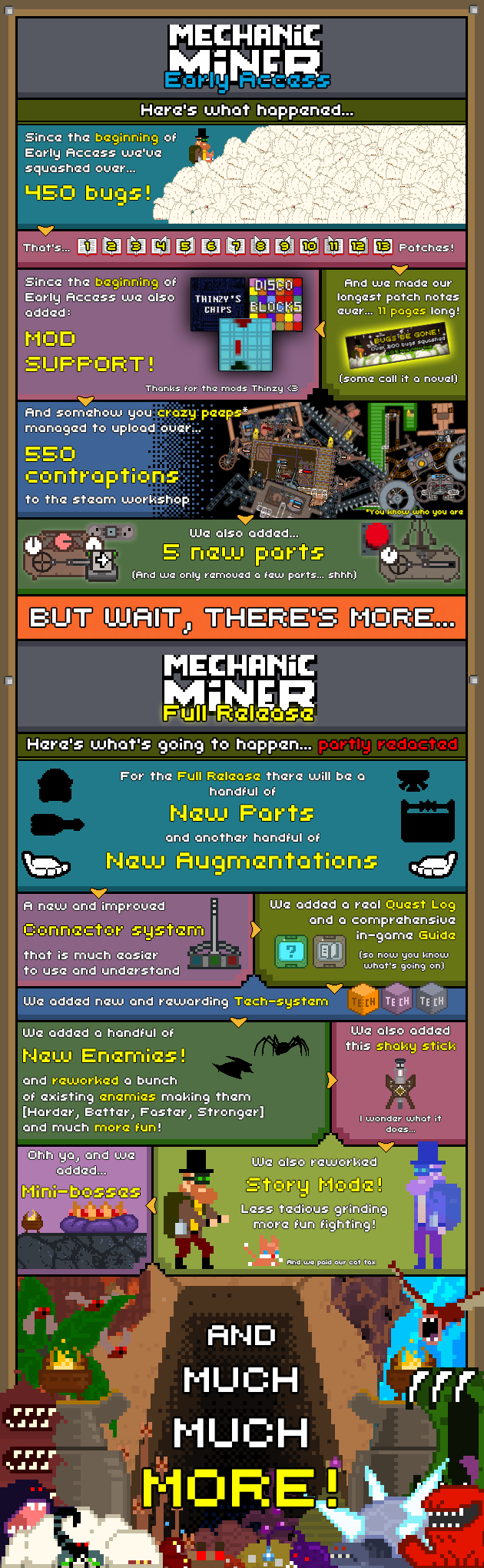
Your help has enabled us to make Mechanic Miner a far superior experience to what it was back when we entered Early Access in 2019, and we can’t thank you enough for all your feedback & suggestions! We really appreciate your enthusiasm and passion for Mechanic Miner!
Thank you
Greetings
Team Mechanic Miner
Patch v.0.5.4b: Hotfix with performance improvements
• Fixed a bug where placing a door on a cable would cause the door to not be eligible for enclosure creation.
• Fixed a bug where blueprints in the inventory did not have any textures when loaded.
• Fixed a bug where the transferring resources in the inventory with CTRL-click would cause a small flash in the slots.
• Fixed a bug where blueprints would be constructed instantly.
• Fixed a bug where pistons and bearings sometimes would fuse in the wrong position.
• Fixed a crash occurring when a piston was fused twice to the same part.
• Fixed a memory leak caused by constraints (from pistons, wheels and so on).
• Fixed a crash sometimes occurring when a machine that had (but now deleted) a piston on it was destroyed.
• Fixed a crash occurring when manually quitting the game (like using alt + f4).
• Fixed a bug where resources in some cases would create more resources when it was stacked.
• Fixed a bug where placing blocks/parts on a grapple locked machine would cause colliding parts to be stuck in a grapple lock state.
• Fixed a bug where any held resources would be not properly be returned to the inventory when pressing ESC.
• Fixed a bug where you could not dislodge plumbings from static objects.
• Fixed a bug where tiles with big machines on it were not loaded correctly.
• Fixed a bug where contraptions would not always load after entering an instance.
• Fixed a bug where a contraption slightly off-screen would sometimes de-spawn (unload) to early.
• Fixed a memory leak caused by saving while tiles are being loaded.
• Fixed a memory leak caused by quitting the current game while tiles are being loaded.
• Improved tile rendering performance.
Patch v.0.5.4 (07.11.2019): Bugs be gone!
Patch 0.5.4 is out! This is the largest bug fix patch we have made for Mechanic Miner yet, with over 200 bugs squashed!
We would like to thank our community for their help with identifying the swarm of bugs - thank you so much for your feedback and suggestions!
Version 0.5.4 includes fixes to graphics particles, blocks and various parts misbehaving as well as a handful of collision errors crash fixes. It also includes quality of life improvements such as additional information in the load game menu, so that you will be warned if you try to load a manual save where a newer auto-save exists. These are just some of the changes, you can find the full list of patch notes below!
v.0.5.4 patch notes:
Changes:
• Reworked the Grappler. You can now only withdraw the Grapplers chain using right-click. The Grappler will now instantly fire to the target position and can be fired to a new target position at any time (meaning you do not need to withdraw the chain).
• The vegetation in the Chromite patch in the Deep Cave now gives water instead of wood.
• Reduced the cooldown of the Demon Interceptors phasing ability.
• Choosing the Respawn at checkpoint option in the menu will now display a confirmation box.
• Added information in the load game menu showing if the player is about to load a game that has a newer autosave.
• Using the recycle tool on a bearing will now prioritize cross-joint connectors (connectors running through the bearing) instead of the actual bearing.
• It is now possible to interact with nearby usable parts while being in fly-mode.
• The forum button was removed from the news section.
• Improved performance of contraptions using Tubes (part).
• Improved loading time of big game by up to 50%.
Fixes:
Enemies:
• Fixed a bug where the Demon Interceptor would start with its phasing ability on cooldown.
• Fixed a bug where enemies would sometimes spawn inside the terrain in the Deep Cave.
• Fixed a crash occurring if a Wrot would try to lift a static machine (a contraption attached to a foundation).
• Fixed a bug where bats sometimes would spawn behind the graphical cave-holes in the Deep Cave.
• Fixed a bug where the falling rocks (caused by the Dweller) would do damage before falling (or even spawning).
• Fixed a bug where Evilplant would still be attached to an object even though that object was destroyed.
• Fixed a bug where the Dweller would be stunned (and undamageable) when shot with a phase-chaining railgun.
• Fixed a bug where the Cavesquid would not flash red when taking damage.
• Fixed a bug where the Cavesquid would start to melee attack even though it were not in range.
• Fixed a bug where the Cavesquid would point in the wrong direction when melee attacking.
• Fixed a bug where the Evilplant sometimes would still be attached to a block even though it was destroyed/removed.
• Fixed a bug where the Dwellers hitbox could be disconnected from its body by using a foundation.
• Fixed a bug where the Dwellers hitbox would extend above it’s head, causing anything above it to be hit/pushed.
• Fixed a bug where the particles appearing when a mob dies would spawn where the mob died and not from the actual corpse of that mob.
• Fixed a bug where mobs that should do area damage does not always do area damage.
• Fixed a bug where anything trapped in the back of the Dwellers body were not destroyed as it should be.
• Fixed a bug where Maggots sometimes would go into idle-state unintentionally.
• Fixed a bug where the hitbox of the Anglerfish were too small.
• Fixed a bug where the hitbox of the Anglerfish were offset when dead.
Blocks and parts:
• Fixed a bug where placing any connectors on a foundation so it would overlap with the terrain would cause these connectors to become ghosted.
• Fixed a crash occurring when rolling a grapplers hook into the ocean-area.
• Fixed a bug where the grapplers hook could not attach to terrain in the ocean-area and the flat terrain (creative mode).
• Fixed a bug where the grappler hooks collision box were bigger than the hook graphics.
• Fixed a bug where the grappler hook were blocked by enemies.
• Fixed a bug where it was possible to cheat gravity by constantly firing one or more grapplers upwards while falling.
• Fixed a bug where the Grapplers head would not rotate when shooting it the second time.
• Fixed a bug where background blocks for connectors were not always removed upon deleting the connector, causing an invisible non collidable block to be left behind.
• Fixed a bug that made it possible to create bearings with any connectors.
• Fixed a bug where it was possible to create ghost-blocks by trying to place blocks that is currently being auto-lifted.
• Fixed a bug where it was possible to place plumbings underground using a foundation.
• Fixed a bug where it was possible to create a stack of 0 blocks on the cursor by picking up any blocks from a storage with left mouse click and then hold CTRL while clicking the same space in the storage.
• Fixed a bug where colliding objects sometimes would not follow through an instance change.
• Fixed a bug where bombs would instantly explode after an instance change or when loading a game with bombs near the player.
• Fixed a bug where particles from the Aeolipile Engine would spawn in the wrong position if the engine were rotated.
• Fixed a bug where dragging connector blocks down in the terrain and then out of terrain would create invisible non collidable blocks.
• Fixed a bug where a small version of the Piston sometimes would try to fuse with itself when using the fuse tool on it.
• Fixed a crash occurring when fusing the Pistons base and head to eachother with blocks, then fusing that Piston to two seperate foundations and then deleting the block.
• Fixed a bug where a plumbing could get stuck in the air when entered while grapple-locked.
• Fixed a bug where it was possible to create a floating static contraption by placing a foundation on top of the foundation that the contraption were attached to.
• Fixed a bug where the delay(logic gate) would always use a 2 second delay no matter what is was set to.
• Fixed a bug where rotating non-square plumbing would be off-set when placed in the world.
• Fixed a bug where fusing a piston to a static object would cause the pistons head to spin around as many times as it was rotated.
• Fixed a bug where it was possible to create non-interactable static contraption by placing and draggin foundations in a specific way while holding shift on an already placed foundation.
• Fixed a bug where the shotgun spread from an augmented cannon would not spread properly according to mouse-position when fired.
• Fixed a bug where the counter (showing stack amount) would also rotate if the part/block that is being placed is rotated.
• Fixed a bug where sawblades were not damaged by bombs.
• Fixed a bug where rotated plumbing would not check for obstructions according to its new rotation.
• Fixed a bug where some parts did not update their damage texture when being damaged by bombs.
• Fixed a bug where a spike would have one global damage cooldown, instead of a separate cooldown for each mob.
• Fixed a bug where blueprints with foundation would not properly check to see if it had space to be placed which could cause overlapping parts.
• Fixed a bug where bombs could be placed inside of blocks if the mouse position was in the clear when placing the bomb.
• Fixed a bug where the propellers thrust was not centered in the middle.
• Fixed a bug where manually placed connectors (cable, belt, etc.) would not return its cost when recycled from a contraption that was made from a blueprint.
• Fixed a bug where blueprinting a rotated foundation would reset the foundations rotation in the blueprint.
• Fixed a bug where blueprints would move/change position before being placed in the world.
• Fixed a bug where blueprints would sometimes render any enclosures inside it before it was placed in the world.
• Fixed a bug where the blueprint inventory image would not be placed in the center.
• Fixed a crash sometimes occurring if a player would cancel placing a blueprint with pistons.
• Fixed a crash occurring if a player would place a blueprint with invalid parts.
• Fixed a bug where spikes did not take velocity into account when calculating damage dealt.
• Fixed a bug where the hatch would not properly create an enclosure when it should.
• Fixed a bug where the background grid on plumbings sometimes would be stuck green after using the repair tool.
• Fixed a bug where a doors collision would sometimes be wrong if the door were connected to a cable.
• Fixed a bug where weapon projectiles would sometimes spawn at a slightly incorrect position when shooting.
• Fixed a bug where logic gates would be reset if anything were fused to a contraption that those logic gates were attached to.
• Fixed a bug where parts/blocks were loaded one frame after the game were loaded.
• Fixed a bug where connectors (belt, cable, etc…) were not rendering blue when hovered over constraints when being placed.
• Fixed a bug where connectors (belt, cable, etc…) were not rendering at all when hovered over parts it could not connect to when being placed.
• Fixed a bug where connectors and machines would try to snap (connect) to wheels when being placed although they could not.
• Fixed a bug where foundation would try to snap to dynamic contraptions even though it can not connect to them.
• Fixed a bug where it was possible to connect a bearings between two wheels.
• Fixed a bug where open doors and hatches would not ignore projectile collision.
• Fixed a bug where all projectiles would have same collision radius. Collision now matches texture of each projectile.
• Fixed a bug where projectiles fired from weapons would sometimes hit the weapon or other weapons next to it right away.
• Fixed a bug where a piercing projectile (from an augmented Ballista) would not pierce enough targets.
• Fixed a bug where projectiles fired from a weapon with an exploding modules would not explode on terrain collision.
Quests and objectives:
• Fixed a crash occurring if the player would try to place blocks/parts in the world while being far away from Hologram John.
• Fixed a bug where it was possible to prematurely complete objectives that requires a certain amount of resources by moving those resources around in the inventory.
• Fixed a bug where the player would get stuck in the questline if the construction of planks were canceled during the objective to build a bridge in the Spaceship (tutorial).
• Fixed a crash sometimes occurring when the failed quest notification appears after the ships engine blows up in the tutorial.
• Fixed a bug where the red barrier at the end of the tutorial were removed to early.
• Fixed a bug where the critter in Act 1 Sand Cave could be pushed around with blocks causing it to lose gravity.
• Fixed a bug where loading the first autosave created when finishing the ship tutorial would load the game with the quest to use the escape pod.
• Fixed a bug where your vehicle could get stuck in the Flux Barrier by asking Hologram John near the barrier to restore it.
• Fixed a bug where re-loading in the Sand Cave just after freeing the critter would cause the critter to get stuck.
• Fixed a bug where the critter would sometimes despawn in the Sand Cave.
• Fixed a bug where Hologram John sometimes would not appear at the Analysis Engine.
• Fixed a bug where the barrier at the end of the tutorial (marsh) would be removed before it was supposed to.
• Fixed a bug where the Analysis Engine becomes unusable during the quest to retrieve Nickel.
• Fixed a crash occurring when unloading the tutorial car when it is partly done and then returning to it and finishing it.
• Fixed a bug where John is teleported to the wrong position when leaving the room during and before the first Aether Eddy in the ship tutorial has passed.
• Fixed a bug where the Flux Barrier in the temple would not load fast enough, making it possible to bypass it.
• Fixed a bug where the white selection indicator on the Analyses Engine would be in an incorrect position after being dropped by the Dweller.
• Fixed a bug where it was possible to use zoom in the ending cutscene in the ship tutorial.
• Fixed a bug where the amount of planks would show incorrectly in the tutorial ship build a bridge quest if the player had already constructed planks before the quest starts.
• Fixed a bug where the critter could get stuck in any player made parts/blocks when jumping out of the Analysis Engine after defeating the Dweller in Story Mode Act 1.
• Fixed a crash occurring when if the critter hits any player made parts/blocks when running to the Sand Cave in the start of Story Mode Act 1.
• Fixed a bug where restoring your car at Hologram John in Story Mode would not always remove all the parts/blocks left in the world as it should.
• Fixed a bug where the GUI would disappear forever if the player would die just before the end cutscene in Story Mode Act 1.
• Fixed a bug where the player sometimes would get stuck in the vehicle when asking Hologram John to restore the vehicle.
• Fixed a bug where it was possible to talk to Hologram-John while being dead.
• Fixed a bug where placing the planks randomly in sections for the bridge in the tutorial (ship) could cause parts of the bridge to disappear.
• Fixed a bug where placing planks in any part of the tutorial (ship and marsh) where the player is supposed to place planks, would sometimes indicate that the plank can not be placed even though it can.
• Fixed a bug where the player would lose control if left mouse button were held while falling down the pit in the ship tutorial.
• Fixed a bug where the ladder that John is climbing would be deleted if the player tried to place blocks while being on it in the tutorial.
Terrain and vegetation:
• Fixed a bug where it was possible to teleport through the flux barrier in Act 1 (story mode) by placing a lever on the other side of the barrier and then mounting it.
• Fixed a bug where it was possible to place parts and blocks inside the flux barrier by using a foundation placed next to the barrier.
• Fixed a crash occurring if a NaN tile was created.
• Fixed a bug where rotated vegetation would have an incorrectly placed hitbox (used when harvested).
• Fixed a bug where some vegetation had collision although they should not.
• Fixed a bug where most vegetation in the overworld would be created incorrectly, causing it to look like the vegetation were hovering over the ground.
• Fixed a bug where the vegetation in the Deep Cave never used a random seed.
• Fixed a bug where the burned-pit (created by the flux barrier in the overworld) would not have the correct collision.
• Fixed a bug where minerals in caves would sometimes spawn on top of eachother.
• Fixed a bug where a non-collidable terrain-line were displayed on the left-top side of the Dweller Arena.
• Fixed a bug where the flux barrier in Act 1 Vulcan temple would not reach the ceiling.
• Fixed a bug where the top of the flux barrier in Act 1 Vulcan temple would disappear if the game was reloaded with the player was standing near the top of the barrier.
• Fixed a bug where the shuttle-cars would fall of its rail if the player would pan the camera when entering the third room in the tutorial Spaceship.
• Fixed a bug where the area where the Dweller Cave would spawn sometimes were too small.
• Fixed a bug where the player sometimes would get teleported inside the Spaceship (tutorial) if the player were climbing a ladder when the first Aether Eddy appears.
• Fixed a bug where the shuttle-car sometimes would get stuck when reaching the end destination in the Spaceship (tutorial).
• Fixed a bug where the beehive could be harvested separately from the tree.
• Fixed a bug with collision in the ship (tutorial) causing low fps.
• Fixed a bug where changing instances while on a vehicle that is upside down would cause the vehicle to be buried into the terrain.
• Fixed a bug where the player would be teleported back to the previous instance if not holding up while climbing a ladder and changing instance (only in ship tutorial).
• Fixed a bug where the footsteps/walking sound would not play when walking in the ship (tutorial).
• Fixed a bug where the planks in the bridge (ship tutorial) and tutorial vehicle (marsh tutorial) would not have any collision before being completely constructed.
• Fixed a bug where projectiles were not destroyed when hitting a flux barrier (only in Story Mode).
• Fixed a bug where the player would not unlock a level (in the fast travel menu) when travelling upwards (previously only worked with traveling downwards).
• Fixed a bug where the grapple-tool sometimes would prioritize static-contraptions instead of non-static-contraptions if they were at the same point when being grappled.
• Fixed a bug where when fusing a part, the part would also try to snap (connect) to wheel although it can not connect to wheels.
Player, controls and inventory:
• Fixed a bug where it was possible to jump in the air after walking out of a ledge.
• Fixed a bug where it was possible to move the player during the first cutscene in the tutorial.
• Fixed a bug where it was possible to hold multiple types of resources on the cursor by using the hotkeys to choose another resource while already having another resource on the cursor that was picked up using the cursor.
• Fixed a bug where it was possible to pick up things in the inventory with the cursor through dialogue boxes.
• Fixed a bug where the player could get stuck in NaN, the player will now be teleported back to spawn point.
• Fixed a bug where it was possible to throw lifted objected if they were lifted with the grapple lock tool.
• Fixed a bug where it was possible to change the amount and type of a resource by placing two different resources on top of eachother in the world and then continuously pick and drop them on top of eachother.
• Fixed a bug where placing plumbing or wheels to a grapple locked object would cause the grapple lock to let go.
• Fixed a bug where it was possible to throw objects lifted by the player after placing a block on that object while it is being lifted.
• FIxed a bug where the player would be teleported to the wrong position if entering an instance while mounted on a static object.
• Fixed a bug where it was possible to harvest vegetation while moving if the player would use the harvesting tool while entering an instance.
• Fixed a bug where breath would restore while inside ghost-blocks even when the player is submerged in water.
• Fixed a bug where lifting a part or block that is being destroyed will cause the grapple-tool to not function correctly.
• Fixed a bug where the grapple lock would let go if another object attached through a bearing to the original part is lifted by the player.
• Fixed a bug where the grapple lock would stay active if a connected lifted object is dislodged.
• Fixed a bug where the double tap to fly function would sometimes not work when reloading a game.
• Fixed a bug where the player could not construct certain parts in the water.
• Fixed a bug where using the zoom out function while respawning would put the camera to far away.
• Fixed a bug where using the recycling tool to recycle items in the inventory could delete then wrong items if the mouse were not moved after activating the recycle tool.
• Fixed a bug where entering a door while the camera pan function was active would cause the camera to get stuck until the player activated the camera pan function again.
• Fixed a bug where falling into the pit in the ship (tutorial) while building the planks would instantly finish the building timer and leave the visual timer frozen on the screen.
• Fixed a bug causing irregular camera movement when using the camera pan function while mounting a lever.
• Fixed a bug causing irregular camera movement when using the camera pan function while having the chat open.
• Fixed a bug causing the recycle tool to not deselect machines when hovering over the inventory.
• Fixed a bug where it was possible to throw stuff with right-click when the player is falling.
• Fixed a bug where John’s weight were not applied when on a ladder.
• Fixed a bug where the grapple-lock disable for one frame when placing a part on the grapple-locked contraption.
• Fixed a bug where the grapple-lock point would change position when placing a part on a grapple-locked contraption.
• Fixed a crash occurring when placing a resource from the ground on a critter in the inventory (Story mode only).
• Fixed a bug where clicking the inventory while the mouse were moving would not work.
• Fixed a bug where John would grapple in the wrong direction when trying to grapple a foundation.
• Fixed a bug where the player would be left behind when entering an instance on a vehicle.
• Fixed a bug where right-clicking a resource (in the world) would not always pick up that resource.
• Fixed a bug where a blueprint hovering on the cursor would disappear if the game autosaves.
• Fixed a bug where anything held on the cursor would disappear if the game was saved during that time upon reloading.
• Fixed a bug where the loading the checkpoint at the start of a story mode game (without the tutorial) would cause John to get stuck in the vehicle.
• Fixed a bug where it was possible to drop resources out of bound.
• Fixed a bug where the same type of resource sometimes would not stack when moved on to of each other between the inventory and containers.
• Fixed a bug where picking up half the resources of a stack from a container and then closing the container would cause the stack on the cursor to disappear.
• Fixed a bug where very small stacks of resources in the inventory would display the wrong number.
• Fixed a bug where trying to recycling anything on a grapple locked contraption would cause the grapple lock to let go.
• Fixed a bug where it was possible to create bearing with planks and bricks by forcing the bricks on top of the plank.
• Fixed a bug where the cannon were not creating the white interactable indicator when the player was nearby.
• Fixed a bug where parts of the ballista were not creating the white interactable indicator when the player was nearby.
• Fixed a bug where rotated parts would not rotated before the cursor is moved if the part/cursor is near anything it tries to attach itself to.
• Fixed a crash sometimes occurring when grapple-locking a plumbing and then deleting any attached blocks to that plumbing.
• Fixed a bug where the player did not take damage from explosions.
• Fixed a bug where resources could not be picked up during the first seconds after loading a game.
• Fixed a crash occurring when clicking the edge of a container with a resource-fragment on the cursor.
Graphics and UI:
• Fixed a bug where some useable parts that were rotated would make a non rotated flash when the player were nearby.
• Fixed a bug where save-games with a long name would display incorrectly.
• Fixed a bug where the Air Tether would create a huge amount of particles if the player were harvesting mineral or vegetation while nearby a running Air Tether.
• Fixed a bug were a confirmation box would not be displayed when a setting that requires a game restart were changed in the settings menu.
• Fixed a bug where weapons attached to more types of modules would sometimes not display the resource-transfer happening in the tubes even though the resource actually were being transferred.
• Fixed a bug where the background graphics and the ocean were displayed incorrectly when moving between the desert and ocean area.
• Fixed a bug where the background enclosure graphic would disappear when opening an attached Hatch.
• Fixed a bug where opening the blueprint menu would cause a huge lag-spike if the player had many blueprints.
• Fixed a bug where the Foundations graphic did not always match its actual position in the world.
• Fixed a bug where all enclosures inside a contraption would always use the same texture.
• Fixed a crash sometimes occurring when trying to load a save-game while the saved game folder is being loaded.
• Fixed a bug where the load game menu will freeze going back to the menu immediately after loading a save-game.
• Fixed a bug where small miss-colored pixels would be created in the terrain background in the Deep Cave and Mines.
• Fixed a bug where the dialogue box appearing after uploading a blueprint to the Steam Workshop would linger for too long.
• Fixed a bug on the color-augmentation infobox that caused non discovered color-augmentations to still show their margins.
• Fixed a bug where the critter would emit a huge amount of particles when getting hit by a spike or sawblade.
• Fixed a bug where the spike would emit particles everytime fra hitting an enemy, should only emit particles when doing damage.
• Fixed a bug where the control conflicts indicator in the controls menu would still be active even after resetting the controls.
• Fixed a bug where using the blueprint-tool in quick succession would sometimes break the blueprint UI.
• Fixed a bug where repair cost would show incorrectly if the repair cost was 0.09 or lower.
• Fixed a bug where hovering over the broken terminal (tutorial) while holding shift would cause the terminal to change layer.
• Fixed a bug where adding the enclosure to the tutorial car (in the tutorial) would not check for obstructions.
• Fixed a bug where the error message occurring when trying to use the copy tool on a part/block with unlocked augmentations would disappear to fast.
• Fixed a bug where some keys would not render in the controls menu when trying to rebind keys.
• Fixed a crash occurring if the player would hit escape right after entering the load game menu.
• Fixed a bug where saving a game, then loading another, quitting that and then loading the first saved game would actually load the second created game.
• Fixed a bug where saving a game with dots in it would cause that game to be unloadable.
• Fixed a bug where a blueprint cost would sometimes display an incorrect cost if the cost were rounded down.
• Fixed a bug where spikes would have the wrong background when placed inside enclosures.
• Fixed a bug where the blueprint cost-area would sometimes become completely black when editing any blueprint.
• Fixed a bug where the main menu background sometimes would not cover the entire screen.
• Fixed a bug where the stars at night would light through the mountains.
• Fixed a bug where the mountains in the Marsh area would not appear at night.
• Fixed a bug where the player sometimes were not able to close down the fast travel menu.
Sound and Music:
• Fixed a bug where the Aether Storm music would continue forever if the player would switch to creative mode during an Aether Storm.
• Fixed a bug where the lowest setting on the music bar in the settings menu were 6 times higher than equivalent setting on the SFX and Ambient bar.
• Fixed a bug where some sounds would not pause when the game was paused.
• Fixed a bug where some sounds would never play after loading into a saved game.
• Fixed a bug where the sound of filling or emptying a pressure tank would never stop.
• Fixed a bug where pressing escape in the Main Menu would cause the music to stop and start the music that were played in the last saved game.
• Fixed a bug where the Temple Music associated with the Flux Vortex would reset every time the Flux Vortex for any reason were unloaded in creative mode.
• Fixed a bug where the music would not play before entering an instance or reloading the game after transferring a story mode game to a survival mode game.
• Fixed a bug where the button click sound would disappear after completing and quitting a story mode game.
• Fixed a bug where the sound of the grappler (part) retracting would loop endlessly if the player unmounts the grappler while it is being retracted.
• Fixed a bug where the grapplers (part) movement sound would first stop a few seconds after the player stopped using the grappler (only happened if grappler was controlled through cable).
• Fixed a bug where the Scorpion would walk without a sound after being feared with the multitool.
Mod-support & Community Mods
Today we released patch v.0.5.3 which includes the first iteration of Mod-support. We’ve been testing Mod-support for a few weeks on the experimental branch, so there’s already a few Community made mods in the Steam Workshop for you to try!
Here’s two very cool community made mods created by Digger1213 and Thinzy:
Aether Tech
(Created by Digger1213)This mod adds a new part and block themed around the Aether. How it works... that’s best explained by the creator himself:
“Adds the Aether Ripper, a machine capable of tearing holes in the aether itself using large amounts of steam from a boiler. Aetherium plates are pulled towards these tears, allowing for unique machine and weapon design!” – Digger1213.
Here’s an example of a custom-made weapon that is using the Aether Ripper and Aetherium plates:
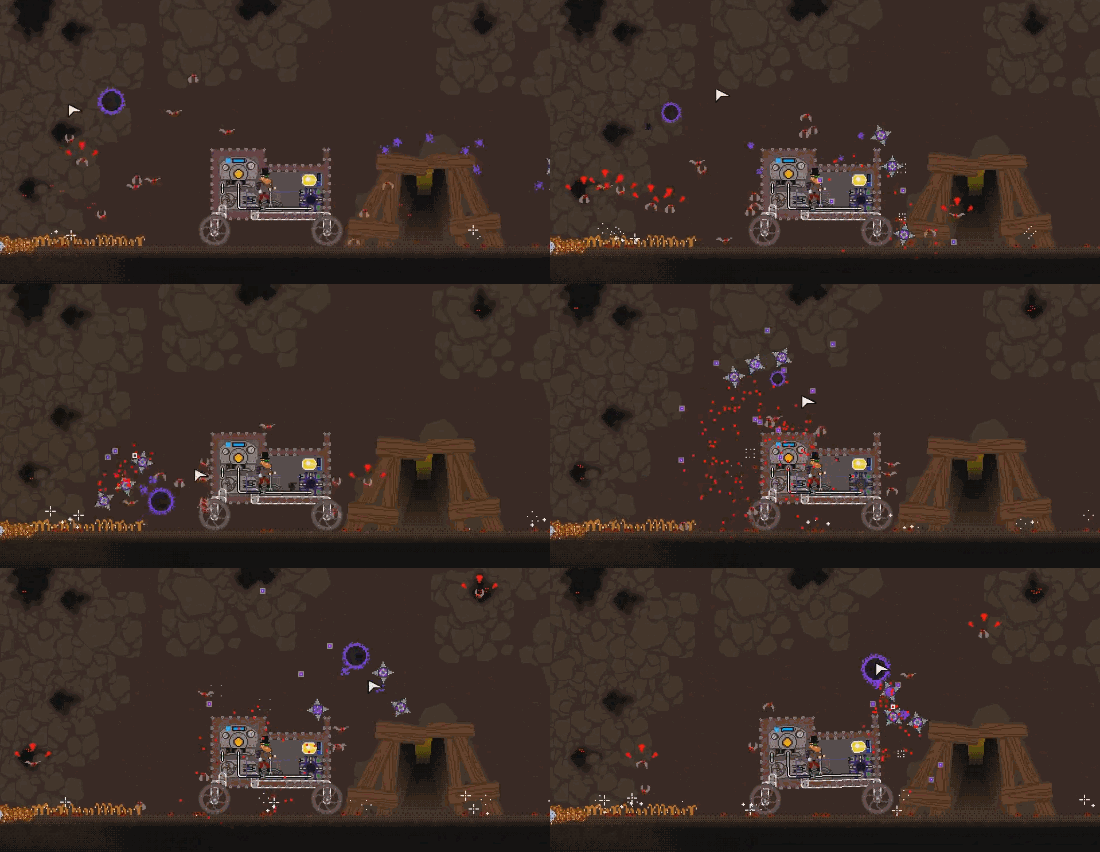
Aether Tech on Steam Workshop
Space battle: The Game
(Created by Thinzy)This mod includes a small arcade-alike mini-game for you to play with. Although this mod is somewhat advanced, it’s quite easy to set up: Simply connect a lever to the grey input, press down and you’re playing! As a small bonus, Thinzy added two different outputs allowing you to chose what should happen if the player either loses or wins the game. Here’s Thinzy's own idea of a punishment for losing:
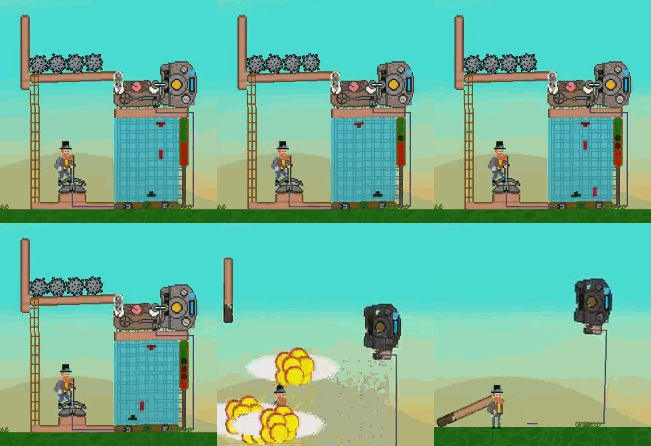
Space battle: The Game on Steam Workshop
Create a mod!
If you’re into modding yourself, we would love to see what you can create. For more information on how it works (including the API) please look at this post and be sure to join our very helpful Discord Community.
We hope to see many more mods in the future. So be sure to upload your mods to the Steam Workshop!
Greetings
Team Mechanic Miner