Hi, This is another progress update. The last build update was in Update #74
The main theme of this update is a continuation of the previous update: [Updated material system]. This is a subgoal under main goal [Engine Simulation] which will be represented by the [Treadmill integration] into the game build.
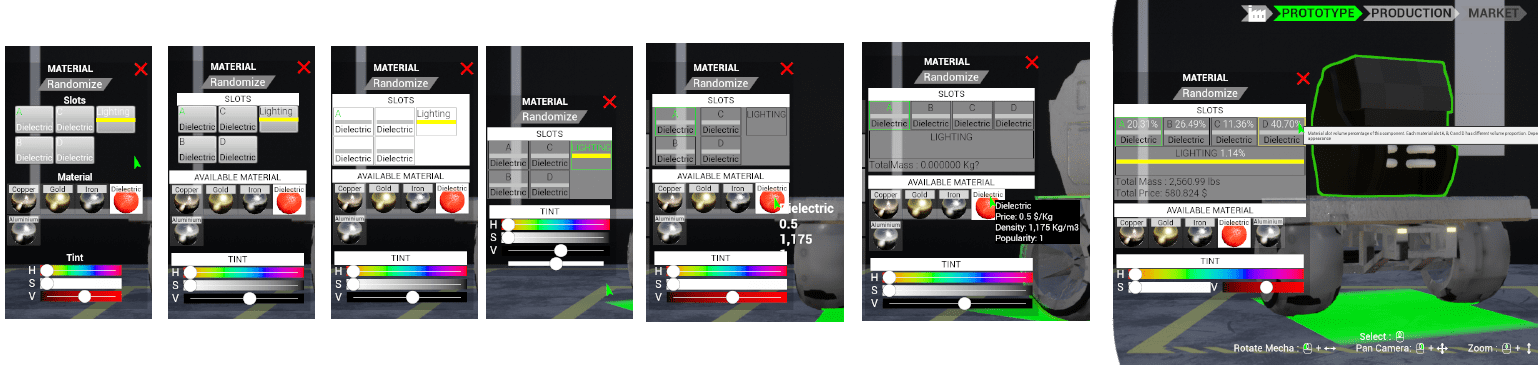
MATERIAL UI
IMG1: Some improvements made here: groupings, detailed information about a material selection price, density, popularity, etc. For a bigger preview; open image in a new tab
IMG2:Added on hover material slot visualization
Several iIterative functional improvements; visual still work in progress.
MATERIAL GAMEPLAY
all working as designed but not as intended. value of gold breaks the game both in cost and mass. need to tweak the value.
Material is now rendered "more" correctly. the masked data is now absolute; previously was wrong as there was red, reddish, kinda red, etc. now just absolute red; i.e: RGB(255,0,0)
The system is also now extensible to support other material selection.
ENGINE SIMULATION
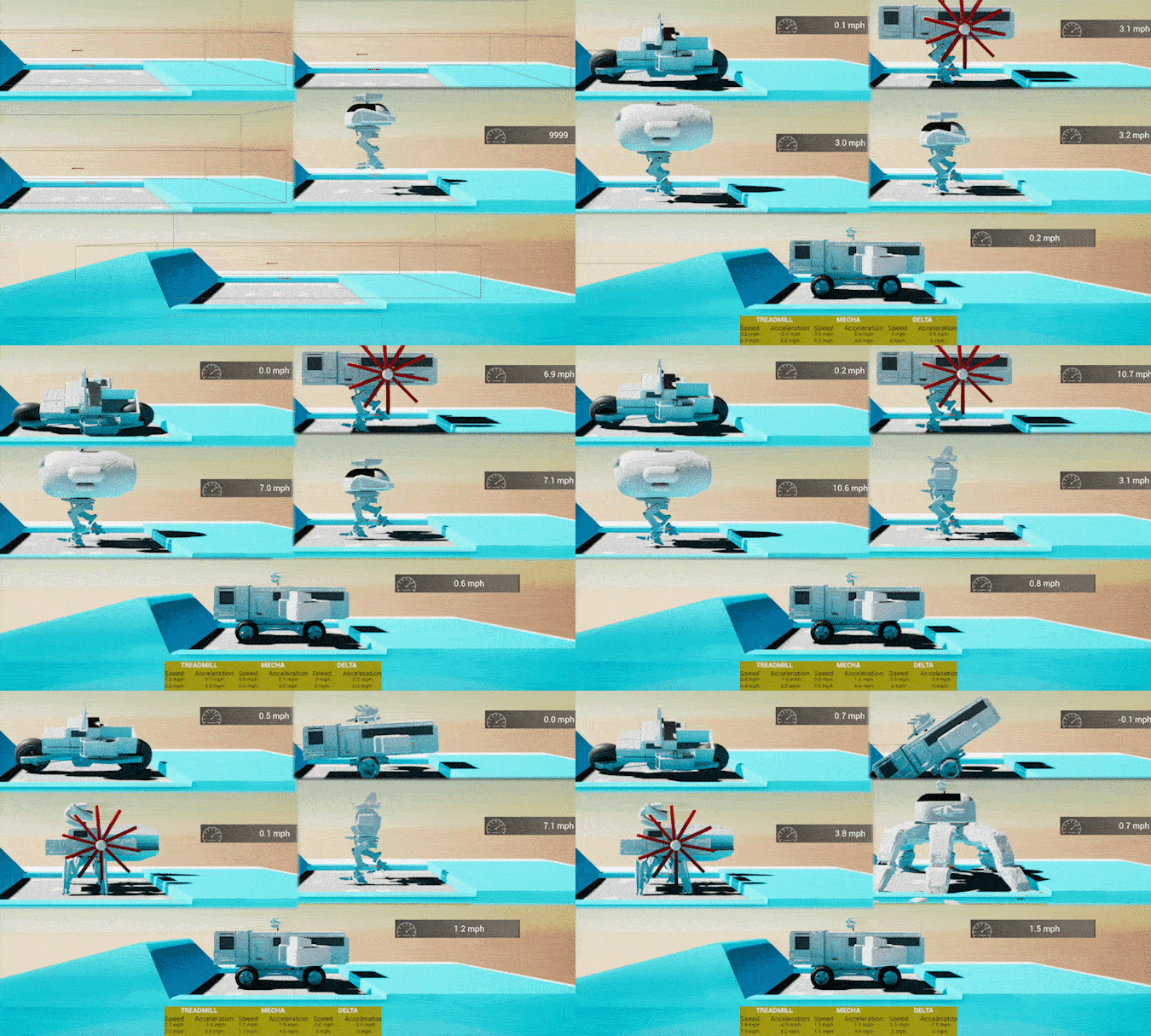
IMG5: In the green box are the 3 different engine power inputs 20, 200, and 2000. This is checking the top speed calculation mentioned in U#75 and the drag factors explained in U#76.
Various improvements, testings, etc
OTHERS
IMG6: Snapshots of camera and lighting tweaking process. Not yet available in-game
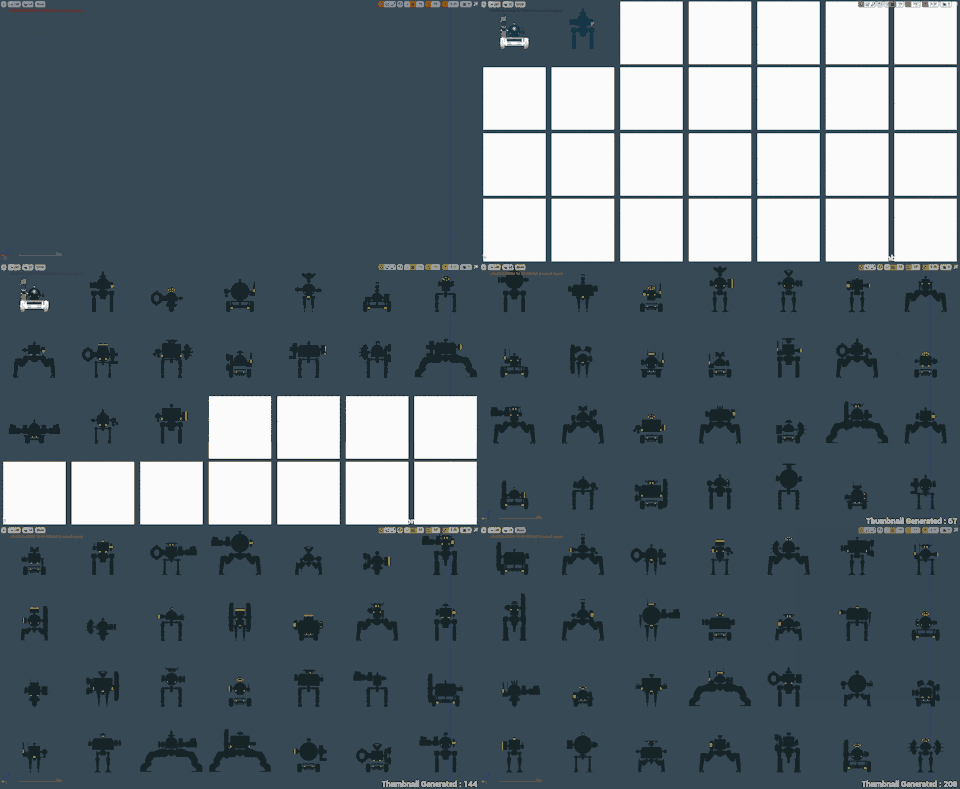
IMG7: Another attempt at speeding up development pace; this Internal dev tool's main task is to control workload complexity. It helps translates the current snapshot of component placeholder states into a more human-friendly format.
The usual bug fixes, refactorings, etc
Started development on 3d UI for mecha
Continuation development on better mecha visual presentation
Next update: 17th April 2020
Thank you
Update #76
Hi!
SUMMARY This is a progress update. A stable build is still WIP. There are several improvements to engine simulation, underlying PhysX, treadmill, controller AI and various other. Those updated modules now require more detailed data input for each mecha component. So the 77 placeholder components that are currently in the game have also been updated into the next placeholder state. Going forward, a component mass is dynamic determined by the applied materials parameters, even though its volume is always constant. The materials have also been expanded upon to provide data about its density, price and market popularity value.
All of these will be made available in the next build update
ENGINE SIMULATION IMG1: A preview of visual inspection of components drag factor. The camera pans from the smallest drag factor to the biggest. There are still irregularities in between as there are still pending improvements in component dimension
Further improvements in engine simulation with wheel locomotion. Using PVehicleDriveNW, acceleration is now dynamic and easier to tweak with a torque curve data
TREADMILL Improvements in start-stop logic; clean up treadmill - mecha - AI Interactions. Both wheel and leg locomotion can be started and stopped
COMPONENTS DATA UPDATE IMG2: Vertex color data improvements in component skeletal mesh. These data are used in material masking, material slot percentage calculation, etc. After several iterations, the final version is: a mech component can have up to 4 material slots, 1 lighting slot, and 1 custom material slot.
Manual entry for drag coefficient
Automatic entry for forward cross-section area
Automatic calculation for drag factor
Implemented new paradigms in the final mass calculation. it is now dynamic depending on the mesh model and applied material(s)
Manual fixes for vertex data colors
MATERIAL Each material now includes a more detailed info about market price (price/ weight), density (weight/volume) and popularity value
TESTING/AUTOMATION IMG3: an example of internal development custom tools
Creation of various new internal development tools to make the development process faster
Next update: 3rd April 2020 Thank you
Update #75
Hi! This is a progress update (no new build). Mecha simulation is currently in heavy development.
Updates:
MECHA FORWARD WALK ANIMATION
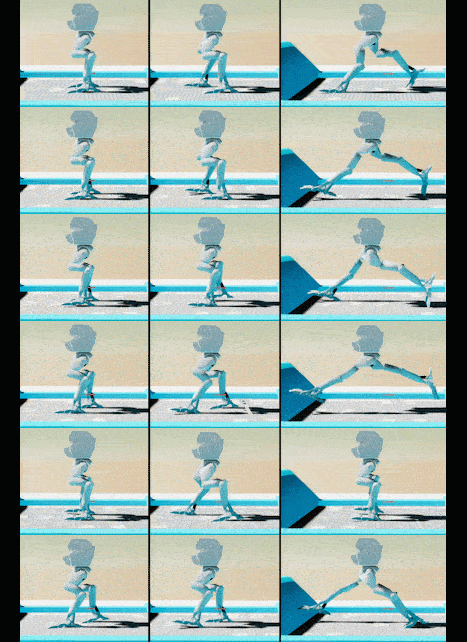
IMG1: Animation improvement
Visualized speed is no longer being capped. Technically there is an extra animation data in the animation blend space -> requires more dev time for each locomotion component
Still being tweaked on to find the sweet spot. The 2 main determining factors are stride length and frequency. In the image above, note the right animation seems slower than the center image due to lower frequency, albeit with a longer stride.
All other locomotions need to be updated after finding the animation sweet spot
CORRECTED TERMINOLOGY
IMG2: Bipedal locomotion category name improvement
"Human" -> "Plantigrade"
"Chicken" & "Doublejoint" -> "Digitigrade"
Short description:
Plantigrade-> walking while touching the ground with heels (i.e: Human, great apes, bears, etc)
Digitigrade-> walk on toes (i.e: cat, dog, hyena, bird)
Plantigrade generally has better stability and weight-bearing capacity, but is slower compared to digitigrade
Digitigrade can usually move more quickly and quietly but is relatively unstable.
These characteristics are some of the new factors included in the simulation (WIP)
Technically there are other locomotion types; i.e: Unguligrade and Semi-Digitigrade. To reduce development complexity, those are not included in the game
In the current game version; there are only digitigrades (for bipedal). Plantigrade was in the game at some point and was removed. It will be readded.
ICONS
IMG3: In-game Icons
Improvements in icon creation workflow. There was a software limitation that makes creations and management of 100s of icons cumbersome. It has been resolved and ready for the next phase
STEAM GUIDE
IMG4: Preview of WIP steam guide
Work has started on official steam guide creation. It is not yet accessible to the public. The idea is to start the guide initialization early so it can be finished on time when the game is launched.
STATS CONSTRAINTS
IMG5: Development spreadsheet sample of mecha constraint calculation
Below are several notes made during the past weeks. Some points are common knowledge, others are decision made by factoring gameplay and development complexity
Maximum speed is limited primarily by a function of power and drag. Given enough track, time and other edge case prerequisites (Power>static friction, flat track, etc), 2 mechas differing only in weight will eventually reach the same top speed
The chosen power unit is Kilowatt. Drag is determined by the sum of all component's surface area and drag coefficient
Attachments; which are items attachable to components; do not contribute to drag factor unless otherwise noted
Maximum achievable top speed is further influenced by locomotion type
Currently working in custom acceleration logic; as the current implementation of leg movement only supports static/linear acceleration. This is where the power-to-weight ratio factors in.
Extracting from the current model, the fastest supported speed in the game will be = 5000 cm/s = 180 km/h = 111.85 miles/h. This value is used in the creation of the new walk animation. Most of the mecha top speed will be much lower than that,
If using the car analogy, a mecha is basically a very big truck (with leg). Some top speed data samples for comparison: Human(6-12kmph), average horse (48.2kmph|30mph), Usain Bolt (44,72kmph| 22,78mph), M1 Abrams (40-72 kmph), Semi Trailer (113 kmph)
Calculations are deterministic, so we can also calculate the performance of a competitor's mecha behind the scene without running the treadmill
In summary: rough top speed calculation is implemented, currently working in custom acceleration, when finished; continue working on fuel consumption calculation
OTHERS
IMG6: A developer preview of when something goes wrong during development. It is a bug and not an intended feature
Minor engine update to unreal engine 4.24.3
Various other minor improvements/ refactorings/ testings
Next update: 20th March 2020
Thank you
Update #74
Hi
Updates:
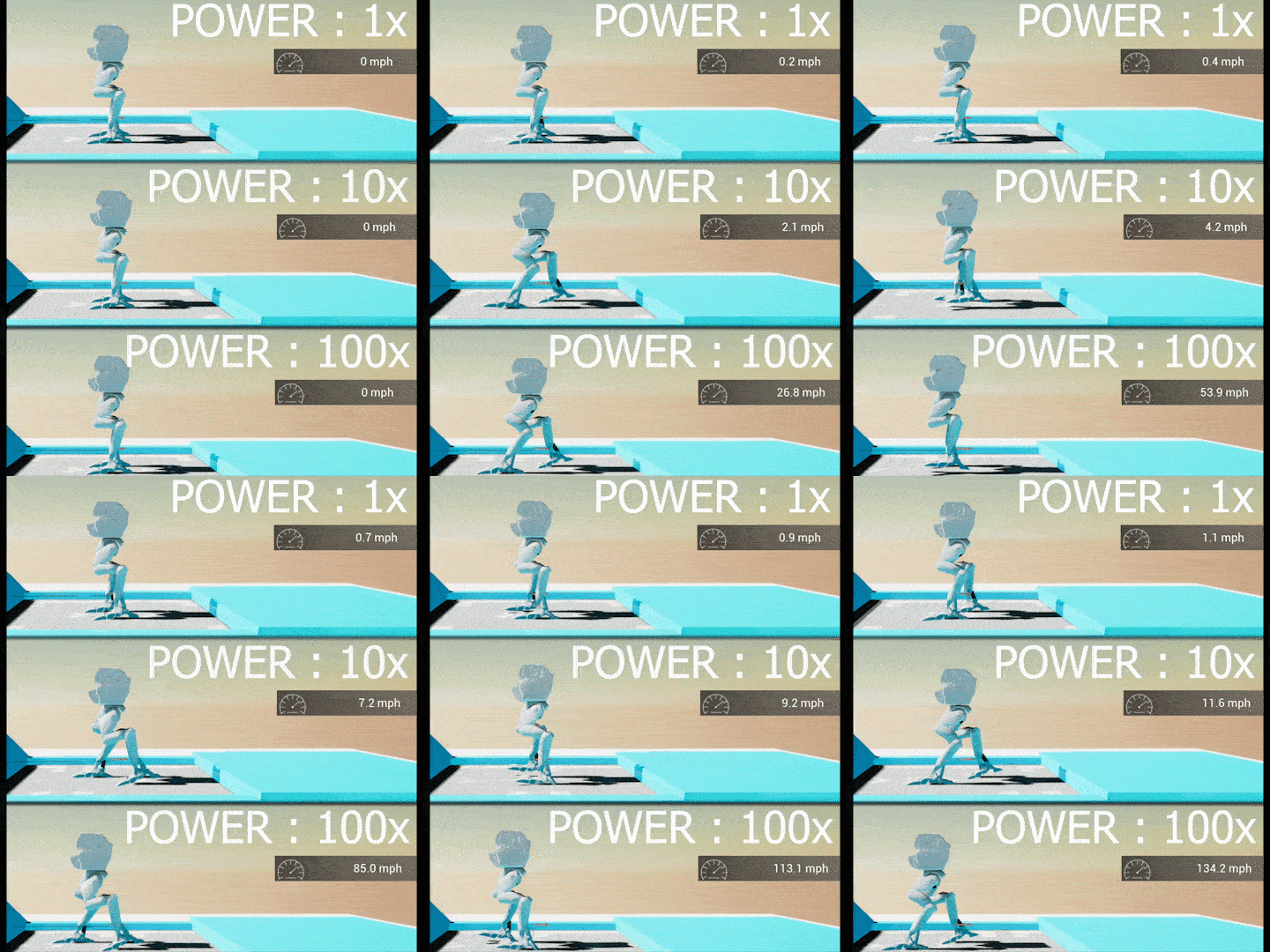
GIF1: Internal development preview. In real life, an "average" car can have between 70-140 HP. what is the most suitable power unit to represent a mecha power? how much "mecha power" does an average mecha have?. Visualized above are 3 mechas with the same constraints (mass, drag coefficient, drag area, medium density, etc); only differ in power output (baseline 1x vs 10x vs 100x) being tested in an attempt to determine the baseline performance most suitable for a tycoon simulation game. Notes that the walk animation itself is currently capped at 600cm/s (~13.4mph or ~21,6kmph)
ENGINE SIMULATION [WIP - not available in current build]
Implemented drag resistance factor. Each component has its own drag coefficient Cd (derived from its cross-section shape and surface area) which influences top speed.
Mecha runtime performance is now simulated, still need input/data for baseline mecha performance and its performance constraints -> expect more detailed info in next update
Overhaul to the underlying system; fixed numerous bugs and increase overall stability.
CONFIGURATION UI
GIF3: Common workflow when customizing a mecha. now less prone to bugs (GIF is heavily compressed to reduce size)
Major technical improvements; fixed numerous bugs.
Next update: 6th March 2020
Thank you
Update #73
Hi!
Updates:
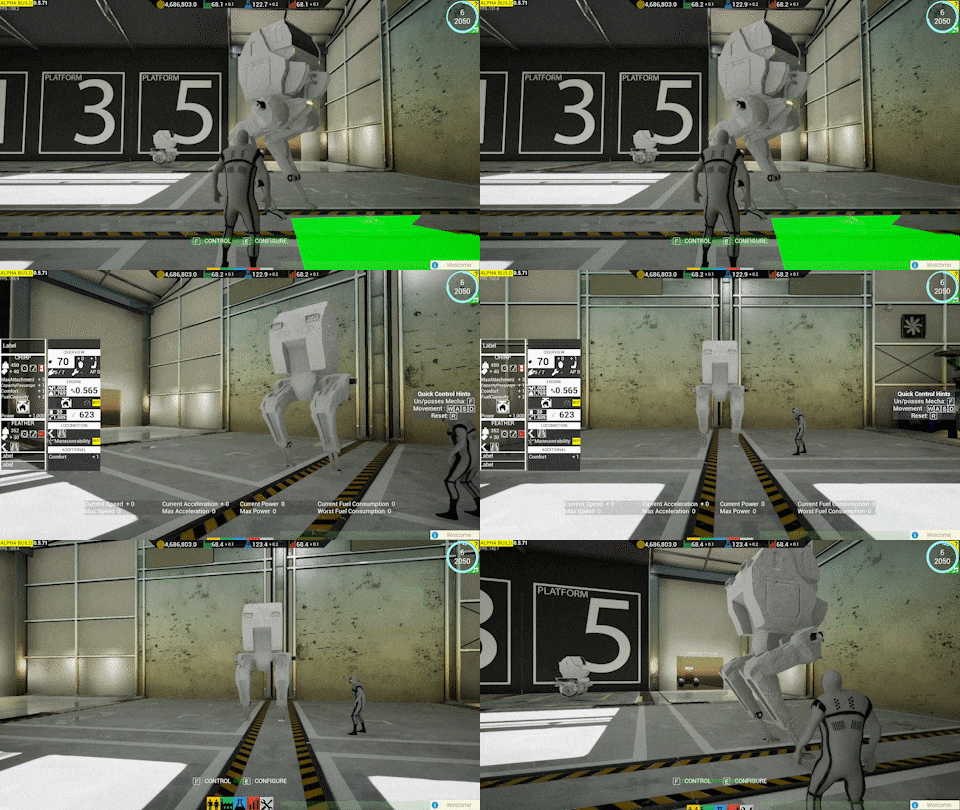
IMG1: Current state of treadmill development. Work In Progress
TREADMILL This is a progress update, as the treadmill is still not included in the current build. A progress blocker issue was finally solved with this update, future progress should be faster. Currently working in mecha performance simulation calculation (engine power, fuel consumption, acceleration, etc)
Implemented automatic correction for wheel locomotion; wheeled mecha can now correctly sustains its speed on a treadmill
Improved wheel movement by leveraging sub stepping. Wheel movement is now correctly independent from frame rate
Improved locomotion data structure. no more unused redundant data between wheel and leg -type locomotion
Implemented top speed detector, new mech movement interface and UI (performance info, start-stop button, camera control, etc)
Implemented dynamic collision box on a treadmill to detect if a mecha has left/fallen out
Improved treadmill model; from using 250cm plank to 10m plank; previously 5 planks, now only need 2, this reduces the transition gap error and has better performance
Various other improvements (CDO for chassis and info widget ecosystem, Fixed Treadmill inheritance for easier default property management, new dedicated FTreadmillData, test asset for 3d widget implementation in screen space, plank material, etc )
USER INTERFACE IMG2: Streamlined UI. Work In Progress
A major technical improvement in the underlying UI framework has been implemented (non-cosmetic). This yields better performance, is easier to test and faster to develop (after the initial update-delay which need to be done sequentially)
Upgraded several technical-implementation from alpha version to the final version
Implemented global custom SlateStyle, several fixes, module registration, several new icons
Fixed regression bug: mecha summary not updating when randomizing a mecha
OTHER
Updated Unreal Engine to 4.24.2
Updated Save Version to v.44
Implemented a macro library for unit conversion
Fixed long-hidden bugs which will lead to incorrect market data
Major refactor in FMechPerformanceData
Added dedicated test level for Treadmill Camera, Treadmill widget, custom GameMode, etc
Next Update: 21st February 2020
Thank you
Update #72
Hi!
Updates:
GIF1:A preview of internal development test for runtime thumbnail generation. Corrected runtime thumbnail generation logic; mecha position and dimension is now photographed correctly
FIXES
Fixed unable to remove an installed component in mecha configuration UI
Fixed unable to reenter platform after exiting using master toggle TAB-key and not F-key
Fixed missing mecha on the default platform camera view. If a player has previously controlled the platform mecha and moving away from the platform; its position will now be reset upon entering the platform.
Fixed randomly uncontrollable mecha with wheel movement. Was caused by intersecting collision data if any of the arms penetrated any of the wheel.
Improved [player-mecha interaction collision box]. Its dimension is now dynamic depending on the final mecha dimension. The visual was also changed from an arrow into a "carpet". The visual cue is now clearer; where to approach mecha in order to control it
Numerous other fixes (load crash, unresponsive controls, game session data, etc).
UI
Implemented several preparations works for UI finalization in 0.6 (C++ templates, Slate integration, Skeleton codes, etc)
Improvements in loading screen logic, Setting Measurement System widget, New Game Configuration, Factory, ResearchDetailPanel, Competitor thumbnail overview, etc
RUNTIME THUMBNAIL
Improvements in runtime mecha thumbnail generation (custom lighting setup, orientation, check macro, dependency removal, lighting channel, scene reflection capture, etc). Still WIP; there are still several pending improvements
MECH ENGINE SIMULATION
Changed internal PhysX drive implementation from PVehicleNoDrive to PVehicleDriveNW; still work in progress with wheel-treadmill interaction
INTERNAL DEVELOPMENT TEST
Added runtime thumbnail generation test framework with extended functionality in hope to reduce development time.
Extended support to simulated accelerated time frame test. This is for testing behavior that spans multiple in-game-years
GENERAL
Addition of initial dynamic mecha presentation logic; WIP
Corrected main lighting tint; from previously noon reddish to midday white
Various refactoring (data management, modules clean up, class variables scopes, deprecated references, git index fixes, etc)
Updated save version to v.43
Next Update: 7th February 2020
Thank you
Update #71 + Edit #1
Edit #1 (6th January 2020) Hi, This edit is made to inform that the next update will be delayed between 2-4 Weeks due to natural disaster (City-wide flash floods).
Thank you for understanding ______________________________________________ Hi! IMG1: Internal development automation test samples [Left] Attachment points tests; continuation from U46. [Middle] Material tests; continuation from U26. [Right] Mecha-component-attachment randomization test; continuation from U66
Updates:
The treadmill mechanic mentioned in the previous update is still not accessible in this update. During manual tests, there have been several critical bugs encountered which has a higher development priority The goal is to control the development complexity and bugs reduction before treadmill integration
IMG2: Still image from IMG1 to better see what's going on
FIXES
Fixed crash when attachment was randomized for the second time
Fixed proto part panel not updating correctly when using [randomize components button]
Fixed initialization sequence of default mecha's leg and body sometimes not updating correctly
Fixed inclusion of invalid weight class and country data map inside mecha production setting data
Fixed crash caused by a specific sequence of runtime mecha thumbnail creation; triggered when producing a mecha
Fixed a very specific crash; triggered when clicking [platform unlock button] while mouse cursor was moving at the time left mouse button was pressed down
Fixed a random crash when the game has been running for several minutes -> triggered by an incorrect implementation of a competitor retiring it's oldest prototype
TESTS
This is the internal development test context (unit test, integration test, etc), not to be confused with the test mechanic inside the game (Treadmill, etc). i.e: The tests made to test the test framework etc, which test the in-game test platforms (i.e: Treadmill) among other things
Functional Test: Extended test cases and improved implementation in mecha, mech component, attachment, materials, DataTables, etc
Spec Test: Extended test cases and implemented more test features; i.e: now support asynchronous, latent and complex testing
Test Helper: MechsTestHelper.h, test templates, enum helpers, test suites presets selections, automated testing of attachment point generator, new custom empty test level, new actor class StandaloneComponent, etc
With this update, almost all applicable test framework in UE4 has been implemented in the project. The last one "Automation Driver" which simulates player input is currently WIP.
A secondary (weaker) development machine has been partially integrated into the dedicated testing workflow. This will free up resources in main dev pc -> less downtime
OTHERS
Updated Unreal Engine to v.4.24.1
Updated save version to v.42
Next Update: 10th January 2020
Thank you
Update #70
Hi!, The main goal in this update is mecha engine simulation progress and initial test platform (Treadmill). Unfortunately, the treadmill is still inaccessible in the current build as it still requires several improvements (see GIF2).
Updates:
TREADMILL (Development preview - Will be made available in the next update)
Implemented autonomous forward movement and internal speed regulator that will match mecha's speed
Improved collision detection, treadmill mecha spawn location calculator, motion structure ->form is now flat instead of an oval and open-loop for better performance
Added treadmill chassis mesh
Fixed incorrect treadmill world forward direction
Extended spawn test mode to support default and MoveForward behavior
Deprecated several outdated temporary class variables/functions i.e: bSimulatedMecha, bOverrideLocomotion, ApplyDebugAIWheelHandbrake, SetupAsAI, SimulatePlanarMovementInput, etc
Fixed CustomInitialLocomotionKey implementation, invisible editor placement mecha, mecha wheel control regression, NaN invalid transform, wheel not turning, etc
AI
Created additional simplified AI ecosystem for treadmill behavior
Improvements to treadmill mecha behavior tree; will now not stopping after failure to reach the goal; will keep moving indefinitely until stopped from command, simulating real scenario when tested on a treadmill. Also removed idle-delay in Behavior Tree
Added c++ class for AIControllerMechaTreadmill and subclassing mecha with AMechaTreadmill
TEST
Implemented several initial test environment setups for new performance test mechanic (treadmill-mecha-AI interactions)
Created several locomotion-specific-type mecha archetypes to streamline test workflow
Implemented dynamic all-locomotion spawning tests with dynamic navigation
Implemented several c++ functional tests and dedicated test templates for faster future locomotion test additions
DATA
Implemented new data structures for mecha performance (FMechRuntimePerformance, FMechPerformanceData)
Improved const getter implementations, Refactored several gameplay structure's types; mostly from int32 to more "efficient" types i.e uint16, unint32
Sale History per tick now of type uint16 which means the max value is 65.535
Added FProductionSetting FinalizeProductionMetrics function to sync up the WeightClassMap, CountryMap and ProductionCost values
Fixed crash when accessing data inside ComponentMap in PerformanceData
TIME
Refactored Time; changed master time data type from int32 to uint32; improved encapsulation and include dependencies, etc
UI
Initial integration implementation of custom slate UI in preparation for future UI finalization
Implemented dedicated test GameMode for faster Slate Testing
Minor improvement in ProductionPanelW
Implemented new RuntimePerformance widget and slate as the main panel for all related performance info
OTHERS
Updated to Unreal Engine version 4.24
Updated save version to v.41
Implemented #pragma region for improved source code readability
Various other general improvements i.e: corrected several scoping/encapsulation, module migration, etc
Fixed incorrect upgraded platform back wall placement
Next update: 27th December 2019
Thank you
Update #69: Build 0.5.75
Hi!, The main theme of this update is general stability improvements
Updates:
SAVE SYSTEM
Improved internal data structure managements; serialization is now more atomic; more robust to future changes
Improved user interface logic (SaveLoadPanel, SaveSlot, ResourcePopup)
Improved save data validity query, now only accessing required header data
Implemented save serialization, log category profiling, and saveable-interfaces
Updated to v.40
TEST
Added data validation check in testing workflow
Added several internal dedicated editor maps for various use case tests
Implemented several random data generations to aid in internal testing
Implemented main game objects decoupling; internal testing can now test all main game objects separately
Implemented extensive assertions on each initialization step
MARKET
Improved Market initialization and logic
Fixed bug cartesian chart sometimes not showing the graph
Fixed several minor UI visual issues
Fixed wrong const pointer implementation in market data
MECHA
Fixed crashing during mecha reset
Fixed several errors during randomization
Fixed loading not correctly updating material
MUSIC
Improved music manager i.e: data validation, nativization, etc
Fixed music not playing in the main menu, incorrectly looping, control behavior, etc
Fixed crash when loading a save game with active sales
Fixed reduction of initial prototype cost upon loading a saved game
WORKER
Improvements to worker manager (XP calculation, daily contributions, tick rate, data access, etc) and worker character (c++ nativization, uniform and accessories setups, etc )
Fixed crashing when hiring a new worker
Fixed initial engineer not spawning in shipping build
Fixed stale dangling delegate member of SpawnVolume causing a crash when transitioning back into main menu level
ATTACHMENT
Fixed attachment data not correctly setting its runtime attachment component
Fixed incorrect relative transform upon load
DELEGATES
Added dedicated delegates manager
Added several new delegates; i.e: OnLoadedMainMenu, OnLoadedLevelFullGame, OnValidMarketEventManager, OnChangedNonCreditResource, etc
Improved delegates implementation; now using the most lightweight version (Dynamic multicast to event) ; i.e: in OnExecuteAccidentChange, OnFinishMarketTick, OnMarketProtoChanged, OnNewEventIntroduced, BeginLoadingScreen, EndLoadingScreen, etc.
WORKFLOW/META
Fixed upload pipeline technical issue
Changed steam build configuration from development to shipping
Formalized project management tracking
Started initial integration of DevOps CI/CD
Added doxygen, source monitor, cppclean, cpu profiling integration
Next update: 13th December 2019
Thank you
Update #68 : Build 0.5.71
Update Edit 2 (25th November 2019) Hi, There is currently an unexpected technical issue in the build upload pipeline. New build will be deployed once the issue has been resolved Thank you for understanding ___________________________________________________________ Update Edit 1 (8th November 2019)
Hi, This is to inform that the next build update will be at the end of November. Currently still in heavy development. Short term goal is to implement working mecha engine simulation and medium-term goal is to expedite progress into version 0.6. This means a lot of refactoring, bug fixings, technical-debt/backlog resolutions. The full change list will be included in the next update.
Next update: 24 November 2019 Thank you ___________________________________________________________ Hi!, IMG1: Implemented dedicated camera manager to manage transition between different controls. More visual features will be implemented in upcoming updates
Updates:
General
Fixed DirectX issue
Fixed several non-critical backlogs: physics constraints warnings, outdated redirectors, etc
IMG2: Now support context-sensitive mouse cursor
UI
Improved core logic; creation of dedicated UI module, migrated bulk logic to custom HUD
Cleaned up several widgets (assembler, notification systems, main widget, escape menu, etc )
Further ecosystem cleanups: initialization, references, dependency, scoping, etc
Improved tooltips creation for MarketWorldEventDetails, PartSelection, MechSummary and SaveSlots
Deprecated outdated widget manager
Improved caching of MechConfig/MechControl widget
Fixed regression EA_Disclaimer show tutorial button not working
Fixed control/config UI hint and visual cue still showing when in general UI mode
Implemented new custom mouse cursor; now context-sensitive to 6 cursor state; each with a new icon
Refactored configuration context panel logic and delegates call. fixed initial button selection and interaction sync between the traditional button click and interactive component click
Improved attachment removal UI [WIP]
Controls
Implemented new camera manager class with CameraBlendTransition upon ControlStateChange
Improved main avatar control logic transfer, fixed edge case unable to possess the main avatar
Improved MechPlayerInteractSensor by also listening to global control change
Fixed camera in the wrong position when entering config mode after previously in control mode with wheel locomotion
Fixed sometimes unable to enter general UI mode when in mechInteractSensor proximity



</i><br><br>)
















. Properties being tested are max-speed, acceleration, and fuel consumption. Other properties (i.e: comfort, durability, etc) are testable on other test platform types (Work in Progress)</i><br><br>)
 Quadruped, (B) 2-Wheeled Bike, and (C) 6-Wheeled. All 3 samples show incorrect behavior which prevented the treadmill to be deployed in this build</i><br><br>)
 locomotion types currently still has the same acceleration regardless of weight, engine, and leg-type (WIP)</i><br><br>)