

Modbox
Modbox 2.0 Releasing September 9th!
Releasing September 9th - for Desktop + VR
Free update to Modbox v1 owners
Check out our website for all the info + features + guides! http://www.modboxgame.com
Sign up to try the Modbox 2.0 Preview
More details will be released next week (trailer and videos, features, platforms, release date, website+documentation).
If you want to try the private alpha version right now you can sign up here: Sign up Form
Total private alpha players will be limited, and I'll be sending out Steam keys tonight and throughout the week. You can discuss the alpha and set up online games with other testers on our Discord
- The new version will be a free update to all current Modbox owners. You'll still have access to the old version through a separate Steam branch
- A free version of Modbox will be released later to allow anyone to play creations (it will just have limited creation tools, no plans for micro transactions)
- Old Modbox creations can be used in the new version. Current creations on the Workshop will be set as 'incompatible', meaning they need to be opened and updated to the new version to show up on the Workshop again.
Instead of a large 'relaunch', I would have liked to have just continuously updated the game with changes every few weeks like every other early access title. The main reason I couldn't was the game's new visual scripting system and language - MBScript. It's the foundation of all creations built with Modbox - and would have been extremely difficult to change while creations are built with it (it has been rewritten about 4 times now, with the final version a month ago). So until the language was advanced enough that we could make our own compelling game creations entirely in Modbox - it didn't make sense to release a early version of it. Now that we've been able to make complex AI and SP/MP/Coop game modes entirely with MBScript, it's ready for release.
News to follow next week! Thanks!
- Lee
Modbox Update v0.656 + Indev branch update
- Fixed 'Featured' content not showing up
- Fixed halt on downloading Steam workshop creations
And added two more creations by ShadowQiller into the 'featured' section:
Gladiator Arena: https://steamcommunity.com/sharedfiles/filedetails/?id=1465932715
Hockey Rink: https://steamcommunity.com/sharedfiles/filedetails/?id=1424688698
Along with that we've updated the 'devonly' branch on Modbox to 0.701!
The 'devonly' branch has the update to Modbox we've been working on for a year now - including desktop editing, new group system, new visual scripting. It's a complete rewrite of Modbox, which we plan to finish in the coming months.
See here to access the 'devonly' branch: https://steamcommunity.com/app/414120/discussions/0/1733210552642809144/
Trello board for the status on bugs/features is here:
https://trello.com/b/mrZrNwx6/modbox-public-bug-tracker
Note: At the moment saving to workshop on the 'devonly' build is disabled, it's only meant to be used to get a early look and give feedback to us on development.
Thanks!
- Lee
Preview of the new Modbox visual scripting system / Desktop editor
https://www.youtube.com/watch?v=8eVXymBNDhc
Video starts in VR editing a AI, then shows the desktop editing 45 seconds in
I am hoping to make Modbox a Unity-like experience - only simplified, focused on VR creation, and always online. Multiple players can script entities at the same time - and coming in the next update a player can edit/script on the Desktop while another player is in VR. Using the desktop can be good for something like scripting / entering in text, while VR is better for 3d creation / level design.
The entire game has been rewritten the last few months so that everything is accessible/changable easily with this visual scripting system. I really hope to make it powerful enough to allow for any game modes (and if a visual scripting feature isn't in yet, a modder can always add features using the ModboxSDK and C#).
Let me know if you have any feedback! As a programmer it's not always obvious to me whats not clear to non-programmers (like using the terms 'True/False' and not 'Boolean'). I'll be developing it over the next month, along with a number of other Modbox features, to be out in a March update.
thanks!
- Lee
Fix for loading old workshop creations - v0.656.2
- Lee
Modbox 0.656
I still plan to have a big update out in the next 2 to 3 weeks! Along with some new videos to show of all our new work
Fixes:
- Better voxel syncing: Fixed issues with loading voxel terrain when joining a game midgame, or joining a game in edit mode
- Fixed a error that happened on joining a game in mid mode (harmless error message)
- Fixed a crash that happened on the host when joining a game in play mode (I am 95% sure this is entirely fixed, but please let me know in the Discord if you experience this)
- Fixed loading an old mod's grass texture that was used in a few creations
- Fixed 'Only Once' and 'invert' wiring options missing
- Fixed drone enemies not going for players head (they were going for torso)
- A lot faster voxel generation when in CPU mode (for older GPUs / operating systems like Win7)
Let us know any issues / comments in our Discord - https://discord.gg/2cNnWjb . And you can check the status of any bugs / suggestions on our public trello here: https://trello.com/b/mrZrNwx6/modbox-public-bug-tracker
Thanks!
- Lee
Support for Google Poly is now live
https://www.youtube.com/watch?v=Kjq3_SzuxD0
Google Poly is a library of thousands of 3d low poly assets - perfect for using with Modbox creations. Adding adding them to your creations you can then set their physics - and connect them to other entities.
We will have more Modbox announcements soon!
- Lee
Modbox Update 13 - Vehicles, Import system, Locomotion options, UI overhaul
Unlike our other games which have a 'ship date', we have a long term approach to Modbox, which means rewriting and making sure we are building the right foundations for it's future. I am excited to get this update out so I can start releasing updates more frequently - and finish our visual scripting system, which I think will be a very important part of Modbox's creations.
We have another announcement tomorrow, then this weekend I'll share our Vive Tracker support.
To talk to other players, or us, or just to follow our development - join our Discord! https://steamcommunity.com/linkfilter/?url=https://discord.gg/2cNnWjb
Large Changes
- Vehicles and ridable creations: We added a 'ridable seat' entity that the player can hop into. Along with that we changed the 'rc cars' mod into a 'vehicles' mod, and added a large amount of vehicle building options. Including wheels (with actual suspension), monster wheels, propellers, plane wing, zeppelin, helicopter propeller. For creating flying vehicles we also added a 'gyroscope' entity, that allows for easily setting orientation. Car building example: https://twitter.com/Alientrap/status/901122144020701184 - and gyroscope: https://twitter.com/Alientrap/status/913827139925020673
- Import System: You can now import models (over 30+ formats), avatar models, images, sound (wav/mp3/ogg), and videos, into your creations. Physics for imported models will be created automatically. Anything imported will be included when you upload your creation to the workshop (or upload a group that includes the imported content). Old video to show importing Google Blocks): https://twitter.com/Alientrap/status/888492314074763264
- Upgraded to Unity 5.6, along with moving to single pass rendering system (which means large performance improvements).
- Player set locomotion: Locomotion options are now in 'player settings'. Creations have the option of overriding the locomotion option and selecting a specific one, or limiting the locomotion options (like no flying, no teleporting).
- Terrain Generation options: There is now a 'generate terrain' button to bring up the generate terrain UI. Which lets you select the size of the voxel terrain, the resolution, and how to generate it (as a flat ground, or as a random terrain, with many variables to tweak the random generation)
- Camera Tool and Gallery: Select the 'camera' in the main menu to use the camera tool. You can take pictures and record video (and set some resolution options), which will be included in the gallery. Gallery photos can be used as the creations photo - and videos/photos can be imported into creations.
- Saving Groups to workshop: We've completely redone how 'entity groups' are saved/loaded, and now allow for importing groups from the Steam workshop. To save a group to the Steam workshop use the 'group tool' and select any group.
- Gamepad controller entity: A 'gamepad controller' entity has been added to the entities in the 'wiring' category. It will accept input from a USB connected gamepad, and can be wired to control entities (like a RC car). Right now it would use the first gamepad connected, and only the Host can provide input, but we will be expanding on this soon.
- UI overhaul: All UI menus have been changed and updated to a new style - making them more readable, and with a better layout.
- Gun recoil, and two handed weapon holding. Two handed weapon holding is used by a majority of the guns in the Modern Weapons mod. Along with that we fixed all of the aiming / scope issues with the Modern Weapons mod.
Thanks to all the testers on our Discord! Including Pontus, Shadowqiller, Duke54, Abracadaver, PackOWolves, Harveyyy
The ModboxSDK will be updated in the next few days (it will also move to Unity 5.6)
Other additions
- Can now start a new creation while online
- Spectate mode: 'Spectate' is now a option alongside 'Play', to start your creation but not join the game as a player.
- Better spectator camera: The 'local entities' option is now in the main menu. Spectator camera now includes a lot more options for positioning it and having it follow the player.
- Option to only start game once Host starts it - and option to not allow new players to join until new game
- Added Map tool - optional map to show where player is / other players (if other players should be shown, or if just team players should be shown)
- Toggle based touchpad locomotion
- Grab and pull play mode locomotion option
- Low FPS warning: When low fps is experienced (sub 45), the creation you are playing will pause and a option to exit will come up. This can be turned off in options.
- Add 'Connect Group' option to Group Tool, to connect group together to one body in play mode.
- Better support for voice dictation (used to set text in keyboard screen, and also to talk to chat bots right now)
- Better fading in/out between game states
- 2d Onscreen Menu: We added a button in the top left corner to go into a 2d menu - where creations can be loaded, options can be selected , and players can switch between edit/play mode.
- Changed default locomotion button for Oculus (Rotate button now in radial menu)
- Added a default scoreboard, which just shows all current players and their states (is overridden by deathmatch scoreboard or others if added)
- For toys that use the touchpad, you now select to start controlling with the touchpad first (then exit that control with menu button). So for RC Controller there is a 'control car' option
- Moved a few editor entities to 'advanced' category
- Renamed 'aiwall' to 'pathfind blocker'
- A 'Deactivate' modifier, that can be hooked up with wiring to deactivate / activate entities or bodies
Small fixes / changes
- Added 'CPU Terrain' option to misc options menu, for windows7 users (or others) to manually turn on CPU terrain rather than GPU
- Moving all the sky boxes to 'blank enviroments' mod, which i've renamed 'Skys and Environments'.
- Added 'No Range Limit' option, so players wont die if they go far out of world / below ground
- Can now set damage amount on any melee damage entity
- Better syncing of physics joint breaking
- Added 'climb options' modifier, and moved 'climbable' out of 'physics options'
- Better interpolation / online player syncing
- Fixed piston: A lot more stable, and handles negative values
- 'Autobrake' wheel/car bool option
- Damage in lava / water now done if the avatars bones are inside (so legs or arms), not just in head is
- Spawn spots can be edited/wired to select what team they are for, or be disabled.
Thanks!
- Lee
Modbox v0.57 - Fixes!
You can keep track of what we are working on our public bug tracker here: https://trello.com/b/mrZrNwx6/modbox-public-bug-tracker . We also have a Discord to discuss development: https://steamcommunity.com/linkfilter/?url=https://discord.gg/2cNnWjb
The big fixes:
- Fixed error online after killing a NPC
- Fixed long bows not working online for clients
- Fixed Spawners not syncing with other players when creating them in edit mode online
- Weapons in hand now move with player locomotion better, even when moving very fast
- Editing entities is better sync: will update modifier settings, and edit window of other clients if theirs is open
Changes \ Other fixes:
- Changes to camera effects / tone
- Fixed some textures not updating properly - after going into edit tools / other things
- Getting off a platform now keeps the speed you were going on the platform
- Added filesize display to creations / mods
- Now player will still stay at ground height when using handheld jetpack
- Increased climb grab distance
- Fixed error after deleting saved local creation
- Fixed choppyness when on a fast moving platform
- 'Platform Options' now its own modifier, outside of 'physics options'. This is because we plan to expand this
- Added 'fade away body' option to entity npc edit window
- Fixed being able to grab toys out of NPCs hands with the pickup tool
- Fixed error on deleting rope entities
- Fixed radial menu closing slowly when in a slowmo creation
Let us know any feedback on the Steam forums / Discord!
thanks,
- Lee
Modbox Update 12 - v5.61 Online Editing and Worldbuilding
- Online Edit mode. Build games / experiences with friends, and switch between edit and play at any time
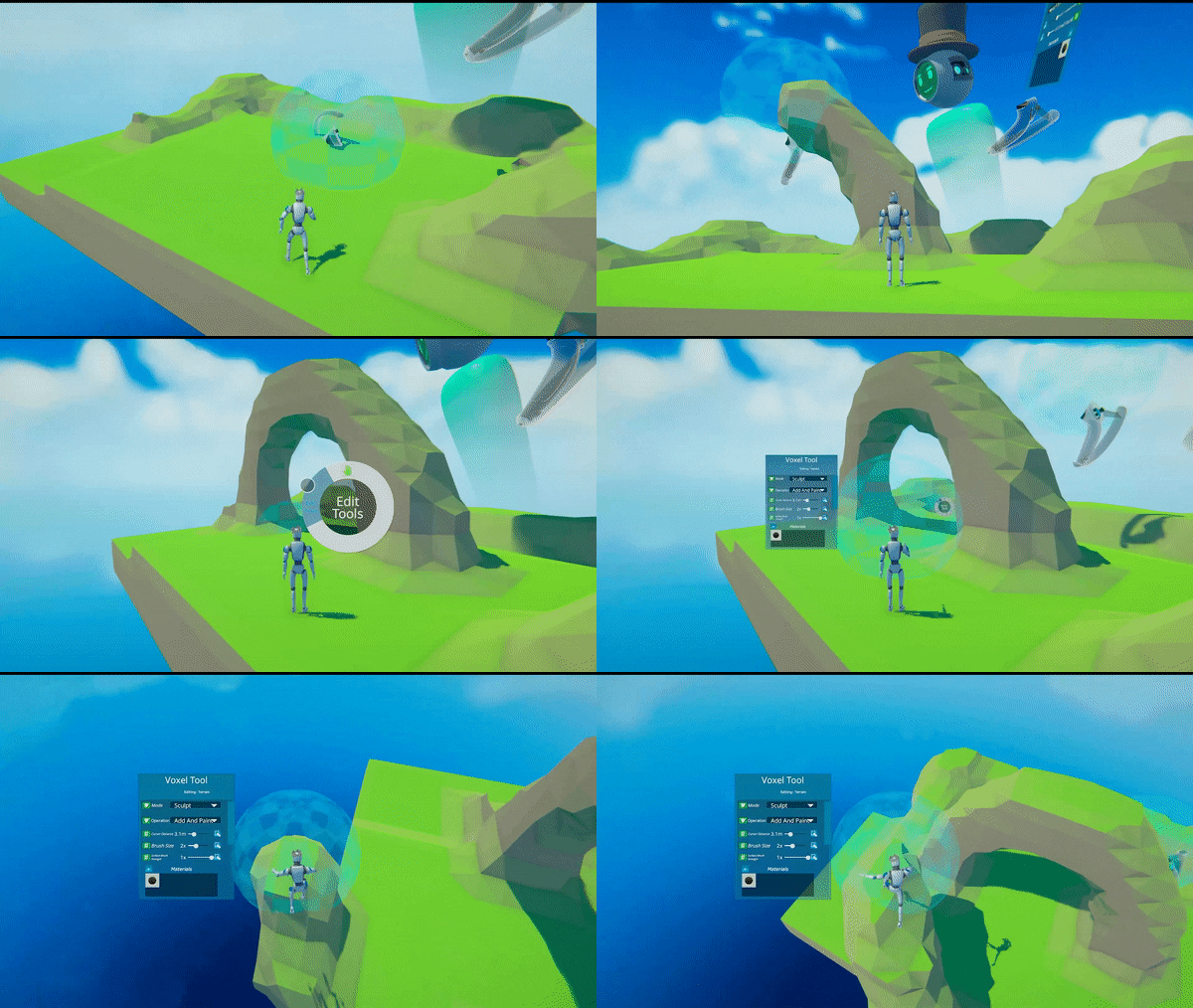
- Terrain Sculpting and Skybox editing, for actual world building
- Completely new radial menu based UI, used for both edit mode (selecting tools / changing entities) and play mode (putting items in a Holster, using items like health, and switching to play mode tools like the Pickup Tool)
- Physics based Locomotion system: By default play mode locomotion is now Directional movement - other options include Touchpad / Teleport / Flying. All Locomotion systems can now climb 'Climbable' entities. They can now stand on (and move with) any 'Platform' entity (good for making moving vehicles / platforms). Setting a Entity as Climbable/Platform is done by assigning a material. We've also added 'Water' and 'Lava' entities, for swimming.
- New Avatar System: Play mode avatars now use the same avatar props as edit mode, with a Robot style body. Avatars can then change based on creations (Like the Gunslinger avatar for WildWest creations)
- A large amount of network fixes / optimizations / smoothing
- Ingame Tutorial videos - watch our new editing tutorial videos ingame (10 in total so far, more to come). All 10 Tutorial videos are now on Youtube:
https://www.youtube.com/watch?v=24tlljmob10&list=PLOupiHHdKWyyPY4klZGxVzlQT8oKZMhZ3&index=7
Playlist: https://www.youtube.com/playlist?list=PLOupiHHdKWyyPY4klZGxVzlQT8oKZMhZ3
We also have a active Discord! To find players / give us feedback / let us know of any issues. Use the invite here: https://discord.gg/2cNnWjb
You can track our current bugs / indev items with our public bug tracker here: https://trello.com/b/mrZrNwx6/modbox-public-bug-tracker
New Alientrap Creations
http://steamcommunity.com/sharedfiles/filedetails/?id=960273957 - Temple Climb, showcasing the new Locomotion options and terrain sculpting
http://steamcommunity.com/sharedfiles/filedetails/?id=960166433 - Asteroid Zero G Defense - Showcasing new zero g locomotion, terrain sculpting, new AI target options
http://steamcommunity.com/sharedfiles/filedetails/?id=960151865 - Old Church: Climbing level using the 'climb anything' option, could be used for deathmatch also
New Featured Community Creations
http://steamcommunity.com/sharedfiles/filedetails/?id=962686593 - Ferris Wheel by Shadowqiller, a great example of complex physics
Other New Features
- Voxel Terrain Environments for Dungeon and Wild West mods
- New 'Nature' mod featuring a large amount of new plants / tree options
- 'Height Calibration' screen when selecting avatar, to better scale play mode avatar to match current player.
- Large performance increases for editing/playing creations with a lot of entities
- Creations by us are now a separate tab on the loading screen - 'Alientrap Creations'. 'Featured Creations' will now be used for community picked ones.
- Local Entities added, letting you add entities just that you can see / interact with (and stay with you while moving through creations / servers). At the moment there is just a spectator camera option - but we plan to keep adding local entities and options (some ideas are a twitch chat window, a music player, etc)
- New UI for selecting Entity Modifiers, AI Systems, Entity selection (for things like starting weapon on a NPC),
- Graphic Options: Can now select graphics quality in the options menu, to remove shadows and other things for better performance.
- Health Pack Entities
- 'Checkpoint' Entity. Place in Levels so that the player will respawn at the checkpoint (after the checkpoint has been reached). They can also always go back to last checkpoint with their radial menu. Good for climbing based creations!
- 'Handheld Jetpack' toy in the Sci Fi Arsenal mod
- 'Pick up Tool', for picking up entities in play mode, good for not having to bend down
- Play mode Tool Selection for edit mode: Select what tools players have access to while playing. Right now the options are Spawn Menu and Pickup Tool (both on by default)
- Force option for Hinge Joints
Minor Changes
- AI Target Entities + Modifier: Add the AI Target entities to have AI attack them while attacking the player - or ad the 'AI Target' Modifier to set this on any entity
- 'Damage Collider' Modifier: Make any entity into a collider that can damage players / other entities
- Added 'Update News' screen when launching Modbox with a new update (shows only first time)
- No fade away body option on NPCs
- Crashtest Dummy NPC model in Basics mod
- 'Comfort Grid On Movement' now a single comfort option
- Fix for SteamVR Knuckles controllers
- Now gives warning message about how many entities from mod are in the world when disablinga mod
Thanks!
- Lee