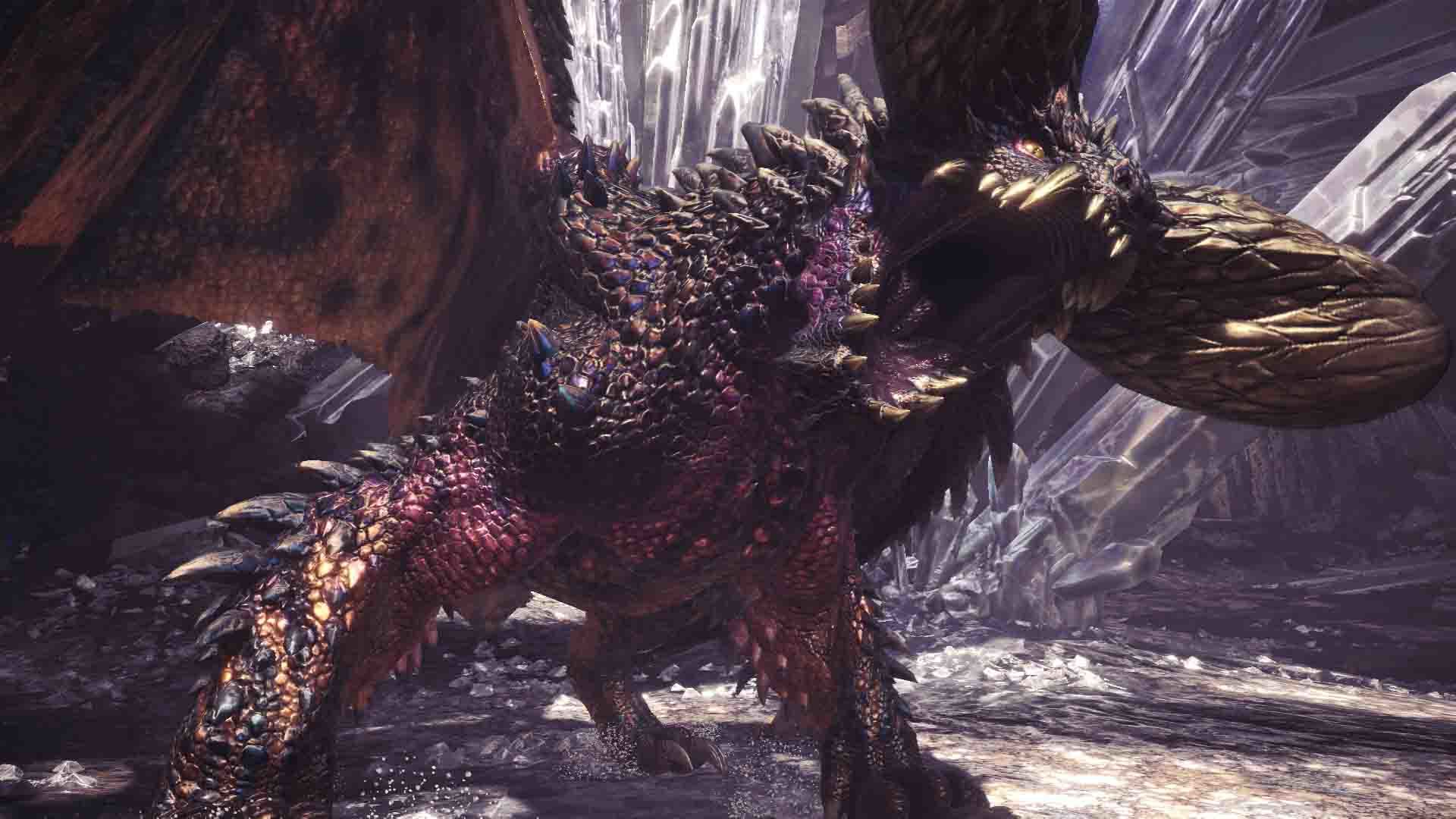
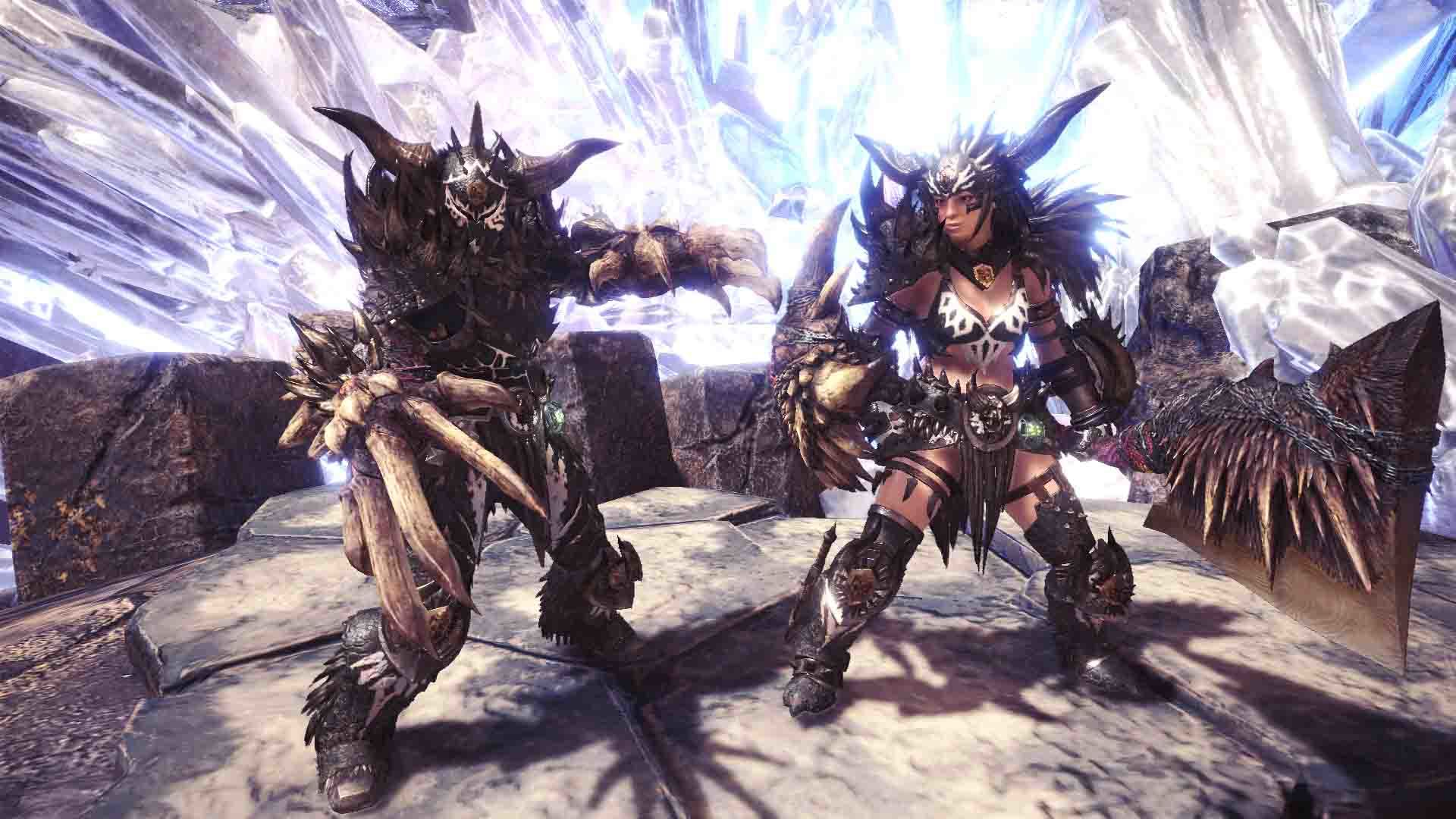
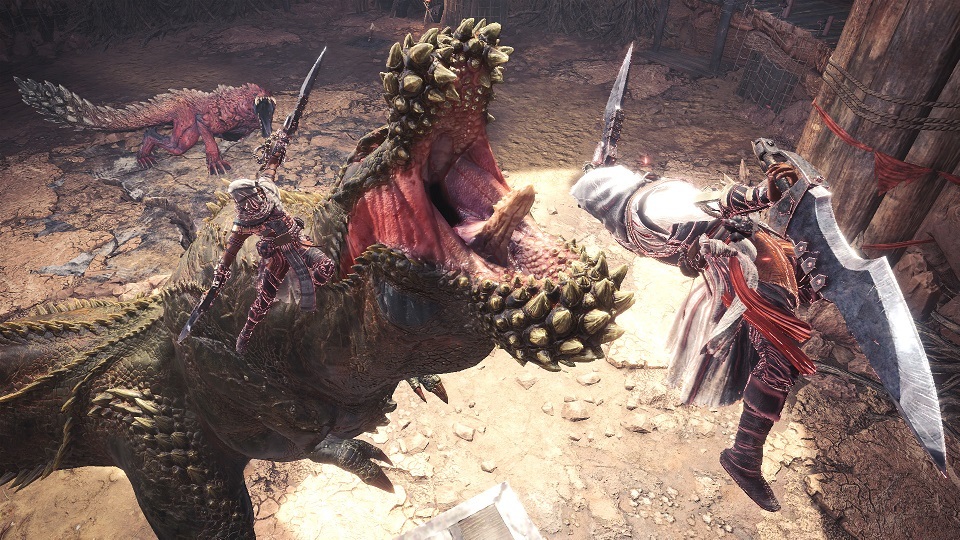
From Friday, June 7 00:00 to Thursday, June 20 23:59 UTC, an extremely dangerous tempered form of an elder dragon, known as an "arch-tempered monster" will be blasting onto Steam!
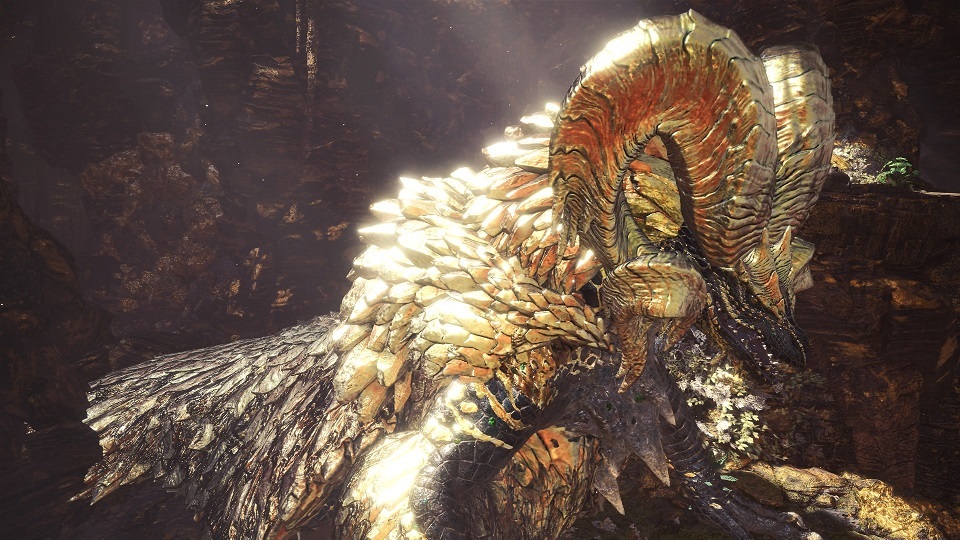
Accept the new Event Quest "The Heralds of Destruction Cry" to take on an Arch-tempered Nergigante.
・Arch-tempered monsters can be distinguished from their normal counterparts by
their slight metallic gleam.
・When taking on this Event Quest, the color of the frame around the monster icon
will be different than usual, so keep an eye out!
・You need to be Hunter Rank (HR) 50 or higher to take on this quest.
・Please note that the availability of this quest is subject to change without prior notice.
Craftable equipment:
・Nergigante γ armor series
Important:
The latest version of MONSTER HUNTER: WORLD is revision number 167541.
You can verify the version number in the top-left corner when you launch the game
in windowed mode.
Keep in mind that you can only match with other players who have the same update
version as you.
For other questions, please visit the official MONSTER HUNTER: WORLD support portal below.
http://www.capcom.com/mhwsupport/
Title Update: Major Additions and Bug Fixes from the May 9 Update
On Thursday, May 9 at 00:00 a.m. UTC, we released our sixth title update, which included major new content, high resolution textures, and some bug fixes.
Important:
By default, Steam will automatically download both the game and High Resolution Texture Pack DLC when the update goes live. To disable the auto-update feature, please follow the steps outlined below before then.
1. Launch the Steam client application
2. Right click on MONSTER HUNTER: WORLD from your Library and select View
Downloadable Content
3. Uncheck the High Resolution Texture Pack DLC
Major Content
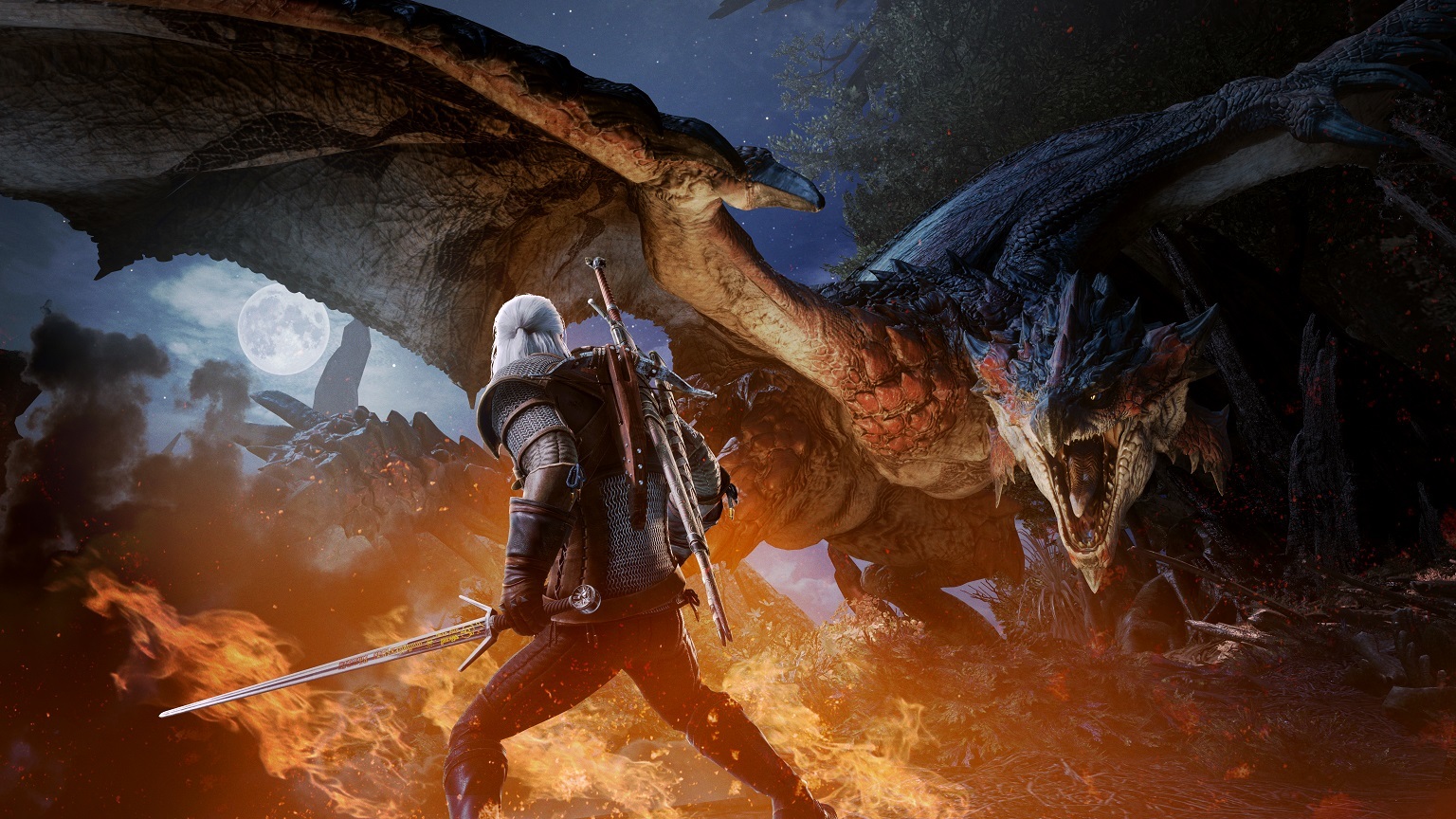
Monster Hunter: World and The Witcher 3: Wild Hunt collaboration content is now on Steam! Check the news for more details!
Major Additions and Changes
Guild Cards: Certain poses or expressions may not be available when using armor or layered armor obtainable via the Witcher 3: Wild Hunt content.
Simplified Chinese: New words have been added to the banned word list for Simplified Chinese. A feature has been added to allow a player's or Palico's name to be edited if it contains any word from this list prior to update 6.00.
Bug Fixes
Mantle Duration: A bug has been fixed where the duration of an active mantle would continue to count down even if the player idled, or was equipped with one of the following weapons drawn: Switch Axe (Sword Mode), Charge Blade (Axe Mode), Light Bowgun, or Heavy Bowgun.
Item Use: A bug has been fixed that allowed players to use an item unintentionally. When a weapon is drawn, players can either press X two times to sheathe their weapon and consume an item, or hold down X once to do both actions consecutively. However, if the Dash Settings are changed to allow running by using both the Left Stick and R button, players could use an item unintentionally if they held down the Left Stick while tapping the X button. This has been fixed so that tapping the X button will not consume an item if the player is holding down dash.
Note: This issue does not occur if Dash Settings are set to allow running using only the RB button. If your Dash Settings are set to the Left Stick, this bug occurred when holding down the RB button and tapping the X button, but has also been fixed.
Speed Crawler: A bug has been fixed that caused the Speed Crawler effect to stop working properly after update Ver. 5.2. It is now working as intended.
Dual Blades/Hammer/Hunting Horn/Insect Glaive/Light Bowgun/Heavy Bowgun: A bug has been fixed where a neutral attack would be performed when the player executed an attack with the Left Stick and the attack button while the player was in the middle of a turning animation.
However, if the player performs a Charged Upswing or Charged Brutal Upswing while turning and charging power, the attack is designed to add movement if the game detects that they are holding the Left Stick forward. In this situation, players can perform a neutral Charged Upswing if they input the attack fast enough, and is not considered a bug.
Switch Axe: A bug has been fixed where the damage bonus from the Assassin's Hood specialized tool only applied to the first attack of the Switch Axe's Left Rising Slash in Sword mode instead of all three attacks.
Charge Blade: A bug has been fixed where the visual and sound effect of the Condensed Element Slash would play during a Rising Slash when the player releases the Y button just before Condensed Element Slash finishes charging.
Insect Glaive: A bug has been fixed where the Quick Sheath skill would not activate when sheathing the weapon while the Kinsect is flying.
Light Bowgun/Heavy Bowgun: A bug has been fixed where ammo listed with a Fast or Normal reload speed would not automatically reload when aiming the Light Bowgun or Heavy Bowgun and pressing the Y button just after aiming the weapon. It has been fixed so that it automatically reloads like ammo with a Slow or Very Slow reload speed.
Long Sword: Fixed a bug where players would occasionally initiate a Spirit Blade I attack (RT), rather than a Foresight Slash (RT+ B button), immediately following an Overhead Slash (Y button → Y button).
Zorah Magdaros: Fixed a bug where multiple players attacking with Spread Ammo 3 in their Heavy Bowguns could potentially crash the game while on Zorah Magdaros.
+ Key: Out of consideration for keyboards without the + key, all instances of the + key appearing in keyboard settings and controls guide have been changed to the ; key. The change is a visual one and has no effect on gameplay.
Multiplayer: A bug has been fixed where a monster would be lured to a player's position instead of the location where a slinger was fired during multiplayer quests.
Online Play: A bug has been fixed that allowed those playing the Arch-tempered Kulve Taroth siege to receive rewards without breaking its horns, if they were online for over eight hours and playing the siege at the eight-hour mark.
Equipment Sorting: A bug has been fixed that caused the Kulve Taroth appraisal weapons to be sorted in a strange manner when sorting equipment by Weapon Tree. This issue affected the following weapon types: Long Sword, Sword & Shield, Dual Blades, Hammer, Hunting Horn, Lance, Gunlance, Switch Axe, Charge Blade, and Bow.
Quests: A bug has been fixed that would not, under certain circumstances, let players skip the opening cutscene during the Fury of El Dorado quest.
Item Sorting: A bug has been fixed where the position of the item used to command Palicoes would sometimes change after restarting the game from the title menu.
Gastodon: A bug has been fixed where players hiding, whether in the bushes or with the Ghillie Mantle, would be detected if they shot, or shot near, a Gastadon. However, if a player previously discovered by a Gastadon hides again (in a bush or Mantle), and fires at the monster, they will be detected. This is by design.
Display Issue: A bug has been fixed where, in certain resolutions, changing the display mode to Windowed occasionally cause the mouse cursor to appear on screen.
Screen Brightness: A bug has been fixed where adjusting the brightness via the start menu—and then restarting the game without saving—would cause a discrepancy in the brightness values shown in the menu, and the actual current brightness.
Multiplayer: A bug has been fixed in multiplayer where a player could retire from a quest, then rejoin the same quest, and attack a monster without causing it to enter a combat state.
Quests: A bug has been fixed where the 4★ quest, One for the History Books, would not show up in Search SOS --> Low Rank if the player hasn't unlocked the 6★ quest A Colossal Task.
Behemoth: A bug has been fixed that, at 90 FPS or higher, prevented the proper visual effect from appearing whenever Behemoth began to cast Charybdis.
Gallery: A bug has been fixed where, at higher frame rates, the screen would turn dark for a long period of time if players prematurely ended a movie they were watching in the Gallery.
Windows 10: A bug has been fixed that could prevent the player's mouse from operating correctly if it was plugged in after opening Monster Hunter: World.
Mouse Camera Controls: A bug has been fixed where vertical aiming controls for attacks such as the Heavy Bowgun's cluster bombs and the Bow's arc shots would behave as Type 1 controls, despite being set to Type 2. Additionally, an issue where aiming control speed would change based on the Mouse Sensitivity Vertical Bias values has also been fixed.
Other: In addition to the above, this build also contains other minor bug fixes.
Important:
The latest version of MONSTER HUNTER: WORLD is revision number 167541.
You can verify the version number in the top-left corner when you launch the game
in windowed mode.
Keep in mind that you can only match with other players who have the same update
version as you.
For other questions, please visit the official MONSTER HUNTER: WORLD support portal below.
http://www.capcom.com/mhwsupport/
Title Update 6: Space requirements for May 9 update
On Thursday, May 9 at 00:00 a.m. UTC, we will be releasing our sixth title update! Space requirements are listed below.
Game files: approx. 3.3 GB
DLC (High Resolution Texture Pack): approx. 3.5 GB
Note: These figures represent our best estimate at the time of this notice.
Important:
By default, Steam will automatically download both the game and High Resolution Texture Pack DLC when the update goes live. To disable the auto-update feature, please follow the steps outlined below before then.
1. Launch the Steam client application
2. Right click on MONSTER HUNTER: WORLD from your Library and
select View Downloadable Content
3. Uncheck the High Resolution Texture Pack DLC
Important:
The latest version of MONSTER HUNTER: WORLD is revision number 167353.
You can verify the version number in the top-left corner when you launch the game
in windowed mode.
Keep in mind that you can only match with other players who have the same update
version as you.
For other questions, please visit the official MONSTER HUNTER: WORLD support portal below.
http://www.capcom.com/mhwsupport/
The Spring Blossom Fest is coming on Friday, April 26!
From Friday, April 26 00:00 am to Thursday, May 16 23:59 UTC, the Spring Blossom Fest is coming to Astera!
What is the Spring Blossom Fest?
A seasonal event held at the Gathering Hub.
Visit Astera's Gathering Hub, the Celestial Pursuit, and you'll find it bedecked with decorations, and the staff garbed in their springtime best! The Spring Blossom Fest is a great opportunity to get together with hunters from all over the world!
・During this period, almost all of the previous special Event Quests are available again.
・You'll get some new login bonuses and limited bounties too!
- As a login bonus, you'll get two Lucky Vouchers plus a Spring Blossom Ticket.
- For the duration of the event, there will be daily limited bounties where you can earn
Blossom Fireworks and Spring Blossom Tickets.
・With Spring Blossom Tickets, you'll be able to craft the Blossom armor set, as well as the Felyne
Butterfly set for your Palico.
・You'll get new backgrounds, titles, and poses for your Guild Card, as well as the Buzzy Bee
costume for your Poogie.
・The Handler's Busy Bee Dress will be available for a limited time only.
・Items or services at all facilities will be available at reduced costs.
・A special seasonal platter will be available in the Gathering Hub.
Important
:
The latest version of MONSTER HUNTER: WORLD is revision number 167353 You can verify the version number in the top-left corner when you launch the game
in windowed mode.
Keep in mind that you can only match with other players who have the same update
version as you.
For other questions, please visit the official MONSTER HUNTER: WORLD support portal below.
http://www.capcom.com/mhwsupport/
Title Update: Special Collaboration Event with The Witcher 3: Wild Hunt from May 9!
From Thursday, May 9 00:00 UTC, we'll be releasing the sixth title update, which will include various bug fixes, as well as a special collaboration with "The Witcher 3: Wild Hunt" (Developer: CD PROJEKT RED)!
Major New Features:
In this collaboration, the main protagonist of the Witcher series, Geralt of Rivia, makes an appearance in the New World! A unique quest featuring RPG elements from "The Witcher 3: Wild Hunt" brings a fresh gameplay experience, with newly recorded voiceovers by the original voice actor for Geralt! (English, French, Italian, German, Spanish, Japanese and Monster Hunter Language)
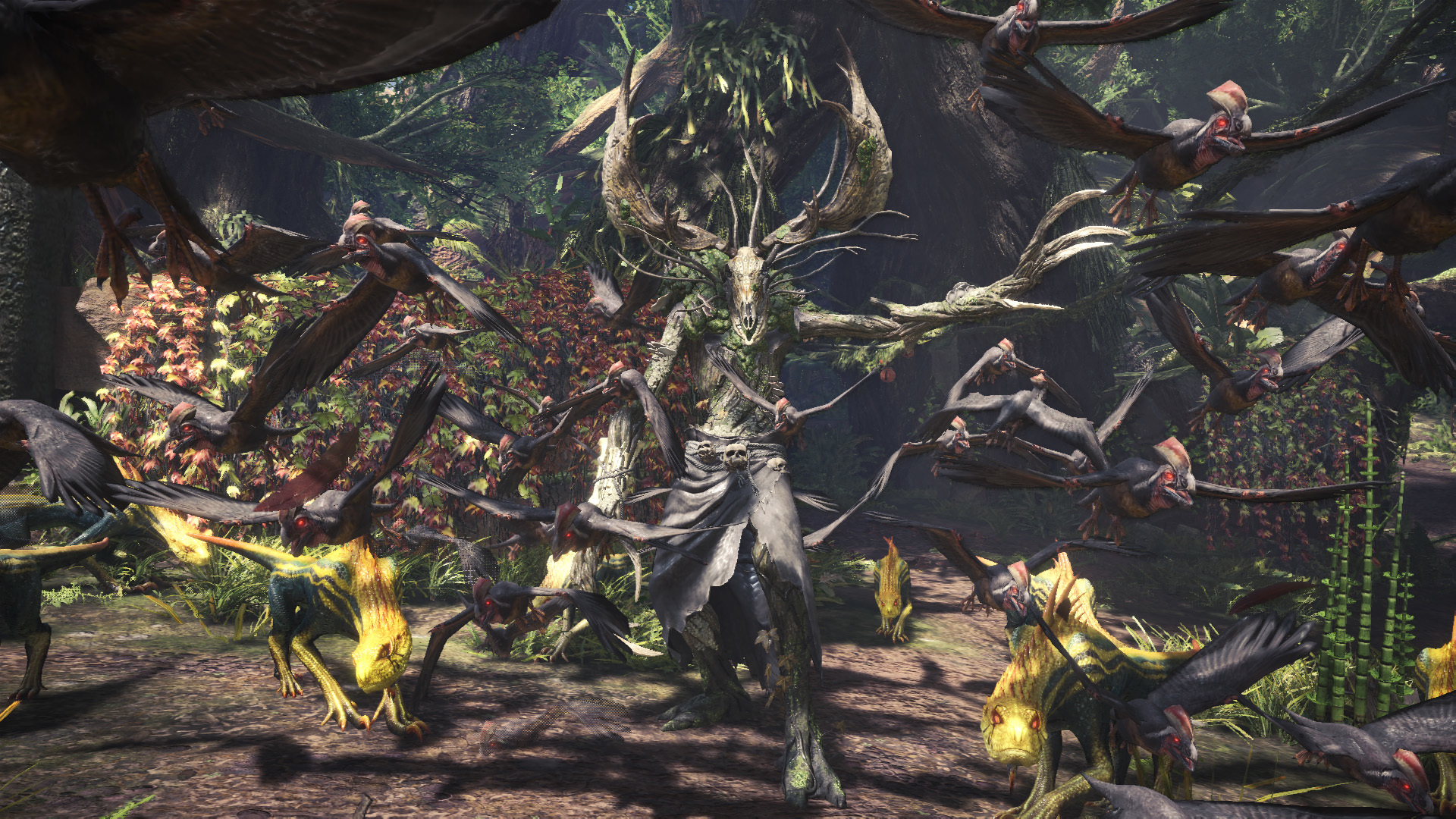
Leshen, a monster from another world, arrives in the New World!
Dwelling deep within the forest, these creatures use their innate magic to control all flora and fauna within their territory.
Special Assignment — Contract: Trouble in the Ancient Forest
・Play as Geralt of Rivia and take on a new special assignment! Go on a quest containing RPG elements from "The Witcher 3: Wild Hunt," and solve mysteries as an expert monster slayer for hire!
・The ending of the quest will depend on your progression through the side objectives!
・Complete the special assignment to earn a special item and gesture, a new guild card background, as well as poses and titles.
・You can also earn materials to craft the "Geralt α" full armor set and the "Witcher's Silver Sword" sword & shield! Furthermore, completing special objectives will earn you a critical bounty that, if completed, allows you to get the materials needed to craft the "Cursed Staff α" weapon, and the "Nekker α" full armor set for your Palico when completed!
・Special assignment "Contract: Trouble in the Ancient Forest" is a single player only quest where you get to play as Geralt of Rivia.
Note: This special assignment will always be available.
Event Quest (From May 17) — Contract: Woodland Spirit
・The difficulty for this quest is similar to Death March! difficulty in The Witcher 3: Wild Hunt.
・Complete the quest to earn materials to craft the "Ciri α" full armor set and the "Zireael" dual blades, as well as earn delivery requests that allow you to get the materials needed for the Geralt Layered Armor and Ciri Layered Armor.
・Any bugs related to this quest on other platforms have already been fixed for Steam.
Note: This quest is available from Friday, May 17 00:00 to Thursday, May 30 23:59 UTC.
The latest version of MONSTER HUNTER: WORLD is revision number 167353.
You can verify the version number in the top-left corner when you launch the game
in windowed mode.
Keep in mind that you can only match with other players who have the same update
version as you.
For other questions, please visit the official MONSTER HUNTER: WORLD support portal below.
http://www.capcom.com/mhwsupport/
An Arch-tempered Kulve Taroth slithers onto Steam!
From Friday, April 19 00:00 to Thursday, May 16 23:59 UTC, an extremely dangerous tempered form of an elder dragon, known as an "arch-tempered monster" will be sliding onto Steam!
Accept the new Event Quest The Fury of El Dorado to take on an Arch-tempered Kulve Taroth.
・Arch-tempered monsters can be distinguished from their normal counterparts
by their slight metallic gleam.
・When taking on this Event Quest, the color of the frame around the monster icon
will be different than usual, so keep an eye out!
・You need to be Hunter Rank (HR) 16 or higher to take on this quest.
・Please note that the availability of this quest is subject to change without prior notice.
Craftable equipment:
・Kulve Taroth γ armor series
・New reward: Incandescent Weapon
(By completing specific objectives, you'll have a chance at receiving new rainbow
rewards that are more powerful than gold rewards.)
Important:
The latest version of MONSTER HUNTER: WORLD is revision number 167353.
You can verify the version number in the top-left corner when you launch the game
in windowed mode.
Keep in mind that you can only match with other players who have the same update
version as you.
For other questions, please visit the official MONSTER HUNTER: WORLD support portal below.
http://www.capcom.com/mhwsupport/
(1) Title Update: New Features Coming On April 4!
On Thursday, April 4 at 00:00 a.m. UTC, we released title update 5.2, which contains some new features.
Major New Features/Design Changes:
Added support for High Resolution Texture Pack DLC.
After downloading the pack, go to the main menu > Options > Display > Advanced Graphics Settings to adjust the texture quality.
The High Resolution Texture Pack requires at least 40GB of available storage space, and 8GB of graphics memory (VRAM).
Please make sure to check the system requirements on the DLC page before installing the pack.
Added a "TAA+FXAA" option to Anti-Aliasing in the Advanced Graphics Settings.
Go to the main menu > Options > Display > Advanced Graphics Settings to toggle it.
Added a meter to the Advanced Graphics Settings menu that shows how much PC VRAM (graphics memory) you're using with the currently applied settings.
When selecting "Take All" at the rewards screen after completing a quest, a list of all items received will now be displayed.
Added a new mouse control type that is less sensitive to unintentional movement when controlling the Focus Camera with the mouse.
With the newly added Type 2, you can hold down the lock-on key and use the scroll wheel to switch between monster parts when you are locked on to a monster. It also takes longer for the focus camera to disengage (from moving the mouse) when using this type.
Go to the Start Menu > System > Options > Controls to change control types.
Added a camera control category to the keyboard settings.
Camera control used to be tied to the O, K, L, and + keys, but they can now be changed to other keys by going to the main menu > Options > Key Config.
Added a "Friends Can Join" option to the Private Session Settings.
Until now, it was only possible to access private sessions by entering the Online Session ID, but by turning on the "Friends Can Join" option, your Steam friends will be able to join by using "Invite a Friend" or searching for friends' sessions.
Accordingly, the "Yes" option for private sessions has been changed to "Online Session ID Only."
Bug Fixes:
Added a countermeasure for a bug causing the game to crash when performing actions with a lot of visual effects, such as Spread Ammo 3 for the heavy bowgun, during the event quest Undying Alpenglow. This bug will be further addressed in future updates.
To compensate for this issue, the availability of Undying Alpenglow will be extended as follows:
Before: Friday, March 22 00:00 a.m. to Thursday, April 4 23:59 UTC.
After: Friday, March 22 00:00 a.m. to Thursday, April 18 23:59 UTC.
Fixed a bug where a player would perform a backstep facing the left if they performed a neutral evade (backstep) within 0.3 seconds of performing a guard with the analog stick.
Fixed a bug where the Gunlance's Wyrmstake Cannon would continuously hit a monster if it connected as the monster begins digging underground until it coming up from beneath the ground. It has been fixed so Wyrmstake Cannon will end once the digging underground animation is over.
Player characters are supposed to be displayed with high resolution textures at all times, but there was a bug where the player would be displayed with a similar texture resolution to NPCs when restarting the game from base and departing on a quest or expedition. This has been addressed.
Fixed a bug causing low scroll sensitivity when using the scroll wheel on the Skill Info screen.
Fixed a bug where, when the player faints with a specific window on screen, the window would not close and could still be controlled.
Fixed a bug where the Support window on the title screen would show the web manual and support page URL for other platforms.
Fixed a bug on the oven roast and Tailraider Safari results screens where pressing the left directional key when the cursor is set to "Take All" would not result in the cursor moving to "Sell All."
Fixed a bug where the mouse controls for sorting equipment loadouts and keyboard presets behaved differently from the sorting controls for other UIs, such as item loadouts.
Various other bug fixes.
Important:
The latest version of MONSTER HUNTER: WORLD is revision number 167353.
You can verify the version number in the top-left corner when you launch the game in windowed mode.
Keep in mind that you can only match with other players who have the same update version as you.
For other questions, please visit the official MONSTER HUNTER: WORLD support portal below.
http://www.capcom.com/mhwsupport/
(2) Title Update: New Features Coming On April 4!
On Thursday, April 4 at 00:00 a.m. UTC, we released title update 5.2, which contains some new features.
Localization-related bug fixes:
- The Kulve Taroth weapon Taroth Daggers "Fire" are fire element, but were translated to infer that they were Blast Element. The translations have been fixed to the following:
If you have the Taroth Daggers "Blast" in your possession, please note that they have simply been renamed to Taroth Daggers "Fire" and have not been deleted.
- In French, two guild card titles unlocked upon reaching hunter rank 6 were called Assassin, so one of them has been changed to Massacreur.
Please note that if you're using the updated guild card title, it might be have been changed to the new translation without warning.
- In Russian, a bug has been fixed where editing a shoutout over 34 characters resulted in the latter half of the message disappearing. The translations have been updated to the following:
・When firing a Dung Pod: Выстрел навозом!
・When planting a Health Booster: Усиление здоровья!
・When planting a Cleanser Booster: Усиление чистоты!
・When planting an Affinity Booster: Усиление мастерства!
- In Arabic, the translation for the skill names Guard and Guard Up were the same, so Guard Up has been renamed to the following:
التصدي
↓
زيادة التصدي
- Various other bug fixes.
Important:
The latest version of MONSTER HUNTER: WORLD is revision number 167353.
You can verify the version number in the top-left corner when you launch the game
in windowed mode.
Keep in mind that you can only match with other players who have the same update
version as you.
For other questions, please visit the official MONSTER HUNTER: WORLD support portal below.
http://www.capcom.com/mhwsupport/
Get Ready for a Special Collaboration Event with the Assassin's Creed Series!
From Friday, May 3 00:00 to Thursday, May 16 23:59 UTC,
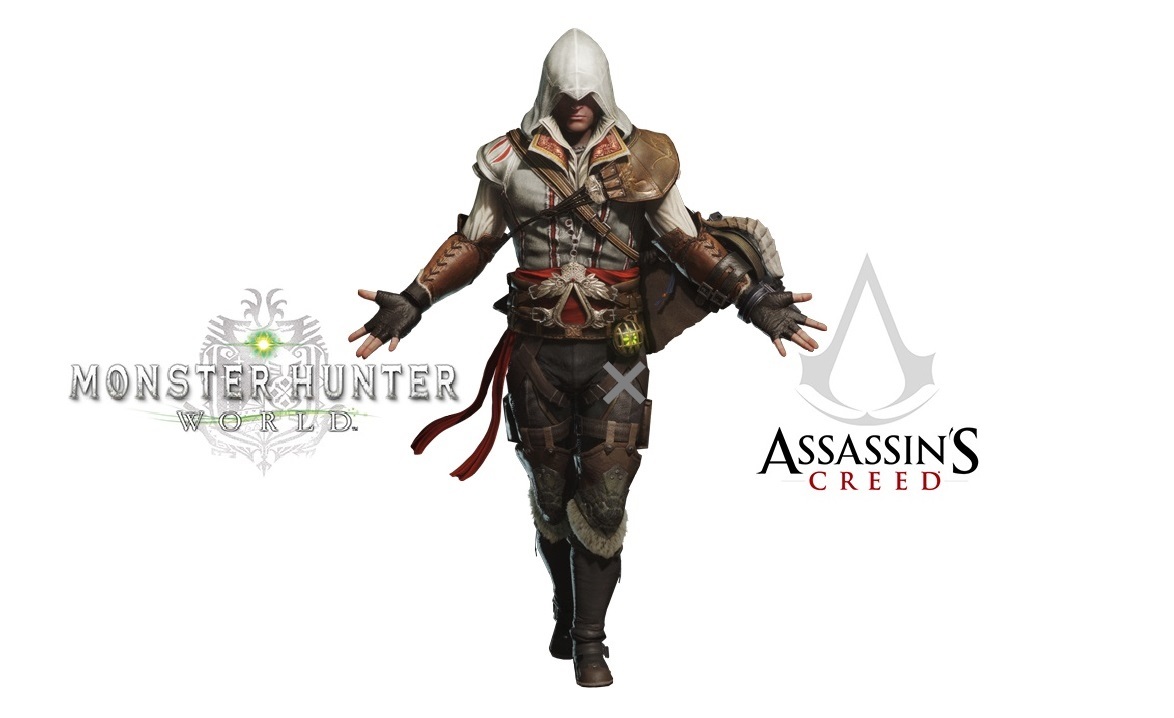
a special collaboration with the Assassin's Creed series sneaks onto Steam with a new event quest: "SDF: Silent, Deadly, and Fierce"!
Hunt all target monsters to earn "Senu's Feather." Take this item to the Smithy to unlock delivery requests for the Bayek Layered Armor and the Specialized Tool: Assassin's Hood. Once the requests are done, you can also earn new backgrounds, titles, and poses for your Guild Card!
Note: You need to be Hunter Rank (HR) 14 or higher to take on this quest.
The latest version of MONSTER HUNTER: WORLD is revision number 166925.
You can verify the version number in the top-left corner when you launch the game
in windowed mode.
Keep in mind that you can only match with other players who have the same update
version as you.
For other questions, please visit the official MONSTER HUNTER: WORLD support portal below.
http://www.capcom.com/mhwsupport/
Notice Regarding a Bug in Event Quest: "Undying Alpenglow"
The following bug has been discovered in the arch-tempered Zorah Magdaros event quest "Undying Alpenglow," which was released on March 22 UTC.
It has come to our attention that performing attacks that generate a large amount of effects upon impact (such as Spread Ammo 3 for the Heavy Bowgun) would cause the game to crash when playing this specific event quest.
A fix for this issue is planned for title update 5.2, which is scheduled to be released on Thursday, April 4 at 00:00 a.m. UTC. Once the fix is implemented, we will extend the availability period for the event quest.
We apologize for any inconvenience this may have caused, and appreciate your patience while we sort out this issue.
Important:
The latest version of MONSTER HUNTER: WORLD is revision number 166925.
You can verify the version number in the top-left corner when you launch the game in windowed mode.
Keep in mind that you can only match with other players who have the same update version as you.
For other questions, please visit the official MONSTER HUNTER: WORLD support portal below.
http://www.capcom.com/mhwsupport/