Moons of Ardan cover
Moons of Ardan screenshot
Genre: Simulator, Strategy

Moons of Ardan

Version 0.10.0.7 released April 01, 2023

Bugs fix


  • Improved the functionality of the +/- buttons in the employment tab to allow for quicker changes to worker slots.
  • Fixed a bug in the space route summary that caused "no storage at destination" to be displayed twice.
  • Resolved a crash that occurred when selecting a building during the first launch cut scene or from a selected spaceship.
  • Addressed an issue where the system view population stats were "corrupted" when loading a save without a population level present.
  • Fixed a bug where the building steps were not displayed in the build menu for upgradable buildings if the body was not settled.
  • Resolved a crash that occurred when hovering over the build menu for upgradable buildings while the game was saving.

Balancing


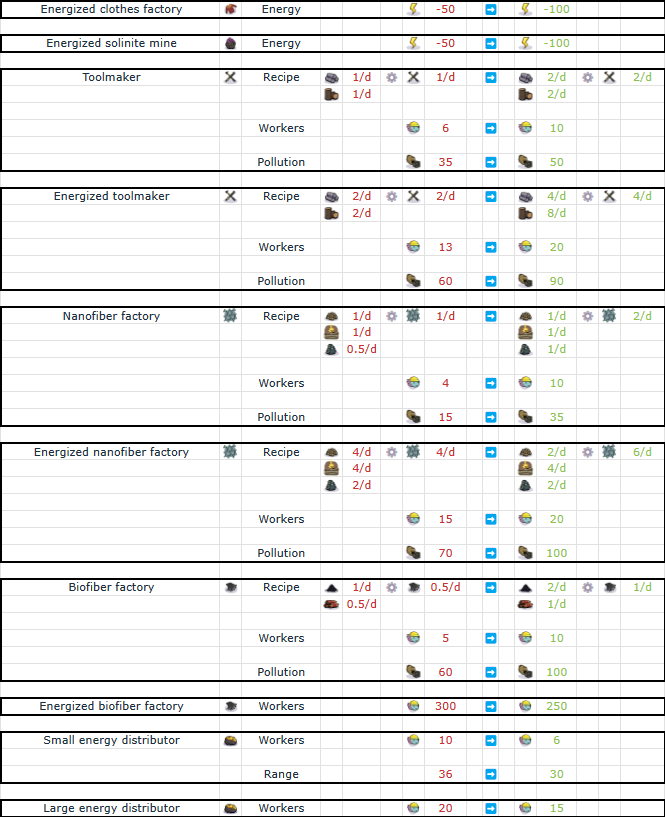
  • Energized pollution processing facility - Energy consumption -50 -> -100
  • Advanced pollution processing facility - Energy consumption -100 -> -200

Version 0.10.0.6 released March 29, 2023

Bugs fix


  • Resolved a bug causing crashes when attempting to delete an energized resource producer.
  • Addressed an issue where energy circuits were becoming corrupted upon deleting an energy consumer.

Balancing


Version 0.10.0.5 released March 23, 2023

Get ready for a game-changing update that introduces a brand-new mechanic to the world of Moon of Ardan! After unlocking jewellery in population level 3, you'll unlock a whole new world of possibilities with energy management. Discover exciting new buildings that require energy and learn to optimize your production chains like never before.

But that's not all - we've also added a wide variety of building upgrades that allow you to fine-tune your production and achieve even greater success. And with our latest improvements to the UI, building designs, fixes, and technical adjustments, the game is more stable and engaging than ever before.

So whether you're a veteran player or just starting out, there's never been a better time to jump in and experience all the excitement and adventure that awaits in this amazing world. So come join us and start your journey today!

https://store.steampowered.com/app/1694260/Moons_of_Ardan/


Join our Discord server to help us improve the game!



Improvements


Space route improvements


Experience greater freedom and flexibility in space routes management! We've removed a previously insidious constraint that prevents spaceships from taking off if there wasn't enough storage space at the destination.
This could cause your spaceship to get stuck at some point and cut off the supply of critical resources.


In this example, if the biofiber storage at Tinar was full, the spaceship would have been locked on Velaa and the Soilgrain would never be delivered to Velaa anymore.

Now, in situations where storage space is lacking at the destination, the timeout set at space route creation will be used instead. This means that you can load resources at both moon stops and optimize your economy with even greater precision.


Energy management


The biggest change this month is the addition of energy management to the game, which adds new constraints to colony building but also increases your options for tuning production chains. This feature also enables us to create upgrades for old buildings, adding new challenges when you want to energize them. Check out these tutorials for an in-depth explanation of the mechanics:


The energy requirements are displayed in building tooltips.


A new tab has been added to the energy-building information window, which shows you the balance on the energy circuits.


The first building, the Small Energy Plant, unlocks when you reach 300 dwellers (level 3 population).


Energy-related buildings are grouped together in the energy category.


Like other production buildings, energy production can be throttled using worker slots.

Energy production can be throttled using worker slots, just like other production buildings. With energized buildings, you can choose to connect them to the grid, which introduces a second value that shows the predicted production value when they are energized.

Unlike advanced buildings, energized buildings can function at a higher yield than their basic counterparts even without a supply of energy. But when provided with energy they receive an additional 50% boost to their production.


You can see directly if a building benefits from the boost in the production UI.


We've added several new floating icons to provide more detailed information about the energy status of your buildings:


  • Buildings that are not connected to the grid.


  • Energized buildings that are not receiving enough energy.


  • Advanced buildings that require energy but are not working due to a lack of energy.


When placing energy-related buildings, we've included helpers that display the grid connections:


  • Green indicating connections to consumers.
  • Yellow indicating connections to pylons.


Energy-related buildings all have one or many lights reflecting their status:

  • Green means the building is adequately energized.
  • Yellow means the building is connected but not benefiting from the energy boost.
  • Red means the building is not energized or not connected to the grid.

Unlock timing


  • The medium energy plant will unlock once you have 300 cyborgs.
  • The energy distribution system (pylon and Small energy distributor) will unlock at 400 cyborgs.
  • The large energy plant will unlock at 1300 cyborgs.


Improved building upgrade tooltip


Now, when you hover over the upgrade button, you'll receive a detailed tooltip that includes critical information such as the required worker count, the new recipe, and even the updated pollution value and energy options.

But that's not all! We've also fixed a pesky issue where the tooltip wouldn't update after being clicked, potentially leading to confusion about the true cost of the next upgrade.


Improved end game conditions


Aim for the ultimate goal of completing the game, but remember that the wonder's construction alone is not enough. To achieve total victory, it must also be energized and fully staffed.


Improved multi-step building tooltips


With our newly improved multi-step building tooltip system, you can now easily keep track of the number of workers required for each step of the building process.

That's not all - we've also made significant improvements to localization, allowing you to quickly and easily identify the different construction steps.

With these powerful tools at your disposal, you can streamline your construction process, save time and resources, and build structures that will stand the test of time.


Photo mode


Using the P key you can hide the user interface to make beautiful screenshots. Use the p key again to exit the mode.

Unleash the full potential of your screenshots with a simple keystroke! By tapping the illustrious "P" key, watch as the clutter of the user interface gracefully disappears, leaving only the pristine beauty of your captured image. And fear not, for when you are ready to return to the world of functionality, simply tap "P" once more to exit this mode of artistic expression.


Improved producers input UI


Take your production to the next level with our newly updated production buildings UI! You can now view your consumed resources directly in the production tab, giving you an easy-to-read display of your input storage and current resource consumption.

But that's not all - you can also use the navigation feature that lets you switch between buildings producing input resources with just a single left-click. And if you need to access the resources screen, simply right-click to bring it up, just like with the output resource.


Improved production chains navigation


With our improved resource screen, you can now navigate production chains more efficiently than ever before. If a parent exists, you can easily move to it with a simple click, allowing you to stay focused on the big picture and make informed decisions about your production.

We've added a new highlighting feature that makes it easy to see which resource you've selected, providing even greater clarity and reducing the risk of mistakes.


Improved spaceship UI in system view


With our newly improved spaceship interface, when you glide your cursor over the spacecraft icon, a detailed summary of its entire space route will be revealed. And that's not all - if the ship departed with less than a full cargo, fear not, for the reason why will also be disclosed, providing insight into the workings of our complex spacefaring world.


Updated buildings [WIP section]


  • Small energy plant
  • Medium energy plant
  • Large energy plant
  • Energy pylon
  • Small energy distributor
  • Large energy distributor
  • Hydroponic farm
  • Water purifier
  • Fabric weaver
  • Clothes factory
  • Solinite mine
  • Bioreactor
  • Solinite foundry


New buildings [WIP section]


  • Energized hydroponic farm
  • Energized water purifier
  • Energized fabric weaver
  • Energized clothes factory
  • Energized solinite mine
  • Energized bioreactor
  • Energized solinite foundry
  • Energized toolmaker
  • Energized metalloids extractor
  • Energized nanofiber factory
  • Energized bioactivator
  • Energized biofiber factory
  • Energized synthwiches factory
  • Energized permium mine
  • Advanced permium mine
  • Energized pollution processing facility
  • Advanced pollution processing facility


Other improvements


  • Added a pollution icon near the planet name.
  • Displayed the range of woodcutters in the building tooltip.
  • Changed the icon for required workers on asteroid building upgrade tooltips to the axobot icon.
  • Production estimation in the employment tab of buildings now takes pollution into account.
  • Prevented building on asteroids before the hub was complete.
  • Paused building animations, light, and fx (such as smoke) when the building is not producing or is shut down.
  • Paused the game after the loading of a savegame is completed based on feedback and displayed a message indicating that the game is paused in the middle of the screen.
  • Displayed the range of other service buildings when placing a new service building.
  • Reduced initial volumes for fresh installs based on feedback.
  • Increased the resources graph range in the resource screen.


Balancing


We've made some significant changes to ensure that you have everything you need to succeed, starting with unlocking Axobots before the asteroid hub.

But that's not all - we've also increased the size of the community center from 9mx12m to 9mx15m to provide space for future visual improvement.

And with the arrival of energy, we've simplified the production chains ratio for early building, making it easier to get started and giving you more time to focus on the things that matter most.

Population consumption


Level 1 buildings


Level 2 buildings


Level space route buildings


Level 3 buildings


Level 4 buildings


Fixes


  • Fixed issue where the red overlay in the build menu did not show for incompatible stellar body types.
  • Fixed issue where the landing platform was not showing the warehouse "reach" overlay.
  • Fixed issue in the spaceship tutorial screen where woodcutter input for biocrusher was not shown.
  • Fixed issue where the worker slot value was reset when upgrading a building.
  • Fixed issue where the upgrade tooltip went out of the screen.
  • Corrected the position of the building info dock for the city center, the level 2 shelter and the wonder
  • Fixed issue where the producer count in the graph overlay constantly changed when production buildings were shut down.
  • Fixed descriptions for the Permium foundry, the Permium mine, and the Jeweler.
  • Fixed issue where the selected recipe was not showing on the Multi-output assembler.
  • Fixed issue where production buildings were not showing correct information about input resources.
  • Fixed crash when a destroyed building was selected as the destination by a transporter arriving at a warehouse.
  • Fixed issue with multi-step buildings that crashed when upgraded regularly.
  • Fixed crash when selecting a citizen on an asteroid.
  • Fixed issue where the Permium mines were not selectable on asteroids.
  • Fixed issue where a space route edited but not saved (with the "Exit" button) would not be executed anymore.

Last discount before price increase

Dear players,

We're excited to announce that development of Moons of Ardan is moving forward smoothly, and we want to thank everyone who has supported us thus far. As part of our commitment to transparency, we want to let you know about our pricing plans for the game.


As we continue to make progress on the game, we are gradually increasing the price to bring it closer to the final selling price. This means that if you've been considering purchasing Moons of Ardan, now is the time to do so to get the lowest price.

https://store.steampowered.com/app/1694260/Moons_of_Ardan/

Here are some examples of how the pricing will change in the coming weeks:

  • The current price of $14.99 will increase to $19.99
  • The current price of €14.99 will increase to €19.99
  • The current price of £12.99 will increase to £16.99

We believe that the value of Moons of Ardan will continue to increase as we add new features and content.


We hope that you'll continue to support us on this journey and that Moons of Ardan will bring joy to players for years to come.Thank you again for your support,

Quentin and François

Join our Discord server to help us improve the game!


Version 0.9.4.3 released February 05, 2023


  • Fix for the bug where upon reaching 10,000 pollutions, the pollution system becomes faulty and the game ceases to function correctly.

Version 0.9.4.2 released January 27, 2023


  • Fixed the advanced pollution scrubber mesh that was broken

Version 0.9.4.1 released January 23, 2023


  • SR-2501: Fixed a crash that occurred when a Multi-Output assembler without a selected recipe was destroyed.
  • SR-2503: Fixed a crash and added logging in Pandora.Managers.CitizenManager+
  • SR-2201: Fixed a crash and added logging in Pandora.Citizens.TransporterComponent.CancelTransport()

Version 0.9.4.0 released January 21, 2023

In this update, we've made several improvements to enhance performance, fairness, and overall game experience.

We've made changes to the pollution system, improved management tools, and added new building designs.

Additionally, we've made various fixes and technical adjustments to improve the game's overall stability and performance.

Stay tuned for the full changelog for all the details.


https://store.steampowered.com/app/1694260/Moons_of_Ardan/


Join our Discord server to help us improve the game!


Balancing


Enhance pollution fairness


  • Decrease pollution citizen consumption penalty from 175% to 150%
  • Revise recipe for Pollution Processing Facility


  • Revise pollution variation calculation to balance overall impact and minimize pollution growth on newly settled moons.


Improvements


Performance improvements


In this patch, we made several improvements to the performance of the game.

We realized that by better managing the hierarchy of all objects in a scene, we could dramatically improve the game's performance.
We re-evaluated the most used meshes and new ones with this in mind to enhance performance and make the game run more smoothly.

With these changes, we managed to achieve almost 2x fps in some cases.
We are still not done optimizing Moons of Ardan, but we believe that our players will appreciate the improved performance.

These changes will result in a more seamless and enjoyable gaming experience for players.


New building designs


Hydroponic farm


City center


Water extractor and Water purifier


Improved trends


We've made an improvement to the resource trends feature in the game.

Previously, the resource trends displayed green and red arrows depending on the variation of resource storage in previous days.
However, it was not intuitive and not very useful.

We have now implemented a new system for resource trend arrows.
A red arrow will now be displayed when the production of a resource is less than the consumption, not including trade routes.
A green arrow will be displayed when production is significantly higher than consumption.


This change should make it easier for players to understand the resource trends and make more informed decisions.


Missing Resources Display


As the number of resources in the game has grown, we've had to remove some of them from the main screen.
This has caused a problem, as it has been difficult to know when a production chain is about to be affected by a lack of input resources.

To address this issue, we've implemented a new feature that displays missing resources in a separate column under the "all resources" icon when a local transporter needs to fetch resources for a building and the storage of that resource is empty.
This will be limited to a maximum of 8 resources at a time.

This new feature will help players quickly identify and address any missing resources in their production chains, ensuring smooth and efficient operations.


Better trade route visualisation in overview screen


In this patch, we made improvements to the trade route overview screen to enhance the player's experience.

We improved the contrast of the travelled route to make it more visible and fixed the orientation of the spaceship icon.

Additionally, we added an arrow to the spaceship icon to make it clear in which direction the ship is travelling.

These changes will make it easier for players to understand and manage their trade routes, leading to a more efficient and enjoyable gaming experience.


Save Game Compression


We have implemented a new feature that compresses save games in gzip format.
This is a necessary step in order to integrate the Steam Cloud API, as our save games tend to be quite large.

Not only this allows us to implement Steam cloud API, but also, it has a significant benefit in terms of saving time, especially in the late game when the amount of data to save increases.

This new feature will help players save their games faster and make the experience more seamless.


Other improvements


  • Improved building range visualization clarity through colour enhancement


  • Improved building selection decal with distinct colours for hover and selection for better visibility.


  • Improve the options menu


    • Displayed camera shortcuts in the options menu for easy access.
    • Added options to invert pan and rotate controls on the mouse for improved customization.


  • Added Demo text on the demo main menu for better identification.


  • Updated the design of the bug error report screen for a more streamlined experience.


    • Included information on what data is being sent in the automated bug report for transparency and user awareness.

  • Reduced log size by eliminating SpaceRouteDataChangedEvent logs.
  • Removed Main shortcut tutorial


Fixes


  • Fixed an issue where the spacebar would stop working from pausing the game after using the speed buttons.
  • Improved the holocenter's information UI by moving up its information dock.
  • Fixed the bug error report screen comment field, allowing contents to be sent.
  • Fixed pollution visuals not displaying correctly on the newest buildings.
  • Fixed pollution visuals not displaying correctly when loading a game.
  • Fixed a crash that occurred when changing the recipe of a paused Multi-Output assembler.
  • Fixed a crash that occurred when changing the recipe in a Multi-Output assembler with resources still stored from the previous recipe.
  • Fixed error messages for localization in non-transactional updates.
  • Fixed error messages for localization in recipe tooltips caused by non-transactional updates.
  • Fixed an issue with the CTA button's autosize font parameter for improved display.
  • Resolved miscellaneous localization errors in French.
  • Resolved missing localisation for building info tab (plan and launch)


Technical


  • Added occlusion components to the most frequently used buildings to improve performance.
  • Optimized warehouse meshes to improve performance.
  • Reduced the depth of the game object hierarchy to improve performance.
  • Optimized tree meshes to improve performance.
  • Optimized house meshes to improve performance.


December 2022 Newsletter

We’ve just released our December Newsletter.

We talk about:

  • the last patch
  • #inktober
  • new websites look
  • and more…

You can check it here: https://moonsofardan.com/newsletter_2022_12_december/

You can also subscribe to the next issues here: https://moonsofardan.com

https://store.steampowered.com/app/1694260/Moons_of_Ardan/

Version 0.9.3.1 released December 16, 2022

https://store.steampowered.com/app/1694260/Moons_of_Ardan/


Join our Discord server to help us improve the game!


Improvements


New buildings


We’ve added two levels of pollution scrubbers.

  • A simple pollution scrubber that cleans 400 units of pollution


  • An advanced pollution scrubber that cleans 700 units of pollution


More details in the Balancing section


New building designs


Shelter


House


Residence


Building


Warehouse


Large warehouse


Giant warehouse


Woodcutter


Pollution scrubber


New job assignment priority system


One of the most requested features is here, the priority system allowing players to optimize production.

You can use the priority system in the *employment* tab.

There are three priority levels:

  • All building priority levels are set by default to
  • normal*.
  • High* means that the worker positions get filled before the
  • normal* and
  • low* levels.
  • Low* means they get assigned last.


The job assignment tutorial has been updated to explain the new feature. A new animation has also been added to better explain the job assignment.


New visuals


Clouds


Grass and trees


New building information icons


New influence ranges color


New building selected visual


Improved building placement and area ranges


We have improved the visuals to reduce cluttering when placing buildings.


When placing the woodcutter’s hut, you will now see the work area of all others to prevent sharing trees.


More data graphics


Now, graph history is saved to keep track between games.

Pollution graph


The tooltip of the pollution bar now shows the level of global pollution and pollution progression on your moons for the last 5 days.


Resource graph


In the tooltip, we’ve added the consumption of the industrial buildings beside the citizens'. The graph has also been updated with:

  • In brown, the pollution level of the buildings.
  • In black, the evolution of the moon storage.
  • In green, the industry and citizen consumption rate.
  • In blue, the production rate.


Misc


  • The sampling of graphs is now constant to avoid too thin lines of messy graphics.


Other improvements


  • From the moment a resource is unlocked, its production chain is available in the resource window for the player to study it.
  • A new panel is shown on the main screen to attract player attention on how they can help increase our visibility.
  • A message is displayed when a camera shortcut is assigned
  • Axodrones have been renamed Axobots
  • On the planetary map, spaceship cargos are directly displayed


  • Space route overview button is not hiding moons or asteroids anymore
  • When a need is frozen for your citizens, a pop-up is now shown to warn the player


  • The tooltips of unique buildings have been improved to show important information on their construction process


  • Misson control queue and space route overview screen are now pausing the game


Balancing


  • The growth rate of trees has been reduced [(0.96/d-1.6/d) ➡️️ (3.6/d-6/d)]
  • Local transporters (those in charge of fetching input resources of producers) only fetch resources in the range of the building. This fixes behavior where they traveled the whole planet to fetch a resource in a producing building far away because the moon storage was empty
  • Buildings values that have been changed:


Fixes


  • Biofiber factory animation is fixed


  • Looping space routes parameters (loading limit, wait time) are now used and saved correctly
  • Needs that were unlocking two spaces into houses (entertainment, jewelry) were bugged
  • Savegames were broken if the last city center of a moon was destroyed
  • The resource graph was not shown when entering the resource window
  • Prevent zooming when scrolling a panel (overview and queue), that was linked to pausing those
  • Events were not correctly unregistered when the GameManager was destroyed, which could cause strange behavior when games were started/reloaded without restarting the game
  • Fix the repeated Dweller in the system population summary
  • Pause setting was something messed up when a pop-up was shown


Technical


  • Trees are correctly included in the visibility manager
  • Revert Unity workaround: Production chains in the resource panel do not show tooltips anymore nor are navigable [UNITY 2021.3.5f BUG]
  • LODs have been created for more buildings and for citizens


💾How save conversion works💾


When you launch the new version, all saves that have been done with the previous version (0.9.1-0.9.2) will be converted and usable in the new version (0.9.3)

BUT…

No acceptable ways of converting trade from v0.9.1 routes were found, so trade routes have been reset.

WHAT DOES THAT MEAN?

You will have to replan your trade routes. This means you get to use the new planning tool at once, 🎆YAY!🎆

[expand="info" type="More"]
WHAT TO DO IF I WANT TO CHECK MY OLD GAME?

Using the "betas" tab in the steam game properties you can switch to branch v0.9.1, launch the game and you will be able to check all your beautiful trade routes to redo them in the newest version.

⚠️You will have to switch back to the default branch otherwise you won’t receive new updates later⚠️

I LAUNCHED THE NEW VERSION, AND SAVES HAVE BEEN CONVERTED, BUT I’D LIKE TO FIX STUFF IN THE PREVIOUS VERSION BEFORE

It starts to get a bit ⚙️technical⚙️ but you can navigate to
"%AppData%\..\LocalLow\PandoraTechnology\MoonsOfArdan" delete all the new saves (v10) and re-import them from the previous version (with your new progress - but still no trade routes)
[/expand]
WHAT IF I NEED MORE HELP

Just pass by our 🗨️Discord💬 and we will help you