

PC Steam
Genre: SimulatorNatural Locomotion
Fixed buttonless mode (again)
Fixed buttonless mode for some headsets
Restored SteamVR tools, fixed smartphones and other critical bugs
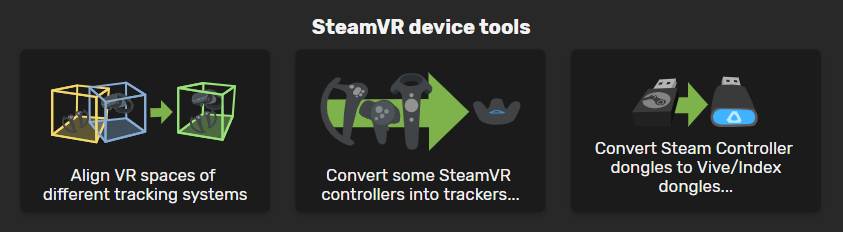
Align VR spaces of different tracking systems
Combine lighthouse devices (Trackers, HTC Vive controllers or Index controllers) with Oculus, WMR or Vive Cosmos headsets.

Convert some SteamVR controllers into trackers
This tool will temporarily emulate HTC Vive trackers using other lighthouse devices (And Oculus CV1 controllers) without flashing them.

Convert Steam Controller dongles to Vive/Index dongles
This utility allows you to convert Steam Controller dongles into Vive/Valve controller/tracker dongles (and restore them).

You need one dongle per device. A Vive or Index headset has two of them built in. For example if you have 4 controllers and an Index/Vive headset (only USB and power connected), you only have 2 receptors and you need 2 dongles to use all controllers.

New Features
- Restore converted dongle to be used with Steam Controller

- Added "head_direction" workaround to enable a feature for use the direction of the head instead of feet/hands. This option could be added in the profile editor > Configure speed and trackpad emulation > Workarounds.
Remember you can combine multiple workarounds by separating them with spaces.
Fixed bugs
- Smartphones disconnected after a few minutes
- Fixed Horse Mode (very immersive in Skyrim)
[previewyoutube="gIw0rwVWeYQ;full"]
Enable it in the profile editor:
To use it press the activation button and shake both hands at the same time to start walking. the more you shake your arms, the faster the horse will run. If you stop shaking hands, the horse will slowly reduce its speed. If you want to instant stop, make a quick movement upwards with both hands while pressing the locomotion activator. - "Run game" button and "DLL Hack" didn't work with some profiles
- Default profile created when clicking in "Add new" button are not properly configured for the HP Reverb G2 buttons scheme.
Modified profiles
- The Elder Scrolls: Skyrim VR (HP Reverb): Fixed run button.
Other Changes
- Improved performance and stability of the SteamVR Overlay
- Alert for Lighthouse HMD users to disable pass-through cameras to avoid SteamVR to crash. We have made progress in investigating this issue and we believe it will be finally fixed soon.
- We have temporarily disabled the option "Enable walking backwards by leaning back" when devices from different tracking systems have been detected. This is only working for the following devices combinations:
- Lighthouse HMD + Lighthouse Trackers/controllers
- Any HMD + bluetooth/WiFi devices (smartphones, Joycons...)
This feature never worked properly, so we will make a new algorithm from scratch for the non supported combinations. We hope to bring this improved option soon. - Lighthouse HMD + Lighthouse Trackers/controllers
- Removed Force smooth rotation option (from dev settings) which was in conflict with some other features and was not supported by Oculus headsets.
We also have a lot of new profiles and a few more features (including the Pico Neo 2 support) prepared to be published in the next update as soon as we finish testing everything exhaustively.
Performance improvement, auto-minimize removed
We're still working in bringing back all features of the legacy version ASAP (SteamVR tools) as well as fixing the disconnected phone issue.
Improved stability and Auto minimize window feature
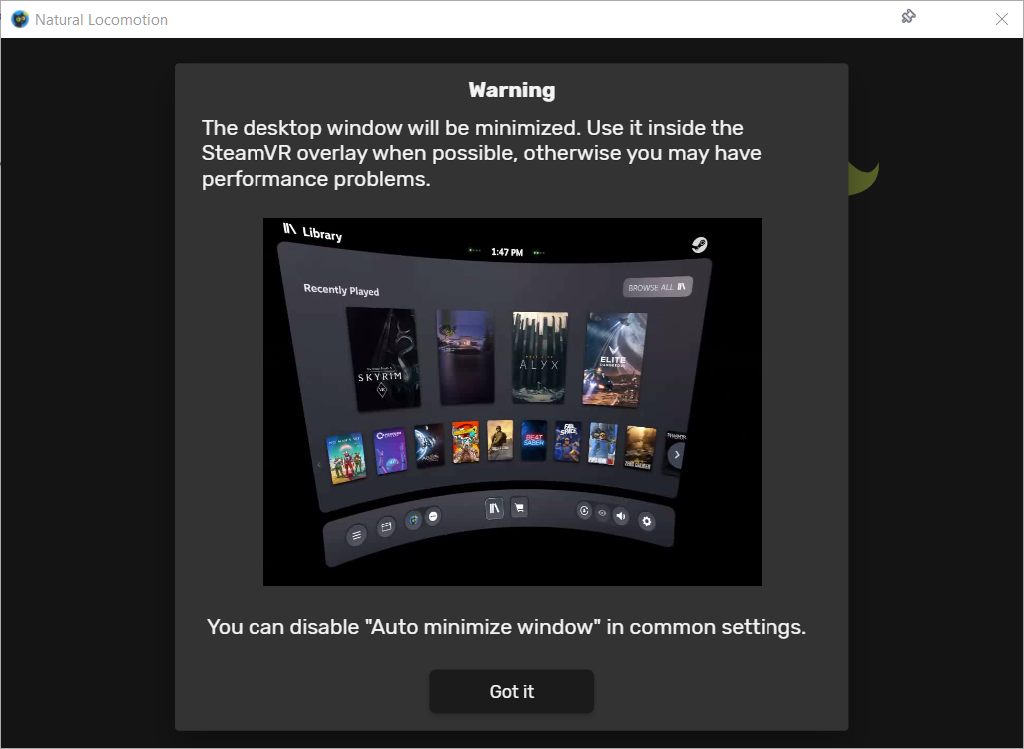
This feature can be disabled from common settings.

Anyway this not the perfect solution, so we will continue investigating and try to fully fix it in future updates.
We also have fixed a few minor bugs which could be related with the crashes reported by some users.
If you experienced a crash or any other issue, be free to ask or report it in the forum. If you experienced a crash before and this update has fixed it, please let us also know.
Thank you very much.
Added support for HP Reverb G2, Joystick tilt, profile for Hellsplit: Arena
Joystick tilt has been fixed, and we've added "joystick tilt up" that only activates in that direction so that it can be remapped independently of the other three directions.
HP Reverb G2 profiles by default have this configuration:
- Dominant hand joystick: Tilting up enables walking. Tilting and releasing up very quickly passes that action to the game.
- Movement hand joystick: Tilting on any direction enables walking. Tilting up does it normally (both hand directions are used). Tilting on any other direction it overrides the direction of both hands.
Added profile: Hellsplit: Arena.
Fixed reading SteamVR tracker configuration when there are several configuration folders.
Known problems that we're trying to fix at this moment:
- Phones disconnect after a while
- High CPU consumption on low end machines
If you have these issues you can switch to the legacy version (in app properties, betas tab).
Fixed the other "Waiting for driver..." problem, and a couple of other issues.
Thanks to everybody that notified us of the problem, and particularly to Steam user (ナルト)narutoo999 for helping us figuring it out.
Apparently it's crashing for a couple of users. That's a different problem altogether and we're investigating it. If NaLo crashes in your machine, try closing SteamVR and then reinstalling NaLo.
We've also fixed an issue with Cosmos and made a change that might make HP Reverb G2 compatible, although without adapted profiles. If it works you'll have to change the profiles to change them from joystick touch to something else. We'll finally receive ours in a few days so we'll be able to ensure compatibility.
Fixed "Waiting for driver...", added driver integrity check
This update also fixes buttonless activation for some new SteamVR users, and fixes with Joycon/PSMove.
If you still have issues please comment below what headset you have and then revert to the old version:
Feet mode fixed in latest update
VR Overlay, Buttonless armswing locomotion, Medal of Honor and much more!
We have rewritten the driver from scratch (over the last year), as well as 99% of the app code. This is finally allowing us to develop many new features and improvements, and today we are publishing just some of them.
New Features and improvements
- VR Overlay: Natural Locomotion can be used from the SteamVR overlay as well as from its window in the desktop.
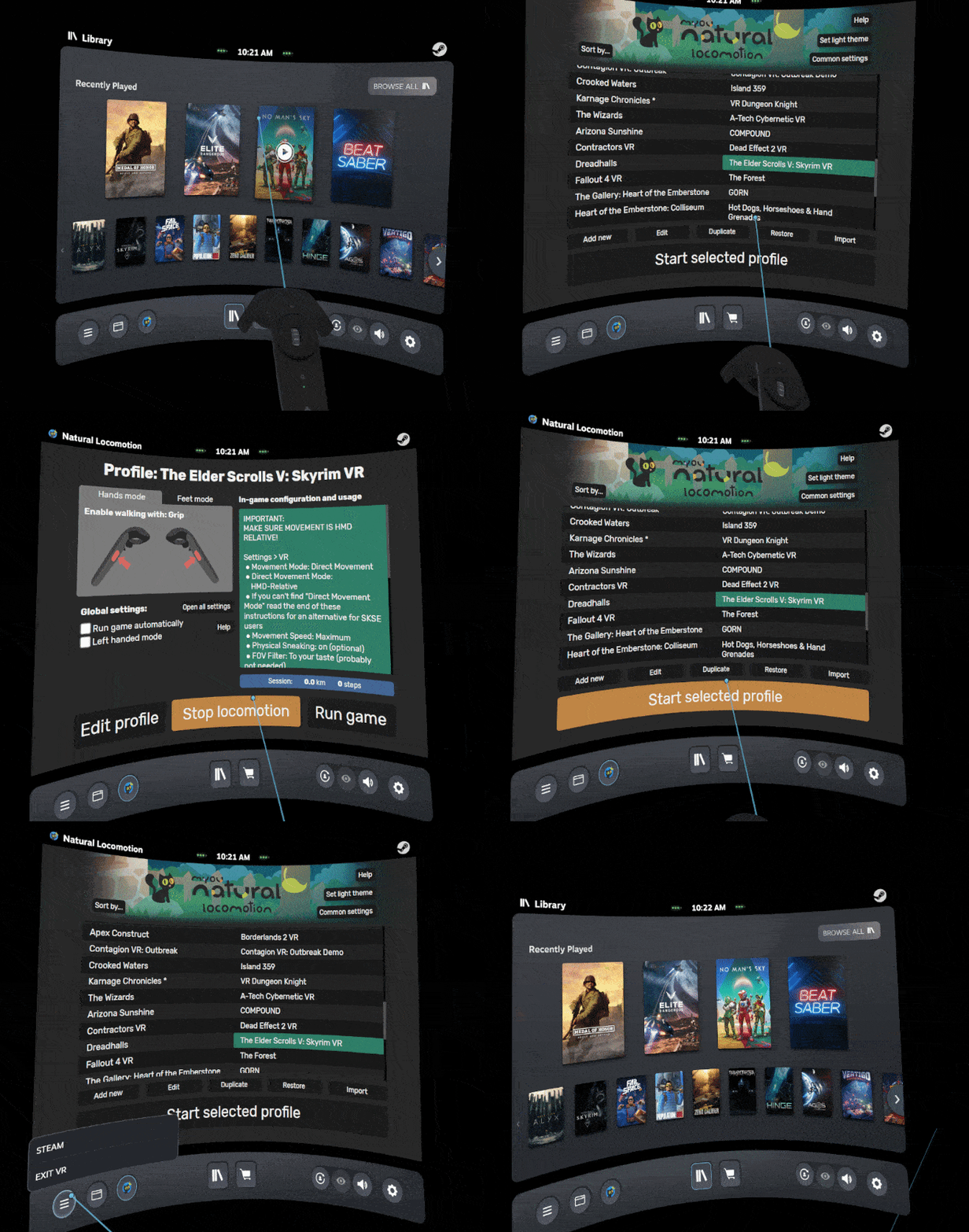
- Buttonless armswing activator (just lowering your hands down to the hip)

This activator can be enabled from the "Configure buttons" section in the profile editor. It works like magic allowing to manipulate objects, fight with a sword, shoot with one hand while walking with the other... without pressing any button to enable the locomotion! Just lowering your hand down the hip to start moving.
After the first swing gesture under the hip height you can continue moving your arms for walking as usual even raising the hands over the hip level. For stop walking you only have to stop swinging your arms. - Dark/Light themes

- Pimax support with all features tested with a Pimax Vision 5k Super
- Import/export profiles: The Import button is in the profiles list screen and the export button is in the profile editor
- Improved performance
- Natural Locomotion automatically enables The SteamVR option for allowing multiple tracking system devices (activateMultipleDrivers)
- Improved system to install the driver
- Improved remapping of the trackpad touch activator (Remap to trackpad click and passthrough pressing quickly)
Fixes
- Fixed some bugs related to Natural Locomotion tracker app support and the system to add the required rules to Windows Defended Firewall
- Fixed a bug which didn't allow to force running Oculus games forcing OpenVR after the first try
- Fixed lots of minor bugs and added some others (probably)
Temporarily disabled features
Some tools have been disabled temporarily but you can use the old version (legacy) until we add them back.

New profiles
- Medal of Honor: Above and Beyond (Vive, Index, Oculus, Cosmos)
- HINGE (Vive, Index, Oculus, Cosmos)
- Swordman VR (Vive, Index, Oculus, Cosmos)
- Failspace (Vive, Index, Oculus, Cosmos)
- Until You Fall (Cosmos)
- Swordsman VR (Vive, Index, Oculus, Cosmos)
Note: We are waiting to receive a HP Reverb G2 (Pre-ordered in July) to create the versions of the new profiles for WMR. Sorry for not including them in this update.
Fixed profiles
- Zero Caliber (Oculus, Index)
- POPULATION ONE (Vive)
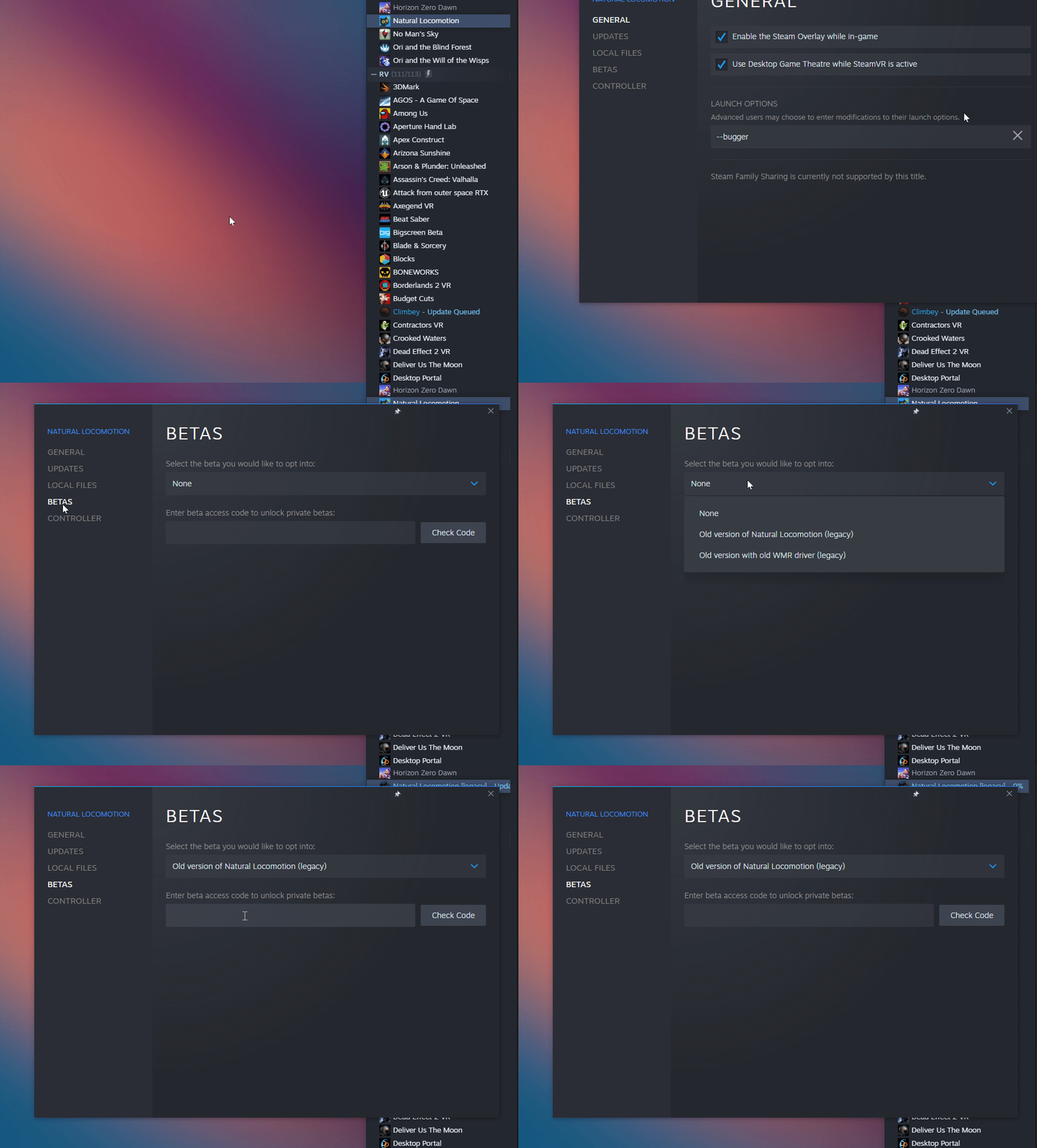
How to switch to legacy branch (old version)
- Right click in Natural Locomotion from the Steam Library
- Click in Properties
- Go to BETAS section
- Select legacy branch from the list

What's coming next
- Re-enable SteamVR tools
- Detect game to auto start profiles
- Universal support for any SteamVR headset without explicit support on our side
- OpenComposite support
- iOS version of NaLo tracker
- Gamepad emulation
- Demo version with all features to use in games
- Steam cloud support
- Steam workshop support