

Nimby Rails
Devblog for July 2023
https://carloscarrasco.com/nimby-rails-july-2023/
Version 1.9.20
- Fix: branch-track-branch constructions should not create and invalid inner track. The resulting inner node now behaves like a point mode track but can be parented to tangent mode tracks
- Fix: some complex track builds involving many parallel tracks and branches were not loading properly
- Fix: branch tips should not be eligible as parallel parent nodes
Version 1.9.18
- Fix: when clicking built one node stations the track editor opened instead of the station window
- Fix: built one node stations had 0 capacity, with various negative consequences
Version 1.9
New track system
The way tracks are edited and specially shaped hasn't changed in 3 years. Some new tools have appeared, some new capabilities were added like splitting and boundaries, but it's still the same system implemented back when the game was a prototype and I was focused on releasing with a deadline. It has been long overdue to review this system but it's such a core piece of the game, it had to be done carefully. I spend most of June researching computer curve design to find a new system, and this is the result:
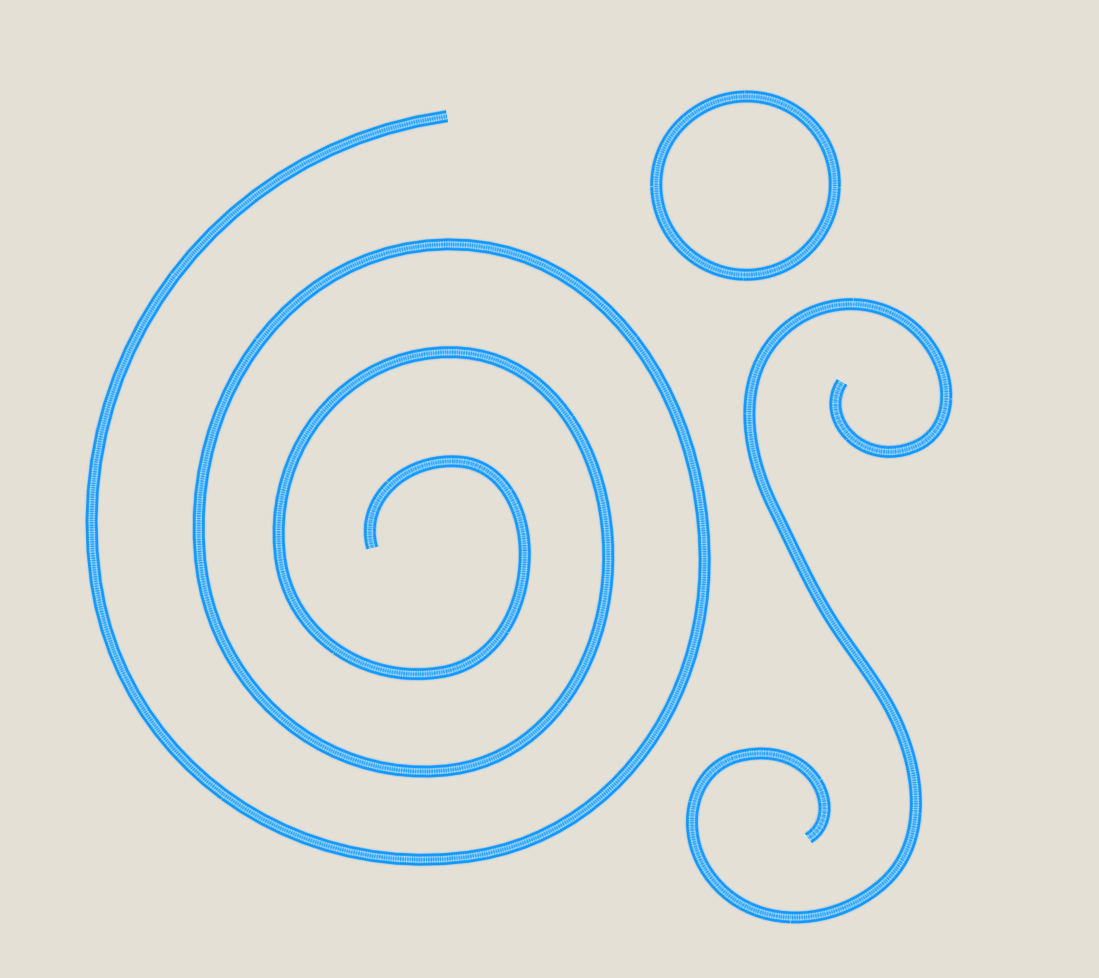
Up until 1.8, railways in the game have always been composed out of circle arcs and line segments. While this produces pleasant results to the eye, in the real world such a railway would only be valid for very slow vehicles like older tram systems. The 1.8 curves have first degree continuity (position), but are second degree discontinuous (curvature).
In 1.9 the new track system is based on the Hobby spline, which is capable of approximating both circle arcs and clothoids, and gives good results when trying to approximate how railways look like. Clothoids are short segments of the Euler spiral and are used in CAD drafting to transition between curvatures, so for example, to link two circle arcs with a straight section in the middle:

The limited track mode emulates the 1.8 behavior, and the full mode allows the spline to express the arc-straight connections with a clothoid-like segment. Players can choose between the two modes. If you don't like the new mode, set the track creation mode to Limited and you will never have to deal with Full mode again. All 1.8 imported games have their non-branch tracks set to Limited mode.
An additional new mode, Point, is also available (but not at creation time). Point tracks behave very differently than limited of full tracks. A Point mode track node is always part of the track, and there is no tangent polygon or arc fitting. Instead the player has direct control of the tangent angle for every point mode track node. Point mode allows to do things like curved dead end tracks. It is also the mode all track branch tips use, since it is capable of linking any point in the map with any possible tangent, unlike the Limited/Full system.
Late train boarding for pax
I always wanted to enable strict pax boarding for trains, so pax only board the exact train in their schedule, a not any train which happens to be on the same line+stop, but this breaks player saves which depend on pax being able to board late trains. So the solution to have both things is to make it official for pax to board (some) late trains, with a specific set of rules.

Basically pax will board late trains if the predicted train arrival is still before the departure time of their next train. If the next stop is the final stop, pax will accept late trains up to 3h.
N-track platforms
A very old limitation of the game has been lifted in 1.9: station platforms can now be composed of any number of tracks, starting at just 1:

Track+point line stops
And to completing the previous new feature, line stops are now always based on a exact point on the track, rather than some general direction on half of the platform. This means players now have full control on where trains stop on platforms on a per line per stop basis.
As always, check the devblogs for more in depth descriptions of these new features:
https://carloscarrasco.com/nimby-rails-may-2023/
https://carloscarrasco.com/nimby-rails-june-2023/
Version 1.9 is now in the beta branch
New track system
The way tracks are edited and specially shaped hasn't changed in 3 years. Some new tools have appeared, some new capabilities were added like splitting and boundaries, but it's still the same system implemented back when the game was a prototype and I was focused on releasing with a deadline. It has been long overdue to review this system but it's such a core piece of the game, it had to be done carefully. I spend most of June researching computer curve design to find a new system, and this is the result:
The new track system is based on the Hobby spline, which is capable of approximating both circle arcs and clothoids, and gives good results when trying to approximate how railways look like. It brings a host of new features too: custom tangents on any track node, zero node branches, zero straight segment branches, track nodes are now part of the track, etc. And some more will be added in time.
Since every track of every save is changed by this new system, your track max speeds and line leg timings have changed too. Like I mentioned in the past, assume every new version of the game will change line timings, until the game is out of Early Access.
Late train boarding for pax
I always wanted to enable strict pax boarding for trains, so pax only board the exact train in their schedule, a not any train which happens to be on the same line+stop, but this breaks player saves which depend on pax being able to board late trains. So the solution to have both things is to make it official for pax to board (some) late trains, with a specific set of rules.
Basically pax will board late trains if the predicted train arrival is still before the departure time of their next train. If the next stop is the final stop, pax will accept late trains up to 3h.
N-track platforms
A very old limitation of the game has been lifted in 1.9: station platforms can now be composed of any number of tracks, starting at just 1:
Track+point line stops
And to completing the previous new feature, line stops are now always based on a exact point on the track, rather than some general direction on half of the platform. This means players now have full control on where trains stop on platforms on a per line per stop basis.
As always, check the devblogs for more in depth descriptions of these new features:
https://carloscarrasco.com/nimby-rails-may-2023/
https://carloscarrasco.com/nimby-rails-june-2023/
Version 1.8.28
- Immediately move pax to their next station stop when a train line changes into depot mode (same behavior as automatic interventions due to stale train)
- Enable intervention respawn in secondary platforms for pax service lines
- Display a circle around secondary platform signals when line is being edited in line editor
- Assume some minimal tractive power if a train has at least 1W of power (not visible in UI)
- When clicking on an unspawned train in the asset list, open the train editor
- Fix: refresh all track reservations on the first sim frame after loading a saved game
- Fix: in parallel append track mode, if the track editor is proposing a track merge, changing the track type only changes the parent track
- Fix: intervention respawn was ignoring the last secondary platform
- Fix: do not allow to create a branch whose immediate sibling is a "keep straight" platform
- Fix: do not allow to set a "keep straight" platform if its immediate sibling is the immediate sibling of a track branch tip
- Fix: train acceleration displayed in the "Dynamics" line of the train editor was not always correct when train is running a line with an overrode max acceleration
- Fix: Line max acceleration did not always correctly apply to train AI
- Fix: do not reposition trains stopping at secondary platforms for stacked orders
Version 1.8
Track + point pathfind
The track and train pathfinder now supports precise starting points and goals, rather than whole pairs of tracks as in previous versions. This in turn means line timing now matches the intuitive real world concepts of arrival, departure and leg, and keeping track of things like braking time or "reach middle of platform" are not needed anymore. This new capability also powers a new, much improved braking system.
Push-pull
One of the consequences of track + point pathfinding is trains being able to "flip in place" when they need to reverse direction, rather than going all the way to a track dead end to do so. Additionally, when flipping, trains are now capable of doing so in a push-pull way: if the train composition is enabled for push pull (with the push-pull flag, or by having a head and tail car tagged as control or locomotive), its cars won't change orientation on direction changes.
Improved braking
Previous versions didn't really implement braking. Instead a check was done in the train AI if the train had crossed into the center of the pair of tracks designated as a goal, and a speed limitation as forced just at the point, with no regard for realism.
But in 1.8 trains approaching a line stop now start braking at the correct braking distance given their current speed, independently of how many track segments are required to cross over to arrive to the destination. And not just for stops: every static (so, not signals or other train rear ends) speed change in the train path is equally anticipated and braked for in advance. Trains won't start accelerating again until the entire length of the train is past the slower track segment.
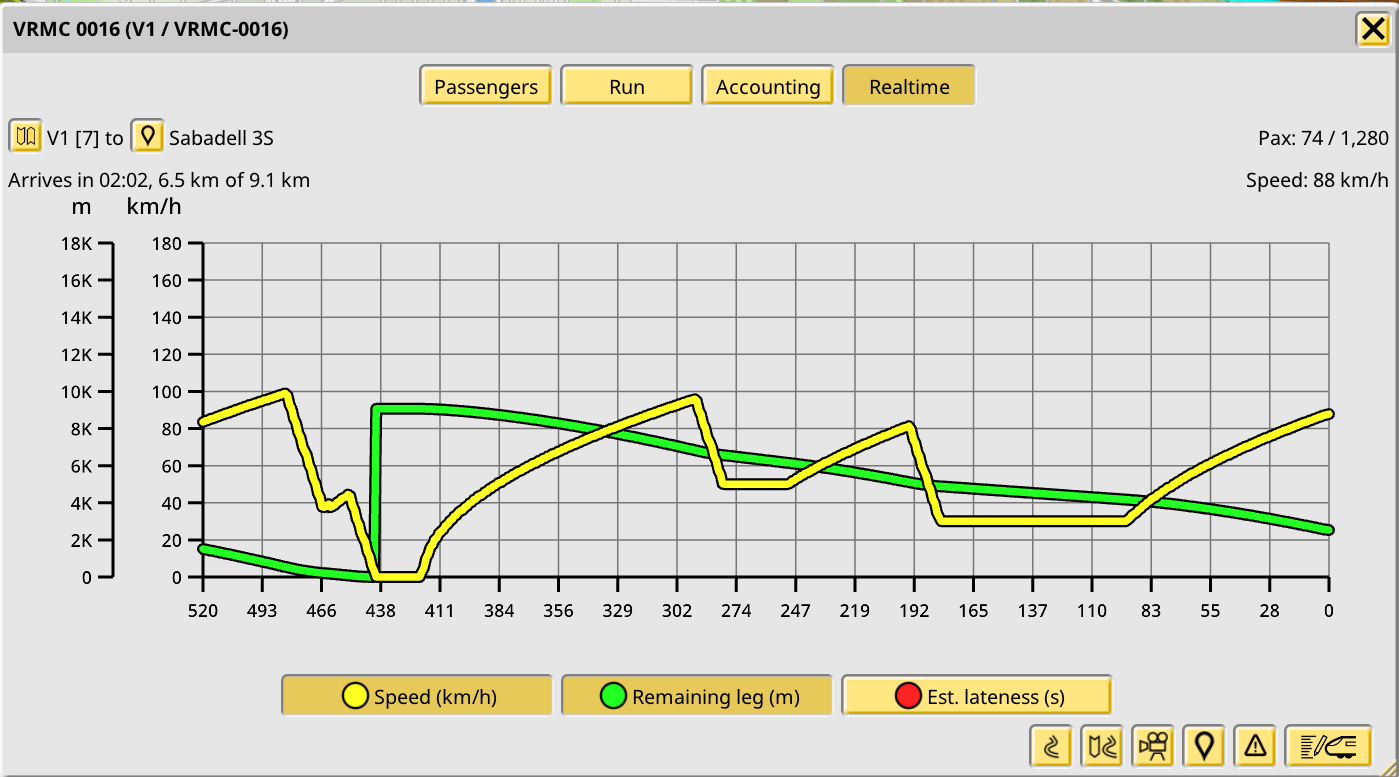
The braking acceleration can now be controlled by mods. The default braking rate (1 m/s/s) is a bit fast compared to most non-subway trains in the real world, but I think it's better to keep it a bit fast so it's closer to old behaviors. Modders can of course change it for their mods. Players can also set a maximum braking and acceleration value at the line level.
Unified append and branch track tool
Branching (and, new in 1.8, merging) tracks is now a mode of the track append tool. The track append tool will now seamlessly support both appending tracks and creating new branches, if clicking on top of existing tracks. And when "holding" a track while appending to it, it will also propose to merge it as a branch if hovering on top of existing tracks. This behavior can be toggled with the old keybind and/or branch button in the UI.
Shared games browser
The shared games feature has proven popular, with more than 400 shared games! In 1.8 you can also browse these games in a listing, with sorting criteria for various parameters:

Red signal info in train window
When trains are stuck at a red signal, it's sometimes hard to understand why. In 1.8 when you open the train window and the train is waiting at a red signal, the train path beyond the signal will be displayed, stopping at the point where it found an obstacle, and a text label will be displayed at that point identifying the train or track reservation that failed the signal check.

Full details
The devblog posts for March and April contain detailed explanations for these and other changes in 1.8:
https://carloscarrasco.com/nimby-rails-march-2023/
https://carloscarrasco.com/nimby-rails-april-2023/
Version 1.8 is now in the beta branch
Track + point pathfind
The track and train pathfinder now supports precise starting points and goals, rather than whole pairs of tracks as in previous versions. This in turn means line timing now matches the intuitive real world concepts of arrival, departure and leg, and keeping track of things like braking time or "reach middle of platform" are not needed anymore. This new capability also power a new, much improved braking system.
Improved braking
Previous versions didn't really implement braking. Instead a check was done in the train AI if the train had crossed into the center of the pair of tracks designated as a goal, and a speed limitation as forced just at the point, with no regard for realism.
But in 1.8 trains approaching a line stop now start braking at the correct braking distance given their current speed, independently of how many track segments are required to cross over to arrive to the destination. And not just for stops: every static (so, not signals or other train rear ends) speed change in the train path is equally anticipated and braked for in advance.
The braking acceleration can now be controlled by mods. The default braking rate (1 m/s/s) is a bit fast compared to most non-subway trains in the real world, but I think it's better to keep it a bit fast so it's closer to old behaviors. Modders can of course change it for their mods.
Unified append and branch track tool
Branching (and, new in 1.8, merging) tracks is now a mode of the track append tool. The track append tool will now seamlessly support both appending tracks and creating new branches, if clicking on top of existing tracks. And when "holding" a track while appending to it, it will also propose to merge it as a branch if hovering on top of existing tracks. This behavior can be toggled with the old keybind and/or branch button in the UI.
Shared games browser
The shared games feature has proven popular, with more than 400 shared games! In 1.8 you can also browse these games in a listing, with sorting criteria for various parameters:
Full details
The devblog posts for March and April contain detailed explanations for these and other changes in 1.8:
https://carloscarrasco.com/nimby-rails-march-2023/
https://carloscarrasco.com/nimby-rails-april-2023/
Devblog for March 2023
After 1.7 was done work started immediately on 1.8. The main feature of 1.8 is a rework of train pathfinding, to solve long standing issues with how exactly train paths origin and destinations are represented by the game. If this effort is successful, it will lead to important improvements like making line timing more in line with real life. This work is ongoing as 1.8 is under private development, but in other areas a couple of new features have been implemented: an unified track append and branch tool and a shared games browser with a sortable listing. Read more in the March devblog:
https://carloscarrasco.com/nimby-rails-march-2023/
Version 1.7
Custom train editor
The basic view of the train editor now gains a new panel to inspect each individual car of a train. The usual options seen in other UI editors of the game are present here: multiple selection, clipboard copy/paste (including between trains), reordering of selected cars, etc.
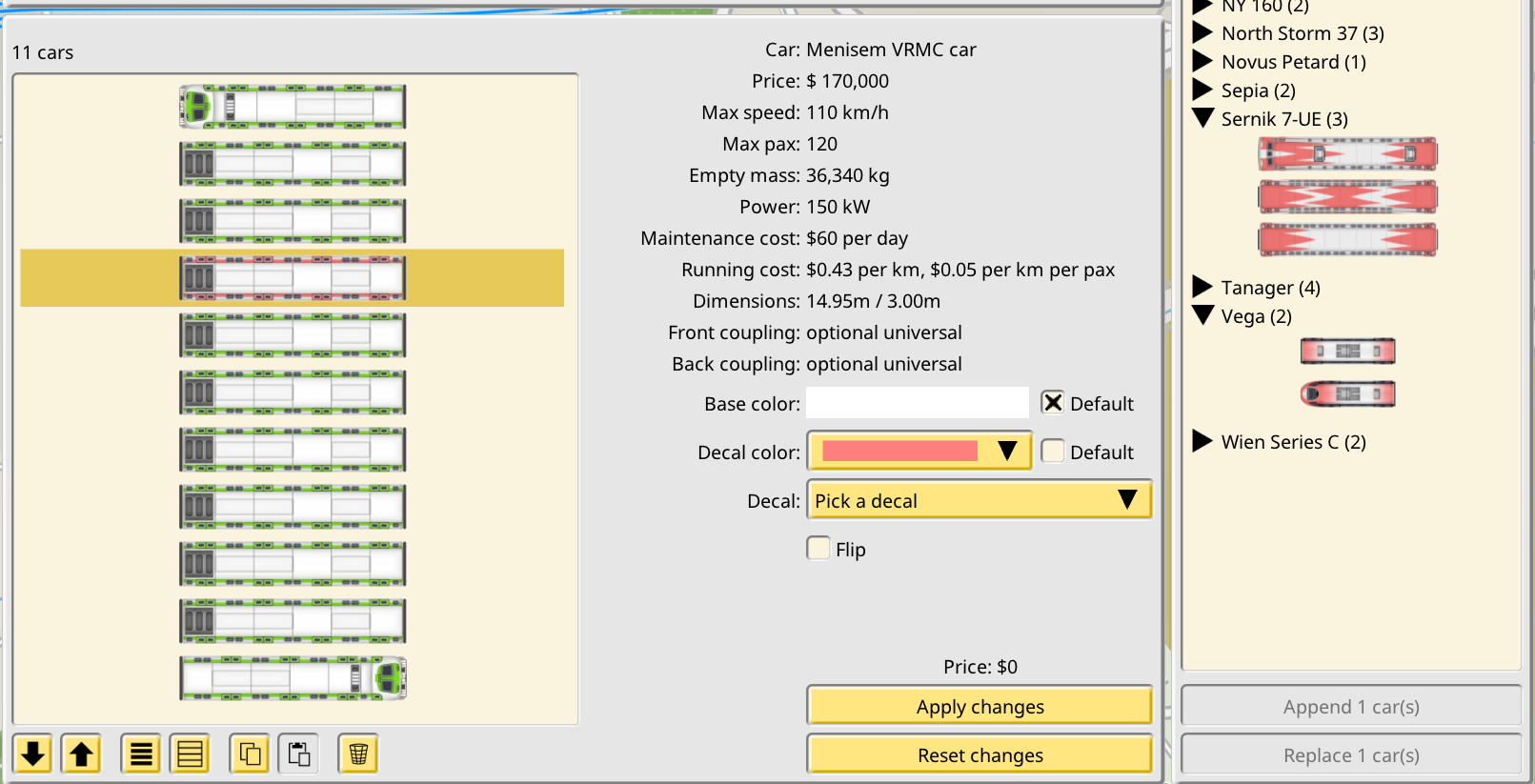
In the right side a new panel appears, the “car shop”, although using it does not spend any money. Here all the car models in the game are shown in a listing. Once you select a car model it is possible to append it to the currently edited train, or to replace the current selection of cars with the new car.
The editor allows the player to make any change they desire, but none of these changes are actually applied to the train. In order to do so the player must explicitly apply the changes with a dedicated option, which makes them pay for the price of the changes (or get refunded if the new composition is cheaper than the original one.) If the new composition is invalid, the option to apply the changes is disabled. The new train purchase mode of this system is very similar, with the usual train bill acting as the apply option.
Car coupling
As part of the new freeform trains, individual train car models can declare which coupling system they support on each side. The train editor restricts which train compositions can be created so these settings are preserved. After beta feedback this system has been made optional with a toggle in the Company panel.
Game sharing
Saved games can now be shared on a world map. You just load your save as usual, center the map on the point and zoom for your pin and preview image, and use the new My shared games dialog to upload your game.

To see other players shared games select the new browser option in the main menu. You can zoom and pan like you would do in-game. Clicking any map icon will directly load the game, and then gives you the option to like it.
Shared games can also be accessed with a web browser in https://share.nimbyrails.com/ if you don't want to load the game, or to show your save to people who don't own the game. This web site collects all the shared saves by players, and offers two main features: a dedicated page for the save, with a preview of the tracks and buildings, and the download link for the save (1.7 can load saved games directly from the Downloads folder of your PC). And the site home page, which shows a world map with a icon for every shared game, similar to the in-game world browser.
Multiplayer also benefits from this feature: the initial save download required for all joining players is now performed via a hidden, temporary shared game. This new method is many times faster than the old one for large saves.
Fixed departure times
1.7 addresses some line timing issues. The most visible change is the fact line departure times now take into account the time it took the train to brake into the station. In 1.6 and earlier departure was just the stop time after the time the train entered the station (actually the moment it crosses the middle of the platform). This is a first step in making line time concepts better match their real world definitions, which will continue in 1.8. Hover the mouse cursor over line times for a detailed breakdown of what every number means and how they add up.
Thanks to this change departure timing is now more robust, so fixed departure times (at the line level) are now possible. This new feature allows the player to input a fixed departure time for one or more line stops, eliminating the guessing and maths required to achieve them with leg and stop timing. Fixed departure times are always relative 0:00:00 in the line timing, so if you want to use this feature for rounded-looking train run times, or for clockface scheduling, make sure your orders are set to a line event which itself is also a nice round number also participating in the scheme (like the first arrival at stop 1, which is always 0:00:00, or to a fixed departure stop, for example).
Mod cleanup
As mods are updated or abandoned, saved games can accumulate broken train modes which are not maintained or used anymore. It is now possible to cleanup abandoned mods which no longer have a valid Steamworks presence, and to cleanup individual objects like train models which became "orphan" after mod changes.