

Nonozle
3.02.01 patch notes
The update also fixes an issue with puzzle sizing and placement that would occur if extra row and column info was enabled and the resolution was set to an ultra-tall one, meaning absolutely no one encountered the problem anyway, but whatever.
Minor update (no version number change)
To do this, create a .txt file called "export_location.txt" in the base save file folder ("C:\Users\[user]\AppData\Local\Nonozle" on Windows, "~/.local/share/Nonozle" on Linux), not any sub-directories of it. Have the text file only contain the path to the new directory. If the specified directory doesn't exist, then the text file will be ignored.
This won't move or delete the already existing folders and their files, if any. You'll have to do that manually.
Food and Drink puzzle pack patch
Food and Drink + Miscellaneous Puzzle Packs DLC Out Now!
https://store.steampowered.com/app/3077890/Nonozle__Food_and_Drink__Miscellaneous_Puzzle_Packs/
Update 3.02.00 - Color theme overhaul
Prior to this update, the game had three built-in themes and a hard limit of five custom themes that couldn't be renamed or shared. With 3.02.00, themes are now like puzzle packs: you can rename them, sign and export them, and add as many as you want.*
The five existing custom themes will be imported into the new system on first startup. But the theme you had selected as your current theme prior to 3.02.00 will not be recalled because the method of saving and recalling which theme is the current one has been changed.
Twelve new included themes
This update includes twelve new built-in themes. Click below to see previews of them.
[expand type=details]
Forest Green
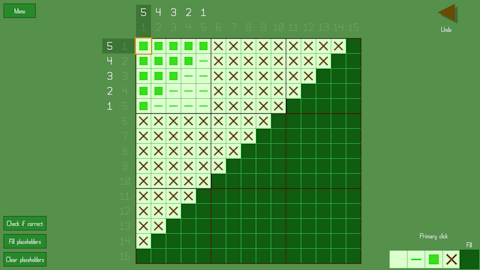
Deep Sea Blue

Purple

Ice Blue

Orange

Light Blue

Computer Terminal

Green-blue

Rose


Black and White

White and Black

Additionally, the three original built-in themes (Light, Grey, and Dark) are still included but have been somewhat reworked.
Primary color differences
Prior to this update, you could choose from multiple different primary colors for the built-in themes Light, Grey, and Dark. But because of how the theme system has been reimagined, this is no longer the case. Each theme has just one primary color associated with it, and directly changing the primary color of a built-in theme is not possible. You can copy the theme to create your own version of it and thus change the primary color that way, but you would also likely want to change a few of the other colors that are often related to the primary color, such as the puzzle select button background and hint highlight colors, because those are now settable color types of their own instead of directly using and modifying the primary color. So the process is a bit more involved now.
Theme select
Instead of using a MultiOptionSelector to choose the current theme, there's a new screen (with a layout like that of the user puzzle pack lists) where you can scroll through the list of themes. From here you can pick the current theme, create a new theme or copy an existing theme, edit your own themes, and delete themes (except built-in ones). The items in the list use their respective theme's color instead of the current theme's colors as a quick preview, and all colors in the theme are shown in a row of color swatches.

Theme editor
The theme editor has been completely reworked. Instead of showing a list of the colors, color types are accessed by using a drop list. A preview of how the current theme looks is shown, and the screen being shown in the preview automatically changes to make sure that the currently selected color type is visible. You can see in real time how every color looks as you change it.

The color selector has been changed; instead of simply putting the red channel on the slider, the green channel on the x axis, and the blue channel on the y axis, the selector is now based on hue (slider), saturation (y axis), and value (x axis). This change makes finding and picking colors much more intuitive. Additionally, the granularity has been greatly increased, with 256 units along the x and y axis instead of 25, and 360 units along the hue slider, giving much more precise control over the colors you can pick. Because of this, directional movement with gamepad or keyboard on the color picker now has acceleration added to it.
The ability to copy and paste colors remains as before, including the ability to do so between themes.
Sharing themes
Custom themes can be exported and shared by directly sending the theme file (.THM) to someone else, who can then drop the theme into their Documents/Nonozle User Themes folder to have access to the theme in-game. Despite originally planning on it, I decided not to include Workshop theme sharing. I don't think the game's Workshop sees enough use for the extra effort to be worth it. But I'm willing to consider changing my mind if, like, more than one person requests it in the Steam forum. No promises though.
New color types, new color assignments
Several new color types have been added, and the colors of several elements in the game have been reassigned to different color types. The list of color types has also been reordered. Click below to learn more.
[expand type=details]
New color types
- "Button and credits background", which buttons and the credits screen now use as their background color instead of just using the "Background" type
- "Dots" color type, which page dots now use instead of the "Text" type they used before
- "Hint highlight" color type, which hint highlights now use instead of simply using the primary color with a lower opacity
- Removed "Hint highlight opacity" as an option and concept in themes
- Removed "Hint highlight opacity" as an option and concept in themes
- "Puzzle select button background" color type, which puzzle select buttons now use instead of using a variant of the primary color
- As a result, puzzle select buttons now no longer change color slightly when selected
- As a result, puzzle select buttons now no longer change color slightly when selected
- Added "Selected square border" color type, which the selected square in a puzzle is now outlined with when the "Outline/border color" option under "Puzzle appearance" is set to "Themed"
Renamed color types
- Dropped "color" from the end of all color types
- "Main color" to "Primary"
- "Faded text color" to "Faded hint" to reflect its new singular purpose
- "Highlighted hint fade color" to "Faded hint (highlighted)"
- "Arrow and X button color" to "Arrow, X button, slider handle" to reflect its new use
- "Input color" to "Highlighted text" to reflect its varied uses
- "Five-line alt. color 1" to "Five-line alternate 1"
- "Five-line alt. color 2" to "Five-line alternate 2"
Color type reassignments
- The puzzle select button checkmark now uses "Primary" instead of "Puzzle title text"
- The slider UI element now uses "Border" for the bar and "Arrow, X button, slider handle" for the handle instead of using hard-coded grey colors that didn't change with the theme
- The outline around actionable row/column hints now uses "Text" instead of "Faded hint" for greater visibility
- The background color behind UI elements in the main menu now uses "Puzzle grid background" instead of "Background"
- "A game by HopefulToad" and the version number text now use the primary color instead of "Text"
- The icon box on the title screen now uses "Puzzle grid" instead of "Border", which is how it should have been in the first place
- The toggle square on toggle buttons now uses "Text" instead of "Primary" for maximum visibility regardless of the theme ("Text" will always be highly visible against "Button background" in a usable theme, but "Primary" might not be)
- Additionally, the toggle no longer specifically changes color when it's disabled (other than the overall fade applied to the entire button)
- Additionally, the toggle no longer specifically changes color when it's disabled (other than the overall fade applied to the entire button)
- Checkmarks and signatures in the puzzle pack select screen and URLs in the credits now use "Highlighted text" (previously "Input") instead of the primary color to ensure visibility
- Disabled buttons now fade using a partially transparent "Background" rectangle overlaid over them rather than using "Faded hint"
- Percentage bar colors and appearance have been reworked; see "Other miscellaneous changes" below
New UI element: DropList
I created a new UI element specifically for the new theme editor: the DropList. Like the MultiOptionSelector (button with arrows on either side), its purpose is to pick one particular option among several. But instead of having to scroll through the options one at a time without being able to see them all at once, the DropList does exactly what it sounds like. When you click it, a drop-down (or up) list appears showing all the options at once, and you can then pick one.

Many of the options that used to be contained within MultiOptionSelectors are now in DropLists. Click below to see the list.
[expand type=details]
Square overwrite behavior
Border/outline color
Window mode
Horizontal resolution
Vertical resolution
Font
Filling animation
Removing animation
Puzzle solved animation
Title/menu track
The ones that have been left as MultiOptionSelectors are either because there's only two options for the setting or because the options are sequential in nature.
Puzzle layout changes
I reworked puzzle grid sizing and placement. Again. This should be the last time, though. The method of determining how to best fill up the screen space with the grid has been improved and greatly simplified. Specifics are somewhat out of scope for these patch notes, but if you're curious, drop a thread on the forum asking about it and I'll do my best to explain.
The "Puzzle incorrect" warning label's location has been moved to directly below the "Menu" button instead of directly below the puzzle grid, freeing up more vertical space for the puzzle.
A new setting has been added that changes the placement of the puzzle grid on the screen. The setting can be found at Settings > Puzzle > Puzzle appearance > Puzzle centering style. There are three options.
The first, Grid, tries to place the puzzle grid itself as much in the center of the screen as it can, ignoring hints except to the extent that it won't allow the hints to be offscreen or overlap other elements.
The second, Hints and grid, considers both hints and the grid as one whole to be centered as much as possible. Imagine a rectangle drawn around and encompassing all the hints plus the grid. This rectangle is what is centered (as much as it can be). This is the type of centering the game did prior to adding options.
The third, Golden mean, places the grid at a point exactly between the two other options as a sort of compromise. I've found that, to my eye, this one looks the best, and it is the default now.
The puzzle editor grid's positioning and placement has similarly been simplified and improved. It is now always centered horizontally, whereas before this update it could sometimes be horizontally off-center at some aspect ratios or resolutions. The above-mentioned option doesn't affect it as there are no hints to display in the editor.
Bug fixes
Click below for the list:
[expand type=details]
- Fixed rumble bugs
- Fixed UI-movement type rumble occurring in puzzle pack selection, pack editor, and virtual keyboard screens even when it was toggled off.
- Removed an extra rumble on puzzle restart that shouldn't have been there
- Added back in the big rumble on puzzle solve which was mistakenly missing
- Fixed UI-movement type rumble occurring in puzzle pack selection, pack editor, and virtual keyboard screens even when it was toggled off.
- Fixed a minor visual bug with the fade animation in tutorial puzzles that became more noticeable when I was trying out new themes.
- Fixed a bug where the puzzle title shown in the solved puzzle screen would not update when the puzzle was renamed (until the game was restarted)
- Fixed bugs where UI reconstruction and primary color changes were not propagating to exported (other user) puzzle packs that weren't currently loaded into the reusable puzzle select scenario
- Fixed a bug with the puzzle solved animation that was only visible when the background and puzzle grid background colors were different
- Fixed font index and scaling settings not changing when all settings are reset to their defaults
- Fixed a bug where having empty inputs in multiple control categories (universal controls + one or more others) would be considered a conflict due to empty being considered the same input as empty
- Fixed an issue where elements of the puzzle solved screen would pop into view instead of fading into view when the puzzle solved ripple was disabled
- Fixed a resolution change being triggered twice on startup when it didn't need to be
- Fixed tutorial puzzle hint highlights being drawn over the puzzle grid instead of behind it
During initial load, the game occasionally gets stuck waiting for a Workshop query to finish that never does. There's not much I can do about that on my end, unfortunately. However, this update adds code to time out the query if it takes too long; that way the game can finish loading instead of being stuck. But when that happens, some of the Workshop items will have failed to load, so the game shows a notification warning you about happened and recommending you restart the game to properly load the Workshop items.
Other miscellaneous changes
- "Extra 2," another puzzle track disabled by default, has been added into the game. It was a track I composed at the same time as the others but didn't initially include with the game.
- The game now remembers the most recent puzzle you had selected within a puzzle select scenario in-between sessions. For instance, if puzzle B-45 was the last selected puzzle in the original puzzle pack at the time you close the game, when you start the game again and go to the original puzzle pack, it will start with that puzzle selected still. The only exception to this is with puzzle packs by other users due to their dynamic nature. They will instead automatically navigate to the earliest as-yet-unsolved puzzle.
- The UI of the puzzle validation screen has been simplified. Instead of two separate buttons ("Skip solve animation" and "OK") where only one would be enabled at a time, there's now just one button that changes its text and function as needed—it starts as "Skip solve animation" and changes to "OK" once you click it or once the animation has played out. Also, the back input now skips the solve animation and exits the validation screen, allowing you to intuitively mash either the select button or the back button when you're impatiently repeatedly tweaking a puzzle trying to get it to be solvable.
- A certain puzzle in the original puzzle pack has been renamed to "Ice Pops" because the prior name is actually trademarked and I'm scrupulous.
- Once the DLC comes out, "Ice Pops" will have the honor of being the only puzzle title to be used twice among any of the puzzles I've published, though the two puzzles are not identical.
- Once the DLC comes out, "Ice Pops" will have the honor of being the only puzzle title to be used twice among any of the puzzles I've published, though the two puzzles are not identical.
- Because the puzzle grid can now be closer to the bottom and right edges of the window/screen than before, it transpired that in certain cases the counting label would be partially off-screen. To rectify this, the counting label is now moved to the left side of the selected square when at the right edge of the puzzle and moved to the top side of the selected square when at the bottom of the puzzle.
- As mentioned under "New color types, new color assignments" above, a new option has been added to the "Border/outlined color" setting: "Themed." With this option, the selected square (and optional row/column outlines) will use the "Selected square border" color from the current theme. The other five options for that setting still do what they did before, but "Themed" is the new default and recommended option.
- The percentage bars representing music and sound effects volume and gamepad rumble intensity have been reworked visually. Previously, with the button inflation animation disabled, it was impossible to tell they were the currently selected button when full. To fix this, a buffer was added that surrounds the bar, so you can see the color of that buffer change when the button is selected versus when it's not. Mouse input involving the bar has thus been modified to account for the buffer. Additionally, the bar itself is now uses the "Selection" color type rather than a partially transparent "Primary." This addresses visibility issues with some of the new themes that weren't apparent with the original three built-in themes.
- All MultiOptionSelectors that contain only two options have been made non-wrapping for consistency. In fact, there are no longer any MultiOptionSelectors that wrap, because the only ones that used to wrap were two-option ones.
- All references to "visual theme" have been changed to "color theme" instead.
- Tutorial select buttons now ignore the puzzle transparency and solved puzzle border settings, displaying with the former and without the latter no matter what. It didn't really make sense to apply those settings to them in the first place.
- The default puzzle solved animation option has been changed to "Shuffle."
- The hint highlight on single-row tutorial puzzle examples has been removed as there's not much point in highlighting which row is being modified when there's only one row.
- The opacity of tutorial puzzle row/column highlights has been increased.
- The "Only aggregate ones" option is now disabled when hint aggregation itself is disabled.
- The positions of the music and sound effects volume bars have been swapped.
- The slider handle size is no longer determined by the number of units the slider has. Also, how the position of the slider handle is determined, including when using the mouse, has been modified.
- The number of disparate progress sections in the game's initial loading screen has been reduced to ten.
DLC puzzles out soon!
I had 100 new puzzles I was planning to release in a DLC pack to coincide with this update. Unfortunately, it didn't occur to me that the DLC page would have to be reviewed by Valve before it could be made public, so it'll have to wait a bit.
*Admittedly, I haven't tested how well the game handles having a thousand themes, but why would you want that many anyway?
3.01.00 - Counting passes
For any given line-solvable puzzle, the solver takes a number of passes before completing the puzzle. This number is useful as a rough approximation of difficulty.
Before this update, when generating a random puzzle, you would pick a percentile range that you wanted the random puzzle to fall within. Now you can specify the exact pass count range you want.
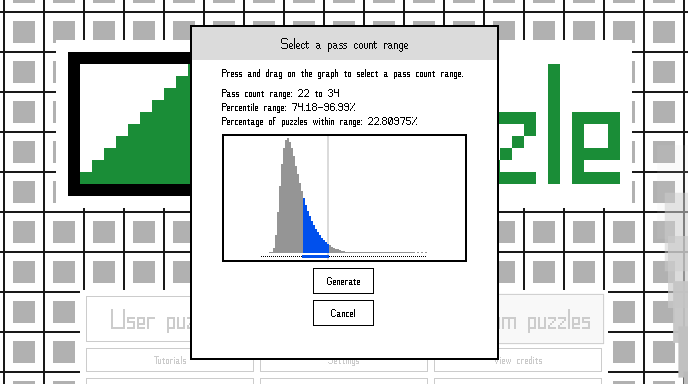
As shown in the screenshot above, you're presented with a graph representing the distribution of solvable puzzles by pass count for the selected puzzle size. You can select any range on the graph, and the readout will display the percentile range and what percentage of puzzles fall within the range you've selected. Keep in mind, the smaller the percentage of puzzles within the range, the longer it'll likely take to generate a puzzle within that range. If you select only the tail end where the outliers are, where only .0001% percent of puzzles fall, for larger puzzle sizes generating the puzzle could take days or even months!
You also have the option of skipping selecting a pass count range and just going with the first solvable puzzle that's generated, regardless of its pass count. This is also the only option for 30x30 puzzles since generating a solvable 30x30 takes so long.
To get the distribution of pass counts, I generated 10,000,000 solvable puzzles of each size, except for 25x25, which I only generated 1,000,000 for, and 30x30, which I didn't bother with because it would have taken months of 100% CPU usage to get a decent sample size. Prior to this update, the percentile ranges were based on smaller sample sizes, so they should be more accurate now.
Also, when a random puzzle is generated, it now tells you its exact pass count and percentile range, and you have the option of seeing the same information for every puzzle in the puzzle select screens if you want.
A full list of changes follows.
- Increased the pass count sample size for more accurate data. Prior to the update, percentile ranges were based on sample sizes of 1,000,000 (100,000 for 25x25). They have now been increased to ten times that size.
- Changed how the pass count data mentioned above is accessed by the game. Previously, I only stored the pass counts at specific percentile intervals, meaning that percentile ranges were limited in their accuracy and only pre-determined percentile ranges could be used when generating a puzzle. But now all of the statistical data is included, so percentile ranges that are shown are much more accurate and narrow, and any arbitrary range can be selected when generating a puzzle.
- Added a screen for selecting a specific pass count range prior to generating a random puzzle. The screen shows a graph with the distribution of pass counts for the given puzzle size, and by clicking/pressing and dragging on the graph, you can select the range you want. It will also tell you what percentage of random puzzles fall within the range you selected and the percentile values of the range. Additionally, the pass count range for each size is saved so that, when you exit the game and start it again, the same range will be selected as you left it.
- Changed the thread count to be saved so that it doesn't reset each time you start the game.
- When generating a random puzzle, the distribution data is now shown behind the live bar graph, so if you select a range where a very small percentage of puzzles is found in it, you can watch as the live graph gradually conforms to the curve of the pre-calculated data.
- The pass count (and percentile range for puzzles smaller than 30x30) of the randomly generated puzzle you'll play is shown once it's generated.
- By enabling the option at Settings > Appearance > Other appearance settings > Show pass count data in puzzle select, you can see a text readout telling you the pass count and percentile range, if applicable, of the currently selected puzzle in any of the puzzle select screens. If you have a lot of saved random puzzles, the initial startup after this update might take a while, because I neglected to save the pass count of saved puzzles prior to this update, so they have to be recalculated the first time you start the game after this update.
- The warning about discarding the currently paused random puzzle has been moved and reworded.
- Added a button to generate a random puzzle without specifying a pass count range, if you're not particular. This is the only option for 30x30 puzzles.
- Changed the title of the random generation window so that it lists the pass count range instead of the percentile range.
- Moved the label showing the count of the tallest bar to the right edge of the bar graph so that it doesn't overlap the bars.
- Fixed system memory that is no longer in use after generating a puzzle not being freed up.
- Fixed a crash that could occur if you have a 64-or-more-thread processor (look at you!) and selected more than 31 threads when generating a random puzzle. Everyone is now limited to 31 threads maximum, and less if your CPU has less threads.
- Fixed the "check if correct" option giving erroneous reports after using undo.
- Fixed random puzzle generation window's title not having the correct font size.
- Fixed a few issues with transition animations.
- Reworded some info pop-up text and probably some other things.
3.00.02 patch notes
3.00.01 patch notes
Update 3.00.00 - Workshop puzzle sharing and much more
With such a big update, there's bound to be a few bugs that I missed, so please report any that you find, or any crashes you experience, on the game's forum so that I can fix them as quickly as I can. Thanks!
An extensive explanation of changes that have been made follows.
User puzzles
Puzzle titles
You can now set and change the title of user puzzles. Previously, a user puzzle was simply titled with a time stamp and could not be changed.
Exporting puzzles
Puzzles can now be exported to a .PZL file that can be shared with other users. Puzzles are exported to Documents/Nonozle User Puzzles/Exported. Other players should copy your exported puzzle to Documents/Nonozle User Puzzles.
When you export a puzzle, you sign it with a username of your choosing (ASCII characters only due to in-game font limitations). The exported puzzle's file name will contain your signature, and other players who you give the puzzle to will see the signature on the puzzle select button and after solving the puzzle. The signature is saved for later use so that you don't have to retype it each time, but it can be changed later if desired.
You can choose to either show the puzzle title from the start—it will be visible in the file name and in puzzle select—or hide it. If you hide it, a hexadecimal number (your puzzle's hash code) will be used to identify the puzzle in its stead until it is solved.
Separation of puzzles by you from puzzles by others
Previously, all user puzzles were stored in the same location and puzzle select screen, with no distinction between puzzles you created and puzzles others created. This has been rectified, so that now puzzles others have created and shared with you (whether via exporting them, via clipboard, or via Workshop) are kept separate from puzzles you created. Unfortunately, there's no way for this to apply retroactively, so if you previously used the clipboard puzzle sharing system before this update, those puzzles will still show as puzzles you created.
Because of this separation, the prompt about a puzzle not being solved yet that used to show up when you tried to edit it no longer appears, as "spoilers" are not a concern for your own puzzles.
Puzzle packs
You can now create puzzle packs, which consist of a sorted list of your puzzles of your choosing.
Pack editor
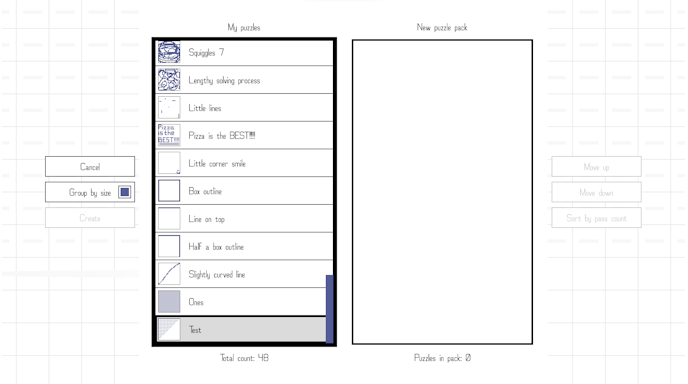
This is the pack editing screen, where you create a puzzle pack using your list of puzzles. Puzzles in the pack can be reordered via drag-and-drop or via the "Move up" and "Move down" buttons, and they can be automatically sorted by solver pass count.
When you click the button to sort by pass count, any puzzles that are in the pack that haven't yet had their pass count determined need to be processed by the solver first (pass counts are saved once they are computed, so that they do not need to be computed again unless the puzzle is changed). If you have a lot of puzzles that have no determined pass count yet, this could take some time. Puzzles with the lowest pass count go to the top, with the pass count increasing as you go down. Puzzles that are not line solvable (the solver cannot solve them) go to the bottom of the list. In the event of puzzles having the same pass count, smaller puzzles will go first.
You can choose whether or not you want to group puzzles by size. It might make sense to turn this option off if your pack has a small number of puzzles that nevertheless vary in size, so that you can avoid having your pack have a bunch of pages with only one or two puzzles per page.
Packs need two or more puzzles in order to be saved. Before you can save a pack you have created, you'll need to title it.
Exporting puzzle packs
Once you've created a puzzle pack, you can export it just like an individual puzzle. Exported packs go to the same location as exported puzzles and are also .PZL files. Your signature will appear in the pack select screen, the puzzle select screen of the pack, and the solved puzzle screen when other players play your exported puzzle pack.
Internal puzzle packs versus exported puzzle packs
There are two different types of puzzle packs: internal puzzle packs and exported puzzle packs. Basically, internal puzzle packs are used to create exported puzzle packs.
Internal puzzle packs are packs you created using the pack editor. They only store references to the user puzzles they contain, not the puzzles themselves. They can be edited, they can be exported, and they can be uploaded to Workshop. When you delete an internal puzzle pack, none of the puzzles it contains are deleted, because they are stored as individual user puzzles. When you delete one of your user puzzles, it is automatically removed from any internal puzzle packs that contained it.
Exported puzzle packs are packs that have been exported or uploaded to Workshop. They store the actual puzzle data within them, not just references to puzzles. They can't be edited, but they can be played just like the built-in puzzle packs.
Puzzle editor

Transparency support
You can now create puzzles with transparency to them (just like the built-in puzzles) using the puzzle editor. Individual squares are either blank, transparent, or filled. Transparency only affects how the puzzle appears after it is solved. In the puzzle editor, transparent squares are represented by a moving grey checkerboard pattern. The movement of the pattern can be disabled in the settings.
Solver validation
You can now run the puzzle solver to check whether your puzzle is line solvable, how many passes the solver needs to solve it if so, and what percentile range it falls into (except 30x30 puzzles, which are too large for me to have generated percentile groups). The validator/solver automatically runs whenever you save the puzzle you're working on, and the pass count is saved along with it. The validation screen plays an animation showing the solver working one pass at a time, though the animation can be skipped if desired.

Bucket fill tool
You can now toggle between the paint tool (regular filling in of squares one at a time) and the bucket fill tool, which fills a contiguous space (with blank, transparent, or filled squares) in the same way that such a tool works in image editors. This is particularly handy for turning backgrounds of images transparent quickly.
Mini puzzle preview
A small preview of the puzzle was added above the main editor grid, to help you correctly visualize the image you're creating at a smaller scale.
Removed animations
Individual square animations have been removed from the editor, as a way of distinguishing it from the puzzle solving experience and to avoid distracting from the puzzle creation process.
Reworking of controls
Because of the additions made to the editor, it was necessary to define a separate group of controls for it. You can set your desired inputs for the following actions:
Gamepad:
Fill - default: A
Blank - default: B
Make transparent - default: X
Change current tool (paint or bucket fill) - default: Y
Undo - default: left shoulder
Redo - default: right shoulder
Keyboard:
Fill - default: W
Blank - default: S
Make transparent - default: A
Change current tool (paint or bucket fill) - default: tab
Undo - default: Z
Redo - default: X
Set primary click to fill - default: M
Set primary click to blank - default: N
Set primary click to make transparent - default: B
Mouse:
Primary click - default: left click
Fill - default: undefined
Blank - default: right click
Make transparent - default: middle click
When using the mouse, the current primary click type can be changed by clicking one of the primary click boxes, scrolling the mouse, or using one of the keyboard inputs, just like how you can change the primary click type when solving puzzles.
Workshop
Nonozle now features Steam Workshop integration. Puzzles and puzzle packs can be uploaded to Workshop in-game. When you go to upload an item to Workshop, it'll work much like exporting a puzzle or pack, with you being prompted to show or hide the title for puzzles and asked for a username/signature for both puzzles and packs. You'll also be prompted to agree to the Steam Workshop/Subscriber Agreement, complete with a link to the relevant Steam URL. Items uploaded to Workshop aren't shown to other users until you've agreed to it on Steam. After a successful upload, the game will open up Steam's built-in browser to the webpage for the Workshop item.
Workshop items are automatically tagged according to their attributes. Here is the current list of tags:
- puzzle (for individual puzzles)
- pack (for puzzle packs)
- line solvable (puzzles that are line solvable or packs where all puzzles are line solvable)
- not line solvable (puzzles that aren't line solvable or packs where all puzzles are not line solvable)
- 5x5, 10x10, etc. (individual puzzle sizes)
To play puzzles or packs uploaded to Workshop, you'll need to subscribe to them using Steam's Workshop webpage. In-game browsing of the Workshop is not currently planned. But you can subscribe to items on the web while the game is running, and the items will automatically download and be playable without having to restart the game first. A notification will pop up from the right side of the game window indicating that a Workshop item has been installed and is ready to use.
Playtime of Workshop items is tracked so that you can see what Workshop items you've played when browsing them on Steam and sort items by playtime.
In-game, Workshop puzzles and packs are grouped together with exported puzzles and packs that you've manually placed into the Documents/Nonozle User Puzzles directory, if any. When you delete a Workshop item in-game, you'll be automatically unsubscribed from it.
I've uploaded a pack of 21 puzzles as well as a single individual puzzle for you to try out Workshop with.
Random puzzles
Separation of random puzzles from user puzzles
Randomly generated puzzles are no longer grouped with user puzzles and are instead stored separately and have their own puzzle select screen. Unfortunately, this could not be applied retroactively and any random puzzles you generated before this update will still be considered user puzzles you created.
Auto-pausing of current random puzzle
When you generate a random puzzle, you can now leave it and come back to it later without having to save it to your collection of random puzzles first. This change does mean that if you want to permanently save a randomly generated puzzle to your collection, you have to beat it first. If you generate a new puzzle while a paused one is incomplete, the paused one will be discarded.
Pass count bar graph
While generating a random puzzle, a bar graph showing the distribution of puzzles generated so far by solver pass count is shown. This replaces the text readout that served a similar functionality. A highlight below the bar graph indicates the pass count range you selected. Of course, since the graph stops as soon as a matching random puzzle has been generated, it won't be very interesting to look at unless you select one of the outlying ranges (very low or very high pass count).

The bar graph can be disabled in the game's settings if desired.
Go straight to a new random puzzle
You can now generate a new random puzzle from the puzzle solved screen after solving a random puzzle.
Export and copy to clipboard
Random puzzles can be exported and copied to the clipboard for sharing. When this is done, [Random Generator] will show as the creator of the puzzle. Random puzzles cannot be uploaded to Workshop directly.
Puzzle solved animation
The transition from the puzzle screen to the puzzle solved screen has been made fancier. The puzzle grid lines now slide out of view, and Xs, placeholders, and UI elements now fade out or in instead of suddenly disappearing or appearing. The puzzle solved color ripple has also been changed. And a new satisfying sound effect has been added when the puzzle is completed.
Previous puzzle solved animation:

New puzzle solved animation:

Also, two new animations have been added.
Center then slam:

Flying squares (the new default):

You can also choose to alternate between the three types of solved animations by choosing the "Shuffle" option in settings. And the solved animation can also be disabled if you prefer.
Hint aggregation
A new optional feature I've termed "hint aggregation" has been added. With this enabled, repeated identical hint numbers are instead shown as one hint number with a superscript indicating how many identical copies there are.
This:

Becomes this:

In settings, you can choose how many identical hints there are before aggregation occurs, and you can also choose to only aggregate groups of 1s (as those are pretty common). This can make hint counting less frustrating.
When a hint is aggregated, it won't be faded out until all of the hints in the aggregation are accounted for.
Hint aggregation is off by default.
Line solvable retcon
All built in puzzles have been retconned into being line solvable. This means that any puzzles that were previously not line solvable have seen minor changes to make them so. This inevitably entails a large decrease in difficulty for some of the puzzles that have been modified, but I believe it's a positive change for all built-in puzzles to be consistent in this regard.
A list of the puzzles that have been affected follows.
Original puzzle pack
A-8
B-31
B-33
C-24
C-36
C-41
C-64
C-70
C-71
C-74
C-76
C-78
C-79
D-27
D-31
E-3
Abstract puzzle pack
C-13
C-22
C-28
C-30
D-20
If you've already solved any of the affected puzzles, they will remain solved and you won't need to go back and solve them again.
The A-8 step-by-step tutorial has been modified to reflect the change.
Clipboard puzzle sharing
Sharing puzzles via clipboard has been updated to reflect the addition of user puzzle titling and user signatures. When you copy a puzzle to the clipboard, it'll now contain the puzzle's title, and you'll be prompted to sign it just like when exporting puzzles. This results in a somewhat larger text string than before. Clipboard puzzles that were formatted in the old way can still be pasted into the game, but, of course, they won't have a proper title or user signature.
When you save a puzzle that's been copied to the clipboard, it is automatically exported to Documents/Nonozle User Puzzles.
Also, if you try to play a new clipboard puzzle that's identical to one you've already saved, the game will let you know that you already saved that puzzle.
Virtual keyboard
In order to add user puzzle titling and signatures, I had to create a virtual keyboard to support text input using all three input methods supported by the game.

You can use the virtual keyboard using a gamepad or a mouse, or you can simply use your physical keyboard normally.
A new group of controls had to be added for gamepad to support this. You can define the following inputs for gamepad for use in the virtual keyboard scenario:
Select (to press keys) - default: A
Backspace - default: X
Space - default: Y
Shift - default: left trigger
Escape (to cancel text editing) - default: B
Other changes
Reworked controls editor
How the controls editor works has been changed. Previously, the game would attempt to auto-swap conflicting inputs as needed. As it turns out, the way the auto-swapping was implemented was flawed and sometimes didn't work correctly, and I decided that trying to fix it wasn't worth it.
Instead of swapping inputs between control groups, the editor now highlights any conflicting inputs so that you can easily see them, and won't let you save your changes until the conflicts are resolved. Also, the changes now are not applied until you leave the editor screen, and you have the option of discarding the changes you made instead. Inputs within an individual control group are still auto-swapped.
The explanation text for each control editor screen has been rewritten, in part to reflect this change.
Rearranged main menu
The main menu has been rearranged (again).

The big three buttons are now User puzzles, Puzzle select (for built in puzzles), and Random puzzles. With UI animations enabled, user puzzles move in from the left, built in puzzles move in from the top (as before), random puzzles move in from the right, and tutorials move in from the bottom (as before).
The margins of the big text buttons have been adjusted, and a blank background was added behind the main menu buttons for better separation from the title screen puzzle animation.
Rearranged puzzle select screen
Page dots and page size labels have been moved to the bottom of the screen, and a title label has been added.

Rearranged and improved tutorial page sizing and placement
Like the puzzle select screen, page dots have been moved to the bottom. For pages that have it, the page title text has been moved to the top.

Info pop-up changes
The text pop-up that explains menu items at the bottom of the screen now has an animation where it slides into and out of view. This animation can be disabled, and the info pop-up itself can now also be disabled.
Scrollable options menus
Options menus have been made scrollable when they don't fit vertically onto the screen, adapting the scrolling code I had to create for pack select screens and the pack editor. Now I no longer have to create yet more sub-menus when the number of settings spirals out of control. Hooray!
Task dialog
Added a new type of dialog that shows up when a task is running that takes a while. It has a nice little spinny square in the corner. This dialog appears when deleting all progress, when sorting puzzles by pass count that haven't had their pass counts determined yet, and when creating and uploading Workshop items.

New actionable lines look
Changed how actionable lines are pointed out when that option is enabled.
Before:

After:

The new look is more professional and saves space, allowing the puzzle grid more screen space to work with.
Credits
The URLs in the credits scenario can now be clicked (even with the keyboard or gamepad), opening a browser window to the URL. A link to MonoGame's About page has also been added, as well as a mention of Steamworks .NET, which Nonozle has always used for its Steamworks integration, and a link to the Steamworks .NET homepage.
Other minor changes
- Changed the title screen puzzle animation to not restart when the UI is reconstructed but the resolution hasn't been changed (like when toggling certain options, for instance)
- Rearranged "Other appearance settings"
- Decreased button inflation rate so that the animation doesn't appear as frantic
- Code refactoring that doesn't present outwardly, such as only using a single info pop-up instance instead of creating one for each button that has info text, and a total reworking of how lines of text are stored and read
- Changed how puzzles are saved to binary (they save their solver pass count now)
- Changed the sound effect that plays when moving the slider in the expanded color picker. The same sound effect also plays when scrolling in other contexts, and when the puzzle grid lines are sliding out of view during the puzzle solved animation.
- Improved the transition from the pause menu to the puzzle when clearing a puzzle and starting over
- Changed the "Play" button on user puzzles to not automatically restart the puzzle if it is solved, instead going to the puzzle solved screen
- Changed delayed repeated input changing the state of a tutorial puzzle to stop when it gets to the beginning or the end of the list of states
- Made solved puzzle title text twice as large
- Added more of a buffer between text and buttons in dialogs
- Adjusted CheckmarkTextButton margins
- In the sound effect editor screen, changed sound effect buttons to play their sound on hover even when the sound is disabled
- Changed the puzzle select dot group to account for a very high number of user puzzles
- Changed exit buttons during clipboard puzzle to say "Exit"
- Changed puzzle music to begin on starting a solved puzzle when the option to stop music on puzzle solve is disabled
- Added a blank background to "no puzzles" text in puzzle select screens so that it's more easily visible against the background puzzle animation
- Changed solved puzzle screen buttons to fade in the background of dialogs
- Changed the playlist and sound effect editor screens to fade in the background of dialogs
- Reworked how built-in puzzles are saved and read to allow for easy adding of more built-in puzzle packs
- Puzzle select buttons now use marquee-style scrolling when the puzzle title doesn't fit instead of decreasing the font size for the title
- Renamed "Show checkmarks for solved puzzles" to "Show checkmarks on solved puzzles"
- Probably some other changes I should have kept better track of
Bug fixes
- Fixed the puzzle incorrect warning delay sometimes not working
- Fixed mouse interpolation not working outside of the puzzle screen space
- Fixed "You're all done!" sometimes showing when it shouldn't
- Fixed completed hints darkening even when hint highlights are disabled
- Fixed inconsistent sizing of multiple option selectors
- Fixed issues with puzzle auto assists not triggering when they should
- Fixed puzzle select buttons sometimes missing the primary color
- Fixed a bug where a click sound effect would play when clicking between the two text buttons in the hand-picked color screen
- Fixed an issue with puzzle sizing and placement
- Fixed an issue with puzzle editor sizing and placement
- Fixed a bug with repaginating user puzzle select after a new puzzle has been added (not sure if this one is present in the previous release)
- In the playlist editor, fixed the title/menu track showing the wrong value after clicking "Reset to defaults"
- In the playlist editor, fixed "Reset to defaults" not actually resetting the title/menu track at all
- Fixed a crash that could occur in the playlist and sound effect editors after a resolution change
- Fixed display settings being synced with Steam Cloud by mistake
- Fixed a crash when a file storing the menu types you've visited is missing
- Probably some other bug fixes I should have kept better track of
New settings
All of these settings have already been mentioned above, but I've also gathered them here for convenience.
- Hint aggregation starting amount (Settings > Puzzle > Puzzle appearance)
- Only aggregate ones (Settings > Puzzle > Puzzle appearance)
- Show info pop-ups (Settings > Appearance > Other appearance settings)
- Show random generation bar graph (Settings > Appearance > Other appearance settings)
- Show transparency animation in editor (Settings > Animations)
- Show info pop-up animation (Settings > Animations)
- Puzzle solved animation (Settings > Animations)
What's next for Nonozle?
The next update I'm planning is an overhaul of custom visual themes. I'll rework the custom theme editor so that you can see a preview of the theme, I'll change how custom themes are stored and remove the five theme limit, and I'll add exporting of custom themes and sharing them to Workshop.
After that, I'll be working on DLC puzzle packs! The current plan is to price potential future DLC puzzle packs at $1 for 100 puzzles. Look forward to it, and in the meantime, enjoy creating, sharing, and playing puzzles using Workshop!
Native Linux build added
Thanks to Steam Auto-Cloud, if you switch over to the native version, your save files should be synced to the new save location and things should just work.
However...
There's a caveat. Any functionality involving the clipboard (copy and paste) had to be disabled in the native build because the Windows version relies on convenient clipboard access provided by System.Windows.Forms, which can't be used in a native Linux build—and there is no equivalent available for me to use that I know of on Linux. That means the somewhat rudimentary puzzle sharing that the clipboard allowed can't be done with the native Linux build, nor can the feature where you paste external image data into the puzzle editor be used. If you still want to use these features, you'll have to stick with the Proton version.
Another interesting thing to note is that the native Linux build takes up about half as much space as the Windows build. Presumably DirectX MonoGame projects simply have higher space requirements than their OpenGL counterparts, though it's also possible it could have something to do with Windows vs. Linux.
MacOS users, if there are any who are interested in Nonozle, are out of luck, unfortunately. I don't have any Apple computers and I'd need one to be able to properly build and test the game for MacOS.