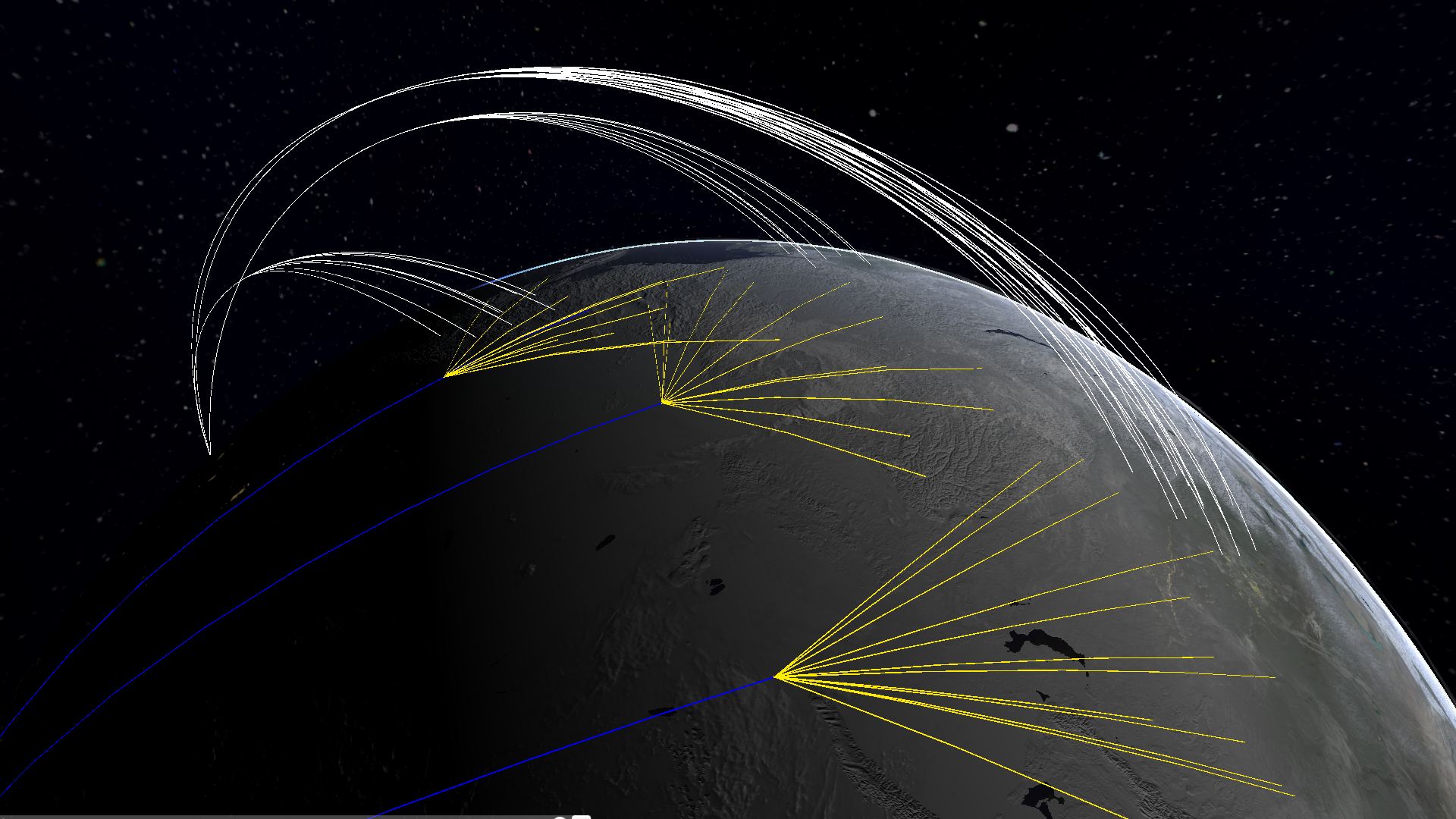
It is now possible to visualize the trajectories for a selected attack plan (in the attack planer menu) - white: ballistic missile trajectories - yellow: cruise missile trajectories - blue: aircraft paths
This new feature can be used to quickly visualize an attack plan, to create illustrations and to look for intersections with the early-warning radar search fences:
UI improvements
Plan execution is now possible from the scenario editor giving a better overview of available attack plans and making a fast execution more comfortable:
It is now possible to set the desired resolution, choose between windowed and full-screen mode, limit frame rate. The audio settings now follow the standard allowing to control main, music and effects volumes independently. A button is there to select another random track if you don't like what is playing in the moment. Some new background music is added.
Complete list of new features and bug-fixes:
Build 272 - New Feature: visualization of plans by showing trajectories - New Feature: removed auto-calculate settings. They will probably return once casualties calculation is optimized - Bug fix: entering the name of a scenario to be saved was not possible - Bug fix: wrong calculation of weapons range in automatic plan generation fixed - Optimization: effects on humans are optimized
Build 262 - New Feature: graphics settings menu: resolution, windowed mode, fps limiter - New Feature: audio settings: main, music and effects volume settings. Option to play another random track if you don't like what is running at the moment. - New Feature: button added to return to the main menu - New Feature: new background music added - New Feature: Player.log is now sent to the Trello board when reporting a bug or requesting a feature through the bug-tracker - New Feature: improved the scenario editor. Plans can now be executed from the list for easier scenario coordination.
Nuclear War Simulator - Build 260 Beta Update
Moving human individuals, time-resolved fallout
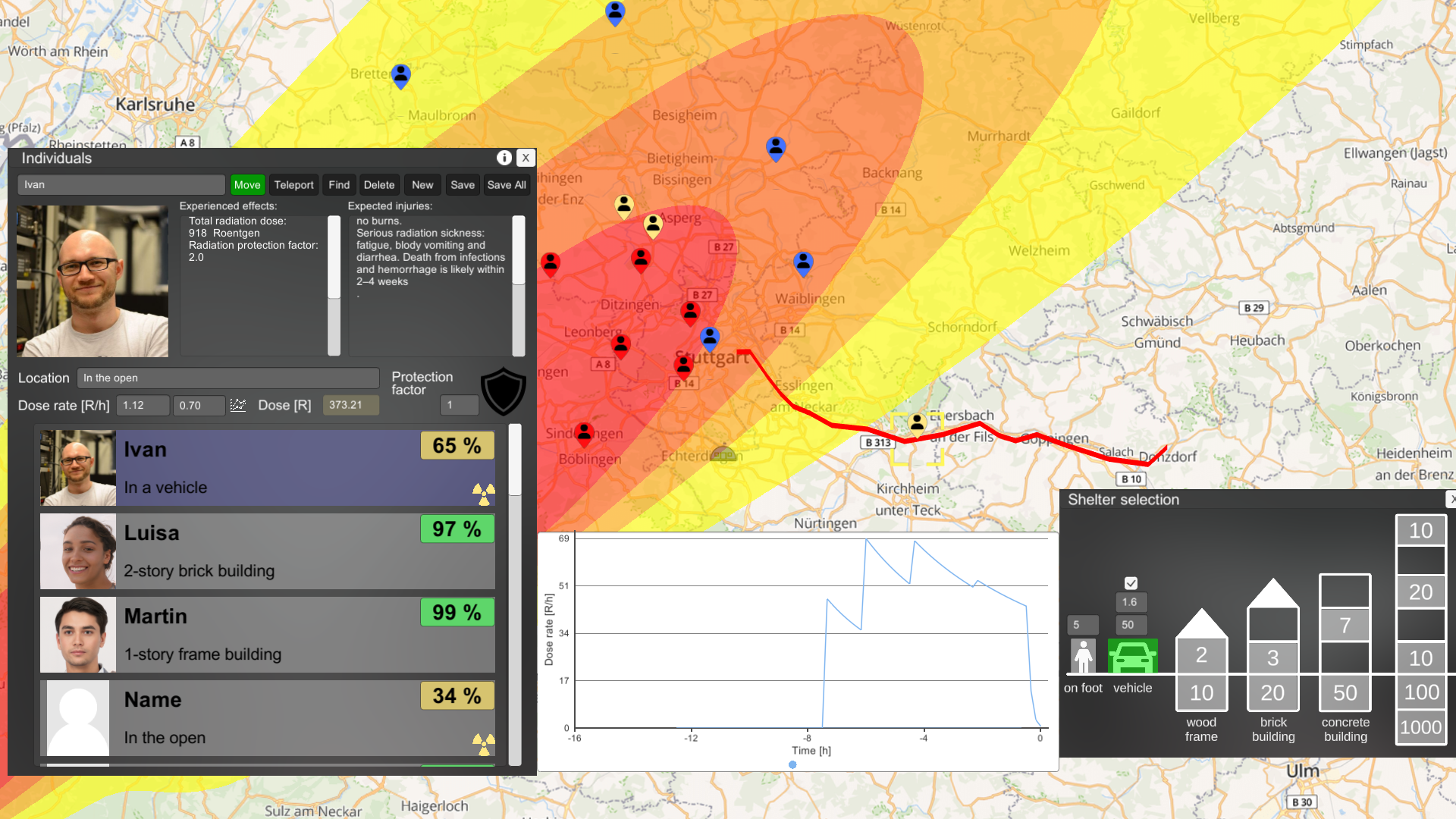
Human individuals can now move on the map and radiation dose from fallout is calculated and displayed in a time-resolved fashion. Civil defense situations and other aspects of survival after a nuclear war can now be simulated. There is a new UI for intuitive selection of shelter. Humans can move on foot or in a vehicle (if available). The speed and protection factor of the vehicle can be set in the UI. The route can be chosen by clicking multiple times on the map.
The fallout dose is now calculated time-step by time-step. The dose rate curve shows how each mushroom cloud arrives at the individual and then the radiation decays. When people take shelter it can be seen on the curve.
These new features can be used to simulate taking shelter from fallout and evacuation.
Improved single explosion UI
A drop down menu is added to select one of the available warheads (for the selected country). There is also an option to select the next warhead randomly. CEP is displayed (dashed circle) and can be changed to simulate the CEP of a delivery system. Multiple detonations can be done with one click. The combination of a very large CEP and multiple detonations can be used to quickly create a random warhead placement.
Complete list of new features and bug-fixes:
- New Feature: human individuals can now move on the map, change shelter and fallout is measured in a time-resolved fashion. This enables the simulation of evacuation vs shelter-in-place strategies, civil defense scenarios and survival situation. - New Feature: human individuals can move on foot or in a vehicle. Movement speeds and protection factor of the vehicle can be set and saved. - New Feature: new, intuitive UI for shelter selection - New Feature: curves showing time-resolved radiation dose rate from fallout. The curves can show when fallout is arriving at the individual, how it decays and how changing shelter affects the exposure - New Feature: a button is added to save the parameters of one or all individuals. Parameters are not saved automatically when changed. - New Feature: "Single explosion" panel: it is possible to select one of available warheads as preset. Toggle box can be used to select a random warhead. - New Feature: "Single explosion" panel: CEP can be set - New Feature: "Single explosion" panel: it is possible to detonate multiple warheads with one click. It is possible to distribute a large number of detonations by selecting a large CEP and a large number of detonations on one click. - Bug fix: plan addition (creating a new plan with the name of an available plan) was not working with silos
Nuclear War Simulator - Build 258 Beta Bugfix Update
- Bug fix: increased the country index map resolution to match the resolution of the population density map. This should eliminate some of the fatalities counting inconsistencies in small countries - Bug fix: fixed two errors in the calculation of the biological effects terms. The calculated dose is now lower than before the fix - Bug fix: changed all bearing angles to the widely accepted convention: clockwise angle with zero direction North