Some great feedback has made it back to me. This new version addresses the following points:
Vsync has been disabled by default. One player reported having an issue starting the game (and probably others too) and I wanted to test whether the vsync might be at the root of the problem. You can re-enable it by going to "C://users/-your username-/AppData/Local/Paradox Vector" and opening the "config2.cfg" file. You will see the last entry is "V-Sync,0" - simply change the zero to one, and save the file, to re-enable vsync. I have included an option in the preferences menu to change this setting.
Purple Locks should now appear more clearly on the map. Some players have had trouble finding these, especially in the later levels. Hopefully this will make the gameplay a little less frustrating.
One outdoor area, and one dungeon have also been adjusted slightly to make them easier to navigate. One part of the gameplay is to observe your surroundings to find the various paths. However, in some cases they are so well hidden that players may get frustrated and quit. The idea with these adjustments is to find that balance between too easy and too hard. I won't give away the exact locations that have been changed, but hopefully the game will be more accessible as a result.
This is the first update since the full release of Paradox Vector. If you encounter any problems, please don't hesitate to let me know.
Testing Branch Updated to 1.0.1
Some great feedback has made it back to me. This testing version addresses the following points:
Vsync has been disabled by default. One player reported having an issue starting the game (and probably others too) and I wanted to test whether the vsync might be at the root of the problem. You can re-enable it by going to "C://users/-your username-/AppData/Local/Paradox Vector" and opening the "config2.cfg" file. You will see the last entry is "V-Sync,0" - simply change the zero to one, and save the file, to re-enable vsync. I will include an option in the preferences menu when going to the default branch.
Purple Locks should now appear more clearly on the map. Some players have had trouble finding these, especially in the later levels. Hopefully this will make the gameplay a little less frustrating.
One outdoor area, and one dungeon have also been adjusted slightly to make them easier to navigate. One part of the gameplay is to observe your surroundings to find the various paths. However, in some cases they are so well hidden that players may get frustrated and quit. The idea with these adjustments is to find that balance between too easy and too hard. I won't give away the exact locations that have been changed, but hopefully the game will be more accessible as a result.
This is the first update. I will be testing it for stability, and uploading it to the default branch later today or tomorrow.
Paradox Vector - Full Release Announcement
I'm here to announce the transition from early access to full release!
After a few weeks of very intense testing, I am finally putting Paradox Vector out into the world. The little ones have to leave the nest at some point, and i felt it was time to do so.
New Features
Even so, there are a number of new features added to the game since the most recent pre-release version. Here's a summary:
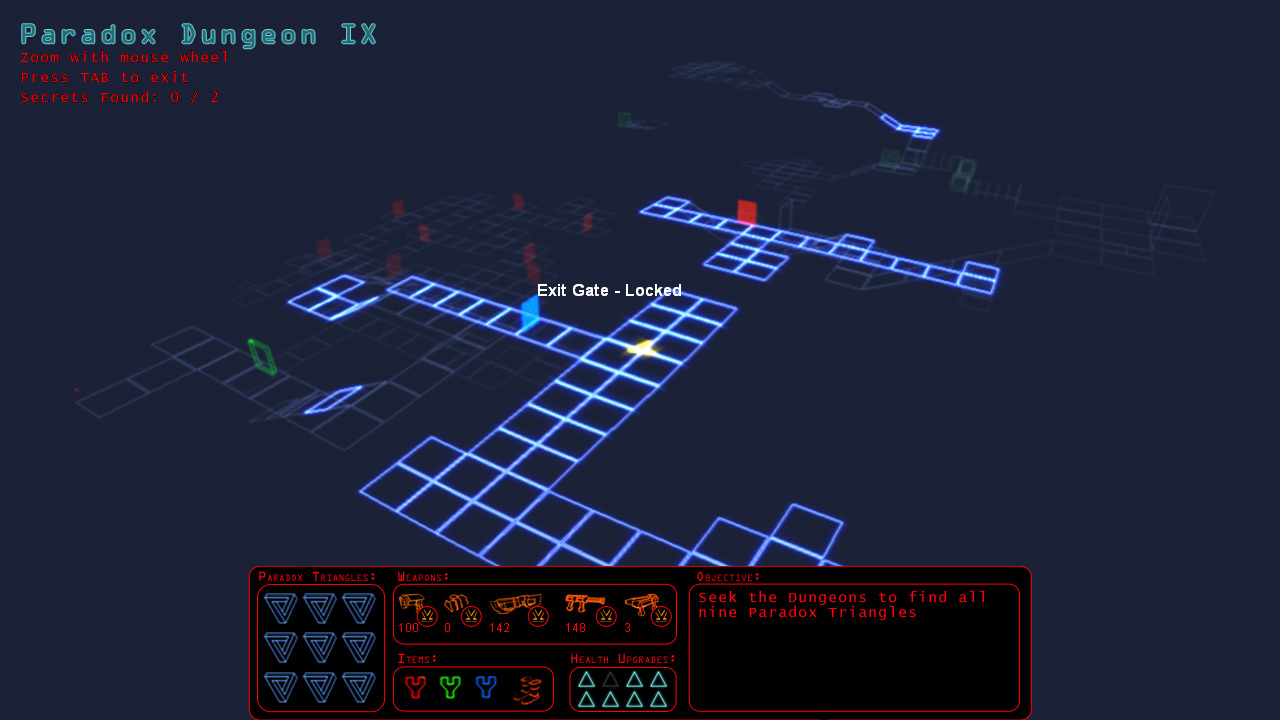
1. New Inventory Menu: Previously, there was no way to track any items picked up or upgrades found. Now, when you access the map, you will see a small menu with all the artifacts, weapons and items you have discovered. It also shows a brief summary of your current objective, and displays the amount of ammo you have for each weapon.
2. Enemy rockets: Some enemies in the higher levels will shoot rockets instead of bullets. This should make the game a bit more challenging in the higher levels.
3. Boss Bombs: The primordial source of the servitor creatures will now shoot a higher number of bombs in various directions, making it harder to simply strafe around and avoid damage during that fight.
There are also a number of fixes and optimizations in the latest version that may not be noticeable to players. Anyway, I hope you enjoy the full game!
Bugs
This does not mean the game is 100% bug free, but I was not able to discover anything that will really break the game on my numerous play tests. Hopefully players will enjoy an error free experience. In case this does not happen, I will be here on the forums, ready to take any further feedback.
Review
Now that the game is complete, I hope some of the early players may feel like trying it again. If you like what you see, please take the time to add your thoughts in a review. This may be the single best way to help the game's visibility, so I always appreciate your thoughts!
Update 0.9.9.9e
I've included a few new features that help with the gameplay.
New Jump Sounds - If you jump once, from a solid surface, you will hear a somewhat ordinary jump sound, like feet on stone, or whatever surface you are on at the moment. However, if you hit the jump key (space by default) again, you will hear a special, spiffy space-jump sound. These sounds let you know what kind of jump you performed, and this can help in some of the platforming sections of the game.
Fixed Menu Issue - If you hit ESC during one of the text narration parts of the game, some things would appear, or disappear, that were not supposed to. This should be working as intended now.
Fixed Load Problem - If you tried to load a game while you were standing near a keyhole, or some other interactive objects, the game had a likelyhood of crashing. This has been addressed and should no longer cause problems.
Secret Areas - There are secret areas in the game, and it will now let you know when you've found one.
Rocket Robots - Some of the enemies in later levels will now fire rockets instead of standard bullets. Enjoy!
Update 0.9.9.9d
This update has the new textures throughout all the game levels.
Also, there was an issue where Window mode will not work properly if your computer's DPI settings are configured to enlarge any text. This has been resolved. However, in order to fix this, I need to change the .exe manifest each time I update the game. It's not a problem, but it's possible that I may forget to do so, as happened with the most recent build.
If you are used to playing in Window mode, and encounter this issue, please don't hesitate to remind me. You can post here on the forum, or send an email to michael@schmidtworkshops.com.
Thanks!
P.S. Also, if I do forget this in a future update, you can also right click the exe file, and go to "Properties > Compatibility" and check the "disable display scaling on high DPI settings." That is basically what I did to fix the issue, but I edited the manifest for the .exe file directly.
Update 0.9.9.9c
This update includes some new surface textures and a wider variety of architectural features in the first few dungeons. There are also a few fixes for minor issues.
Fixes:
Saving the game is now only possible when the player is over normal ground. Previously, you could save the game when falling down onto spikes, or when on an elevator. When reloading, the player could appear over the spikes, and die, which defeats the purpose of saving the game...
Saving/Loading in vents should now work correctly. Previously, if you saved when crouching in a vent, loading the game would fail to put the player in the crouch position, and she would be stuck.
Enjoy!
Paradox Vector is nearing the full release. If you find any issues, or have any great ideas to improve it, please use this discussion forum to post your thoughts.
I plan to have a good, long look at the controller scripts, as it does not seem to work with all kinds of controllers at the moment.
Update 0.9.9.9b
Paradox Vector is getting closer to full release!
This week's update is small, but progress is going smoothly in some other areas that are not quite ready yet.
Some new environment art has been added in the form of different archways. I want to do a lot more here, and give each level a more unique look and feel. Now the factory has a different style of arch, as does the final room, known as the Paradox Prison.
I have adjusted the game's manifest so that it should go to fullscreen independent of whether your computer has DPI scaling on or not. This is something I fixed before, but I have to do it each time I export the game.
Update 0.9.9.9a
Paradox Vector has been updated. Check out some of the new features!
New Drones
The brand new, creepy-crawly drones are active in this latest build. They have also been adjusted so that they can't shoot through walls. Here's what they look like...
Draw Distance
I am thinking about including a draw distance slider to help improve the frame-rate on older computers. Right now, the variable is working, but it is not in the preferences menu yet. To change it, you will have to modify the config.cfg file manually. Here's how to do it:
First, make sure you have the testing branch active. Go to "Paradox Vector > Properties > Betas" and select "testing" from the drop down menu.
When the game updates, you should see Version 0.9.9.9a on the title screen.
Now open the game, go to the "Options > Preferences" and change any parameter. If you turn off colored fog, then turn it on again, that should create the "config.cfg" file for you to modify.
Now go to "C:/Users/-your username-/AppData/Local/Paradox_Vector" and open the "config.cfg" file. It will look something like this:
800 600 2 46.655 0 1 0.500 300 1 15 -1 1 1 1
To change the draw distance, change the last "1" to any number between .25 and 1. This will reduce the distance at which vector lines are drawn when playing, and could improve the frame rate. The higher the number, the farther objects will be drawn. 1 represents the normal game.
If you enter a number higher than 1 or lower than .25, the game will ignore it and set it to 1.
I recommend starting with .5 to see if that helps.
I still have some ideas to help improve performance that I want to try out.
AMD/Radeon Graphics Cards
For some reason, Nvidia graphics cards can handle the number of line draws in this game, while Radeon cards seem to slow down a lot.
The problem was discussed in some detail here: https://opserver.de/ubb7/ubbthreads.php?ubb=showflat&Number=481106#Post481106
I did find a way to improve performance in that other game, but doing so in Paradox Vector would require almost rebuilding the game from scratch.
If you have a Radeon Graphics card, and would like to help trouble shoot this issue, please reach out to me at michael@schmidtworkshops.com.
Testing Branch Update 0.9.9.9a
I am updating the testing branch. It has a few new things, but has not been tested very thoroughly yet.
New Drones
The brand new, creepy-crawly drones are active in this latest build. They have also been adjusted so that they can't shoot through walls. Here's what they look like...
Draw Distance
I am thinking about including a draw distance slider to help improve the frame-rate on older computers. Right now, the variable is working, but it is not in the preferences menu yet. To change it, you will have to modify the config.cfg file manually. Here's how to do it:
First, make sure you have the testing branch active. Go to "Paradox Vector > Properties > Betas" and select "testing" from the drop down menu.
When the game updates, you should see Version 0.9.9.9a on the title screen.
Now open the game, go to the "Options > Preferences" and change any parameter. If you turn off colored fog, then turn it on again, that should create the "config.cfg" file for you to modify.
Now go to "C:/Users/-your username-/AppData/Local/Paradox_Vector" and open the "config.cfg" file. It will look something like this:
800 600 2 46.655 0 1 0.500 300 1 15 -1 1 1 1
To change the draw distance, change the last "1" to any number between .25 and 1. This will reduce the distance at which vector lines are drawn when playing, and could improve the frame rate. The higher the number, the farther objects will be drawn. 1 represents the normal game.
If you enter a number higher than 1 or lower than .25, the game will ignore it and set it to 1.
I recommend starting with .5 to see if that helps.
I still have some ideas to help improve performance that I want to try out.
Realms Deep is Happening Now!
Hey everyone, the Realms Deep 2020 conference is happening right now. You can see a bunch of great interviews with game industry champions, watch trailers for new games (including mine), and win prizes! Mature audiences only.
https://www.twitch.tv/3drealms
I hope to see you there!
Also, here's a sneak preview of the new drones. I managed to link the animation speed to the movement speed, something I've never attempted before.