

Paradox Vector
Update 0.9.7.8
The game will now create an "Error.log" file when it is run. This file keeps a record of things that the game does. For instance, when setting the resolution, or changing other settings, it records some basic information on what was done, and if any errors were encountered during that process.
Now that the bulk of the game's content is finished, we are focusing on getting it to run smoothly on as many systems as possible. Some players had issues getting the game to run in full screen mode. Hopefully, with the new log file, we will be able to track down any possible causes for this issue, and resolve them as quickly as possible.
If you encounter any errors while running Paradox Vector, feel free to check the "Error.log" file. It is located on your Windows drive, normally in "C://users/-your username-/AppData/Local/Paradox Vector."
You can send the file, or just the contents of the file to the email mentioned in the file: michael@schmidtworkshops.com, and that will help us figure out what's going on.
Paradox Vector Updated to Version 0.9.7.7
Optimized Levels:
- Each of the game's larger levels has been optimized so the framerate is as good as or better than the earlier, smaller levels. It's not 100% consistent throughout, but in testing we did not see it drop below 30 fps at any time, and it normally stays above 40 or so. Of course this will depend on the hardware you are using. We use a computer that's about ten years old for testing, so it should be decent on most modern systems.
- If you do experience any trouble with the framerate, please feel free to let us know. You can comment here, or start a discussion on the forum.
- We found that some of the larger levels now outperform even the early, small levels, so we may decide to optimize some of those as well.
Colored Fog:
- The game now has the option to enable colored fog.
- The goal is to help with the motion sickness some players complained of, due to the stark black background and bright lines.
- Let us know if you have had this issue, and if the fog option helps out at all.
- We are strongly considering to use the fog as the default look of the game, as it makes for more interesting screenshots. Please feel free to express your opinion about this.
- Go to "Options > Preferences" and click on "Colored Fog" to enable this feature.
- We may be adjusting the brightness, colors and other parameters of the fog as we get ready for the full release, so again, opinions are welcome!
View Distance:
- Outdoor levels now have a bigger view distance.
- Did you know you can change the view distance in Paradox Vector?
- It's not available in the Preferences yet, but if you go to "C://users/-your username-/AppData/Local/Paradox Vector" you will find a file named "config.cfg"
- Open that file and look for the eighth number, which should be set to 300 by default
- You can adjust that number and get a longer view range in your game.
- The game has not been tested outside of the default view range, so it's possible you may see some errors or issues as a result. Let us know if you encounter anything unusual if you choose to try adjusting the view distance.
- Also, if you are experiencing a slow framerate, you may see improvement if you lower the view distance.
To Fog or Not to Fog ... That is the Question
Currently the game has no fog color as seen here in the first two images...
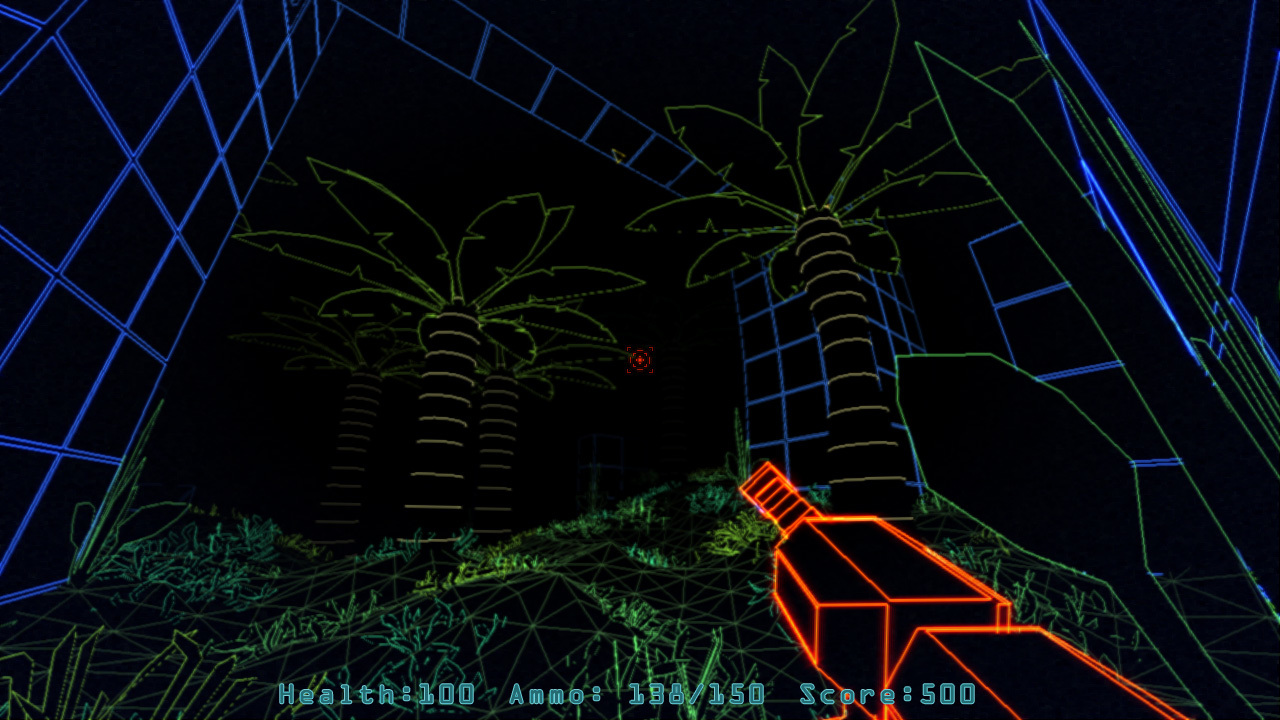

I like the addition of fog, but I am also concerned that it will take the game too far away from it's Vector Graphics aesthetic...


What do you think?
More on Optimization
Instead of using individual models for each wall, we came up with a way to combine many models into one larger model. The challenge was to get the tiled appearance with the larger model, but this was just a matter of using a bit of math.
The results look promising. This is an image of two similar rooms. The one on top has individual models for each tile. The bottom one has just one large model. Have a look at the difference in framerate, or "frames per second" (fps).
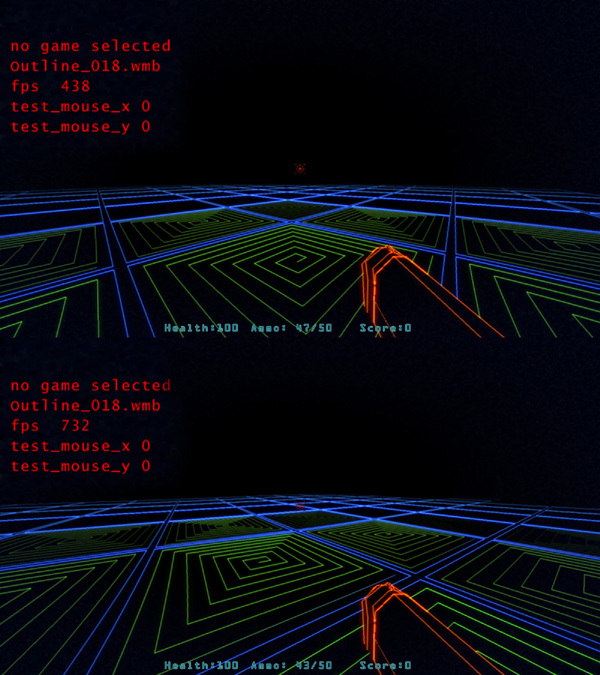
Of course we probably wont see framerates like either of these in the actual game, this is just an empty room. But the results are still significant. From 438 fps to 732 is a big jump. Over 1.5 times the amount. Using this method, we intend to get all the levels running at around the same speed. For the larger, slower levels, we can simply add more, large tiles, until the framerate comes down to similar levels.
Another technique we have used involves doing a similar thing with spikes. Some levels have huge regions of spikes, and each spike was a separate model. Combining spikes as already improved the framerate on some of these levels.
The next update should see significant performance improvements!
Optimization
I am taking a few different approaches to this.
- I am optimizing the code. Reducing the number of commands per frame has allowed me to get a few extra frames per second already. I have more ideas I want to implement here, but it may not solve the overall problem.
- Level editing. I have already reduced the size of some of the larger levels. I am trying to do this without negatively impacting the gameplay, so wherever I can, I plan to combine game objects, to reduce the total number, and reduce the number of polygons being rendered.
- Splitting levels. I did this once before in the outdoor levels. Originally, the outdoor region was one large level. Now it is divided into three. I may take the same approach with some of the dungeons.
I hope to increase the overall framerate, as well as make it more or less even across all the various levels. If you notice any places where the framerate goes up considerably, I probably know about it already, but feel free to let me know.
Default Branch Updated to 0.9.7.6
After a couple successful play-throughs, we are ready to update the default branch of Paradox Vector. We hope you all enjoy some of the updates and fixes. Here's a summary of what's happened.
New Stuff:
- New music for the caves and factory areas.
- New color schemes for caves and factory areas.
- Checkpoints added to caves and factory areas.
- The game now supports a gamepad/controller - this feature is still being tested and improved upon.
- Several dungeons have been streamlined a bit for improved performance.
- Story and lore have been modified.
- The game now has a female protagonist.
Fixes:
- Grates will now reload in the same state they were saved in, e.g. if they had been destroyed, they should not reappear after loading a saved game.
- Several small errors with certain levels have been fixed, i.e. missing tiles, invisible barriers in the wrong place, etc...
- Flybots should no longer spawn after generator is destroyed
More tweaking and improving will be happening this week. We anticipate the game to be finished very soon, and we will announce the full release date at that time.
Testing Branch Updated to 0.9.7.5
What's New?
- Updated color schemes in some of the levels and game objects
- Fixed some small issues with the controller configuration screen
- New footstep sounds for ventilation shafts
- New music for caves and factory locations
- Added checkpoints in caves and factory locations
What's Fixed?
- Vent covers should now be removed when reloading a level, so you won't get stuck inside
- A certain boss enemy could be killed before entering his evil chamber, this will no longer be possible
We want to do some more play-testing before sending this up to the default version
Let us know if you have any issues or questions.
Testing Branch Updated to 0.9.7.4
We have updated the testing branch again at 6:30 pm. It includes some minor adjustments to the controller configuration dialogue, and should prevent players from assigning more than one function to the same button. This new version also handles resolution slightly differently, as some players were having trouble going to fullscreen mode. It will generate some error messages if screen resolution does not set correctly, and this may help us resolve the problems people are facing.
ORIGINAL MESSAGE:
Okay, this should all but finalize the Controller Support aspect of Paradox Vector.
There were a few spots where the controller was not working, specifically when the player encounters parts of the game's story. Now these text panels should work, and allow the controller to click on panel buttons.
One last issue remains. The game will start with mouse control set to default. To activate the controller, you will need to go to "Options > Preferences" and click "Use Controller." Once the controller is active, the mouse will become inactive.
This causes two problems:
- If there is no controller plugged in, it will effectively freeze the game. But clicking again with the mouse should release it again.
- Since the game requires this initial set-up, we cannot list it as having "full controller support" which would be nice to say. If we can fix this issue, we will, but it is not a high priority any more.
As always, give it a try, and let us know how things go! We are always looking for more feedback.
Testing Branch Updated to 0.9.7.3
A new update improved controller support.
Configure Buttons
Now you can configure the controller buttons to suit your playing style. Also, you can set the "dead-zone" for your joysticks, in case you are getting any problems with controller drift.
Set the Dead Zone
If you notice the camera drifting, or player movement while you are not pushing a joystick, simply increase the dead-zone for that joystick.
Controller Support in Menu
The game also supports using the controller in menus, so you should not have to go back and forth between mouse and controller once you've enabled the controller.
What Else?
The game will now store your controller configurations. But, we're guessing there are some other issues and bugs that will pop up, and we will be keeping a look out for those. Let us know if you find anything!
Testing Branch Updated to 0.9.7.2
0.9.7.2 is now in the testing branch, and it is a first attempt at getting a controller to work in-game.
To activate the testing branch, go to "Paradox Vector > Properties > Betas" and select "testing" from the drop down menu.
Then, when you run the game, go to "Options > Preferences" and click the button next to "Use Controller."
Right now, it only works in the actual game itself, the controller will not effect menus. Also, the buttons are currently fixed. The "Configure Controller" button does not work yet. We will be working on this, but we thought we would put this out there to see how it works for other players.
Let us know what you think so far!