The BGP now concludes with the Albergtal (no more cracks in the ground)
Claas Vario 930 is no longer dirty when bought from the dealer
BGP bunkers and fermentation residue tanks are now stored
Smoke Axis 30.1W Particle VC Update
Sale now takes into account correct volume and remuneration
BGP icon is displayed again on the map
Inner collision of the bunker lowered
BGP control unit: button text synchronous to bunker lid status
Trailers no longer empty into/onto unloading points on their own when the vehicle is left
The silos on the farm reveal the right side
Field grass allows the bulls to gain weight in the barns
The voxel mesh in the Hawe SLW can now display different materials depending on the load (no more white fill tarpaulins)
NOTES
The Bressel & Lade blades are not always visually empty when tilted
BGP silo tarpaulins are still temporary and without function, so they can be safely ignored
Fertilizer,Plant,Soil,Silo,Weather,BGP v0.6.0
With the update 0.6.0 we introduce a new fertilization system. From now on your fertilizing actions have a big influence on plant growth. And with the revised biogas plant you can now generate electricity and sell it.
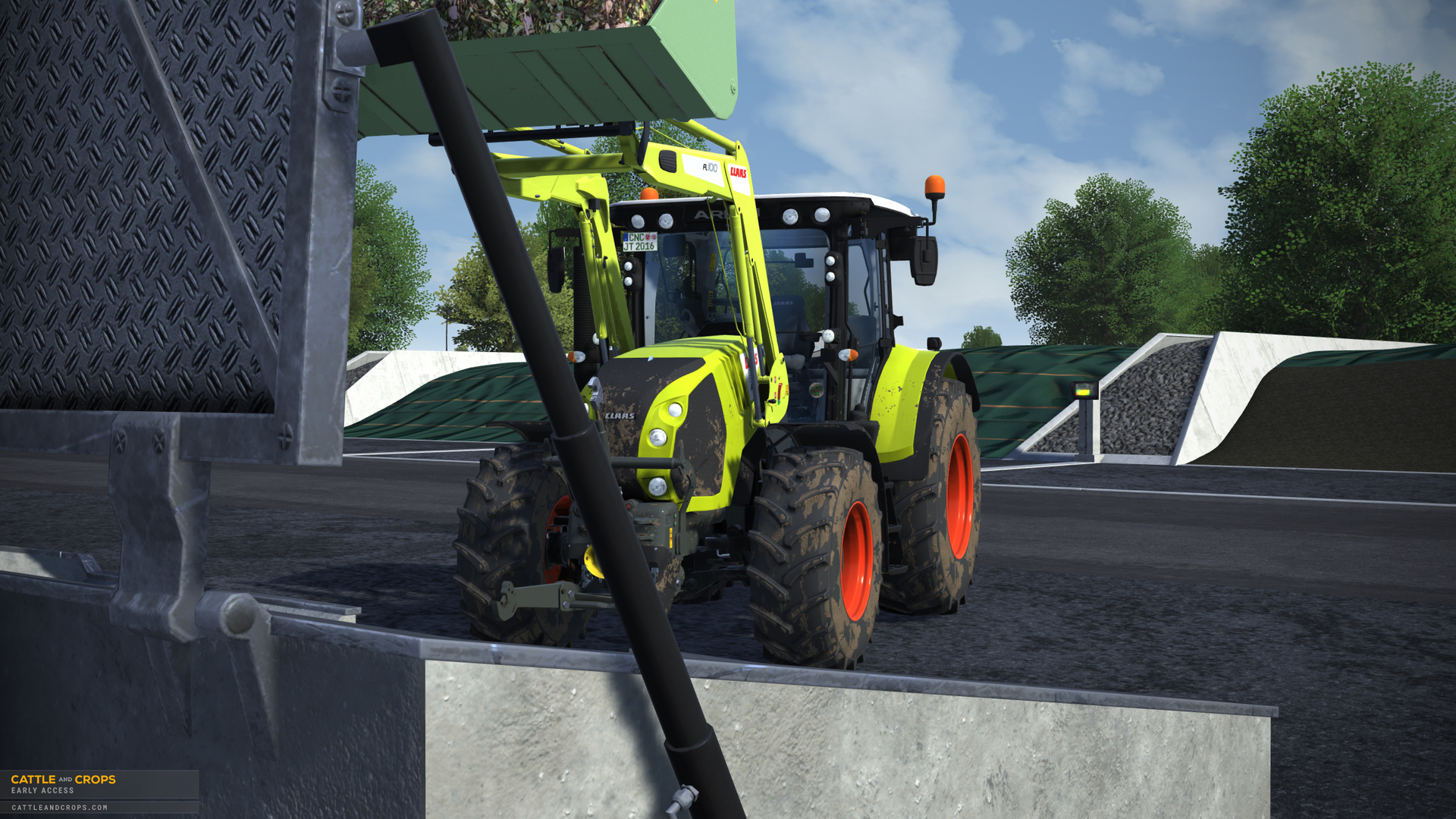
With the revised biogas plant (BGP) we give you the possibility to dump chopped maize into the new silos, to compress it and finally to cover it to activate the fermentation process. After 60 days this process is finished and you can use a front loader and shovel to transfer the silage into the BGP bunker. The BGP then starts to process the silage on its own and after 20 days produces the first methane gas which is converted into electricity and then credited to your account once a month. So in order to guarantee a continuous additional income, you’ll have to make sure the bunker is filled up on a regular basis. In upcoming updates the BGP will be expanded further in its complexity.
The new dynamic silos that can now be found in the Albergtal are fundamentally different from the old ones. If you drive the trailer loads into the silo and dump them, the silo fills up at the position where you unload. You should therefore take care to unload straight and evenly into the silo so that no too steep heaps stack up. At the moment these cannot be pushed flat yet and will be added in one of the next updates. The BGP uses 12×50 meters silos, while the farm and harbor uses 12×25 meters. As with the BGA silos, the silos at the farm can be compacted and covered for fermentation.
There are new interactive 3D-Panels, so that you can operate the BGP and silos. These have been installed at the appropriate locations, which you can easily operate with the activated mouse pointer.
The traders have been revised. We have installed a new slurry trader at the harbor where you can sell your surplus slurry or buy it if necessary. Additionally, the farm cooperative now offers a multitude of granular fertilizers for use with the new Rauch Axis spreader.
The new weather system is now based on accurate hourly data. In preparation for future plant growth, we have implemented a revised weather system that transfers numerous realistic measured weather data to the game for one year. The first step was to make the weather more credible and comprehensible. In the next step the weather will also affect plant growth as mentioned above.
The field menu has been greatly revised: if you now select a field in the menu, you will get various information about the status of the field or the plants. The status on the map is also shown in color. If you click on one of the eye icons, the status of the corresponding parameter will be displayed after a short loading time. If you now exit the menu, you can monitor the status on the minimap, very helpful if you are on the road with the fertilizer spreader. The update takes place every 5 seconds.
The fertilization is an essential component when planting crops, and this update finally implements it in large detail. You’re going to have to make sure that the plants are supplied with enough nutrients. With the revised field menu you can see at a glance if the NPK values are within the green range. The revised growth levels will be divided into 100 BBCH levels. Currently only the NPK values are included in the growth process. The appropriate solid fertilizer is offered for sale at the cooperative in the city, bull slurry is available at the harbor and the farm, fermentation residues (particularly efficient!) at the BGP, and sewage sludge at the sewage treatment plant.
Many values such as NPK concentrations but also prices have been adjusted to real-life values which are based on the current fertilizer guidelines.
For example: NPK concentrations in slurry are now real values. 50 fattening bulls consume about 450 tons of maize silage (9 hectares × 50 tons fresh matter per hectare) in one year and produce 360 tons of liquid manure. Almost 360 tons of slurry are also required to fertilize 9 hectares of maize if 4.1 liters of slurry per square meter is spent. This results in NPK nutrients: N = 196 kg/ha, P = 90 kg/ha, K = 221 kg/ha, equivalent to the consumption of maize.
Let's assume that with Stapel liquid manure barrel you can spread 18 tons; that results in 2.2 trips per hectare. Farming is tough work: 9 hectares require about 37 trips. With this size of work, it is worth working with helpers.
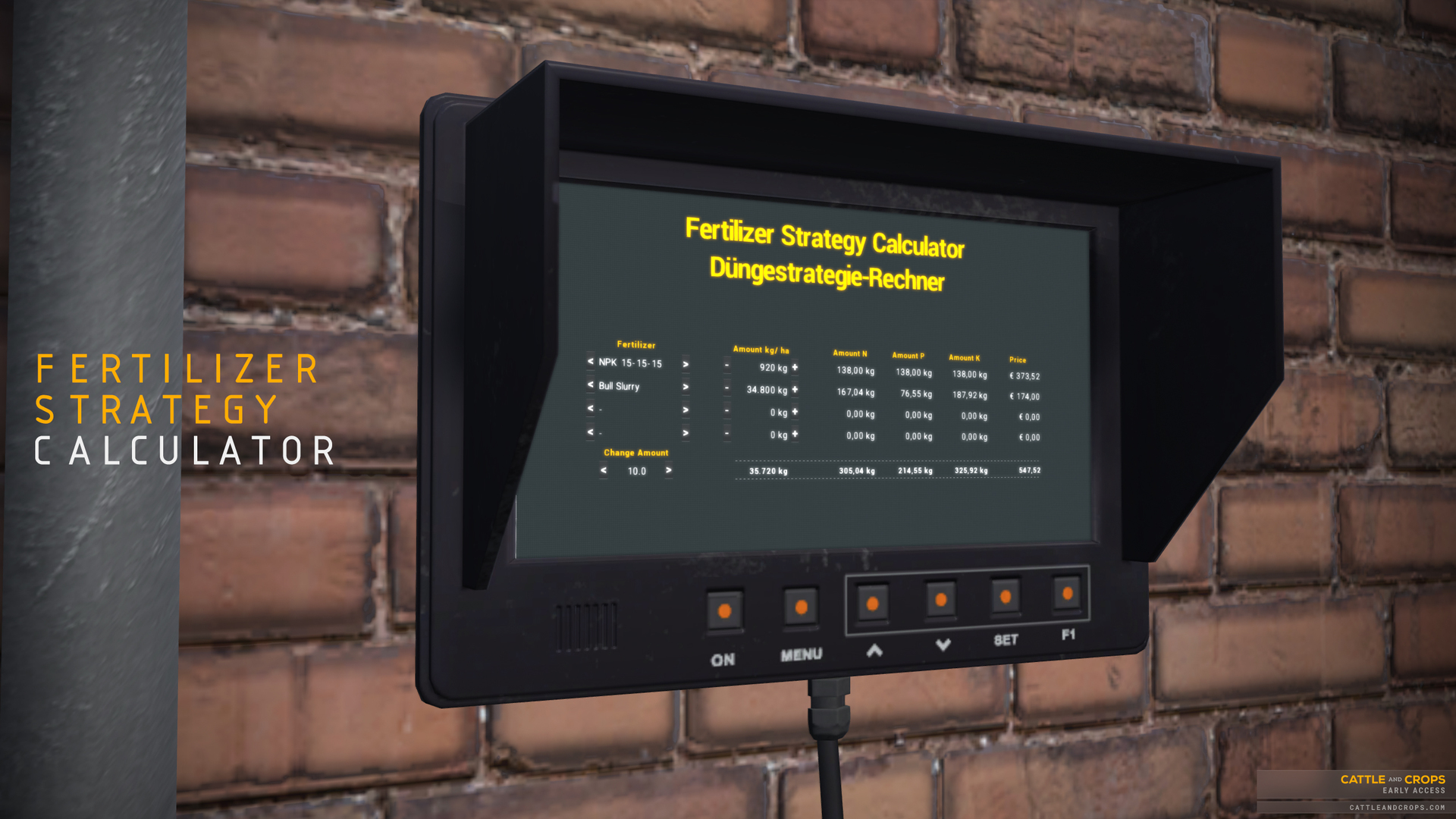
But to make sure that the whole thing doesn't degenerate into a difficult math lesson, we have implemented a fertilizer strategy calculator, which you can find at the cooperative as well as at the port slurry trader. The tool helps you to calculate which types and quantities of fertilizer would bring how much nutrients to the field, and what that would cost you. To do this, open the desired field in the field menu, select the reference fruit and check the target NPK quantities (in kg per hectare or lbs per acre!). Now you can combine different fertilizer types and quantities in the calculator so that these target values are reached as close as possible. Multiply the calculated fertilizer quantities by the field size and you will have the total quantities you need.
We know that the topic of fertilizing can be overwhelming at first sight. In the near future we will go into this in more detail and give you instructions and/or tips.
The machines have numerous modifications. A separate fertilizer system has been added to the seed drill Hammer CornKing. The slurry barrel Stapel VT18000 now has an adjustable spread rate. In addition to that, we’re introducing the Rauch Axis 30.1 W granular fertilizer spreader, giving you a work width option from 12 m up to 42 m. All fertilizer machines have received an “empty tank” option that allows you to refill them with a different fertilizer type.
The AI helpers have received many changes and bugfixes. The complete strategy for the unloading combines has been revised. We also fixed some bugs which caused crashes. In addition, the road network has been adjusted, e.g. we have changed almost everything at the harbor to one-way roads. The AI does not have its final state yet and we are still working on it.
Community: What makes us very happy and motivated is seeing how active the community is. The multitude of ingenious mods, the exchange and feedback in the forum and the commitment of all volunteers!
Many thanks to all modders, moderators, testers and of course to the whole community! Have a look at our forum or have a look at the latest mods for CNC and give the modders feedback.
Your MBB Team
CHANGELOG
NEW
Field crops grow using NPK fertilizer values per square metre
Weather is based on hourly data from the German weather service Region Münster/Osnabrück for the year 2016.
Field menu with new live field data
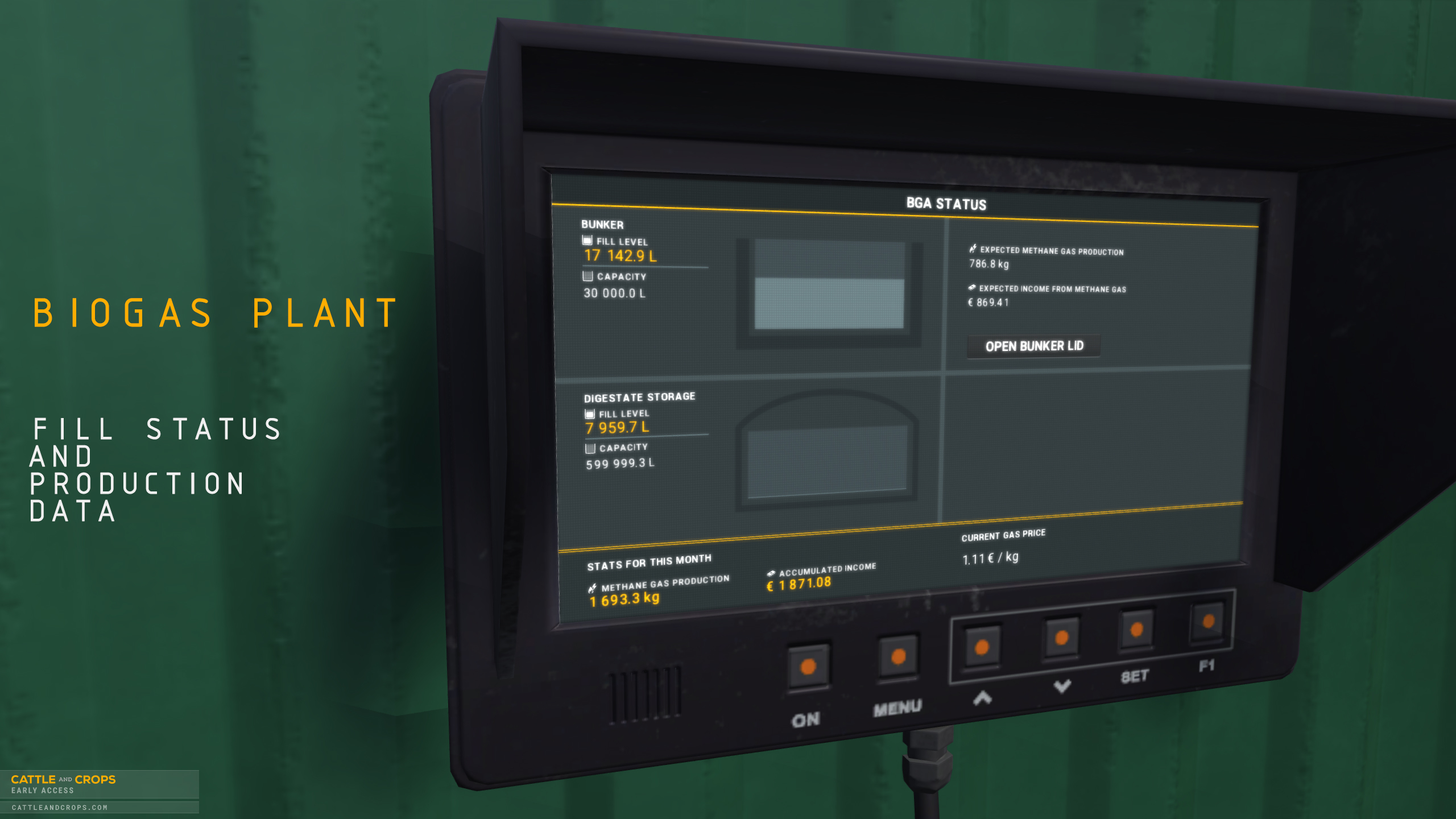
BGP with control station, bunker, pumping station and introduction mission
New silos in the BGP and farm with cover function
Rauch Axis 30.1 W fertilizer spreader with adjustable spread rate
Mission points and tanks have new translations
New silo tarpaulins
Digital display at the bunker
New console command listInfoForTaskIds which gives you a CSV file with an overview of all mission points in the played level and with details for translations and missions
Stapel liquid manure barrel has adjustable spread rate
The console command addFillToTank now also accepts InfoForTaskIds so you can fill silo tanks directly via console
There are one-way streets at the port and sewage treatment plant so that AI drivers work better
Traders at the port are divided into several to have more precise points of contact for the purchase & sale of assets.
Gameplay option to also display the special minimap field data in the 3D world
Helpers distribute their load evenly when unloading into the silo (in the future there will still be options to dump in the main area or at the pre-discharge area)
Hammer CornKing fertilizer system added
There is a new liquid fertilizer ammonium nitrate-urea solution (AHL 28) for the Dammann spreader which can be purchased at the port.
Dammann fertilizer mission converted to AHL28 liquid fertilizer
Rye, wheat, barley and field grass have new optimal growth times. Partly 100 days faster than before
Rye, wheat, barley and field grass have new NPK consumption curves and yields have been adjusted for each BBCH level.
Numerous new granular fertilizer types at the cooperative
New slurry dealer at the port
Fertilizer strategy calculator at the cooperative (left-hand side, next to the ramp) and at the port at the left slurry trader
BUG FIX
Filltypes determine the MatterAttributes like NPK or water concentration for traders
Filltypes at the slurry pump stations have been adjusted
AI tasks should be able to be recreated and work again
Vehicle “Init” scripts are executed again when loading a savegame (affects support feet, wheel chocks and other small things such as the Joskin Delta-Cap support foot)
MissionCommand “setGround” now takes NPK values in kg / hectare and water data are now in litres
MissionCondition “ground” fixed
BGP digestate now has correct NPK values
Activated autopilot can be deactivated again after save game loading
Hourly weather data
Translations further adjusted
AI Helpers should work in all missions again so that you can complete the missions
The voxel mesh in Hawe SLW is only faded out after 800 metres.
The objects which are divided in the ring detail system are correctly illuminated again
The mentioned areas are still under development, will be extended and optimized together with your feedback.
CHANGE
In the slurry mission, you now have to fill up the bull slurry at the farm instead of the sewage treatment plant.
Silos at the farm and at the harbor have been replaced by the new ones
Console command “addFillToTank” now also accepts InfoForTaskIds so you can fill silo tanks directly via the console
Console command “takeFillFromTank” now works the same way with InfoForTaskIds
Dammann fertilizer mission changed to AHL28 liquid fertilizer
Change of slurry types at the farm, BGP and sewage treatment plant to distinct types with different NPK values
The previous fruit varieties such as wheat have been renamed summer wheat as we will soon be making a distinction between summer and winter varieties.
NOTES
Temperature, sunshine hours and water consumption are not yet used as growth factors in this version.
The silo display does not yet indicate compaction via the heat map.
The silos at the port are for sale only and do not fill up visually. This is intentional.
The scales at the BGP have no functionality yet.
As the Hammer CornKing now offers its own fertilizing tank, you need to check the parking position at the seed/fertilizer traders. At first the fertilizer tank is shown and seed types are shown as “incompatible”. In order to fill the seed units you have to drive ahead until the window appears for a second time. At this point you’ll be able to buy and fill the usual maize, grain or grass seed types. We’re going to improve such “double matches” in the future by adding a vehicle selection in the trading window.
You have to create a completely new profile and are not allowed to use old save games. Otherwise it cannot be guaranteed that all changes will work properly!
DevLog - Status Update 12 July 2019
After having introduced the dynamic silo heaps recently, today’s a good day to check out the silo fermentation covers and the silo control panels. We start off with a filled silo which can be covered using our new computer control system. After a fermentation time of about two months it can be uncovered piece by piece for the following removal. The texture is not final and will be adjusted in color.
https://youtu.be/Lm86xnhuLuE
DevLog - Status Update 28 June 2019
With the coming extensive plant growth changes we’d like to present you one of the contained aspects in a small video, displaying the effects of NPK fertilizer during plant growth. You can see how on a maize field three lanes were spread with liquid manure. The time lapse shows that the maize grows better on the fertilized part than on the part where no liquid manure was used.
https://youtu.be/SLPu4oMwNsE
So in the upcoming update you will have a significant influence on your plant growth and fertilizing is not only for looks, but has a realistic influence on the soil. But that doesn't just mean throwing as much slurry or fertilizer as possible on the field - overfertilization also leads to less than optimal growth. In combination with the revised weather system, this results in very differentiated plant growth and new challenges.
Since the balancing of weather, fertilization and the factors influencing soil and plant growth are very extensive and are currently being put through their paces in the test department, the planned update for Q2 will be delayed by about two to three weeks. We have to ensure that all plant growth parameters work coherently and optimally after these major changes.
DevLog - Status Update 14 June 2019
Last week we presented the new dynamic silage heap. We have extended the morph mesh system extensively. Today’s video shows how you can distribute an already unloaded pile further in the silo using the front loader silage bucket. The displacement (silage pushing) hasn’t been integrated yet.
https://youtu.be/ow-E51GDIdM
We are also currently revising the biogas plant (BGP): the terrain and road paths are being adjusted with appropriate optimizations for the AI. We have equipped the map with new silos with a width of 12 meters (39.4 ft). So you have enough space in the silo when it comes to compacting, for example. The silage heaps can be up to 3.5 meters (11.5 ft) tall. We’re programming the AI not to drive over the heap when it reaches a height of 2 meters and above, but rather to unload over in front of the silo, protecting the vehicle’s chassis.
In order to explain the new and changed features, we’re in the process of creating a new mission encompassing unloading into the silo, fermentation, and loading into the BGP’s bunker.
With the introduction of the new weather system and the adjustments of the plant growth, we are also extending soil fertilisation. Not only the weather will influence your plant growth but also the fertilization and thus the nutrient content in the soil.
DevLog - Status Update 07 June 2019
Due to the Community Manager’s vacation there were no separate threads concerning the news our moderators had posted here in the forum. We're still working on the most recently introduced systems and would like to briefly summarize the current development and progress of these features.
Part of our work is currently focused on the visualization and function of the silos. Similar to the trailers, they will be able to be filled dynamically at any point and additionally will be able to compressed. Depending on the vehicle, weight and fruit type, the achievable compaction rates can be higher or lower. The end of this week, the focus was on the correct loading and unloading of the silos and the volume distribution when hitting a point in the silo. In the coming days we will refine the compaction in order to make the effects of the vehicles as real as possible. But as always, pictures say more than a thousand words:
https://youtu.be/3Lon8souCCM
The weather system related to plant growth is the second major building block for the upcoming update. Not only are we working on increasing the complexity of plant growth, but also on adjusting it to the new real weather data. Most recently, one of the main factors of the weather was rain, and thus water reserves in the soil. We have to make sure that our rainfall and soil conditions, with influences such as transpiration, soil evaporation and storage capacity, interact correctly with the fruit growth and that the plant develops as realistically as possible according to the parameters. After water, we’re going to deal with further growth parameters such as temperature and further develop fertilisation.
Additionally we’re working on general bug fixing and AI improvements.
DevLog - Status Update 16 May 2019
As you all know well from last year, the weather has a major influence on plant growth. Due to prolonged drought, the fruit grows very poorly or not at all, or dies in the worst case. At the same time rain can have a negative effect. The weather is therefore one of the great challenges in agriculture.
Up until now, we have calculated a simple daily average from historical weather data, but this was more difficult than expected to implement and led to undesirable side effects, such as too much fog or permanent turbidity. We are currently converting our system to real hourly data so that the weather can be mapped more accurately - and realistically.
Thanks to access to a large pool of historical data from the last decades we can show a very real weather development over the entire year. In particular, we can use the weather of a station that geographically matches the map’s location. In the beginning we will implement the weather data of a specific year, later there will be several variations.
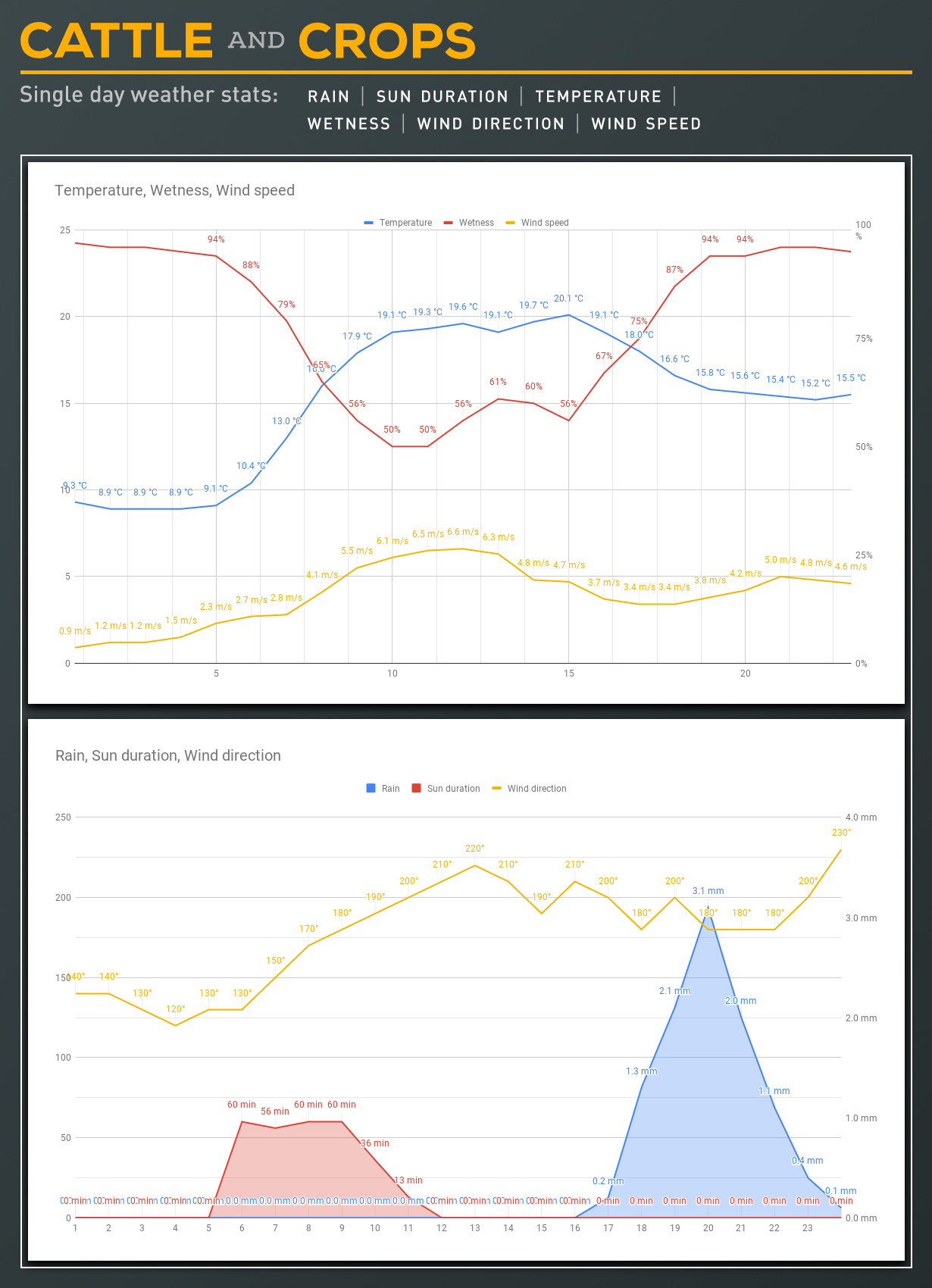
The image shows a daily analysis of the weather data - in this case a varied June day. While the morning brings a few sunny hours it gets more windy and cloudy at noon. From early evening until midnight it rains continuously.
Note: the charts shown are data visualizations in Excel. The ingame representation will differentiate.
The individual elements such as sun duration, precipitation and wind will be an important basis for plant growth in the game and will accordingly also have effects - both positive and negative. Therefore, it will be essential in the future not only to base your planning on machine and staff availability, but also to take weather forecasts into account.
Another advantage of actual weather data is that it’s not our fault if the weather doesn't play along when you’re playing. 🌦️🤓
Our Community Manager is on vacation from Monday and will be back for you from 03 June.
DevLog - Status Update 09 May 2019
The current condition of the biogas plant (BGP) is limited to the basic sale of chaff. We know how important a BGP is for the gameplay and have decided for a step-by-step feature implementation.
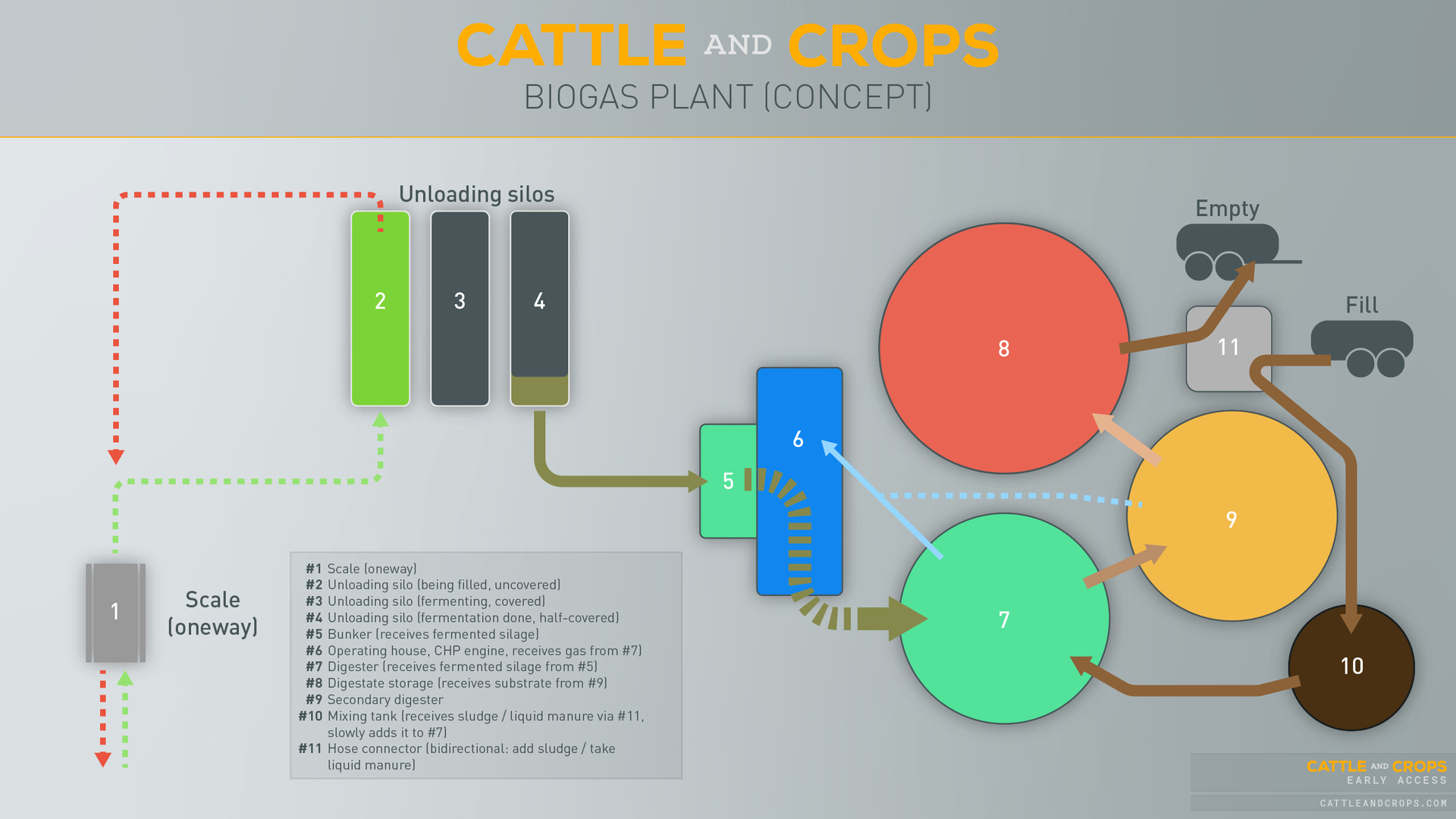
In the long term, the BGP will consist of various stations: the bunker will transport the silage to the digester, which will supply the CHP station and its connected power generator with methane gases via the secondary digester and thus contribute to energy generation. It will also transport liquid manure into the digestate storage container using an overflow system, which can be emptied into liquid manure barrels with a hose.
In the long run, there will be certain elements that can be controlled by the player. Keeping a BGP efficient and productive can be a complex task, so we won't include these controls until later and as part of the difficulty system.
The first part will focus on a simple fermentation and manure generation process in the next update. This means: unloading into the silo, compacting, covering the silo, letting it ferment and shovelling it into the bunker. The quantities shovelled into the bunker are rewarded financially after processing. As a player, you don't have to operate the BGP yourself, nor does it need any start-up times and can’t die off. The remaining elements of the process (gas and digastate production) are automated.
The second stage will extend the complexity of the BGP. There will be certain parameters that will contribute to a better (or worse) plant performance and effectiveness. Here, for example, the quality of the chaff and the degree of fermentation come into play. In addition, it will be possible to improve the nutrient supply to the bacteria using the mixing tank for sludge supply.
At this stage it will also be important to be able to see the current status and progress, so a dedicated BGP window will provide information.
With the last expansion, the player will gain complex control of the BGP. Many more parameters and optimization possibilities will be included, allowing you to get the maximum out of the system - and of course a higher yield.
As mentioned at the beginning, the elements of the BGP will be adjustable by the degree of difficulty. Those who prefer a more simple gameplay will be able to as much as someone who has always wanted to control a system without having to go to college for it. 🙃
Controller Hotfix Update: v0.5.1
With the Hotfix Update v0.5.1 we have further improved the radial menu, applied the new design to many UI elements and fixed some bugs.
We'll be back at the beginning of May with another status update, until then we wish you all a relaxing holiday and happy Easter! 🐰🥚
CHANGELOG
NEW
The vehicle lights as well as the ignition are now available in the radial menu
The first important vehicles (all tractors and the Jaguar) have received complete translations for the UserActions and CabControls
CHANGE
Mission start, status and complete displays have been redesigned
CareerInfo display top left has been redesigned
A vehicle can also consist of several animated sub-models and these will now always be displayed correctly
The Key Bindings Info window now uses the gamepad keys when using a controller
The radial menu has been further improved regarding the assignment of the quickslots
At the start of the game you are in the first-person view
Radio was removed from the hud
BUG FIX
Autopilot can be switched off after save game loading
Fixed language selection in options menu in launcher version
Numpad Enter no longer triggers screenshots under Steam
Pause menu buttons no longer disappear at 21:9 resolutions
The Key Bindings Info window no longer interferes in the main menu or in the WorldEditor
The mission "Fast growth, better business" is no longer doubled
Fixed a problem with the "Fill Tank Failed" warning in the "Good Crops" and "Bale Mission" missions
The mission "The bulls are back in town" is playable again
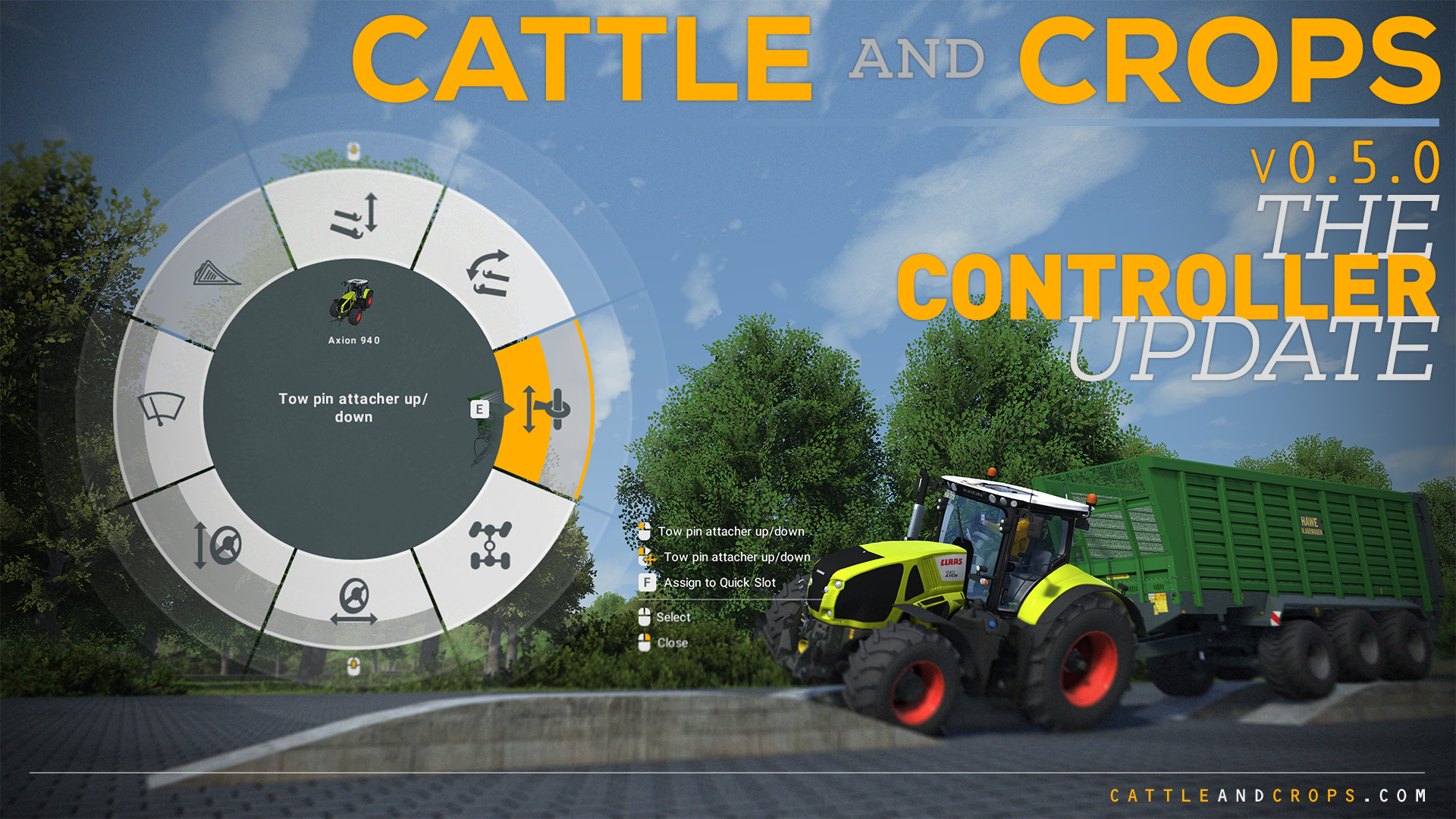
The Controller Update: v0.5.0
With today's v0.5.0 update we have made extensive changes to the gamepad controls, introduced a new radial menu system, upgraded to PhysX 4.0 and fixed several bugs.
The radial menu is a new control concept which was actually developed for the controller support, but is also easy to use with keyboard and mouse. We wanted to make sure the user has full and fast access to the numerous vehicle functions and that you don't have to remember too many key combinations. The previous UserAction menu on the right side has been switched off by default with this update, but can be reactivated via the options if required.
Controller Support & Operation
The game can now be started and played using the Steam Big Picture mode. With our new control concept, we wanted to avoid long iterations through list menus. By pressing the left controller stick you get a mouse pointer emulation, where the controller the keys (A, X and Y) are equivalent to the (left, right and middle) keys of the mouse.
Instead of simply offering a few fixed choices for the controller support, we designed the system as flexible as possible, so you can assign the controls as you use the UI to a joystick, steering wheel or any DirectInput device. Go to the options / controls, and use the new input profile “Radial menu” to adjust the controls.
If you click the left stick (keyboard CTRL) ingame, you’ll activate the known UI interaction mode. This way you can also control the cab controls in the vehicles.
The radial menu can be opened and closed by pressing the right controller stick or the middle mouse button. If the stick is moved in one direction and the A button is clicked, the user action is executed. Moving the right stick while holding shoulder button RB you can execute Relative Changes, e.g. open a door only halfway.
You can switch between all attached machines using Dpad right or left, or keyboard Q and E in the open radial menu. With Dpad up/down or using the mouse wheel, you can switch through the rings in the radial menu, giving you access to all UserAction groups.
Using the QuickSlot Favorites function you can assign certain functions to key combinations, so you can quickly use a UserAction without having to open the radial menu. To do so, open the radial menu with the controller and press Y (or F on the keyboard), then you can assign the selected action to a QuickSlot. By using the controller you can simply hold it with LB and/or RB + A, B, X or Y and confirm with A. You can choose a total of 10 individual assignments. The QuickSlots can also be overwritten with another UserAction. Favorites can still be assigned with the keyboard as before, 1 to 0, and controlled with keyboard and mouse. These user-defined assignments are saved per vehicle.
Controllers/joysticks/steering wheels can now be plugged in and out while the game is running (hot plugging).
PhysX
With the introduction of PhysX 4, there will be a major change in the game, giving it a more realistic feel, while vehicles and attachments are now feel heavier. The optimizations of the PhysX 4 engine are not yet completely finished and there will be more optimizations in the course of development.
Options: Difficulty
We have added a new difficulty tab In the options menu. All options that affect the realism and difficulty while playing CNC will be collected here in the future. There are three presets and a custom level where you can adjust individual functions as you wish. For each function you'll get a boost - depending on the difficulty - that rewards you with additional XP the more realistic you play. For example, if you have selected the highest level of difficulty, you will also have to turn on the engine and cannot simply drive off by pressing the throttle pedal.
Helper AI
We have adapted the helper mode for the Claas Disco cutterbar, so you can now mow a meadow using the AI. The helper AI has been reworked in more places and some problems with the driver and the known crashes have been fixed.
Units
After many requests we have separated the units (metric vs. imperial) and currency from the language. So you can use metric units with english language or imperial units with german language.
CHANGELOG
NEW
Game completely controllable via controller (XInput API)
Detection of controllers while game is running (hot plugging)
UserAction radial menu for controlling vehicle functions
PhysX 4.0 Upgrade
Tab in the options menu for difficulty level settings
Controller "Joint", with the method InterpolateJointLimit
Script methods: GetEmittingAvgWetnessUpper, GetEmittingAvgWetnessLower, GetEmittingAvgWetness and GetEmittingAvgRottenFactor n the Cutting Controller
Script method: Get Joint Linear Limit
CHANGE
Fullscreen and Full HD are used by default when starting CNC for the first time
The default volume has been increased
New control key graphics for keyboard, mouse and gamepad
CabControls no longer have to be clicked exactly but can be approximated
Albergtal and Techdemo mission texts revised
Redesign of the loading and unloading window
UserAction menu on the right can only be activated via option
Standard key assignment has been updated and changed
G key for shifting between manual and automatic gears has been replaced by an option
Help menu is now opened with key F2
Optimization of UserAction-Infos (descriptions, icons)
Claas Tucano 570: display of chopped material/swath delivery system improved
Claas Quadrant: driving dust now synched on dirt level
Script Editor: All steps of a script are now executed immediately in one frame, if the script has no waiting methods or loops.
BUG FIX
Small helper (AI) improvements, e.g. in harvest mode with several drivers
Fixed several crashes while using the AI
Front loader center of gravity fixed
Helpers unload again in the silo
Unloading only possible in the areas provided for this purpose
Claas Vario 930 no longer dirty from the start
The mentioned areas are still under development, will be extended and optimized thanks to your feedback.
NOTES
There is now a versioning of the input configuration. If users have old input settings then the settings will automatically be changed to the new default settings and you may need to reassign your previously changed keys
PhysX 4 will be further optimized (handling, three-point, turntable...)
We support the controller control under Windows only via the XInput API like most games. That means: you should use an Xbox One, Xbox 360 or compatible controller. There is a XInput wrapper for the PlayStation 4 controller, which we currently can't officially support, though.
If there are problems with the controls with old player profiles, e.g. keys don't work as usual and can't be changed, please restore the default settings in the settings menu.
The KeyBindings window (F2) has not yet been adapted to the controller control and will be revised accordingly.