Every day, one map per game mode will be ranked. These are the maps your clan needs to play. You will receive a notification on the new website, in-game, and on Discord when this happens.
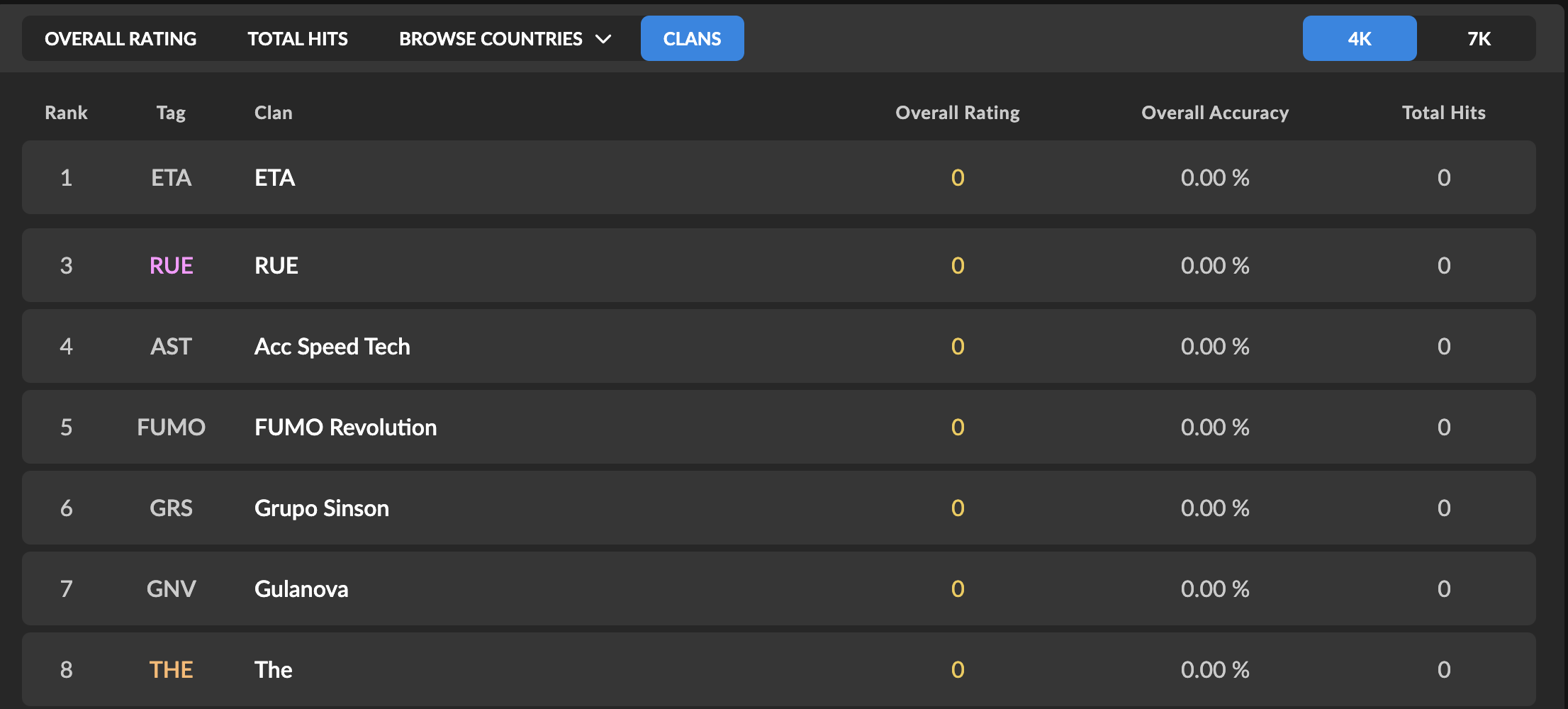
The top 10 scores from your clan will be combined into one clan score which will be used for scoreboards and your clan's overall rating.
Tips
Here are some tips to help your clan have the advantage.
Make sure you have at least 10 active members in your clan.
Make sure the members of your clan are diverse when it comes to their skillset. If you have players who excel at one particular skillset but not others, you are at a disadvantage.
Log in every day to keep up to date with the newly ranked maps.
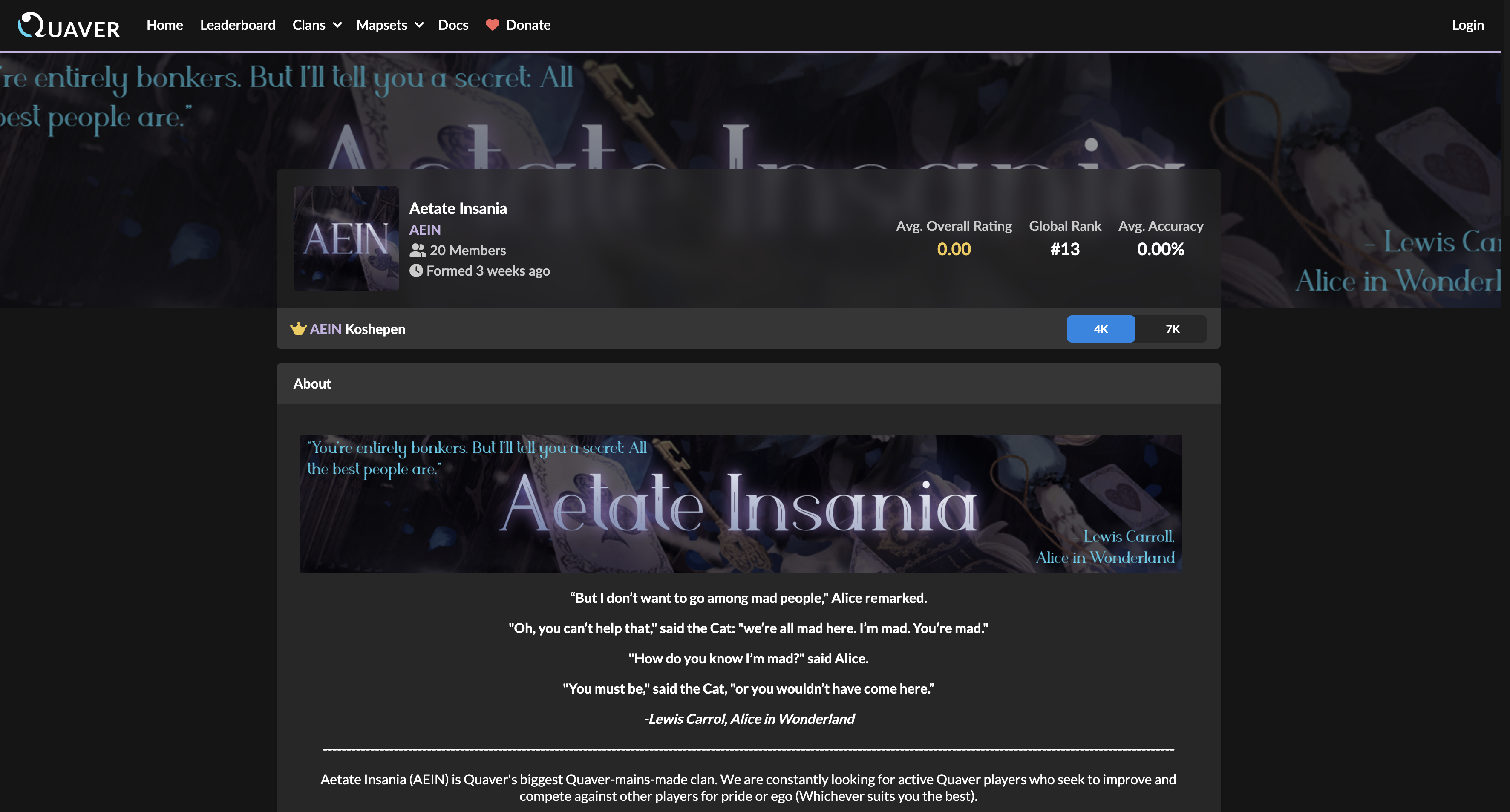
Clan Customizables
If you would like to customize your clan's profile, any member of your clan can purchase customizables for $9.99.
The clan leader can customize any of the following:
Clan Name
Clan Tag
Avatar
Banner
About Me
Accent Color
Timing Groups
https://www.youtube.com/watch?v=MXOhdH6hBgo
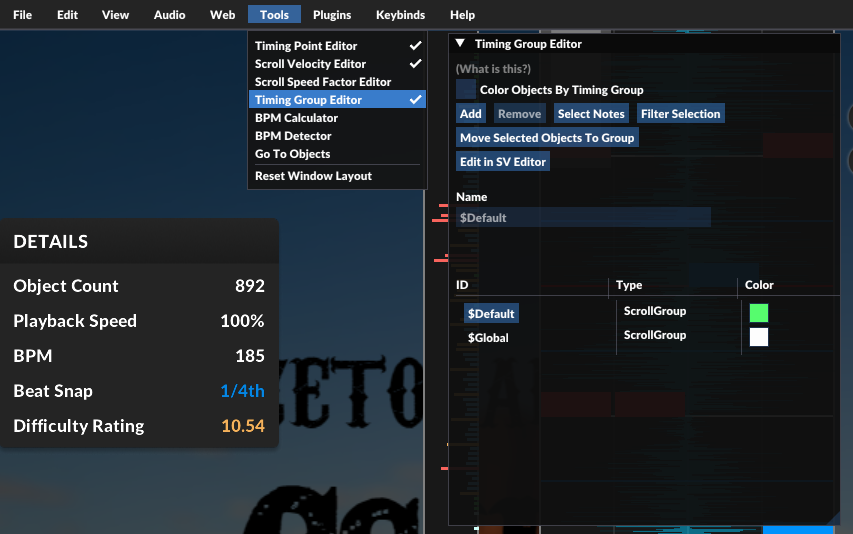
Timing groups are a brand new mechanic that pushes the limit of the visual effects of maps.
This allows different sets of notes to adhere to completely isolated visual effects. It is now possible to make maps where some notes are bouncing and some are going backwards — all at the same time.
As a scroll velocity player, this means that you may now see much fancier maps coming out in the future.
As a mapper, this means that you could now assign different scroll velocities to different sets of notes by using the new Timing Group Editor.
You can also find that in the scroll velocity editor, you can now make separate SV effects for different timing groups.
Scroll Speed Factor
https://youtu.be/QWOYMk2HoWY
In addition to scroll velocity, which changes the velocity of notes, you can now directly manipulate the spacing between the notes.
With Scroll Speed Factor (SSF), you can scale the spacing between notes. This has the same effect as directly multiplying your scroll speed by a factor, hence the name 'Scroll Speed Factor'.
As a mapper, you can now find the editor for SSFs under `Tools`. It has the exact same view and behavior as the scroll velocity editor. The SSF will smoothen between adjacent SSF points, so you can easily create effects with a few points (e.g. parallax effect).
Editor Keybind System Rework
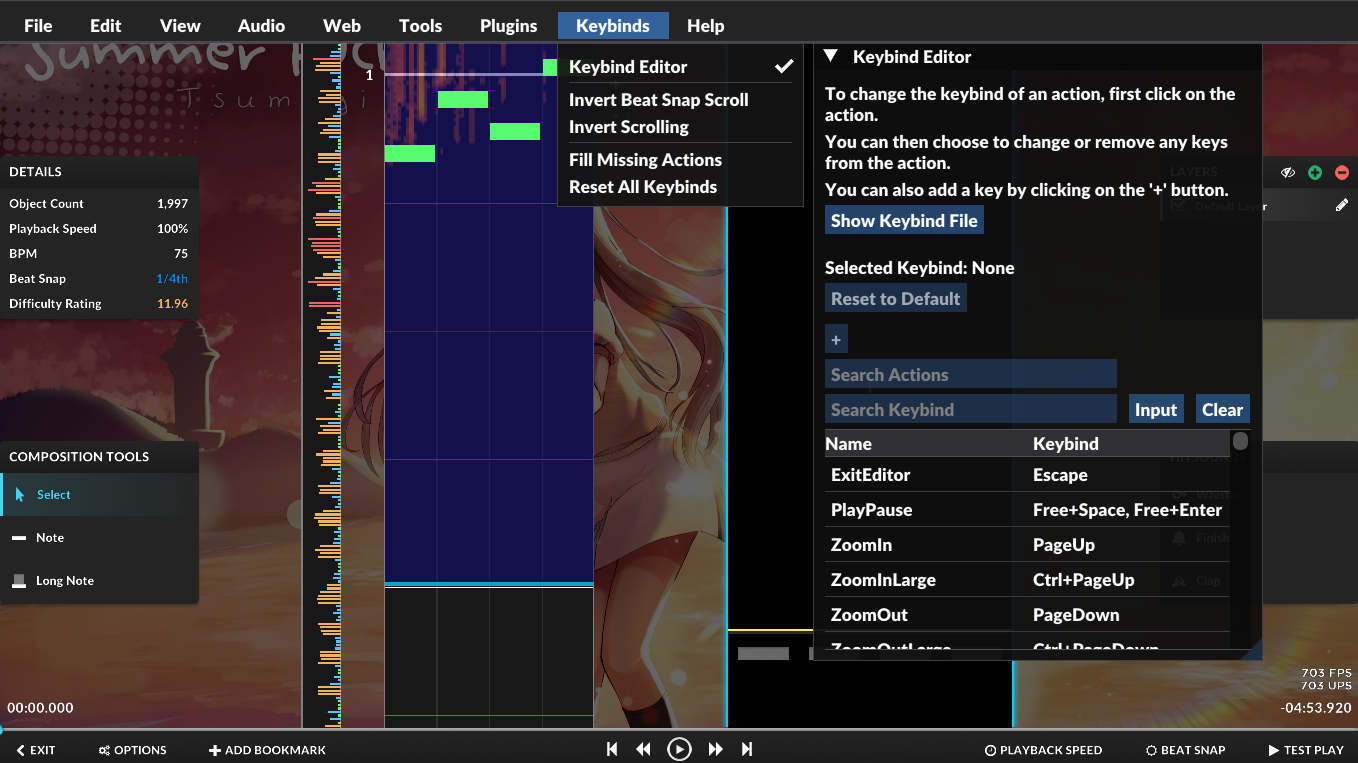
The editor input system has been reworked, so that you could now customize your own keybinds for most of the actions in the editor. You can check this out via the `Keybind Editor`, located under the new `Keybinds` menu:
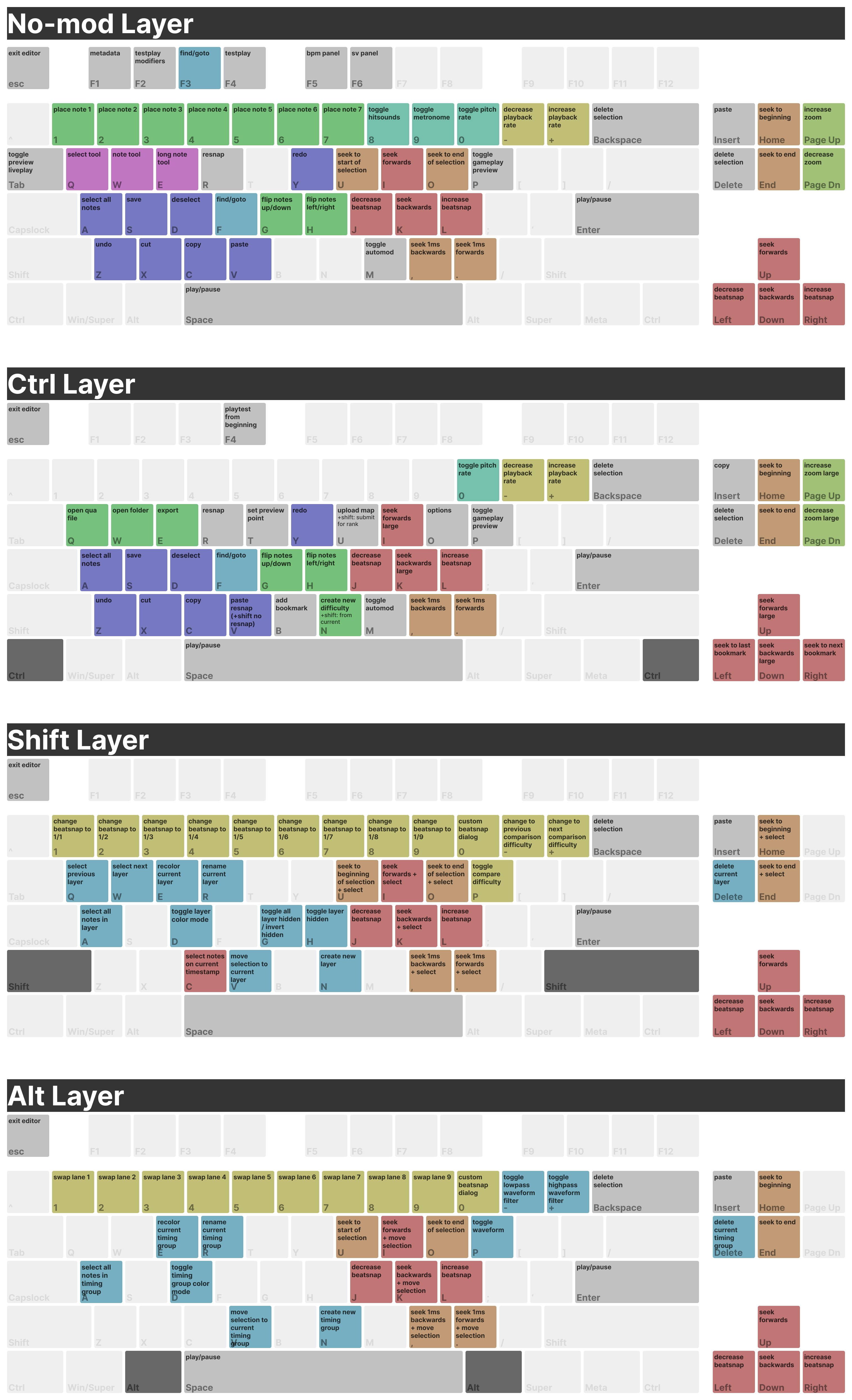
The default keybinds have undergone a massive change. You could find all of the existing keybinds in the screenshot above.
Furthermore, you can also share your keybindings to others using the `Show Keybind File` button. All they have to do is drag the file into the editor window so they could use your keymap.
Hit Bubbles
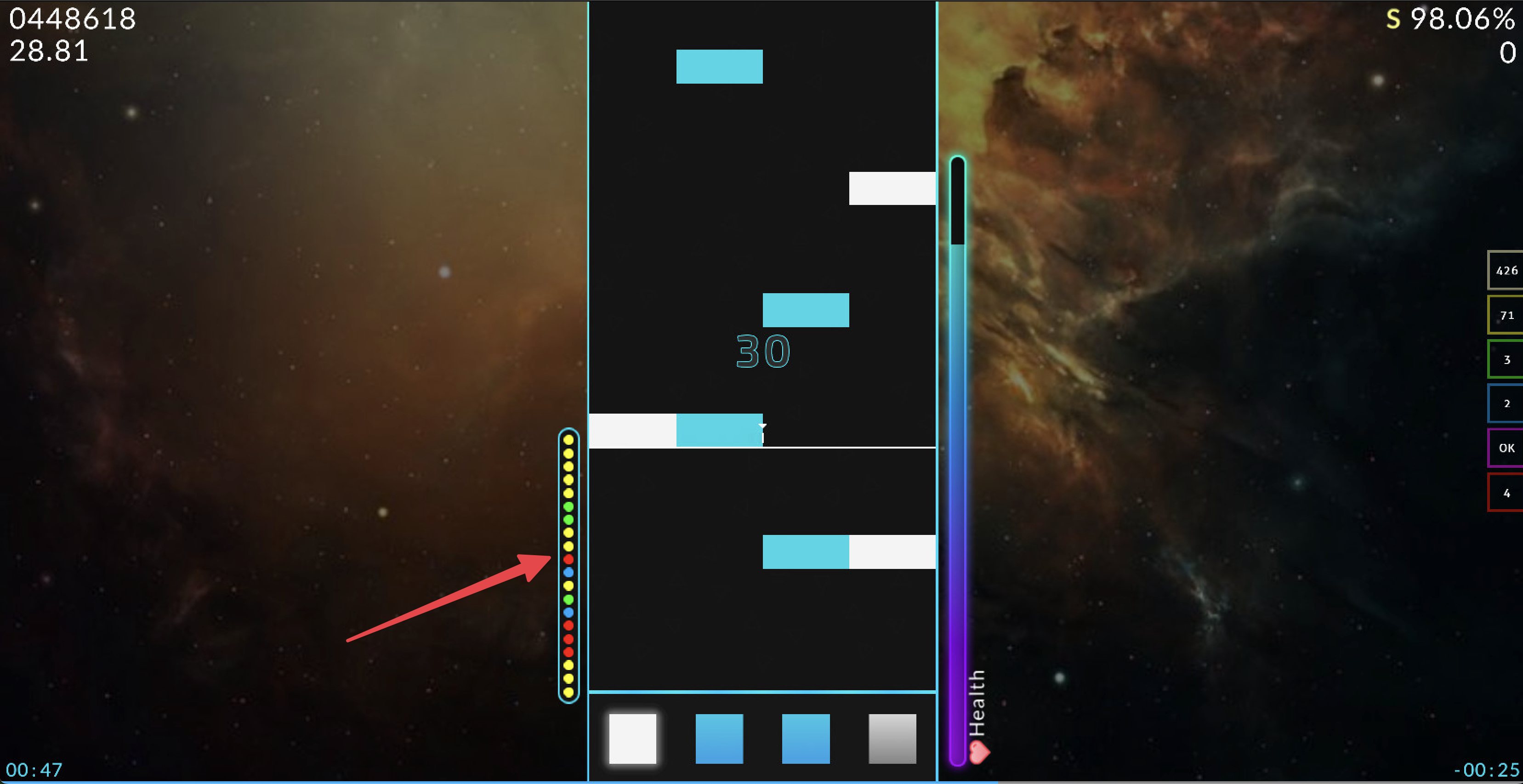
Hit Bubbles are a new skinnable element which displays an ordered version of the previous judgements that were achieved during gameplay.
You can learn how to skin the Hit Bubbles on our wiki.
New Additions
Added & improved sorting options in the map download screen.
Added cancel & retry buttons to the mapset download notifications.
Added an experimental option to smoothen the audio to reduce lag at the beginning of maps.
The layout of the panels in the editor now preserve its location.
Improved song select mapset searching. You can view more info here.
Updated audio engine libraries.
The window title now displays the game's build revision.
Improved the speed of mapset importing by retrieving online information asynchronously.
Added the option to disable Discord Rich Presence.
Migrated network usage to API 2.0.
Updated ImGUI to the latest version.
Various editor plugin API improvements.
Various performance improvements
Bug Fixes
Fixed an issue with judgement burst & combo bump.
Fixed longer replays not loading.
Fixed an issue where the map background would not update when changing difficulties in the editor.
Fixed various issues when playing converted maps from other games.
Fixed an AutoMod issue with feat., ft., etc metadata.
Contributors
The following people were involved in making this update happen. If you would like to contribute to the game, you can do so on GitHub.
AiAe, Emik, Swan, Warp, WilliamQiufeng, & more!
If you enjoyed this update, consider donating in order to support the game and its development!
Join them for a 6 week, double elimination, scroll velocity focused tournament — the second of its kind to touch Quaver!
If you are interested in playing in the tournament, you can register here!
Note: This is a community-run tournament and not officially sponsored. All logistics regarding scheduling, tournament details, and prizes are at the responsibility of the organizers.
Tournament Details
Format: Double Elimination Solo
Rank: Open rank
Registration Phase: September 22 - October 12
Tournament Phase: October 13 - November 30
Prize Pool
🥇 1st Place - $250 USD, 1 year of Donator and a Profile Badge
🥈 2nd Place - $150 USD, 6 months of Donator and a Profile Badge
🥉 3rd Place - $70 USD, 4 months Donator and a Profile Badge
Since this is an SV tournament, we do not use the normal "Rice" and "Long Notes" categories. Instead, our categories are as follows:
Reading - Focused on the reading element of SV
Memory - Has elements of memorization (stacked notes, chunking, etc.)
Hybrid - Has elements of both aforementioned categories, usually more focused on reading than memory
Reverse - Main focus of the map is reverse scroll (upscroll if you read downscroll and vice versa)
Splitscroll - Focused on reading multiple scroll directions at once
Wildcard - Qualifier exclusive, contains elements of all types
This is a more basic version of the rules and information for this tournament, but you can check them in depth here, where you can also register for the tournament.
This update contains a ton of new features, improvements, and bug fixes!
Please read below for all information regarding this update.
Quaver Official Tournament 2024 Supporter Badges
The official Quaver 2024 tournament is now underway! If you would like to financially support the cost of running this tournament and future ones, an option has been added to the donate page of the website.
You will receive one of four badges on your profile depending on the amount of months you choose to purchase.
We plan to use this money to continue running tournaments and improving the player and viewer experience with each one.
If you do decide to donate, as always, we appreciate your generosity!
New Additions
Uploading skins to the Steam workshop now works on Mac and Linux.
Skins will now automatically reload during replays when updating any of its files.
Improved server connection. This should result in less frequent disconnects.
Added an option in the editor to reimplement legacy long note rendering.
Multiplayer modifiers now update when pressing the Mirror keybind.
Deleting maps will now go to the recycle bin instead of deleting permanently.
The editor now automatically creates backups of your map every 5 minutes.
Allow custom divisions to be chosen when resnapping notes in the editor.
Improved .sm file importing.
Added various performance improvements.
Bug Fixes
Fixed issues when audio seeking in the gameplay preview.
Fixed the beat snap lines not showing in the editor when using 1/48 snap.
Fixed a crash caused by an invalid skin.ini file.
Fixed various tournament related issues.
Fixed render issues for the map background and difficulty bar in song select.
Fixed incorrect results displaying after playing.
Fixed tooltips going off-screen.
Contributors
The following people were involved in making this update happen. If you would like to contribute to the game, you can do so on GitHub.
AiAe, Emik, faluhub, Warp, and WilliamQiufeng.
If you enjoyed this update, consider donating in order to support the game and its development!
Thanks for reading! - The Quaver Team 💙
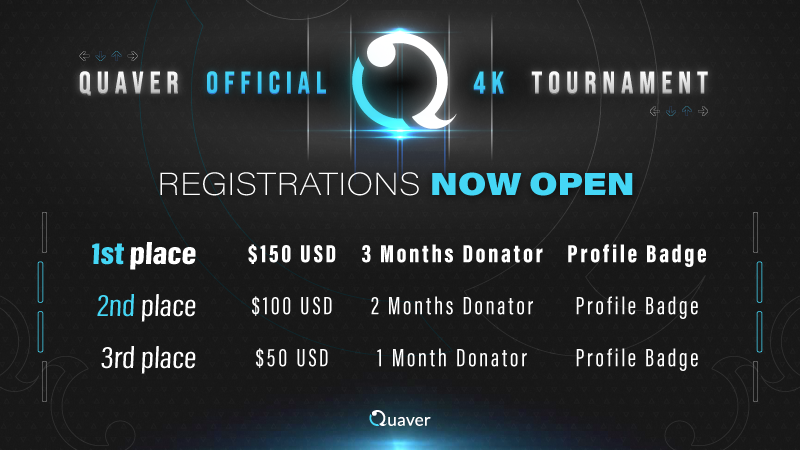
Quaver Official 4K Tournament 2024 - Registrations Open!
Register For The 4th Quaver Official 4K Tournament!
After a much anticipated wait, the 2024 edition of the Quaver Official 4K Tournament is now open for registrations!
For those unaware, this is a 10-week long competition where players battle it out in a series of individual duels fighting to be crowned the Quaver 4K Champion.
Basic information will be found below, but it is highly recommended to check out the full tournament details on the Quaver Tournaments website. It is also where players will register for the event.
Added a "/server" chat command to switch to a different multiplayer server.
Added an option to play hitsounds when releasing a long note.
Added an option to toggle the Mirror modifier with a keybind.
Added an option to toggle the Autoplay modifier with a keybind.
Added an option to hide the unranked alert when pausing during gameplay.
Added an option to unlock the Windows key during gameplay.
Cleaned up the options menu by adding a new "Advanced" section.
Improved performance in the editor for maps with a large amount of timing lines.
Bug Fixes
Fixed an issue where the audio would overlap in the download screen.
Fixed a bug with infinite scrolling in the download screen.
Fixed the editor not scrolling properly due to rounding errors.
Fixed a crash when using certain metadata in .qua files.
Fixed the Autoplay toggle being active while dialogs are shown.
Fixed an issue with Discord Rich Presence.
Fixed the multiplayer results screen displaying incorrect scoring values.
Fixed an issue with .sm and .mcz file importing.
Fixed the waveform initializing even while not being displayed (reduces memory usage).
The difficulty name in the tournament overlay no longer ignores max width.
The difficulty name in the tournament overlay now uses the correct color.
The difficulty rating in the tournament overlay now uses the correct value when mods are applied.
Fallback Version
A new beta version named "fallback" with version 1.2 has been created. If you encounter any issues with the latest update, you can revert to the previous version.
Contributors
The following people were involved in making this update happen. If you would like to contribute to the game, you can do so on GitHub.
AiAe, Emik, GrimMaple, Swan, Warp, and WilliamQiufeng.
If you enjoyed this update, consider donating in order to support the game and its development!
Thanks for reading! - The Quaver Team 💙
Quaver Official 4K Tournament - Staff Applications & Schedule
We are pleased to announce that later this year we will be having the return of the Quaver Official 4K Tournament.
As we gear up for the months ahead, we are looking for staff to help organize the tournament. In addition, we have also provided a tournament schedule down below to give everyone a chance to plan accordingly.
Tournament Staff Registrations
If you are interested in helping out with the tournament, staff applications are now open for the following roles:
Live Streamer
Commentator
Referee
Mapper
Map Pool Selector
Play Tester
Graphic Designer
Composer
Note: Players who register as composers, play testers, mappers and map pool selectors cannot play in this year's tournament.
If you would like to get involved in any of these roles you can fill out the form here.
Tournament Schedule
For players interested in participating in the tournament this year, here is the estimated timeline.
[table] [tr] [th]Phase[/th] [th]Date[/th] [/tr] [tr] [td]Registration[/td] [td]April 27th - May 18th @ 19:00 UTC+0[/td] [/tr] [tr] [td]Qualifiers Map Pool Showcase[/td] [td]May 18th @ 20:00 UTC +0[/td] [/tr] [tr] [td]Qualifiers[/td] [td]May 19th - May 26th[/td] [/tr] [tr] [td]Swiss Week #1[/td] [td]May 27th - June 2nd[/td] [/tr] [tr] [td]Swiss Week #2[/td] [td]June 3rd - June 9th[/td] [/tr] [tr] [td]Swiss Week #3[/td] [td]June 10th - June 16th[/td] [/tr] [tr] [td]Swiss Week #4[/td] [td]June 17th - June 23rd[/td] [/tr] [tr] [td]Swiss Week #5[/td] [td]June 24th - June 30th[/td] [/tr] [tr] [td]Swiss Week #6[/td] [td]July 1st - July 7th[/td] [/tr] [tr] [td]Knockout Finals Week #1[/td] [td]July 8th - July 14th[/td] [/tr] [tr] [td]Knockout Finals Week #2[/td] [td]July 15th - July 21st[/td] [/tr] [tr] [td]Knockout Finals Week #3[/td] [td]July 22nd - July 28th[/td] [/tr] [/table]
We look forward to an exciting tournament this year full of competitive showdowns and hidden surprises.
Thank you to everyone who participated, and we hope to see you in the next tournament!
New Additions
Editor Bookmarks
You can now add bookmarks to your maps in the editor. This was a feature request that spanned back about three years. Bookmarks are another useful tool to keep track of what you're doing while creating maps in the editor.
To create a bookmark, simply click the "+ Add Bookmark" button at the bottom of the editor, or press CTRL+B.
To edit a bookmark, you can left click one of the yellow ticks in the timeline.
To delete a bookmark, you can right click one of the yellow ticks in the timeline.
Multiplayer Server Rewrite
Over the past few months, we've been working on rewriting our original multiplayer server, so that we can provide a better experience for everyone. The original server was buggy, had frequent disconnection issues, and was becoming increasingly more difficult to add new features. With this rewrite, things should be more stable and also open the door for us to experiment with new realtime multiplayer features.
However, we made the conscious decision to remove/change some of the features the old server had:
Auto Host is now an option that can be applied to any multiplayer game instead of having their own dedicated lobbies. This should remove the clutter in the multiplayer lobby, as well as give the host more control over when the matches start.
Team mode in multiplayer is no longer available.
The jukebox screen is no longer available.
The #announcements channel in-game has been removed, and will be replaced with a #first-places channel soon.
The #offtopic chat channel in-game has been removed.
If you experience any bugs with the new server, please report them on GitHub, so we can put out a fix ASAP.
Other Additions
In the miscellaneous section of the options menu, there are now settings to prioritize the game mode and difficulty rating that is automatically highlighted when you choose a map in song select.
Increased performance during gameplay — notably during intense scroll velocity sections.
Increased performance while scrolling through a lot of maps in song select.
The grade in the results screen is now skinnable.
Added the skin.ini option to change the y position of the song progress bar.
Added a setting in the options menu to to enable "Tap to restart" during gameplay. This makes it so instead of holding the restart button for a brief period of time, simply tapping it will trigger a restart.
Increased the range of the audio and visual offset settings to -500 to 500.
The experimental theater screen has been removed.
Bug Fixes
Fixed the sound effect volume not being consistent with the master volume.
Fixed the "Player Profile" button in the leaderboard directing to the incorrect user.
Fixed a crash in the editor when placing an object without a timing point.
Fixed an issue that does not render objects in scroll containers.
Fixed time signatures and timing lines not being copied when copying timing points in the editor.
Fixed duplicate scroll velocity and timing point selections while shift clicking in the editor.
Fixed an issue with replays failing when missing long notes.
Fixed an issue where the the 7K+1 scratch lane was not ignored when using the Inverse, Full Long Notes, Randomize, and Mirror modifiers.
Fixed an issue where the game would not launch with some controllers plugged in.
Fixed a crash when changing modifiers in multiplayer while being host and not having the selected map.
Fixed duplicate ghost users in multiplayer.
Fixed disbanded multiplayer games showing up in the lobby.
If you enjoyed this update, consider donating in order to support the game and its development!
Thanks for reading! - The Quaver Team 💙
Quaver Official 4K Tournament #3 - Registrations Now Open!
Register For The 3rd Quaver Official 4K Tournament!
If you are a player looking to show off your skills, compete with other players, and win cool prizes, and wasn't here last year? Well, we have news for you. The third edition of our 4K tournament is now live!
This tournament is for players of all skill levels. If you are new to the game or an experienced player, be sure to sign up and participate!
Please visit the tournament page for more information on rules, dates, prizes, how to sign up, and more!
Below is a table of the tournament schedule for each round. Please read below, and make sure you will be able to attend to play your matches if you are participating.
THE FULL RULESET CAN BE FOUND HERE. It is assumed players and staff have read the full ruleset in its entirety. We will assume you did in the case any disputes occur. The following is a short summary of the basics.
This tournament will be played as a 1v1 format on Quaver. There is no player cap to the number of registered players.
It will be divided into 3 stages. Qualifier, the Elimination Swiss and the Knockout Finals.
It's an open rank tournament. Keep in mind, we reserve the right to refuse a players entry if they have a past history of putting the tournament into serious disrepute.
All participants must keep a proper attitude and act in good faith when it comes to sportsmanship.
Most communication will occur on the Official Quaver discord server. Any rule changes or unexpected occurrences will be announced in the Discord server. Any player unable and/or unwilling to use discord must notify host by any means before the registration period closes.
Qualifiers Instructions
The Qualifier mappool will consist of 8 maps featuring 1 SV, 4 Rice, 2 LN and 1 Hybrid.
A registered player will have two attempts to set a qualifying score on each map.
There will be no warmups in any of the qualifying lobbies.
All players who officially submit 1 attempt of each map will have completed their Qualifying run.
Once all runs have been submitted and calculated, the bottom 33% of players are eliminated. If more than 300 players complete Qualifiers, the top 200 will advance into the Swiss Stage.
Swiss Instructions
Seeding for the Swiss Stage will be generated based on the performances made during Qualifiers.
Once the initial seedings are generated. Players will play one match a week.
Each swiss stage mappool will consist of 13 maps featuring 1 SV, 6 Rice, 4 LN and 2 Hybrid.
Matches are Bo10.
In order for players to advance from the Swiss Stage into the Knockout Stage, a player must receive at least 5.5 Swiss Points in 6 weeks. Players will receive an uneven start of Swiss Points based on Qualifier results. Players unable to theoretically reach 5.5 Swiss Points at any week WILL BE REMOVED FROM THE TOURNAMENT AND ELIMINATED.
If a player reaches 5.5 Swiss Points+ early, they will advance and skip all remaining Swiss Stages.
At the end of Swiss Week 6, all surviving players will advance into the Knockout Stage.
Knockout Instructions
Following the end of the Swiss Stage, a bracket will be generated. Depending on the number of surviving players, Byes may be given.
Bracket stage will last 3 weeks. It will be a single elimination bracket.
Each Knockout Stage Mappool will consist of 16 maps featuring 1 SV, 7 Rice, 5 LN, 2 Hybrid and 1 Tiebreaker.
Matches are Bo13.
No player will play more than 2 matches a week regardless of how the Knockout Stage is structured.
Staff Registrations
We are looking for extra people to help out on our tournament's staff team! If you are interested in any of the following roles, please sign up here! Prior experience is not mandatory, but it is a plus. If you are interested in commentating, please make sure your microphone is clear.
Referee - You oversee each match and tally up the scores - confirming a winner in the end.
Streamer - You livestream the match for others to view on Twitch. It is important to create a fun viewing experience for others.
Commentator - You speak on the stream for the match - providing an entertaining and informative experience. Streamers can also be commentators.
You can sign up for the tournament here! If you choose to sign up for the tournament, please make sure you are able to make it to every match. If you are not able to make a match, either reschedule, or let us know ahead of time!