Quaver 0.32.0 Update Patch Notes - AutoHost Multiplayer, No Miss Mod & More!
Quaver 0.32.0 Update Patch Notes
A new Quaver client update has been released!
This update contains a ton of new features, improvements, and bug fixes!
Please read below for all information regarding this update.
AutoHost Multiplayer Games
We have added a new feature to multiplayer - AutoHost. These are multiplayer games that are hosted automatically and select ranked maps at random in a given difficulty range.
These lobbies are useful if you want to discover new maps from the community while playing with others. It is also possible to play by yourself while waiting for other players to join.
To use this feature, just head over to the multiplayer section of the game, and you'll find 16 lobbies with varying skill ranges and game modes.
No Miss Modifier
A No Miss modifier has been added to the game. When activated, this modifier will automatically fail and restart your gameplay session when you break combo.
If you combine this modifier with a custom combo break judgement, you can quite easily create an "Absolutely Marvelous" or "Perfectionist" modifier.
This modifier is ranked and can be used to submit scores.
Other Additions
Added the ability to import playlists from the website. However, currently it does not download new mapsets. It only syncs maps you already have downloaded. Downloading will most likely come in a future update.
Added the ability to set your audio output device in the options menu.
Disabled the windows key during gameplay.
You can now press F10 to play test from the start in the editor.
Old map backgrounds are now deleted when adding a new one in the editor as long as it is not in use by another map in the set. This is to reduce the file size of the mapset folder.
The BPM Affects SV option in the editor is now defaulted to off.
The Miss and Okay windows for the default judgement presets no longer scale.
Added a small delay when play testing from the start in the editor.
Added the ability to change a map's local offset in the multiplayer game lobby.
Improved the performance of playlist loading. This should improve game load and import times if you have a lot of playlists and maps.
Screens now refresh when reloading your skin (main menu & song select). This should make the process of designing menu skins easier.
The location of the modifier display in song select has changed. This change was made due to modifiers not appearing if the song difficulty name was too long.
Bug Fixes
The applause sound effect now stops when exiting the results screen.
Layers for reference difficulties in the editor no longer hide even if they are set to.
Fixed a positioning issue when using the WidthForNoteHeightScale skin.ini config option.
Fixed profile pictures not displaying in local scores.
Fixed scores not submitting if you paused prior to the map starting.
Pressing ALT + Enter in song select no longer starts the map.
Autoplay no longer gets toggled when pressing tab if the chat is open.
Fixed an issue where a song would keep playing when entering the map downloader screen.
The online user count now displays "OFFLINE" if you are disconnected from the server rather than "USERS ONLINE."
Map ranked statuses now update when refreshing your maps with the F5 function.
Minor Update Patch Notes
We've released 4 other minor updates from 0.31.0-0.32.0. You may have missed the changelog if you are not in our Discord server. Below are the changes that were made.
Fixed the NSV modifier not displaying correctly in the tournament viewer/theater mode.
Fixed the results screen not working properly with Autoplay/Spectator.
Fixed the lane cover not scaling properly on different screen resolutions.
Fixed the editor's waveform not being fully loaded for longer songs.
Map metadata is now trimmed when modifying it in the editor (prevents multiple spaces).
Fixed a crash in the tournament viewer + added more logging to diagnose multi-spectator crashes.
Fixed the applause sound not playing in the results screen after gameplay.
Fixed a crash in multiplayer song select.
Fixed the friends list loading infinitely on login.
Fixed text truncation issues for song select maps.
Fixed the broken Discord invite URL in the main menu.
The skinnable avatar mask in the results screen now has full alpha support
This update contains a ton of new features, improvements, and bug fixes!
Please read below for all information regarding this update.
Tournament Registrations
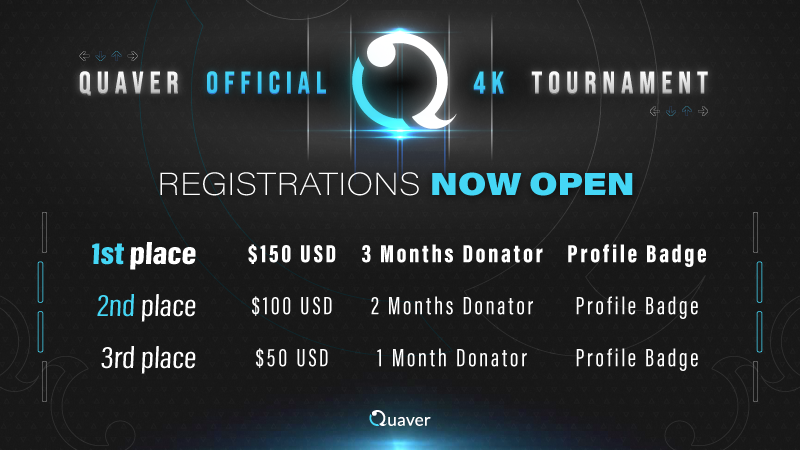
In case you missed it, registrations for the second official Quaver 4K Tournament are now open. Please refer to our last news post for more information on how to sign up.
Difficulty Calculator Update
In this update, we've deployed an update to our difficulty calculation system. All scores, ranks, and leaderboards have been recalculated to reflect these changes. All of your maps will recalculate to the new difficulty calculator version while in the menu screens.
Improved and fixed a bug with long note calculations.
Fixed a bug with jack pattern detection.
Fixed an issue with long jack pattern detection.
There is no longer a cap/maximum value on strain calculations.
A new difficulty bar has been added to song select to better reflect difficulty level thresholds.
You can view a more in-depth explanation of the changes on GitHub.
Other Additions
Added controller support for gameplay inputs.
Added Steam Rich Presence. Players on your Steam friends list can now see what you are currently up to in-game.
Scores with the No Scroll Velocities (NSV) modifier can now be submitted to the server. These scores are are unranked and can be accessed via the Mods or All scoreboards in-game.
Added low/high pass filter settings to the waveform in the editor.
Added color and alpha settings to the waveform in the editor.
Added an audio direction setting to the waveform in the editor.
Improved the quality and loading speed of the waveform in the editor.
The results screen can now be skinned.
The note visualizer on the main menu can now be skinned.
Added a hover skinning element for the main menu navigation buttons.
Added a hover skinning element to the song select mapset buttons.
Bug Fixes
Fixed the song select scroll bar handling at incorrect heights.
Fixed a small typo in the editor.
Fixed overlapping chat messages.
Fixed multiplayer mapset uploads not working if the folder contains rejected file types from the server.
Fixed the game's config file not saving for displaying notifications from bottom to top.
Fix SV normalization with 2+ timing points & scroll velocities.
HitObjects are now deselected when they are removed via plugins or live-mapping in the editor.
The song time and time left indicators in editor are now rounded to the nearest millisecond.
Thanks for reading! - The Quaver Team 💙
Quaver Official 4K Tournament #2 - Registrations Now Open!
Register For The 2nd Quaver Official 4K Tournament!
If you are a player looking to show off your skills, compete with other players, and win cool prizes, and wasn't here last year? Well, we have news for you. The second edition of our 4K tournament is now live!
This tournament is for players of all skill levels. If you are new to the game or an experienced player, be sure to sign up and participate!
Please read below for more information on rules, dates, prizes, how to sign up, and more!
Below is a table of the tournament schedule for each round. Please read below, and make sure you will be able to attend to play your matches if you are participating.
[table] [tr] [th]Date[/th] [th]Round[/th] [th]Best of[/th] [/tr] [tr] [td]February 5th - February 6th[/td] [td]Qualifiers[/td] [td]N/A[/td] [/tr] [tr] [td]February 12th - February 13th[/td] [td]Round of 128[/td] [td]9[/td] [/tr] [tr] [td]February 19th - February 20t[/td] [td]Round of 64[/td] [td]9[/td] [/tr] [tr] [td]February 26th - February 27th[/td] [td]Round of 32[/td] [td]9[/td] [/tr] [tr] [td]March 5th - March 6th[/td] [td]Round of 16[/td] [td]9[/td] [/tr] [tr] [td]March 12th - March 13th[/td] [td]Quarterfinals[/td] [td]11[/td] [/tr] [tr] [td]March 19th - March 20th[/td] [td]Semifinals[/td] [td]13[/td] [/tr] [tr] [td]March 26th - March 27th[/td] [td]Finals[/td] [td]13[/td] [/tr] [tr] [td]April 2nd - April 3rd[/td] [td]Grand Finals[/td] [td]13[/td] [/tr] [/table]
Qualifiers are played for seeding purposes. There are four maps you must play in a multiplayer lobby with others. You play each set of maps twice, with a 5 minute break in between. This will determine whether or not you qualify for the tournament. Only the top 128 players will advance.
Tournament Rules and Format
Double Elimination - This means there is a loser's bracket.
Each player is allowed to ban one map from the map pool per match.
Each player may choose one warm-up map to play before the match. The warm-up must not exceed 4 minutes in length, and it must be uploaded on Quaver's website.
Free rate will be turned off (you must use the rate specified for each map)
If you are thinking of rescheduling your match, please do it up to 24 hours before your match time. We will give you more information on how to reschedule in the coming days.
if a disconnect happens up to 30 seconds into a match, it will be restarted.
The tie-breaker map will only be played in the case of a tie (both players being one away from the point limit)
Staff Registrations
We are looking for extra people to help out on our tournament's staff team! If you are interested in any of the following roles, please sign up here. Prior experience is not mandatory, but it is a plus. If you are interested in commentating, please make sure your microphone is clear.
Referee - You oversee each match and tally up the scores - confirming a winner in the end.
Streamer - You livestream the match for others to view on Twitch. It is important to create a fun viewing experience for others.
Commentator - You speak on the stream for the match - providing an entertaining and informative experience. Streamers can also be commentators.
Want To Participate? Register Here!
You can sign up for the tournament here! If you choose to sign up for the tournament, please make sure you are able to make it to every match. If you are not able to make a match, either reschedule, or let us know ahead of time!
Map Pool Suggestions
We're also looking for more maps for future map pools. Please submit maps using this form.
This update contains a ton of new features, improvements, and bug fixes!
Please read below for all information regarding this update.
In-Game Leaderboard Additions
Scores that are played with the No Long Notes, Full Long Notes, and Inverse modifiers now submit to the server. These scores are unranked and do not count towards your overall rating.
You can now view No Long Notes, Full Long Notes, and Inverse scores on the "Mods" leaderboard.
Added a new "All" leaderboard for Donators. This displays both unranked and ranked scores on one leaderboard.
Donators can now view 100 scores on the leaderboard instead of the usual 50.
Local scores with the No Long Notes, Full Long Notes, and Inverse modifiers now display the correct performance rating (only applies to new scores). This also applies to multiplayer and gameplay UI.
Steam Workshop Editor Plugins
Editor plugins are one of the many great features of Quaver. They allow you to extend the functionality of the editor in virtually any way you choose!
Previously, sharing editor plugins was not directly supported in-game and was a hassle to do. You can now upload plugins for others to use in the editor with only a few clicks.
Downloading plugins for the editor is now available on the Steam Workshop. It follows the same process as installing a skin - just click subscribe!
If you are a developer, and you would like to learn more about creating editor plugins, check out our wiki.
Other Additions
You can now customize which judgement causes combo breaks in the judgement window modifier dialog.
Holding down Page Up/Down now zooms the playfield in the editor.
A right click option to add/remove friends was added to the song select's leaderboard.
The hitlighting animation now plays when releasing long notes.
Added a keybind (F4) to test play maps in the editor.
Added a keybind (Shift+F2) to undo random song selection in the song select screen.
Players in a multiplayer lobby now change color depending on their status (Gold = Host, Blue = Not Ready, Green = Ready, Red = No Map).
Pausing before the song starts no longer unranks your score. It will now only unrank it after the first note has past.
Bug Fixes
Fixed the "Unknown Server Error" issue when attempting to log into the server.
Fixed an issue when uploading mapsets to the server with slow upload speeds.
Fixed the incorrect song length displaying for maps in the download map screen.
Fixed a textbox issue in song select when the map preview's autoplay is turned off.
Fixed the LeaderboardScoreColor skin.ini value being flipped.
The editor now requires a timing point in order to test play.
Fixed a crash when a textbox's character length is too long.
Fixed the judgement texture height not being scaled correctly in the judgement window modifier dialog.
Fixed the "Download In-Game" button on the website not working for some maps.
Fixed various dropdown menu issues in the options menu.
Fixed a crash when a judgement window's preset name is the same as a default preset.
Fixed an issue where the game resizes itself on a loop on secondary monitors.
Fixed an issue where you cannot select duplicate scroll velocities or timing points in the editor.
Disabled the retry hotkey in the multiplayer and spectator results screen.
Fixed the scroll wheel audio seeking not working on the map preview in multiplayer.
Fixed a typo in the upload mapset dialog.
Thanks for reading! - The Quaver Team 💙
Chat Moderator & Ranking Supervisor Applications
After almost a year, we are opening back up applications to join our chat moderator and ranking supervisor teams!
This means that we are looking for active players and community members who are skilled in either chat moderation or reviewing maps to further expand our team and improve the quality of the game in these areas.
If you are interested in either (or both) positions, read below for more information on how to apply. Furthermore, if you've already applied in the past and did not receive a response, please apply again!
💬 Chat Moderator Application
Chat Moderators are important members of the Quaver Team. They are responsible for handling mutes and keeping the in-game and Discord chats clean and free of spam. Moderators are also involved in helping players with issues and answering questions about the game.
We are looking for active individuals who are knowledgeable about Quaver and experienced in chat moderation that are interested in joining our team.
Before applying, make sure you meet the following requirements:
Ranking Supervisors are important members of the Quaver Team. They are responsible for reviewing mapsets in the ranking queue and nominating them to be officially ranked. Ranking Supervisors are also heavily involved in having in-depth discussions with each other and the developers about how to improve both the ranking process and criteria.
We are looking for active individuals who are experienced in both map creation and reviewing (modding). Applicants must also be great at communicating with other supervisors and community members.
Before applying, make sure you meet the following requirements:
This update contains a few general improvements and bug fixes as well as some website additions.
Please read below for all information regarding this update.
Additions
The AutoMod feature in the editor now detects issues with your audio file format.
The AutoMod feature in the editor now detects when a map does not have a preview point.
The "Back" button in song select now has the same behavior as pressing the escape key.
Disabled the menu navigation buttons when you are already on that specific screen.
Removed the "Retry" button in the results screen when accessing the screen through a replay.
Improved the robustness of mapset importing.
Disabled the fullscreen hotkey (Alt + Enter) during gameplay.
Added a crash logging system (the next update will contain lots of stability improvements).
Added a map selection/download IPC Handler (quaver://map/{id} in the browser).
Added a mapset selection/download IPC handler (quaver://mapset/{id} in the browser).
Bug Fixes
Fixed a crash involving notifications.
Fixed a crash when having a corrupted config file.
Fixed a crash when quickly exiting the map download screen.
Fixed a crash in the editor when a mapset contains an invalid map from another game.
Fixed a "background thread" error popping up during score submission.
Fixed the "Go To Objects" panel not working with extra spaces at the end of the input.
Fixed the game window being off-screen when not using 100% window scaling on Windows.
Improved the text quality on smaller resolutions on Windows.
Ranking Queue Discord Notifications
A few weeks ago, we added a feature on our Discord Server where you can receive notifications when actions are placed on your mapsets in the Ranking Queue. This can be useful for being notified if your maps require updates in order to be ranked.
To enable this, go to the settings page on our website, and link your Discord account. Then check the box to start receiving notifications.
OAuth 2.0 Implementation
If you are a developer and you would like to integrate Quaver account authentication in your applications, you can now do so using OAuth2. To learn more, you can view our documentation.
For this update, we've opened back up the ranking queue, added a new AutoMod feature to the editor, and much more!
Please read below for all information regarding this update.
Ranking Queue Reopened & Ranking Process Changes
After a few months of the ranking queue being closed, we've finally opened it back up for submissions. Throughout that time, new tools and systems have been developed to make the ranking process flow smoother and be less overloaded.
Submitting Mapsets For Rank
Previously, to submit mapsets to the ranking queue, you needed to go on the website and submit it there. This has moved to in-game via the editor's "File -> Submit For Rank." option.
This change was made because the game now runs the AutoMod (see below) on all of your maps to make sure they fit the ranking criteria. If there are errors in your maps, it will be able to detect and require you to fix them before they are allowed to be submitted.
Ranking Process Changes
A couple of changes have been made to ranking queue submission in an effort to keep the queue less overloaded.
When getting a mapset denied for rank, you will now need to wait two weeks before being able to submit it again. This does not prevent you from submitting other mapsets - only the one that was denied.
The ranking queue now has a slot system depending on how many ranked mapsets you have. This is an effort to make users to choose more wisely about which maps they submit to the queue, as well as reduce some of the queue's backlog. [table] [tr] [th]Ranked Mapsets[/th] [th]Allowed Slots[/th] [/tr][tr] [th]0[/th] [th]1[/th] [/tr][tr] [th]2[/th] [th]2[/th] [/tr][tr] [th]5[/th] [th]3[/th] [/tr] [/table]
Editor AutoMod
A new "AutoMod" feature has been added to the editor. This is a tool that will allow you to view any errors and warnings that your maps have.
The AutoMod checks for things such as:
Overlapping Notes
Metadata Errors
External File Errors (background, audio, etc)
Errors With Timing Points Or Scroll Velocities
Miscellaneous Ranking Queue Errors
& Much More!
As mentioned above, this same tool is also used when submitting mapsets for rank. If any errors are detected, then it will prevent submission.
To access this tool, you can use the "Edit -> Enable AutoMod" option in the editor.
Results Screen Performance Rating & Health Graphs
In the last update, a graph was added to the results screen to display accuracy throughout plays. In this update, two new graphs have been added to display your performance rating and health as well.
Other Additions
Added "mods.txt" and "mapid.txt" files to the "/temp/Now Playing/" folder for use with live streaming.
Editor plugin descriptions now display in the file menu bar when hovering over them.
Gameplay now takes custom timing signatures into account when rendering timing lines.
Added Ctrl+Shift+V to paste without re-snapping in the editor.
Added links to the Ranking Criteria and Ranking Process to the editor's help menu.
Bug Fixes
Fixed the difficulty seek bar in the editor scaling incorrectly with playback speeds.
Fixed the recently played sorting option in song select not working properly.
Fixed subsequent skins not exporting when attempting to export the default skin first.
Fixed objects being unsnapped when pasting in the editor.
Quaver 0.27.0 Update Patch Notes - Main Menu Skinning, Rank Updates + More
Quaver Update 0.27.0 Patch Notes
A new Quaver client update has been released!
For this update, we've added difficulty calculation updates, main menu skinning, editor improvements, bug fixes, & much more!
Please read below for all information regarding this update.
Difficulty Calculator & Leaderboard Updates
A few changes have been made to our difficulty calculation system. It may take up to a day at the time of writing for leaderboards to fully update.
Upon launching the game, your maps and local scores will automatically recalculate as long as you are in the menu screens.
Here are the following changes:
Beginner and Easy Difficulties are scaled by density to provide a more accurate result.
Improved the quality of the short long note nerf from a previous update.
Hard Maps with easy sections that were previously underrated have been buffed.
Short maps below 60 seconds that were previously overrated have been nerfed.
For a more detailed explanation with graphics, you can read the following notes.
Main Menu Skinning
We have added the ability to customize the main menu screen.
You can learn how to skin the main menu on our wiki.
Menu skinning will be an incremental and iterative process - building out one screen at a time. Try it out, and provide feedback on GitHub with things that are missing or things you would like changed.
Editor Quality Of Life Improvements
Further quality of life improvements & bug fixes have also been made to the editor.
When using the "Apply Offset To Map" feature, the preview point will also be moved.
Implemented EditorActionBatch for plugins to group actions into a single batch.
When adding notes with the number keys, it will now add it to the currently selected layer.
Toggling layer visibility no longer adds to the "Undo stack" in the editor.
Time signatures are now taken into account when rendering the editor playfield lines.
The metronome now takes into account the current timing point's time signature.
Added the ability to explicitly hide timing lines in the timing point editor.
Added a file menu bar option that contains information on how to add a background image.
Added a file menu bar option & shortcut to force update the .qua file cache (for manual changes).
Added manual .qua file change detection.
Added the ability to add a new difficulty to a mapset from a .qua file.
Added a copyright notice on the upload confirmation dialog.
The number keys now change the composition tool when the "Place Objects With Top Row Numbers" option is disabled.
Results Screen Improvements
Updates have been made to the results screen such as the new addition of the "Accuracy" graph and improvements to the "Deviance" graph.
The deviance graph in the results screen is now scaled to the full map length - meaning if you fail, it displays the total progress made in the map.
The judgement window number labels on the deviance graph are now correct.
Added red lines to display misses on the deviance graph.
Added an accuracy graph in the results screen (use the "Graph" dropdown to access it).
Added the ability to use the retry key in the results screen.
Other Additions
You can now drag folders into the game window to import any maps inside of them.
Chat message times now display in local time.
Improved bulk song import speed.
Improved the load speed and look of the difficulty seek bar in song select/editor/multiplayer.
Implemented online offset & added a button to update all online offsets in the misc section of the options menu. We're currently working on adding online offsets for all existing maps.
Added support for "Edit" difficulty when loading maps from an external game.
Bug Fixes
Fixed long notes rendering past the receptors if hit late.
Fixed an issue where the config file would not be written.
Fixed songs from an external game not loading with a custom "BeatmapDirectory."
Fixed the client hanging on startup if the config file is corrupted.
Fixed banners not exporting to .qp files.
Fixed borderless window issues when starting the game.
Fixed banners not importing when loading .sm files.
This update is fairly small and mostly contains additions & fixes pertaining to the tournament viewer in preparation for the upcoming Quaver tournament.
Tournament Viewer Additions
Added a "MaxWidth" property to the various tournament overlay text displays.
Added a setting to color the map's difficulty name in its associated difficulty rating's color in the tournament overlay.
Replaced "DimWhenLosing" with "ColorWhenLosing" in the various tournament overlay scoring text displays.
The progress bar will now draw on top of the tournament overlay.
Added the ability to set the Player 2 skin in the tournament viewer/co-op/theater mode.
Added player modifier display settings to the tournament overlay.
Added current winner display settings to the tournament overlay.
Other Additions
Added an option to toggle the displaying of notifications during gameplay.
Added a "Plugin" menu option to the Help section of the editor.
The ResnapNotes() function is now available to use in editor plugins.
Bug Fixes
Fixed a freeze when another player spectates in the middle of gameplay.
Fixed the tournament viewer getting stuck at the end of the match.
Fixed player usernames and avatars being incorrect in the results screen of the tournament viewer.
Official Quaver 4K Tournament Registrations & 0.25.0 Update Patch Notes
Official 4 Keys Tournament Registrations Open!
If you are a player looking to show off your skills, compete with other players, and win cool prizes, we have a very special announcement for you. That's right! We're finally ready to host our first official 4 Key tournament!
This tournament is for players of all skill levels. If you are new to the game or an experienced player, be sure to sign up and participate!
Please read below for more information on rules, dates, prizes, how to sign up, and more!
Below is a table of the tournament schedule for each round. Please read below, and make sure you will be able to attend to play your matches if you are participating. [table] [tr] [td]Date[/td] [td]Round[/td] [td]Best of[/td] [/tr][tr] [td]October 24th-25th[/td] [td]Qualifiers[/td] [td]N/A[/td] [/tr][tr] [td]October 31st-November 1st[/td] [td]Round of 64[/td] [td]7[/td] [/tr][tr] [td]November 7th-8th[/td] [td]Round of 32[/td] [td]7[/td] [/tr][tr] [td]November 14th-15th[/td] [td]Round of 16[/td] [td]9[/td] [/tr][tr] [td]November 21st-22nd[/td] [td]Quarter Finals[/td] [td]11[/td] [/tr][tr] [td]November 28th-29th[/td] [td]Semi Finals[/td] [td]11[/td] [/tr][tr] [td]December 5th-6th[/td] [td]Finals[/td] [td]13[/td] [/tr][tr] [td]December 12th-13th[/td] [td]Grand Finals[/td] [td]13[/td] [/tr][/table] Qualifiers are played for seeding purposes. There are four maps you must play in a multiplayer lobby with others. You play each set of maps twice, with a 5 minute break in between. This will determine whether or not you qualify for the tournament. Only the top 64 players will advance.
Tournament Rules and Format
Double Elimination - This means there is a loser's bracket.
Each player is allowed to ban two maps from the map pool per match. You can only ban one map per category. Each category is based on map type, and you will be able to view the possible categories on the map pool spreadsheet in the future.
Each player may choose one warm-up map to play before the match. The warm-up must not exceed 4 minutes in length, and it must be uploaded on Quaver's website.
Free rate will be turned off (you must use the rate specified for each map)
If you are thinking of rescheduling your match, please do it up to 24 hours before your match time. We will give you more information on how to reschedule in the coming days.
If a disconnect happens up to 30 seconds into a match, it will be restarted.
The tie-breaker map will only be played in the case of a tie (both players being one away from the point limit)
Staff Registrations
We are looking for extra people to help out on our tournament's staff team! If you are interested in any of the following roles, please sign up here. Prior experience is not mandatory, but it is a plus. If you are interested in commentating, please make sure your microphone is clear.
Referee - You oversee each match and tally up the scores - confirming a winner in the end.
Streamer - You livestream the match for others to view on Twitch. It is important to create a fun viewing experience for others.
Commentator - You speak on the stream for the match - providing an entertaining and informative experience. Streamers can also be commentators.
Map Pool Selector - You select, possibly chart, and assure quality of the maps selected for the participants to play.
Want To Participate? Register Here!
You can sign up for the tournament here! If you choose to sign up for the tournament, please make sure you are able to make it to every match. If you are not able to make a match, either reschedule, or let us know ahead of time!
Check out the player spreadsheet here for all the information you need!
Map Pool Suggestions
We're also looking for more maps for future map pools. Please submit maps using this google form.