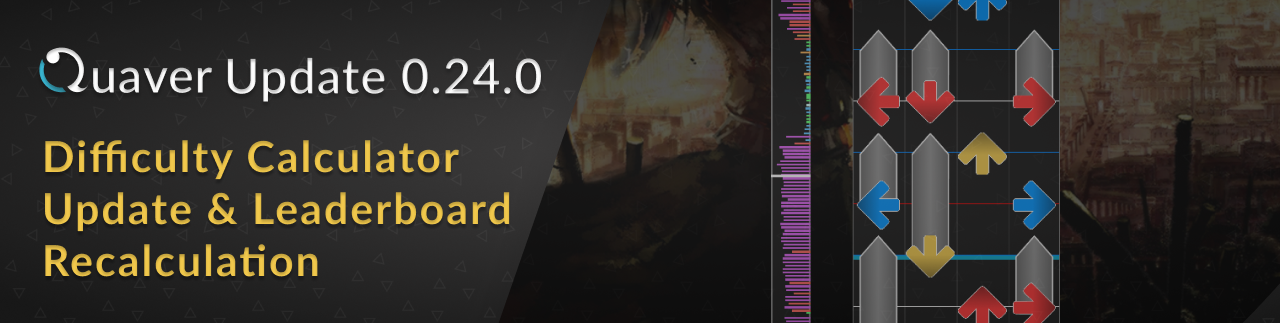
For this update, we've made an update to our difficulty calculation system. This means that your scores and leaderboard ranks may have changed.
Please read below for all information regarding this change.
Short Long Note Difficulty Nerf
Over the past week, we've worked on developing the necessary tools to be able to recalculate all scores efficiently as well as making the first ever change we've made to our difficulty calculation system.
This means that your scores and leaderboard ranks will most likely change. For some players, you may be affected more than others depending on the maps you have played.
Keep in mind that the difficulty calculator is an on-going development process, and no changes are final. However, we now have the correct tools to be able to iterate on it as much as we would like to in the future.
The Change
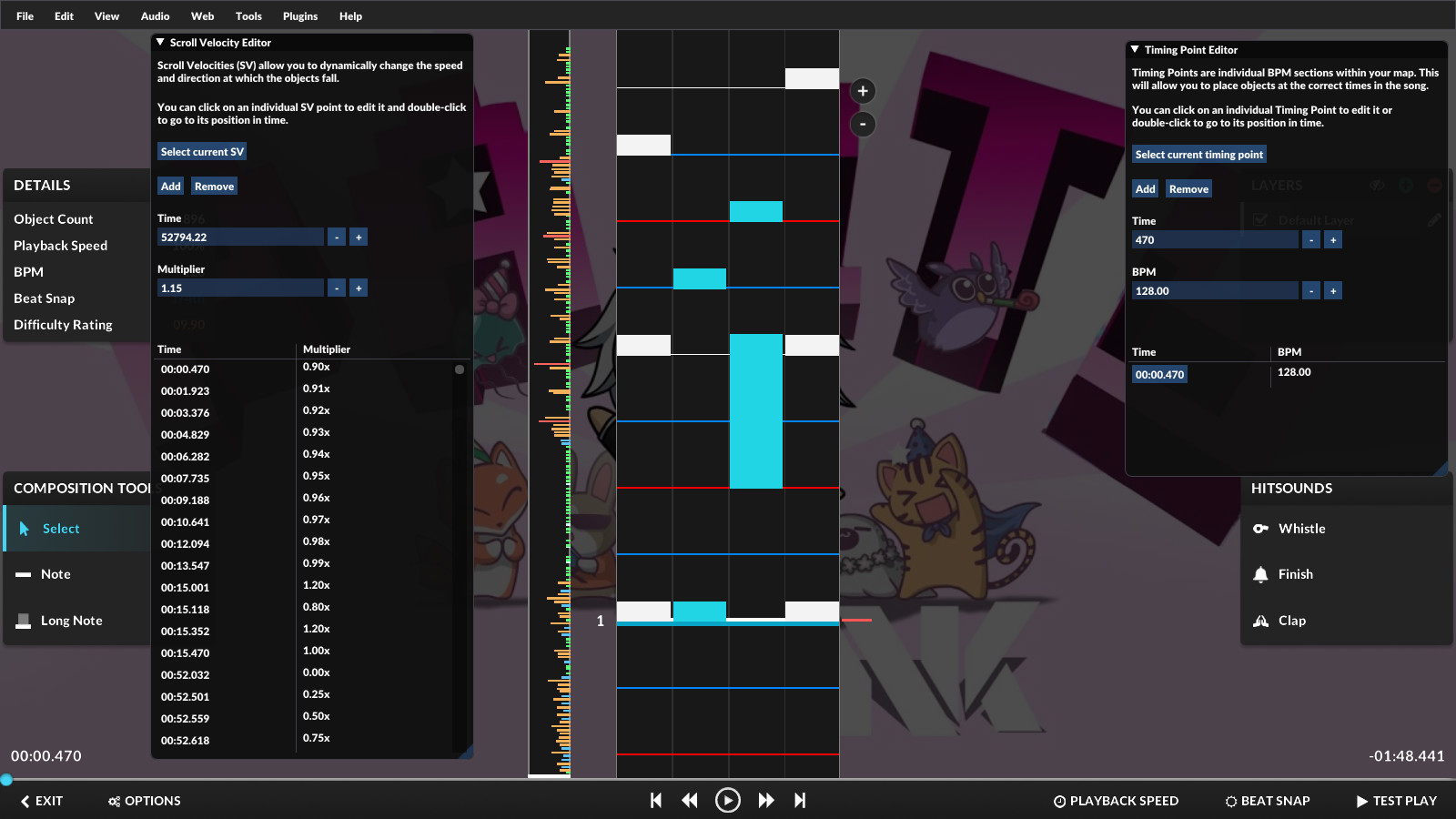
One of the biggest flaws in the difficulty calculator was that short long notes heavily inflated the difficulty rating of maps.
The change we've made is relatively simple - as you can see by the image above, long notes that are too short to the point where they could be tapped as normal notes are now treated as normal notes by the difficulty calculator.
This change effectively nerfs the difficulty rating of maps that heavily use short long notes.
This nerf has only been applied to 4K and not 7K.
Furthermore, we are very well aware that there may be flaws with this change. As we push out updates to this system, it makes it easier for us as a community to identify issues that are present, so we can address them accordingly.
Leaderboard Rank & Score Changes
All scores and leaderboard ranks have been recalculated. You are now able to view the changes on both the leaderboard and on your profile pages on the website.
We understand that some players may be affected more than others by this change, and it won't make every single person satisfied. However, we now have the proper tools to be able to iterate on the calculator and improve it over time.
Client-side Difficulty Recalculations
After updating to the latest client version, the game client will automatically recalculate your maps to the newest difficulty calculator version. This happens in the background while you are in the menu screens. Keep in mind that performance may be lower while this process is running.
Furthermore, any local scores that you have made will be recalculated as well.
Other Additions & Bug Fixes
Bug fixes & performance improvements have been made to timing lines during gameplay.
Improving the process of creating skins is an on-going development process, and with this update we've worked on the first batch of improvements.
Keep in mind that there may be breaking changes during the beta while we work to improve skinning. We will try our best to avoid breaking changes, but sometimes it is inevitable.
Here's what we've added and changed.
Replaced the skin.ini config values "HitLightingWidth" and "HitLightingHeight" with "HitLightingScale" and "HoldLightingScale." You can now control the sizes of the hit and hold lighting textures individually, and changing the sizes of them is now consistent with other elements.
Added "HitLightingColumnRotation" and "HoldLightingColumnRotation" skin.ini config values to be able to rotate the hit/hold lighting based on the column it is in.
Added a "DefaultSkin" skin.ini config value to be able to explicitly set the default skin your custom skin will use. If none is specified, it will use the default skin the player has set in the options menu.
Removed "UseAndRotateHitObjectSheet" and separated it into two settings. Added "UseHitObjectSheet" to use a spritesheet for skins that use different note textures per beat snap and "RotateHitObjectsByColumn" to rotate the notes depending on the column that they're in. This allows you to create bar skins which use beat snap colors much easier.
Added a "JudgementHitBurstFps" skin.ini config value to explicitly set the animation frame rate of judgement hit burst textures.
Added a "WidthForNoteHeightScale" skin.ini config value to be able to customize the height of the objects without having to resize all of your images manually.
If you need a full breakdown of everything skin config related, check out our wiki!
More Editor Shortcuts
A few new keyboard shortcuts have been added to the editor. Here's what we've added:
You can now place normal notes using the number row keys. However, you cannot currently place long notes with them just yet!
Pressing Ctrl + I will place a scroll velocity point at the current time.
Pressing Ctrl + Shift + I will place a timing point at the current time.
Pressing Shift + Up/Down will now switch the active layer.
Pressing Home/End will skip to the beginning/end of the map respectively.
Pressing Shift + H will show/hide the current layer.
You can check out the full list of editor shortcuts here.
Other Additions & Bug Fixes
The "BPM Affects SV" option in the editor now works properly and is toggle-able.
The left and right audio channels of the editor's waveform have been swapped. Previously they were displayed incorrectly.
"CreateTimingPoint()" for editor plugins is now able to take float values for its parameters.
Added wiki links to the "Help" section of the editor's file menu bar.
In song select/multiplayer, using the "CTRL + +" keybind at 1.95x rate will now increase the speed to 2.0x.
The "Rate" leaderboards for .05x speeds above 1.0x are now working.
The "Ratio" value in the results screen now displays "0" if no marvelous judgements have been hit and infinity (∞) if marvelous judgements have been hit but no perfects were hit.
Added an "actions.SetHitObjectSelection()" function for editor plugins.
Fixed timing points & scroll velocities in the editor not pasting to the correct location.
Added CTRL/Shift + Click functionality for the select button for the timing point/scroll velocity panels in the editor.
Disabled the hitlighting and judgement hit burst animations scaling with the playback rate of the song.
Fixed the judgement hit burst animation disappearing and it having the incorrect sizing.
Fixed a crash when the game is unable to read the skin.ini file.
Discord Donator Role
If you're a donator, you are now able to get an exclusive role on our Discord server! Setting this up is super simple:
You should now have a green "Donator" role on the Discord server which lasts throughout the duration of your subscription.
Thank you to all of the generous people who have decided to support our project!
Quaver 0.22.0 Update - Quality Of Life & Performance Improvements
Quaver Update 0.22.0 Patch Notes
A new Quaver client update has been released!
For this week's update, we've introduced a few quality of life updates, performance improvements, and bug fixes.
Download Screen Audio Previews Are Back!
[previewyoutube="tLa5LlsDFtI;full"] The audio previews in the download screen have returned! You can now listen to songs before you commit to downloading them in-game.
Because of the high influx of users upon launch, the audio previews were using a very large amount of bandwidth. This caused us to have to temporarily disable them while we work out a solution.
You should see no difference compared to how it was on launch.
Also, if you haven't noticed already, you can now listen to audio previews on our website as well!
Toggle Gameplay Overlay
[previewyoutube="HkxvZWui-iE;full"] By pressing Shift+F6 during gameplay, you can now show/hide all of the UI during gameplay.
This is another feature that many of you have asked for and is very useful if you find the UI distracting during gameplay.
You can also change this setting in the options menu.
Update Ranked Statuses & Open Game Folder Buttons
In the Miscellaneous section of the options menu, you will now find two new buttons.
The first button is self-explanatory. It will open up your file explorer and take you directly to the game's folder. This is useful if you want to fiddle around with your configuration or find files quickly.
The second button is a quality of life feature that many of you have asked for - a way to update all of your maps' ranked statuses. If you click this button, the game will find any maps of your's that do not have the Ranked icon in song select and update it. This currently does not work for unranked and is only limited to ranked.
Gameplay Startup Speed & Loading Screen
For some players, the speed at which the game launched was fairly slow. We have added a loading screen that the game goes to at launch which makes the window display faster. This should provide you with some feedback that the game has launched and is loading.
We are still investigating an issue that makes the game take abnormally long to launch for some players. During our investigation, it seems that it has to do with player hardware (Integrated Intel GPU). We will keep you updated as we find out more. If you have any information or have found ways to fix this, please reach out, so we can make other players aware and/or implement a fix.
Song Select Search Filter Additions
You can now use != when filtering your search by ranked status and original game (status!=ranked, game!=quaver)
A "short name alias" has been added for the ranked status filter. You can now use s=r which is equivalent to status=ranked and s=u which is equivalent to status=unranked.
Other Additions & Bug Fixes
Added a setting in the options menu to toggle the game's process priority from normal to high (can help with performance/stuttering)
We have fixed a bug where the map would never end while spectating a user.
The game no longer soft locks when importing while spectating a user.
The built-in audio offset calibrator's map offset has been corrected.
We hope you enjoy this update! - The Quaver Team 💙
Quaver Update 0.21.0 - Editor Waveform & Dev Updates
Quaver Update 0.21.0 Patch Notes
A new Quaver client update has been released!
In this update, we've made a few improvements to our editor, squashed a couple bugs, and have made several changes to our back-end.
Editor Waveform
This is a feature that many of you guys have requested for a long time. In the editor, you are now able to display an audio waveform. This tool should help you identify sounds more clearly in the song you're editing as well as make the process of timing your maps easier.
If you'd like to enable or disable the waveform, you can do so by going to "View -> Show Waveform."
Timing Point & Scroll Velocity Editor Improvements
A few improvements have been made to both the timing point & scroll velocity tools in the editor.
They now include the following features:
Both panels are now vertically resizeable.
You can now select a range with Shift + Click.
Added a "Select Current..." button to jump to the current point and select it.
You can now deselect all points with CTRL + D.
The "Multiplier" and "BPM" fields are now automatically focused when creating a new point.
Other Additions
Migrated to cdn.quavergame.com for fetching mapset banners.
Removed the "Smooth Accuracy Changes" setting from the options menu.
Removed the "Audio Device Period" and "Audio Device Buffer Length" settings from the options menu.
Added support for loading "AdditionalSongFolders" when importing .sm charts.
Image Host (CDN) Migration
We've mentioned this in a brief update on our Discord server, but if you are a developer that has a project that used our old domain (http://quaver.blob.core.windows.net/) for fetching images, you will need to update it to our new domain.
Our old domain will no longer be available to fetch images from.
We hope you enjoy this update! - The Quaver Team 💙
Support Quaver Development & 0.20.0 Update Patch Notes
25,000+ Players & 700,000+ Scores. Thank You!
This past week has been very successful for Quaver! With in only a week since launch, we've gained over 25,000 players and over 700,000 submitted scores! Thank you to all of the players who have decided to give Quaver a try. We're growing at a very fast rate, and we hope you're enjoying the game so far! We have a ton of plans and updates coming to the game, so be sure to stay tuned.
Support Quaver Development - Donator Perks
Since even before launch, many of you guys have been asking us how to support Quaver's development financially, and now we finally have a way!
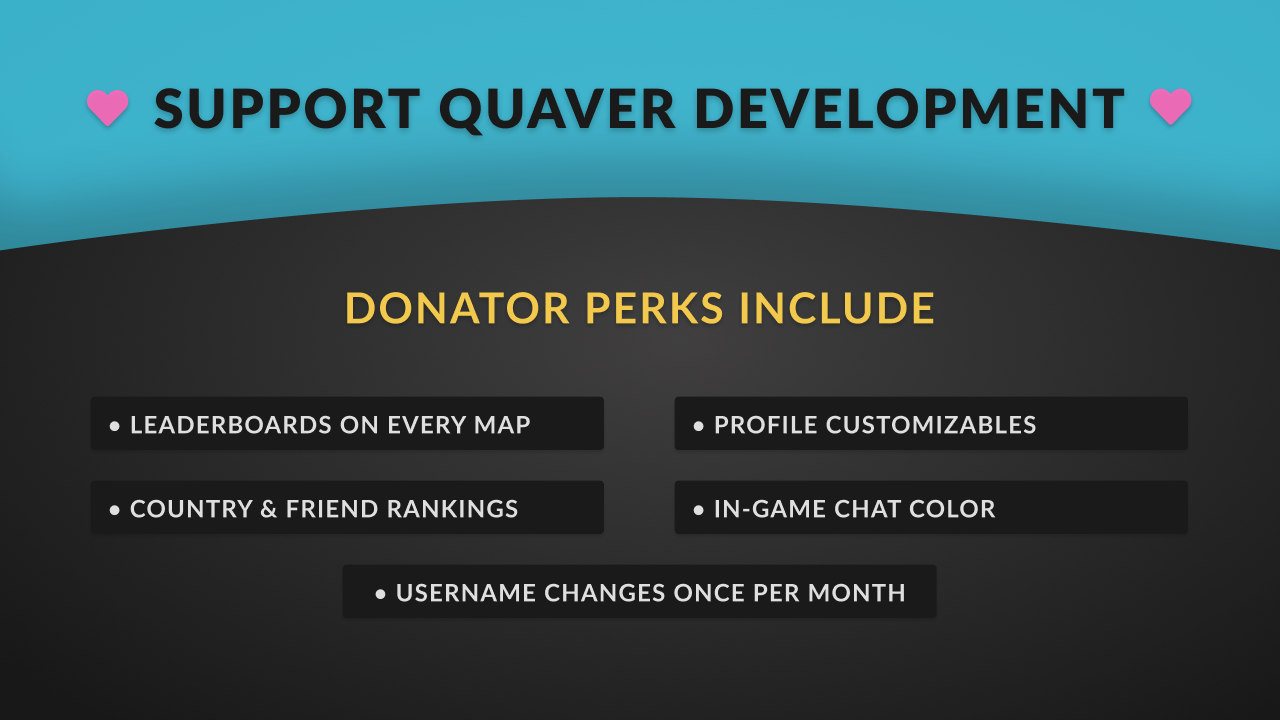
If you're feeling generous, you can now go to https://quavergame.com/donate, and donate for some extra perks in-game and on the website.
By donating, you'll get a few extra features that are meant to make the game a bit more enjoyable.
Here's what you get:
The ability to view and compete on leaderboards for any map (including unranked and unsubmitted)
The ability to customize your website profile banner and add an "about me" section
Access to country & friend leaderboards in-game
Username changes once per month
The ability to right click a multiplayer match to spectate it
A website profile badge
An in-game chat color
An Increase in map upload slots (12 instead of 10)
Real-time scoreboards for online leaderboards (ghost scores)
The ability to upload unsubmitted maps in multiplayer for others to download
& much more in the future!
We offer 4 different options to purchase a donator subscription which include:
1 Month - $4.99
3 Months - $13.99
6 Months - $26.99
12 Months - $49.99
Keep in mind that donating is never required to play Quaver! We want to provide a system where if you're feeling generous, you get extra features that make the game more enjoyable without making it impact usability.
If you're thinking of donating, thank you in advance!
0.20.0 Update Patch Notes
For this week's update, we've wanted to focus on not only fixing more bugs and issues that people were having, but also to focus on beginner players that are getting into these types of games for the first time.
Difficulty Recommendations
One of the most common pieces of feedback among beginners is that it is hard to find easier maps to play. To temporarily combat this, we've added a "Recommend Difficulty" feature to the map downloader screen.
Although it's not perfect, it should allow you to find maps within your skill level a bit easier. We plan to expand upon this recommendation system in the future.
Remember that you can always filter by difficulty rating as well! This is a feature that not many know about but is still very useful to find what you're looking for.
Keybind Display
Another concern that beginners had was that they had no idea which keys to press. We've added in a display which shows the keys you have to press prior to the song starting.
Other Additions
Temporarily disabled the song preview in the download screen (it will return soon!).
Added a "Donate" button to the top navigation bar.
Changed the default skip keybind to [Space].
Added a setting to display ranked accuracy while using custom judgement windows.
Bug Fixes
Fixed the game locking up sometimes when accepting the privacy policy.
Fixed a login failure when unable to load news posts.
Fixed the game setting its process priority to high upon game launch.
We hope you've enjoyed this update! - The Quaver Team 💙
Quaver v.0.19.2 Update + Patch Notes
A new Quaver client version has been released!
0.19.2
Bug Fixes
Fixed an issue where users could not register with numbers in their usernames.
Fixed a crash when opening the game while disconnected from the internet.
0.19.1
Bug Fixes
Fixed a visual bug where long notes would slide below the receptors.
Fixed a bug on Windows where alt+tabbing while in fullscreen doesn't minimize the game.
0.19.0
Additions
Half rates above 1.0x can now be played for ranked scores and in multiplayer,
Health at lower levels now scales based on map density (actions per second). The game should now be more beginner-friendly.
DrawLongNoteEnd is now defaulted to True for the default bar skin.
Added "HyuN - Disorder" as a default/bundled song.
A notification with useful information now appears when failing to upload a skin to the workshop.
Bug Fixes
Fixed the editor causing a black screen when creating/uploading maps.
Fixed a crash when unable to load custom skin textures.
Fixed a crash while playing multiplayer matches.
Fixed judgement burst texture animations not working.
Fixed an issue where the game may lock up a user's session on Linux.
We hope you enjoy the update! 💙 - The Quaver Team
Quaver Open Beta Release Date & Huge Alpha Tester Update
Quaver Open Beta Release Date!
Mark your calendars, it's almost time!
We are very excited to announce that the Quaver Open βeta will be releasing on Friday, July 10th, 2020!
This past year, we've been working super hard to take all of your feedback from the closed alpha and use it to completely revamp the game. This means that everything, including the game client and website has been rebuilt from top to bottom to provide a fresh beta experience!
We hope you're as excited as we are about the release! This officially marks the point where the game will start to look and function like you would expect out of a community-driven game. This means frequent game updates, tournaments, contests, and other ways to get involved are on the way!
If you want to keep up to date with everything going on until release, we're going to be super active on Twitter and might even give away some more Steam keys prior to the beta 😉. You can also join our Discord Server where the majority of our community hangs out!
Alpha Testers, You've Got a HUGE Update!
As teased in the previous blog post, this past year we've been working on rebuilding the game client from top to bottom according to your feedback. The client features a brand new design, tons of new features, and a hefty amount of stability and performance improvements, so go check it out! You now have full access to the new game client on Steam.
Furthermore, we've also given our website a brand new look. It's now cleaner, faster, and better! We wanted to provide a design that was both familiar to existing users but closer to the sleek and minimalistic theme that we're going for. It's definitely a step up from the old website, so be sure to browse around, and let us know what you think!
To Our Community: A Thank You!
Throughout the past 3 years of development, the amount of support and excitement you guys have shown us has been insane! Even with the small team we have, we were able to push through and deliver what we believe is a great game that will last for years to come.
Our mission has always been to provide a rhythm game where the community would be involved and have the opportunity to give their input from the very start. The result of this development style has been phenomenal, and we will continue to involve you in the process going forward.
Thanks for reading! - The Quaver Team 💙
Quaver Winter 2019 Development Update - The Year To Come!
With the decade closing and Quaver approaching closer to release, we feel it's time to start showing off what's coming to the game upon its release in 2020. Many of you have questions about the game and how far we are into its development, and we'll give an answer to some of them in this post.
Development Status
How far into development is the game?
Currently we are in the process of redesigning and polishing the entire game. This includes giving the game client a completely new and fresh UI, as well as creating an entirely new website.
All of your feedback and feature requests over the past year are now being incorporated into the game, and we're very happy with the results thus far.
When is the game releasing?
2020. Early 2020. We currently do not have a set in stone date, but judging from how far along we are with development, the game should be good to release within the first half of the year!
Hype! ːsteamhappyː
How can I contribute?
The Quaver game client is open source on GitHub. We're always looking for more people to contribute code to the game to speed up the process, so if this sounds like something you're interested in, feel free to jump in anytime!
What's Coming to Quaver Next Year
There's a ton of new and exciting stuff coming to Quaver in 2020 including a brand new UI, shiny new features, and performance improvements!
Currently we're in the midst of taking apart the entire client and giving it a new look. If you've previously given us feedback over the past year, your ideas have most likely made (or will make) it into the game!
A Brand New Song Select
https://www.youtube.com/watch?v=g4IDo3Q7ot4 What's new in song select?
Playlists - A long-awaited feature - In the new UI, you're able to create and manage groups of all of your favorite maps. It's not limited to just this though. You're also able to export your playlists to a zip file or even upload your playlists online from directly in-game to share with other players!
Rate & Friend Leaderboards - We've added two new leaderboards to the game. You'll be able to view scores that were played on a given playback speed as well as scores that only your friends have submitted!
Custom Map Banners - Many of you have asked for a way to make custom banners for your maps in the game. You'll be able to do so.
Over 15 different sorting options - We've added sorting options for everything ranging from difficulty, average notes per second, to even long note percentage. If you can think of it, it's most likely there!
Spectator, Theater Mode, & Co-op Gameplay
https://www.youtube.com/watch?v=Brc1qApyZFA What exactly are these features?
Spectator - Wanting to watch other players live? We've added the ability to spectate others in the game.
Theater Mode - With this feature, you'll be able to load up to 4 replays, and watch them simultaneously.
Co-op Gameplay - Have a buddy next to you that can't wait their turn? We've added a co-op mode where two players can play on one screen at a time.
The Online Hub - Connect With Others & Twitch Integration
https://www.youtube.com/watch?v=KmPz2n-5xJE What does it come with?
Resizable Chat - Whether you want to cover your screen with the chat or make it a tiny portion, you'll be able to resize the chat to your heart's desire.
Twitch Song Requests - You'll be able to connect your Twitch to your Quaver account, and receive song requests from viewers directly in-game.
Online User & Friends List - See who else is online, and manage your friends list.
Active Song Downloads - Songs that are currently downloading will have its own tab and be displayed.
Missed Notifications - Went AFK for a bit? No worries. Any important notifications that you missed such as chat messages, game invites, or even errors will be displayed for you to view and interact with.
Other than a complete redesign, not much has changed from the old multiplayer. However, there are a few notable new features to highlight:
Uploading Unsubmitted Maps - If you have donator features (more on this in the future), you'll be able to temporarily upload unsubmitted maps for the multiplayer lobby to download.
Map Leaderboard View - You'll now be able to view the leaderboard of the selected multiplayer map at any time while waiting for the match to start.
Chat Display - We've added an on-screen chat to multiplayer along with message history. This means if you leave the game and rejoin, you'll be able to view the past 20 messages that were sent.
Replay Playback Controls
https://www.youtube.com/watch?v=bf9Q3yXI6hE Major improvements to the replay viewer have been made. We've added a set of playback controls for you to use while watching replays. With this, you'll be able to seek to any time in the replay, and change the playback speed.
We're now in a place where we can greatly expand upon the replay viewer, so if you have any ideas, be sure to let us know!
Listening Parties - You and up to 15 other players will be able to simultaneously listen to tracks. This serves as an alternative way to connect with other players, and to share your favorite tracks.
Playlists - Any playlists that you've made in song select will also be available in the music player.
Sharing Skins via Steam Workshop
And finally, we've finally integrated the Steam Workshop into the game. With this, you'll be able to upload and share your custom Quaver skins for others to download without ever leaving the game.
Sharing skins has always been very popular within the rhythm game community, and we're excited that we've made the process extremely easy to do within Quaver!
Conclusion
As you can see, there's a lot in store for Quaver next year, and we're getting closer and closer to release. We still have a few more screens to finish such as the results screen, map downloading screen, and the editor.
With the small team we have, we're making a ton of progress, and I'm very excited to let you get your hands on the new client on release next year.
Thank you for all your support during the past two years of development, and here's to another year to come!
Happy holidays! - Swan 💙
Customizable Judgement Timing Windows - Quaver v0.17.0 Patch Notes
An update to Quaver has just been released which introduces our newest feature: Customizable Judgement Timing Windows.
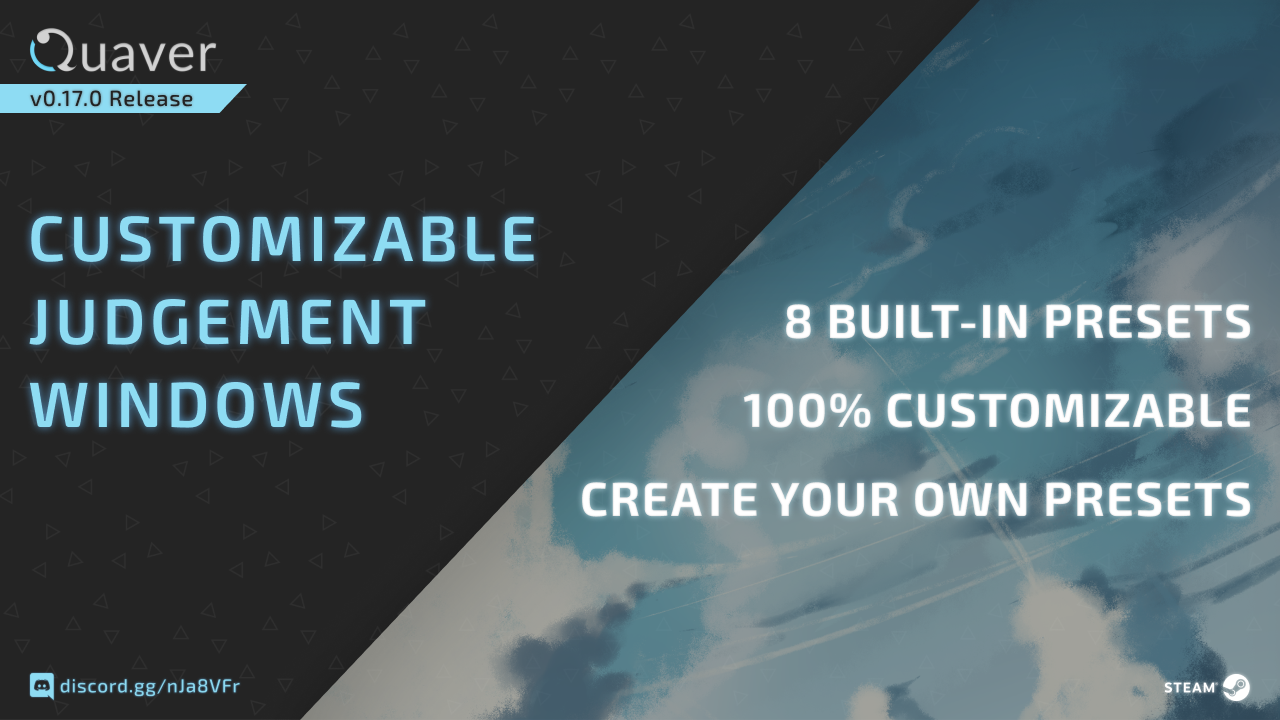
In the song select modifier menu, you can now find a new option where you can create presets for your own judgement timing windows.
This will effectively enable you to make the game as easy or hard as you choose, allowing for 100% customizability.
The game comes with 8 built-in presets that you can use including the following from easiest to hardest:
Peaceful
Lenient
Chill
Standard* (Default)
Strict
Tough
Extreme
Impossible
Here's How It Works:
While using custom judgement windows, the game will use your replay and internally convert your score, accuracy, and performance rating as if it were using the Standard* windows.
When scores are submitted to global rankings, they will submit as the converted versions so that all leaderboard scores are normalized and easy to compare as they always have been.
You are able to see the accuracy of both your custom preset and Standard* windows in the results screen after playing.
Keep in mind that if you pass on an easier judgement window preset, but the score fails on Standard*, it will submit as failed at the point of failure on the Standard* windows.
Bug Fixes & Improvements
Added mean & standard deviation values to the results screen.
Added buttons to fix local and global offset in the results screen after playing.
Global offset is now unaffected by audio playback rate.
You can now change local offset by 1 millisecond by holding CTRL while adjusting it during gameplay.
Added the ability to copy a timestamp with no objects selected in the editor.
Fixed the game crashing when copying hitobjects in the editor on Linux.
In Other News...
Quaver is now officially in the polishing phase! Over the past month, we've been working super hard on getting ready for the Steam open beta.
As some of you already know, Quaver is getting a completely new UI which will make the game look and feel more modern, polished, and smooth. We've taken all of your feedback into account, and we're super excited to share our progress with you in the upcoming weeks.
We've also been working developing a new map modding system which should be out soon.
Stay tuned.
---
Thanks for reading! 💙
0.16.1 Release - Accuracy/Scoring System Changes
After receiving a ton of feedback from you guys, we believe it's time to start tweaking and balancing some of the game mechanics of Quaver. According to your feedback, one of the main concerns with Quaver was with the way accuracy was calculated - particularly because of its harshness and extreme focus on Marvelous to Perfect ratio. On Tuesday, we released an update which makes it slightly more lenient.
All of your existing scores have been recalculated to this new system, and almost everyone has benefited from it. You may have gained or lost ranks and first place scores as a result of this change.
In order to understand the change, it's important for you to understand the overall goals that we want to achieve when calculating accuracy in this game.
We want to discourage spamming & not playing the game properly Achieving high scores for not playing the game correctly is something that we want to avoid. If you're consistently achieving poor judgements, your accuracy should reflect that.
We want to encourage and reward players for achieving a higher ratio of Marvelous judgements as opposed to Perfects Achieving consistent Marvelous judgements is significantly harder than Perfects when it comes to the timing windows. We acknowledge this and want to reward this in accuracy calculations without being too harsh.
We want accuracy to reflect a play's overall performance well This one is pretty simple. If you perform extremely well on a score, your accuracy should be extremely high and vice versa.
Achieving 99%+ scores should be difficult and rewarding for the player Given that 100% is only achievable by gaining all marvelous judgements, 99% should be difficult to achieve as well and focused more heavily on ratio past a certain point.
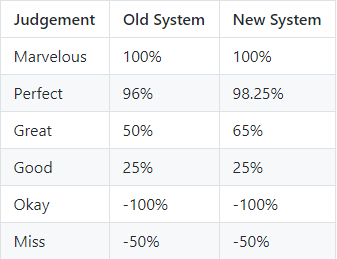
For this update, we've changed the way judgements are weighted when calculating accuracy.
In the picture above, you can see the differences between the two systems - namely the Perfect judgement weighting changing from 96% to 98.25%, and the Great judgement weighting changing from 50% to 65%. This ultimately makes the game slightly easier than before.
After spending a long time tweaking values, we've settled on testing this approach. While the system is still not perfect, it seems to align more with the goals we have for this game when it comes to our scoring system, and we believe it's a great start.
Keep in mind that this update only changes accuracy. The performance rating algorithm has not been modified, so naturally the rating of your scores have also increased.
From what we've heard so far, this tweak seems to make the game head more in the right direction, and we believe the same.
Give the new system a try, and let us know why and how you believe things should be tweaked further.