
UPDATE: Expected speed of contracts adjusted to be reachable on short distances (e. g. can not reach avg greater than 60 km/h on 1 km distance because of timetable rounding)
UPDATE: Localizations (de: achievements, ui; en: ui; nl: ui; no: ui; ru: research, ui)
UPDATE: Timetable times rounding & average speed computation explained in Offered Contract dialog. (I.e. why contract average speed is lower than trial train average speed). Hint how to improve avg speed added.
UPDATE: Train label positioning & sizing improved
UPDATE: Tunnel speed can be upgraded with track items selected (rather than with signal & sensor items)

FIX: Arrival sensor prevents routing sensor from being triggered when on the same grid point
FIX: Offered urban contracts was incorrectly displayed in Offered Contracts panel, could not be rejected & caused all other contracts not to be displayed
FIX: Routing sensor detail panel does not show the same content all the time.
FIX: Routing tutorial failed to finish when train was reversed before being instructed to do so
FIX: Scaling with zoom did not produce equal results for various screen resolutions / window sizes
FIX: Track was not highlighted for modification so bulldozing was not possible if one of its endpoints was missing due to some previous error
FIX: Typo in 'through'

Rail Route
Hotfix 1.11.20
Rail Log #14: Contracts Generation
Contracts Generation: The Old Way
Let's start by looking at how contracts were generated in Rail Route previously. Contracts used to be global, meaning they were not specific to any particular station. Every game tick, there was a chance for a new contract to be generated, and its maximum possible distance was determined randomly. The game would then decide the type of contract and the routing it would have based on predefined probabilities.
The game would search for stations that could be a good fit for the contract, considering weights assigned by the map author. Some stations were more likely to appear in intercity (IC) contracts, while others were favored for commuter (Com) contracts. However, there were instances where the game couldn't find a suitable station or the contract didn't make sense, leading to its removal and a subsequent attempt to generate a new one.
Introducing a Station-Centric Approach
In our continuous efforts to improve the gameplay experience, we're introducing a new approach to contracts generation. Contracts will now be station-centric, meaning each station will generate its own contracts based on its specific characteristics. Every game tick, stations with available contract slots will have a chance to generate a new contract.

This change ensures that every station has a fair chance of having contracts generated specifically for it. Previously, some stations may have had sparse or no contracts generated at all. With the station-centric approach, the generation process starts with each station in mind, guaranteeing a more balanced distribution of contracts across your network.

New Buildings: Salesman Post, Dispatcher Office, and Loading Dock
To facilitate this station-centric contracts generation, we're introducing three new buildings that will take over the contract generation process: the Salesman Post, Dispatcher Office, and Loading Dock. These buildings will add a new level of control and customization to your rail network management.

Let's start with the Salesman Post. Initially, each station sign will have one slot for a green contract, and offered contract icons will appear next to the station sign. However, with the Salesman Post, you can unlock additional slots and move the offered contract icons to this building. By configuring the Salesman Post, you'll have more control over where the icons appear for each station. You can even fine-tune the contract generation by specifying your preferences. For example, you can focus on generating intercity (IC) contracts for a particular station, ensuring that the generated contracts align with your strategic goals.

Moving on, the Dispatcher Office and the Loading Dock will handle the generation of red (Regional and Urban trains) and blue (freight) contracts, respectively. Once connected to a station, these buildings will enable the generation of their respective contracts, and the contract icons will appear next to the building. By strategically placing and configuring these buildings, you can shape the contract generation for each station, tailoring it to your network's needs. For example, only stations with a Dispatcher Office will appear as ending stations in Regional train contracts. This means that the more Dispatcher Offices you build, the more diverse (and complex) regional trains will become.

But remember, with great power comes great responsibility! Each building you construct for a station will incur upkeep costs. These costs will increase significantly for subsequent buildings of the same type for one station. By connecting multiple Salesman Posts to one station, you can increase your slots and contract generation speed, but it will also put a strain on your finances. So, plan your expansions wisely and keep a close eye on your budget to ensure the financial sustainability of your rail empire.
Focus Views: Bringing Contracts to Life
Another significant change to the user experience (UX) and user interface (UI) is the introduction of Focus Views. We've heard your feedback and wanted to find a better way to display important information without cluttering the traditional UI. With Focus Views, we're bringing the data where it belongs—right onto your scheme, on the board of your rail network.

When you click on an offered contract icon, a Focus View for that contract will appear. The game will pause, and everything else on the screen will darken out, drawing your attention to the contract details. The camera will smoothly move to display all the relevant data on the board. First, we'll compute the possible paths the train needs to take through the contract, drawing them over your network. Then, we'll show station timetables next to the stations in the contract at their predicted arrival times. This way, you can easily evaluate whether it's the right time to accept that contract.

You can accept or decline the contract by clicking the corresponding buttons within the Focus View. Alternatively, if you've made up your mind you can use the secondary action (right mouse button) or hit the ESC key to leave the view while keeping the contract intact.

But wait, there's more! You could "pre-configure" the trial train by selecting the desired platforms before accepting the contract. This means that when you start the trial, the train will already have a pre-set route, allowing your existing automation to seamlessly take over. Scheduled contract acceptance is also on the list, but that's for another time and another Upgrade.
The introduction of Focus Views not only enhances the visual appeal of the game but also improves the decision-making process when selecting contracts. You can now assess the impact on your network, consider timetables, and make more informed choices—all without leaving the immersive environment of your rail network.
Exciting Times Ahead
With the upcoming changes to contracts generation, the introduction of the Salesman Post, Dispatcher Office, and Loading Dock, and the immersive experience of Focus Views, Rail Route is taking another leap forward in providing you with a dynamic and engaging gameplay environment. We can't wait to see how you'll utilize these new tools and buildings to create intricate rail networks and conquer the challenges that lie ahead.

That's all for this edition of Rail Log. As always, we value your feedback and suggestions. Feel free to leave your comments below or reach out to us on our social media channels and Discord. Your input plays a vital role in shaping Rail Route into the best railway management game it can be.
Next time, I'll be writing about upcoming UI changes, especially of the Info Panels. Stay connected with us on:
Stay connected with us on:
Thank you for joining us on this exciting journey, and happy railroading!
Angel
https://store.steampowered.com/app/1124180/Rail_Route
https://store.steampowered.com/app/1896900/Rail_Route_The_Story_of_Jozic/
Hotfix 1.11.18
NEW: Signal deallocate action in the building mode
NEW: Train reward visibility checkbox in the gameplay options page

UPDATE: Localizations (no: ui; zh-Hans: ui)
UPDATE: Log station when topology search from it takes more than 10 seconds (for troubleshooting purpose)

FIX: All tunnels built at once shared the recent displayed connector. Caused loading error if building ended with impossible connector.
FIX: Generic modal sizing did not match its displayed text
FIX: Save game modal didnt always show existing save if only 1 existed
FIX: Tunnel stays highlighted after closing the construction wheel
FIX: Urban contracts were not generated
Rail Log #13: Contracts Overhaul & Regional Trains Update
Post-Update 11: Hotfixes
After Update 11 went live, our dev team has been hard at work fixing major issues and fine-tuning the game based on your input. One improvement we've made is in track speeds. Now, track speeds are more visible when zoomed out, and they'll appear over the track for 5 seconds after every speed change. You can even enable track speeds to be visible all the time through the options menu.

We've also made it more intuitive to change signal types using the primary action (left-click), just as you were used to, rather than grabbing them.

Your feedback has been essential in refining Rail Route, and we're incredibly grateful for your constructive comments! It's important to remember that it's difficult to please everyone, and while we strive to bring numerous improvements, there's always a chance of introducing new issues. The key here is iterating and moving forward. That's what we trying to do.
Upcoming Update 12
Revamping the Contracts System
Note the presented images are concept previews we are currently implementing to the game.
In the next update, we're overhauling the contracts workflow to enhance your gameplay experience. Instead of a UI list, offered contracts will now appear as icons on the game board, above station signs (the position of contract icons for a station will be configurable by additional Upgrade we'll bring to the game later).

The contracts limit and generation will now be station-specific instead of global. No more waiting for a new contract to station of your desiree, each station will have its own generation interval based on the free slots in it. Contract details will be displayed directly around that icon, replacing the small UI window. Additionally, when a contract icon is clicked, its details will show on the board as well. Timelines with predicted arrival times for every station will be visible, making it easier to plan your train traffic more efficiently.

Our main goal with this contracts system revamp is to make your gameplay more fluent and enjoyable. By moving contracts to the game board, you'll be able to play the game where the action is, instead of focusing on the UI. This change lets you quickly find contracts for a specific station just by checking around that station, eliminating the need to decline unrelated contracts.

You might recall from another Rail Log that we want to use this approach for sensor configuration as well. We see a great fit from internal prototypes and it brings another level of immersion to the game.
New Contracts - Regional Trains
In the upcoming update, we're introducing a new type of contract: Regional Trains. These contracts require more attention and careful handling from players, as they come with multi-stage schedules.

Each stage of a Regional Train contract is treated as a separate train, with its own destination and timetable within your stations. After completing a stage, there will be a waiting period before the train can proceed to the next stage and continue on its journey under a new train number.
The next stage may begin at the same station where the previous train ended, or it may require a transfer between stations. This adds an extra layer of complexity, as you will need to manage "idling" or "traversing" trains and ensure they are not forgotten when needed. Players will have to make sure these trains are stored appropriately and are ready to proceed when the time comes for their next scheduled stage.
These regional trains will become the first source of red points once we introduce the Revamped System Upgrades structure. However, that won't be included in the next update, as it would be too big of a task.
Beyond the Update 12
Automating Regional Trains

As our goal is to have fully automated traffic, the new Regional Trains will bring two fresh challenges: first, how to stable the trains (either on dedicated tracks or, later on, in the coach yard when it becomes a higher-tier unlock with the revamped System Upgrades). Second, how to "call" the train back to a platform after the waiting period has passed.
To tackle these challenges, we're introducing two new sensors:
- the Stabling Sensor and
- the Dispatcher Sensor.
The Stabling Sensor will be able to route finished trains based on their "next stage" destination and will effectively replace the "finished to" functionality of the current Routing Sensor. You can define multiple destinations per station, allowing you to assign a set of tracks to be used for stabling the finished trains.
On the other hand, Dispatcher Sensors will be used to signal stabled trains and switch them to their new schedule, which would need to be done manually without it. The train can then be routed via the standard Arrival Sensor logic to the corresponding platform. This combination of sensors streamlines the process of managing Regional Trains and helps maintain the seamless automation of your rail network.
Note, that these sensors won't be included right at the beginning of Update 12, but we'll try to bring them as soon as we stabilize the Update 12!
Closing Notes
That's all for this week's Rail Log, folks! I'm already looking forward to sharing more exciting news and updates with you in our next edition. Apologies for not delivering this Rail Log on Monday as usual - we had a national holiday this week, and we'll be having another one next week. Rest assured, we'll be back on track soon!
As always, we'd love to hear your thoughts on these updates and any suggestions you might have. Please feel free to leave your comments below this article or reach out to us through our social media channels and Discord. Your feedback is incredibly valuable to us, and we appreciate your continued support in making Rail Route the best it can be.
Stay connected with us on:
Thank you for joining us on this journey, and happy railroading!
- Angel
https://store.steampowered.com/app/1124180/Rail_Route
https://store.steampowered.com/app/1896900/Rail_Route_The_Story_of_Jozic/
Hotfix 1.11.17
UPDATE: Do not display reward icons for prototype trains
UPDATE: Localizations (cs: ui; nl: ui; ru: ui)
UPDATE: Sensors can be built on occupied & allocated tracks
UPDATE: Track and track sprites improved, should be more clear when zoomed out
UPDATE: When building signal over different signal, primary action is 'Change type' (was: 'Grab')

FIX: "Always show track speeds colors" were turning off
FIX: Building item change caused animation glitch - previous action list jumped down to the bottom of the screen and the new one jumped up
FIX: Hidden UI was still interactable
FIX: Save containing prototype train with 2 subsequent stops at the same station (e. g. an urban contract train) was not loadable
FIX: Time was running in Editor, causing timetable times not aligned to whole minutes
FIX: Track preview became invisible when connector destination was occupied track
Hotfix 1.11.16
The improvements include better visibility of track speeds when zoomed out, track speeds visible for 5 seconds after every speed change, and an option to enable speeds display over tracks. We're confident these changes will enhance your gameplay experience, and we welcome your continued feedback!
Full 1.11.16 patchnotes:
NEW: Toggle 'Always show track speeds in construction' in the Options
NEW: Tracks speeds are better visible after connection speed is changed in construction

UPDATE: Level of detail zoom treshold can be set in options (when track lines become thicker)
UPDATE: Localizations (zh-Hans: achievements, tutorials, ui; nl: ui)
UPDATE: Onboard UI scale matched to panel scale
UPDATE: Rebuild grabbed item where was before when other item grabbed / building item changed / construction closed.
UPDATE: Switch circle shown for trivial and incomplete switches
UPDATE: Track speeds better visible when zoomed out in construction

FIX: Autosave's screenshot was empty when game autosaved during exit
FIX: Autosave sometimes created just as new game started
FIX: Close menu button stayed in disabled state after level failed to load and another level was loaded after
FIX: Sandbox was not working for newer maps (stored as savedMap.bytes)
Update 11 is OUT!
Rail Route's Update 11: More Control and Flexibility in your Rail-building Experience
One of the key improvements is the addition of the Build Actions feature, which makes it easier for players to understand what construction actions are available at each step of the process. The feature comes with keybinds that allow you to perform actions quickly and easily, whether you're using a keyboard or a controller. In addition, a new action wheel has been introduced, making it easier to select actions without needing a keyboard.
Another exciting addition is Sandbox Mode, which allows players to experiment and create their rail network without any restrictions. The mode allows you to start an endless game with unlimited money and all system upgrades unlocked, providing a playground for players to explore different strategies and test their creativity. These two features alone add an extra layer of depth and immersion to the game, giving players more control and flexibility over their rail-building experience.
But that's not all! Update 11 also includes several other exciting new features, such as mod.io support for broader accessibility and community content sharing, the ability to bulldoze whole tracks, the option to rotate signals before building, and the addition of construction actions for changing speed. The list goes on, with numerous updates and improvements to the game's building user interface, construction messages and sounds, and more.
Changelog:
For a detailed list of changes and fixes, see the following changelog:
New Features
- Action wheel in Construction
- Added sandbox mode and page for new game settings
- Bulldozing whole tracks
- Construction action added to rotate signal before building
- Construction actions for changing speed
- Construction actions in construction mode, building ux reworked
- Construction actions introduced for guided building / bulldozing
- Context Action 1-4 input actions added to be used e. g. in building for context-relevant input
- Cycle through time keybind
- Mod.io support
- Mouse position has slight light around on the grid
- New binding: Build (B), opens/closes Construction
- Sinks for vertical / bending platforms (named North/South if having same latitude)
- Train timeline and label are scaled with zoom
- Trivial Switches introduced to allow loops, continuing a track with different speed, continuing a track not build from inventory and other
- Updated keybind icon and added new keybind hint icon to buttons
- Walls built with help of using auto-routing from start to end point
Updates
- All Board Sprites resolution increased
- All stations & autoblocks can be bought from beginning of the endless game
- Autoblock built by converting tracks; bended autoblock supported, signals not enforced
- Autoblock sensors placed in the middle of the autoblok
- Bigger sprite for selected item in menu
- Bounding wall is created surrounding the whole map when map is saved, old map started or old save loaded. Prevents unwanted shortcuts & speeds up topology search if map not enclosed by author.
- Building indicator (cursor) reworked: dashed border not displayed, text & price display unified and colored by possibility to build
- Coach yard can be grabbed and replaced even if it contains trains
- Construction action list & wheel displays balance change if applicable
- Construction messages refined
- Construction sounds improved
- Custom game cursor
- Distance between stations computed by drawing virtual track between them. Need for reversing computation and reversing bounty removed.
- Hyphen replaced with en dash wherever remained
- Localizations (nl: tutorials, ui; zh-Hans: tutorials, ui; de: ui; fr: ui; no: ui; ru: ui)
- Localizations (ru: research, ui; no: ui; zh-Hans: ui)
- Localizations (zh-Hans: tutorials; ru: ui)
- Milos renamed to Miloš everywhere
- Navigation is active on game start when a controller is detected
- New Sink sprite
- Platform and autoblock sensors are being placed in the middle
- Platforms are built by conversion of existing tracks rather than from scratch. Many limitations removed (vertical or even bent platforms allowed, no signals needed...)
- Preserve identity when grabbing signals & coach yards
- Sensors do not split tracks when placed
- Signal rotated, upgraded and downgraded using context actions
- Signal, tunnel portal and coach yard colliders reduced to ⅞ of grid cell size to allow access to track between them
- Station sign and platform can be centered on grid cell edges rather than only centers
- Station signs no more block building. In Update 11 and newer maps it is up to the map creator if he creates walls manually under them manually. In older maps & saves walls are created automatically once loaded.
- Switches shown in Construction
- Train timelines are affected by UI Scale
- Tunnel can be built from / to empty space
- Tunnel count limit removed
- Visuals on zoomed out map improved
- Walls textures improved, different one used in building
- When building coach yard, nearest station is found if a connection can be built to it, even beyond a tunnel.
Fixes
- Accessibility settings color overrides set before game restart could not be reset
- Autoblock price tag does not make hover sound
- Autoblock Track speed line not visible when the autoblock is built until the construction menu is opened again
- Automation was not triggered in old saves with autoblocks that has only routing sensor
- Build mode was toggled when pressing the keybind while the menu was open or an input field was selected
- Button hover state remained active when navigation was disabled
- Buy platform and autoblock or upgrade track was not possible when infinite money was enabled and not enough money
- Clicking Stop and Reverse almost before the train reaches the platform led to train departure from that platform even before its departure time passed
- Color picker ignoring the hex color provided by input field
- Completed trial train modal had highlighted last stop and did not indicate if trial run matches original contract
- Delete button was shown on map detail page when new map was not saved yet
- Delete map confirmation panel did not prevent you from closing the main menu leaving the panel active
- Detail panel content shown at incorrect position when coming from editor and ui was in expanded state
- Disabled sink toggles in the editor where invisible and toggle labels had the incorrect color
- First map item was not always selected when navigation was active and maps menu page was shown
- FPS drop occureed in the unlock basic tracks upgrade task
- Game controls where disabled after changing a save name
- Loading screen background animation was not smooth
- Missing "can not build' message when building a signal on a switch
- Missing localization on Wave Finished screen
- Mouse only interacted with buttons after clicking and moving it when keyboard key had been pressed before
- Nothing clicked sound had no 3d setting
- Reset all sensor settings did not reset UI completely (warning and default platform not reset)
- Reward icon of prototype train is not placed on the last visited platform
- Selecting the Coach Yard to be one of the sensor routes ends up opening the Coach Yard instead
- Sensors tutorials were not working properly
- Switching pages back and forth from binding options tab would lose navigation
- Train overshot 2nd of 2 consecutive platforms of one station
- Updating track speed not possible after panning the screen
- Waiting train icon of a trial train being placed on a not active platform
I hope you'll enjoy the Update, and I look forward to sharing insights into what's coming next in the following Rail Log the following week. Until then, Happy Dispatching!
Angel
Don't hesitate to reach out to us on Discord, Twitter, Facebook, or our Homepage. If you have any questions, or comments, I'm always eager to hear from you under the article!
https://store.steampowered.com/app/1124180/Rail_Route
https://store.steampowered.com/app/1896900/Rail_Route_The_Story_of_Jozic/
Rail Log #12: Update 11 on Unstable, + minor additions
We're excited to announce that Update 11 for Rail Route has officially been released on the Unstable Branch!
As mentioned in our previous post, we take feedback from our community seriously. After thoroughly testing the Staging Branch, we're confident this update will enhance your gameplay experience. While we've already shared some significant features in our previous posts, we also wanted to highlight some minor yet essential additions in this update. Keep reading to learn more about what's new in Rail Route!
Simple Switch
Have you ever tried joining two tracks with different speeds and realized it's impossible? We have, and that's why we've added a Simple Switch to the game! This feature lets you connect tracks of different speeds, giving you more freedom and creativity in your rail network design.
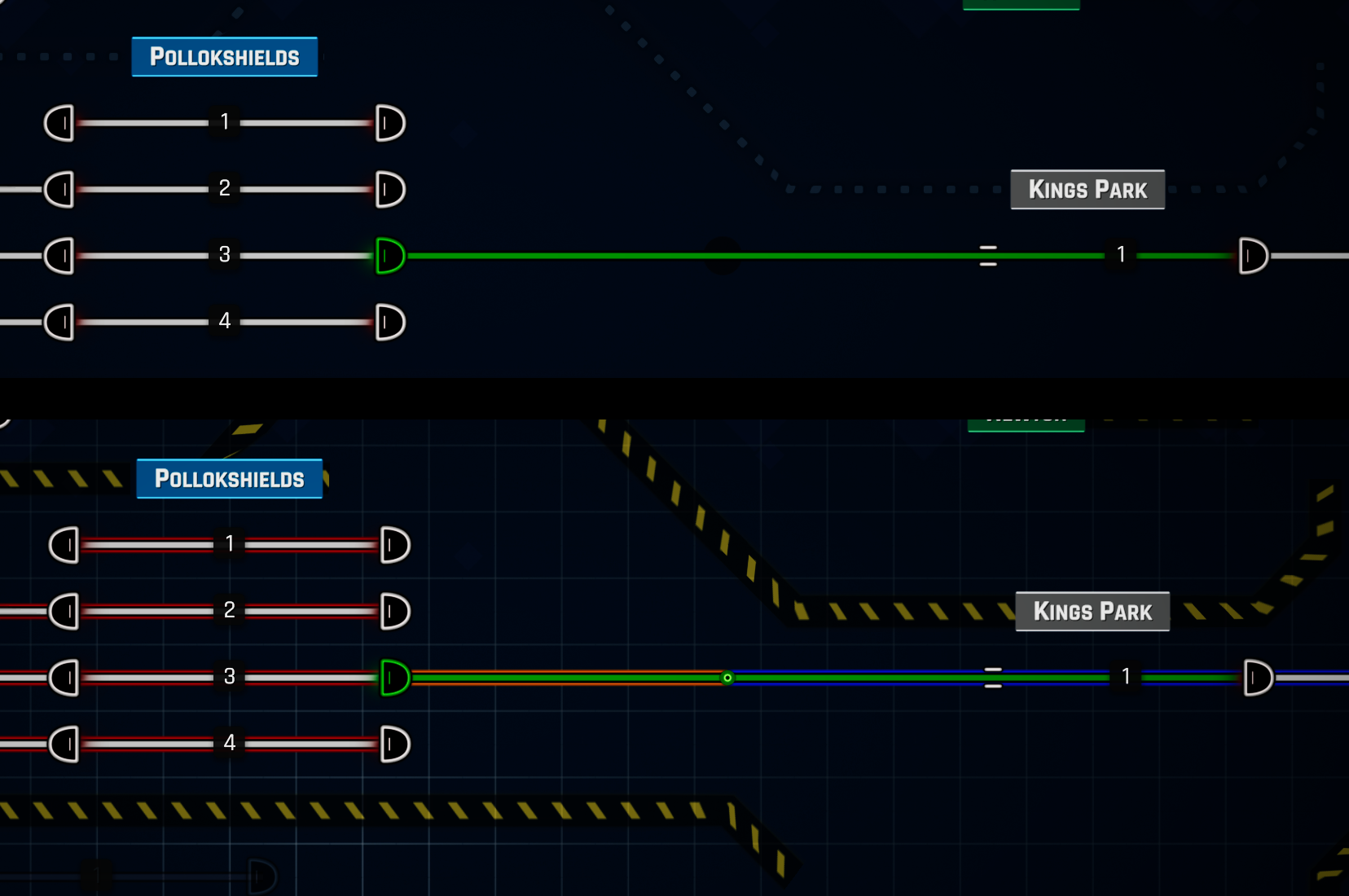
The Simple Switch is placed automatically in between tracks with different speeds, enabling you to connect them seamlessly. It can also be used in between platforms and autoblocks, when they're joined, and the signal is removed. And, as requested by many of you, it's now possible to place platforms without a signal! Check out this example of a rail network with two autoblocks next to each other:

New Keybinds
We've added two new keybindings. The first is quickly opening and closing the build menu using the "B" key on the keyboard or "X" on the controller.

The second keybinding added is for cycling through time, which can be found by pressing the "`" key on the keyboard or pressing the right stick on the controller. With this keybinding, you can quickly cycle through how fast the time flows.

In addition to these new keybindings, the build menu itself will be improved in following UI update (not part of 11), which will include additional features such as cycling through build items with navigation keys (Q/E or shoulders on the controller), fast cycling through the mouse wheel, and the ability to assign shortcuts (1-9) to specific build items. With these additions, your construction process will be more efficient and streamlined.
Changes to Map Editing
When you save a map in the editor, we now compute the routing table and save it to the map data. This means that we no longer need to compute the routing table every time you load the map, resulting in faster load times and smoother gameplay. With this change, you can jump into your maps and start dispatching trains faster.
Previously, you could purchase stations and autoblocks next to any already bought station, but now you have the freedom to choose where to buy them without any restrictions.
Sometimes, when our path algorithm is leaking during the map saving, it may put a wall around your map to "close it" and prevent any issues from arising during gameplay. You can easily remove the wall and redo your map if necessary.
Update 11: April 24th
We're thrilled to release Update 11 for Rail Route on April 24th and can't wait for you to experience all the new features and improvements we've made. From the simple switch that enables more creativity in your builds to the faster load times and improved construction as a whole, we've worked hard to ensure that this update provides you with a better gameplay experience. We'd like to extend our sincere thanks to our dedicated community for their continued support and feedback. Your input helps us create the best train dispatcher game possible. We hope you enjoy playing Rail Route as much as we enjoy developing it.
Happy Dispatching!
Angel
Don't hesitate to reach out to us on Discord, Twitter, Facebook, or our Homepage. If you have any questions, or comments, I'm always eager to hear from you under the article!
https://store.steampowered.com/app/1124180/Rail_Route
https://store.steampowered.com/app/1896900/Rail_Route_The_Story_of_Jozic/
RailLog #11: Behind the Scenes of Development and Testing
It's been an exciting week for the Rail Route development team as we've been putting the finishing touches on the upcoming Update 11 for our train dispatcher simulator game. This Update is packed with new features and improvements that we can't wait for you to experience. We spent a considerable amount of time last week perfecting the new features and tirelessly bug-fixing, and we're eager to share more insights with you about how we structure our work on the game that we all love. The series will be a little different this week, as I'll give you a deeper look into our development process.
Staging Branch
One critical part of our development process is the Staging Branch, where we release a version of the game to a small, closed group of active members in our Discord community. This version includes all of the significant features planned for the upcoming Update. We only release it once we're confident no critical issues will hinder your gameplay experience. From here, we start gathering early feedback from our community and actively work on fixing every reported problem.

This feedback process takes about a week or two to ensure we address every reported issue before we proceed to the next stage. Once we're confident that there are no critical or regression issues, we begin preparing the Update for release onto the Unstable Branch, bringing it one step closer to its official launch.
Automated Tests
Before I dive into our next stage of an Update lifecycle, the Unstable Branch, let's jump onto a different topic. Although we have a small development team, we are committed to ensuring that our developers don't have to rely on external QA teams to catch issues with the game. So, how do we test the game? We write our automated tests as a part of the development process!

Our tests include both unit and integration tests. Unit tests allow us to test small, internal code fragments to ensure their correctness. They are primarily used on the core game logic - train movement, sensor activations, modification to the rail network, etc. Here's an example of a test that tests whether an arrival sensor is correctly activated for a simple scenario. The most significant benefit of these tests is they run blazingly fast in a split of seconds for more than two hundred of these tests.

Integration tests, on the other hand, cover real player scenarios and the issues we've encountered in the past. They try to simulate actual player behavior and run in full graphical mode. That means they are slower but cover many more possible issues. We aim to cover most problems reported with automated tests so the issue doesn't resurface. We understand that it's not always possible to catch every single bug, but we make every effort to minimize the possibility of issues occurring.
Developing a comprehensive automated testing framework requires time, effort, and resources. However, it's worth it, as it ensures that our game is of the highest quality possible and minimizes the possibility of issues slipping through the cracks. By investing in our automated testing, we're confident that we're providing our players with the best experience possible.
Unstable Branch
Our Unstable Branch is available for all members of our Discord community. After the Staging Branch has been thoroughly tested and all critical and regression issues have been addressed, we release the latest version to the Unstable Branch. This allows us to gather even more feedback and insights from our dedicated player base before we prepare the release for the Main Branch. Typically, the version sits on the Unstable Branch for a week or two while we monitor any reported issues and make necessary adjustments. We highly encourage players to join our beta test by becoming a part of our Discord community. Your feedback is extremely valuable in helping us ensure that Rail Route is the best train dispatcher game it can be.
Joining our Discord community is critical for players who wish to report any issues they encounter while playtesting Rail Route. This is because we need direct chat contact with players who report issues. It lets us obtain all the necessary details to diagnose and resolve the problem effectively. By having a direct line of communication with our players, we can work together to ensure that the game runs as smoothly as possible and that any issues are addressed quickly and efficiently. Unfortunately, our small dev team doesn't have the resources to monitor more locations where bugs could be reported. So if you want to help us improve Rail Route and be a part of the development process, joining our Discord is the best way!
Issue Management
We internally use YouTrack as a ticketing tool. It helps us keep track of reported issues and work on them organizationally and efficiently. With a ticketing tool, we can easily assign issues to specific team members, prioritize them, and track their progress. This allows us to ensure that every issue is addressed and resolved and that nothing is left behind.

Additionally, it provides transparency and accountability, as we can easily see who is working on what and when. Overall, using a ticketing tool is a key component of our development process and helps us ensure that Rail Route is the best it can be.
Update 11 release date
We are confident that Update 11 will be ready on April 24th.
I hope you've enjoyed a little different blog post this time. I am still unsure whether I should keep weekly or bi-weekly blog posts, so let me know :). Give me your comment or thumbs up; thanks! See you then.
Happy Dispatching!
-Angel
Follow us:
https://store.steampowered.com/app/1124180/Rail_Route
https://store.steampowered.com/app/1896900/Rail_Route_The_Story_of_Jozic/
RailLog #10: Upcoming Update 11
I'm excited to be back with another Rail Log, where I'll share the latest Rail Route development team insights. It's been a busy couple of weeks for us, and we've made great progress on new features that we can't wait to share with you. In this blog post, I'll be going into detail about these features, so sit tight and get ready to learn more about what we've been up to! And what you'll see in the upcoming Update 11, which will be live this month during April!
By the way, if you want a sneak peek of the update before it hits live, join our community Discord and apply for a closed alpha or open beta test of Update 11. We already got some lovely feedback. It helps us finish this last mile in this significant milestone of construction UX overhaul. Under the hood, the game engine has changed significantly.
Build Actions
One of the key improvements we've made in Rail Route is the Build Actions feature. We understand that it's essential for players to have a clear understanding of what they can do at every step of construction, so we've made it easier than ever before.
With Build Actions, players can now see a list of available actions for construction at every step of the way. These actions come with keybinds, making it easy to perform them quickly with a keyboard or controller.
Additionally, we've included a selection wheel that can be accessed with the right mouse button. It allows players to select an action without pressing the key and staying exclusively on the mouse. It was part of your feedback on an article in this series that you want to be able to perform these actions without a keyboard!
Walls Construction
We've also significantly improved the Wall Construction feature. With the new improvements, walls can now be built seamlessly and effortlessly by just clicking at the origin and destination points.
The wall line is computed automatically, making the process much smoother than before. In addition, we've also improved the deterministic behavior of the walls, which means that they behave consistently and predictably.
Scale to Zoom
We're excited to introduce the Scale to Zoom feature. We understand that some game elements require clarity, even when you're zoomed out, and that's why we've made it easier than ever to see these elements. With Scale to Zoom, elements such as train timelines, labels, construction actions, and the selection wheel will now be scaled automatically to remain easily readable when you zoom out.
We're excited to hear from you about other possible uses for this feature. Do you have any ideas for other game elements that could benefit from being scaled to zoom? Let us know in the comments!
Sandbox Mode
A new feature that offers players the opportunity to let their creativity run wild. With Sandbox Mode, players can start an endless game with unlimited money and/or all system upgrades unlocked. This means that players are free to experiment with different strategies and build their rail network without any restrictions.
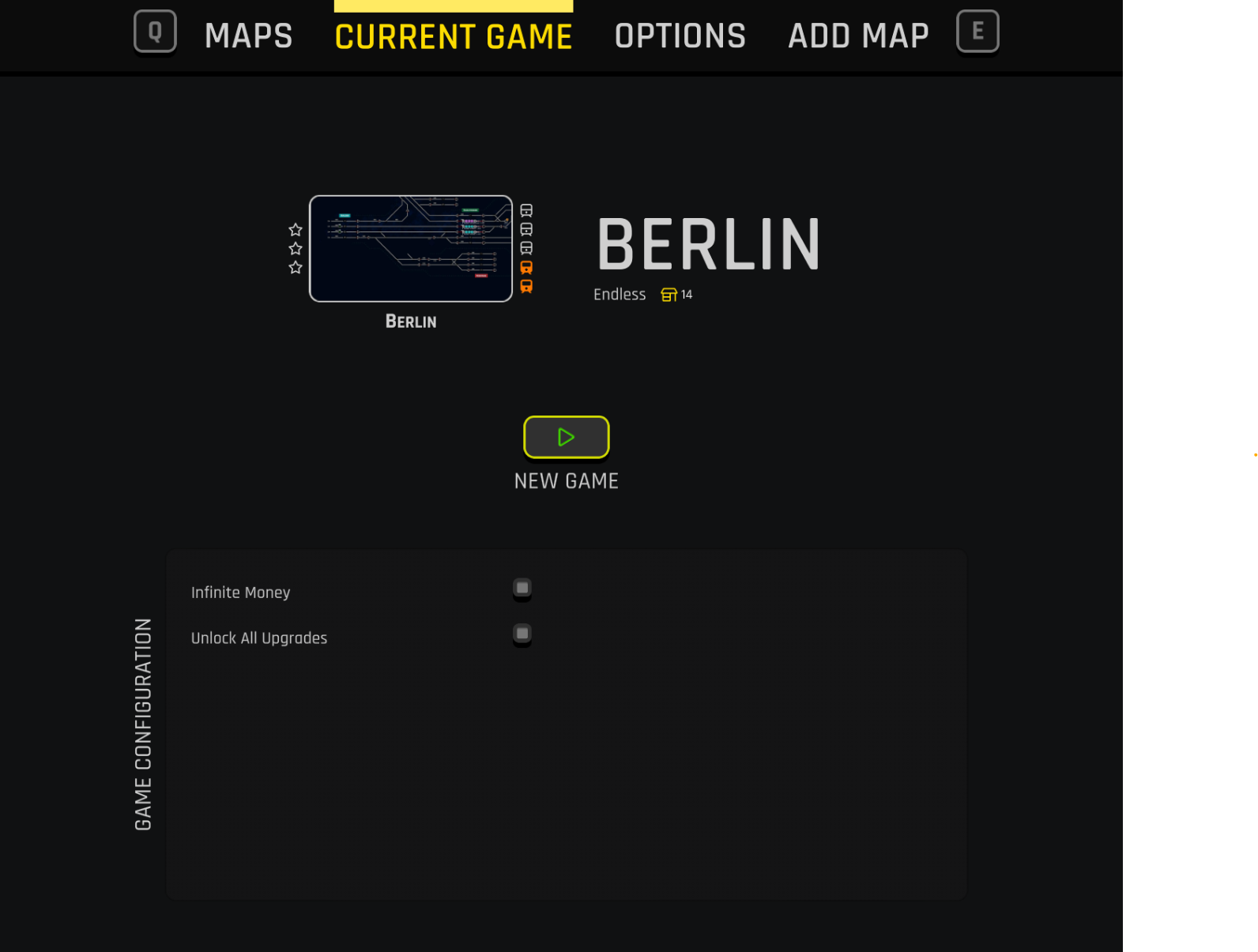
Whether you're a seasoned player looking for a new challenge or a newcomer to Rail Route, Sandbox Mode is the perfect way to explore the game in a way that suits your style of play. So why not dive in and see what kind of rail network you can create? The only one YOU WANT!

See you next week. Happy Dispatching!
-Angel
Follow us:
https://store.steampowered.com/app/1124180/Rail_Route
https://store.steampowered.com/app/1896900/Rail_Route_The_Story_of_Jozic/