
UPDATE: Localizations (nl: ui; no: ui)

FIX: Could not extend track from dead-end track with sensor attached
FIX: Locked station info panels had wrong collider
FIX: Station sign were performing click action even when active selection for station
FIX: Time panel were underneath the Overview after contract acceptance

Rail Route
Hotfix 1.12.10
Summer Sale Special: Get Rail Route at a 20% Discount!
We're thrilled to participate in the Steam Summer Sale, where we're offering a 20% discount on Rail Route. This is the perfect time to dive into the world of train dispatching and build your own railway network. Don't miss out on this limited-time offer to start your Rail Route journey at a discounted price.
See you on the tracks!
https://store.steampowered.com/app/1124180/Rail_Route
https://store.steampowered.com/app/1896900/Rail_Route_The_Story_of_Jozic/
Hotfix 1.12.9
NEW: Station Info Panel is closed if not moved from initial position upon 2nd station sign click

UPDATE: Station Info Panel is being created at initial hover scale
UPDATE: Station Info Panel is scaled to zoom on hover


FIX: Contract accept was not available in Focus View
FIX: Regional train was missing in Advanced Routing Sensor & Advanced Departure Sensor config
FIX: Selected contract leg in offered contract focus view was not scrolled to when changing select leg
FIX: Station Info Panel disappeared after Focus Views
FIX: Station info panel with adjusted scale shown on station sign hover would not show in correct position
FIX: Station were not selected for the configuration properly
Rail Log #19: Full Steam Ahead on the Updates!

Hey there, rail enthusiasts and system-builders! Today, we're chugging along with some new updates and tweaks, based on the incredible feedback you've been providing. So, let's get down to the nitty-gritty of the upcoming changes. Prepare for departure!
Hotfix for Update 12
We've just released a quick hotfix for Update 12, smoothing out some of the rickety joints and polishing the shiny new station info panels. They now appear on mouse hover and stays at their position once sign is clicked. You can then decide where to put them, either left edge, right edge or just leave them on board.

- NEW: Added reject contract and contract info buttons to contract modification info panel
- NEW: Keep station info panel in position close to sign after station sign clicked
- UPDATE: Change close icon on station info panel - x sign instead of bin, no red color
- UPDATE: Info panels on board expand to bottom instead of top when settings are clicked
- UPDATE: Locked station info panels on board dont show time offset slider on hover
- UPDATE: Modification of platform possible also for trains waiting or already running if station visit not happened yet
- UPDATE: Platform button icon & tooltip in editor updated to be more understandable.
- UPDATE: Removed pin info panel functionality as panels are now always pinned
- FIX: Construction mouse lightning were broken
- FIX: Contract modification button tooltip had extra new line
- FIX: Error thrown when clicking adjust contract button on one-time freight train
- FIX: Money was overflown when amount reached 2,147,483,647
- FIX: Non functional build button for platforms was shown in editor
- FIX: Offered contract icon and station info panel timeline visit train name popup had incorrect sorting orders
- FIX: Overview panel was visible in focus view
- FIX: Station info panels could be shown in Rush Hour maps
The Sprint to Update 13
Remember when we talked about our 'continuous delivery' model and faster summer development cycles in a previous Rail Log? Well, expect Update 13 to arrive faster than a high-speed express train— a week or two, tops! We've been scribbling down your feedback since Update 11 and are implementing changes to the Construction User Experience accordingly.

Revamping the Radial Menu
We've heard your calls about the radial menu— and we agree, right-click was the wrong click! We're introducing an 'empty-handed' mode for all your modifying needs, from upgrading/downgrading tracks to rotating signals and moving items. Once you select a build item, you can either build it or right-click will put it back in your pocket, freeing you up to return to your modifications. No radial menu there.

Bulldoze— Fast and Primary Options
When your hands are empty, we offer more flexibility with your right mouse button. You can set it to close a construction mode, do a quick bulldoze, or show our good o' friend radial menu. Yes, you're right, this does sound like we're satisfying those who have been using right-click to bulldoze.
But that's not all! Say hello to a primary bulldoze action, with options to remove the entire track or just a partial section. This means more customization and control, perfect for our system builders and puzzle solvers out there.
Station Configuration Focus View
In the upcoming Update 13, we're introducing station configuration focus view. Press the configure key (middle click, V on keyboard or Y on controller), and you'll get a comprehensive station configuration view to modify all your stations at once but most importantly, close to your mouse, at your disposal.

Improved Keybinds
For all you shortcut lovers, we're making our keybinds even better. We're adding a keybind for every action, giving you granular control over your interface. Missed out keybinds? Don't worry; they're on their way!
That's all for this update, folks! Remember, we're here because of your valuable feedback. So don't be shy, keep those comments coming! Join our community Discord for more chat, updates, and all things Rail Route.
Stay tuned for our next stop, the exciting journey continues. Until then, happy rail routing!
https://store.steampowered.com/app/1124180/Rail_Route
https://store.steampowered.com/app/1896900/Rail_Route_The_Story_of_Jozic/
Update 12 is Live: Discover What's New in Rail Route!
We're thrilled to announce that Update 12 has officially left the station and is now live! After an exciting journey through the development tracks, we're ready to unveil the new features and improvements that we've been working on. Here's a quick rundown of the key highlights:
Notable New Features:
- Revamped UI: The in-game user interface has been upgraded with new elements like info panels, context panels, and bottom bars, enhancing your gameplay experience.
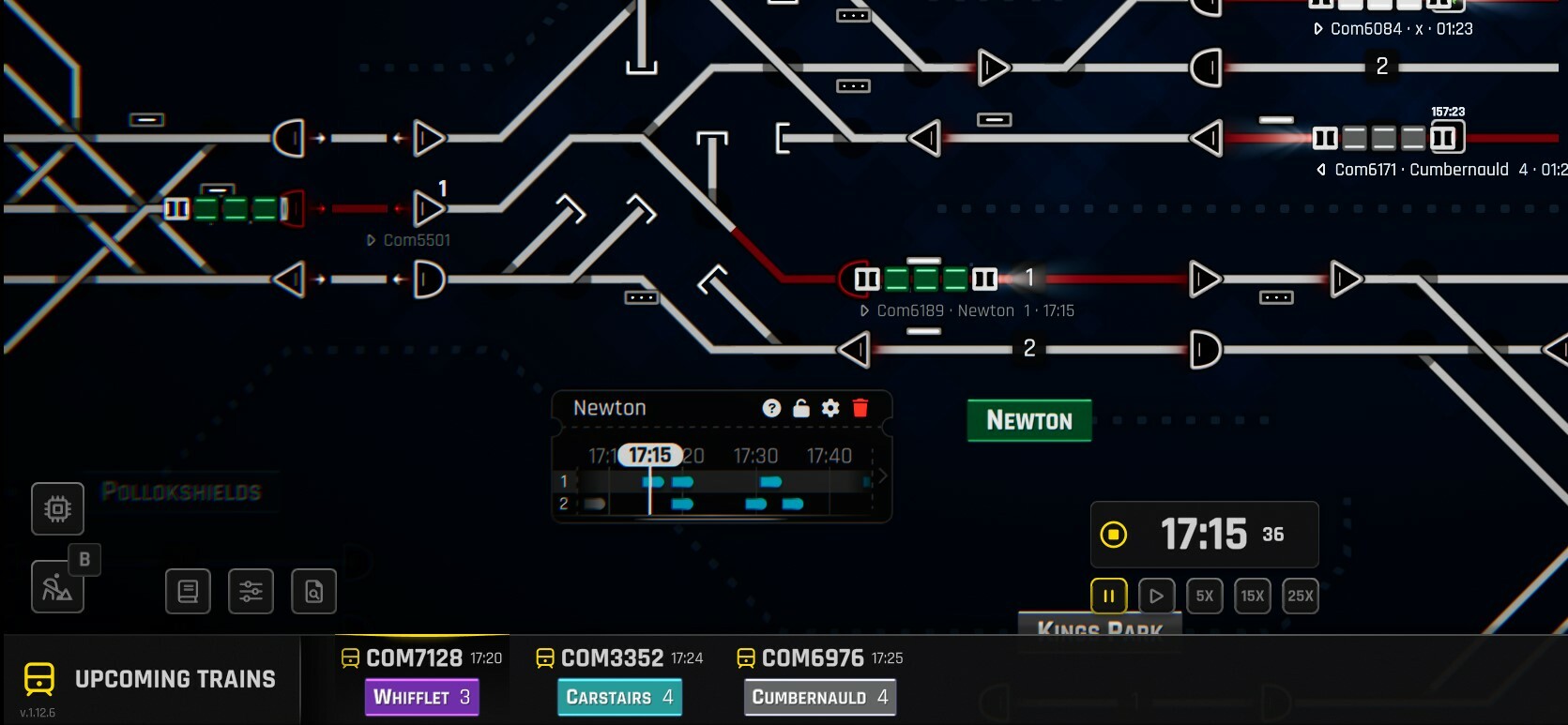
- Expanded Gameplay: With the addition of multi-legged trains, the possibilities for your railway empire have expanded.

- Contract Management: The active contract schedule editing in the Contract Focus View has been improved for better contract management.

- Enhanced Train Controls: We've added 'Stop' and 'Run' commands to the train controls, giving you more control over your railway operations.

- Improved Train Management: A new button allows you to set up a train to be dispatched from the coach yard in reverse when relevant.
Notable Updates:
- Visual Upgrades: We've updated the visuals of the buttons for a more modern and intuitive look.

- Regional Train Contracts: The bottom bar schedule for offered regional train contracts has been improved for better planning.

- Localizations: We've updated the localizations for a more inclusive gaming experience.
- Customizable Interface: The overview panel is now toggleable and disabled by default for a more customizable interface.

We're incredibly excited for you to experience these new features and improvements in Update 12. Your feedback has been instrumental in shaping this update, and we can't wait to hear what you think.
Please note that we're planning to address some additional changes throughout the coming week. We're committed to bringing even more fluent controls and will be making adjustments based on your feedback. The changes in this update are astronomically big, but don't worry, we'll be iterating over them.
In the coming weeks, we'll also be releasing some changes to the building UX, especially how the right mouse button is used. We've identified some UX flaws there and are working hard to improve them.
So, are you ready to explore the new horizons of Rail Route? Update 12 is waiting for you at the station. All aboard for a thrilling journey!
Full Changelog
News
- Accept more contracts hint shown when no upcomming trains are shown in general bottom bar
- Added 'Stop' and 'Run' commands to the train controls
- Added hold button and replaced train stop start and tutorial skip buttons with it
- Added ingame UI elements like info panels, context panels, bottom bars and other new UI
- Added support for multi legged trains in train bottom bar
- Added support for urban trains in train stop visuals
- Button to set up train to be dispatched from coach yard reversed (loco pushing the train) added to Train Bottom Bar, displayed only when relevant.
- Display precise transfer time of trial train between stations for easier schedule modifications
- Focus view for Offered Contract
- Individual contract legs can be selected by clicking them in the offered contract bottom bar
- Multi-leg contracts displayed in Active Contracts view
- Multi-leg contracts generated for stations with Coach Yard
- One-off contracts can be configured to arrive later when accepted but further modifications to their schedule are forbidden
- Show keybind hint for configure acton on bottom bar
- Time shifting for offered contract
- Train alert for trains stopped by user
- Train finished & reverse sounds
- When Trial train is finished, info panel is shown to accept / decline contract
Updates
- Active contract schedule edited in the Contract Focus View
- Added current time above indicator line in station info panel timeline
- Added new button style and improved existing buttons visuals
- Added scroll area to interface configuration panel for lower resolution displays
- All Upgrades for Overview panel removed and unlocked by default
- Animated score icon instead of entire panel when Rush Hour wave completes
- Assigned the same state colors from new UI buttons to old UI buttons
- Changed all old UI to use new colors
- Clicking upcomming train item now shows train bottom bar for that train
- Construction mode switched off when main menu opened
- Contract.OwningStation introduced, contracts generated for stations where free slot still available. Contract limit adjusted to 2 per station & More Contract... upgrades unlock 3/4/6 contracts per station
- Default Configure Keybind - middle mouse with alternative 'V'
- From, mandatory and to stations no longer clickable in active contracts panel
- Hidden left and right buttons on train bottom bar for single leg trains as they are unused
- Improved bottom bar schedule for offered regional train contracts
- Info panels are added to the other side when the prefered spawn location is full
- Localizations (nl: achievements, tutorials, ui; zh-Hans: tutorials, ui; de: ui; no: ui; ru: ui)
- Localizations (nl: research, tutorials, ui; zh-Hans: research, tutorials, ui; no: ui)
- Made overview panel toggleable and disabled by default
- Moved configuration panel close button to top right of panel
- Moved existing detail panels to configuration panels
- Multi legged contracts can now show contract legs in active contracts panel
- New sprites for joystick button press L and R
- One-way contracts (to and from coach yard) generation turned off - were replaced by multi-leg contracts
- Overview panel properly display highlighted and selected trains
- Platforms selection for offered contract
- Randomization of expected average speed removed for freight, recurrent IC, commuter & regional contracts. Max train speed used instead to simplify contract selection. Reward adjusted to compensate.
- Reg trains accepted to, displayed in & auto-dispatched from Coach Yard
- Replaced old automated contracts manager panel with new configuration panel
- Research points on the top can be clicked to open the system upgrades menu
- Reward for one-off single-leg contracts no more comprises red point; contracs offer twice as money instead
- Reward for single-leg IC contracts no more comprises red point if expected speed is above 100 km/h
- Reward for urban transit contracts no more comprises green point
- Reward for urban transit contracts no more dependent on average speed, only on number of unique stations. Max speed reduced to compensate & freigh train max speed reduced as well to balance.
- Station Colors are unlocked by default and are not an Upgrade anymore
- Station configuration panel elements replaced with new UI variants
- Story Of Jozic's chapters that are related to getting red experience point have been removed as the basic track upgrade is no longer requires red points to be unlocked.
- Train bottom bar shows selected train in map editor
- Train that is being modified is highlighted in station info panel timeline
- Train timeline is showing times
- Upcomming trains on bottom bar show station of arrival and are clickable
- Urban trains rewards per station increased significantly
Fixes
- Actions with keybinds would still fire while typing in some input fields
- Adjust active contract button was shown on train bottom bar in timetable and rush hour mode
- Auto scroll to current destination in timetable adjustments panel could cause interactions to be misaligned from destinations
- Build button was not shown in system upgrade tutorials
- Buttons with hover scale effect got stuck mid animation when clicked
- Camera movement with keys stopped working after closing configuration panel with button
- Construction cursor were scaling with zoom from wrong pivot
- Error when trying to get previous or next instance of train in timetable map for train bottom bar
- Game over modal was not navigatable with controller
- Handling of possible NRE when unbinding virtual cursor
- Keybind hints where shown as text for other input device then current if no binding existed for current input device
- Missing text highlights in cycle report
- Mouse pointer was not reenabled after modal was shown during story when using a gamepad
- Navigation highlighter was destroyed when loading a map
- Previous and next legs on train bottom bar where not available for trial train
- Reverse and Adjust timetable buttons on train bottom bar did not listen to shown keybind
- Scrollbar had incorrect colors setup
- Selecting different train in editor station info panel timeline would not deselect previous train
- Slider handle still animated when slider was non interactable
- Some menu pages did not reenable navigation on correct elements when switching pages or opening menu
- Station info panel timeline train highlight out of panel when train with 2 stops on the same station was selected
- Station info panel timeline visit highlights could show outside of panel
- Station info panel train labels overlapped research panel
- Station info panels had disabled station color when switching contract legs in offered contract focus view
- Time control bindings stopped working when closing system upgrades with toggle button
- Time could overlap buttons above bottom bar on large UI scales
- Timetable and Rush Hour trains did not work in train bottom bar
- Train schedule did not fit properly in train bottom bar
- Train stop in train bottom bar schedule had black time text when station has yellow sign
- Trains already in selected state were not highlighted in station info panel when panel is created
- Trains scheduled in the future could not be selected in the station info panel timeline
- Upcomming train remained highlighted after upcomming train bottom bar was closed
- Various UI Elements where visibile on the map when a Rush Hour wave completion screen was shown
- Zoom in Camera MoveToBounds were wrongly calculated
Full steam ahead, folks! 🚂
https://store.steampowered.com/app/1124180/Rail_Route
https://store.steampowered.com/app/1896900/Rail_Route_The_Story_of_Jozic/
Update 12 Preview: Get a First-Class View with Our Unstable Version!
We're excited to share that the first look at Update 12 is now available through our Unstable version. This is your opportunity to be the first to explore the fresh additions and enhancements we've been laboring over.
Join here: Rail Route Discord
How to join: Unstable version
In this update, we've been fueling the firebox and oiling the wheels to deliver an experience that's as exhilarating as a ride on the Orient Express! From innovative challenges to novel optimizations, we believe this update will ignite your passion for train dispatching and keep it burning brightly. 🛤️
Please note, this is an Unstable version. There might be a few unexpected stops along the way, but our committed team is ready to address any issues quicker than a bullet train! 🛠️
We're still working on the changelog, but we promise to deliver it to you as soon as it's ready. If you come across any issues, we encourage you to share them with us. Your feedback is the coal that fuels our engine and helps us steer Rail Route in the right direction.
We're keen to hear your insights, suggestions, and experiences with the new update. You are the drivers of this community, and your input is instrumental in shaping Rail Route's journey.
So, are you ready for an adventure? Grab your conductor's hat and join us in exploring Update 12! 🚀
Full steam ahead, folks! 🚂
https://store.steampowered.com/app/1124180/Rail_Route
https://store.steampowered.com/app/1896900/Rail_Route_The_Story_of_Jozic/
Rail Log #18: Automating Regional Trains
Staging Success: All Aboard the Progress Train 🚂
Our staging version is shaping up like a well-tuned locomotive. We've been busy resolving all feedback and fine-tuning the last bits of new features - regional trains and focus view mainly. The unstable version will be available on Tuesday evening for all our Discord members. It's like a surprise party, but with more trains and fewer balloons.
The Journey Ahead: Future Adjustments 🛠️
The scope of Rail Route is as vast as the Union Pacific Railroad, and we can't bundle everything together. So, expect final touches in everything we're delivering. The first thing to expect are additional buildings and sensors that enable the regional trains automation and will replace the current Coach Yards, moving them as an Upgrades towards later in the game. It's like giving our game a whole new set of tracks to explore.
The Future of Rail Route: Post Update 12 🚀
As we look beyond the upcoming Update 12, we're excited to share some of the new features and improvements we're planning, mainly targeted at automating regional trains. These changes are designed to enhance the gameplay experience and introduce new challenges for our players. Here's a sneak peek at what's coming:
Shunting Track: Laying the Foundation 🏗️
We're adding a new element that can be built on plain track, without any switches - the shunting track. This will have routing functionality and can execute the next command in a train's shunting queue. It's like giving our tracks a mind of their own!
Shunting Path: The Road Less Traveled 🛤️
We're introducing the concept of a shunting path, a defined route leading to a set of shunting tracks. It's like a secret passage for our trains, making their journeys more efficient.
Train Shunting: Trains with a Brain 🚂
Our trains are getting an upgrade! They'll soon be able to enter "shunting" mode between schedule legs or while waiting for the next leg. This will allow them to have a wait time, a defined next station, and a shunting queue for storing shunting commands. It's like giving our trains a degree in logistics!
Stabling Sensor: The Watchful Eye on the Tracks 👁️
The stabling sensor will be a new addition that can be built on a platform or track. It will monitor trains that are "in shunting" mode and execute commands based on the train's next station and wait time. The commands include routing the train through the shunting path, setting the wait time until the next leg, sending the train back to the platform, and switching the train to the next schedule. It's like having a personal assistant for each train, ensuring everything runs on time - or at least as close to on time as we can get in the world of train dispatching.
Routing Sensor and Auto/Shunting Signal: Simplified and Efficient 🚦
We're simplifying the routing sensor and enhancing the auto/shunting signal to execute commands from the shunting queue if a train is "in shunting". It's like giving our signals a promotion from traffic cop to traffic controller!
Looking Ahead: Continuous Development 🛣️
These additions and changes will enable full regional train automation and preparethe game for future possible shunting traffic of the freights. We aim for smaller and more frequent releases during the summer. We'll see how gradually we'll bring these elements to the game, but we're optimistic!
Now, you might have noticed a distinct lack of images in this post. I'd love to say it's because I wanted to let the words paint a picture, but the truth is, I've been a bit lazy. So, apologies for the lack of visual aids - I promise to make it up to you in the next post!
As we pull into the station for this week's Rail Log, we want to hear from you! Got thoughts on the new features? Feedback on the shunting mode? Or just want to share your experience with the staging version? We're all ears! 🐰
Hop aboard the discussion train on our community Discord. Your input is invaluable to us, and we're excited to hear what you have to say. Until next week, keep those signals green, and remember - a delayed train is just an opportunity for a longer coffee break. Angel signing off. 🚦
https://store.steampowered.com/app/1124180/Rail_Route
https://store.steampowered.com/app/1896900/Rail_Route_The_Story_of_Jozic/
🚂💨 Rail Log #17: The Upgrade Purge & The Golden Stop Button

Last Week's Progress: Staging Success 📈
- Staging version: It's shaping up nicely, like a well-oiled locomotive. 🚂
- Regional Trains: We're all aboard the feedback train, refining and polishing as we go. 🛠️

The Great Upgrade Purge 🧹
- Interface upgrades: We've removed a bunch, unlocking them by default. We realized they were like the caboose - nice to have, but not essential. 🚋
- Colored station signs: Now a standard feature. You can still turn them off if you prefer your stations in monochrome. 🌈

The Stop & Reverse Conundrum 🔄
- 'Reverse once Stopped' and 'Stop & Reverse' upgrades: Removed. The Reverse button now marks the train for reversal. We've added a new sound and animation for this, because who doesn't love a bit of drama? 🎭
- The Golden STOP BUTTON: It's new, it's shiny, and it lets you stop and start your trains. It's like a pause button, but for trains! 🛑

The Road Ahead: Continuous Development 🛣️
- Post Update 12: We're switching to smaller, more frequent updates. It's like snacking, but for game development. 🍪
- Upcoming features: Automation of regional trains and further UI improvements. We're not just removing upgrades, we promise! 🤞
As we pull into the station for this week's Rail Log, we want to hear from you! Got thoughts on the new upgrades? Feedback on the golden Stop Button? Or just want to share your experience with the staging version? We're all ears! 🐰
Hop aboard the discussion train on our community Discord. Your input is invaluable to us, and we're excited to hear what you have to say. Until next week, keep those signals green, and happy dispatching! Angel signing off. 🚦
https://store.steampowered.com/app/1124180/Rail_Route
https://store.steampowered.com/app/1896900/Rail_Route_The_Story_of_Jozic/
Rail Log #16: Accelerating Towards Update 12
A Whistle-Stop Tour of Last Week
Our core mission last week was to roll out the first staging version and voila, it arrived on Friday! It might be a little rough around the edges, but rest assured, we'll have a medium-rare version by this Wednesday - just in time for your midweek gaming session.
Update 12: Taking Shape and Color
This locomotive of an update is hauling a vibrant new UI color scheme, enhanced Bottom Panels, and nifty Info Panels. We're also giving a facelift to Focus Views and introducing Regional Trains to replace the current Coach Yard (CY) contracts. Don't miss the train; Update 12 promises a truly captivating journey!

Last Week's Focus: Colors, Panels, and More
We poured our hearts into finalizing the color scheme last week, and it's done! The new Info Panels also received some final touches and are now 95% complete. We spent some time shining up the Bottom Panels too, with these being just a hair's breadth away from completion.

Not All Smooth Rails: Challenges & Difficulties
We won't sugarcoat it; revamping the entire UI at once is like shunting a mammoth locomotive - it's hard. Keeping two separate UI versions active isn't an option, so we'll roll out the changes more gradually. So, while we polish the edges, bear with us if you spot any inconsistencies. Your patience is appreciated, and we promise to iron out these creases in the upcoming updates.
Navigating the Transition: Old Meets New
Change can be exciting, but we understand if some of you might feel a pang of nostalgia for the old overview. Fear not, dispatchers, for we've got you covered! You can still turn on the old overview whenever you like. The best part? Now you can have your detailed view and overview simultaneously! Keep a close eye on the upcoming trains while soaking in the new improvements. It's the best of both worlds, all in one!

Stop & Go: A Fun New Mechanic!
By the way, did you know there's a brand-new way to stop and start your trains?


Ahead Full Steam: This Week's Focus
Our sights this week are set on refining contracts. Expect tweaks to enable prior acceptance, fine-tuning, and a possible retrial feature - if your feedback nudges us in that direction. We're also chugging full steam ahead with the Regional Trains!

Introducing Regional Trains: A Fresh Approach to Contracts
Wave goodbye to the old Coach Yard contracts as we are ushering in a new era with the introduction of Regional Trains. These are not your usual one-leggers, but instead, are composed of multiple legs, bringing a fresh challenge and a new layer of complexity to your dispatching adventure. These multi-legged beasts are all set to replace one-legged contracts, providing a new source of red points. So, you might want to reject your old contracts and hitch a ride with the new ones.

Regional Trains: A Deep Dive
Each Regional Train contract comprises of 2 to 3 legs, bringing a fresh dimension to gameplay as you handle the transfer in between these legs. You'll need to carefully plan for waiting times and consider how to best utilise your space. This introduces a dynamic new element into gameplay that will keep even the most experienced dispatchers on their toes.
Coach Yards and Regional Trains: An Exciting Partnership
With Regional Trains entering the scene, Coach Yards are due for a makeover. In anticipation of the changes, Coach Yards are set to become a Tier 3 upgrade. This means they'll serve as a valuable asset later in the game when space becomes a luxury. You can utilise Coach Yards to temporarily store a train from a Regional Train contract.

Release Date: 26th Jun
There can be delays on the track.
As we approach the final station for this Rail Log, we want to hear from you! Have a stellar idea for the contract adjustments? Or a creative suggestion for the Info Panels? Or just want to share your experience with the new Regional Trains? We're all ears!
Feel free to comment below, or join the conversation on our community Discord. Your input is invaluable to us, and we are excited to hear what you have to say. So hop aboard the discussion train!
Until next week, keep those signals green, and happy dispatching! Angel signing off.
https://store.steampowered.com/app/1124180/Rail_Route
https://store.steampowered.com/app/1896900/Rail_Route_The_Story_of_Jozic/
Rail Log #15: Breathing Life into UI
Spoiler Alert: All the fantastic updates you're about to discover will be arriving in Update 12!
Info Panels
Our primary focus has been the introduction of Info Panels, an idea nurtured by the feedback we've received from you all. Info Panels are customizable panels that can be placed either on the left or right side of the screen or directly on the game board, providing key information right where you need it.

Station Timetable
One of the key Info Panels we've introduced is the Station Timetable. We've heard your requests for a detailed view into the station's timetable, and we've made it happen! Now, you can pin any station to have an easy glance at all the trains passing through at a given time.

Note: The longer variant will show longer period then on the picture
Configuration
The best part? Each Info Panel can be configured to your liking. For instance, the Station Timetable panel allows you to choose which platforms should be visible and whether there should be an offset applied. You also have the flexibility to choose between a smaller panel showing 30 minutes in advance or a larger one revealing 80 minutes ahead.


Onboard Info Panels
When an Info Panel is placed on the game board, it stays put, enabling you to "decorate" your game area with context-sensitive information. And yes, we're considering options for size adjustments and zoom sensitivity to ensure maximum flexibility.

Other Info Panels
While the Station Timetables will be the main Info Panel in Update 12, we're already mulling over introducing more of them, like a Train List Overview. But let's keep that for the future. For now, we're excited to see your response to the current updates.
Bottom/Other Panels
Next, let's delve into the revamped bottom bar. We're relocating node details to a configuration panel on the right, which now houses the sensor configurations. But remember, this is just a pit stop. We plan to bring these panels onboard via Focus Views soon!

Train Detail
Don't worry, we haven't forgotten about the Train Detail panel. It still finds its place at the bottom of the screen, albeit in a much more compact form. The space now has multiple uses, depending on the game context.

Build Bar
The Build Bar takes centre stage during construction, replacing the previous left panel and giving you more horizontal space. You can quickly navigate through buildables using the keybinds Q, E, mouse wheel, or assign hotkeys 1-9. And yes, we plan to reintroduce category delimiters for better visual guidance.

During an Offered Contract Focus View, this bottom bar will provide insights into the planned timetable of the contract, keeping everything at your fingertips. As well as as customer set of info panels to give you the context for the contract!

And much more coming!

It's been a delight working on these updates, and we can't wait for you to experience them. Your feedback has been instrumental in shaping these changes, and we hope they'll bring a whole new level of convenience and fun to your Rail Route journey. Btw. if you would really like to see
We're just about to wrap up, but we want to leave you with an invitation to get involved. We've designed these new UI changes with our players in mind, but the real joy comes in hearing directly from you.
If you have ideas for a standout feature for station info panels, something that would make the game experience even better, we want to hear it. We're a few weeks out from the Update, which means there's still time to make tweaks and add features based on your suggestions.
So don't be shy, join the conversation! Drop us a comment below, join our Discord community, or reach out on social media. Your suggestions have the potential to shape the future of Rail Route and make the gameplay even more exciting. We look forward to hearing from you!
Get in touch with us on:
Keep railroading, and see you in the next week or two!
-Angel
https://store.steampowered.com/app/1124180/Rail_Route
https://store.steampowered.com/app/1896900/Rail_Route_The_Story_of_Jozic/