
NEW: Auto-save the current game (if possible & needed) when new game is started, not to lose any unsaved progress in case of accidental clicking

UPDATE: Loading screen between levels updated to match the screen on initial game load
UPDATE: Localizations (de: ui; fr: ui)


FIX: Navigation could get lost in some cases and navigation highlighter did not fit properly on some elements
FIX: Rush Hour maps saved after Update 8 (savedMap.bytes format) did have all stations visually unlocked from beginning (but the traffic spread to them wave-by-wave as usual)
FIX: Rush hour mode configuration screen is missing entries
FIX: Starting the story would show the map before showing the illustration
FIX: Station listings in stations panel in editor flashed white when opening
FIX: Steam Deck controllers were not working
Rail Route
Hotfix 1.10.3
Update 10 is OUT, let’s celebrate Valentrains Day
Menu and game scene combination
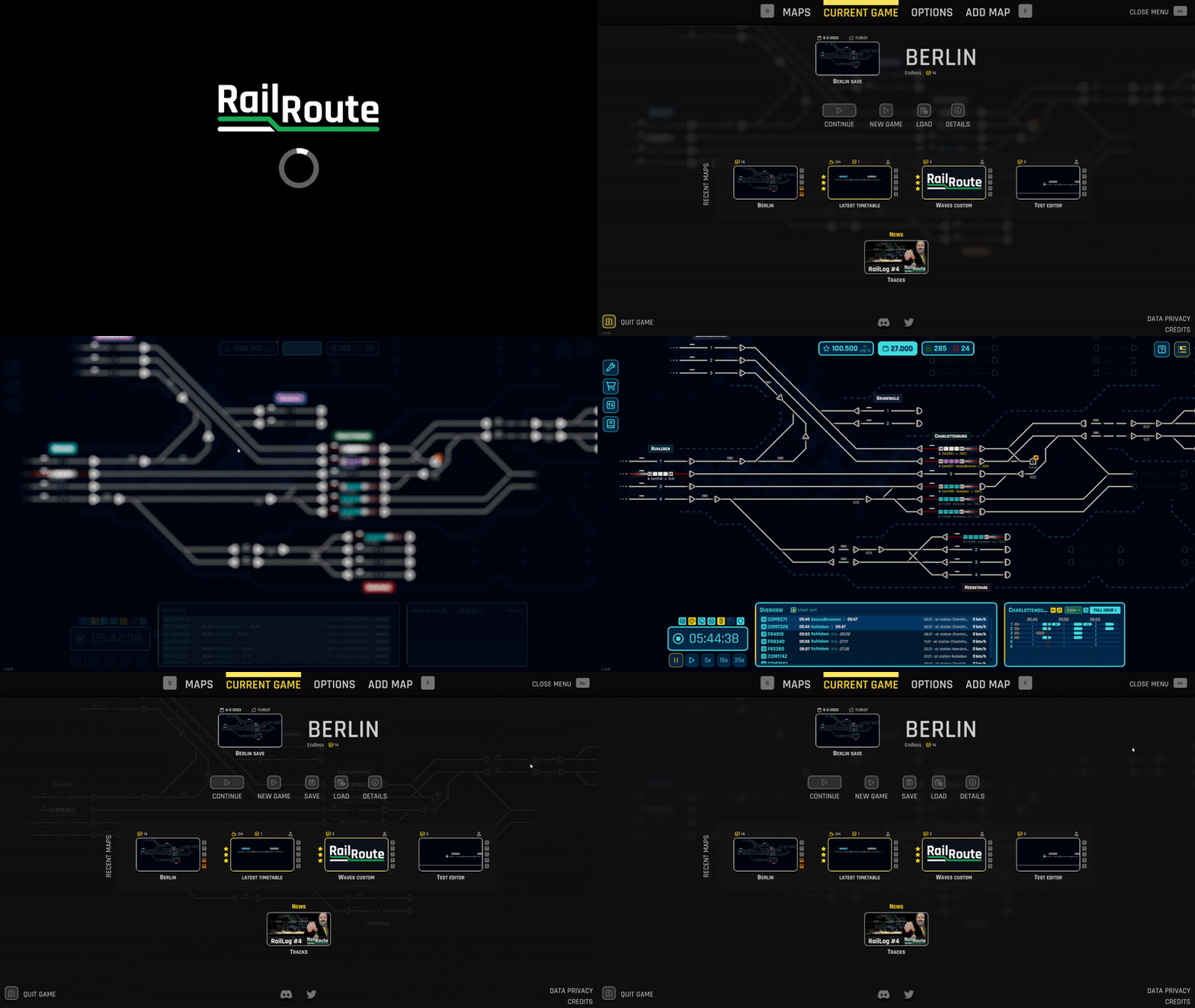
As a fairly large change internally, we have combined the menu and game scenes resulting in improved loading times and an overall improved user experience. Upon loading the game for the first time, your last played game or edited map will be loaded in the background. Allowing you to quickly resume where you left off.This change is also part of our transition to the new user interface style and better controller support as we are slowly updating all UI elements.In addition this changes makes it easier for us to improve loading times ever further in the future when switching between editing a map and playing the map as we would not have to load the level twice, once for each mode.
Naming new saves
As a quality of life improvement we added the ability to give your save a name before you make a save. Previously you had to save the game, open the load game menu and then edit the name of your new save. And all this is now also done in our new UI style.

Featured maps
As talked about in last week's News post, we added a featured maps section to the main menu.You can find this next to the News section. Here we will feature a map from the workshop that we or the community loves and want to highlight. You can play the map the same way the contest currently works.

New loading screen
Upon opening the game you will notice that we have a new loading screen! This loading screen looks a lot better than the simple black background with a simple loading icon that was there before.The new look fits a lot better with the game, look at that train go!

Open in workshop button
It may not be a big addition but it's nice. On maps that you downloaded from the Steam Workshop, you will now see a “Workshop” button. This will open the map on the Steam Workshop.

Bug fixes
As always we created, found and fixed a lot of bugs with this update. Everything from completely broken saves to buttons not showing when they should.
RELEASE
NEW: Featured map shown on current game page
NEW: Open in Workshop buttons displayed on Current Game and map detail pages when relevant
NEW: Previous save loads immediately after game starts, menu is displayed as overlay over it. Works as pause menu as well.
NEW: Skipping cutscenes action added
NEW: Conguent map added for Valentine's day celebration
UPDATE: Localizations (cs: achievements, research, tutorials; de: ui; hu: achievements; fr: ui; nl: all; no: ui; pl: all)
UPDATE: New loading screen upon game start
UPDATE: nl is now considered translated while jp and de in progress (fell below 90 % threshold)
UPDATE: Removed Reset All button from Options
UPDATE: Updated graph to new UI style and added Rush Hour progress graph to current game page
PERF: Start-up speedup - do not populate Upgrades UI in non-endless levels
FIX: Active contest could hide map item
FIX: Closing panel button for some panels in editor did not work
FIX: Closing modal when another is open unpaused time when it should not
FIX: Controller support could break after moving analog sticks
FIX: Detail pages for contest and featured map did not show correct screenshot
FIX: Flying score elements where invisible on Rush Hour wave completion
FIX: Keybind to reset ui scale did not apply to the scale of the main menu
FIX: Keybound buttons were triggered even when button was hidden
FIX: Loading failed when a referenced station no more existed
FIX: Losing wave 3 in prague rush map took player back to prague and finished the story
FIX: Map string field was not interactable
FIX: Menu scale was too small
FIX: Navigation did not work on some modals in the menu
FIX: Penalization log was not cleared when a map was edited so it was stored in savedMap.bytes and doubled on each editing
FIX: Perpetual route toggle could be set even when that upgrade was not unlocked
FIX: Removing all saves from active level while game over screen was shown still showed restart from last save button
FIX: Rush Hour tutorial being played on each map even if skipped
FIX: Save loading failed for saves containing overriden routes from some signals.
FIX: Second of music was played when starting game
FIX: Story didnt continue when save modal was opened and time keybinds didnt work after load
FIX: Story save before Prague Rush story could not be found when another level was loaded before
FIX: The background blur was removed when the delete map dialogue was hidden while the menu was still shown
FIX: Time keybinds did not work upon continuing save after first game load
FIX: Timetable panel was empty when returning to editor after a trial train
FIX: Various UI elements had incorrect sorting orders resulting in incorrectly hidden or shown elements
FIX: Walls buttons were missing in the editor
Upcoming Update 10
We're back with our fifth RailLog - this time, focussing on some more quality of life changes for Rail Route. Hope you enjoy!
Menu and game scene combination
As a fairly large change internally, we have combined the menu and game scenes resulting in improved loading times and an overall improved user experience. Upon loading the game for the first time, your last played game or edited map will be loaded in the background. Allowing you to quickly resume where you left off.
This change is also part of our transition to the new user interface style and better controller support as we are slowly updating all UI elements.
In addition this changes makes it easier for us to improve loading times ever further in the future when switching between editing a map and playing the map as we would not have to load the level twice, once for each mode.
Naming new saves
As a quality of life improvement we added the ability to give your save a name before you make a save. Previously you had to save the game, open the load game menu and then edit the name of your new save. And all this is now also in done in our new UI style.
Featured maps
While this new addition is not done yet, it should be soon. We will be adding a featured map item next to the news item on the current game menu. Here we will pick a community created map from the Steam Workshop and feature it in the game. We love all the beautiful, and sometimes crazy hard, maps our community creates and wanted to share these with all of you. Simply click on the map and play it like you would any other!

Bug fixes
We might not even have to mention this but as with any update we fixed a lot of bugs that were found internally or with the help of our awesome community!
Happy dispatching!
-Aidan
Follow us:
https://store.steampowered.com/app/1124180/Rail_Route
https://store.steampowered.com/app/1896900/Rail_Route_The_Story_of_Jozic/
RailLog #5: Load Speed
We're back with our fifth RailLog - this time, focussing on some more quality of life changes for Rail Route. Hope you enjoy!
Menu and game scene combination
As a fairly large change internally, we have combined the menu and game scenes resulting in improved loading times and an overall improved user experience. Upon loading the game for the first time, your last played game or edited map will be loaded in the background. Allowing you to quickly resume where you left off.
This change is also part of our transition to the new user interface style and better controller support as we are slowly updating all UI elements.
In addition this changes makes it easier for us to improve loading times ever further in the future when switching between editing a map and playing the map as we would not have to load the level twice, once for each mode.
Naming new saves
As a quality of life improvement we added the ability to give your save a name before you make a save. Previously you had to save the game, open the load game menu and then edit the name of your new save. And all this is now also in done in our new UI style.
Featured maps
While this new addition is not done yet, it should be soon. We will be adding a featured map item next to the news item on the current game menu. Here we will pick a community created map from the Steam Workshop and feature it in the game. We love all the beautiful, and sometimes crazy hard, maps our community creates and wanted to share these with all of you. Simply click on the map and play it like you would any other!
Bug fixes
We might not even have to mention this but as with any update we fixed a lot of bugs that were found internally or with the help of our awesome community!
Happy dispatching!
-Angel
Follow us:
https://store.steampowered.com/app/1124180/Rail_Route
https://store.steampowered.com/app/1896900/Rail_Route_The_Story_of_Jozic/
RailLog #4: Tracks
Excitement continues to build as we progress on our train dispatching PC game. In this blog post, we'll give you a sneak peek into some of the new features and updates we've been working on, so sit back and get ready to hop on board for an unforgettable ride.
Building Better Train Tracks in Our Game
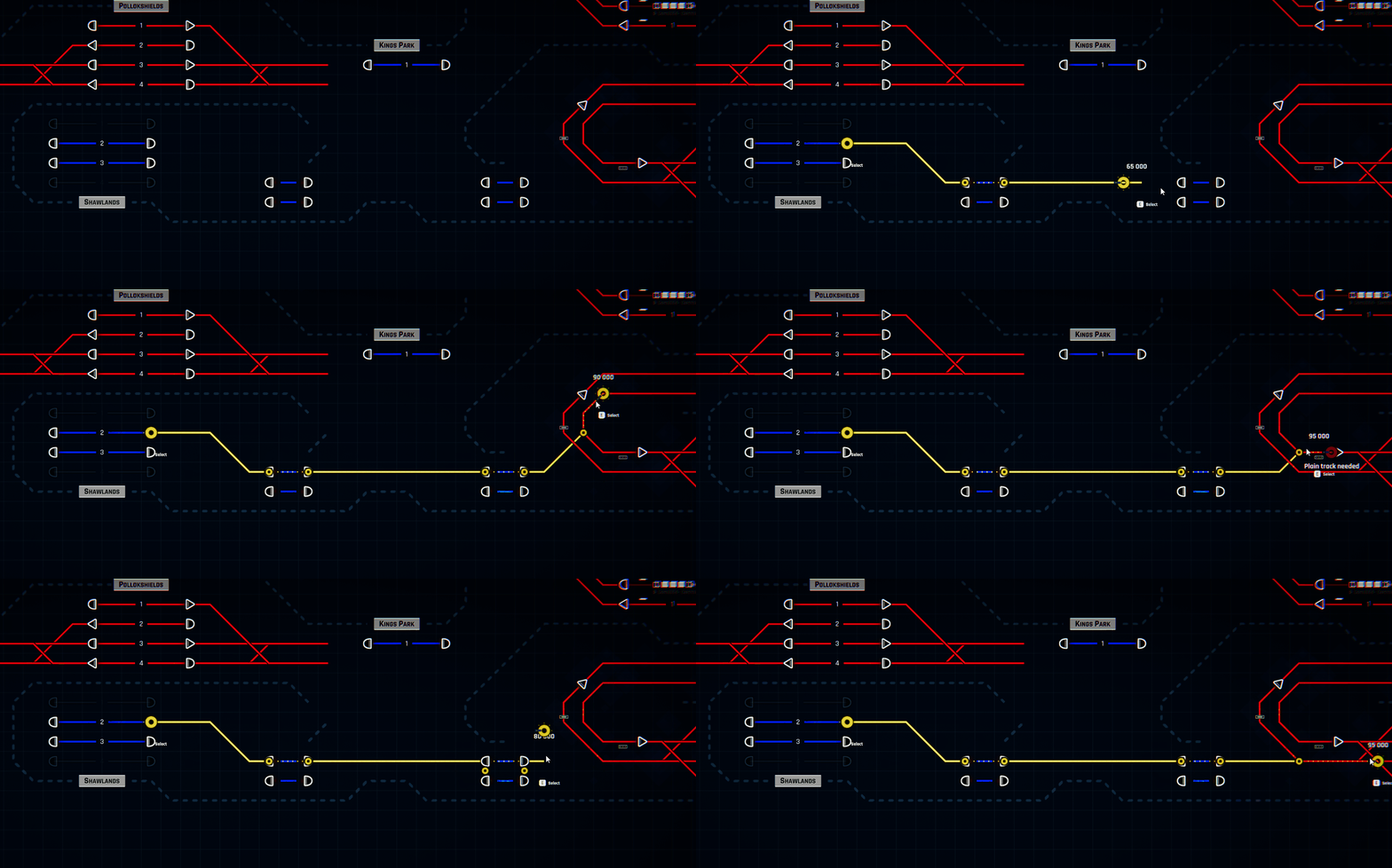
We're making significant changes to make track building in our game more fun and easier to do! No more laying out each piece of track by hand. With our new automatic track layout, players can simply select their start and end points and let the game do the rest. The game will even consider things like terrain and other tracks to give you the most realistic and efficient track possible.
Reusing Old Tracks is a Breeze

We're also making it simple to reuse parts of other tracks when connecting two points. No more laying down new track every time - just pick and place the pieces you need.
Easy Rotation of Beginning and End of Track

If you need to rotate either the beginning or end of a track? No problem! We've made that easy too. By using our new actions keys - Q, E, Z, C (or d-pad) and mouse wheel (RT or LT on the controller) you can access additional actions. In this case, you can select track beginning with Q or the track end with E and then rotate it with mouse wheel.
Visual Help When You Need it

We've also added some visual aids to make track building even more effortless. You'll see helpful cues as you lay out each piece of track, so you'll always know where to place the next one. And your tracks will always be perfectly aligned!
Next? Context Actions and Sensors
This week, we're finishing up the improved track building. Next up, we're working on "context actions" for other elements in the game. For example, when you're building a signal, you'll be able to rotate it (action key Q or E), change its type (action key Z or C), or even pick it (if you hovering already built one) up with your primary action (left mouse button or X key on the controller) and move it to a different spot. This will allow you to move your sensors, signals (or all other elements) to make more minor adjustments to your network without breaking any of your sensors' configurations. Or without the need to reconfigure the sensors again. I'll show you bits of the progress on this next week.

And speaking of sensors, we're fixing them so their placement won't split the tracks anymore. So go ahead and place those sensors without worrying about invalidating your configurations and not speaking of the small pieces of tracks if built close to a signal. These are a pain to click in automatic routing. Sensors will lay on the tracks instead of splitting them.
Menu, Game and Editor - all integrated
We are preparing a minor update to be on Unstable version this week which features a different loading mechanism of the game. The new menu has been integrated into the game, speeding your transitions between maps, editor, saves, and everything you can find in the menu. Be sure to join the beta testing.
We could improve that even further, especially the Editor part so the game don't need to load the map if you want to test it or run a trial. But we're leaving that for now and maybe will iterate over this in the future.
New Buildings, New Sensors
We're wrapping up some major improvements to our game's behind-the-scenes systems. This work will make it easier for us to add new content in the future. We're fixing technical issues and improving our designs from when the game was first started.

Stay tuned for next week when we'll share more about new buildings and updated system upgrades. it will be about Block Signal, Accept, Reverse and Replay Sensors and Salesman's Post.
Happy dispatching!
-Angel
Follow us:
https://store.steampowered.com/app/1124180/Rail_Route
https://store.steampowered.com/app/1896900/Rail_Route_The_Story_of_Jozic/
RailLog #3: Roadmap to 1.0
As you may be aware, we've never shared a roadmap for our Early Access title Rail Route. Instead, we've opted for a different approach than the "industry standard." After a year and a half in the EA, I can confidently say that this decision has been excellent. Let me explain why - and, of course, I understand that not everyone may agree with me. We've heard a few voices stating that we should make our roadmap public. However, this approach has allowed us to remain flexible and better understand our Dispatchers; how you play the game, what difficulties you experience, what you enjoy the most, and so on. By observing this feedback, we were able to form an actual roadmap, which has resulted in much better outcomes than if we had simply stuck to the ideas we initially thought were great. Additionally, it has enabled us to experiment and be creative.

It's worth mentioning that while we are seasoned software developers, some of us have been in the industry for more than 15 years, the Rail Route is our debut game title, which means we needed to learn bits of the game design as well, right? It was a great ride, but the time has come! We can confidently share a detailed image of what the game will be once hitting the 1.0 release, hopefully, this year. Or just soon (tm) if you want us to use the typical jargon, which we have learned as well :). And I'd like to welcome you to this weekly RailLog blog series, where I will share and explain that image until we hit that release.

Roadmap 1.0
It looks simple, but keep that from fooling you; there's A LOT underneath these sticky notes. I already covered some topics in my previous dev log when I shared our work on improving track building or the new user interface and what we plan with it. I will keep informing you how the development in these areas is going weekly. But let's focus on the Reworked Tech Tree because that's where the fun begins.
Reworked Tech Tree

As you may read, we are giving the Endless mode (should we rename that to Tycoon mode?) the purpose. You need to handle different types of traffic in some quantities to progress through the game and ultimately reach the highest point for a sweet gold star reward (for every category of train traffic). The Unlockable System Upgrades are here to help you achieve that task, allowing you fully automate it all. There will be three types of very different traffic to handle, and every one of them will require you to use a different approach to its automation and incorporation. You will need to optimize your network layout and its configuration. Let's have a look at the traffic categories.
The Through Passenger Traffic - Green points

Passenger traffic contracts are something you are already familiar with from the current game (if you already own the game. If not, you should definitely buy it right now). InterCity and Commuter services run from the border stations to the stations you operate and back to the border stations, repeating every cycle (currently set to one hour). Each contract consists of one train, and every successful handling of a train rewards you with a green point. While ordinary Commuters are in slower-paced traffic, InterCities require more speed and timing. Check out the proposed green Upgrades.

In the following weeks, I will cover the Upgrades in more detail, so stay tuned and only speculate a little until then! In the comments, of course. The gray-colored cells are the new additions! You can see new signals, sensors, and stuff - great stuff. We are following the trend of more buildable elements than more UI elements. We want to keep the UI to its minimum when the design allows us. That's why we introduce the accept sensor rather than a toggle in the UI, as in other cases. It will enable us to give you even more configuration options, like an option to accept ANY platform trains.
The Advanced Passenger Traffic - Red points

We are reworking the red points from the ground up to provide a smoother progression and unlock a new set of upgrades. Forget the current red points; these are different! You will now have to manage more complex contracts with multiple trains connected via your stations. This means that you need to handle the finished trains, such as shunting them off the station or to a different one, and switch their train numbers and schedules, according to the timetable, to fulfill the contract. This eliminates the need to accept two contracts (as of the current state); instead, you will have the whole route of multiple trains (with one train set) in just one contract. No more balancing issues or a missing train set!
These more complex routes require you to incorporate the traffic into your already-built layouts. This includes handling the finished trains to be reused later or even moving them to another station where they will be needed. As such, the Coach Yard is becoming a Tier 3 upgrade that helps you solve this traffic faster and more efficiently in a late game, but is optional in the process, especially at the early stages of the game. Just build your stashing tracks and use them!

These changes to the red contract structures will allow for much more diverse and close-to real-world traffic in your operation. Players will no longer struggle with finished trains when there is no Coach Yard and will now be able to balance incoming and outgoing trains without losing any trains due to the lack of available train sets. Every train (contract) will require you to fulfill its routes fully. I will go into more detail in the future but if you need more clarification, don't hesitate to ask your questions in the comments!
There are a lot of possibilities how these contracts could look like, here's just some simple examples:
- Train A -> B (pause 20mins), B -> C (or A)
- Train A -> B (pause 20mins), C -> D
- Train A -> B (pause 10mins), B -> C (pause 10 mins), C -> A
- Train A -> B (pause 10mins), B -> C (pause 10 mins), D -> B -> A
- and so one
At first, you need to switch the train number manually at Dispatcher Office, but that process can be automated later in the game using the proper System Upgrades.
The Freight Traffic - Blue points

A new type of freight traffic contracts to the game. Unlike current freight contracts which are one-off, these are recurrent. The stations will ask you to deliver a specific composition of freight cars, but the incoming trains will deliver them all together. Completing the contract will therefore require you to do some shunting work. If you don't already have a shunting yard, you will have to find a suitable space to build one. Shunting the cars can be tricky so having shunting signals, shunting sensors, and command queues will be essential. This new traffic category is still in the game design phase, so I can't share too many details. However, hopefully this gives you an idea of what's to come.

The Development Update
Most things have stayed the same as the previous week as we need another to finish the tasks in a polished state. And this Rail Log is already insanely big, so let's keep it short this time :).
- Seamless menu integration - Editor and Play mode (will be release on unstable the next week)
- Tracks building UX
- New Accept sensor
- Build menu design (see below)

That's all, folks! Thanks for reading and give me your thumbs up or comment. I am happy to answer all your questions.
Until the next week,
Happy Dispatching.
-Angel
Follow us:
https://store.steampowered.com/app/1124180/Rail_Route
https://store.steampowered.com/app/1896900/Rail_Route_The_Story_of_Jozic/
Hotfix 1.9.16
UPDATE: Localizations (es: achievements, ui; ja-JP: tutorials, ui)

FIX: Deleted platform / station was not removed from train schedules
FIX: Departure sensor's controlled signals were not updated when signal was swapped by sink & vice versa, leading to errors when executing the automation
RailLog #2: Tracks Building
What a wonderful week, and here's another Monday and Rail Log from the development of the Rail Route. I told myself I could keep you more in the loop, especially after creating the #dev-logs channel on our community Discord. Let's cover the most important thing first.

Track Building
We are not happy with how our construction works (in terms of user experience), so we address it with improvements. Tracks were the first to hit the train of refactoring. But video can describe the situation better than a thousand words, so let's check it out first:

As you can see, you don't need to lay out each piece of track but connect two points, and the game calculates "what's in the middle." But that would not be enough. Initially, we thought you could cycle through the possible layouts with a mouse wheel, but the result could have been more staggering. Then we tried a different approach, and that was the right hit.

You can select the beginning or the end of a new track and rotate it with a mouse wheel while building the track. It feels so smooth once you get the grasp of that. We are introducing four new keybinds as additional actions during constructions (Q, E, Z, C, or d-pad on the controller). In this situation, you can use them to select the track endpoints and upgrade/downgrade or rotate the signal in other examples.
In short, this will follow:
- Ability to take and move every element (signal, sensors, CY)
- Improved bulldozing (whole tracks by default)
- Sensor placement won't cut the track in two (breaking your configs)
System Upgrades Restructure
I've covered this previously, but let's go into more detail. We don't see the current structure of the Upgrades as best for several reasons. One of the issues is the need for more natural progression, but Upgrades can be seen as overwhelming and need to be more structured for new players as well. We, who have played the game for more than three years already, must not forget that, in the shade of our curse of knowledge.

The most notable change in the structure is we want the Endless mode to have a goal like the other two modes. To give players a sense of progression and satisfaction. And once it is all about automation and traffic optimization, we build up the structure around that, dividing the Upgrades according to the traffic category.

If you reach certain thresholds in your trains per cycle counter, you unlock more until you get the star - an ultimate reward for each category of unlocks. The upgrades in the corresponding categories are here to help you achieve that, allowing you to automate everything. You'll also unlock a new category of Upgrades pretty soon, so it's up to you to start including red traffic or just continue filling the green bar.

We are dropping nearly all the Interface upgrades as they feel superfluous. We just make most of them unlocked by default. We could have introduced the interface upgrades, little different ones to these. If we do, they will be global, and once unlocked, you'll have them available on all your games.
Next to it, we would like to introduce more granular unlocks in terms of sensors below the arrival or routing "sensors tiers." I'll write about them once they are assigned to the development week sprint in another dev log.
Accept Sensor

You probably know the "Auto-accept" upgrade. It unlocks a toggle for every station to accept the incoming trains automatically. We don't like toggles and UI, so we redo this toggle into a buildable cheap sensor. After unlocking it, you would place it either on a platform or next to a station - we have yet to decide - maybe you can share your thoughts in the comments. But this sensor will allow us to do a more detailed configuration of auto-accepting (whether to accept ANY trains and where) and will be much better aligned with the rest of the game. We'd like to take this approach once iterating over other Upgrades content.
Main Menu Integration

It's nearly done, but it still requires a day or two to polish it up. But a seamless transition between the menu and the game is there. We'll need to improve the Current Game tab even more to show some statistics about your current game, for example, but we'll leave it on the roadmap and get back to it later.
This week, we'd also like to integrate the Editor similarly. No more loading between editing the map and trying its timetable! Hell yeah! Hopefully.
That's all for now. Don't forget to join our community Discord and/or share your love in the comments :).
Until the next week, Happy Dispatching!
-Angel
Follow us:
https://store.steampowered.com/app/1124180/Rail_Route
https://store.steampowered.com/app/1896900/Rail_Route_The_Story_of_Jozic/
RailLog 2023/01: Improving UX and System Upgrades
It's the start of a new week, and I've got some fresh news from the development. As you can see in the last hotfix, last week went all great; we delivered a lot of fixes and some improvements to the menu I've covered previously.
Let's see what's in the bag for this week:
Main Menu integration
We want the new menu to be more integrated into the game scene, so we will replace the Pause Menu (when you hit the ESC) with it. It means ESC will open the full-screen menu where you can save, load the current game, or start another game quickly. No more switching to the Main Menu and back from your games.
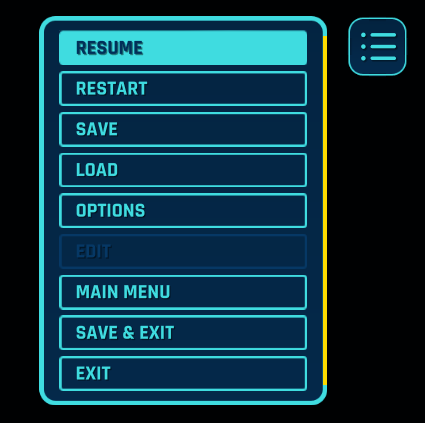
It requires us to make some addition, like the ability to save a game on the Current Hame tab and some additional actions inside the editor.
Tracks construction UX
We got a whole category of UX improvement of construction (and bulldozing) planned for this month, and tracks will be the first. There are two improvements planned
- visually, we want you to give a clue about a newly built track, and
- tracks will bend automatically (you can cycle options with a mouse wheel)

As you can see, connecting two points will be as easy as clicking on the origin and the end. The game will calculate the track in between these points for you. You can still click in smaller segments if you want more granular control over the outcome. This will be the UX improvement of the month. It will not matter if other tracks need to be crossed! We could apply some hard limits on the maximal length of the track to make that happen.
New System Upgrades design
We've finished the System Upgrades design for 1.0 and are now prototyping the UI before implementing it. I can say now that Upgrades won't be categories (Contracts, Automation, Control, Interface) but according to the type of traffic (and color).

We will have three types of traffic (or contracts)
- Through (green)
- Flip (red)
- Freights (blue)
Every category will have its Upgrades to unlock, divided into Tiers, and an ultimate goal of the Endless map will be operating all of them in some amounts. Automation will be a great help to accomplish that. The primary metric will be the "trains dispatched per cycle," which also gives you the progression in the Tiers dimension. I will talk details later, but you can expect a whole reworked freight traffic contracts and automation of your freight yard just in your Endless maps by 1.0 :-)!

All screenshots are works in progress and do not represent a final state. That's that. Be sure to drop me some comments below or on our community Discord.
Until the next week,
Happy Dispatching!
-Angel
Follow us:
https://store.steampowered.com/app/1124180/Rail_Route
https://store.steampowered.com/app/1896900/Rail_Route_The_Story_of_Jozic/
DevLog 2023/01: Improving UX and System Upgrades
It's the start of a new week, and I've got some fresh news from the development. As you can see in the last hotfix, last week went all great; we delivered a lot of fixes and some improvements to the menu I've covered previously.
Let's see what's in the bag for this week:
Main Menu integration
We want the new menu to be more integrated into the game scene, so we will replace the Pause Menu (when you hit the ESC) with it. It means ESC will open the full-screen menu where you can save, load the current game, or start another game quickly. No more switching to the Main Menu and back from your games.
It requires us to make some addition, like the ability to save a game on the Current Hame tab and some additional actions inside the editor.
Tracks construction UX
We got a whole category of UX improvement of construction (and bulldozing) planned for this month, and tracks will be the first. There are two improvements planned
- visually, we want you to give a clue about a newly built track, and
- tracks will bend automatically (you can cycle options with a mouse wheel)
As you can see, connecting two points will be as easy as clicking on the origin and the end. The game will calculate the track in between these points for you. You can still click in smaller segments if you want more granular control over the outcome. This will be the UX improvement of the month. It will not matter if other tracks need to be crossed! We could apply some hard limits on the maximal length of the track to make that happen.
New System Upgrades design
We've finished the System Upgrades design for 1.0 and are now prototyping the UI before implementing it. I can say now that Upgrades won't be categories (Contracts, Automation, Control, Interface) but according to the type of traffic (and color).
We will have three types of traffic (or contracts)
- Through (green)
- Flip (red)
- Freights (blue)
Every category will have its Upgrades to unlock, divided into Tiers, and an ultimate goal of the Endless map will be operating all of them in some amounts. Automation will be a great help to accomplish that. The primary metric will be the "trains dispatched per cycle," which also gives you the progression in the Tiers dimension. I will talk details later, but you can expect a whole reworked freight traffic contracts and automation of your freight yard just in your Endless maps by 1.0 :-)!
All screenshots are works in progress and do not represent a final state. That's that. Be sure to drop me some comments below or on our community Discord.
Until the next week,
Happy Dispatching!
-Angel
Follow us:
https://store.steampowered.com/app/1124180/Rail_Route
https://store.steampowered.com/app/1896900/Rail_Route_The_Story_of_Jozic/