
NEW: Added checkmark in editor for rush hour initial stations in schedules

UPDATE: Allocated switch next to free track can now be deallocated with right click
UPDATE: Localizations (cs: tutorials; de: tutorials, ui; fr: ui; ja-JP: ui; zh-Hans: ui)

FIX: Finishing Rush Hour wave 10 displayed wave 11/10
FIX: Keybind could contain the same modifier key twice
FIX: Trains could be accepted on platforms without a sink
Rail Route
Hotfix 1.4.15
The Story of Jozic – A New Prologue from Rail Route
We know that you’ve all been wondering what our next, major content update will be (and what the team’s been so busy working away on), and here it is: The Story of Jozic – A Rail Route Prologue!
What is it, you ask? This one is a little different than our other updates. We’ll be releasing this as a free, standalone game on Steam at first, and it will later become part of Rail Route. We’re doing this so that we can give more people a taste of Rail Route – and, truthfully – afford us some more visibility so we can make making the game we love!
Features of The Story of Jozic:
- Embark on a fully-voiced narrative, taking on the role of an apprentice train dispatcher being taught the ropes by, you guessed it, Jozic.
- Explore the dramatic machinations of becoming a train dispatcher – and the suspense as Jozic’s past comes back to haunt him…
- Forge your network, dispatch your trains, earn rewards, and chat your way through multi-choice dialogue options never before seen in Rail Route.
Sounds pretty good, huh? We’d love if you could wishlist The Story of Jozic on Steam!
https://store.steampowered.com/app/1896900/Rail_Route_The_Story_of_Jozic
Because this update is a little different from the others, we’re once again asking for your help. Our community was incredibly supportive with our Rush Hour livestream in the last update, and we hope to gain another incredible reception to this one.
We’d like to ask you to wishlist The Story of Jozic on Steam. Not only will it help us to gain visibility (and show more people the joys of Rail Route!), you’ll get notified when it releases! It’s a win-win.
Update 5 soon
And while we are serving good news to you here's another one! There will be another free update for Rail Route before The Story of Jozic will go live soon. Update 5 will bring Steam leaderboards to Rush Hour maps and much more! So stay tuned for another announcement.
As always, thank you very much – and happy dispatching!
- Angel
Follow us:
https://store.steampowered.com/app/1896900/Rail_Route_The_Story_of_Jozic
https://store.steampowered.com/app/1124180/Rail_Route/
Hotfix 1.4.14
NEW: Visual feedback when game is saved

UPDATE: Improved coach yard train count text visibility
UPDATE: Localizations (fr: ui, tutorials, de: tutorials, zh-Hans: ui)

FIX: Destination animation was played so many times, how many paths were possible between signal and destination.
FIX: Inconsistent new contract button had wrong tooltip and active state
FIX: Level station count included platformless stations (signs)
FIX: Main Menu button remained when hiding UI
FIX: Removing platform in editor did not always remove it from train schedules
FIX: Rush Hour autosave on wave end could cause new inventory items to get lost
FIX: Shown offered contract times were not updated once generated
FIX: Sign activation sound played when buying platform on already unlocked station
FIX: Starting custom Rush Hour level sometimes resulted in an error
FIX: Station colors were shuffled if game was started directly from the Editor
FIX: Track speed could not be upgraded in editor because of initial research state settings
FIX: Traffic intensity for wave onset phase was wrongly computed
FIX: Tualatin / Tualatin Acres station name in WES map was misspelled
Hotfix 1.4.13
NEW: UI autoscales on window resize

UPDATE: Item inventory amount now always animated on build menu opening
UPDATE: Localizations (de: ui; fr: ui; ja-JP: tutorials, ui; zh-Hans: all)

FIX: Default paths were reset after building (even if nothing changed)
FIX: Final Rush Hour score on screen did not match actual score
FIX: It was possible to dispatch a train from an empty Coach Yard using the round train icon above station sign
FIX: Loading of save was not possible if it contained obsolete default paths (referencing non-existing nodes)
FIX: Options menu could be closed when confirmation window was active preventing it from being closed
FIX: Overlapping map settings text
FIX: Rush Hour wave finished while train was still waiting at final destination
FIX: Train could be spawned on inactive platform
FIX: Urban transit 'per unique station' label and reward value were not shown correctly (translation missing / value not updated)
FIX: When upgrading / downgrading a signal, the scroll text displayed wrong value (sum instead of difference)
🗺️ April Workshop Highlights & Contest results
Man, it's been an eventful month, hasn't it? We've all been hard at work making sure Update 4 was the best it could be before April rolled around. Hopefully you all have been enjoying the new features! We sure have, and we've got some more in store for you in the following weeks.
Unfortunately, that means we've been so busy that some other subjects - such as these monthly featured list updates and the contest results - were delayed. Sorry! I hope you can understand why we've put this off for a bit, though - Update 4 was a huge game-changer (quite literally), after all.
Either way, we're here, with three new maps to show off from the community! And let's start with the most important one of them all: Who won the contest?
Westendhafen

Of all the maps submitted to the contest, it's honestly no surprise this one won. Its layout is the most unique of all the maps, even without the inventory, and the places you need to connect are all simple yet clever. Being only 35 minutes, the level never really overstays its welcome,
Congrats to Laroso for winning the contest, and thanks to all who submitted maps! This contest was quite fun, and I hope you all will be around next time we do another contest.
Sudoku
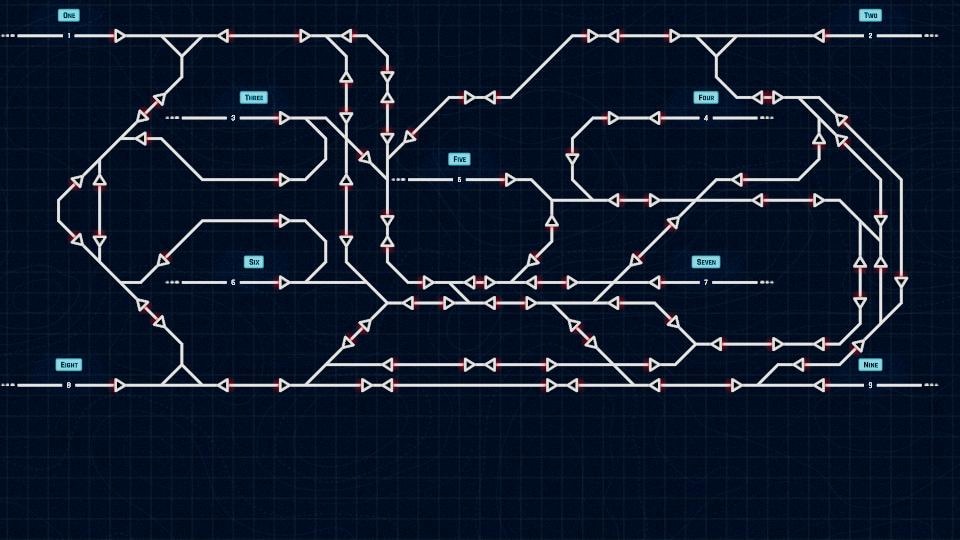
Sometimes, the best maps are the ones that try something different. That's not always the case, but it sure is for this one. Sudoku's track layout is CRAZY to follow - pattern recognition is a must for a map like this. Either that, or frequent pauses to make sure you can find the perfect route for trains to take through the spaghetti trackwork.
Think you're up to this unique challenge?
Hostivice

Seems this month's features are all unique challenges in some way or another, hmm? Hostivice is the most standard of the three maps so far, but it's still got its fair share of tricks up its sleeve. Figuring out the sequencing of trains on single-track routes can sure be tricky, and the main station has its fair share of odd moves to keep every train on-time.
Still, it's a worthy challenge, standard or not. Can you catch every trick in the book used here?
A tip
So, one thing we've noticed is that some players don't pick up on some of the game's features. Some of them aren't easy to pick up on your own, so... here's one you might not have known!
When setting a route, hold Shift to make it set the exact same route every time it's clear! This is a simple technique that saves a lot of time, especially in long sections of track where the train can only go to one place anyways.
Some of you definitely knew this before, but a lot of people don't seem to pick up on that. Well, here you go - something useful for all modes! Hopefully this helps someone play maps better by simplifying their workload.
Alongside these featured maps, the curated list has some new additions:
- Pine Rice Area control
- Pulse
- Small Town with small coach yard
- Gießen
- Growing Metropolis
That's all for this month. Hope you all enjoy the three non-standard maps we've picked for this month!
- SteR
Follow us:
https://store.steampowered.com/app/1124180/Rail_Route/
🚉 Train Dispatcher Simulator LIVE
📆 31th March, 7 pm UTC
⚡ Live stream
This is the date of our second Steam Simfest stream. Be sure you check it out!
Follow us:
https://store.steampowered.com/app/1124180/Rail_Route/
🚉 Train Dispatcher Simulator LIVE
📆 30th March, 7 pm UTC
⚡ Live stream
This is the date of our second Steam Simfest stream. Be sure you check it out!
Follow us:
https://store.steampowered.com/app/1124180/Rail_Route/
🚆 Update 4 is live!
New Game Mode
We are so, so happy to announce that our fourth update - Rush Hour - is now live! Check it out, let us know what you think, and try your best to beat Milos… If you can! For an even quicker overview, you can check out the Rush Hour trailer:
[previewyoutube="sn48dTtySIA;full"]
In case you missed our earlier announcement, we’ll also be live with MasterHellish at 19:00 UTC to play the new update - so don’t miss out! We’d really love your support on this one.
Changelog
You can find the full feature list below:
New features
- NEW: Ability to research and toggle colored station signs
- NEW: Accept train buttons above station signs
- NEW: Added `Rush Hour` workshop tag
- NEW: Animate a track path created from auto signal queue
- NEW: Animated end of wave screens for waves of chaos mode
- NEW: Better hover animation over highlighted track
- NEW: Editor support for waves of chaos game mode
- NEW: Macer Extension rush hour map
- NEW: Outlining of route to be created & cycling through possible routes with mouse wheel; created route remembered and preferred next time
- NEW: Play a sound when selection signal/connection in sensors
- NEW: Rush hour mode chapter in the tutorial
- NEW: Save score for waves levels
- NEW: Show score also for Rush Hour maps in main menu
- NEW: Show train destinations over the train in new game mode
- NEW: Signals can be deallocated during construction
- NEW: Simple train schedule destination view
- NEW: Tracks visuals improved with emissive lightning
- NEW: Unlock sound for station sign
- NEW: Wave schedule view per station
- NEW: Added button to open map creation wiki in editor
- NEW: Added checklist for map creation in editor
- NEW: Right clicking a train in an autoblock will reverse it if possible
- NEW: Wave onset in Rush Hour can have reduced intensity (some trains dropped before start)
- NEW: Added time to score animation on rush hour wave completion
- NEW: Rush hour view starts focused on unlocked stations
Updates
- UPDATE: "Not built from inventory" message displayed on applicable tracks as bulldozing cursor moves
- UPDATE: Accept trains by clicking tracks
- UPDATE: Automatic signal sprite improved
- UPDATE: Better music intensity during tutorial
- UPDATE: Blinking station signs removed
- UPDATE: Color space switched into the gamma space
- UPDATE: Create as less garbage as possible in Train.Move()
- UPDATE: Default music volume level normalized
- UPDATE: Different sound for contract accept/decline
- UPDATE: Don't play open sound for modals with overlay
- UPDATE: Due to the performance, train labels at slower pace
- UPDATE: Due to the performance, update trains in station timeline at slower pace
- UPDATE: Improved train label visuals
- UPDATE: Inventory changes displayed in scroll text when building from inventory
- UPDATE: Less intensive train light
- UPDATE: Localizations (de: research, ui; cs: tutorial)
- UPDATE: Make building button non-interactable if there is no item in inventory for it
- UPDATE: Music intensity for timetable maps based on trains to dispatch
- UPDATE: Music intensity in Endless maps based on time speed
- UPDATE: New look for number badge on game and building button
- UPDATE: Not acting signal graphics improved
- UPDATE: Removed black background option from the game (will be replace by color picker)
- UPDATE: Showing only items in Construction menu that are or once were present in the inventory (not applied on economy-based maps)
- UPDATE: Signals hover animation improved
- UPDATE: Station sign graphics has been improved
- UPDATE: Station sign unlock animations and wave modal visual refactor
- UPDATE: Switch background improved
- UPDATE: Switch hover animation improved
- UPDATE: Task panel spacing was wrong
- UPDATE: Track colors match more signal colors
- UPDATE: Train sprite improved
- UPDATE: Waiting train buttons display next station color and accept timer
- UPDATE: Added station sign item to Rush hour checklist in level editor
- UPDATE: Corrected editor train occurrence tooltip
- UPDATE: Localizations (de: all; fr: all; ja-JP: tutorial)
- UPDATE: Removed Rush Hour option from first time player menu
- UPDATE: Switched next wave button order
- UPDATE: Train notifications and color coded stations research video updated
- UPDATE: Zero inventory item count is shown
- UPDATE: Building items no longer disabled when no items left in inventory
- UPDATE: Localizations (de: all; fr: research, ui; ja-JP: all; zh-Hans: tutorials)
- UPDATE: More trains to accept button now shows timeout
Fixes
- FIX: 'Change Speed' and 'Tunnel' building buttons remained inactive after return from in-game tutorial (e. g. arrival sensor tutorial)
- FIX: Clicking on a track caused sound even when no routing was posible
- FIX: Do not display price 0 when building from inventory
- FIX: Do not display price 0 when bulldozing to inventory
- FIX: Game over screen button width did not fit text
- FIX: Ghost track in bottom left corner of the map
- FIX: NPE was thrown in Editor
- FIX: Small tracks have a mouse priority over switches when routing from auto signal
- FIX: Station sign could become uninteractable after opening menus
- FIX: Subtitles panel was too small on smaller screens
- FIX: Deallocating signal in build mode would add signal to inventory without bulldozing
- FIX: Routing highlights remained after cancelling routing during animation
- FIX: Train schedule didnt remove previously shown stops on shorter schedules
- FIX: Locked building items were only shown as locked after researching anything
- FIX: Trains collided where a train just left a switch
- FIX: Bottom menu was not shown after game restarted from pause menu when level / wave finished / game over screen was displayed
- FIX: Sometimes no train went to newly activated station if intensity lower than 100 % was set
- FIX: Time was not updated
That’s all for now folks - enjoy, and we can’t wait to see your high scores.
And, as always, happy dispatching.
- The Rail Route Team
Follow us:
https://store.steampowered.com/app/1124180/Rail_Route/
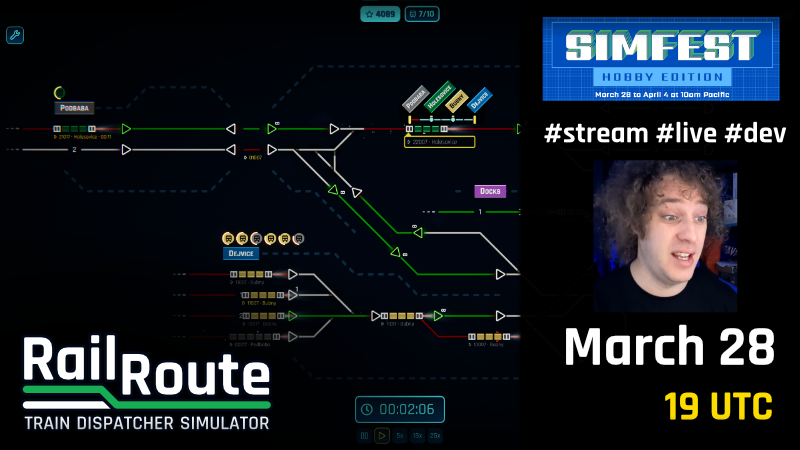
Simfest LIVE #1: 28th March, 19 UTC Rail Route 🚉 Rush Hour
We announced last week that our Fourth Update, Rush Hour, would be arriving on the 28th of March. Now, we need your help.
📆 28th March, 7 pm UTC
⚡ Live stream
To make our launch (perhaps our most important one since we entered Early Access) the best it can be, we’ll be hosting a Steam livestream showcasing the update! More than that, this livestream will be part of the Steam SimFest - meaning the more viewers we get, the higher up Rail Route will be on the festival page!
This is where you come in.
If you’re around, we’d love for you to join Angel (that’s me!) and MasterHellish for the livestream at 8 pm London Time on the 28th March. The more people we can get, the better! We’ll be exploring the new mode, cracking jokes, and generally chilling out.
Finally, a huge thank you to you - our community - for making this update (and all of our others) possible. We think you’ll love it, and we’re really proud of it.
And, as always, happy dispatching!
- Angel
🚉 Rush Hour Update arriving on Mar 28!
This last month, we slipped, but fortunately, it's not due to procrastination. Instead, we've been hard at work, getting you all something new to play with. Check out... Rush Hour.
[previewyoutube="sn48dTtySIA;full"]
Look forward to this new mode on March 28th!
New Rush Hour Mode
As soon as Update 3 hit the public, we were already working on getting a prototype for this new mode. It took a while, but the prototype was completed in just a few days, and we've been hard at work polishing it to its current state. It's been a wild ride of refactoring, map design, new graphics, you name it.
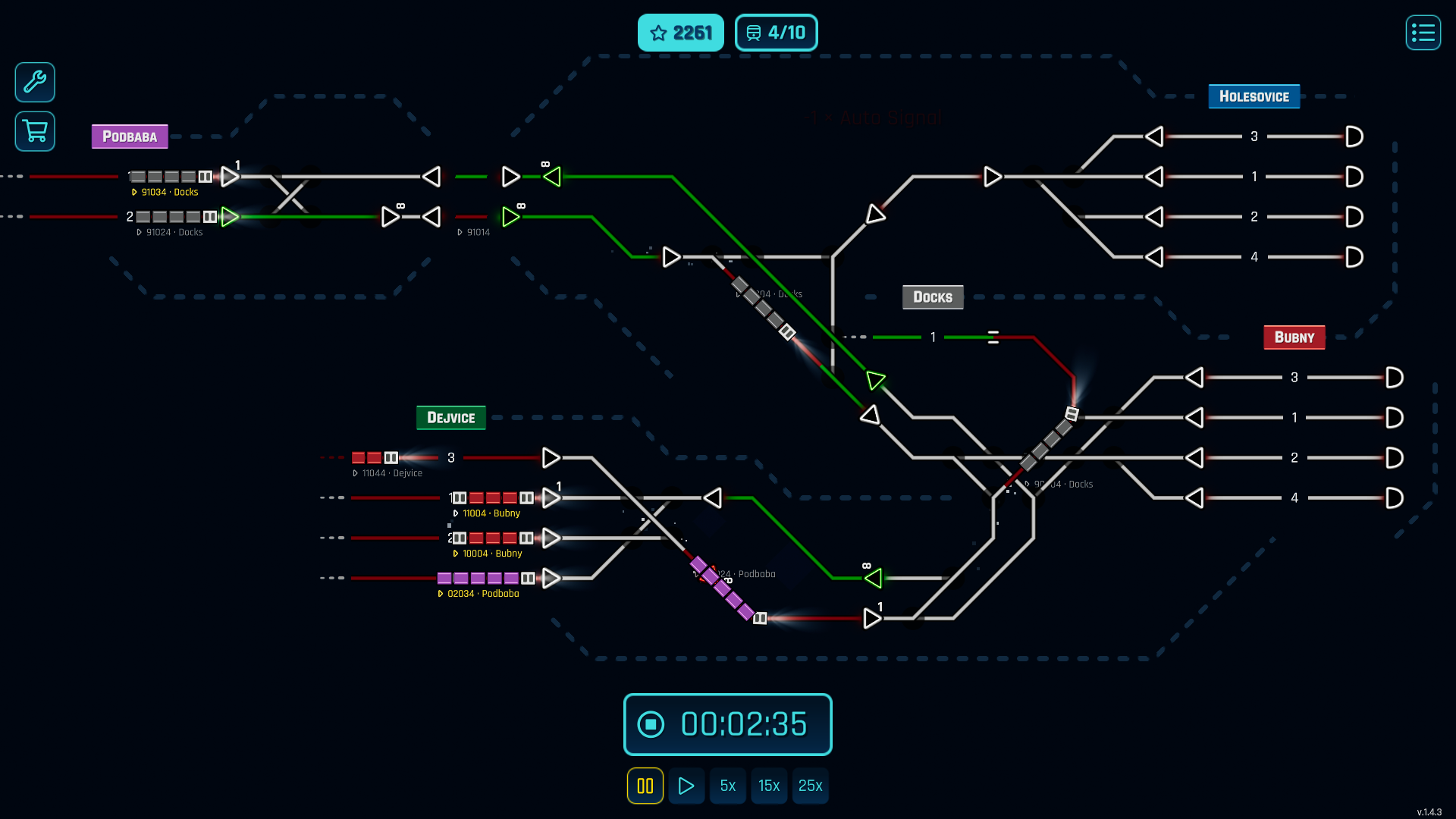
This mode will bring a brand new experience and way to play the game, managing to bridge the gap between Timetable's arcade-y, set-in-stone feel and the track laying/contract generation of Endless. It's your job to get through ten waves of increasingly chaotic trains, with meager rewards between rounds to keep upgrading your system piece by piece. Think you can survive to the very end?

But we don't want to spoil everything for you... the mode's crazy fun, and you'll have a blast exploring the ins and outs of the mechanics, whether they're completely new or a repurposed one you've already seen before.
That's not all we can tell you about, though!
Train timeline

Something about Rush Hour that's a bit weird is the UI at the bottom of the screen - the only thing you can see is the time controls. You don't really NEED it for the mode, but this leads to some things that will be much harder to see, right? Checking a train's route will be a pain if you can't read the small text beneath each train, and there's no way to check its future destinations...

You probably already noticed, but we have you covered - trains are now color-coded according to their destinations! Each train displays its next destination better by changing the colors of every non-locomotive carriage in the train's consist. This also helps make it even more obvious whether a train has an engine on both ends or not!
Hovering over the train will also show you the train's whole timetable! With just a glance at a train, you should be able to figure out where it needs to go next. No more need to pull up the schedule!
New Interface options

This ability is also available in Timetable and Endless, but if you don't like it there, don't worry - there's some new buttons to toggle colors on and off above the clock! It's right next to the notification sound toggle, which has also been relocated to this new place.
That's nice and all, but what about accepting trains? Isn't that impossible without the UI?
Accepting trains

Well, we've come prepared for that, too. Whenever a train wants to enter a station, a little circular icon appears above it. You can hover over the icon to see the train's route.

Click the icon, and the game will highlight all free platforms you can accept a train to in Orange, just like it shows the routes you can make when routing an auto-signal.

Simply click on the platform, and you're done!
Map Editor


Of course, the editor has some major changes for Rush Hour - Things such as the amount of time trains can spawn for, how long trains can wait to enter before you lose the game, and the chances of any given contract generating in a wave.
Systems Available

That's not all the editor has to show now, though: You can now toggle what system upgrades are active at the start of the map!
This is HUGE for timetable map creators. Don't want people cheating your trains with Signal Penalties using Stop & Reverse spam? You can turn that off. Feel like having slower switches? You can disable 120kph ones. Want players to be able to automate Coach Yards? Go ahead and turn it on!

As for Endless, this allows you to have finer control over the challenge you create for players. Want a coach-yard exclusive experience? Why not give people access to freights from the beginning? Or maybe ban a feature completely, such as Tunnels, to really give folks a difficult time?
The only mode this doesn't affect is Rush Hour, which has everything unlocked, but is restricted by the Inventory. It's disabled there for simplicity's sake. It's still got a huge impact on mapmaking, though, and lets players design some crazy new challenges with old modes!

I hope you're as excited as we are! There's plenty to look forward to coming up in just over a week. Mark your Calendars for March 28th!
- The Rail Route Team
Follow us:
https://store.steampowered.com/app/1124180/Rail_Route/
