Hey folks! It's March, and you know what that means, right?
If you thought "It's time for new workshop highlights", well... yeah, that's true, but that's low-hanging fruit. It's the title of this article, after all...
It also means the Contest is closing soon. If you'd like your level to qualify, submit soon! Submissions close this Saturday. If you're not interested in submitting, why not play the levels and vote instead?
Alright, enough of that. You already know about the contest. What about this month's front-page features, though?
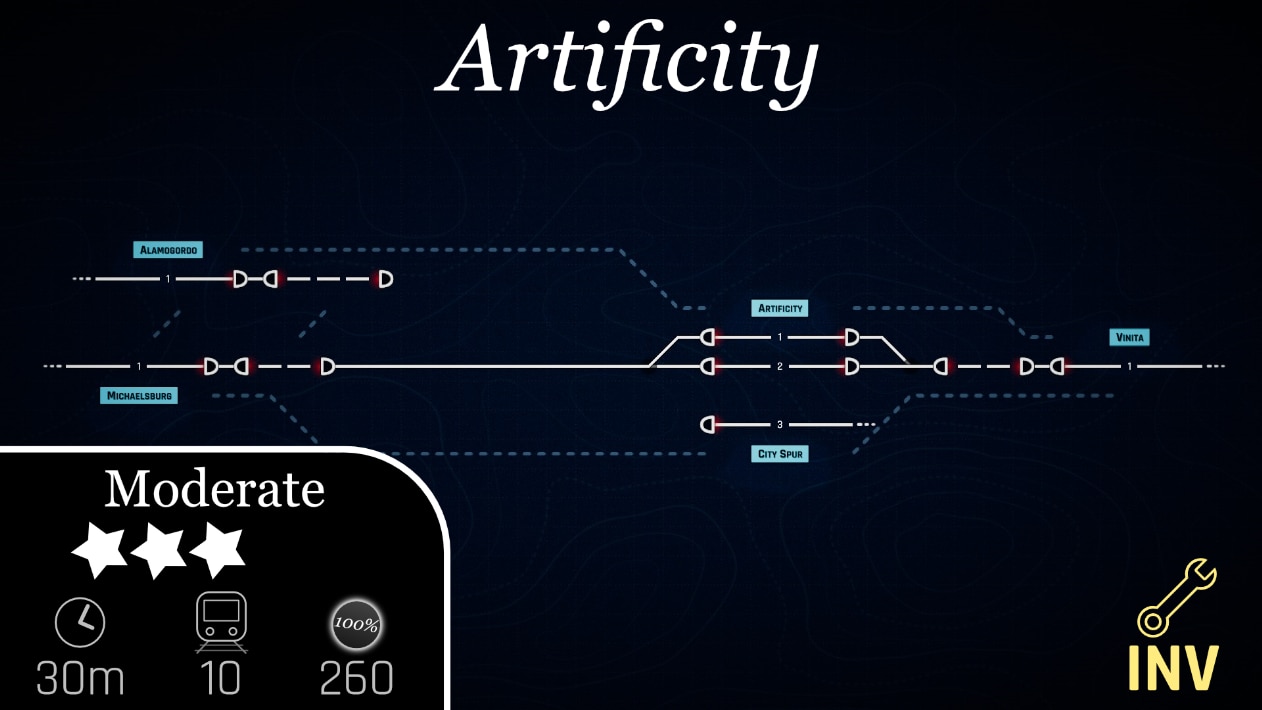
Artificity
One thing we wanted to try and showcase this month was at least one good inventory map, but there was one big problem - A majority of the maps we knew about were contest submissions. Featuring one of them would give it an unfair boost ahead of the others by giving it more recognition, so instead we've featured a small map that's not part of the contest.
Artificity is a short but sweet map, where only the mainline on this fairly small route is built for you. It's up to you to connect the branch to Alamogordo and City Spur, and maybe you need a few extra connections so trains can pass each other... The space to build is kinda limited and can be tricky to master, but there's more than enough materials given to the player to beat this level without too much trouble.
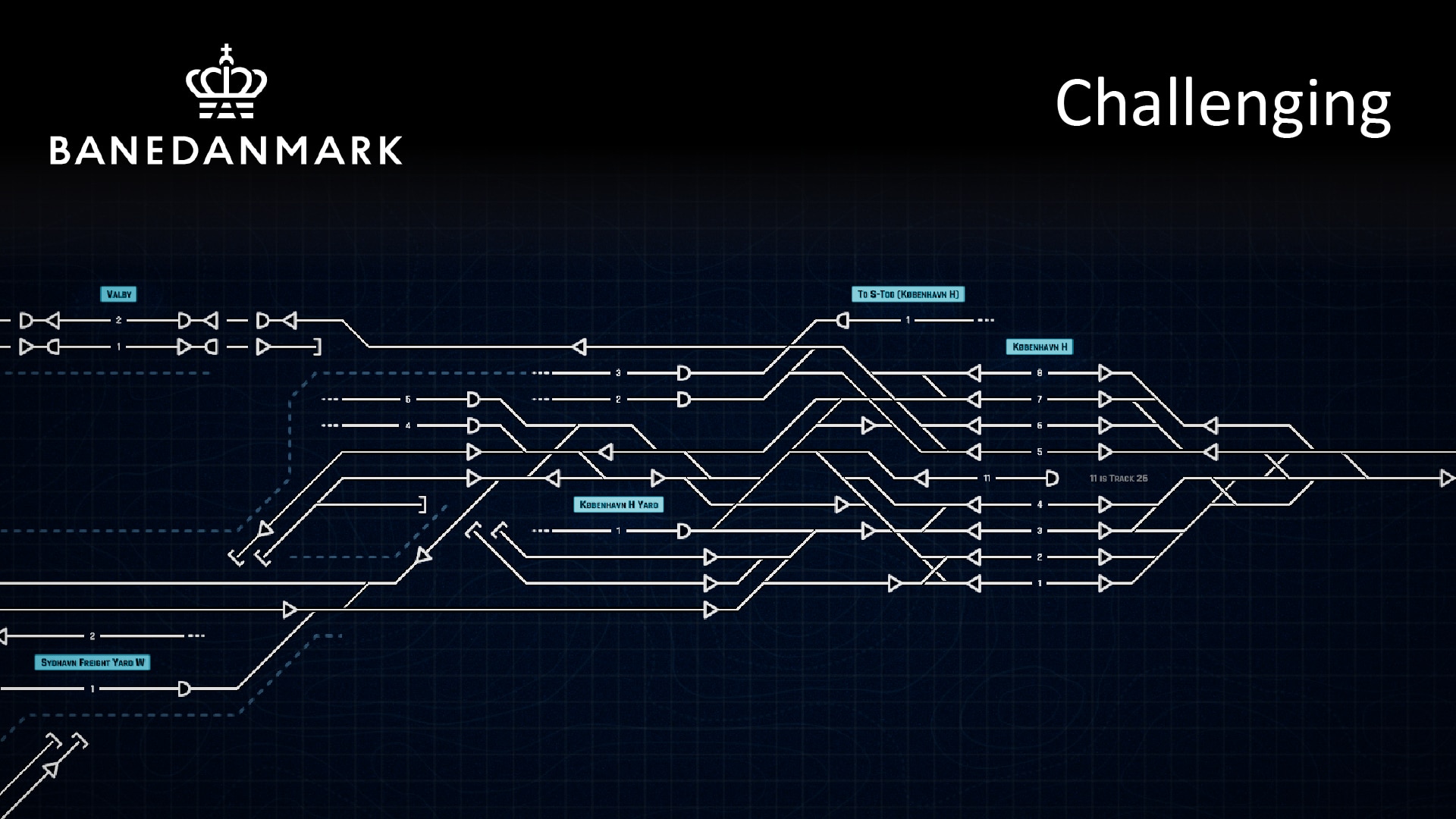
Copenhagen
If you've never gotten around to playing any of Der Drache's career levels, you're missing out on quite a few fun challenges. There's always another train to keep track of from start to finish, and the routes trains need to take aren't always as simple as they may seem...
These levels are well-crafted, and Copenhagen is no exception.
South Station
Terminus stations are a classic way to make a map visually distinct, while also adding an interesting challenge to the level by having a bottlenecked entry point into the station. This level does that well, but it also has an oddly-placed loop... what's that there for?
Old, but still good, this map is difficult, but fun. Are you up for the challenge?
Alongside these featured maps, the curated list has some new additions:
Boston Commuter
Finland
Melissenstadt
Sudoku
Redlang Junction
That's all for now. Hope you enjoy this month's picks!
FIX: Building constraint did not show reason during tutorial FIX: Bulldozing a switch that is connected to dead end tracks with signals on them was leaving those signals floating without tracks FIX: Long trains waiting in station showed incorrect train label color FIX: Sensor got left behind when deleting autoblock in editor FIX: Subtask ui panel's color was getting stuck with yellow color if the task was fulfilled and unfulfilled quickly FIX: Subtitles were missing for first train routing back to Dejvice narrations (repeated instruction to set switch & flip signal).
FIX: Autoblock with preceeding green manual signal got deallocated when train exited FIX: In levels without economy, it was possible to remove signal bridging two tracks with different speeds with track speed being unified to the lower speed but inventory was neither checked if there is enough items nor updated after removal FIX: Previously used track speed was not re-selected when the building menu was reopened. FIX: Upgrade to Auto Signal button on Manual Signal Detail did not work FIX: When a signal was bulldozed at the end of a bulldozed track, no money was returned
🗺️Workshop Mapmaking contest #2
There's over 750 maps on the workshop now! It's seriously impressive how many levels have been made since our last contest. It's roughly two maps a day! I'm really glad to see the creative minds of the community are using their sparks of inspiration well and giving us more and more levels to play. Keep up the good work! 💜
Last time we did a contest, we did it to try and highlight a new feature and get people to know about it more. Can you guess what new feature we're doing this time? That's right, the Inventory!
📃 Mapmaker Rules
Timetable maps only
Map can be no longer than 1 hour and 30 minutes
You may include up to 80 trains
Max score cannot exceed 1500
Max score cannot contain any penalties
Inventory must be turned on
Level must use at least 20 Inventory items
No text-file exclusive edits
Only one submission per person
Submit by March 12th
Submitting your level is simple: Just reply to this post with a link to your level! That's all it takes. We'll handle the rest from there.
🕹️ Playing and Voting
If you would like to vote, just check the comments on this announcement and play the levels linked there! You can also check in on the contest submission collection, which will be regularly updated when new maps are submitted.
Once you've completed each level (or when you give up in frustration), just give the map a ːsteamthumbsupː or ːsteamthumbsdownː either through the game's interface or by voting on the workshop page for the level.
You don't need to vote by March 12th - Instead, make sure you vote by March 19th.
We'll handle the rest of the process from there!
Some Inventory Tips
While we could just throw you out into the world without any guidance, the Inventory is a difficult system to use well when building a level. There are some tricky details you might need to work with/worry about, and some are things you should really know about before you get started building. While we won't stop you from submitting any level you want to make, the rest of the community might, and we aren't stopping them from voting however they want.
With that in mind, here's some ideas:
Don't get overwhelming
For example, do you know which of these two levels a player would find more fun, just by looking at the non-inventory tracks already built for them?
If you think that the first picture looks more fun, you're probably right. One thing we've noticed time and time again is levels that players need to spend time setting up rather than playing aren't as fun as ones that let them dive into routing trains immediately. There's no response from the game if they're doing things right or wrong until the trains start moving, which makes the setup part of the map tedious.
We've already seen this in the past with sensor-heavy levels - The player spends a lot of time at the start setting up all the sensors, getting no immediate reward for their actions, and if they mess anything up, the response to that screwup arrive minutes - or even hours - later, making it harder to identify what the problem even was to begin with.
The delay between required player action and point-based rewards or penalties can be really frustrating, especially when the player has no exact idea of what tracks they should be building in the first place. Some junctions the player needs to entirely build themselves are okay, but when your map ONLY has stations and relies entirely on the inventory, it can quickly get tiring. it MIGHT work for tiny maps, but for any map with more than ten station platforms... we would recommend giving your players some sort of base to build off of.
Instead, give the player some base tracks to work with, and some freedom to add onto your original system with their own unique ideas. Why not give them a single-track border station for a few freight trains that they need to connect to the main route?
Or why not give them a bunch of tracks they need to add crossovers to, with an additional route to connect off to the side?
Wall 'em in
You should definitely keep track to keep track of is the walls between stations and autoblocks. Without them, your map can be easily broken... So make sure you close things off so nothing unintended happens!
Station signs, Platforms, and Autoblocks also restrict players from building certain routes. Platforms and Autoblocks don't completely stop players obviously, since they can just build up to the edge of the platform or autoblock to connect to it, but they do restrict throughput.
Speaking of player restrictions, here's a little detail you might want to keep in mind:
While this isn't exactly "walling players in", it is an odd restriction you might need to worry about. Players cannot connect dead-end tracks to inventory tracks.
There is a slight workaround - If there's a signal on that piece of track (whether the player built it or you put it there), the player will be able to build straight no problem.
It's just a little thing that might mess up your level if you're not careful, you know?
As long as the connection is legal, players can build tracks, place signals, and place sensors. Keep that in mind!
Also, it's worth noting - Players can upgrade manual signals to auto signals (and vice-versa) and get the signal of the other type added to the inventory. If you don't want people changing the signal layout, be careful with what you give them...
Leave room for slack
When the player has to figure out what tracks to build on their own, it can be quite tricky to get trains to their destinations on time. It's not the best idea to hold them to the tightest standard of timeliness possible - Give them an extra minute or two of travel time between stations, and don't pack the stations to the brim with trains.
This goes for scheduling, but you also probably should avoid Signal Stopping Penalties - If players need trains to slow down or stop so they can build tracks and think, then they shouldn't be penalized for that. Signal Stopping Penalties don't really work well unless the direct route the train wants to take is pre-built, so the player doesn't need to panic.
Testing your Map
It's hard to test a map without tracks... So why start off without them? When testing your map, instead of building from the inventory while playing, you should make a copy and build the tracks in the way you would use them so you don't need to build them each time you boot up the map.
The only problem with this technique is you have to remember to make the edits on both versions of the map so you can publish the version without the tracks! If your memory is good enough, you can achieve this by just using the copy and deleting the tracks you're supposed to, but that might not be the easiest task for most players...
Need more guidance?
While that's all we have for Inventory tips, that's not all we have for level design in general. If you'd like to read some tips for timetable mode in general, too, You can check them out Here. It's not much, but it's better than nothing, right?
That's all for now, though! We hope this little guide helps you get an idea of what to build, and I can't wait to see what you all have to show for this contest! Good luck, and Have Fun competing!
FIX: Asian languages ellipsis was not working FIX: Auto accept trains upgrade task was broken if you unlocked that upgrade before the task starts FIX: Custom resolutions was always displayed resolution change popup FIX: Destination's station in the train timetable panel was not being highlighted when the train move to another station until you click on the train again FIX: Long narrations were being repeated after save and load in the tutorial FIX: Resolution confirmation modal popped up every time in windowed mode FIX: Reason for locked autoblock tooltip was unclear
🗺️ Workshop Highlights - February
Hey folks! Another month has passed. It's been exciting, huh? Not only did we have our first workshop highlights article, but Update 3 released and has many new tools to make level creation even easier and more exciting. I can't wait to see what we as a community can make with the Inventory!
Another month also means it's time for us to feature another three new maps. So, what do we have now?
Qidu Station (2022. Normal)
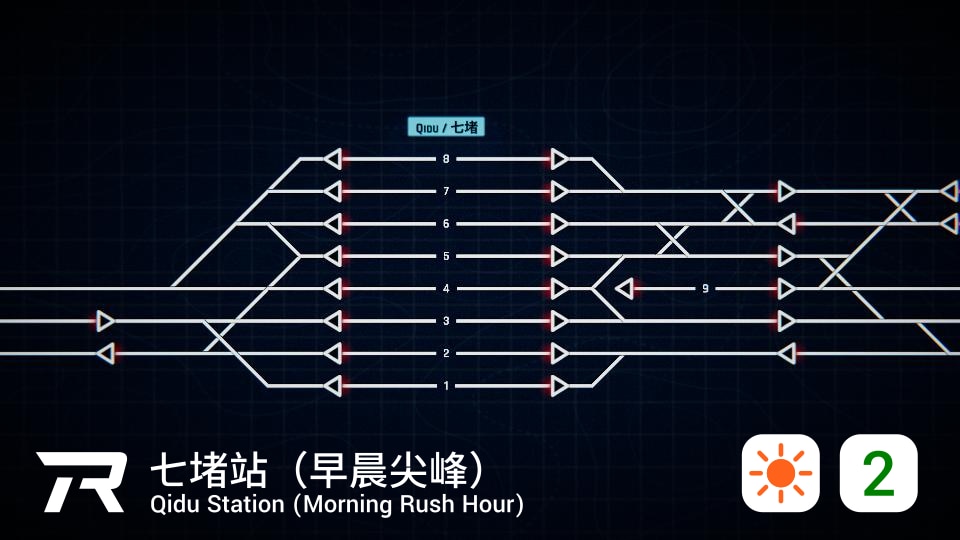
Our first map this month is already quite a popular pick from the community - Qidu station!
This map focuses mostly on one station, having a bit of a unique track arrangement. Not every track can reach every platform, and some of the routes are clearly bi-directional. The timetable is fairly relaxed, though, so there's nothing extremely challenging. Just remember to check for trains going to platform 9 on the main station! Its odd location might trip you up if you're not careful...
Müenchen Ostbahnhof
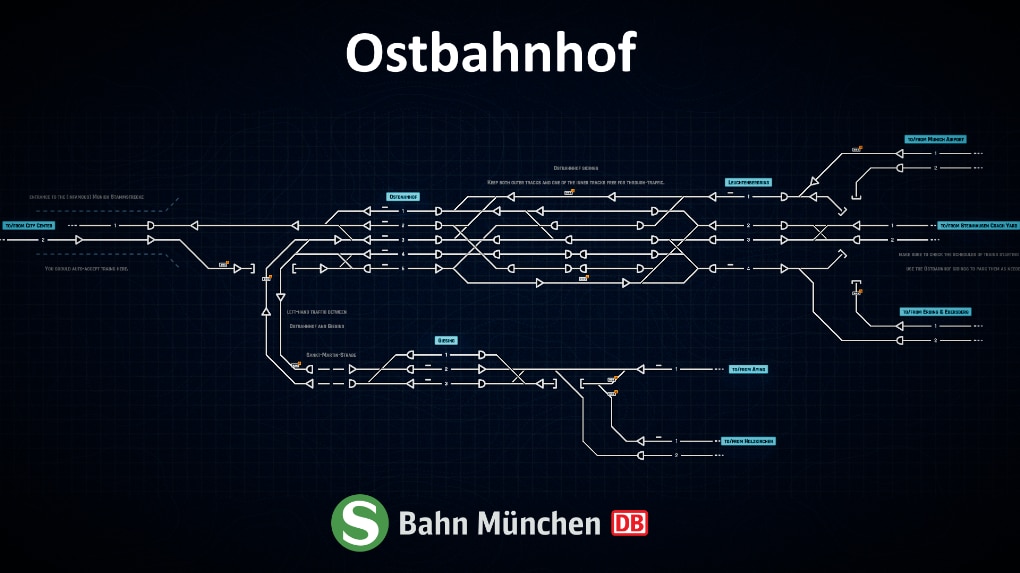
Second is another popular map with an "easy" and a "hard" version where we chose to feature the easy one, and its central focus is a large station... hmm, I'm sensing a slight theme this month.
Some people might be turned away by automation on a timetable map. Setting up the sensors can be a bit tiring to do, you know? Despite this, the map doesn't really go overboard with them, and with how tight some schedules are, it's nice to have a little bit of help to ease your troubles, and it doesn't completely remove the challenge. Instead, it helps let you focus on the part of the level you're supposed to really pay attention to.
River Creek
Last but not least is River Creek, which breaks this month's trends... by not even being a timetable map in the first place.
There's not really much to say here. It's just a fictional endless map with a fine design. The walls are a bit clunky, and the spaces are anything but limited, but there's no flaws to the map's design. Bypassable stations or autoblocks? Nope. Holes in the wall? Nope. Sink-through hybrid stations? Again, nope.
Even though the spaces for you to build track are quite forgiving, there's more than enough ways for you to show your creativity here, as a lot of the junctions need four - or more - connections to fully work. There's a lot of room to build, but also a lot of things to build to... But you'll be able to do just fine, right?
Alongside these featured maps, the curated list has some new additions:
Fintails
142
Tiller Loop
London St Pancras
Hostivice
That's all for now. Hope you enjoy this month's picks!
UPDATE: Load last save made first option after train crash; Restart suppressed unless no saves for the map
UPDATE: Localizations (zh-Hans: tutorials, research; ja-JP: tutorials, ui)
UPDATE: Reload level list even if workshop map fetch ended unexpectedly.

FIX: Build / Buy buttons were displayed after switching from Prague to Wakefield in narrated story
FIX: Inbound icon was not displayed in Chinese and French localization of timeline legend, \uf08b displayed instead
FIX: It was possible to build a track from inventory joining at the end with an original track
FIX: It was possible to change track speed but it is not supported in inventory-only maps
FIX: Short track built from inventory between two original track could not be bulldozed
🚆Update 3 is here!
It's been a while, huh? It's been over two months since we released Update 2. While time may fly when you're having fun, we've been hard at work here getting ready our next big update for you all. In fact, we've already released it - Update 3 is ready to roll! How about we dive into some of the new features you're bound to see as you explore this latest update?
There's a lot to cover! Let's get started with the biggest news:
The Inventory
When you build a new timetable map, you'll notice a new option which has been automatically turned on for you: The Inventory!
At first, it may seem nothing has changed, but as soon as you go to build tracks, you'll notice something new:
The new number beneath each item is how many of that item is available in the player's inventory! You can add more of those items with the plus sign to the right of the number, or remove them with the minus to the left. It's extremely easy to do!
Just remember - While players can't delete the tracks you place, they can otherwise freely build! Use walls if you want to prevent certain connections from being possible!
Would you rather build a more classic timetable map, with no inventory whatsoever? Don't worry! You can turn it off completely in the map settings. The classic style will live on!
How to Play with the Inventory
Maybe you need an extra crossover. Maybe you need a passing siding. Maybe you need a new signal. Maybe there's an open gap you need to bridge.
One way or another, when you need to use the inventory, you'll find it in a familiar place with a familiar face: The build menu! Open the build menu in the upper-left corner of your screen to access the Inventory.
Unlike Endless, there's no prices on the tracks... instead, there's a number in the upper-right corner of each item that tells you how many you have to build with. Once you run out, you can't build any more tracks unless you delete some you've already built! Use them wisely...
Building the connection works the same as building in Endless or the editor - Click on one spot to begin building, click on the blue destination tile to complete the connection! Right-click to delete tracks.
What if you need to build more than a straight connection? What if you need a passing siding to get two trains to their destinations on time? Well, don't worry, you can build switches, both in tracks made from the inventory and permanent tracks built by the map's creator!
Are you ready to really ramp up the way you play the game? There's a whole new world of ways to make timetable maps with the Inventory! I can't wait to see what you all can make and how the community's new levels turn out with this mechanic.
New Accessibility Features
Track Speeds - Pick your Perfect Colors
As we've built Rail Route, one thing in the back of our minds has always been accessibility. We want to make sure everyone can play our game without getting overly confused, and will occasionally add new measures to help streamline how easy it is to grasp certain concepts.
One strong example of this is how we updated the track speed colors in the past. When we did this, we gave each track color stronger contrast from one another, in order for colorblind players (and, well, players in general) to have a much easier time distinguishing between track speeds.
Now, we've taken it to the next level!
No, these are NOT the new permanent colors. In fact, we're sticking with the old colors as the default settings. These are the colors a user chose to play with on their own. You want different colors? Change them yourself!
With the extra menus in the options, we've added one dedicated to accessibility. Here, you can modify the track speed colors as much as you'd like. Want to select your color directly in-game? Use the colorpicker to find what works best for you!
Got a specific hex code you wanna try? Don't worry, you can just paste one in and roll with it!
Timetable Troubles
Update 3 includes a better way to view timetables, which includes special colors for trains passing (but not stopping), trains stopping at the station, scheduled stops or passes that have already happened, and trains trying to enter a station. These new colors will hopefully help players figure out what sort of action needs to happen to what trains at what time when they appear on the schedule!
For trains entering the map, there's also a special symbol in the center of the stop to help you
Oh, and all that color stuff we mentioned about track speeds we mentioned just a second ago? In case you didn't notice, you can apply them here, too! Choose what works best for you!
Locomotive Redesign
One thing we keep getting asked about is "Why is my InterCity train running at 30kph? Why is it running backwards?" New players don't seem to notice which cars are locomotives and which aren't. For example:
And, I mean, can you blame anyone for not seeing it? Sure, it's easy to know these commuter trains can run in both directions without any trouble just because it's a commuter when you've played long enough, but figuring that out because the first and last cars are locomotives is a bit of a stretch for new players, who likely won't notice the small lines to indicate cab windows. It's a bit of a pain to figure out.
Or, I should say, WAS a bit of a pain.
With our redesign, it's way easier to figure out if a train has a locomotive on each end or not! The far more striking design stands out even at a distance, and will help you quickly determine if the train you're running will be slowed down when running in reverse. Here's a couple of trains from our latest timetable map, WES. You can easily see the difference, and identify which trains can go which ways.
That's all for now on the accessibility front, but we're not done here! Expect more features in the future to help all types of players enjoy the game.
Editor: Trial Trains
Wow, it's been forever since the level contest ended! Maybe we need to do another one sometime soon... ;) Either way, Eduran, the winner of the contest, requested three features. While we've been able to add two already, this third one took a little more time to get working... but it's definitely worth the wait. Editor trial trains!
When you're editing a train's schedule in the editor, you might notice a new button in the lower-left corner: "Run Trial".
Clicking this button will start the map... but with ONLY the train you want to test.
This way, you can figure out the time it takes to travel between two stations, and set it up correctly in the editor! No hassle from other trains, no more need to guess-and-check by playing the whole level - Just run your little trial around and take notes on when it arrives at each destination!
Automation - Copy & Paste
Have you ever been tired out, building sensors and setting up the same routes over and over again for a junction or station? There's a lot of clicking that goes into perfecting your automation system, and it can be a real pain to do.
Well, now with far less clicks than before, you can just copy the settings from one sensor to another! It's simple; First, click on the "Copy settings" button:
Next, select the other sensor you want to copy the settings to, and hit "Paste settings":
And Presto! Your settings are copied over!
Just be careful, pasted settings will override all previous settings...
This can also be used to copy Coach Yard auto-dispatch settings!
Hopefully you all find this new feature as useful as I do! I've personally been using it on another playthrough of Prague, and it's definitely saved me many headaches perfecting my automated system.
That's all for now!
There are more changes, but I think we've gone on long enough here. Why not go out there and try out the update for yourself? See what other minor changes you can find! Maybe you'll notice a new sound, or find one of the timetable maps we updated...
If you'd like to read up on all the new things, here's the list:
What's been added
Ability to set amount of build items in inventory from editor
Added some juice to all buttons
Better slider sprite
Brand new train sounds
Button click sound when clicking all table items
Change arrival time on multiple stops at once with modifier keys in the editor
Clock icon changed when time is stopped
Copy & paste for coach yard automation settings
Copy & paste for sensors
Credits screen
Dropdown hover and select sound
Highlight stop when clicking stop in editor timeline
Hint when train is acceptable on train detail
Holding modifier keys while adjusting the timetable in the editor now highlights affected stops
Hover & sounds for toggles
New sound for nothing clicked
New sounds for modal dialogs
Routing practice chapter in the tutorial
Slider hover sound and animation
System Upgrades tutorial introduced
Time buttons sounds also when switched by keybind
Timetable color coded station visits
Timetable tutorial Ft. Jozic
Train highlight when mouse is over
Trial trains will now show (any) for platform in train detail screen
Accessibility menu with color selection added to Settings
Option to toggle vignette added to settings
The Inventory for Timetable maps
Trial trains in Editor
What's been Updated
Improved highlighting to station detail toggles
Added single stop adjustment hint to timetable adjustment panel
Changed "play tutorial" and "new game" button sounds
Default UI scale reduced to 80% of original value
Improved performance to all list layouts
Lock time buttons when time is stopped
Locomotive sprite improved
Long narration subtitles displayed in shorter, timed segments
New contracts added to the bottom of the list instead of the top
Node detail panel performance improved
Overview item click sound as train select
Reset the volume settings to defaults for everyone
Settings menu reordered
Station timeline graphics improved
Train label highlighting improved
Train label in station timeline improved
UI performance of destinations and of train detail panel improved
Wider offered contracts panel
Braking penalty removed from various trains in Daytona, East Sinnoh, Glouchester, Iron Falls, Pleasant St. Redsnag, South Honk and Ścinawka Średnia