Rivalry Status Update #92 - Skinning feature complete!
Over the last week I managed to finish much of the skinning feature to a point where it is almost ready to be released! I must now only find and fix a few bugs as well as polish already completed features
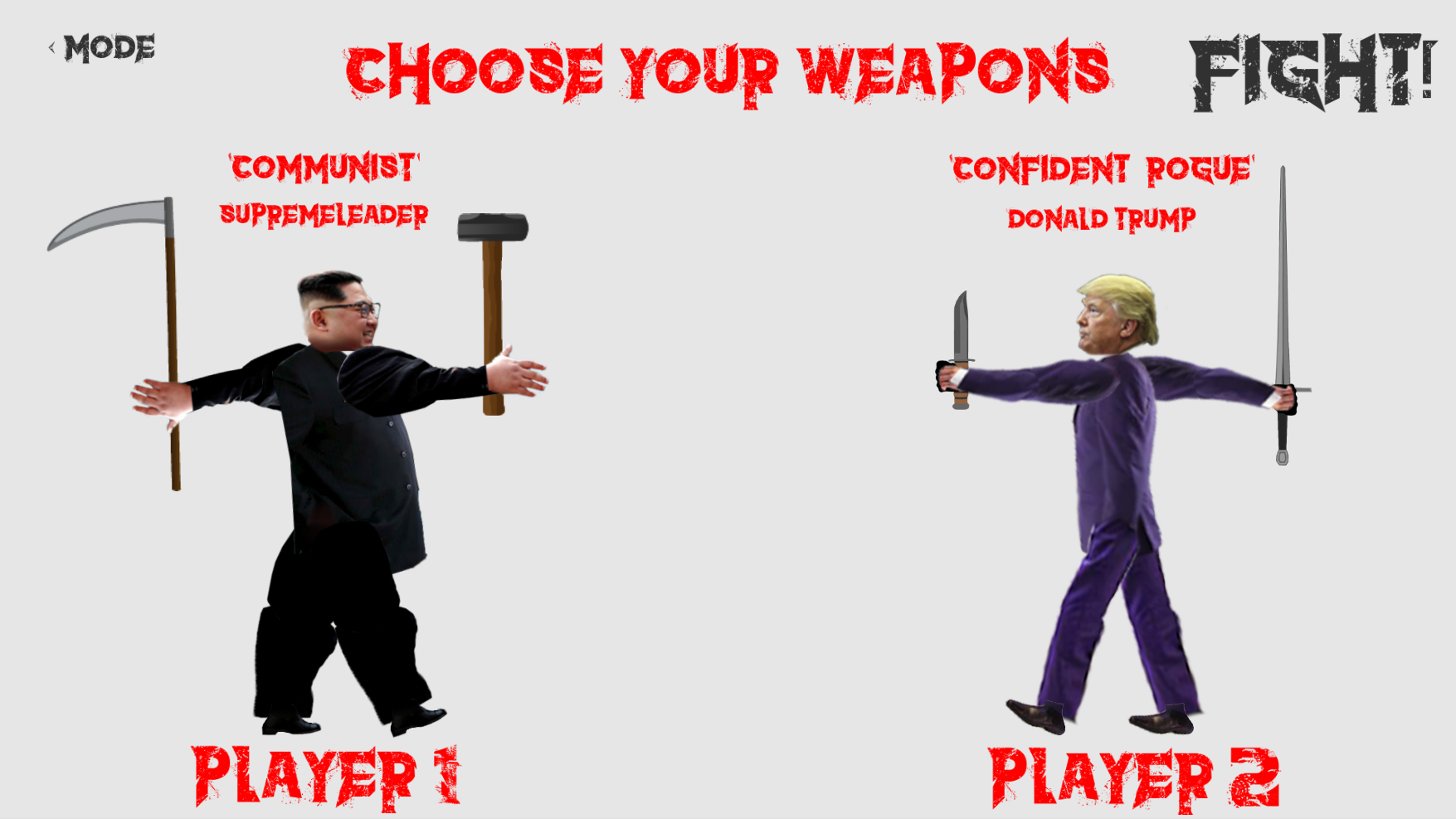
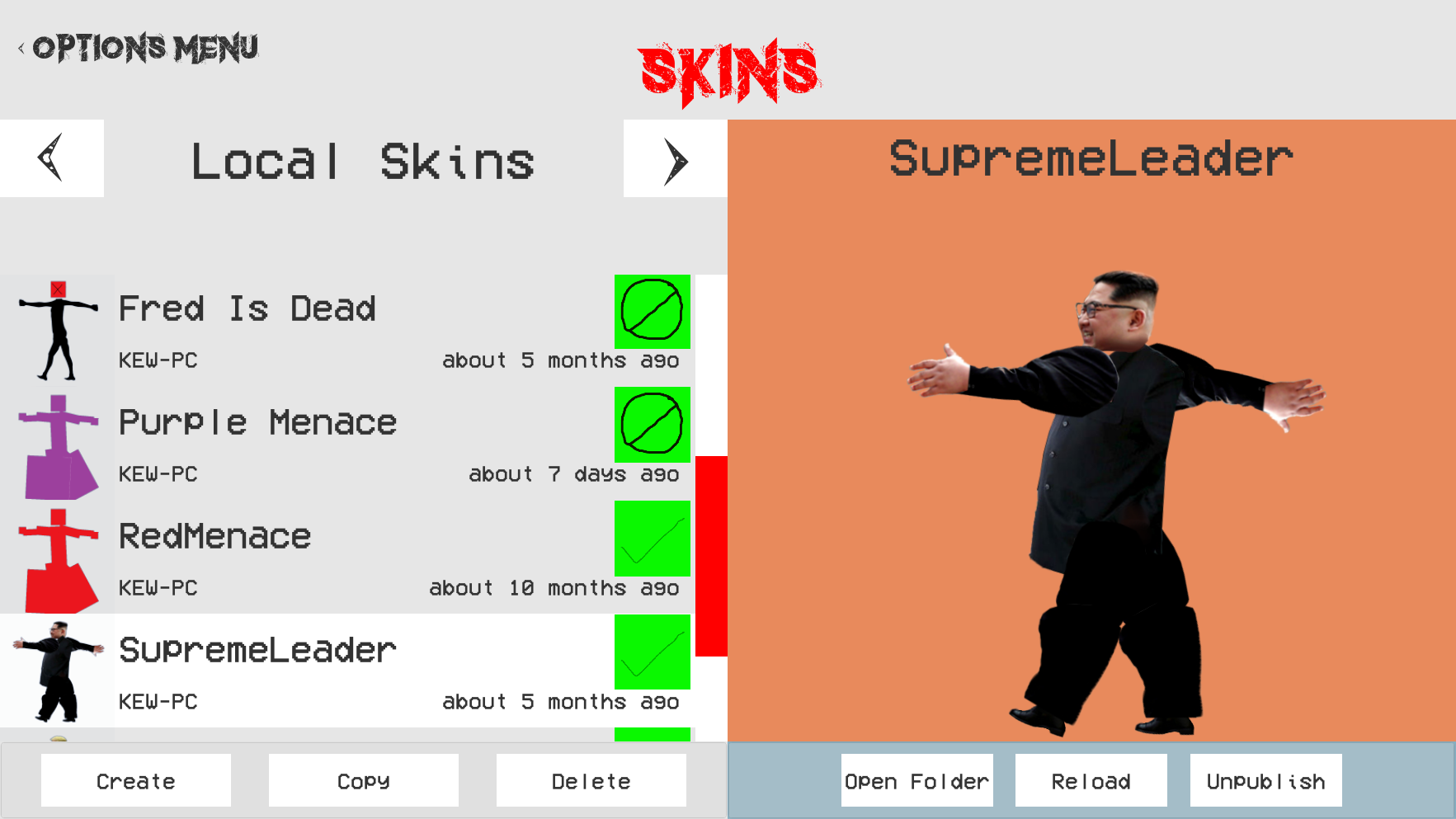
Skins can now be created, uploaded, approved, downloaded, remixed and used in both local and network games! I have also recently changed how choosing skins and weapons work to make it simpler and more intuitive to use. Now, clicking the hands of your player changes the hands weapon and clicking the players body changes the players skin without the need to change any modes.
(New weapon and skin selection with the weapon combo name being listed above the skin name)
I have also worked on developing a method that allows for your last skin and weapon choices to automatically appear when playing another local or network game However, I am yet to complete the network side of this feature and must consider how such a system should work with multiple people controlling one player.
As more bugs are fixed and features polished the skinning update should end up being released soon hopefully!
Pending tasks are now
Polish and debug skin feature
Steam workshop for player skins.
Complete network game lobby UI (make pretty and complete all network game modes).
Complete network game restart UI (make pretty).
Research different arenas and backgrounds.
General bug fixing, tidy up and enhancement of look and feel..
Rivalry Status Update #91 - Happy Holiday!
With my assessment period over followed shortly by Christmas time and other heavy duty family duties, I will probably be able to start work on Rivalry again either early or mid January.
Happy Holiday!
Rivalry Status Update #90 - First Network Game With Skins!
This week I managed to finish the functionality of sideloading and play the first network game with skins. As well as this, I also managed to fix many gameplay and Character Setup UI issues that have arisen from the implementation of skinning.
https://youtu.be/ItBrsERwuPs
(First network game featuring skins, This is also the first time I realised that the chat feature is visible during rendering..)
Now both uploaded and privately owned skins can be display in network games through sideloading. There are however still some aspects of the system that need to be fixed, For example: if someone joins a game after skins have already been decided, such skin information won’t be sent to them and they’ll therefore have only the default skin displayed.
Many bugs have also been fixed such as player weapons randomly becoming black, highlighting bugs crashing games, and the ability for the display players within the Character Setup UI to reanimate and fly away….
Sadly I will have to take a few weeks break off of Rivalry development seeing school exams are coming up again once more (but this time they count). So I hope to continue work either during late December or Early January.
Pending tasks are now
Implement skinning server functionality
Creating inventory system and skin database.
Steam workshop for player skins.
Complete network game lobby UI (make pretty and complete all network game modes).
Complete network game restart UI (make pretty).
Research different arenas and backgrounds.
General bug fixing, tidy up and enhancement of look and feel..
Rivalry Status Update #89 - Work On Sideloading
After fixing some issues relating to the skin lists I began work on sideloading, the feature that allows both published and private skins to be displayed in online games.
I first fixed an issue whereby Authors names were not being displayed on downloaded skins and then another wherein the player setup skin selection button would skip certain skins when the user clicked through previous skins. With these issues fixed and others identified I decided it was time to start on sideloading.
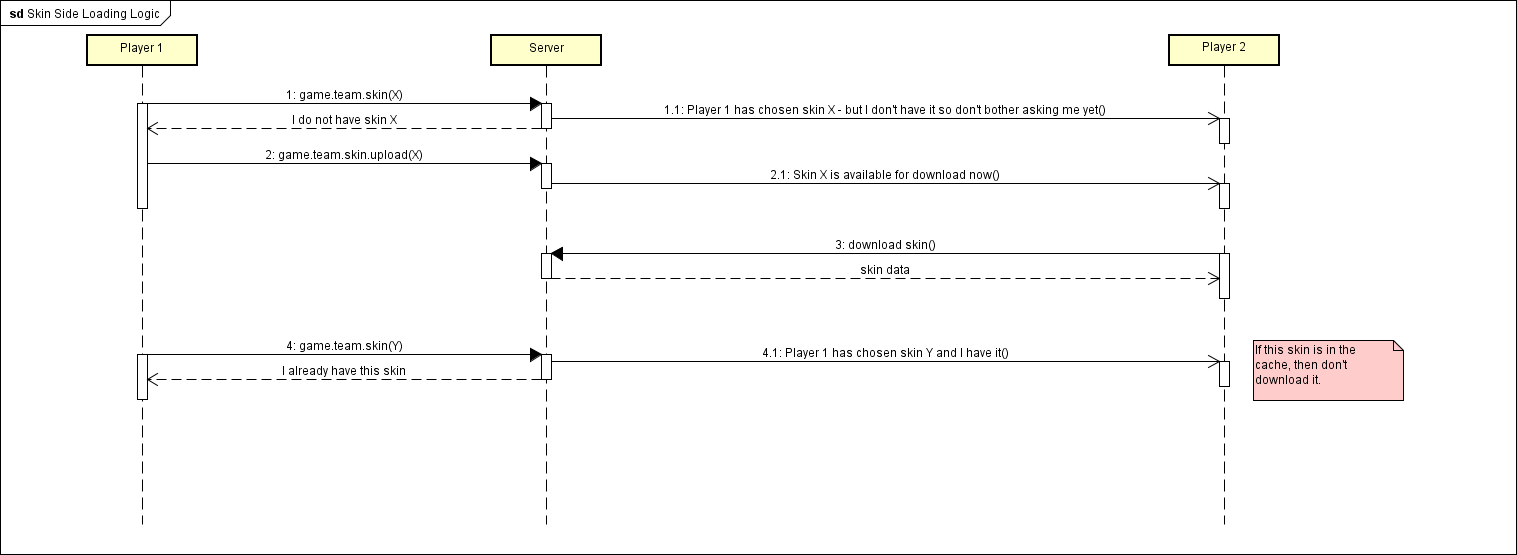
(Sideloading Interaction Diagram)
Currently the user can now select a skin in the online player setup UI which then queries the server on whether it has seen the selected skin. The server then alerts all players within the game and sends information about whether the skin is publically available to download or must be sideloaded through the server. It will then attempt to upload the privately owned skin to the server and then to each player. However, I have yet to get a player to fully sideload a skin to another player as a few issues have arisen surrounding network play that must first be fixed before more progress can be made.
Next week my goal is to fix these issues as well as any remaining issues within the skin lists and then hopefully get more work done on sideloading.
Pending tasks are now
Implement skinning server functionality
Creating inventory system and skin database.
Steam workshop for player skins.
Complete network game lobby UI (make pretty and complete all network game modes).
Complete network game restart UI (make pretty).
Research different arenas and backgrounds.
General bug fixing, tidy up and enhancement of look and feel..
Rivalry Status Update #88 - Skin Caching
With the skinning buttons functionally complete I decided to focus on allowing published skins as well as private sideloaded skins to be displayed online.
However, in order to ensure that these features could work efficiently I realised that it would be necessary to allow viewed online skins to be cached locally and then used for later. Because of this, the speed at which viewing skins has increased as you no longer have to reload a skin off the server every time you see it again.
I have also generally decreased the time it takes to view online skins by displaying the thumbnail of the skin while the actual skin downloads in the background. Before, each skins high definition thumbnail would downloaded as you scrolled through skins, but when you selected one it could take up to 10 seconds until it all downloaded. So now, by displaying this high definition thumbnail in the display panel while the actual skin downloads, Players can get a much faster response time when browsing skins online.
Next week I am planning to fix some issues I have found with the skin lists themselves as there are some problems surrounding how skins are added as your scroll down. Then, hopefully after that has been fixed I am planning to begin work on actually allowing public and private skins to be played with online.
Pending tasks are now
Implement skinning server functionality
Creating inventory system and skin database.
Steam workshop for player skins.
Complete network game lobby UI (make pretty and complete all network game modes).
Complete network game restart UI (make pretty).
Research different arenas and backgrounds.
General bug fixing, tidy up and enhancement of look and feel..
Rivalry Status Update #87 - Skinning Management is Feature Complete
Over the last week I have managed to make the skinning management UI complete with all buttons functional and tested. I have also now fixed reporting so people can't report the same skin over and over again and the server will now keep track of which skins each user has reported as well as a list of every person who has reported each skin.
However, I may also have to address a problem surrounding notifications for the Skinning management UI as the code has become increasingly unwieldy. This was caused primarily because of the current notification system. Last week I thought that if users actions were made to send notifications instead of only skin status changes then a clean and efficient solution could be produced. However, it would seem that the entire system would be more simpler if it was rebuilt to just keep track of which skin “versions” are in which skin index, instead of also using statuses.
Next week I will begin work on this fix as well as allowing for public skins to be viewed online. I will also work on sideloading which will allow for local skins to be seen online even if they aren’t publically available. This features content safety setting 'Anything Goes' can be adjusted within the new settings UI.
Pending tasks are now
Skin "Sideloading"
Skinning UI optimisation and polish
Complete network game lobby UI (make pretty and complete all network game modes).
Complete network game restart UI (make pretty).
Research different arenas and backgrounds.
General bug fixing, tidy up and enhancement of look and feel..
Rivalry Status Update #86 - Skin Button Functionality Completed
This week more work was done on adding button functionality to the remaining buttons with every skin button now having its own button functionality implemented.
Now the Unpublish, Report and Ban buttons have been given their corresponding functionality as well as the previously unconsidered buttons that arose from their completion such as Clear button (Which removes the reported skin from the reported list), Unban button (Which removes the banned skin from the banned list), and the Purge button (Which removes the skin from the Server completely).
However, there are still a few issues that have not yet been addressed. For example there is nothing stopping the user from reporting a skin multiple times. Currently, In order for a skin to be placed in the reported list it must be reported a certain number of times until it reaches a limit where it will be added to the list. So this current issue allows anyone to push any skin they don't want past this threshold and therefore add it to the reported list.
Another issue that persists is that the current notification system that is based entirely off skin statuses is lacking the required information to ensure that every client is aware of the current state of every skin. With the addition of the new Unpublish and Report button functionality it became apparent that if a skin was to be reported, as its state could not be changed (This is because a skin can be both online and reported at the same time) a notification would not be sent and no other clients would be aware of the skin being reported.
I am planning to fix this all next week with by including the action along with the status change to add that extra bit of information so that clients can stay updated.
Pending tasks are now
Implement skinning server functionality
Creating inventory system and skin database.
Steam workshop for player skins.
Complete network game lobby UI (make pretty and complete all network game modes).
Complete network game restart UI (make pretty).
Research different arenas and backgrounds.
General bug fixing, tidy up and enhancement of look and feel..
Rivalry Status Update #85 - Skin Notifications
This week, more work was done on the skin feature with the development of skin notifications which now allow clients to be alerted to changes in skin statuses.
Previously, in order to see if skins had either been added or removed from the online skins list Rivalry had to be restarted. Also for new skin statuses to be updated the skin UI had to be exited and then re-entered. Now, when a skin’s status is changed it will alert the server which reacts by sending a notification to all players logged in. From these status change notifications it can then be assumed what has happened to the skin. For example, if a client received a notification that a skins status had been changed to public it could then be assumed that it has completed its publication process and now must be removed from the pending list and added to the public list.
However, more work still has to be done on button functionality with the Ban, Report and Unpublish buttons all still lacking any function. As well as this more testing must be done using larger quantities of skins. This is test whether or not the developed notification and listing systems are built to handle hundreds of skins.
Pending tasks are now
Implement skinning server functionality
Creating inventory system and skin database.
Steam workshop for player skins.
Complete network game lobby UI (make pretty and complete all network game modes).
Complete network game restart UI (make pretty).
Research different arenas and backgrounds.
General bug fixing, tidy up and enhancement of look and feel..
Rivalry Status Update #84 - Skin Button Logic and Functionality
This week was focused on the development of how button display states are controlled as well as their functionality.
Now, published skins that can be viewed from the public list can be downloaded and used both locally and online. This development now renders the skinning feature functional end to end. These downloaded skins can now also be copied and edited to create new remixed skins. Other important buttons that have been implemented now include the withdraw button that allows for users to remove their skins from the publishing process, as well as the reload button which had had certain aspects fixed.
Next week more button functionality will be added such as the unpublishing, reporting and banning buttons. More server notifications will be added as well that allow for skins to be added and updated continuously without having to restart the game for new skinning updates.
Pending tasks are now
Implement skinning server functionality
Creating inventory system and skin database.
Steam workshop for player skins.
Complete network game lobby UI (make pretty and complete all network game modes).
Complete network game restart UI (make pretty).
Research different arenas and backgrounds.
General bug fixing, tidy up and enhancement of look and feel..
Rivalry Status Update #83 - More Skin Versioning and Buttons
This week more work was achieved on both versioning of skins we well as adding functionality to the buttons that control them.
in order to know the current status of a skin it became necessary to have an icon attached to the skins entry that displays whether the skin is local, published, accepted, rejected or banned. However, as skins can have multiple of these statuses at once a system that could determine whether locally owned or downloaded skins were also available online or awaiting publication had to be created.
The reject button has also been implemented enabling skins that are in need of verification to either be accepted into the online list or rejected. However there are still some holes in how such buttons affect skin statuses, which will be the primary focus over the next week. It is finally starting to showing consistancy and can almost push a skin through its complete lifecycle
Pending tasks are now
Implement skinning server functionality
Creating inventory system and skin database.
Steam workshop for player skins.
Complete network game lobby UI (make pretty and complete all network game modes).
Complete network game restart UI (make pretty).
Research different arenas and backgrounds.
General bug fixing, tidy up and enhancement of look and feel..