November 3rd also marks the release of RoboCo’s Steam Workshop, which is where players can go to upload, download, and share robots from other community members. Our development team has already submitted some cool creations, but what we’re really interested in is seeing what robots the community can come up with. To learn more about how to directly upload your robots from RoboCo to the Steam Workshop, click here.
And that’s it! Have fun playing RoboCo, good luck to those competing in The Platinum Cup, and we’ll talk to y’all soon about more exciting RoboNews!
RoboCo Launch Day is Coming - Here’s Everything You Need to Know!
Last week, we unveiled some visual changes we made to our wheels. This week, we’re talking about everything that’s going on during RoboCo’s launch. Much like our initial release date blog, imagine this post as a long roll of parchment paper as we decree the following:
What Features We're Launching With
RoboCo’s launch to Steam Early Access is less than a week away, and we know from regularly patrolling the Discord that some fans are wondering what exactly is included in RoboCo’s launch! Here’s a breakdown:
11 Campaign Challenges, each with its own unique batch of objectives and secrets
Steam Workshop Integration which allows players to directly upload robots built in RoboCo to the Steam Workshop as well as download and use other people’s creations
We want to remind you that this release date and these features only pertain to the PC version of RoboCo. The VR version for PC as well as a standalone version for the Meta Quest 2 will launch sometime in 2023.
A different development team at Filament Games is also working on a brand new game for the Roblox community called RoboCo Sports League, also expected sometime in 2023.
The Road to Version 1.0
We hope to be in Early Access for about a year while we gather user feedback, iterate on existing features, and continue development of new features.
Whenever we leave Early Access and declare a version 1.0, RoboCo will have new parts, additional challenges, Steam Achievements, assorted usability improvements, and the ability to give commands to human NPCs! We’ll also have VR up and running as well as some other unannounced features at that time, so 1.0 will provide a ton of exciting new content for players.
We will continue to use this devblog to give behind-the-scenes looks and updates into how Version 1.0 is going post-launch, so make sure you check in every Friday to see what’s up with Version 1.0 and beyond!
We Have a New Trailer!
A reimagining of our 2020 Gameplay Trailer, this video goes over everything a player would want to know about RoboCo. It even features some cool robots from our community like Team People’s Republic of China’s Cybercat from FGRC21 as well as the iconic Derpbot. Make sure to share it with your friends to help get them excited about RoboCo as we continue to get closer and closer to November 3rd!
The Platinum Cup is Coming!
BUT WAIT - there’s one last thing! In addition to a new trailer, we wanted to do something special to celebrate our Early Access Launch. That something is The Platinum Cup - an exclusive Discord competition/launch race.
The Platinum Cup will first consist of six different but simultaneous races. Each race involves players competing for an exclusive title and are outlined below. These will start on November 3rd, 2022 and will go until a player completes the race objective:
The Speedster - First to beat the game wins
Inspector Gadget - First to find and solve all of RoboCo’s secrets wins
The Completionist - First to get all acquirable bits (earned by completing both challenges and the RoboRepair Tutorials) wins
The Hacker - First to solve a challenge with coding
Players will prove their claims by submitting a screenshot (Speedster, Inspector Gadget, and The Completionist) or a video (The Hacker) so these illustrious titles will go to the first person to complete these achievements AND prove them with the associated media. We’re also limiting it to one title per person, so pick your favorite and make your best run!
In addition to the races, there will also be two additional titles that players can submit clips for. The competition for these titles will also begin on November 3rd but will have a firm deadline for submission - Sunday, November 13th at 11:59 PM CST. Our team at Filament Games will then pick the winner from those who submitted. These titles are:
The Jokester - Awarded to the person who submits the funniest clip
The Engineer - Awarded to the person with the most advanced robot
Prizes include a Discord title as well as an enamel pin that’s a replica of the RoboCo personal badge. These pins haven’t been seen or given out since we went to PAX in 2019 and are a cool collector’s item for any RoboCo fan!
To participate and learn more about The Platinum Cup, you must be a member of our Official RoboCo Discord. Make sure to join so that you don’t miss out on the chance to win or witness what will end up being historical moments for RoboCo.
And that’s it for this week’s devblog! We know we threw a lot at you today, but you only ever launch a game once, so we wanted to make sure we covered everything. Next time we talk, it’ll be after launch so, until then, we hope you continue to spread the word and, most importantly, have fun playing RoboCo!
Last week, we talked about adding collision sounds to RoboCo. This week, we’re talking about some visual changes we made to our wheels!
From Secret Experiment to Intended Feature
Pop quiz for those of you who have played a RoboCo demo: How many types of wheels were there in the demo you played, if you ignore the different sizes?
If you answered, "just one type of wheel," that is true enough, based on how those past demos have presented the wheels. But the secret, more correct answer is "two types." Let me explain.
Our original wheel dates back to 2017 when the project began. This wheel uses a mesh collider that roughly matches the shape of the wheel. As a result, this wheel could exist at a variety of dimensions like 3x3x1 or 5x5x3.
In 2019, we experimented with a second type of wheel. This used a sphere collider in addition to a slightly inset mesh collider, yielding a different physics experience. As a result of the sphere collider, this wheel could only exist at cube dimensions like 3x3x3 or 5x5x5.
In the RoboCo demos, both of these wheels have been present but they looked the same and were just called "Wheel." The only way to know which type you were getting was to pay attention to the wheel's dimensions and notice the different physics. This is because we didn't originally expect to launch with both types. We thought we would select one of the wheel collider types or come up with a third approach that we preferred to either of them.
In the end, we saw some value in keeping both wheel types and making them more distinct and official. We ultimately concluded that this is a creative sandbox game and having options is part of the fun!
Setting the Right Expectations
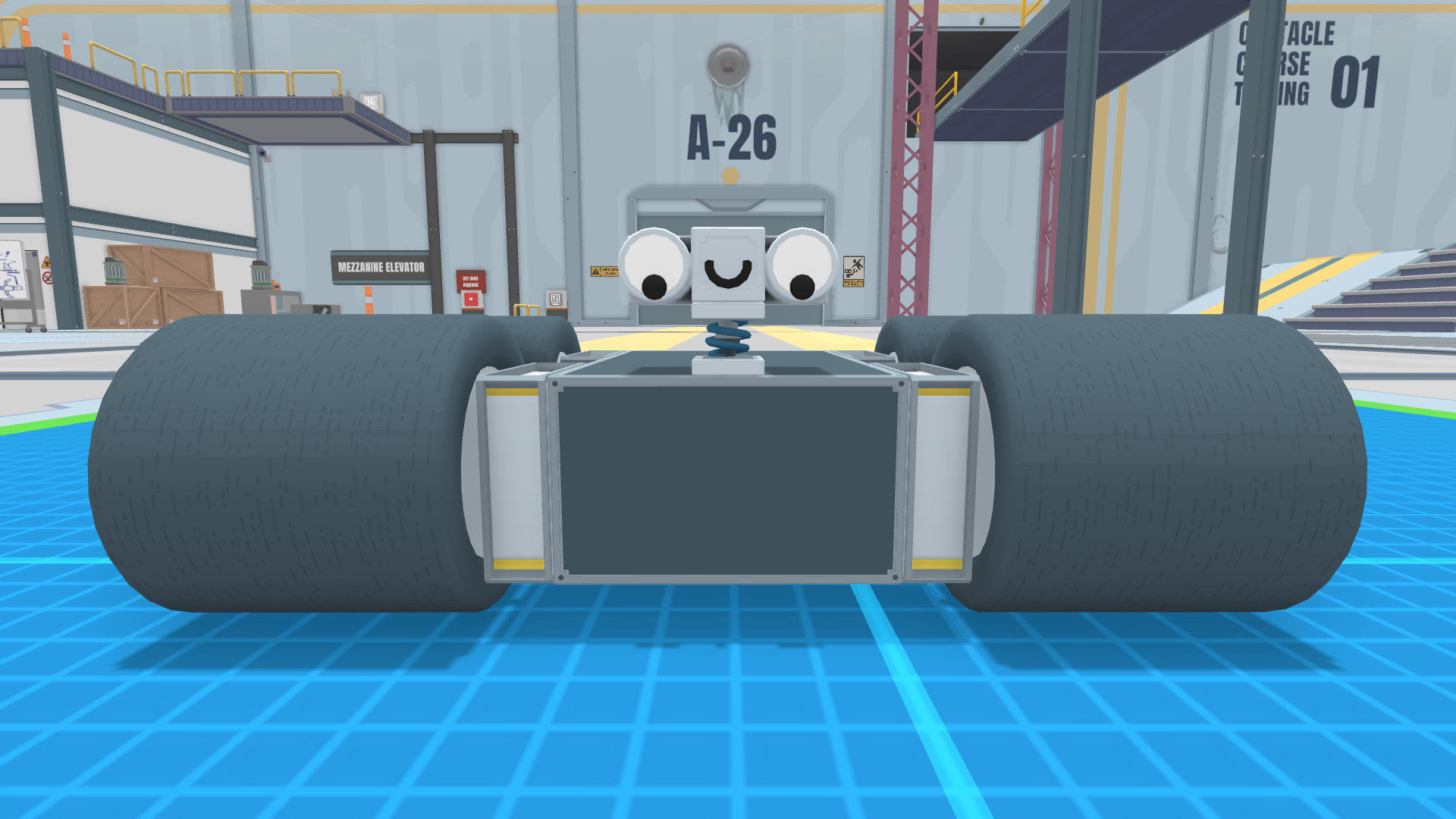
Another factor in our visual redesign is that up until recently, our wheels had a rubber tire tread texture on them. It looked slick but the car tire implications didn't match how either of our current wheels feel. And in fact, many real-world robotics wheels aren't car tires. So, we decided to come up with two new wheel visuals, to differentiate our two current types of wheels and better match their feel.
So here we are, (re)introducing RoboCo's two wheels!
Solid Wheel
A solid wheel with a rubber grip. High friction, but bumpy at high RPM. You may prefer these wheels in instances where you want snappy turning or stopping. If you are looking to optimize your robot's cost, these wheels are also less expensive than an RC Wheel of equivalent size.
A dense foam wheel. Low friction, and smoother at high RPM. You may prefer these wheels when you want to trade rapid responsiveness for a less bumpy ride.
Note that we are using different default colors to help set the two types of wheel apart, but both wheels are paintable if you prefer your own look.
Sounds Like a Great Match! Will a Third Wheel Tag Along?
These two wheel types are what we'll have available for Early Access launch (very soon!), but they are unlikely to be the last. Post-launch, we anticipate adding some manner of omnidirectional wheel like mecanum wheels. We also hear all of you in the community who have asked for suspension and/or a pneumatic wheel that looks and feels more like a car tire.
And that's it for this week's dev blog! We're working tirelessly to fix bugs and prep for November 3rd. But don't worry, wheel be back next week with more exciting RoboCo updates!
Last week, we announced that RoboCo would be launching on Steam Early Access on November 3rd, 2022. This week, we’re giving you a behind-the-scenes look at all the new crashes, thuds, skids, and more to RoboCo’s soundscape!
Why are Collision Sounds Important?
In general, the main job of a sound designer is to help further immerse a player into the game world through a combination of dialogue, music, sound effects, Foley, and ambience. This includes something as big as scoring an epic fight scene with music to something as small as crafting the squeak for a chair as it slides across the floor
That squeak you get from a chair is what we call a “collision sound” which occurs when two objects in the game world interact with each other. It's an extremely important component to helping a game feel more immersive. After all, a robot doesn't really feel like it crashed without a satisfying thud, nor does a bowling ball seem real if you can't hear it roll across the floor.
In July, the RoboCo development team along with RoboCo’s Video and Audio Producer, Josh Bartels, met to discuss what steps we’d need to take to add collision sounds to the game. Here’s how it was done!
Finding the Right System, Tagging Props, and Setting Rules
The job of a collision sound system is to take all the collisions that are happening in the physics system and decide how and what sounds to play based on the math involved: How fast was each object moving and in what direction? Should these objects' interaction count as a bump, roll, or slide? Developers have two options when it comes to designing a collision sound system: building it themselves or using a third-party system.
Because there are so many calculations and logic involved with making a good collision sound system, we decided to go with a highly accredited and popular third-party system known as Impact - Physics Interaction System. Not only is this system very modular (i.e., allows us to pick what parts of the system we want to use and what parts we don’t), it also results in a great player experience due to how well the system handles sliding, rolling, and other sonic nuances beyond just objects hitting!
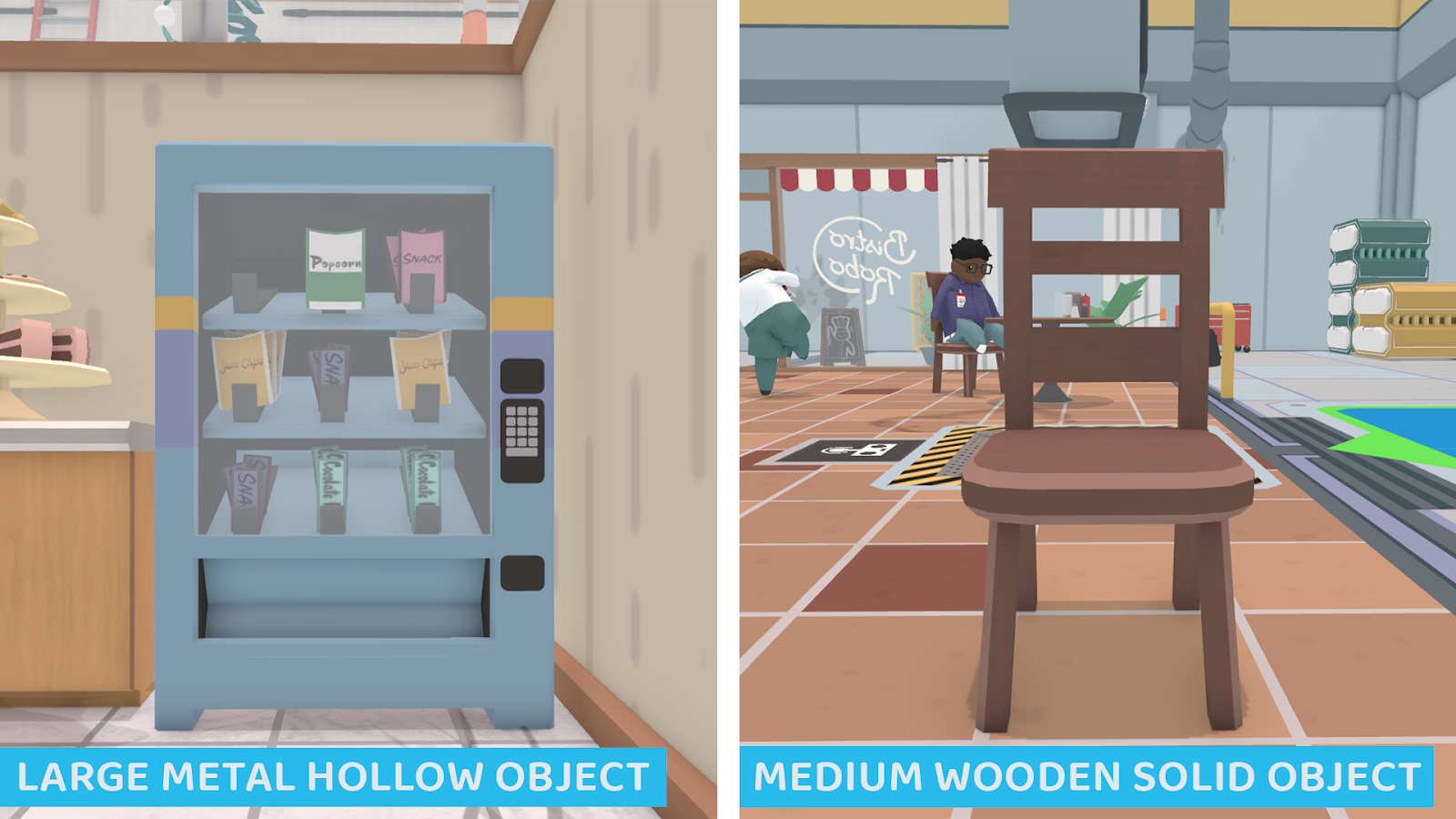
Once we picked our collision sound system, we created a design doc. The main goal of this design doc was to determine the fewest types of sounds we would need to cover all the props in the game. We made a classification system based on three factors: size, type of material, and whether it was hollow or solid. We included a snippet of what it looked like below.
For example, a vending machine like the one we use in Robo Coffee would be considered a large, metal, hollow object, while a table chair in Sandwich Server would be considered a medium, wooden, solid object.
After determining what types of sounds we would have, we started tagging all the props in the game with an impact material. The real tagging was done in the Impact system in Unity, but we also used another spreadsheet to keep track so Josh could easily review and so QA had a reference for testing.
These tags tell the Impact system what sort of sound should be played when the objects collide with one another. The Impact system also lets us define interaction rules. For example, if something tagged "metal" hits an object tagged "fabric," it will muffle the resulting sound.
Once we finished tagging objects within RoboCo, we were ready to bring Josh in to help design the actual sound effects. We created a testing scene that was an open room full of different props so we could easily iterate on and test sounds. Then we met with him throughout several weeks as he continued adding more and more sounds.
Throwing Everything at a Wall to See What Sticks
If you’ve ever watched a Foley artist make sounds for a movie, TV show, or video game, you may understand some of the nonsense that occurs when making sound effects from scratch. There are some great videos online these showcase the behind-the-scenes wackiness of making sounds for media, like this one about how they made the sound for Mr. Krabs walking in SpongeBob.
Josh Bartels, RoboCo’s Audio and Video Producer, found himself in similar situations when he was designing sounds for RoboCo. When making one sound in particular, he remembers gathering as many objects as he could find around the house and throwing them against the wall to simulate a crash. In fact, he threw his kids’ truck at the wall so many times that they all came into the studio to see what he was doing and, after being shocked by the fact that he got to run toy cars into the wall for his job, they ended up asking him if they could help, which resulted in many more cars being thrown at the wall.
But it’s not just collision sounds! Josh and the team have also been hard at work creating additional sound effects for the humans, robot parts, and unique interactables that you encounter throughout the campaign. Below are some of our favorite examples.
And that’s it for this week’s devblog! Since we finished implementing our collision sounds in September, we’ve been extremely excited to share this update with you, especially since it wasn’t something seen in previous demos of RoboCo. Next week, we’re going back to the visual side of game design and talking about some visual improvements we made to our wheels!
Normally, I’d recap last week’s devblog and come up with a clever lead-in for what today’s topic is about, but this week, I’m skipping all that and getting straight to the point!
We’ve Officially Picked a Date
🎉 RoboCo is coming to Steam Early Access on November 3rd, 2022! 🎉
As RoboCo’s VP of Marketing and Funding Development, Brandon Pittser, so perfectly put it in our Q4 2022 announcement, our robodreams have turned into roborealities! We’ve been throwing out little hints within our devblog, social posts, and Discord that we were getting close to announcing a final release date, and that day has finally come.
Keep in mind, this launch date only pertains to the PC version of RoboCo. Both the Roblox version of RoboCo (dubbed RoboCo Sports League) and the VR version for PC / The Meta Quest 2 won’t launch until 2023. To learn more about our plans for those platforms, check out our initial release date devblog here.
And that’s it for today’s devblog! We’ve kept it on the short side, but we still have A LOT of material to cover prior to launch. This includes development updates like adding collision sounds and improved wheel visuals as well as the announcement of launch features and some exclusive events coming to our Discord. Check out our devblog every week to make sure you stay up to date and don’t forget to tell your friends, family, robot underlings, and more to wishlist RoboCo today! 🎉🤖🎉
Turn Up Your Robot’s Computing Power + More Cosmetics!
Happy Friday, everyone!
Last week, we unveiled a brand new addition to our paint tool - The Texture Tool. This week, we’re showcasing our last batch of cosmetics before launch!
Add More RAM to Your Robot
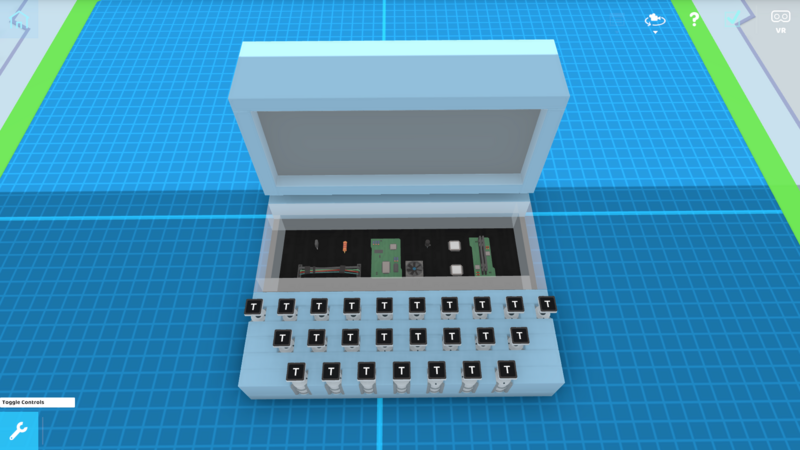
It’s time to celebrate, PC-building aficionados! You’re really going to appreciate our newest collection of cosmetics. Focusing on computer hardware, this batch of cosmetics includes: a transistor, a resistor, wires, two sticks of RAM, a processor, a cooling fan, a circuit board, and a capacitor. Use these cosmetics to help your robot remember what it’s doing, complete those hard calculations, keep it cool while it’s overclocking, and much more
Take Your Robot Back to the 50s
What was as popular in the 50s as Elivis Presley, drive-in movies, sideburns, and cateye glasses? Fuzzy dice! Take your robot back to a time before video games (which weren’t invented until 1966 and popular until 1975) with our fuzzy dice cosmetic.
Become a Master Chef
If you’re fully embracing the idea of your robot being a professional sandwich server or barista, give it an extra tall chef’s hat. Bear in mind that many cosmetics will only become available after completing the associated secret objective, so make sure you’re keeping an eye out for hidden purple tablets as you play through the campaign!
I See Right Through You
Fans of RoboCo’s earliest alpha know the importance and usefulness of glass blocks. Previously in the Structured Parts section, glass blocks can now be found in the Cosmetics section.
Other Stuff We’re Working On
Q4 2022 is right around the corner, which means our development team is busy putting the finishing touches on RoboCo. Here’s a list of some of the big tickets items they’re working on:
QA testing and cleaning up defects and usability issues throughout the game
Adding a few missing breakable states for props
Continuing to hook up sound effects and review with our A/V Director
Tuning part costs, masses, and unlocks
All those important but less glamorous things one needs to release a game (credits, splash, legal text, etc.)
And that’s it for this week’s devblog! Next week, we suggest you gear up for what’s going to be our biggest announcement yet!
Cover Your Robot in Flannel, Bricks, Polka Dots, and More!
Happy Fall, everyone!
Last week, we talked about our new series of weighted structural parts. This week, we’re unveiling a new feature within our Paint Tool - textures! This feature has an interesting origin story, as it was an unexpected result from our initial prototyping for a weight system. But first we need to explain how customizable robot textures have their foundation in how 3D objects in RoboCo are set up in general.
Shape, Color, and Texture
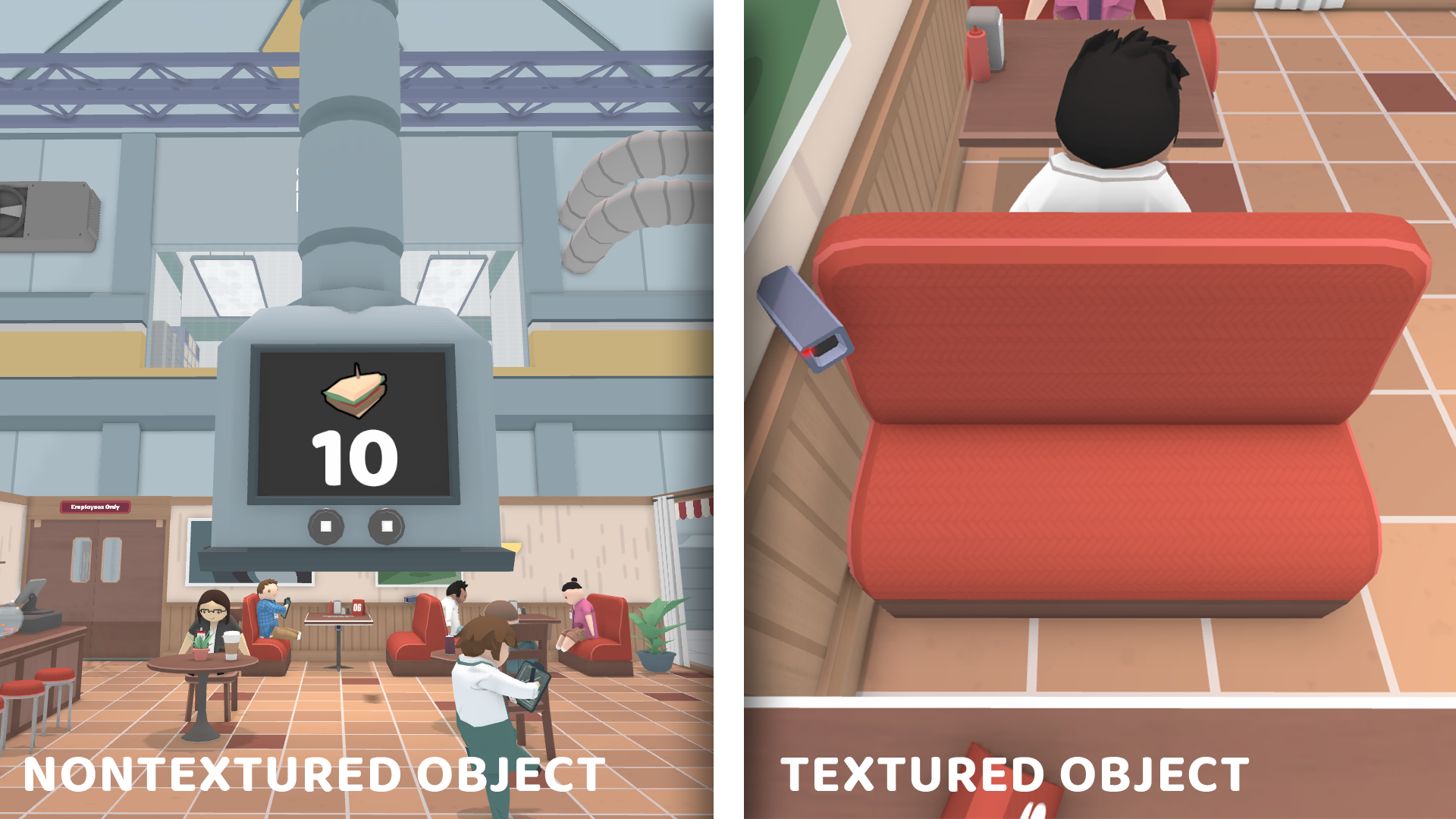
The color and texture of 3D objects in RoboCo are handled a little differently than what you might be familiar with in other games. This is an oversimplification compared to what's happening under the hood, but in terms of the player-facing experience, you could think of RoboCo's 3D objects as mainly having three visual layers: the first layer is the wireframe mesh, which you can think of as defining the shape of the object; let's say, a restaurant booth chair. The second "layer" is the vertex color, which you can think of as a color assigned to different regions on the object; red on the cushion, brown on the base. the third layer is optional. If we wish, we can assign to a region a tiling texture that will be overlayed on top of the colors: a fabric pattern on the cushion, wood grain on the base.
To keep RoboCo's art simple, stylized, and charming, we use textures sparingly, often to communicate certain real-world materials. For the most part, metal and plastic objects in RoboCo don't have a texture (like the sandwich dispenser in Sandwich Server) while objects made of fabric, wood, carpet, etc. do use textures (like the restaurant booth chair).
Two Roads Diverged and We Traveled Both
We haven't often talked about our missteps on this blog, but failing and trying again is an inherent part of creative problem solving, including in game development.
Before we started working on our new system of weighted structural parts a couple months back, we already had a design concept and wireframes that we had been iterating on while we worked on other features, as we always do our best to think ahead about how various future features might work before we put one of them on the development roadmap. In this case, we wanted to have weight be associated with materials like plastic (lightweight), aluminum (medium), and steel (heavy). In our concepts, it seemed plausible, but we were probably too preoccupied with figuring out the user interface and not enough with validating our core idea. Once we began prototyping, we had to admit that a flaw in our plan was more significant than we anticipated.
We thought we might get away with subtle textures like brushed aluminum vs. galvanized steel to distinguish materials, but the more look development we did, the more it felt like we were off track using textures as the heart of our materials / weight system. RoboCo has such an established visual language for metal as untextured that we couldn’t visualize differences like aluminum and steel with subtle textures without it feeling like your robot was made of, at the very least, a different sort of metal than the other metal in the environment. We also became concerned that some players would choose a certain weight block just because they wanted no texture or a specific texture, and nothing to do with the weight at all.
During this process we talked about our other visual options for communicating materials with different weights, and our existing theme color system emerged as the aesthetically-best-looking strategy. In fact, the Tertiary color in our themes had mainly been used for our placeholder heavy block for several years, almost as if it knew this day would come. You can see how the theme-colored weight blocks turned out in last week's blog and we were very pleased with this new solution.
In the meantime, we had already done much of the work needed to allow the player to edit the textures of structural blocks on their robot. So now, we had a core system implemented, plus some textures we had experimented with on structural robot parts that we liked. But we needed a new place to use these in the game… so we decided to add control over these textures to the Paint Tool. This rescued some work from our little detour, didn't feel disruptive like it did when textures were a required side effect of weight, and added a nice little customization option!
How Do I Add Textures to My Robot?
To access textures via the Paint Theme Menu, simply click on the Paint Themes Menu at the top of the RoboCo UI. Once there, you’ll see a large square labeled “Texture” underneath the different paint categories.
Click inside that square to choose from a slew of texture options. Keep in mind that these textures only apply to structural parts (at least for now), so you won’t be able to change the textures of other parts like motors, gears, wheels, cosmetics, etc.
For those that prefer a more hands-on approach to painting, we’ve also added a texture mode to the Paint Tool. To use it, click on the Paint Tool at the bottom of the RoboCo UI and select “Texture Mode.” Clicking within the box to the left of the tool, much like the box in the Paint Themes Menu, will allow you to select the texture you want and then paint it directly onto the structural parts of your robot.
We're still testing the various textures for how they look, wrap, etc. but we expect to have a selection of several at launch. Some current textures include a marble texture, a brick texture, a polka dot texture, and a flannel texture! In fact, you may have seen this flannel texture before on social media as it was used to give our imposter robot a more…human look!
While we didn’t originally intend for robot textures to be a launch feature, it was a nice surprise to add yet another layer of visual customization to our game. We’re excited to see how players use this feature to make even more realistic or wackier robots!
And that’s it for this week’s devblog! Next week, we’ve got some new cosmetics as well as a brand new sound feature to tease!
We Made Some Heavy Updates to Our Structural Parts!
Last week, we showcased some amazing RoboCo content in our fourth issue of Did You See It? - RoboCo Content Showcase. This week, we’re unveiling a heavy update we made to our structural robot parts!
Back in the Early Days…
For most of its development, RoboCo has had three variants of the standard cube-shaped block: a lightweight block, a medium block, and a heavy block. Having at least these weight variants was vital for constructing robots, as it allowed players to build robots with more stable bases (by weighing the bottoms of robots down with heavy blocks) and create more flexible appendages (by lightening arms and legs with light blocks).
Unfortunately, if you were someone that wanted to use light or heavy versions of other structural parts (like cylinders, wedges, pyramids, or pipes), you were out of luck, as only cube-shaped parts had variants in weight. We knew we wanted to resolve the fundamentals of how RoboCo handles weight before Early Access launch, as it could affect robot data in some important ways, so we set to work rectifying this. Which brings us to today's update.
New Lightweight and Heavyweight Champions
There are now lightweight and heavyweight variants for each of RoboCo’s structural parts. These parts include: wedges, block corners, wedge corners, pyramids, bends, bend corners, curves, cylinders, interior corners, ramps, mounts, and pipes.
Players who want to maximize their score by keeping an eye on their robot's overall manufacturing cost will note that each part has different costs based on its weight. The journey to deciding what weight class we wanted to be the most expensive ended up being a lot more interesting than we initially thought!
In a game like Poly Bridge, the cost of a material is based on its structural integrity. For example, it costs players less money to build with wood than it does with steel, but wood will break more easily.
RoboCo doesn’t have these sorts of breakable materials to build with. Our challenges involve many unique and intricate interactions, so we didn't really like the idea of the robot falling apart from unexpected forces while the player was just trying to turn a valve or something innocuous. So regardless of weight, all our parts have the same idealized structural integrity. This meant we had to determine costs based on weight alone and, for that, we took inspiration from… bicycles!
If you've gone bicycle shopping, you may have had to choose between different materials for the frame. Think of our lightweight block as carbon fiber and our heavyweight block as steel. In the real world, carbon fiber and steel are both pretty sturdy, but their weights are vastly different (5x different to be exact). That makes carbon fiber a rather impressive material, but it also means that it costs engineers more money to use carbon fiber than steel in their designs.
With this thinking in mind, we determined that lightweight blocks would be the most expensive to use, with heavy being the second most expensive, and medium being the least expensive. This is also why you see medium parts listed first in the inventory, as we want to encourage players to limit their use of more expensive parts (like saving heavyweight blocks for constructing bases and lightweight blocks for appendages). Medium parts are the default weight we base our physics tuning off of, so while we can't predict how weight will be distributed on a given player's robot, in general a robot made of a larger percentage of medium blocks should tend to perform well physics-wise.
Weight Variants are Like Onions!
With the new weight variants, the color scheme of your robot will be layered with additional meaning, as long as you stick to editing colors with the Theme option.
Here’s how the different weight classes are categorized in the Paint Theme Menu:
Light blocks use only the primary color
Medium blocks are mostly the secondary color with a primary color border
Heavy blocks are mostly the tertiary color with a secondary color border
Painting with either the fill or detail option will override the theme, at which point you will still have some visual cues like the bolts on heavy blocks but will be mostly on your own for keeping track of weight. We have a design concept for a new weight painting tool that would help offset this issue and also make it very convenient to edit the weight of placed blocks, which joins our always growing list of post-launch updates under consideration, so let us know if you'd be excited for that!
Other Stuff We’re Working On
Speaking of launch, here’s another small list of things we’re working on as we get closer and closer to Q4 2022.
Cleaning up defects and usability issues throughout the game
Tweaking art for some parts and challenges to address visual or functional defects
Continuing to hook up sound effects and review with our A/V Director
Tuning part costs, masses, and unlocks
Optimizing
QA testing and assessing remaining work to finalize our precise launch date
And that’s it for this week’s devblog. Next week, we’re talking about a new paint feature that resulted from our experiments with weighted parts!
Last week, we talked with RoboCo’s QA Analyst, Austin Smythe, about what it’s like being RoboCo’s premiere bug exterminator. This week, we’re doing another Did You See It - RoboCo Content Showcase to highlight some new (and retro) content from some of our favorite content creators!
We’ve Officially Passed 100 Devblogs!
However, before we get into showcasing some awesome content, we wanted to acknowledge that, as of last week, we’ve officially published over 100 devblogs for RoboCo! From major gameplay updates to big events to Discord shoutouts and so much more, we’ve sincerely enjoyed bringing readers behind-the-scenes of what’s been happening at RoboCo HQ these last three years.
Thank you to all our fans, both on Steam and our website, who return every Friday to read about what’s going on in the world of RoboCo - Here’s to 100 more!
New RoboContent to Explore!
With that bit of housekeeping out of the way, let’s get back to today’s topic. With our most recent build, we’ve been delighted to see new and old faces making videos about RoboCo, especially those centered around the RoboRepair Tutorials. Here are some of our favorites!
kAN Gaming has been a member of the RoboCo community since our earliest alpha days! His content primarily focuses on robotics, sandbox, building simulators, and some survival games. If you want to learn more about kAN, make sure to check out his YouTube, Twitter, Instagram, Discord, and Twitch!
Like kAN, Durf has been a huge supporter of RoboCo since the beginning. In addition to making several RoboCo videos, he was also the mastermind behind RoboCo’s emoji generator, which allows you to create custom emojis based on RoboCo’s different human expressions. To learn more about Durf, make sure to check out his YouTube, Twitter, Twitch, and Discord!
One of the most recent content creators to join the RoboCo family, cazum8 hosts a popular gaming channel on YouTube. In addition to playing other games like Roblox, Teardown, and Scrap Mechanic, cazum8 is the first channel we’ve featured whose content is exclusively in Brazilian Portuguese. If you’re interested in learning more about his content, make sure to check out his YouTube, Instagram, Facebook, and Twitter!
Retro Content to Look Back On!
In addition to some of the new content we’ve highlighted above, we wanted to look back on some older RoboCo content that continues to make us smile and laugh. If you’re new to RoboCo or are looking for a fun video to rewatch, make sure to check out these below!
Robbaz has now been making content on YouTube for over 16 years! A self-described basement dweller, mad scientist, and gaming enthusiast, his content mainly focuses on sandbox, simulation, and building games. Make sure to check out his YouTube, Twitter, and website so you can be there to support him when he gets back from his break!
A RoboCo veteran, Scrapman was the first channel to ever publish content on RoboCo! His videos mainly focus on games with advanced building and robotic elements like Besiege, Main Assembly, Satisfactory, and more. He even has a playlist on his channel where you can check out all his videos on RoboCo specifically! If you love his content as much as we do, make sure to check out his YouTube, Twitter, Discord, and Instagram!
And that’s it for this week’s devblog! Next week, we’re talking about how and why we made some of our blocks a little….heavier.
Learn More About Austin - RoboCo’s Premiere Bug Exterminator!
Last week, we unveiled two new RoboRepair Tutorials! This week, we’re going behind-the-scenes of what it’s like working on RoboCo with our QA Analyst, Austin Smythe!
More RoboCo Events!
A quick announcement though before we introduce Austin: we’re excited to announce that RoboCo will be taking part in the 2022 Seattle Indies Game Expo! Keep an eye out for the live broadcast on their Twitch channel coming up September 24th, 2022! Check out their website to learn more.
Meet Austin Smythe, RoboCo’s QA Analyst!
Austin first joined Filament Games in February 2018. While the majority of his time is spent working on RoboCo, Austin also spends a lot of time working hand-in-hand with Filament’s other QA Analysts (Georgia Adkins, Brian Czech, and Alex Avalon) on other projects. In addition to troubleshooting games, Austin is a talented RoboArtist, particularly when it comes to RoboCo pixel art.
Nicole: Hello, Austin! Thanks for taking some time today to talk about RoboCo!
Austin: No problem, Nicole! Happy to be here!
Nicole: Let’s jump straight into it. We haven’t covered QA or their roles extensively in a devblog before, so could you explain what a QA analyst does?
Austin: So I could give you the very boring job title or job description, but basically a QA analyst is someone that tests the software that the company is creating.
Nicole: What’s the process you and your team goes through when testing a game?
Austin: The whole process involves a lot of verification testing. Oftentimes, when a developer or a designer creates a game, they have these lists of actions that are supposed to happen. As a QA analyst, I take that list and test against everything that the designer says should happen to see if it all works. This allows us to search for blindspots that a developer may have missed and make sure an end user (i.e. player) won’t run into something weird. Essentially, we play the game differently than it was intended.
Nicole: So does that mean you’re constantly playing the same game on repeat? Or is there other stuff like software involved?
Austin: Partially. We spend a lot of time in a software called Jira, which is where developers will write “stories” that have a list of all the different acceptance tests we need to perform for a feature. Once we know what branch specifically of the game we need to test, that’s when we’ll go in and repeatedly play the game. We also, whenever we find a defect, reproduce it multiple times. We then document what we find in Jira and send it back to the developer to fix, so it’s basically a constant cycling of reading, playing, and writing.
Nicole: How did you first get interested in this type of work then?
Nicole: I imagine going from Activision to Filament took some adjustment then, given just how big their studio is.
Austin. It was quite a culture-shock, especially since I went from a team of 200 people to (what was then) two people. On Call of Duty especially, I remember I would work my QA shift, leave my desk, and then have someone come fill my spot as soon as I left to work their night shift. Working on Sekiro was a lot of fun though, I personally love that game and was super happy to be a part of it!
Working on those games really taught me a lot about what I liked about QAing. For example, I like that a lot of things are Pass/Fail, and that it’s almost a perfect balance between programming and exploration, because a lot of the job is figuring out what you don’t know rather than what you do know.
Nicole: So what does the typical day of a QA analyst look like then?
Austin: Typically our team starts or ends the previous week with sync, which is a meeting where we go over which projects need QAing. Sometimes, we’ll divide the QA work between people or, if we need to test things more quickly, we’ll all jump in on a project. That’s again when we’ll go into Jira to look at what tickets have been submitted, which can either be “stories” from the developers like I mentioned earlier or a list of previous fixed defects. When it’s the latter, I will go through those fixed defects again to make sure nothing else popped up. Once those tickets are verified, I’ll then go through them again just to double-check I didn’t miss anything.
Nicole: And how do you and your team determine which games get tested first?
Austin: Each game goes through phases. Typically, a game goes through three phases: alpha, beta, and gold. It usually takes a game six to eight months to get through till the end of a gold phase, since that’s the last QA phase a game will go through before it’s ready to launch. Games that are at the end of their phases usually take priority over small QA items from sprints. We also have additional exit/entry criteria for games that are close to release, but that has more to do with company standards than it does anything else.
The six to eight months timeline isn’t set in stone either. RoboCo, for example, has been through more phases than any other game we’ve worked on, because we want to make sure we’re going through it as detailed as we can before it’s released to Steam Early Access later this year.
Nicole: Speaking of RoboCo, what’s been the funnest thing about working on that project?
Austin: I really enjoy that my job is sometimes just going into the sandbox and creating a robot. A lot of times I get asked to test stuff for the challenges and my whole day will be spent building a robot that can complete every aspect of it. Funnily enough, I also learned from doing this that my boss, Brian Czech, is… less enthusiastic than myself about robot-building. This means, whenever I bring him in to help on RoboCo, I get to either teach him about building or send him robot files I’ve made, leading to a super fun role-reversal.
I also, when testing, get the opportunity to build whacky robots like the F1 or the Boston-Dynamics inspired claw arm, which is super cool.
Nicole: Is there any aspect of the job that’s been challenging?
Austin: I’d say the most challenging part of QAing RoboCo is the size of the project. Normally, games at Filament consist of one designer, one engineer, and one artist. On RoboCo, we have one or two designers, three engineers, and at least one art person. We currently have over 5000 test cases for RoboCo, which is about five times more than an average project. Sometimes juggling that work within a two week testing period can be difficult, especially if there are other games that need looking at.
Nicole: What about the robot programming feature? Has that made things more complex?
Austin: Sometimes. I know the bare essentials of Python, so sometimes I’m able to figure things out on my own. Other times, I may have to have one of the engineers send me a robot for testing. The process for QAing is the same though. I just have to run through the code a bunch of times to make sure that the robot is doing what it was intended to do.
Nicole: Are there any funny glitches or bugs you’ve encountered that you can tell us about?
Austin: Hmmm. That’s a good question. There’s the one about humans knocking themselves out with clipboards, but I think Carter already talked about that one. One I fondly remember involves the Center of Mass RoboRepar Tutorial. You used to be able to move the block so it was inside the robot, which, when you pressed play, would cause the block and base to jump away from each other, thus catapulting the robot over the finish line.
Nicole: Final question, what is your biggest dream or hope for RoboCo?
And that’s it for this week’s devblog! Next week, Luke Jayapalan returns to talk about a brand new feature added to our Paint Tool to take your robot's customizations to the next level!