

Sequence Storm
1.3.4j
Update 1.3.4i
- Prevent switching to a campaign the user doesn't own by using the reset mission progress menu.
- Fixed a bug in the first mission where the rivals could speed ahead.
- Fixed being able to skip the intro in missions.
- Editor: Reverse zig zag direction is now ctrl+shift+r instead of ctrl+alt+r.
- Fixed a bug where the quit-without-saving prompt could be active but invisible.
Update 1.3.4h
- The "reduced flashing" option prevents objects in the world from changing color.
- World editor: Fixed a possible crash on changing skyboxes.
- Song editor: The "X Position Follows Track Center" setting can now be toggled at any point on the track.
- Parameter editing: "Interpolate Parameter Values" now uses I as a shortcut key.
Olokun Dive! Beta Test:
- Added the soundtrack files to soundtrack\OlokunDive
- More progress on new tracks.
Update 1.3.4g
- Fixed a bug where the draw distance was not working properly with the near/medium/far settings.
- Fixed a bug where jump notes were appearing in the editor incorrectly when editing a track with a looping spline.
Join the SEQUENCE STORM Fall Score Challenge!
Enable the Fall Event option in the arcade, when playing score mode:
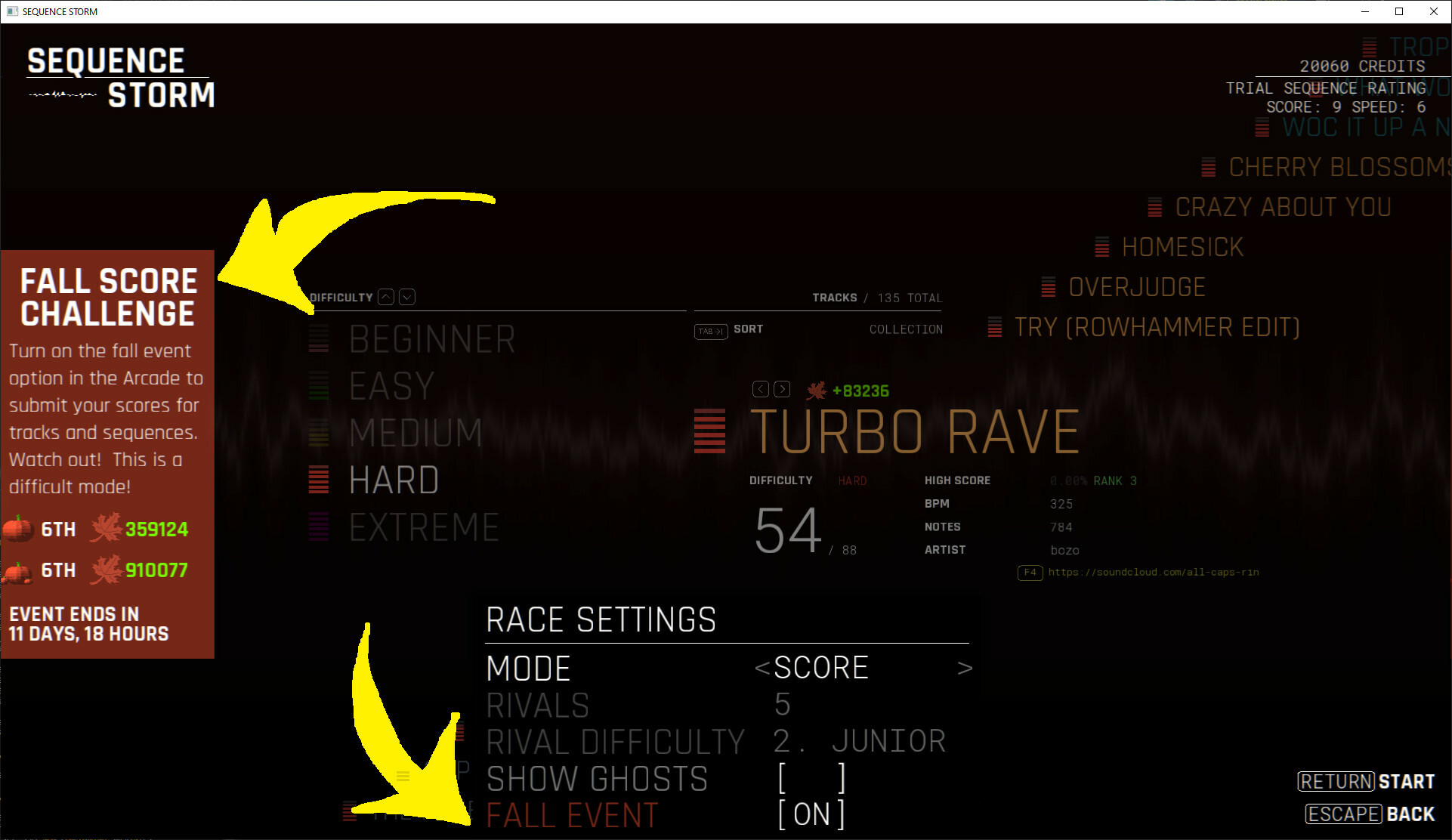
This activates a very punishing health bar! But your best scores in this mode are stored on the event leaderboard:

Participants will receive a pumpkin leaderboard badge, and the top players will receive gilded pumpkin badges!
Update 1.3.3k
- Fixed a bug causing some models that should be on the side of the track to appear in the wrong place.
- Each Trial Sequence is now unlocked by completing the previous trial. Only trials 1 through 4 are available by default.
- There is a new menu for selecting leaderboard badges on the customization screen.
- Fixed a content build issue on my end where some DLCs were not getting properly updated.
Leaderboards:
- Changed how options that make the game easier are handled on the leaderboards. Options that reduce the number of notes or holds in a track will no longer apply any leaderboard score reduction. Instead, the player will simply miss out on the points for the notes or holds that have been removed.
- In audible cues 1 mode, fixed an issue where score reduction for options was being applied before scaling the score up to meet the normal number of notes in the track.
Editor:
- You can now toggle the active zig zags with alt-z. Options that move/edit zig zags will only apply to the active zig zags.
- Mirroring zig zag notes with ctrl-r now correctly positions them.
- Mirror notes (ctrl-r) now only reverses notes associated with the selected channel.
- You can now adjust the size of a zig zag hold with alt left/right when the hold is under the cursor.
- When setting hold duration with shift+note button, if the cursor is on a note without a hold, it will set the hold duration for the previous note.
- The track stretch parameter is now only shown when using the player camera (ctrl-space).
- Disabled changing autoplay accuracy with F2.
Update 1.3.3h - Crash fix
Update 1.3.3g
- Hold notes are more opaque (especially jump note holds)
- Made the hold end marker a bit less annoying.
- The hold end marker now draws on all holds.
- Added the zig zag hold particles back.
- Fixed an issue where jump notes were drawing in a too pale color.
- Camera barrel roll modified slightly to wobble a bit less after the roll.
- Fixed options menu text being too big and going off the screen.
Editor Changes
- Select a range with the mouse uses shift-click instead of ctrl-click.
- Page up and down behavior changes depending on the bpm.
- Player camera mode (Ctrl-Space) will be disabled if you try to pan or zoom the camera.
- Track spline editor changes:
Q turns on slide mode
A disables slide mode
Constrain along up vector (u) becomes constrain along normal (n)
Constrain toward track shortcut is now T (was Shift-T)
Aim normal at track is now Ctrl-T (was T)
Added aim normal away from track command: Ctrl-Shift-T
Select the next/previous points is now J and K (was up/down)
- Spline editor: Added a "Set Track Starting Offset" that allows the track to start before the first beat of the track, however this is still being developed.
- Editor: Stretch isn't applied to the view in the track spline editor or the environment editor.
- Added a bunch of new set pieces for Olokun Dive! which are still in development.
- Parameters editor: Added icons to show the interpolation type of each edit.
Update 1.3.3f
- saves/progress.json backup files will only be created once per session, rather than every time the game saves.
- Some note colors are more saturated.
- Hold notes are more opaque.
- Hold notes flash slightly while being held.
- There is a marker at the end of column hold notes to show that the player should let go at the end.
- Added a note flash effect when completing a column note hold successfully.
- Removed the flashing particle at the beginning of zig zag hold notes.
- Song editor: added a shortcut key for setting zig zag size: Shift-Z.
- Added friction sparks to rigs that shoot out either forwards or backwards when being slowed or when accelerating.
- Some rig effects like friction sparks now also happen in score mode.
- Fixed some visible gaps between track models.
- Added a water color override option to the edit world menu in the world editor.
Update 1.3.3e
- There is a new animation for jump notes.
- Rhythm control labels are now only shown in beginner difficulty and tutorials.
- All rhythm UI and note hit effects are colored according to the user's preferences.
- Rig acceleration and deceleration move the camera forwards and backwards a bit.
- Many UI elements and rhythm gameplay graphics no longer draw with bloom or chromatic aberration.
- Song editor: The column selection for the notes editor and the parameters editor is now separate.
- Fixed a bug where yellow arrows in the loadout could draw sideways.
- Fixed using ctrl-space to toggle the game camera in the parameter editor.
- Rigs can no longer take damage when editing or after the track has been completed.