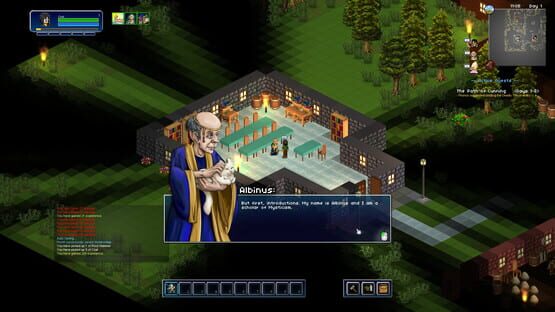
To follow on from Build 11, this build has continued reworking the UI by overhauling the look of the in-game HUD. This has involved completely redesigning the positioning and look of the in-game HUD from the elements in the top/left and top right to all be together in a single decorated bar at the bottom. The aim was to bring things together in a more cohesive single arrangement.
Below shows the HUD section across the bottom:
Looking at the Bottom Left:
- The health and mana bars are now in the bottom left. - The experience bar has now shifted centrally and under the action bar. - Certain things have been cleaned or omitted in the redesigning - such as the Character Profile/Name and Extra Strikes.
Bottom Middle:
- The action bar still remains in the same position. - Other key option buttons are now worked to sit around the action bar frame. - Experience bar now sits below.
Bottom Right:
- The Map, Day & Time information has moved to the bottom right. - Certain things have been cleaned or omitted in the redesigning - such as the Building Edit indicator and NPC conversation indicators.
And below is a full screenshot, showing the HUD as it fits altogether:
Cheers! Phill
Build 11
Hi all!
The focus of this build has been in reworking the overall look and feel of the UI. To start with, we have re-done the Character, Crafting and Inventory screens. We hope these changes are a step in the right direction and are looking forward to doing similar improvements.
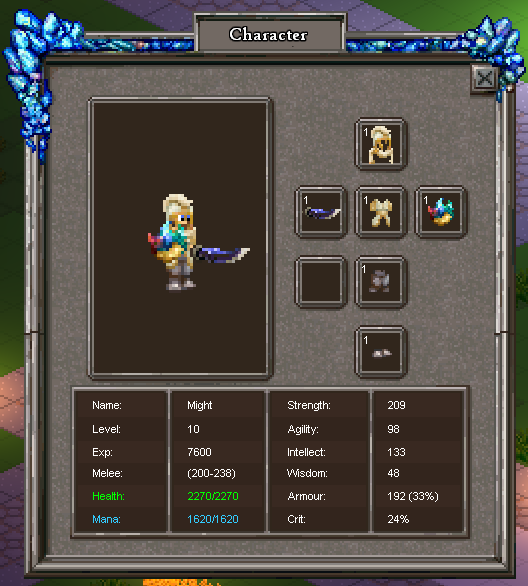
Character Screen:
- Functionally this should feel similar, but we hope the overall feel of the screen is improved. - The Dodge text was removed from the character details.
Crafting Screen:
- Functionally the crafting has had the most change: - The added crafting requirements of the the tool stations (Work Bench, Forge, Trainers for Abilities etc) has been removed. (The crafting process had too many steps of inhibiting a natural flow of crafting items. This was one of them.) - The crafting input "filter" slots have been removed, in favour of more auto-craft rows. - There are now 6 auto-crafting rows, up from 5. - Scroll bar now functions to allow easier navigation of all the recipes. - The crafting cast progress now shows as a bar on the Crafting screen itself. - Added a crafting cancel button.
Inventory Screen:
- Functionally this should feel similar, but we hope the overall feel of the screen is improved. - The colour highlight around all items has been removed. - The help tooltip button was removed.
Misc Changes:
- Fixed the edge of the map showing at the top of the screen. - Fixed crashes occurring when clicking Save & Exit.
Cheers! Phill
Build 10.2.1
- Re-fix to ensure the Worlds are generating correctly.
Build 10.2
Hi all!
This build includes fixes, sound work and UI changes.
Build 10.2
Change Log:
Change to allow for different sized enemies to have different sized hit boxes. This in particular relates to being able to more easily melee them.
Fix to ensure the XML\Maps directory exists when attempting to create a World.
Fix to correct the name of Alris on the conversation UI window.
Changed the in-game font used to a different font.
Change to the inital loading screen image (same as world loading).
Many sounds have been sound rebalanced or reworked. These include:- (Mouse interaction, Melee, Walking, Enemies, Abilities)
UI has been tidied up in places to improve cohesiveness (Character, Inventory, Crafting, Vendor, Storage)
The default application mode is now Full Screen. If people prefer, this can still be changed in settings to windowed. However the game visually runs at its best in Full Screen, due to vertical sync eliminating horizontal line issues.
Cheers! Phill
Build 10.1 (Fixes)
Hi all,
Following feedback from Build 10, I have put together a small update specifically for fixes.
I will putting this live later this evening.
Build 10.1
Included an option for selecting a 4K screen resolution.
(The default resolultion is still ordinarily 1920x1080, as the game was primarily developed with this in mind.)
Holding down CTRL will now allow you attack interactable objects (Doors or Beds).
(If you have your cursor over a Door/Bed, it will normally be a hand symbol. Holding CTRL will change it to show an attack 'Sword')
(Then whilst holding CTRL, if you left click, it will attack the object.)
(Previously, there wasn't a straight forward way of destroying/removing these kinds of objects after placing them).
Fixed a bug with Beds not clearing the "occupied space" that it takes up after placing it.
(This bug only occured after saving/loading the World.)
(The occupied space is something that applies to larger objects, which stops players or enemies from moving on top of things.)
Fixed the output stack amount on the crafting window, where the lists of recipes show for auto-crafting.
Fix applied to prevent the Status Effects from certain objects re-applying, rather than just resetting the time duration.
(This was most notable with crafting stations (Work Bench etc), as it interferred with the crafting system.)
Thank you for your feedback!
Phill
Build 10: Release
Today on August 10th, Build 10 will be going live on Steam.
This will also mark the date of which Shards of Azuria will be leaving Early Access.
Shards of Azuria will is now graduating from Early Access to Full Release status.
Build 10 itself is the flag pole that will mark the end of the Early Access journey.
Almost 3 years ago, 12th October 2016, Shards of Azuria released in Early Access.
I am extremely thankful for the support of everyone during this time.
It was incredibly rewarding to have players experience something I had poured my time into.
Seeing some of the building creations from players and the characters they played was really amazing. But being the first time I have done something like this, there certainly was a lot to learn for the future.
The journey of Early Access has been a long and winding road. It has seen various updates during it's time. From Halloween specials, to Fishing and the one of the most significant additions - Online Multiplayer.
There were also various other changes along the way, that were shaped by the invaluable feedback of players.
It has been a combined effort to mould Shards of Azuria into it's current form.
Thank you all once again for taking part in this journey!
It wouldn't have been the same without everyone's feedback and support.
https://www.youtube.com/watch?v=rDA8KN3h_0Y
Build 10 Changes:
NPCs - Moving & Routes
One of the main areas of change for this build was to change the NPCs in Azuria to be movable instead of static. Previously, they remained set in one place and did not feel part of the town. This involved ensuring the NPCs had appropriate animation sets, were replaced with the static versions and then also had routes applied. The routing itself was also a new addition to allow for a predetermined set of positions to move to.
The Conversation window has changed in it's style and layout. One part of this is that the profile images take up less screen space (it felt a bit clogged before). Secondly, dialogue options have been introduced. You may first notice this with the option to trade with the NPC (Vendor). There are also some other occurrences of dialogue options being used now (e.g the new quest!).
Quest Window (New)
A Quest Window has been added, this is to supplement the existing tracking text already shown on the right of the screen. Also, another important change regarding quest (as request from feedback):
Quests to no longer have a max day limit, where they can no longer be completed. So any previous quest that was marked as "Days 1-3" will now be "Days 1+".
New town NPC: Farmer Pete
Farmer Pete has appeared in Azuria and he may need your help with something... A new quest called "A Missing Friend" has also been introduced. This may have something to do with Farmer Pete.
New Quest "A Missing Friend"
New Items:
Myria Lich Robes
Myria Lich Hood
NPC/Enemy Chat Bubbles
NPCs & Enemies have had the addition of random chat bubble dialogue.
I wanted to add a little extra personality through a bit extra dialogue being expressed.
Misc
Mytsticism, Might & CunningEssences & Orbs are now for sale from Albinus, Labrys & Phonos.
Fixed graphical glitching with Wooden Fences
Build 9 was changed to be Full Screen by default and may have caused crashing issues for some players. The default is now back to Full Screen - Windowed.
Build 10: The Road to Release on August 10th
On August 10th, Build 10 will be going live on Steam.
This will also mark the date of which Shards of Azuria will be leaving Early Access.
Build 10
Build 10 itself has already been in the works for a while.
The details I will be able to share on August 10th when the Build goes live.
In general though, Build 10 has had a focus on NPCs & dialogue.
The mindset of the changes are around improving the overall feel of Azuria.
For instance, up until now, NPCs have been mostly static.
With Build 10, I have worked to have the NPCs moving around more, to feel part of the town.
This does mean that the effort has been mostly on improving existing content.
However you can still expect some new additions in the build.
Shards of Azuria Final Release
Now a few words on the next piece of news:-
Shards of Azuria will be graduating from Early Access to Full Release status.
Build 10 itself is the flag pole that will mark the end of the Early Access journey.
Almost 3 years ago, 12th October 2016, Shards of Azuria released in Early Access.
I am extremely thankful for the support of everyone during this time.
It was incredibly rewarding to have players experience something I had poured my time into.
Seeing some of the building creations from players and the characters they played was really amazing. But being the first time I have done something like this, there certainly was a lot to learn for the future.
The journey of Early Access has been a long and winding road. It has seen various updates during it's time. From Halloween specials, to Fishing and the one of the most significant additions - Online Multiplayer. There were also various other changes along the way, that were shaped by the invaluable feedback of players. It has been a combined effort to mould Shards of Azuria into it's current form.
Taking this step has been something that I have been weighing on for a long while. For most of it's lifetime, Shards of Azuria has been in an indie/hobbyist level of development. Blue Potion Games has comprised of myself (Phill) as the main developer/programmer & Cheryl as the artist. Full time development has never been a sustainable situation, save for a 6 month period, that had to come to an end. This means that development has largely had to fit in and around a day job situation.
As a whole, I am generally comfortable with managing that kind of work flow, but it's not without its drawbacks. Developing around a job is slower and less predictable, life can interrupt the flow, compared with the consistency of full time. Unfortunately, whilst I am overall patient enough to develop in this way, it does not suit Early Access itself.
While the work/development balance is a factor, I don't see it as much of an issue.
Ultimately, I feel Shards of Azuria itself has gone as far it can in its current form.
It is inevitably held back by dated technology, built upon an aging framework.
I have known for a long time now, that Shards of Azuria was behind the curve compared with modern tools.
On a personal level, this stems from starting on a development track (more than 6 years ago).
Back then, I was inexperienced and did not expect to push development as far as I have.
What does that mean for the future?
Following the full release, I will be assessing the next step in regards to game development.
It is likely I will still be operating in a hobbyist capacity, developing around a day job.
Although I will likely be setting myself up with a long term mindset.
And I will almost certainly be taking advantage of modern game engines.
Overall, I know that I would be in a much better position to create an enjoyable game by taking this step. Precisely what I intend to develop is still up for debate. But even a game in the nature of Shards of Azuria itself, would benefit from a complete re-develop with a new engine.
That itself would be a complete do-over and would basically end up a new game on it's own. That point alone reaffirms the decision to bring things to close at this point.
Thank you all once again for taking part in this journey!
It wouldn't have been the same without everyone's feedback and support.
Thanks!
Phill
Build 9 - A New Look
Hi all!
Build 9 is here! (finally). The main focus of this update was with overhauling the menu GUI and redesigning Azuria itself using new furniture.
Menu UI
Build 9 itself has involved quite a bit of behind the scenes programming to improve the GUI.
Before, there wasn't decent way of designing and positioning the GUI elements on-screen.
So I had to do some extra work to allow for in-game GUI design.
After implementing this, I took the opportunity to refresh the appearance of the Menu screens.
I'll also be able to take advantage of this in future, when doing other GUI related changes.
Azuria Re-design
There were 30+ new block/furniture additions in this update.
Adding this new range seemed to fit with a chance to rework the town.
Azuria is now a bit bigger and roomier, with a river flowing through. Fish included. One change to note, which relates to larger items such as beds. The way large objects are placed down has been changed to occupy multiple tiles properly.
Because of the extent of changes to the start town and the way objects are placed, it is recommended that you create a new world in this build.
Hestia is now selling the new range of decoration items:
Wood Decor Block
Wizard Bookshelf
Study Table
Fantasy Bed
Blossom Wooden Cabinet
Blue Arm Chair
Blue Bed
Candle Stand
Cauldron
Panel Decor Block
Lab Desk
Herb Desk
Stool
Wooden Fence
Empty Flower Vase
Flower Vase
Frilly Bed
Frame Bed
Glass Shelf
Glass Cabinet
Pink Decor Block
Ornate Chest
Small Cabinet
Potion Cuboard
Skeleton Study
Square Table
Wooden Cabinet
Wooden Tile
Cobble Tile
Vertical Style Wooden Block
Rug Tile
Rugged Bed
Lamp
Misc Changes
When using the Paint Blaster, you can now colour pick from existing painted areas. The default keybind is 'X', but can also be changed in the keybind options.
Enemy spawning has been adjusted so that it will not repeatedly respawn in the area you have already defeated an enemy.
The "uncrossable bridge" has been fixed.
Thanks!
Phill
Build 8 - Fixes
Hi all!
An update has been pushed today with some fixes/tweaks for Build 8.
Fixes
When teleporting down through the dungeon stairs, the teleport-to position was still on top of the target stair. This meant that if you didn't move after teleporting, you would eventually teleport back (after a 1 sec timer). For most people, this wasn't a problem, as the loading time was quick enough so you moved away. However machines with slower loading times would end up stuck in the teleport position. It has now been fixed to place the player next to the target staircase.
Fixed a bug that was resulting in the Azuria Town map from always loading the 'template' version of the map. This meant that any items stored in the chests were being overridden.
The spawning of the Blue Skeleton for the quest 'Find Gregor's Note' has been changed to spawn more specifically within the area of the graveyard (in the middle area of the Woodland). The spawning was also randomized, so that it might have taken some time before it appeared. However, it should now immediately appear.
Some changes to the Death Match game mode:
Changes
UI now indicates to press the Tab key for the PvP Scoreboard.
Day Cycle has been adjusted to always start at the correct time.
A new round will automatically start when enough players have joined.
This is only relevant when the host is by themselves and then a new player connects.
Thanks!
Phill
Build 8 (PvP Multiplayer Modes)
Hi all!
This build introduces PvP multiplayer modes into the game. Online co-op was already previously added, but there was no way of fighting other players.
To clarify, Build 7 only had the "Co-op" multiplayer game type. Whereas Build 8 will have the following multiplayer types:
Story (Co-Op)
This is the existing Co-op game, which by default is friendly to other players. It follows the same story experience as the singleplayer game.
However in Build 8, you can also optionally flag yourself for PvP by typing ".pvp" into the chat console.
Story (PvP)
This is the same as the Story (Co-Op) game type, except that every player is automatically set to be hostile for PvP.
Death Match (PvP)
This is different to the usual story game type.
It follows a conventional death match format except for a couple differences.
Things to note:
The character you choose will retain it's name and hairstyle.
However all items and equipment are temporarily stripped for the game type.
At the start a new round, all players are given a basic set of equipment & abilities.
There are a plethora of chests around the map, that contain lots of abilities and equipment.
Players will need to hunt down these chests in order to gain power.
If you die, you will drop anything you have looted.
Pillage from your enemies!
There are a number of spawn 'banner' flags on a Death Match map.
Dead players will respawn at a random one.
Death Match has it's own special maps.
When you choose to host a Death Match game type, the world selection will only list Death Match maps.
To begin with, there is a map callled 'Woodland Skirmish' available.
The max players per game has been increased to 10 for the time being.
The default goal for kills is 20. A player wins when they reach the goal.
Once a player has won, the game restarts for a new round.