It's been five years to the day since SpaceEngine was released on Steam. We're celebrating this milestone with the addition of a high-resolution screenshot tool, letting you capture the universe in greater detail than ever before!
We've put together a blog post with a how-to for the new tool, as well as a retrospective of our development! Check it out here: https://spaceengine.org/news/blog240611/
We're also expecting some bugs with this Beta, so be sure to report any you find in the Troubleshooting and Bug Reports Discussion tab on Steam or #bug-reports on the official Discord! (Remember to include as much detail as possible!)
Changelog
Added high-resolution screenshot tool (See linked blog post for a how-to!)
Improved integration of Settings and Tools windows with the main menu
Updated exoplanet and host star catalog
Updated binary asteroid catalog
Improved the appearance of Eris and Sedna (for real this time!)
Miscellaneous catalog fixes, such as the distance to galaxy and black hole S5 0836+71
Added button to video capture dialog to open the output folder
Added missing gamma correction to several tone mapping options
Added new tone mapping options: AgX Punchy, Reinhard SE, Rec 709, and sRGB -Rec 709 and sRGB are mainly for reference, they are not designed for HDR content and clip harshly with bright pixel values; manual exposure adjustment recommended for best results.
Fixes some settings not saving while in the main menu
Build 0.990.47.2015: Catalog Updates, Additions, and Fixes
Thanks to everyone who partook in the Beta! The public release has a few more additions which will be highlighted along with the patch notes from the Beta. Dr. Megan highlighted one of the new exoplanets, as well as two new black hole systems, in celebration of our new celestial neighbo(u)rs!
Read all about it here: https://spaceengine.org/news/blog240417/
Changelog:
New Additions
Added AgX tonemapping mode
Added Gaia BH2 and BH3 black hole systems
Additions from Beta
Updated rotation models for moons in our solar system to be more precise (DE436 model for Earth's moon, and IAU rotation for other moons in the Solar system) -Known issue: rotation begins to drift at the distant past or future (around the 20,000 year mark from the present)
Date/time field on the Navigation toolbar now accepts input in Julian date format (for example: J2460409 was the day of the 2024 eclipse)
Added a new stellar limb darkening function (WIP)
Updated spectral types for 60,000+ catalog stars
Updated distances for 100,000+ catalog stars, as well as some black holes and their hosts (mostly minor, only a few thousand are more significant)
Added 810 new brown dwarfs
Added a few dozen new exoplanets/host stars
Added missing 'B' components of exoplanet-hosting binaries
Updated naming conventions for some stars and nebulae
Added an accretion disk to T CrB B (aka, The Blaze Star)
Updated Uranus and Neptune's new moons, and tweaked their atmosphere colors to be more accurate
Improved the appearance of Eris, Dysnomia, and Sedna
Updated greenhouse gas concentrations in Earth's atmosphere
Adjusted shadow and totality mask of the recent eclipse
Tweaked atmosphere visuals for Galilean satellites
Fixed Europa's classification/composition (it's a terra, not an aquaria)
Updated albedo of Dione
More climate model bug fixes, largely related to wind speeds
Fixed eclipse shadow sizes being larger than they should
Fixed carbon star spectral types for catalog planets always presenting as C-R
Updated the asteroid (16) Psyche
Fixed visibility distance of star cluster particles
Removed flags from the language selection list
Pruned duplicate catalog entries
0.990.47.2015 Public Beta
Hey folks!
Hope you enjoyed the eclipse! The ongoing refactoring process still demands high commitment, but we wanted to get something out to address the new science and add our newest exoplanetary neighbors as our work continues!
Dr. Megan's pick this round is our newly discovered neighbour, TOI-715 b. Discovered by the Transiting Exoplanet Survey Satellite (TESS), this super-Earth is only 137 light years from our Solar System. TOI-715 b orbits within a conservative habitable zone around its cool, red host star, meaning it could potentially host liquid water! That's not to say TOI-715 b is a hospitable world; it is on a tidally locked orbit, so the same hemisphere always faces its host star, giving it a hot front-side and a cold back-side. TOI-715 b is 0.08 AU from its host star (closer than Mercury is to the Sun!), and its orbital period is only 19 days!
This may just be the beginning of the exciting news from the TOI-715 system, as it is suspected that another, smaller planet may also be present. If this second planet is confirmed, be sure to be on the look out for its future appearance in SpaceEngine!
Additional reading: NASA Press Release https://science.nasa.gov/universe/exoplanets/discovery-alert-a-super-earth-in-the-habitable-zone/
Remember to opt in on Steam to access the Beta build! Right click Steam in your Library, click Properties>Betas, and select 'beta- public beta branch' from the dropdown list!
As always, please share any bugs or inconsistencies you find in the relevant channels: Troubleshooting and Bug Reports on Steam or #bug-reports on the official Discord!
Changelog
Updated rotation models for moons in our solar system to be more precise (DE436 model for Earth's moon, and IAU rotation for other moons in the Solar system) -Known issue: rotation begins to drift at the distant past or future (around the 20,000 year mark from the present)
Date/time field on the Navigation toolbar now accepts input in Julian date format (for example: J2460409 was the day of the 2024 eclipse)
Added a new stellar limb darkening function (WIP)
Updated spectral types for 60,000+ catalog stars
Updated distances for 100,000+ catalog stars, as well as some black holes and their hosts (mostly minor, only a few thousand are more significant)
Added 810 new brown dwarfs
Added a few dozen new exoplanets/host stars
Added missing 'B' components of exoplanet-hosting binaries
Updated naming conventions for some stars and nebulae
Added an accretion disk to T CrB B (aka, The Blaze Star)
Updated Uranus and Netrune's new moons, and tweaked their atmosphere colors to be more accurate
Improved the appearance of Eris, Dysnomia, and Sedna
Updated greenhouse gas concentrations in Earth's atmosphere
Adjusted shadow and totality mask of the recent eclipse
Tweaked atmosphere visuals for Galilean satellites
Fixed Europa's classification/composition (it's a terra, not an aquaria)
Updated albedo of Dione
More climate model bug fixes, largely related to wind speeds
Fixed eclipse shadow sizes being larger than they should
Fixed carbon star spectral types for catalog planets always presenting as C-R
Updated the asteroid (16) Psyche
Fixed visibility distance of star cluster particles
Removed flags from the language selection list
Pruned duplicate catalog entries
Patch 0.990.46.2005
This small patch adds another check to the shader compiling process, and automatically disables old Workshop addons which have invalid or incompatible shader pak file encryption.
Changelog
Workshop addons with incompatible shaders or shader pak files are automatically disabled with a popup message
Minor catalog update
Build 0.990.46.2000: The Catalog Update
Today’s update includes several smaller updates to several SpaceEngine features. The first is a major exoplanet catalog expansion. We have added 336 new exoplanets, 214 new exoplanet host stars, eight new brown dwarfs/stellar binaries, and added 30 missing stellar binary 'B' components of exoplanet-hosting systems. Additionally, we have updated asteroid binaries and Saturn’s moons, and made many other catalog corrections, including removing duplicate objects and correcting naming inconsistencies. We have also added some minor bug fixes for the Climate Model. These include fixing a bug where temperatures were constant across the surfaces of planets with extremely thin atmospheres, and fixing a bug where secondary stars were being ignored in some planet surface temperature calculations.
Recently, we announced the addition of a Climate Model to SpaceEngine, which introduced global temperature maps, local pressures, local densities, wind speeds, and more, affecting planets, moons, and asteroids. An overview of the Climate Model is available in a recent blog post, and more technical details about the math and physics behind this release can be found in an article available on our website.
Beta testing for the climate model is now complete, and we would like to thank all those who participated for the valuable feedback they've provided. We would also like to thank our translators for their hard work translating the new climate tab in the in-app wiki, and other recent features.
The Climate Model is now available to all users on the Public branch.
Finally, we are very excited to announce an upcoming Q&A Session with a three-person panel consisting of SpaceEngine’s author, Vladimir Romanyuk; Cosmographic Software’s CEO, Alexander Long; and the designer and programmer of the Climate Model, Dr. Megan Tannock.
The event will take place live on the official SpaceEngine Discord server on November 3rd at 10AM Eastern. This will also be an opportunity for our community to join the conversation and ask questions about the new update.
As always, thank you for your continued support of SpaceEngine! We look forward to seeing you at the upcoming Q&A.
Changes and Updates in 0.990.46.1990
Bugfixes for the Climate Model - Released to Public
Search by Name tool now allows the selection of clusters and nebulae with the same name (eg: NGC 6711, NGC 7380)
Fixed issues with starting SpaceEngine on a secondary monitor
Added Indonesian localization
Update 0.990.46.1980: The Climate Model
Author: Dr. Megan Tannock
Have you ever wondered how the temperature might vary across different parts of the surface of your favorite planet or moon as the sun sets, or as you travel from the equator to the poles?
Wonder no more! We have introduced a climate model to SpaceEngine, which is currently available in the Public Beta here on Steam. Instructions for opting in and out of beta testing are available here. Please check the list of limitations at the bottom of this post before reporting any bugs.
You can find temperatures, pressures, and other information related to climate on a new tab on the in-game wiki for Climate. The tab displays a variety of parameters related to climate for planets and moons. The main feature of the tab is local temperatures that change with time, latitude, longitude, and altitude on planets and moons. For planets and moons with atmospheres, local pressure, density, and speed of sound values are available too. The Climate tab also shows daily and annual temperature averages, minimums, and maximums on planet and moon surfaces.
Information found on the Climate tab accounts for much more than just the position on a planet. The SpaceEngine climate model calculates a global temperature map based on energy transport calculations and accounts for planetary albedo, presence of an atmosphere, atmosphere properties (including wind speeds, radiation and advection, and greenhouse effects), internal planetary heating, day sides, night sides, axial tilt (for seasons and varying daylight hours, polar days and polar nights), eccentric orbits, tidal locking, and incident light of all stars in the system. Additionally, the altitude dependence had a major overhaul from its previous implementation. Now, we use real vertical temperature profile data for different types of atmospheres, allowing for exciting behavior like temperature inversions (like we see at the tropopause, stratopause, and mesopause for Earth).
Note this is not a visual update to planetary surfaces, but it’s a big step toward a more complete climate model in SpaceEngine.
Figure caption: The new Climate tab of the in-game wiki. Values update in real-time as you change the latitude, longitude, and altitude on a planet, and as time progresses. As with the other wiki tabs, you can change the units to your preferred units in the General tab in the Settings Menu.
How does the SpaceEngine climate model work?
A more detailed look at the physics and calculations behind our climate model will be available in the coming weeks!
All planets are born hot, but without a sustained energy source like fusion taking place inside of stars, they cool quickly. So unless planets are very young, almost all of their energy comes from stellar irradiation. Therefore, the main focus of SpaceEngine’s climate model is on stellar irradiation. We also account for internal planetary heating and greenhouse effects, when an atmosphere is present.
In our climate model, we start by calculating the Planetary Equilibrium Temperature (the theoretical temperature of a planet if it were a blackbody heated only by its parent star), then calculate surface temperature around the planet with a simple thermal transport model. This model has three variations for terrestrial planets, gas giant planets, and tidally locked planets (that can be terrestrial or gas giant). Each variation has a day/night temperature pattern based on real physics and observations of exoplanets. Every planet and moon in SpaceEngine has unique physical properties, so the final model for every planet is different and computed specifically for that planet. We have also introduced a global wind speed parameter (for planets with atmospheres) that affects how heat is carried around the planet.
Our model accounts for latitude and for axial tilt (obliquity). The effect of latitude is that (typically) the polar regions are colder, and equator regions are hotter. Axial tilt is the reason for seasons and the varying length of days throughout the year. For example, on Earth’s June solstice, we know the northern hemisphere experiences their longest day of the year, and the southern hemisphere experiences their shortest day of the year. At this time, the sun never sets inside of the northern polar circle (polar day), and the sun never rises inside of the southern polar circle (polar night). Our model can account for any axial tilt, including extremes like Uranus with a 97.7 degree axial tilt, which is nearly at a right angle to its orbit!
The daylight hours for the current time, and the percentage of the year spent in polar day (or polar night) at the user’s current latitude are also displayed on the new Climate tab.
Figure caption: The temperature throughout a day across a random planet’s surface in the northern hemisphere, on its northern summer solstice. The longitude is relative to the point where the host star is directly overhead (the “subsolar point”), meaning longitude tells us what time of day it is (noon, when the host star is directly overhead, is at longitude=0 degrees, and midnight, when the host star is on the opposite side of the planet, is at 180 degrees). The temperatures for a few different latitudes are shown, and the temperature is lower closer to the pole than the equator. The time of local sunrises and sunsets are marked for each latitude curve. For this planet, the atmospheric properties result in a small offset between noon and the hottest temperature of the day.
Note: This plot is not displayed in-game. This is simply a look “under the hood” of the SpaceEngine climate model.
Figure caption: The temperatures for the same planet, as shown in the figure above, at the same time. Now, they are plotted on a sphere.
Note: This plot is not displayed in-game. This is simply a look “under the hood” of the SpaceEngine climate model.
Temperature also depends on altitude. On Earth, the temperature gets steadily lower as you go up through the atmosphere towards a layer called the troposphere. After this point, it starts to increase again towards the layer called the stratosphere. The Earth’s atmosphere has a few more inversions as you go up through more layers, further from the Earth’s surface. Other planets have different behaviors. For example, temperatures on Venus tend to decrease with altitude, and temperatures on Pluto actually increase with an altitude close to its surface! To account for the variety in vertical temperature profiles, SpaceEngine now interpolates temperature profiles based on real data and simulations.
Note: Following convention, zero altitude on gas giant planets is set to pressure=1 atm in SpaceEngine.
Figure caption: The suite of vertical temperature profiles (pressure-temperature profiles) included in SpaceEngine. Surfaces of terrestrial solar system planets are marked with dots. When these profiles are selected for planets with higher surface pressures, or different surface temperatures, the profiles are scaled appropriately. Solar system profiles are from the NASA Planetary Spectrum Generator (Villanueva et al. 2018, JQSRT 217) and Zhang 2020, while other simulated profiles were sourced from assorted publications (Thorngren et al. 2019, Piette & Madhusudhan et al. 2020, Ohno & Fortney 2023).
Note: This plot is not displayed in-game. This is simply a look “under the hood” of the SpaceEngine climate model and for reference in selecting a suitable temperature profile for custom planets.
Tatooine and Beyond: Systems with Multiple Stars
The SpaceEngine climate model also accounts for systems with multiple stars! Whether your favorite planet is orbiting a star orbiting a star (an S-type orbit), orbiting two stars (a P-type orbit), or some other configuration with even more stars, it is accounted for in the model. Temperatures are computed as time progresses and as stars and planets progress in their orbits. The minimum and maximum distances between all planets, moons, and stars are calculated to determine the annual global average, minimum, and maximum temperatures. Binary planets and moons (and moons around moons!) are properly accounted for as well.
Custom Planets with the Planet Editor or Catalog Scripts
SpaceEngine users can flex their creativity and explore the limits of the climate model with the SpaceEngine Planet Editor (open the Planet Editor in-game with Shift+F2), or the catalog script files (see instructions for creating and editing planets here). The climate model-specific parameters, which can be edited, are the global wind speed, the minimum and maximum surface temperatures, and the type of vertical temperature profile. When users select a profile, it will be scaled appropriately for the planet’s surface temperature and surface pressure.
The climate model will also be updated when parameters which affect a planet’s climate are changed (like the host star’s temperature, the planet’s orbital distance, the planet’s radius, etc.), through the Planet Editor or catalog script files.
Figure caption: The Climate Parameters section of the SpaceEngine Planet Editor (open the planet editor in-game with Shift+F2). The global wind speed parameter is in units of m/s, and the minimum and maximum surface temperatures are in Kelvin. All available vertical temperature profiles are shown in a drop-down list in the planet editor, and listed at the bottom of this blog post.
For custom planets made with a catalog script file, users may now use the “Climate” tag to set these parameters: Climate { GlobalWindSpeed 11.7 // m/s MaxSurfaceTemp 500 // Kelvin MinSurfaceTemp 400 // Kelvin AtmoProfile "Super Earth" }
For both the Planet Editor and catalog script files, the global wind speed is in units of m/s. The “maximum surface temperature” is the temperature (in Kelvin) at the subsolar point when the planet is at periapsis, and the “minimum surface temperature” is the temperature at the winter pole in Kelvin. The “AtmoProfile” is a vertical temperature profile selected from the list of available profiles (see below). Wind speed cannot be set for planets without atmospheres, and if entered in the catalog script files, the GlobalWindSpeed parameter will be ignored when temperature is determined.
This update is the first step towards a comprehensive climate model in SpaceEngine. We hope you enjoy exploring and experimenting with the model, as we have big plans for the future!
Some current limitations of the climate model are:
We have not accounted for the angular size of the sun/host star or atmospheric refraction.
We have not accounted for any weather effects including clouds.
We have not accounted for atmospheric heating due to aurora or magnetic fields (for example, Jupiter’s poles are cooler than the equator with our current model, while it is known that Jupiter’s upper atmosphere is hottest at its poles due to aurora).
Volcanoes do not currently affect local temperature.
Eclipses, and shadows of planetary rings do not currently affect temperature.
Asteroids do not display local surface temperatures (minimum and maximum surface temperatures are displayed in the wiki for asteroids, but local surface temperatures as a function of latitude and longitude are not displayed).
Features such as permanently shadowed craters or mountain and cliff shadows have no effect on local temperature.
Temperatures are not calculated inside of liquid bodies (lakes and oceans).
The Climate model is now available in the Public Beta here on Steam! Instructions for opting in and out of beta testing are available here.
Price correction
Hey folks,
First: We're sorry, and want to apologise to our community for the inflated prices which were listed in some regions.
We recently raised our prices due to several factors (inflation, under-pricing in several areas, team expansion, and the fact we had not updated prices since 2019), but soon became aware of several serious problems.
As of now, those prices should be corrected, pending final approval from Steam. We expect that to happen soon - Please let us know if there are any additional issues!
Again, our apologies for the confusion.
Sincerely,
The SpaceEngine Team
Update 0.990.46.1975: A Few Important Bug Fixes
Build 0.990.46.1975
Fixed crash at startup on Intel HD (released in previous silent hotfix)
Fixed color inversion bug in VR on AMD Radeon
Fixed bright artifacts in the bloom effect at 4k+ resolutions on AMD Radeon
Updated localizations
Update 0.990.46.1970: Event Finder Tool
Have you ever tried to find a beautiful alignment of multiple moons in the sky of some random procedural planet to take a nice screenshot? Or find a triple solar eclipse on an alien gas giant? Or find all transits by Venus of the Sun’s disk, or of Jupiter’s disk, as observed from Earth?
All these things are now possible with a new tool we’re releasing today: the Event Finder.
The tool itself is fairly simple: it takes a list of objects in a certain planetary system (with a starting date, a time step, and an “angular precision” parameter), then iterates in time and looks for an alignment of all specified bodies within specified angular precision.
If an alignment is detected (i.e. all objects are within a circle having the angular radius specified in the “precision” field), its date and time is added to the table on the right side of the tool’s window. Clicking it will set SpaceEngine’s internal time to that date and you can observe the alignment.
You can access the tool by pressing the F7 key, or by pressing the button in the left toolbar (see screenshot below). The Event Finder supports 5 modes, depending on the type of event you want to find, but they all make use of the same math internally.
Ordered alignment
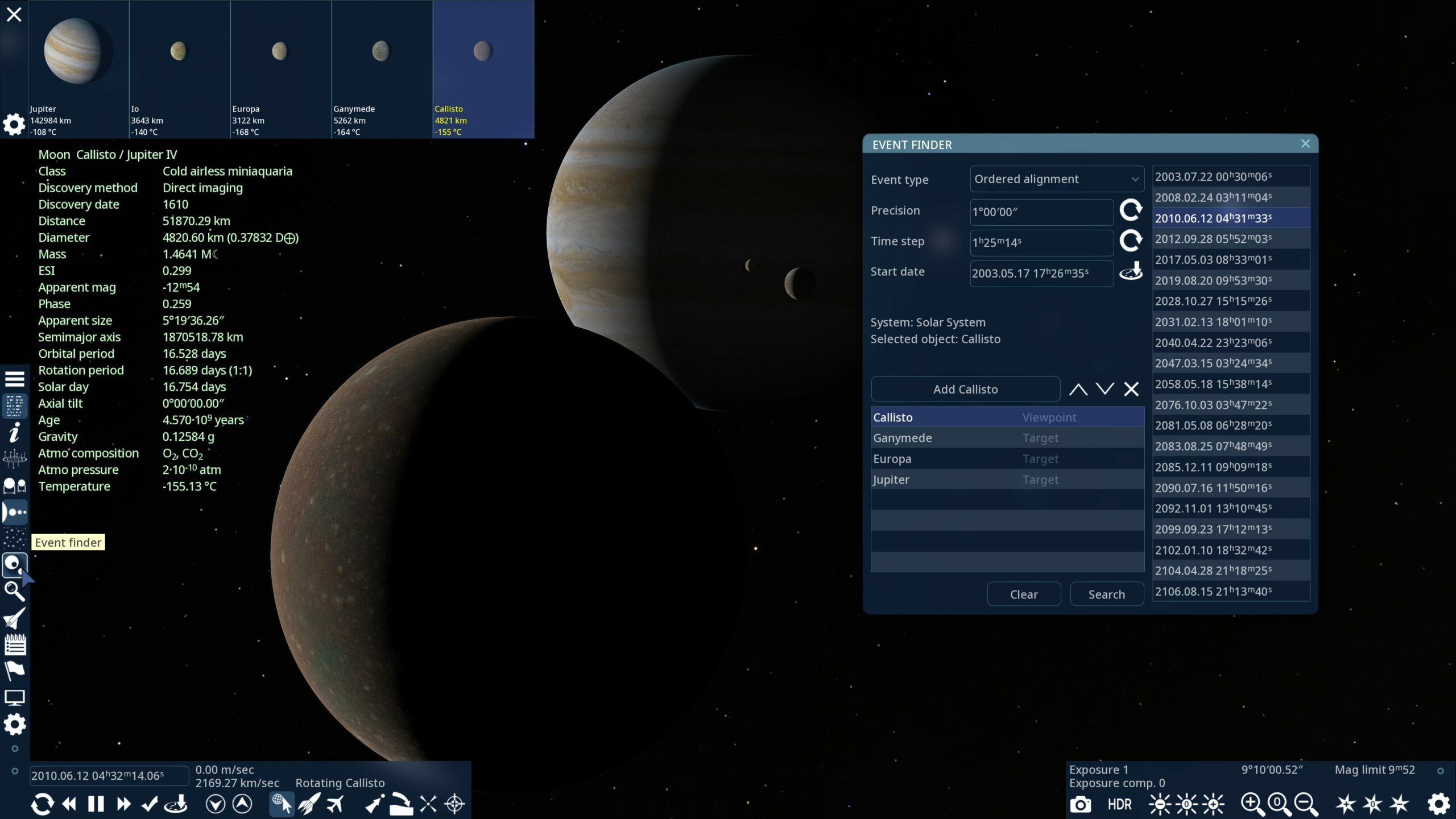
This mode is used to find pretty scenes in the skies of some planet or moon, such as when several moons are visible in front of a gas giant:
To start, you add objects of interest to the table in the left-bottom side of the tool. Addition is straightforward: you select an object with any method available in SE (left click, search by name, click in Solar system browser, etc), and press the “Add” button on the tool.
The tool displays some help text informing the user to add at least 3 objects in the same planetary system. The system is set automatically to that of the currently selected object when you open the tool.
The first object in the list is the “viewpoint”, i.e. the planet/moon/sun from which you want to observe the event. In this example it is Jupiter's moon, Callisto, with the other objects being Ganymede, Europa, and Jupiter itself.
Note that the “Ordered alignment” mode takes into account the order of the objects: it searches for only those events in which Ganymede is closer to Callisto (viewpoint) than Europa, and Europa is closer to Callisto than Jupiter. In other words, Ganymede and Europa are in front of Jupiter as observed from Callisto.
If you swap Europa and Jupiter in the list (using the arrow buttons next to the “Add” button), the tool will search for other events. In this example, Ganymede is in front of Jupiter, and Europa is behind Jupiter:
Of course, just because you can arrange objects a certain way in the list doesn’t mean you can find such an ordered alignment. For example, you will never find a “Callisto - Europa - Ganymede - Jupiter” ordered alignment because such an orbital configuration is physically impossible; in the case of the Jovian moons, you can’t even find the alignment “Ganymede - Europa - Io - Jupiter.” These three moons never align on one side of the gas giant due to the Laplace resonance, but configurations like “Ganymede - Europa - Jupiter - Io” are possible.
Some procedural systems also have similar resonances which prevent finding alignments like “all big moons at one side of a planet”, but you can increase the “precision” parameter to several degrees to find a decent looking picture:
Another example of an ordered alignment in a procedural system:
Alignment
This mode is very similar to ordered alignment, but it ignores the order of objects in space. In the case of a planet and its moons, it will find all alignments of those objects, even if some moons are hiding behind the planet. It is more suitable for finding alignments of planets in the sky, when you don’t know or care about their real arrangement in space. Such alignments are sometimes called “conjunctions”, though this is not exactly what the tool finds. The exact conjunction of 3 or more planets is impossible, but the tool looks for “approximate conjunctions.” In the following example I found all the upcoming conjunctions of Venus and Mercury, ignoring distance to each (in this screenshot Venus is farther than Mercury):
Note that the tool has limitations: it may find multiple dates of the same event. This is because the tool is not “smart” (yet); it does simple time iterations with a constant step, so if the step is too small or if the angular precision is too large, it will detect the same event several times. And it does not detect the exact “center” of the event, you must do it yourself, if you want to. The opposite can also occur: the tool may miss some events if the time step is too large or the angular precision is too small. Future updates may improve this, but for now it is important to keep these limitations in mind.
Below is a close conjunction of Jupiter and Saturn as viewed from Earth, from December 2020. The tool also detected future conjunctions in 2080 and 2147. Note that I edited the Precision manually to 8 arc minutes (the default value for alignment mode is 1°).
A triple conjunction (better to say “triple alignment”) of Venus, Mars, and Jupiter:
Transit
The next type of event is transit. Probably the most famous transit events are of Venus transiting over the Sun. In this mode, the first object in the list must be the observation point (Earth in this example), the next one is the object which serves as a background for the transit (the Sun), and the next is the object which is doing the transiting (Venus). Note that the angular precision is automatically set to the angular radius of the Sun (more exactly, to the sum of the angular radii of the Sun and Venus at the current date), and the time step is also calculated automatically. I manually set the start date to the year 1800.
Some transits are detected several times, due to the limitations described above. Note that Venus transits (and all other events in the Solar system) are accurate only in the validity range of the analytical orbit models used by all involved objects. By default, SE uses the DE436 model for the major planets and the Sun, which is valid only between the years 1550 and 2649.
Another limitation is with the automatic calculation of time step and angular precision, though it is more or less valid in the case of almost-circular orbits. If you look for transits of a procedural planet over its star’s disk and the planet’s orbit is highly elliptical, or if the planet orbits a close binary star, these calculations of angular precision on the current date may not satisfy all possible orbital configurations, so you may need to adjust the values manually. The curved arrow button next to the input field re-calculates the value at the current date using the actual orbital position of the objects.
You may also add more than one transiting object. For example: a triple transit of Io, Ganymede and Callisto over Jupiter (as observed from Earth). Note that SE does not take into account light travel delay, so the event time in real life would be some 50 minutes later (at a distance of 6 AU).
Interestingly, you can find extreme cases, such as the transit of Venus over Jupiter. One such event happened in 1818. Note the difference in surface brightness between Venus and Jupiter (this screenshot was taken in auto exposure mode):
Occultation
An occultation is technically the same as a transit, but where the transiting object is larger than the background object. For example, when Jupiter transits its moon Io (covers it from the observer’s perspective), this is called an occultation of Io by Jupiter. Like in other modes, the event finder allows you to find multiple occultations by the same occulting object. Shown below is an example of a simultaneous occultation of Titan and Rhea by Saturn (position of Rhea is highlighted by the selection pointer):
Such events are not that interesting, but you may search for more extreme cases. For example, the occultation of Neptune by Jupiter! One such event happened on January 3-4, 1613. At that time, Neptune was not discovered yet. Galileo Galilei observed Jupiter and its moons on December 28, 1612, and labeled Neptune as a star! Despite Galileo having observed Neptune, he is still not considered its discoverer because he never identified it as being a planet.
Eclipse
Eclipses are transits or occultations as observed from the sun. The first object in the list must be the sun (or another light source, as the tool allows one to find eclipses of one moon by another as viewed from the planet). In the case of a single-star system, the tool adds the sun automatically; but in multi-star systems you must add the star yourself. The next object is the one which is being eclipsed (ie. receiving the shadow), and the last one is the object creating the eclipse (that is, casting the shadow). The event finder calculates the angular precision and time step for this configuration, but again, this works well only for orbits which are not very elongated.
For multiple eclipses, Jupiter is a great example. Here is a famous triple eclipse (and double transit) on March 28, 2004:
You can also find eclipses of moons by planets (in the example below, Charon is being eclipsed by Pluto):
Moons can similarly be eclipsed by other moons (In this example, Rhea is being eclipsed by Titan):
You can also observe the eclipse of a distant planet by a hot jupiter in a red dwarf system (technically it is a transit, but it has a similar effect):
Or you can see mutual eclipses of stars in a binary system:
Other changes
Below is the full changelog for this version. Included in the updates is the option to reset all SE settings (except controls), which can be found in the F4 settings menu. After pressing the button, SE simply deletes the config/main-user.cfg file, replaces it with config/main-def.cfg and restarts. Of course, the default file main-def.cfg must be intact; you are not allowed to modify it. Upon restarting, SE also clears its cache and rebuilds shaders.
Build 0.990.46.1970
The new Event Finder tool
Function to reset all settings (except controls) to their defaults
Options to change position of text labels near space objects is added to Settings/Visual style
Added 62 new moons of Saturn
Clicking on a table cell with numerical data in the Wiki copies that data to clipboard
Improved Spline Path Editor (PRO feature)
Recording FPS counter display has been added to the video capture tool
Fixed the clipping of long text strings on buttons and other UI elements
Fixed cursor position error in text input fields caused when entering text in certain languages
Fixed a bug with ignoring star age specified in a star catalog