So ... this update introduces some interesting changes to the Star Chart as well as how planet temperature is handled.
Star Chart:
The most significant changes here is that you can now manually move the star chart overlay temporarily when viewing the star chart. By default, you will use the arrow keys to do this. The effect is similar to the "target sector" function. It will temporarily move the overlay to a sector that is not actually present in the star chart - a sector your ship has never visited - and it will allow you to see that sector's stars highlighted at the helm of your ship.
This is a feature that has been on the to do list for a while and several players have requested something like this recently. The reason this feature is necessary, is because sometimes it is difficult to identify stars or sectors that have not been visited. Now by moving the overlay around in the star chart, you can have an immediate idea of where those unexplored sectors are. The TAB - help menu has been updated with instructions on using this feature.
Another minor issue caused a star overlay circle to appear at a random location when the overlay was active, with no star to justify its presence. This should no longer happen.
Planet Temperature:
The recent temperature range update has caused an interesting gameplay issue. Players had to guess whether it was day or night on a planet, and often landed when temperature conditions were not ideal. Now you can see the current time of day of the planet you are orbiting from the ship's computer.
NOTE: Day and night are indicated by a number between -180 and +180. Negative numbers (between -180 and 0) indicate night-time (low temperature). Positive numbers (between 0 and +180) indicate day time (high temperature). The sun will set when that number reaches +180, and the "clock" will switch to -180, dropping to night time temperature. At time 0, the sun rises, and the temperature will go back up.
F11:
The F11 key (by default) will temporarily toggle the HUD. I had to fix an issue where it was not operating correctly, so it should be fine now.
The Black Sphere of Death: This was a problem when visiting the Mothership Altair. The mothership interior sometimes intersected the model for the outer space background, and it would appear as a great, black wall inside of the mothership. It did not actually cause any issues in the game, but it looked very weird. Hopefully after this update it will not frighten anyone any more.
Bugs:
With any new changes, I try to be careful and make sure there are no adverse effects. However, sometimes things get past me and will cause problems for players. If you encounter any new issues, please don't hesitate to let me know.
5.0.7 Update
I have added a redundancy to the screen resolution script, so hopefully it will not try to open the game in an impossible window size - thereby defaulting to a size too small to actually play. This will not give any error messages, but if an impossible window size is attempted, it will default to 1280 x 720.
A player discovered a problem when running out of oxygen. Somehow it caused his health to increase, and thereby increased his movement speed to absurd levels. This should now be resolved, but let me know if you encounter any related (or unrelated) issues.
5.0.6a Update
I forgot to reset a certain variable and it caused the game to produce too many UFO encounters. It should now go back to normal, random UFO encounters as before.
5.0.6 Update
UPDATE: I re-uploaded the game with some slight changes. I had accidentally left on certain warning messages in the last build. I also was able to correct the missing textures from the alien landing craft. I suppose it could have waited till tomorrow ... but it just took a couple minutes.
5.0.6 Update - Many small changes were made based on player feedback. Just for the record, I do not integrate all player feedback into the game. But if it's an idea I agree with, and it's not too difficult to do, I will sometimes implement it right away.
Since the 5.0 release, I have been getting a ton of great feedback. However, I can only do so much in a given day. If you don't see your ideas showing up, don't hesitate to remind me. I try to keep track of everything, but it's not always easy. I am thinking of making some kind of document where people can put their feedback, and maybe vote to rank things higher or lower priority. I do not have a ton of experience in this sort of thing though, so any ideas are welcome.
For this update, here's what's changed:
Fixed the stretched star background in mothership
Added Muzzle Flash for player and enemy guns
Fixed innacurate temperatures on some planets
Reduced oxygen usage slightly - to match the updated walk/run speed - I did also reduce the amount used when running a bit compared to the last version. I thought I had made it approximately 2.5x higher than walking, but it was actually 3x higher by accident. Now it is closer to 2.5x as I intended.
Increased physical and environmental damage when suit condition = 0 - this may alter gameplay quite a bit. It was possible to run around for quite a long time in extreme conditions before.
Added option to rebind crouch and Hud toggle - "controls_5.cfg"
About Rebinding Controls
The game's options menu has a Controls menu where you can rebind keys. However, the HUD toggle and crouch features were added later, and did not fit on this menu. If you want to rebind those keys, you can still do it though.
In order to do so, first you will need to rebind any key via the in-game Controls menu.
Then, go to "C:\Users\-your username-\AppData\Local\Star_Explorers" and find the "controls_5.cfg" file.
Open that file and type in your key of choice after the last two entries: crouch,ctrl, (replace ctrl with your key of choice) toggle HUD,F11, (replace F11 with your key of choice)
Please be careful not to delete any commas. Use the following codes for keys... "a" - "z", "0" - "9", "f1" - "f12", "bksp", "enter", "esc", "alt", "ctrl". "shiftl", "shiftr", "space", "tab", "cuu", "cud", "cur", "cul", "pgup", "pgdn", "home", "end", "ins", "del", "car", "cal", "slash", "equals", "period", "comma", "brackl", "brackr", "semic", "bksl", "apos", "minusc", "grave", "apo", "minus", "plus", "sz", "ae", "ue", "oe", "scrlk", "pause", "caps".
I have not tested every possible key or how they all function - I don't even think my keyboard has a lot of these options ... grave?. If you encounter errors, it may be a good idea to just delete the "controls_5.cfg" and start over.
5.0.5 Update
Some new additions to those fun little guys.
Robot Cache:
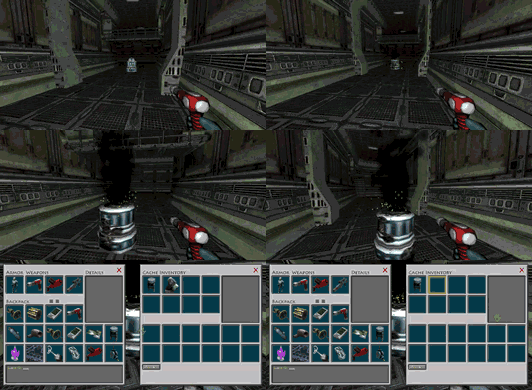
Now, like aliens, instead of dropping a random piece of tech, robot bodies will stay where they are and turn into a temporary cache with tech items inside.
Effects:
To make this more enjoyable, I also added a smoke and spark particle effect to these "powered down" units. Here's what it looks like...
Frequency:
Robots and alien bipeds were pretty rare in UFOs. I have increased the probability of encountering one, so you should not have to look quite as hard to find them.
5.0.4 Update
I was able to implement some recommendations from players in this small update.
1. Save Icon:
The save icon works a little better now, but is still not a reliable way to tell if the game is actually writing to the disk just yet.
2. Reload Old Game Dialogue
The actual text was missing from this dialogue box. It probably did not effect too many people. You can use this feature in the Load menu if you transfer a saved game from another computer.
3. Star Chart Overlay
The star chart overlay will now turn off when you leave the ship's helm. It will remember the last setting, so it will turn on again automatically when you return to the helm. This way the green overlay lines will not appear when you are walking around your ship, or the mothership.
4. Erase Game Issue
Some players complained that when erasing an old game file, it did not allow starting a new game with the same name. For now, I have not been able to reproduce this bug. I am able to delete a game, then start a new one with the same name. I will have to investigate further...
5. Guide Text
The interactive guide text was appearing above the loading panel. Not a big deal, but I fixed it anyway.
6. Run Movement Speed
I have reduced the movement speed of the player on planets and in caves. It was a bit fast according to some feedback.
7. Alien Bodies
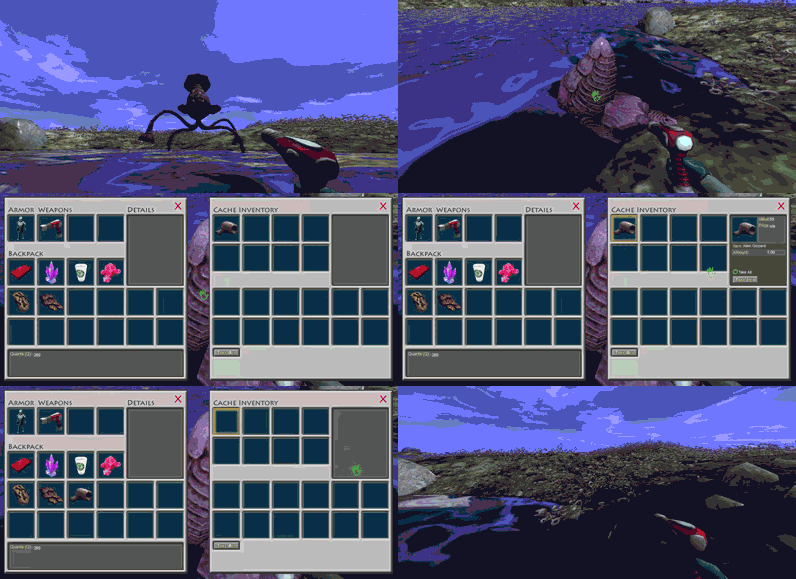
Instead of ejecting a small, hard to find body part on dying, alien bodies will now turn into a kind of temporary storage cache with the alien body part(s) inside. Don't put any stuff in these temporary caches though, they will decompose along with everything inside them when you leave that location.
5.0.3 Update
I was able to implement some recommendations from players in this small update.
1. Oxygen Usage:
Oxygen will be used faster when running. You will also hear the breathing sound a bit louder and faster. This simple mechanic just gives some slight feedback and consequences for running too much, and I hope it enhances the atmosphere and immersion of the game a bit. Prior to this, there was no actual reason to use the standard walk movement at all.
Also, oxygen usage will drop even more if you are not moving at all. So if in doubt, stand still!
2. Window Resolution Warning
A warning about window resolution was added to the video options menu. I hope to continue making this work better, but for now it simply explains that the window size should not be set higher than desktop resolution, and more importantly, that using the "Border" feature will add pixels to the window size, potentially messing up the game window if set too large.
3. Save Icon
Another feature I am implementing is a disk writing icon that now appears in the lower right corner. This is a first attempt so don't trust it completely yet. It tells you if the game is writing to disk. Right now it works, but it does not appear to handle all conditions yet.
As a rule, it's best to shut off the game after saving it at the helm of your ship. If you shut it down on a planet, it's fine, but try not to do that right after landing. The game may still be writing data about the surface features. I am working on making the disk icon show up more accurately...
5.0.2 Update
Some players were having an issue with installing the latest updates. It turns out a file "imgui.dll" was getting flagged by their anti-virus.
This file was added when I (unsuccessfully) attempted to update the resolution dialogue in a previous branch of the game. However, I had accidentally left the file in the game folder.
I removed that file, as well as a few redundant .bak files for some recently edited models.
Hopefully this will prevent any conflicts with anti-virus software.
Star Explorers 5.0.1 Release!
I would like to formally apologize about yesterday. With the release of version 5.0 and the business of Realms Deep, I kind of panicked when a major bug was reported. My big mistake was trying to hastily patch it and not really seeing all the long term consequences of that patch.
So I ended up making the problem worse.
But I had a good rest, and a fresh perspective early this morning. I believe I have successfully mitigated the problem in three ways.
I prevented the game from hanging when trying to land on a planet. Now, even if the same conditions exist, it should not fall into an endless loop.
I found the root cause of the crash, an invisible arm that is used in orbiting planets. The reference to this arm gets removed from the game when leaving orbit. The problem occurred when leaving orbit, then quickly going back into orbit, which is why the issue showed up more in the interactive guide (because the guide directs the player to do just this) but could also occur outside of the guide when the same conditions were met.
I was able to load a crashed game by adding a redundancy in the code. Now, if the reference to the orbit arm is not found when reloading, the game will create a new arm and assign it the right parameters automatically. This should no longer be needed with the prior fix, but I wanted players to be able to reload their crashed games if possible.
Sorry to get so technical, but I wanted to make sure everyone knew what was going on. The new system can be stress tested (if you want to try that) by rapidly leaving orbit, entering orbit then landing on a planet.
Hopefully this particular bug will not cause any more issues. But please feel free to reach out if you encounter any related, or unrelated issues with Star Explorers. Thanks for your patience.
Mistakes Were Made
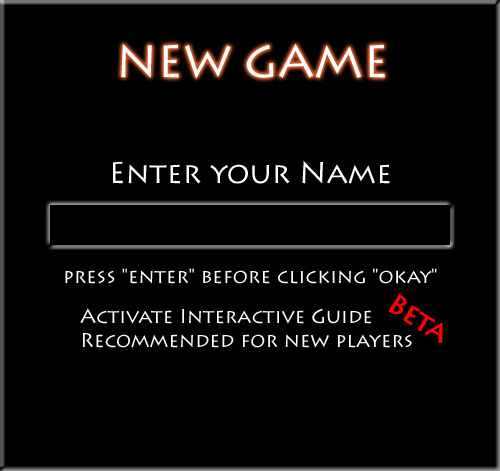
The 5.0 update did not roll out as smoothly as I'd hoped. A last minute bug report caused me to make some major changes this morning, which had unforeseen consequences. The bug seems to be centered on using the interactive guide. However, after "fixing" it, even bigger issues were later reported when players did not use the interactive guide.
So, I have rolled back some of those last minute changes, and relegated the interactive guide to the "beta" designation. If you use it, expect to have problems. I will be taking a slower, more careful look at that in the next few days. I know I announced this in the main update, but that was actually before I realized how big the ripple effects would be.
Thank you for your patience, and sorry for any confusion or inconvenience.