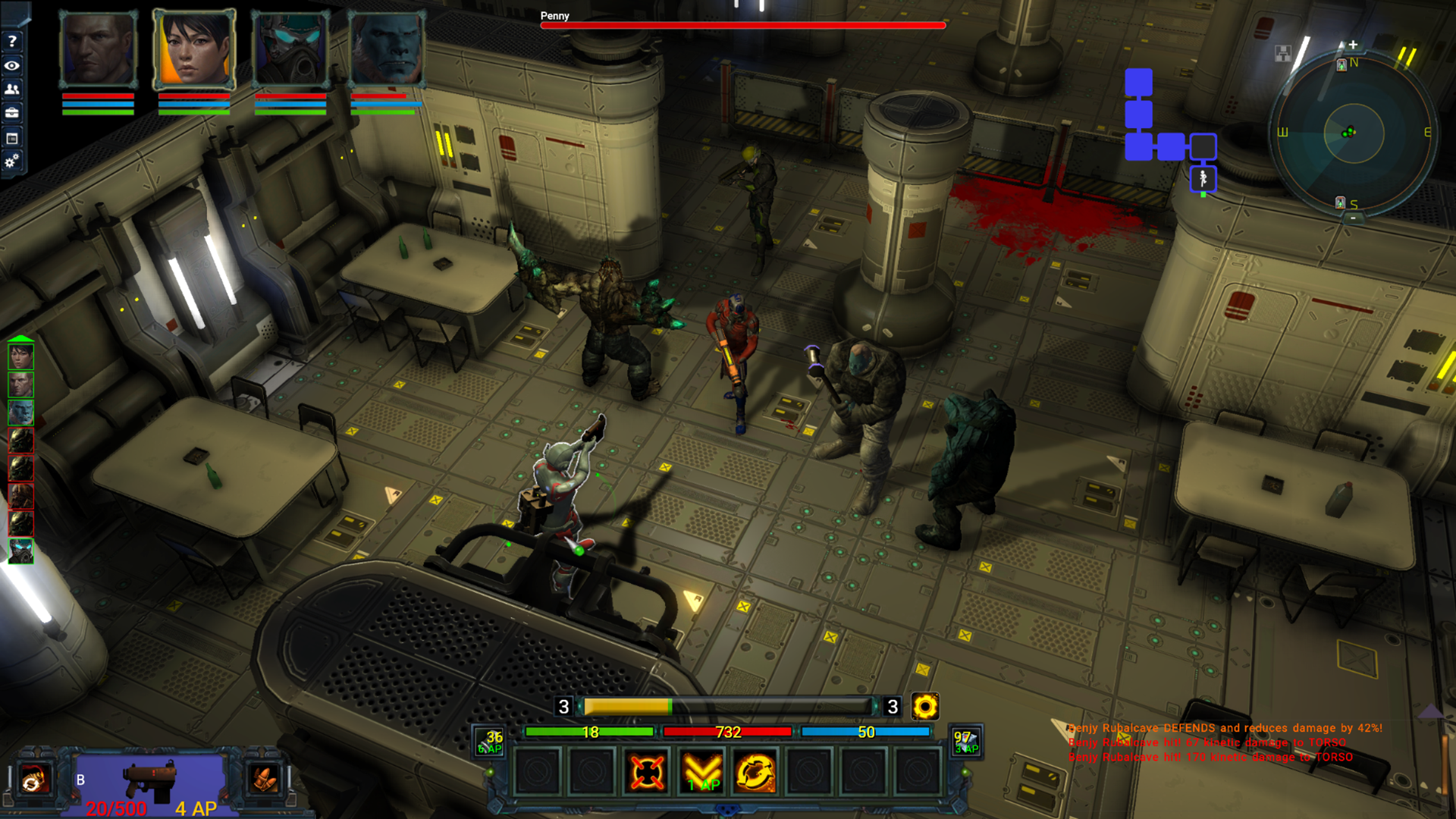
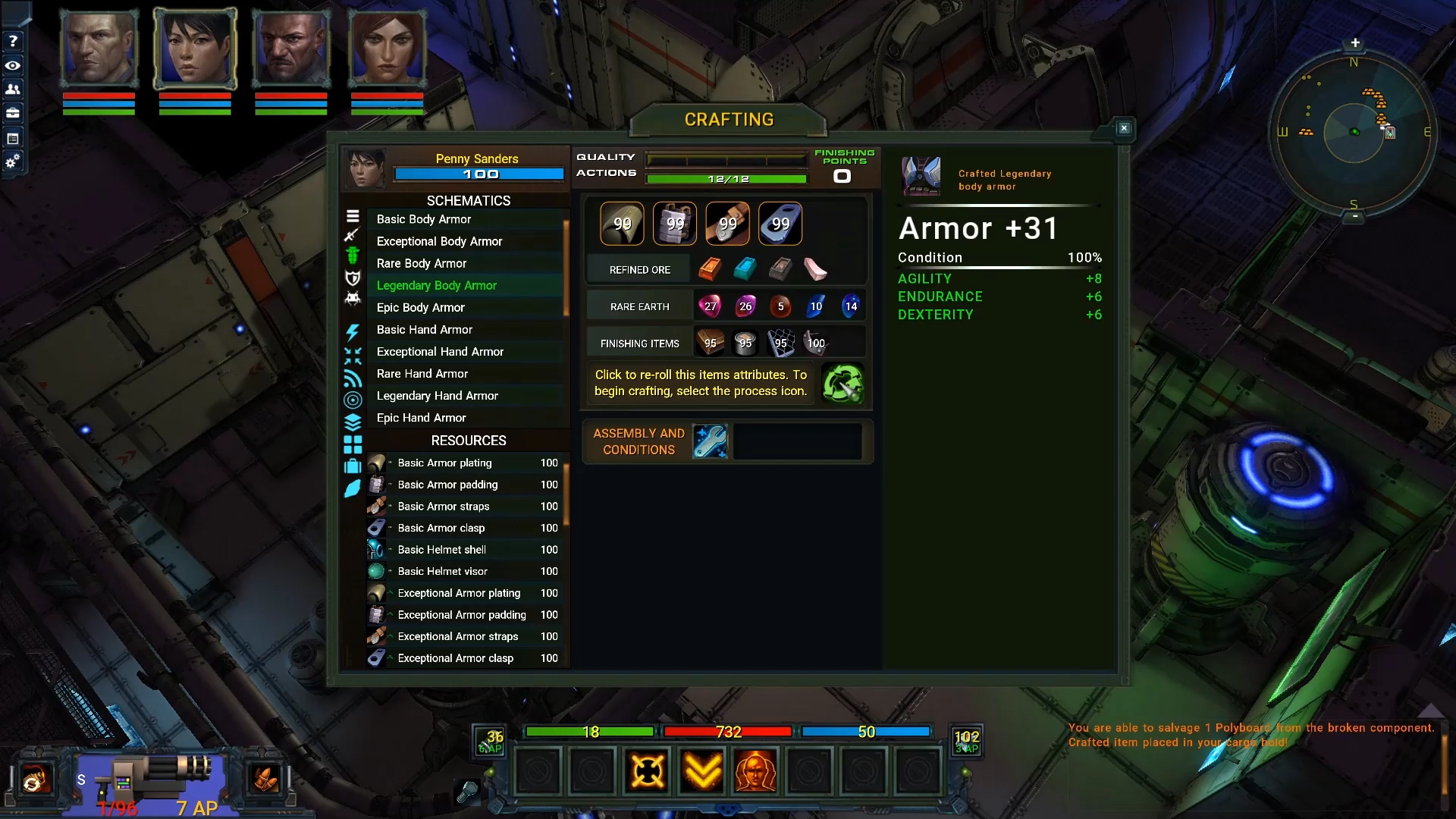
Here is a summary of the things you can expect for the next content patch. I hope to have this update ready for everyone by the end of next week.
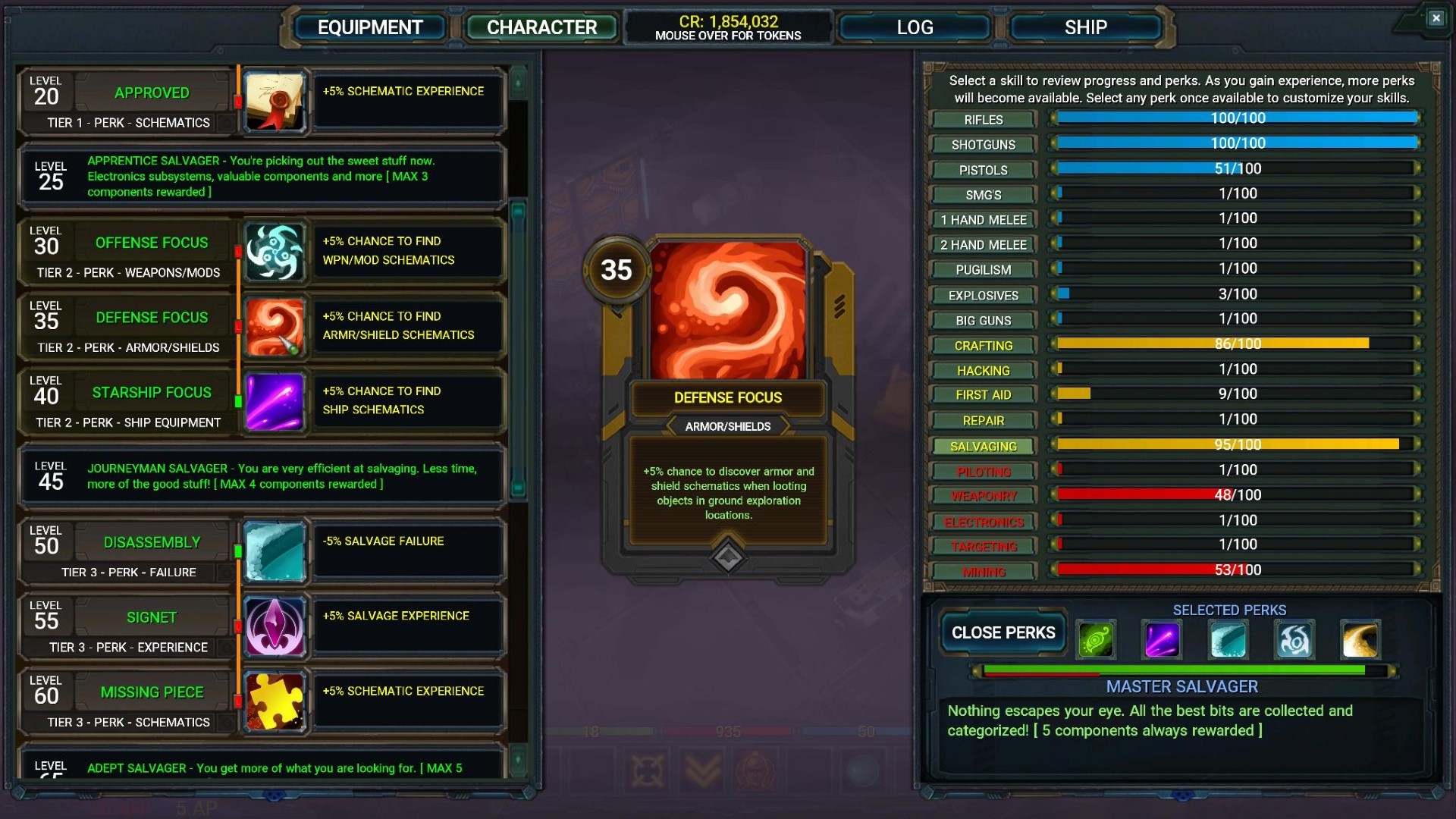
Perks The next patch will introduce the perks and skill tier bonuses for salvaging, crafting, and repair. All perks will be in the game. Some perks and tier bonuses have been revised to be more useful.
Perk and tier bonus progression adjustments Perks or skill tier bonuses will be rewarded every 5 levels with the next patch. Perk selection and preview has been completely overhauled so you can preview all skill perk and tier bonuses through skill level 100 at any time. Perks are still situational and you can switch between selections in each group as you have in the past.
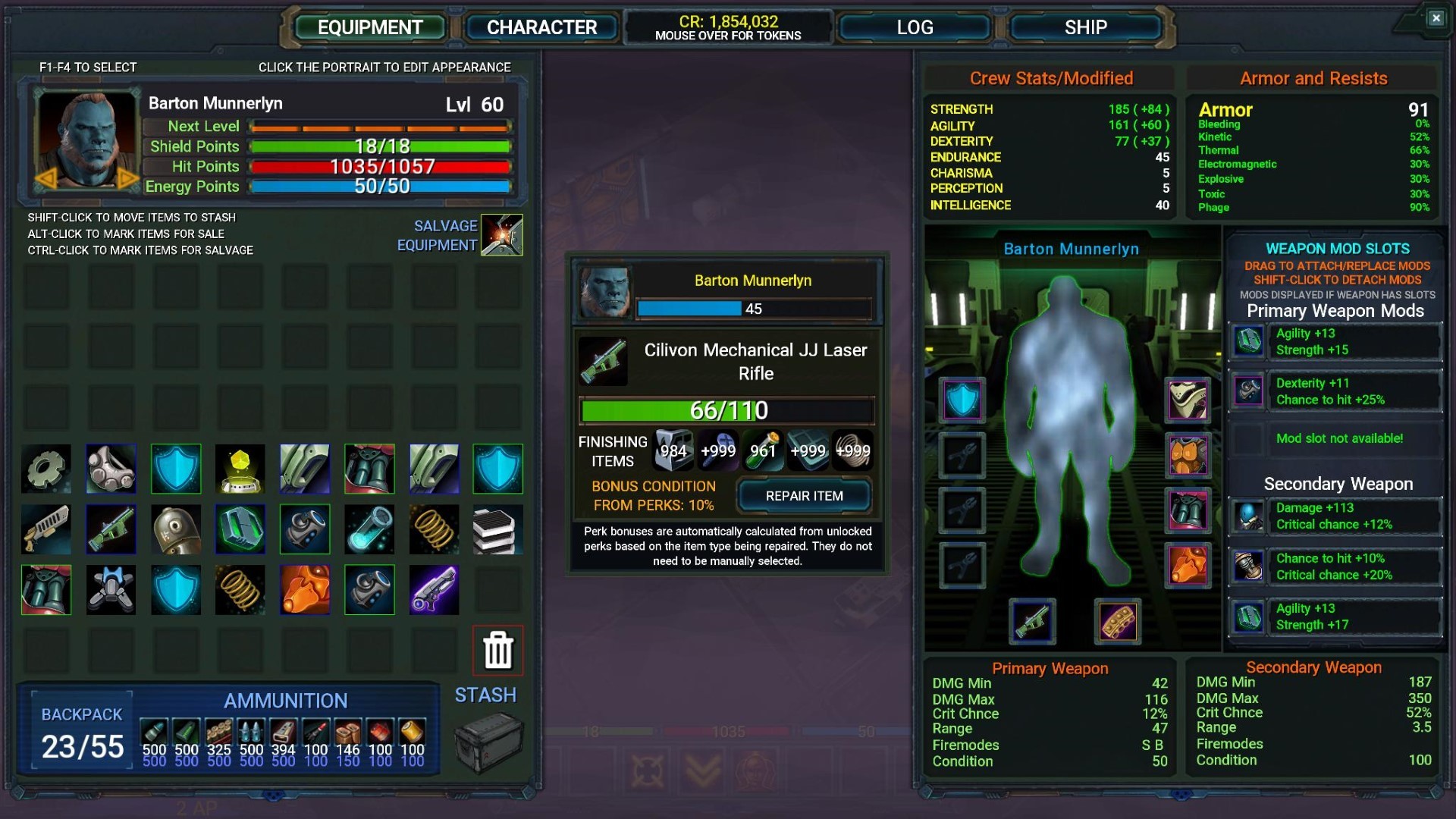
The repair system and equipment wear Weapons, armor, and ship equipment will all degrade over time. The repair skill will allow you to repair gear through your inventory by pressing the spacebar when hovering over an item. Perk bonuses will allow you to apply additional durability bonuses to repaired items (max 125% condition) and repair tier bonuses will apply reduced item degradation to items, slowing the wear of items based on your current repair skill level. Wear progresses at a relatively slow pace so, you won't need to worry about repairing items every few missions.
The crafting perk line will allow you to apply permanent base durability bonuses to crafted equipment, assuming those perks are selected when crafting. The base durability for weapons, armor, shields, and ship equipment can be increased to 130% at the maximum crafting skill level.
Items that do degrade below 50% will have reduced functionality. Ranged weapons will misfire and jam, melee weapons will do less damage, armor will mitigate less damage, turrets will misfire, ship systems will have additional negative penalties.
Below 25% - Additional penalties are applied.
Below 5% - Items will barely function.
At 0% Items are non-functional and must be repaired.
A new slot in the crew manager will let you assign a crew member to a repair station. Repair experience is granted to the crew member in the ship repair slot. Ship damage and ship equipment will be repaired over time as you travel the universe, reducing the need to dock and repair. This will be automated as long as a crew member is assigned to maintenance. Of course, there are some situations where if you do take heavy damage, you may want to manually repair your ship equipment.
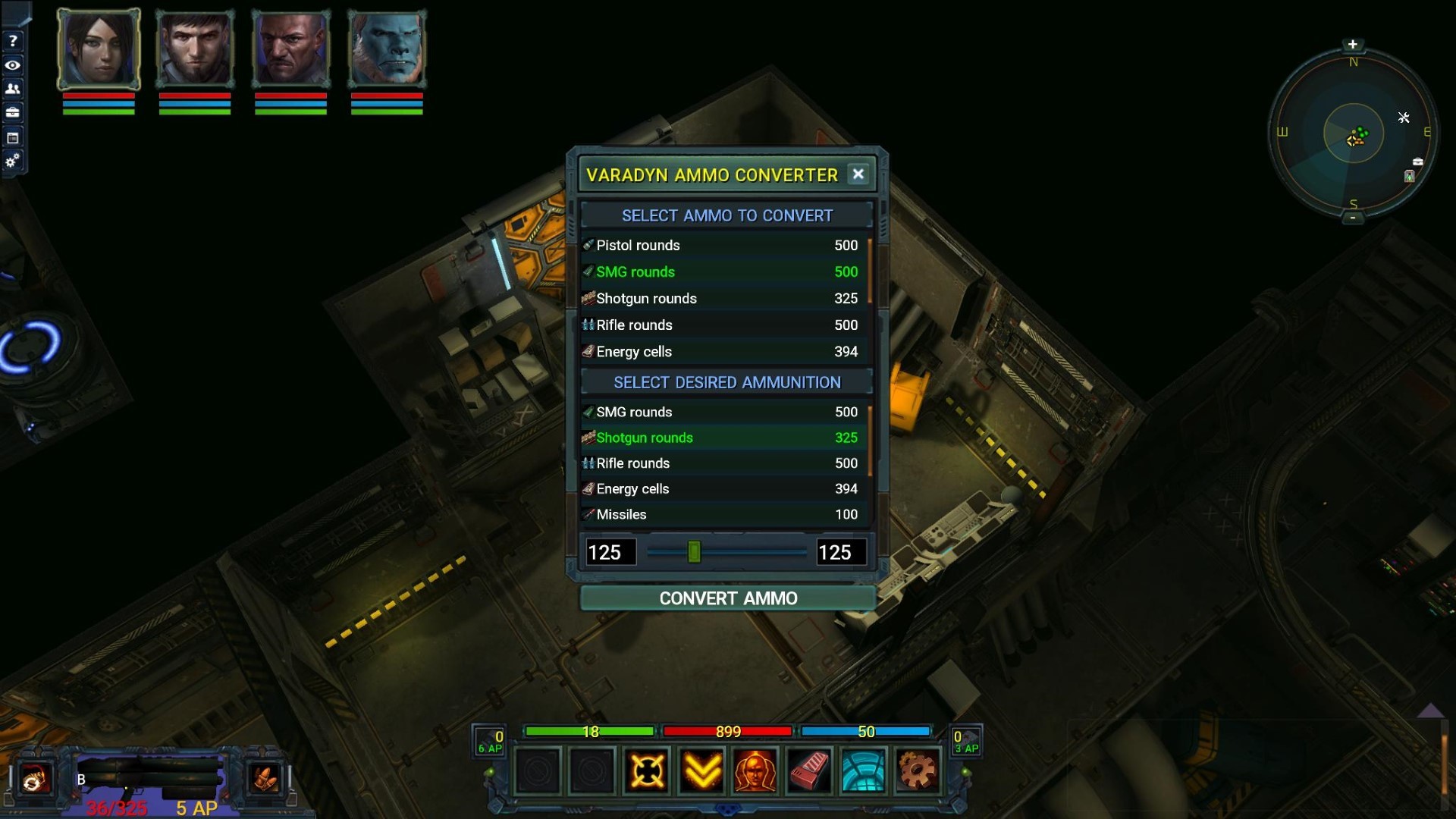
Ammo converter A new device will be available from Varadyn faction vendors that will allow you to convert any type of ammo into other types of ammo. The UI will be simple to use and you will be able to directly convert standard and heavy weapon ammo at the following ratios:
Pistol, SMG, rifle, shotgun, and E-Cell to any other ammo type in this category = 1:1 ratio (1 for 1)
Pistol, SMG, rifle, shotgun, and E-Cell to missile, fusion cell, flamer fuel, minigun = 3:1 ratio (3 for 1)
Missile, fusion cell, flamer fuel, minigun to any other ammo type in this category = 1:1 ratio (1 for 1)
Missile, fusion cell, flamer fuel, minigun to pistol, SMG, rifle, shotgun and E-Cell = 1:3 ratio (1 for 3)
The device can be used in any ground location including missions.
New ranged weapon sound effects - Most of the ranged weapons in the game have new sound effects. I think they sound much better overall and they pack a lot of punch.
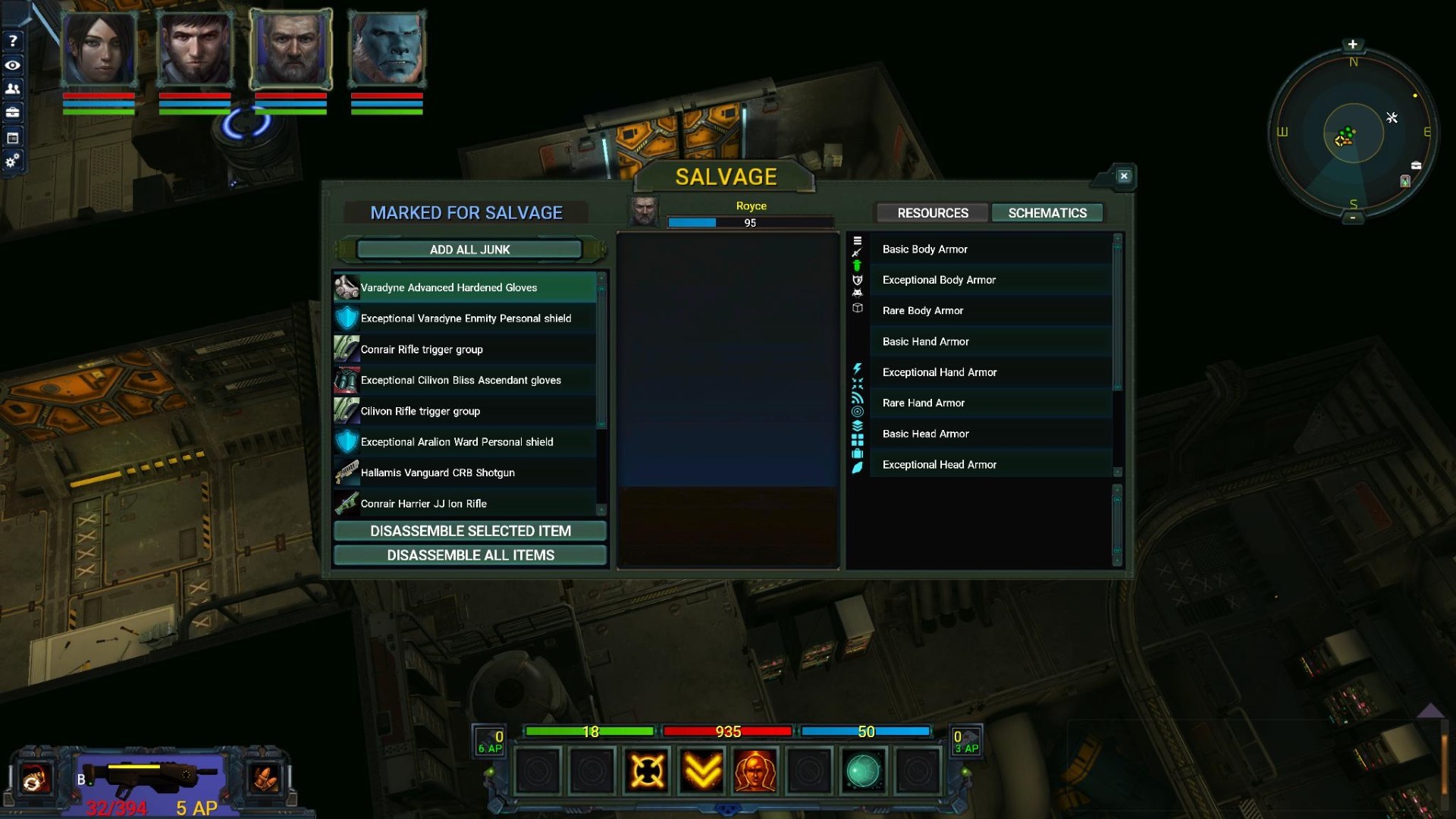
Schematics can be reviewed in the salvage UI so you can see what you have unlocked at any time. And of course, a number of bug fixes and issues that were on my list.
As with all patches, there will be no save game reset – you can just pick up the game and move forward from where you left off.
Once this patch is released, I’ll be finalizing the new weapon special attacks. I had hoped they would be finished at this time, but they need a lot more work. I expect these to be done in December along with a number of other smaller enhancements and QoL adjustments.
It will be great to finally be in a place where I will be working on the expanded mission system, more story content/locations, lore, new enemies, more armor sets, faction agents/merchants for the rest of the main factions, and of course - polish. It's been a long road getting to this point. I'm sure a lot of you are looking forward to the continuation of the game story and some of the features that will be unlocked through the story and side missions.
As always, thanks for supporting Stellar Tactics! I hope you all have a great weekend.
Disable, board, capture and sell enemy ships
I'm releasing the boarding content patch today. Every ship in the game can be boarded and I'd like to hear your feedback on the new system. This is one of the last core systems that needed to be implemented. It will be important as I expand the current mission system adding more variety, branching missions, and of course for the game story where there will be a number of ships that need to be boarded for various reasons. If you find any issues, please post in the bug forums and I'll take a look. As with all updates, there are likely edge cases and bugs that will only show up when people start playing the new content. I'll keep an eye on the forums and patch out any issues.
As it is, boarding is a nice add-on for the game. Short scenarios that net good returns. You can choose the repair/salvage mechanic for better sale value when contacting Arkus, though it is entirely up to you if you want to take the extra time to do this. No matter what, you will at least need to identify all the broken systems on the ship. Repairing them will develop your repair skill which will be used in future content updates when I expand the mission system. Scrapping components will improve your salvaging skill. More on this below.
With the addition of boarding, sub-system targeting is now in the game. This adds a new tactical layer to space combat allowing you to disable enemy engines, weapons, and systems - giving you time to deal with other ships in multi-ship combat scenarios.
Some of you have expressed an interest in walking around on your own ships. I want to say that this is not off the table. I'll be looking into it and I have some ideas I think you will like.
Others have mentioned that they want to keep the ships. Again, not off the table. I'll be looking into ways to expand the boarding system so you can earn ships through Arkus over time.
So whats next?
I'll be wrapping up the new perk system, rewarding perks earlier and more often. The next patch will complete all perks for the game including crafting, salvaging, and repair.
I'll be adding the new special weapon attacks. These will be rewarded at various skill levels and include active skills that can be placed in the two empty combat bar slots. This will round out the ground combat system nicely.
The weapon and armor repair system.
Expanding the mission system. Now that all core requirements are in the game - I can start working on making missions more varied, adding missions with multiple objects, and more.
Here are the patch notes:
Boarding enemy ships: To board an enemy ship, you need to first disable the target ship's shields. Once this happens a new icon (subsystem targeting icon) is displayed to the right of the ships targeting menu on the left side of the screen. Selecting this icon will bring up the subsystem targeting menu. At this point, you can choose to target subsystems (weapons, engines, systems). Once a subsystem is selected, your weapons will start targeting that subsystem until you click the subsystem targeting icon a second time to disable targeting for all turrets. Disabling all three subsystems will disable the ship completely and a new button will be displayed. Approach within range of the ship and you can then board.
Disable a ship's shields.
Select the subsystem targeting icon and disable all three main ship systems. NOTE: To turn off subsystem targeting, select the subsystem targeting icon a second time. This will turn off all turrets.
Approach the ship and select the "BOARD SHIP" button.
You have a limited amount of time to disable a ship's systems before the crew will repair the ship's shields and subsystems. A yellow bar above the subsystem targeting buttons will fill over time displaying that crews progress toward repairing the ship's shields. Once their shields go back up they will start repairing subsystems and you must bring their shields back down before you can board the ship.
Ion weapons are ideal for disabling shields and subsystems - however, other weapons will work. You do need to be careful of strike through damage to the hull as damage to the ship's hull is calculated into the value of the ship when selling it to Arkus. The best weapon for boarding would be ION weapons as they no do little to no damage against ship armor. Beam weapons are preferable and more cost-effective, though they do require a better warp drive.
Explosive turrets should be toggled off when targeting ships you want to board to avoid excess damage (missiles and plasma turrets).
Strikethrough perks should not be selected if you choose to board ships.
When targeting subsystems, missiles, and plasma turrets will be turned off automatically.
You can only board a disabled ship when other ships are not in combat with you. In the case of incursions, all other enemy incursion ships must be destroyed before boarding.
When boarding an incursion ship, incursion rewards will be granted just before you board the targeted ship.
You can only board one ship at a time. If you have active boarding objectives and exit the ship, then board another ship - the previously boarded ship will fly away.
If you fly away from a disabled ship - then return, and the left targeting menu is hidden, fire a few shots at the ship, and the subsystem targeting button will appear again. In some cases, the crew may be so busy that they don't notice you.
Ships have a chance to spawn a unique loot chest/crate that stores ship equipment of varying quality. When you do find one of these chests, the loot will be placed directly in your cargo hold if you have room.
Captured ship repair, salvage, and sale: To sell a boarded ship, the following objectives must be completed:
Eliminate the entire crew
Repair/scrap all damaged ship systems or at least examine the damaged systems.
Place a beacon at the helm of the ship. YOU MUST HAVE BEACONS in your ship's inventory or you will not be able to complete this objective.
Repairing ship systems above their default state before selling to Arkus will net you a bonus on his final price for the ship.
As an example, scrapping all items could net you around 50,000 credits when selling the ship. Repairing all systems to full (requiring a good number of parts) could net you as much as 200,000 credits.
Leaving a ship un-repaired and not scrapping any components will leave the ship in a state with a wide variance of value depending on the state of the systems onboard.
You must eliminate all enemies on the ship and review all damaged systems before you can activate the beacon at the ship's helm.
You can continue to repair and salvage components on the ship at any time, in case you decide to repair or salvage components. Once you place a beacon and notify Arkus, you will no longer be able to activate any ship systems for salvage or repair.
In general, you can completely ignore the repair system other than reviewing all systems if you want to. However, as mentioned above, repairing a ship always has a net positive effect on the number of credits you earn over time. The best strategy is to salvage and repair components. Over time, as your salvaging skill improves, you will salvage more parts. As you gain repair experience, repairing ship components becomes easier.
SALVAGING BONUSES - These will get rolled into the perks for Salvaging when I release them. All perks will be released in the next content patch - including - Salvaging, Crafting, and Repair. LVL 20 +20% CHANCE FOR EXTRA COMPONENTS LVL 40 +30% CHANCE FOR EXTRA COMPONENTS LVL 60 +40% CHANCE FOR EXTRA COMPONENTS LVL 80 +50% CHANCE FOR EXTRA COMPONENTS
You do not need to sell the boarded ship to Arkus. You can always exit the ship and go on about your business. If you dock, land, board another ship or enter FTL space, the ship will be gone when you return. You can exit the ship and reboard as long as you do not dock, land, or FTL from the system. If a ship is in a state where it can be boarded. Over time, a ship will repair it's shields first, then engines, weapons, and systems if there are still crew remaining on the ship and eventually fly away.
ADDED EXTREME DIFFICULTY MODE for ground combat. In this mode, the difficulty of enemies of all types is increased (DAMAGE, CTH, CRITS, STATS, ARMOR, etc,) and enemies are raised by one tier of difficulty. In this mode, there is more risk and more reward as enemies, in general, will drop better loot. Crew members will be K.O. on a regular basis. I would not recommend extreme mode until you have decent armor and a good arsenal of weapons that deliver various damage types. --Basic enemies have a chance of being raised a single tier to single skull Elites. --Elites will always be a tier higher. That is a single skull Lieutenant will always be a tier higher etc. --I would not even attempt this mode until you have some experience with the game and decent equipment. --Bring a ton of medkits! --A reasonable level of skill in first-aid is recommended! --You are going to need an arsenal of weapons that do a variety of damage types to switch between. Pay very close attention to enemy resistances and use weapons of the appropriate type. --Switching to or from Elite requires a save and reload to re-initialize all enemies in the area. Any transition between areas will scale the encounters to extreme mode.
FIXED - A bug with the area map that could leave characters immobile. FIXED – Micro-warp hull visual effect being left on after exiting warp. FIXED - A rounding error when NPC's heal themselves displayed in the floating text. FIXED - A bug that displayed incorrect info for HP and Shields when rolling over KO crew members FIXED - Stability fixes including a few rare lockups on enemy end turns. FIXED - In some cases, combat UI elements could be left on the screen until next turn. FIXED - Crew members are less likely to be left behind when navigating. FIXED - Eliminated character rotation when running upstairs and ramps. ADDED - Occasionally, when looting, an NPC or chest/locker will reward a large sum of credits. ADDED - Progress indicator toward next skill level up is now displayed at bottom of character screen (right panel - bottom) when selecting individual skills as a thin red bar over the progress bar. ADDED - Added a bit of center axis tilt to ships when turning. UPDATED: ION turrets now do minimal damage to ship armor. They may do some minor strike-through damage and strike through perks still apply to ION turrets. UPDATED: Some work done on gravity and physics so characters stay pegged to the ground when running up and down stairs. UPDATED: Enemy ragdoll is more "definitive" with the changes to gravity. UPDATED: Disabled NPC ship conflict in star systems temporarily until I can work out better LOD for this system. It was causing frame rate drops and other issues. UPDATED: All stations in the universe now have recruitable crew members and more of them. This will greatly increase the chance of finding the recruit you are looking for whether that be a male, female, Kchor, or Fabricant. It also increases the odds of finding a crew member with the starting skills you are looking for. NOTE: This only applies to stations you have not yet visited - the change is not retroactive.
I hope you all enjoy the patch. As always, thanks for supporting Stellar Tactics!
Boarding - First Look
Well, I’m code complete on the boarding system as of today. I’ll be fixing a number of bugs, play testing, balancing, and finalizing everything over the next few weeks.
Here is a short video that highlights some of the features: https://youtu.be/1tuFrImTx-Y
Boarding is accomplished by: 1) Disabling a ship's shields. At this point, a new icon appears next to the ship's target menu. 2) Selecting the subsystem targeting icon lets you target various ship subsystems (engines, turrets, and ship systems). 3) Once those are destroyed, you can board the ship.
You are competing against the enemy crew who is trying to repair their shields. In most cases, with decent turrets, this should never be a problem.
Every ship in the game (40) has had its interior modeled, enemies placed and objectives scripted. When you board a ship, you will need to eliminate the crew, repair or salvage various systems for components and place a beacon on the ship's helm.
Once a beacon is placed, you can then contact Arkus, a salvager who will give you a fixed price based on the current state of the ship. Repairing a ship before selling it will get you the best possible price, however, Arkus pays well below the market average for ships for his services. The prices are fair for the effort and he handles translocation, dismantling, and distribution. So, boarding is relatively balanced with most other activities in the game. Scrapping components is critical as these components can only be obtained by scrapping boarded ships. As you gain skill in repair, and with a decent salvaging skill (and upcoming perks), repairing ships to full capacity for full bonus sale prices to Arkus becomes easier.
I had hoped to get the updated skill and perk system in for this next patch but will need to work on this more after the release of the boarding patch. This patch has had a massive amount of work put into it and it’s taken a bit more time than I anticipated.
I hope you are all well and safe. Thanks as always for supporting Stellar Tactics!
Combat update patch released
Lots of changes below. I'll keep an eye on the bug forums over the next few days for any problems and patch out any blockers or major bugs.
I'll be moving on to updates to the pace and timing of skill and perk rewards (more frequent rewards and useful skills) and the boarding system. This update will be quite a bit of work and will include some changes to the visuals in Star Systems, adjustments to space combat, and more. It will take a while and I'll keep you all posted as I make progress.
A few highlights in case you don’t want to read through all the notes:
Cargo volume increased across most ships in the game.
You no longer block your own crew members in combat. NPCs can still block you and you can block NPCs.
EXP increases for salvaging, crafting, first aid, hacking and space skills.
Kchor and Fabricants now have innate bonuses (crafting, CRIT, scanning).
New rollover info and right-click extended hud for combat.
A pass at resists in the game.
Personal shields re-balanced.
Adjustments to rifles and heavy weapons with near range penalties (unwieldy).
Shotguns, SMG’s and flame throwers now do spread damage in a cone that affects multiple enemies.
Melee weapons now do more damage overall, additional damage to enemy shields and allow mods to be equipped that change the base damage of these weapons.
Pugilist weapons added – mods can be equipped. The only weapon type that can be equipped in the primary and secondary weapon slots.
Adjustments to crafting conditions – they occur less often.
Lots of small tuning adjustments to make the pace of combat faster – more work to do including new skills – active and passive, special attacks, perk adjustments, pace etc.
INCREASED CARGO VOLUME: All smaller ships, including the starter ship, have higher base cargo volumes. Cargo expansions for these ships will also be larger (scaled from the base cargo volume of the ship). Adjustments to cargo expansions are not retroactive so you will need to buy new cargo expansions if you want the extra volume.
KCHOR + CRIT innate bonus with all melee weapons. + CRIT innate bonus with all heavy weapons.
FABRICANTS --Fabricants are less likely to generate negative conditions when crafting regardless of skill level. --Fabricants get a bonus to scanning ships and planets.
NEW: ROLLOVER INFO AND RIGHT CLICK EXTENDED INFO HUD A new rollover info display. This display shows additional information at a glance - enemy difficulty, CTH, Remaining AP/Total AP, HP, shield points, and active debuffs. Right-clicking an enemy will display the extended info and targeting UI. I've had several comments that "hunting the pixel" is not fun - so, this revised hud lets you select individual body targets with the extended UI. When this UI is active, the targeted enemy is locked until you right-click again, press escape or the space bar. The extended information displays: --Buttons that can be clicked to attack head, torso, legs, and arms --You can reload your ranged weapon --You can change ranged weapon fire modes --Extended targeting information including min/max damage, range penalties if any and status effects that can be inflicted including the percent chance of inflicting the effects. --Enemy resistance information (innate and shield totals) based on the active crew members' perception STAT. The currently selected weapon damage type highlights that particular resist icon. Note that you can still attack without opening the extended info HUD, add attacks to the combat queue and even fine aim if you want to. None of that has changed.
RESISTS: Resists are now more important and can be reviewed by right-clicking enemies with the new popup extended info UI. Higher perception will display more resist information in the extended info popup when right-clicking enemies. Some second and third-tier enemies are immune to certain types of damage. Having an array of weapons that deal various types of damage can help you take your enemies down much faster. You now have options to change the base damage type of melee weapons (see below) to adjust your damage type strategy.
Resists have always been in the game, however, without a way to see them, it could seem at times that it took a long time to defeat a specific enemy. With the new display, you can now adjust your weapons to an enemy's weakness. An enemy that might take 10 attacks using kinetic weapons may only take 3-5 attacks using a weapon that does toxic damage. This is more important as your crew progresses.
Mitigation is now displayed in the combat log showing damage reduction from shields, armor/perks and defend.
PERSONAL SHIELDS REBALANCED Personal shields were OP - they have been adjusted. Several things were done without modifying the loot tables so current shields are still viable without a reset. --"The slow blade" - Melee weapons deplete shields faster than ranged weapons. --The cost of recharging shields is now increased. The result is energy reserves for shields are depleted faster.
RIFLES AND HEAVY WEAPONS --These weapon types now incur a ranged CTH penalty (unwieldy) when fired at close range. This promotes the use of sidearms and shotguns in close combat situations. You either need to move to range, or use your sidearms if you do not want to incur the penalty. There may be skill tree selections that adjust this penalty down when the skill tree's go in the game. A red rifle icon will display on the rollover info UI if the penalty is being applied at your current range to target.
SHOTGUNS --Range slightly reduced for any newly purchased, dropped or crafted shotguns going forward.
SHOTGUNS, SMG'S, AND FLAMETHROWERS These weapons now have a chance to inflict spread damage in a cone in front of the firing combatant. This effect only applies to enemies within a certain range directly in front of the firing character and applies up to 20% of the initial base damage to enemies in the weapons field of view before mitigation. This value will be increased with future changes to weapon skill tree selections. Status effects have a chance of being applied to secondary targets. --SMG'S MUST BE IN BURST OR FULL AUTO MODES
MELEE WEAPONS Frequency Modulators now allow you to add specific damage types to melee weapons ( thermal, electric, toxic and bleed). In addition to changing the base damage type of melee weapons from kinetic, these mods also have a chance to trigger an additional damage burst that bypasses all defenses, including Defend. The new secondary effect on this mod type replaces the critical modifier which was redundant and applied by other mods. Bleed and toxic augments also apply the bleed and poisoned status effects. Crafting adjusted for the changes above.
When a Frequency Modulator is equipped, melee weapons now display a unique particle effect associated with the various damage types. The above changes also apply to NPCs in the universe. Changes to Frequency Modulators are not retroactive, so older modulators will have the +CRIT secondary modifier.
Attacks of opportunity always inflict kinetic damage regardless of the modded damage type - at least for now.
PUGILIST WEAPONS Pugilist weapons are in the game now. They are a way to augment to your melee skill with mods and damage bonuses, no special visual weapons are equipped at this time. --While pugilist weapons to apply a small amount of base damage that scales by level and quality, primary damage derived from the characters skill level and stats. --Mods - Melee mods and nano's can be applied to pugilist weapons bringing them in line with other melee weapons. Overall, pugilism is very effective. --Crafting - You can craft pugilist weapons by deconstructing weapons you find. Schematics can be found by salvaging pugilist weapons or as rare random drops. --You do not need to equip pugilist weapons to fight hand 2 hand, just unequip your current weapon as it has always been. --Starting a new game and placing weapon points in the pugilism weapon skill will equip a starting pugilist weapon. --Pugilist weapons can be equipped in primary and/or secondary slots.
UPDATED COMBAT BLOCKING/NAVIGATION You can now move through your crew if they are blocking corridors or doorways. NPCs can still block you and you can block NPCs. IMO, this change is a huge improvement and I think a lot of new players were put off by being blocked by their own crew members. Being able to block an enemy is a tactic.
Crew members and NPCs now have discreet areas around them where movement is blocked. That is, you cannot click in a character's immediate area. This helps with pile-up and should help with missed combat clicks that move your crew when you intended to attack.
Crafting --Reduced the chance of positive and negative crafting conditions --Increased EXP gain for salvaging and crafting
FIXES AND UPDATES FIXED: A bug related to key binds for the Q and E keys between space and ground key configurations. FIXED: Double-clicking area exits could lock the game up in some cases - especially on the Dauntless when leaving. FIXED: If a PC is in defend mode and hit during a round of combat, the display of the defend icon is correctly removed from the display. FIXED: Status effects (toxic, bleed) that were mitigated completely by "Defend" are no longer applied to display 0 damage per tick. FIXED: A number of fixes for occasionally missed clicks in the environment. FIXED: Help hud not displaying in some cases. FIXED: Intelligent Phage now have shields. FIXED: The stash list no longer resets to the top on various actions. FIXED: It was possible to add more than 10 crew members to your crew roster. FIXED: Stairs in a specific mission location where you could get stuck. FIXED: Broken dynamic lighting in one of the stations. FIXED: If KO with status effects - status effects are now removed when you stand back up after combat. FIXED: A bug that was deriving scanning bonuses from the incorrect crew member. FIXED: In combat, if crew members are blocked by enemies and have a very long alternate navigation route to the target, they will no longer take the long route and a message is displayed to the screen. FIXED: At level 80+ of melee skill, it is no longer possible to move small distances in combat (one node) for free.
UPDATED: Enemies in combat with the player no longer highlight when pressing the highlight key and cannot be targeted. Use the facing button while in combat - there is no AP cost to use this option. UPDATED: If a NPCs target is blocked, they now make a second check for a new target nearby. If not, they handle various "blocked" tasks, like healing, looking for cover, etc. UPDATED: Global tuning of enemy mitigation and shields. UPDATED: Increased EXP gain for hacking and first aid UPDATED: CTH values for burst and full-auto modes reduced globally based on range simulating less control when using these fire-modes. UPDATED: CTH Values reduction values for various body parts are now fixed regardless of skill level, with the torso always receiving full CTH at any range. Head, arms, and legs receive a CTH penalty and bonuses to various status effects and damage. UPDATED: Increased damage from "Bleed" and "Poison" status effects UPDATED: Increased base damage from frag grenades UPDATED: Numerous changes to resistances across all enemy types UPDATED: Modulators and barrel mods now drop as loot more often and are the primary +DMG mod type for ranged and melee weapons.
I'm looking forward to your feedback on this patch. As always, thank you for supporting Stellar Tactics!
Progress Update - Combat tuning and more
I've been working hard on this next patch. My goal with this is to address a number of weapon class balance issues, weapon differentiation, navigation, blocking and more. Check out the video for a preview.
https://youtu.be/LCGxJ_Duc8M
I'm hoping to get this patch out in the coming week for everyone. This will be part one of a major update to the combat system. The second part will include adjustments to the current perks and the addition of skill trees for the various combat skills including special attacks, passives and other ways to enhance combat performance and pace. Here are a few notes for the upcoming patch. The overall goal of these changes is to:
1) Balance combat 2) Provide more weapon differentiation 3) Give the player more choices, more often to develop their crew 4) Improve the pace of the game and reward the player frequently
Once this work is done, I'll be moving on to the boarding system, a second pass at space combat, filling out the universe with more diversion missions, events, and long term goals and adding interesting and unique content to flesh out the overall experience. At that point, the game will finally be at full Alpha and I'll concentrate on adding the rest of the story to the game, which includes Psionics and a few other things that are part of the main storyline.
INCREASED CARGO VOLUME: All smaller ships, including the starter ship, have higher base cargo volumes. Cargo expansions for these ships will also be larger (scaled from the base cargo volume of the ship). Adjustments to cargo expansions are not retroactive so you will need to buy new cargo expansions if you want the extra volume.
NEW: ROLLOVER INFO AND RIGHT CLICK EXTENDED INFO HUD A new rollover info display. This display shows additional information at a glance - enemy difficulty, CTH, Remaining AP/Total AP, HP, shield points, and active debuffs. Right-clicking an enemy will display the extended info and targeting UI. I've had a number of comments that "hunting the pixel" is not fun - so, this revised hud lets you select individual body targets with the extended UI. When this UI is active, the targeted enemy is locked until you right-click again, press escape or the space bar. The extended information displays: --Buttons that can be clicked to attack head, torso, legs, and arms --You can reload your ranged weapon --You can change ranged weapon fire modes --Extended targeting information including min/max damage, range penalties if any and status effects that can be inflicted including the percent chance of inflicting the effects. --Enemy resistance information (innate and shield totals) based on the active crew members' perception STAT. The currently selected weapon damage type highlights that particular resist icon. Note that you can still attack without opening the extended info HUD, add attacks to the combat queue and even fine aim if you want to. None of that has changed.
RESISTS: Resists are now more important and can be reviewed by right-clicking enemies with the new popup extended info UI. Higher perception will display more resist information in the extended info popup when right-clicking enemies. Some second and third-tier enemies are immune to certain types of damage. Having an array of weapons that deal various types of damage can help you take your enemies down much faster. You now have options to change the base damage type of melee weapons (see below) to adjust your damage type strategy.
Resists have always been in the game, however, without a way to see them, it could seem at times that it took a long time to defeat a specific enemy. With the new display, you can now adjust your weapons to a enemy's weakness. An enemy that might take 10 attacks using kinetic weapons may only take 3-5 attacks using a weapon that does toxic damage. This is more important as your crew progresses.
Mitigation is now displayed in the combat log showing damage reduction from shields, armor/perks and defend.
PERSONAL SHIELDS REBALANCED Personal shields were OP - they have been adjusted. Several things were done without modifying the loot tables so current shields are still viable without a reset. --"The slow blade" - Melee weapons deplete shields faster than ranged weapons. --The cost of recharging shields is now increased. The result is energy reserves for shields are depleted faster.
RIFLES AND HEAVY WEAPONS --These weapon types now incur a ranged CTH penalty (unwieldy) when fired at close range. This promotes the use of sidearms and shotguns in close combat situations. You either need to move to range, or use your sidearms if you do not want to incur the penalty. There may be skill tree selections that adjust this penalty down when the skill tree's go in the game. A red rifle icon will display on the rollover info UI if you are incurring a penalty at your current range.
SHOTGUNS --Range slightly reduced for any newly purchased, dropped or crafted shotguns going forward.
SHOTGUNS, SMG'S, AND FLAMETHROWERS These weapons now have a chance to inflict spread damage in a cone in front of the firing combatant. This effect only applies to enemies within a certain range directly in front of the firing character and applies 5-10% of the initial base damage to enemies in the weapons field of view before mitigation. This value will be increased with future changes to weapon skill tree selections. --SMG'S MUST BE IN BURST OR FULL AUTO MODES
MELEE WEAPONS Frequency Modulators now allow you to add specific damage types to melee weapons ( thermal, electric, toxic and bleed). In addition to changing the base damage type of melee weapons from kinetic, these mods also have a chance to trigger an additional damage burst that bypasses all defenses, including Defend. The new secondary effect on this mod type replaces the critical modifier which was redundant and applied by other mods. Bleed and toxic augments also apply the bleed and poisoned status effects. Crafting adjusted for the changes above. When a Frequency Modulator is equipped, melee weapons now display a unique particle effect associated with the various damage types. The above changes also apply to NPC's in the universe. Changes to Frequency Modulators are not retroactive, so older modulators will have the +CRIT secondary modifier.
PUGILIST WEAPONS Pugilist weapons are in the game now. They are a way to augment to your melee skill with mods and damage bonuses, no special visual weapons are equipped at this time. --While pugilist weapons to apply a small amount of base damage that scales by level and quality, primary damage derived from the characters skill level and stats. --Mods - Melee mods and nano's can be applied to pugilist weapons bringing them in line with other melee weapons. Overall, pugilism is very effective. --Crafting - You can craft pugilist weapons by deconstructing weapons you find. Schematics can be found by salvaging pugilist weapons or as rare random drops. --You do not need to equip pugilist weapons to fight hand 2 hand, just unequip your current weapon as it has always been. --Starting a new game and placing weapon points in the pugilism weapon skill will equip a starting pugilist weapon. --Pugilist weapons can be equipped in primary and/or secondary slots.
UPDATED COMBAT BLOCKING/NAVIGATION You can now move through your crew if they are blocking corridors or doorways. NPC's can still block you and you can block NPC's. IMO, this change is a huge improvement and I think a lot of new players were put off by being blocked by their own crew members. Being able to block an enemy is a tactic ("Paladins! To the doors!") Crew members and NPC's now have discreet areas around them where movement is blocked. That is, you cannot click in a character's immediate area. This helps with pile-up and should help with missed combat clicks that move your crew when you intended to attack. Missed clicks and crew members being left behind is now much less likely. At level 80+ of melee skill, it is no longer possible to move small distances in combat (one node) for free.
Thats all I have for now. Thanks as always for supporting Stellar Tactics!
Performance, shaders and QoL
Today's patch includes a number of performance enhancements, a pre-compiled shader system, and a few QoL updates.
Shaders are now pre-compiled when you launch the game. --The majority of all shaders are now generated via a database at game launch. I would say 80% of all shaders are in the d-base now and more will be added over time. --As you play the game, if a shader is not pre-compiled it is added to the database and saved so the shader does not need to be compiled on the fly ever again. --Certain video drivers could crash - though this was very rare - when compiling complex shaders on the fly. This patch should address that. --In some cases, when entering an area the first time after this patch, there may be a short period of stuttering as shaders are initially linked to materials.
You can now adjust mission length when speaking with a faction agent - Short - AVG 40 Min, Medium - AVG 1-2 Hrs, Long - AVG 2-4 Hrs.
You can now browse available missions while the mission window is open by selecting the "Next" button. A new mission will be offered.
You can now double click crew equipment (shields, armor, weapons) to equip them from inventory. Mods and devices need to be placed manually.
Active status effects are now displayed below each crew member's portrait along with their active duration.
Various code optimizations for performance.
A few changes to the way the physics engine handles movement.
A few changes to the animation system.
A few animation fixes/updates.
A few changes to idle and facing blend animations so they can be interrupted when moving characters. This makes movement more responsive.
The game now generates a backup "sav_dat.xml" file that is not stored on the Steam Cloud when saving the game - just in case there is a disk write error of some kind.
A possible fix for a rare lockup when healing.
FIXED: A bug that was causing random animation and physics slowdown. FIXED: A bug that would leave idle states running at 1.5x normal speed in certain cases. FIXED: Autosave when leaving the Dauntless. FIXED: A bug that would leave equipment quality color border visible when unequipping an item. UPDATED: When grenades and medkits are enabled, a reminder message is displayed when ending your turn to deselect these items from the toolbar. I think in some cases, this was causing confusion. I'll be looking into an automated solution for this. UPDATED: Ship collision damage reduced. Collision damage now affects shields and armor.
I'm continuing to work on a few things: --Weapon special attacks. --Combat pace. --Streamlining of perks so they are available earlier in the game with more frequent updates. --Better inventory sorting. And more...
I'll keep everyone posted as I make progress.
The Kchor, Fabricants and updated animations
It's been an amazing year for Stellar Tactics. I'd like to thank all of you for your support and patience. It's not often that you see such a positive and supportive community. I owe you all a huge "Thank you!" for all you have done for the game, your feedback, and for making this game what it is and will be.
This year, we've seen the addition of updated ships, the ability to sell scan data, the drone mining system, Trade-Net, smuggling, faction warfare (first pass), the area map, crafting and salvaging. A large number of bugs have been fixed and many suggested QoL features have been implemented.
This patch introduces two "mutations" to the universe - The Kchor ( pronounced "Core" ) and the Fabricants. You can find them all over the universe on stations, in missions and they are recruitable as Mercs to join your crew on your journey.
I'm also releasing a large number of updated animations that improve combat pacing and provide a second pass of polish to the overall look and feel of the game. I'm still doing a good bit of work on combat pace for the next content patch which will introduce new special attacks and a few other features. Following that, the boarding system.
A bit of back story about the Kchor and Fabricants. More information will come when I expand the game story.
The Kchor – Class “A” Mutation (Rational : Humanoid : Sanctioned)
On Arrival, a large number of the pods on the HSS Pharris contained the Kchor mutation. Overall, the new species was considered robust other than several anomalies – parthenogenesis, extreme musculature, and a blue/green skin tone. The medical engineers released them with no special conditions and The Kchor have flourished. The Kchor can be found in most star systems and are generally peaceful.
The Kchor have a special relationship with the Sovereignty, having saved their fleet in the notorious Blockade of Karsus 7. Were it not for their arrival, Maezus Karsari would have destroyed or captured the entire fleet and undoubtedly overthrown the Sovereignty. Instead, The Kchor delivered Maezus to the Council earning their autonomy as a reward for their actions. The Kchor interdiction is one of many turning points in recent history that mold the current political environment of the inner systems.
The Kchor are known for their great strength and intelligence. However, rather than using their influence and innate talents, The Kchor cherish their privacy and prefer to trade and explore peacefully. They are famous for their Kchor Brandy, a favorite indulgence across the known Universe.
Fabricants – Class “B” Mutation (Rational : Cybernetic : Sanctioned)
A number of mutations were discovered on the HSS Outland when the ships arrived. These Sleepers had a rare condition and were in a late state of mutagenic drift, having crossed genetic material with a parasitic species that flourished in their Vats. In their current stage of drift, they could not be exposed to the oxygen-rich atmosphere that Humans breath. It was hypothesized that their skin was transitioning toward a hardened exoskeleton.
Considered “unrecoverable”, Fabricants were initially scheduled for termination. A young scientist, Garrius Brons, fabricated a prototype Exo-Suit and AI module that sealed the Fabricants in a permanent outer skin. After a few trials, the suit was adapted and a modification of this suit is in use to this day.
Fabricants are incredibly talented engineers and were instrumental in FTL travel, having worked closely with Garrius Brons. Over time, they have adapted their suits and AI becoming more machine than human. They prefer to name themselves alphanumerically, and their ability to assimilate traits from common items is a closely held secret. Little is known about their culture and habits. When it comes to engineering, mathematics, and science, no other species in the known universe come close to the Fabricant.
A few things left to do - I'm working on these for the next content patch:
Fabricants
+Bonus to crafting/learning
+Bonus to scanning
Unique voice audio
Kchor
+CRIT bonus with melee weapons
+CRIT bonus with heavy weapons
A few animation transitions that need tuning
Here is a list of fixes/updates/additions in this patch.
ADDED: The Kchor and Fabricants. You will find these two mutations on stations throughout the universe. Fabricants and Kchor can now be recruited as Mercs and added to your party when exploring. UPDATED: Several Shikaru armor materials updated UPDATED: A number of weapon SFX for timing UPDATED: Ranged weapon muzzle flash lighting UPDATED: Weapon, armor, shields, and mods now display a colored border based on quality in the equipped slots for each crew member. The quality level of these items now has a dedicated display field in rollover info. UPDATED: Hundreds of animations updated - including increasing overall speed of animations in combat. --Animation timings on end walk in and out of combat for less delay when navigating. --All human animations adjusted for less foot sliding, better hit animations and overall speed --Fixed a large number of wonky animations that have been plaguing the game for a long time. --A number of enemy animations updated --Unique animations added for 2Hand Pierce weapons --Mapped all animations to the KCHOR --Mapped all animations to the Fabricants --I have a number of animations that I am still working on and there are a few transitions that need to be fixed. FIXED: A bug that would cause music to stop playing in some cases. FIXED: A bug related to sound volume settings not being correctly saved and loaded. FIXED: In some cases, it was difficult to enter your first starship after exiting the Aznari Ruins. FIXED: A number of broken weapons SFX. FIXED: When loading to space, rarely the ship camera would rotate uncontrollably. FIXED: A number of stability fixes. FIXED: A bug with crafted epic tier "laser beam" turrets. FIXED: A few typos.
Note that as with all new patches, shaders will need to compile causing a short period of "hitching" for each area with new materials that need to be processed. This goes away in a short time once the shaders are compiled.
Thank you as always for supporting Stellar Tactics, and happy holidays!
Stellar Tactics community wiki
I've had a bunch of requests to start a wiki for Stellar Tactics and I'm happy to say that the wiki is live now!
This is your wiki, so feel free to add content, edit, upload and otherwise make this a great resource for other players. I've seeded the site with a good amount of information. However, there is so much more that could be added and I would prefer to spend my time developing the game. I'll continue to add pages and information as I add the remaining features, content, and polish.
I'm excited to see where you all take this if you decide to get involved. Stellar Tactics has a great community of positive supporters and I'd like to thank you all for your contributions and support.
I've been very busy with the next content update that includes revised character animations, updated ground combat pacing, a number of new combat features and the weapon class special attacks system. But that's not all. I also have a few surprises that I think you are going to like. More on that in a few weeks when I'll be ready to show you some of the new things that are coming to the game.
Thanks as always for supporting Stellar Tactics!
Crafting and Salvaging patch
Today’s patch adds the first pass at the crafting and salvaging system. The crafting system lets you craft almost every item that can be equipped in the game other than faction armor, ammo, grenades, and devices.
Crafting requires the disassembly of items you find in your travels. When salvaging, you learn about the items you are disassembling and eventually, you earn a schematic so you can craft that item.
Salvaging – process items found in your travels into component parts for crafting.
You must mark items in your inventories (CTRL-Click - General/Stash/Cargo Hold).
Once items are marked, you can access the salvage toolbox from the inventory menu via a new icon above the general inventory.
Junk items generate finishing materials used in the crafting finish process.
Weapons, armor and other items that can be equipped generate primary crafting components.
Salvaged items are placed in a separate infinite inventory. This inventory feeds the crafting bench and parts are automatically placed on the crafting table.
As you salvage items, you will earn experience towards unlocking a schematic for that item. At times you may even gain experience towards the next tier schematic.
Crafting - Once you unlock a schematic, you can craft the item. All schematics come in various quality tiers that need to be unlocked. Schematics are also a very rare drop from loot crates, cargo containers, enemy packs, and lockers.
Crafting requires a number of items:
(Required) Base item components of the same quality tier salvaged from a similar item
(Required – In cargo hold or station storage) Refined ore. You can mine ore and refine the ore, or purchase from the Trade-Net
(Optional – In cargo hold or station storage) Rare earth minerals to clear conditions. You can mine ore or purchase from the Trade-Net
(Optional – In cargo hold or station storage) Finishing items salvaged from junk and rewarded during salvaging of equipment
Rare earth minerals and finishing items are optional, however, they are very important and you could end up with a sub-par item if you do not have any on hand when crafting.
To craft an item:
Travel to any trade station and look for a crafting station. Crafting stations have a unique icon on the radar and map.
Select the crew member you want to craft and select the crafting station. The crafting table will be shown.
On the top left is a list of unlocked schematics (if any are unlocked). Choose one.
You may need to adjust a few initial values before you start crafting. For example, when crafting a weapon, make sure to set the correct weapon skill level before selecting the begin crafting button. When crafting an item for your ship, make sure the correct ship is selected.
All items except for weapons can be “re-rolled” That is, you can re-roll a number of base equipment stats.
When you are ready, select the processing button and start crafting.
Processing:
Each process step will expend AP
If successful, the quality of the item will improve.
At various stages, negative and positive “conditions” may arise. You can select a condition to expend a single unit of rare earth for that step to clear negative conditions and activate positive conditions.
Finishing:
Once all AP is expended, the item is ready for finishing.
Select your finishing options if any. The higher the quality, the more options.
Select the “Finish Crafting” button and the item will be placed in your inventory or cargo hold.
About progression:
Primary crafting components cannot be purchased. They can only be gained by salvaging equipment.
Occasionally you are rewarded crafting components for next tier items when salvaging as a bonus
The higher your skill in salvaging, the more components you get when salvaging an item. In some cases, you may be able to salvage enough components to build several items of a similar type.
The value of crafted items of high quality exceeds the value of any similar items you might loot.
Occasionally you are rewarded experience towards the next tier schematic when salvaging a lower tier item
Higher tier schematics require more disassembly than lower-tier schematics. Bonus experience offsets the number of items you need to disassemble to unlock that next tier.
You can find schematics when looting ship containers and gear in ground missions. These are extremely rare.
You are rewarded experience regardless of failures when salvaging.
Schematic experience is rewarded for every component that is disassembled. It is best to use the third salvaging option initially that rewards additional schematic unlock EXP.
Grenades and ammo will have a separate utility device that will let you break down these objects and craft other ammo types. That will come in a future patch.
The patch includes entries in the in-game guide for salvaging and crafting for reference.
Armor visual types are random for now until I can get more sets in the game. I’ll also likely add an “appearance” slot in the future that lets you equip a visual appearance of your choice. The faction armor set appearances are reserved for faction armor.
Perks are not available for Salvaging and Crafting at this time. As usual, I’ll add those after I gather more feedback on the system.
Note: Salvaging has been moved to the general skill area. It is no longer a space specific skill.
There are a few other things I’d like to do with salvaging – salvaging enemy ship wreckage and various items found in ground exploration locations.
I hope you enjoy the crafting system. I’ll be reading feedback on the forums and will make adjustments over time.
So, what’s next? I’ll be updating the ground combat animations and adding weapon-specific special attacks. I’ve gathered a lot of feedback from the community and there will be a few new options for targeting enemies and displaying target information. In general, I’ll be taking a deep dive into the combat system and adding a new pass at polishing the ground combat system.
After that, boarding. I have everything I need for this now including all the ship interiors. I know many of you have been waiting for this and I’m eager to get started.
General patch notes and fixes: FIXED: A rare case where ship cargo could not be looted FIXED: A rare case where incursions would not trigger FIXED: Duplicate stats on high-quality armor FIXED: Map, load/save and cargo storage screens close with the ESC key FIXED: A few UI font scale issues FIXED: A few typos FIXED: A bug related to the correct rollover info displayed for equipped devices UPDATED: FTL Drives and refineries are now dropped as loot in ship containers UPDATED: Stun grenade effect reduced from three to two combat rounds UPDATED: Frag grenade damage increased UPDATED: Gas grenade damage increased per round of damage
As always, thanks for supporting Stellar Tactics.
Crafting preview
I’m posting a video first look at the crafting system today. There is still a good bit of cleanup, bugs to fix and balancing work to do. I’m hoping to have this patched into the game in a week or so.
https://youtu.be/f7ZLqCSHYLM
Crafting requires various components:
Crafting components are broken down from items you find in the world using the salvaging skill
Refined ore and rare earth minerals from mining or purchased from the Trade-Net
Finishing items salvaged from junk you find in your travels
Crafting requires schematics that are unlocked as you salvage items and learn more about them. Schematics can also be very rare drops from various enemies and in ship crates. Over time you will gather a large number of schematics that can be used to craft gear for your crew and parts for your ships.
Assuming you have a schematic and the required resources (components and refined ore) you can begin crafting by selecting a crafting station found on trade stations across the universe. I’ll also be adding crafting stations to ship interiors when I patch the boarding system into the game at a later time.
Once you find a crafting station, you can select a schematic and the table is automatically filled with the resources you need to craft the item. Refined ore and rare earth minerals are pulled from your cargo hold and from the station's storage when crafting, so, you can stockpile these items on stations if you want to. Components and refined ore are required. However, it is very important to also have a good stock of rare earth minerals and finishing items.
Some crafted items have additional options you can select. For example, beam pistols and rifles have options to select various damage types. Ship equipment requires you to select a ship type. Your current ship is always selected by default.
You can re-roll the base stats for most items. Ground weapons are the exception as they scale on the weapon skill of the crew member. When crafting a weapon, you can select crew portraits to preview the weapons stats on that particular character.
Rare earth minerals – At various stages in crafting negative and positive “conditions” may develop. If you do not have the appropriate rare earth mineral, it could cost you finishing points, increase your chance for a crafting process failure and decrease the number of actions you have resulting in a lower quality item. Having the correct rare earth minerals will also let you trigger bonus effects for additional finishing points and extra action points.
Finishing items – The last stage of crafting is finishing. At that point, you should have the correct finishing items from salvaging to take advantage of allocating finishing touches to the item. These additional points increase the effectiveness of the item you are crafting. In general, high quality crafted items will always be better than item drops or equipment found on vendors. The exception to this will be some of the new bosses that will be coming to the game and perhaps faction gear which will see a re-balance in the near future. When crafting weapons, especially higher quality weapons with mod slots, those slots are unlocked based on the quality of the crafted item. In addition, higher quality items unlock more finishing options so you will need to keep an eye on conditions when they pop up.
That’s all I have to show for now. I hope you enjoy the first look at the crafting system!