This is another small patch, it's mainly to fix an "Out of Sync" error which some people reported happening as soon as they joined the game in Online Co-op. Here's the changelist:
Fix for some people getting out of sync errors immediately on joining a game
Fix for mod/story names not being displayed on savegames
EDIT - v112 now, fixed a crash
What's this publicbeta thing?
v112 will be in the "publicbeta" branch for a while, before pushing it to the main game. If you want to try the latest features as they come out (and help test them!) it's a good idea to start using this branch. But keep in mind:
Because it's the bleeding edge it could be less stable
If you want to be able to play online co-op with someone you'll need to be on the same version as them
If you go back from the "publicbeta" branch to the main branch you may not be able to load savegames created on "publicbeta".
To use publicbeta, just right-click on Survivalist: Invisible Strain in your Steam library and go to Properties, then Betas and in the drop-down select "publicbeta".
New patch in publicbeta (v110)
I've updated the publicbeta branch again, this one's mainly just a bunch of crash fixes. Some common ones from the last update, and some more rare ones involving online co-op that got reported recently. Here's the full changelist:
Korean Update
Some fixes for things like joining an online co-op game which uses multiple mods that you haven't downloaded
Many crash fixes
What's this publicbeta thing?
v110 will be in the "publicbeta" branch for a while, before pushing it to the main game. If you want to try the latest features as they come out (and help test them!) it's a good idea to start using this branch. But keep in mind:
Because it's the bleeding edge it could be less stable
If you want to be able to play online co-op with someone you'll need to be on the same version as them
If you go back from the "publicbeta" branch to the main branch you may not be able to load savegames created on "publicbeta".
To use publicbeta, just right-click on Survivalist: Invisible Strain in your Steam library and go to Properties, then Betas and in the drop-down select "publicbeta".
New patch (v109) with better mod support!
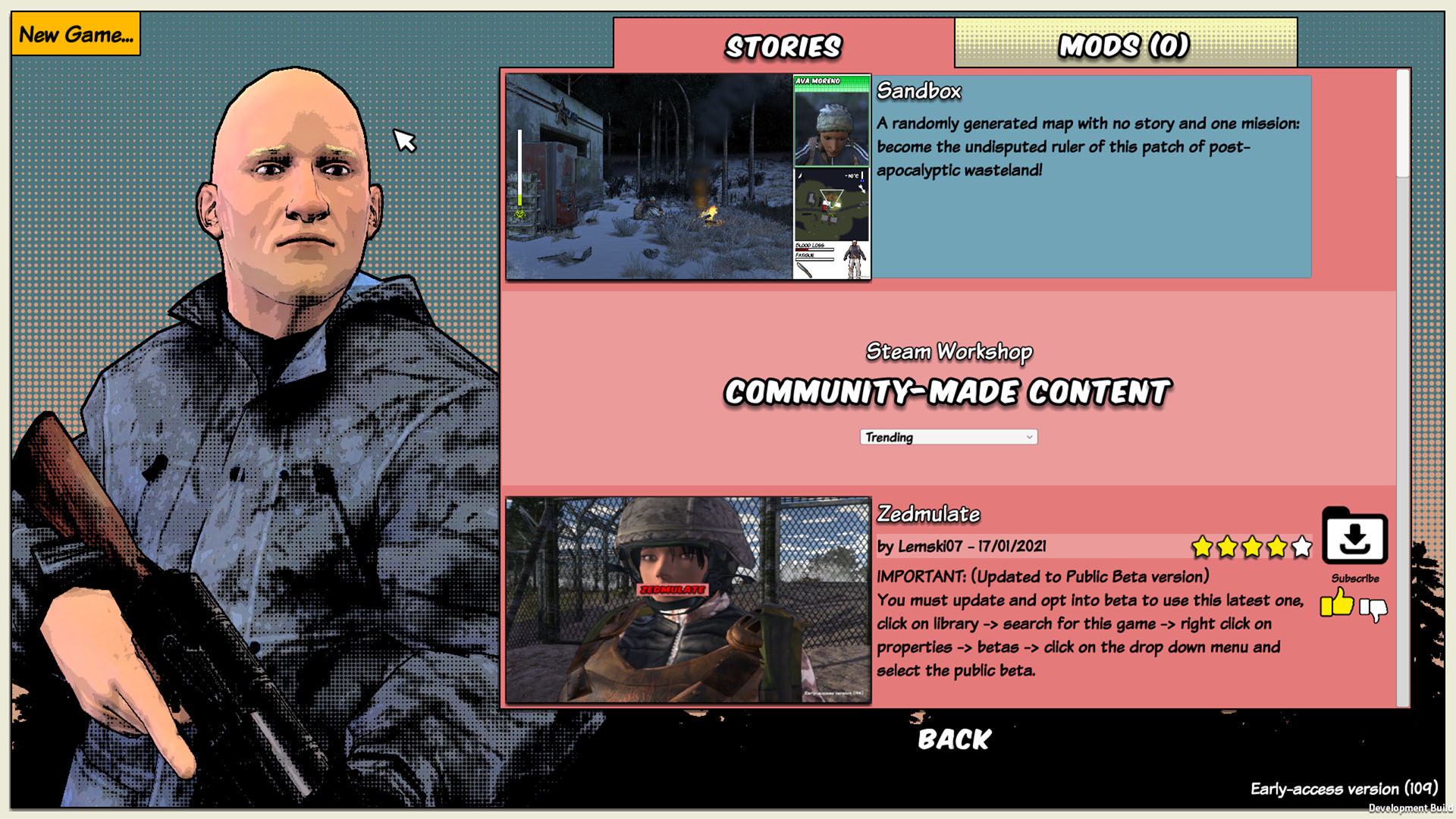
The latest patch in publicbeta is all about better mod support. The most obvious change is when you start a new game you can now browse and select any Story from the Workshop (including those you haven't downloaded yet). You can download them in-game, and also Like them if you want. You can sort by Highest Rated, Trending, or Newest:
The second big change is I've split them into two types: Stories and Mods. You can only select one Story, but you can have multiple Mods applied to it. The idea is Mods would be things like "a new gun" or maybe "a new bit of What's Up dialog" which could be applied to any Story. Stories would be custom maps with their own narrative and quests, or variations on Sandbox mode:
Once you're playing a game you can also add more Mods if you want:
Perhaps more importantly, I've added support for new weapon and clothing models, which I'm demonstrating with a couple of small Mods, the Magnum and the Trilby Hat mod:
I'll write a couple of guides for mod-makes who want to do that soon! Lastly I've also changed the structure a bit so either mods or stories can be dependent on each other, meaning if you download one it can force another to be downloaded as well if it's dependent on it. I'll update the guides in the coming days.
I think having done this I've gotten more or less to the end of the Workshop/Editor work that I wanted to do for the time being. There might be a few bug fixes and tweaks to the mod stuff here and there, but I'll be aiming to get back to working on the game itself. I'll be interested to see what new things people are capable of making with the tools now! I see there are a few adaptations of Sandbox mode that have become quite popular already, such as The New Z World.
Here's the full changelist:
Added support for new weapon and clothing mods
View all workshop items, and download them, from the story selection menu
Split workshop items into two types, Stories and Mods. You can only select one story, but multiple mods.
Stories or mods can be dependent on each other, so you don't have to make a copy of Sandbox to make one small change to it, you can just make it a dependency
Meanwhile, I've moved v108 from publicbeta to the main game.
What's this publicbeta thing?
v109 will be in the "publicbeta" branch for a while, before pushing it to the main game. If you want to try the latest features as they come out (and help test them!) it's a good idea to start using this branch. But keep in mind:
Because it's the bleeding edge it could be less stable
If you want to be able to play online co-op with someone you'll need to be on the same version as them
If you go back from the "publicbeta" branch to the main branch you may not be able to load savegames created on "publicbeta".
To use publicbeta, just right-click on Survivalist: Invisible Strain in your Steam library and go to Properties, then Betas and in the drop-down select "publicbeta".
New patch in publicbeta (v108)
Some people reported a couple of crashes to me so I'm pushing the next patch into publicbeta. Here's what's in it:
Stop towns from overlapping so much in Sandbox
Some fixes for pit trap terrain glitches
Allow crops to be planted on areas where buildings have been demolished
Added ability for Workshop mods to load their own dlls
Added option in recipe editor to not pass on infection to product
Crash fixes
This is mainly just a bug fixing patch but includes support for mods to include their own bits of code! I haven't really finished working on it yet but, very briefly, if you're a mod author you can create a DLLs directory in your Story folder and put a dll in there. You can create a c# project linking against the game's libraries and use something called HarmonyLib to patch some of your own code into the game (though there are limitations), I'll write a guide explaining how a bit later when it's more complete :-P
What's this publicbeta thing?
v108 will be in the "publicbeta" branch for a while, before pushing it to the main game. If you want to try the latest features as they come out (and help test them!) it's a good idea to start using this branch. But keep in mind:
Because it's the bleeding edge it could be less stable
If you want to be able to play online co-op with someone you'll need to be on the same version as them
If you go back from the "publicbeta" branch to the main branch you may not be able to load savegames created on "publicbeta".
To use publicbeta, just right-click on Survivalist: Invisible Strain in your Steam library and go to Properties, then Betas and in the drop-down select "publicbeta".
I've released v107 to the main branch!
Well, I've finally taken the plunge and moved all the updates I've been working on over the last couple of months out of publicbeta and into the main branch, so they'll be available to everyone now ːsteamhappyː
There's a lot in this, but the highlights are:
Made it possible for workshop mod authors to add new props/buildings
Added a bunch of new props and buildings myself, such as trailer homes and crashed aircraft
Added path editor and road markings
Added ability to assign NPCs to number keys (from 4 onwards, by default) for quick selection
Added shortcuts to select best melee ranged and thrown weapons (on 1,2,3 keys by default)
When you switch selection between NPCs, a bar appears at the bottom of the screen showing their faces
Increased the size of the NPC buttons on the Community screen so their names are all visible without hovering, and you can preview their best skills and equipment
Difficulty/World Generation Sliders and default loadouts
I've released a new patch in the public beta branch. This one is just fixing a bunch of bugs in online co-op, in particular some longstanding causes of "out of sync" errors while in combat. Here's the changelist:
Fixes for some sound bugs in online co-op
Fix for hang if you press escape on the character creation screen when joining a co-op game
Fix for arrows sometimes being invisible in online co-op
Fix for dead or zombie characters appearing in character selector bar
Out of Sync fixes
I'll let this sit for a few days then hopefully I'll be able to push all the new stuff to the main branch, finally.
What's this publicbeta thing?
v101 will be in the "publicbeta" branch for a while, before pushing it to the main game. If you want to try the latest features as they come out (and help test them!) it's a good idea to start using this branch. But keep in mind:
Because it's the bleeding edge it could be less stable
If you want to be able to play online co-op with someone you'll need to be on the same version as them
If you go back from the "publicbeta" branch to the main branch you may not be able to load savegames created on "publicbeta".
To use publicbeta, just right-click on Survivalist: Invisible Strain in your Steam library and go to Properties, then Betas and in the drop-down select "publicbeta".
New patch in publicbeta (v103)
It's patch time! This one's got a few different bits in it. I realized after the last one that there were still some problems with the ways NPCs reacted to their buildings being burned by a stealthy player (for example, if you threw a molotov at their fence, they would have a negative memory for each tile of fence that got hit, and any crops nearby, and would repeatedly shout "What the...?" for each one), so I had to work on that a bit.
After that I started working on trying to improve some of the problems with selecting characters and equipment. You can now press 1, 2, and 3 as shortcuts to equip your best melee weapon, ranged weapon, or thrown weapon. (Press it again in quick succession and it equips the second-best one, and so on). The other number keys can be assigned to characters, i.e. hold down 4 for 1 second to assign that key to your current character - then whenever you press 4 it will select that character.
You might ask, why didn't I make it so you can choose which weapon to assign 1, 2, and 3 to? It's because you can control a lot of different characters in this game, I worry it would get confusing if they all had individual weapon assignments, so I thought I'd try this first. That said I guess I might add that later in some form if people still found it necessary.
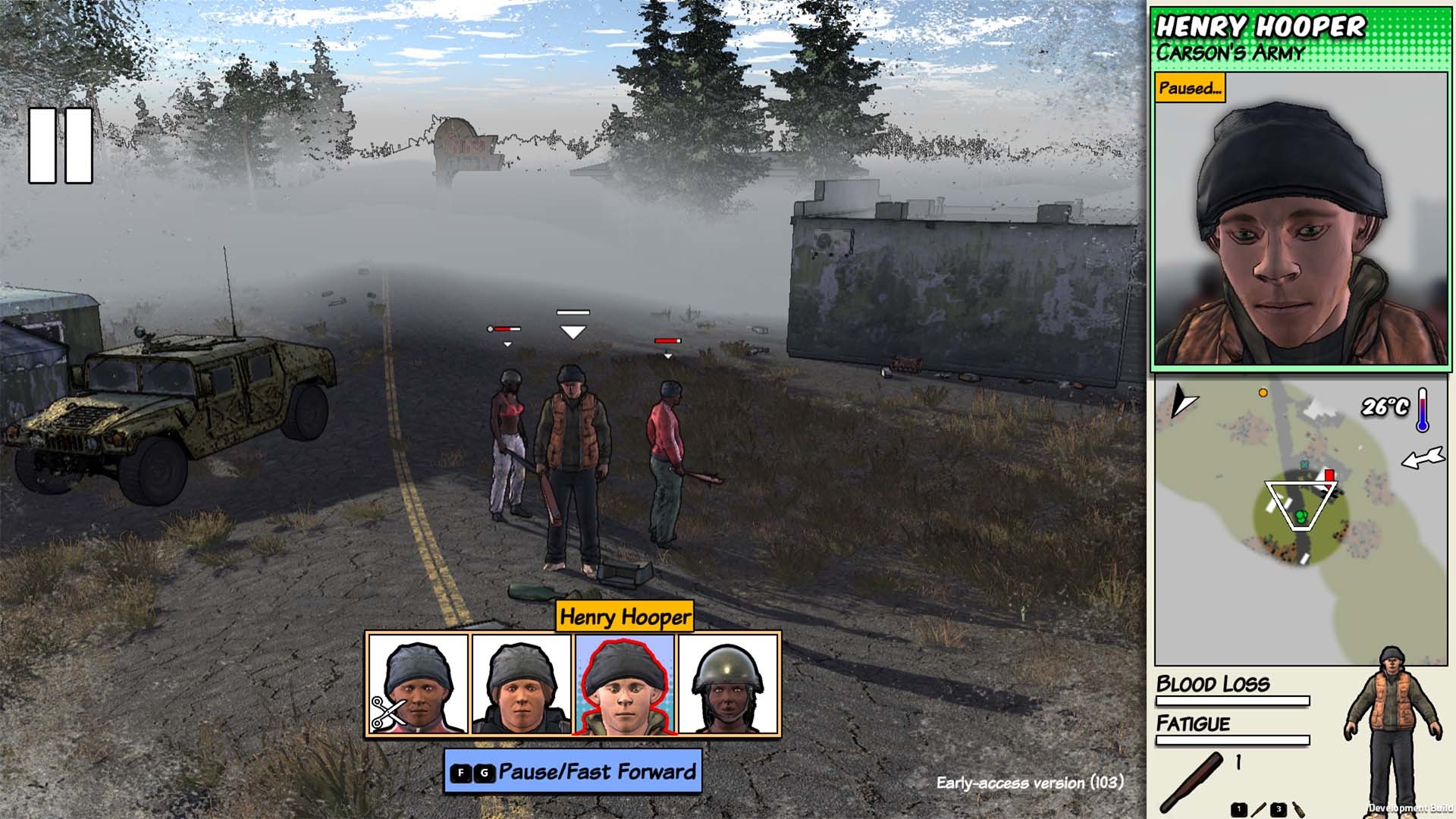
I've also made it so when cycling between characters, a bar with their faces appears temporarily on the bottom of the screen to hopefully give you a better idea of who you're selecting:
I've also increased the size of the character boxes shown on the character screen, and included some info like what skill they're best at, and what their best equipment is. I've always felt that screen becomes a bit of an indistinguishable sea of faces, hopefully this makes it easier to recognize the characters. (It does mean fewer can fit on screen at a time though.)
Let me know if you have an opinion about these UI tweaks! Here's the full changelist:
Added shortcuts to select best melee ranged and thrown weapons (on 1,2,3 keys by default)
Added ability to assign NPCs to number keys (from 4 onwards, by default) for quick selection
When drag-selecting NPCs in Command Mode, you can now hold shift to add to your current selection instead of replacing it
When you switch selection between NPCs, a bar appears at the bottom of the screen showing their faces
Increased the size of the NPC buttons on the Community screen so their names are all visible without hovering, and you can preview their best skills and equipment
Various fixes for how NPCs react to their buildings being damaged
Warn if you play a Story that was made with a later version of the game than you are using
The UsedHumanIngredients memory is only triggered if you use them in food
Updated Brazilian Portuguese translation
Lowered hammer sound volume
Make it possible to display and edit building entrances using Prop Editor
Fix for not being able to scroll equipment shown in buildings on the map screen
Crash fixes
EDIT - released a few new patches (v104, v105, v106) to fix some crashes that I introduced.
This is all still in publicbeta.
What's this publicbeta thing?
v101 will be in the "publicbeta" branch for a while, before pushing it to the main game. If you want to try the latest features as they come out (and help test them!) it's a good idea to start using this branch. But keep in mind:
Because it's the bleeding edge it could be less stable
If you want to be able to play online co-op with someone you'll need to be on the same version as them
If you go back from the "publicbeta" branch to the main branch you may not be able to load savegames created on "publicbeta".
To use publicbeta, just right-click on Survivalist: Invisible Strain in your Steam library and go to Properties, then Betas and in the drop-down select "publicbeta".
Nominate Survivalist: Invisible Strain for the Steam Awards!
Okay Steam is doing this awards thing so... this is for all the people who thought the game was too difficult at first because the zombies all pile on you at once, but who kept playing anyway ;)
New patch in publicbeta (v102)
I got sucked into a couple of rabbit holes these last few weeks. First I spent some time trying to fix glitches in the terrain generation that would often result in some weird bits of terrain around houses that characters tend to get stuck on. Then I fixed a longstanding bug with stealth, where if you choke-hold someone without them detecting you, they would still somehow remember that you did it. In the process of testing that I kept uncovering and fixing more and more bugs with stealth and choke-holds, assassinations, etc. It should be much improved now, I think!
The behavior I've settled on when you choke-hold or assassinate someone, or attack them in some other way without being seen, is:
They investigate the body, or go into the alert state (generally running around looking for you with ? above their heads). If they find someone (either you, or pretty much anyone from a different community) while in this state, they'll attack them.
Once out of the alert state, if they see someone they don't like (including sometimes their own community members) they will get suspicious of them.
If they're very suspicious they might attack (this is influenced by their overall approval of you)
After about 10 minutes, they will no longer be suspicious of the next person they see, and you can go about your business as before.
It hasn't changed massively from before, but it should be more consistent and less buggy now.
Other major additions in this patch are the Lithuanian translation (thanks Audrius Vaidalauskis!), and all the sounds have been remastered (thanks to Gevin Campos!). And I've changed the click sounds to be less annoying... hopefully! ːsteamhappyː
Besides that there's also a bunch of other miscellaneous fixes.
Added Lithuanian, updated Chinese and Japanese
Remastered Sounds
New button click sounds
Options in debug menu (under Utils), and World tab when starting a game, to save/load world gen settings (this includes the seed, which means you can regenerate the same map you are on, if you lost your initial save)
Added an indicator of how much resources are needed to repair or capture something
Fix for not being able to repair or take over tents and wells
Fix for NPCs magically remembering you knocked them out even if they never saw you
Fix for not being able to choke hold/assassinate NPCs who are cooking or crafting
Lots of stealth fixes - if you attack/choke-hold someone without being detected, they will search for you and attack whoever they find. If they finish searching without finding anyone, they will be suspicious of the next stranger they see (but won't necessarily attack), for a while.
Stopped wandering hordes having white strain if it's turned off in the world settings
Fixes for various world generation issues that caused terrain glitches
Made loading screen backgrounds black as apparently the brightness gave some people migraine
Fix for limping zombies moving at run speed in some situations
Fix for crafters sometimes building up empty containers in their inventories
Crash fixes
This patch is in publicbeta and I'm not moving v101 the main branch, because I felt that the terrain glitches were exacerbated by the new buildings and sliders, so I needed to fix that before going mainstream with those features. Next time!
I know you might be wondering, "what's the long term plan, am I ever going to get to such-and-such?" My first aim right now is to make the editor usable to modders (enough so people who want to create content for the game aren't blocked on me). After that a couple of other big things that need to happen are optimization and fixes for out-of-sync bugs in online co-op. And then there's... everything else. I've just updated the very rough roadmap in the FAQ so take a look. That said, this patch is a pretty good example of how things may not always go according to plan, as I didn't expect to spend the last couple of weeks looking at terrain and stealth issues.
What's this publicbeta thing?
v101 will be in the "publicbeta" branch for a while, before pushing it to the main game. If you want to try the latest features as they come out (and help test them!) it's a good idea to start using this branch. But keep in mind:
Because it's the bleeding edge it could be less stable
If you want to be able to play online co-op with someone you'll need to be on the same version as them
If you go back from the "publicbeta" branch to the main branch you may not be able to load savegames created on "publicbeta".
To use publicbeta, just right-click on Survivalist: Invisible Strain in your Steam library and go to Properties, then Betas and in the drop-down select "publicbeta".
Sliders! (publicbeta v101)
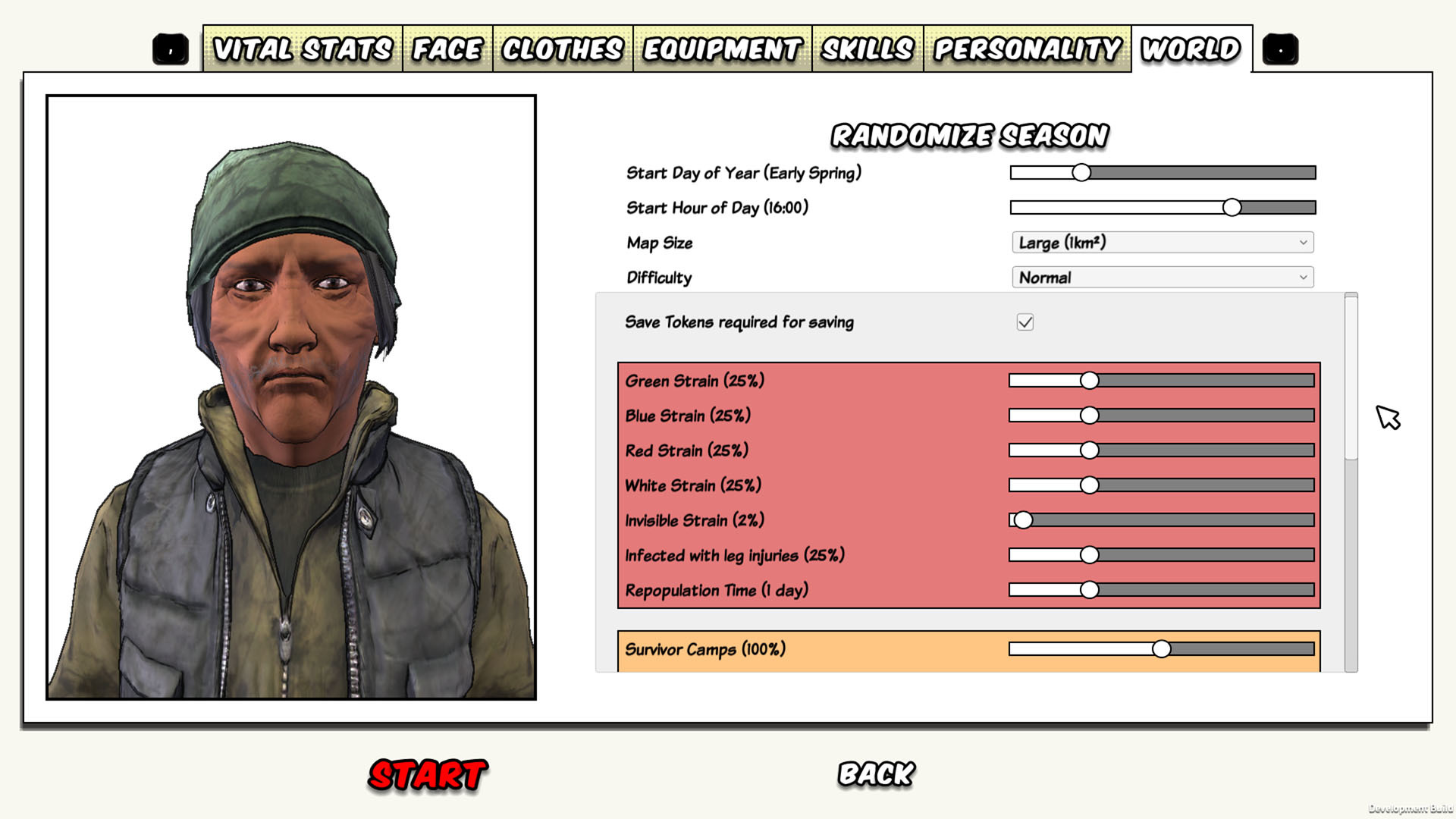
Ever since the dawn of time mankind has yearned for sliders to control the map generation settings on Survivalist: Invisible Strain - and now, here they are!
So if you want to generate a map with no rivers, or with only white strain, or where all the zombies start off with leg injuries, just go to the World tab and (if you're in publicbeta) you can do it ːsteamhappyː
I've also changed the difficulty dialog you get shown when you click Start:
Difficulty levels can now be thought of as presets for all the sliders on the World tab. So you get "Slightly Easier", "Normal" and "Hard" as presets, but if you play with the sliders on the World tab yourself then your difficulty level is considered to be "Custom" and the above difficulty dialog is just skipped.
Previously, "Save Tokens Required" and "Invisible Strain" were extra checkboxes on the difficulty dialog, but now I've folded them into the difficulty levels, so on "Slightly Easier" you can save whenever you like and there's no invisible strain, whereas "Normal" and "Hard" require save tokens and have invisible strain (with more of them on "Hard"). I also reduced the loot on "Hard". I may play with these more as time goes by.
But again, "Slightly Easier", "Normal" and "Hard" are just presets - you can mix and match whatever settings you want on the World tab.
I've also added a concept called "Loadouts" on the Equipment and Skills tabs. This sets the player up with a standard preset set of equipment and skills, i.e. select "Archer" to get a bow and arrows and high Archery skill, or select "Trapper" to get the equipment and Construction skill necessary to dig traps right from the start:
The idea here is to benefit new players who don't know the game well by always starting them off with a set of equipment that makes sense, for a particular strategy. So they don't get dumped into a hostile world with arrows but no bow, advanced Farming skill and some flint. These are also just presets, similar to the difficulty settings. You can override them by selecting any starting equipment or skills that you want.
Both the Difficulty levels, and the Loadouts, are completely customizable by mod makers - in the Edit Story Settings section of the Editor.
Finally, I've added another music track, this one by a new author called Richard Camo. You'll hear it sometimes when you are managing your base.
Here's the full changelist:
Difficulty/World Generation Sliders
Loadouts
Added a new music track for base management
Fix for bug where characters would try to walk to the centre of the map when giving eulogies
Crash fixes
As with the previous patch, all this stuff is still going to stay in publicbeta, until I feel sure all the bugs from the big change to props have been ironed out (I fixed some more crashes from that in this patch, hopefully they're the last but we'll see).
What's this publicbeta thing?
v101 will be in the "publicbeta" branch for a while, before pushing it to the main game. If you want to try the latest features as they come out (and help test them!) it's a good idea to start using this branch. But keep in mind:
Because it's the bleeding edge it could be less stable
If you want to be able to play online co-op with someone you'll need to be on the same version as them
If you go back from the "publicbeta" branch to the main branch you may not be able to load savegames created on "publicbeta".
To use publicbeta, just right-click on Survivalist: Invisible Strain in your Steam library and go to Properties, then Betas and in the drop-down select "publicbeta".