

Tabletop Playground
In-game Editor Update
• Add "New Template" button in object library for edited package in preview mode
• Add "New Folder" button in object library for edited package
• Add buttons on templates in object library for edited package to allow editing, duplicating, and removing templates
• Allow Drag&Drop for templates in edited package to move them between folders, in object library and main editor window
• You can now edit templates of objects from other packages. Before modifying, you'll need to save them as new templates in the edited package.
• Editing scale, color and other properties of templates that also exist as object properties during preview mode is now more consistent
• Changed buttons in preview mode to "Close", "Save as New", "Save and apply"
• Allow editing card stack properties when editing a card template in preview mode. The cards in the edited stack and other card stacks from the same template will be reset to the template default on saving.
• Don't lift penetrable held objects above regular objects
Scripting
• Add `UIElement.castShadow` to allow control over whether a UI casts shadows
• Add `CheckBox.setBackgroundTransparent` and `CheckBox.isBackgroundTransparent` to make the box invisible while it is unchecked
• Always call `GameObject.onReleased` when an object is released. Before it wasn't called when the object was snapped.
• Ensure that non-interactive objects are included in scripting traces and overlap queries
Fixes
• Fixed issues when using drag&drop in the card stack explorer and container explorer
• Editing relative scale of labels and zones did not work properly
• Zooming objects with certain UI widgets could crash the game when the zoom was supposed to show UI
• Zooming to cards in card stack explorer as client could cause an error message to be displayed
• Lighting settings had no effect in Cyberpunk environment
• `CheckBox` check state changes on host weren't shown on clients
• `MultilineTextBox.setBackgroundTransparent` was not replicated to clients
• Zoomed size could be wrong for objects that had UIs with `UIElement.useWidgetSize = true` and `UIElement.zoomVisibility != UIZoomVisibility.Regular`
• `TextBox.setBackgroundTransparent` and `MultilineTextBox.setBackgroundTransparent` did not make the text box fully transparent while hovered or focused
• Using `StaticObject.onSnappedTo` could cause a crash after reloading scripts
Unreal 5 upgrade
• Apple Silicon support: The game now runs much better on recent Macs by natively supporting M1/M2/M3 chips
• The mod.io UI accessible from the main menu has been updated and is now available on Mac and Linux as well
• Allow hiding floor in non-3D maps: renamed "Lighting" in session options to "Environment", moved "Set Background" button to the environment dialog and added "Hide Floor" checkbox in the same dialog
• Improved physics stability in some situations like stacking thin objects such as cards
• The tablet browser version has been updated, improving support for some websites that didn't work with the older browser version
• Text boxes now support using the Tab key to move to the next text field
• Message and input boxes can now be closed by pressing enter
• Improved validation for phase name in turn settings
• Allow much brighter lights - use with caution!
• Allow double clicking a package when starting a new game to continue to map selection
• Show notifications when trying to draw or deal cards while no suitable card holders exist
• Change "Private" checkbox to "Hidden" when uploading a package to align with mod.io terminology
• Prevent users from setting custom package path to the directory of the built-in packages (because that would cause issues with built-in packages not being available by default)
• Allow loading autosaves when starting preview mode
Scripting
• Default to view aligned UI presentation for zoomed object with screen style presentation
• Added documentation for $uncaughtException
• Prevent adding too much data (more than 64kb) to an object using setSavedData
• Parts of the scripting API were not available for table scripts when starting a new game with an empty table
Fixes
• The mouse cursor on Linux could get an offset after the game lost focus
• Some custom tables were imported sideways
• Pressing Enter brought up chat in main menu
• Object library and notes windows changed their size on re-opening with UI scale larger than 100%
• Stored objects with required add-on packages didn't become valid immediately after the package was added
• Some Chinese characters were not displayed correctly
• Dice roll message for single dice did not correctly include the name of the rolled dice face after the last update
• No UI interaction was possible when blindfolded in VR
November Update
• Allow face names of dice to be empty. They will not result in tooltips and are omitted from dice roll messages
• After deleting a mod on mod.io, automatically upload the package as a new mod when trying to upload again
Scripting
• Add `StaticObject.onSnappedTo`
• Add `GameObject.onFlipUpright`
• Add `GlobalScriptingEvents.onShake`
• Script button in editor for table objects is now enabled. Table object scripts have a `refTable` variable available instead of `refObject`
• `GameObject.snap` and `GameObject.getSnappedToPoint` did not work in zones that prevent the host from snapping
Fixes
• Physics state of objects was reset when changing visual properties (like primary color) from scripts
• 3D scripting UIs were not interactable while the cursor was pointing at the floor
• When joining own game by running multiple instances on one computer, new clients ended up in the same player slot as the host
• When the reload button at the top of the editor screen was pressed after a collider model file was changed, the collider visualization wasn't updated
• Sounds played from scripts in 3D stopped playing when moving out of hearing range
October Update
• Add options for package selection in editor to show thumbnails and filter out downloaded packages (both now enabled by default)
• Add align to center horizontal/vertical buttons in object coordinates window
• You can now quickly move a card you highlight in a card holder or your hand all the way to the left or right by pressing 1 or 2
• Add `GlobalEvents.onPackageAdded´
• Don't change snap point values in editor when switching to creating a snap point grid
Fixes
• After zooming an object with a UI that was visible on the zoomed object, the original UI wasn't interactive anymore
• Grabbing additional objects from a container as a client in multiplayer and using the number keys to arrange them led to unexpected behavior
• There was a small missing triangle in the lower right corner of the back of wide cards or tiles
• Game could freeze for a few seconds on startup with many subscribed mods
September Update
Scripting
• Add `PlayerProxy.setSelectedObjects`
• Add `TurnSystem.setCurrentTurn`, `TurnSystem.setCurrentPhase`, and `TurnSystem.setCurrentRound`
• Add `TurnSystem.onTurnChanged`
• Add `ProgressBar.setBarColor` and `ProgressBar.getBarColor`
• Add `Panel.getNumChildren` and `Panel.getAllChildren`
• Add `WidgetSwitcher.getNumChildren` and `WidgetSwitcher.getAllChildren`
• Add `Button.setJustification` and `Button.getJustification`
• Add `ImageWidget.getImageURL`
• Add `GameWorld.getAllTags`
• Add `Package.allow`
• Add `restrictTags` parameter to `SnapPoint.getSnappedObject`
Fixes
• Tinting did not work for textured or two-sided translucent objects
• When switching a switcher object in a zone, it was moved to above the zone
• When first adding a table to a package, starting a preview with an empty table did not show the package until returning to the main menu
• Cards with Hidden Type "Card Back" did not cast a shadow while held face down
• Peeking cards kept the card obscured in VR or when a scripted UI was attached to the card
• For hexagonal card, setting "Emissive Front" to true created a ghost of the front texture on the back of the card
• Emissive maps had no effect for translucent models
• Resetting held objects in measure move mode still added a measurement message to the chat
• Removing a description from an object still showed the description in the tooltip of the object
• Trying to use "Store in Library" on a new install without ever opening the object library resulted in an error message
• Double clicking on the folder selection when moving an object to a different folder in the editor produced unexpected results
• When creating a new object in an object script and immediately calling setScript, the script on the new object was executed twice when reloading scripts
• Spotlight angles and intensity were not always read correctly from saved template files
• Fix a rare crash that could occur when using `GameWorld.addScreenUI`
• When using multiple normals in a `ScriptDrawingLine`, results could be incorrect
• `CheckBox` text could spill over its allotted space
• Don't allow using the game directory as package location if it isn't writable (could happen for Windows Store users)
---
These new updates we've added are just some of the many features on our early access development roadmap for Tabletop Playground, which you can check out on our Trello HERE.
Don't forget to join our community Discord to chat with the dev team and give us your suggestions for new features for the game!
July Update
• The package list in the new game screen now shows images in addition to package names
• Packages in the new game screen can now be sorted by last played or by name
• Add a new option for object templates, available in the generic pane in the editor: "Ground Access". None by default, you can configure ground objects to allow zooming and the context menu from the regular cursor.
• Players can now quickly measure in any cursor mode by holding the ping key (tab by default)
• A new "Camera Acceleration" option in the advanced interface settings allows you to make the camera movement more smooth (but less precise)
• The coordinates window now uses the measure unit configured in the session (inches by default) for position and size. Previously it always used cm.
• Fix: Saving a template in the editor while not authenticated (or not connected to the internet) caused a crash
• Fix: Using `ImageButton.setSourceCard` could cause crashes
---
These new updates we've added are just some of the many features on our early access development roadmap for Tabletop Playground, which you can check out on our Trello HERE.
Don't forget to join our community Discord to chat with the dev team and give us your suggestions for new features for the game!
June Update: Spectators and Game Masters
https://tabletop-playground.com/knowledge-base/spectators-and-game-masters/
• Players can now switch to being a spectator in the player options. Spectators don't occupy a player slot, they cannot interact with objects on the table, and other players can't see their cursor. They are still able to use the chat and voice chat, though. By default, spectators can't see any hidden information but you can change that in the session permissions, allowing them to see cards of all players, peek under card stacks, and use the container and stack explorers.
• Added new permissions: You can disable spectators completely or allow spectators to see hidden information.
• In the session options under player slots, you can now assign slots to be game masters. A player in a game master slot can see all hidden information like other player's cards. Game masters can also interact with anything, they can take cards from the hands of other players, for example.
• When holding the below modifier key (Shift by default), show the back of cards in tooltips for card stack explorer
• Improved user interface for in-game mod browser
Scripting
• Add `ImageWidget.setSourceCard`: you can use a card on the table as image for the widget.
• Add a new `ObjectType`: `NonInteractive`. Use it with `GameObject.setType` to make objects completely non-interactive for players.
• Add `Player.isSpectator` and `Player.isGameMaster` to check whether a player is currently a spectator or game master
Fixes
• Mod browser could not be opened multiple times without exiting the main menu
• Fix potential crash when getting an achievement in Epic Games Store version
• Fix crash that could occur when leaving a multiplayer game
• Fix mod download issues on Linux
---
These new updates we've added are just some of the many features on our early access development roadmap for Tabletop Playground, which you can check out on our Trello HERE.
Don't forget to join our community Discord to chat with the dev team and give us your suggestions for new features for the game!
Hotfix
• Fix crash that could occur when exiting the game or switching to/from main menu
May Update: Custom lights
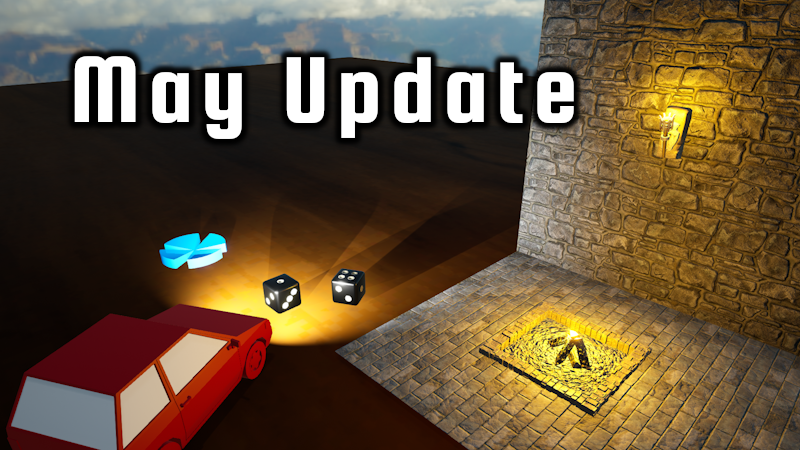
• You can now add lights to objects in the editor. There's a new pane in the lower left (collapsed by default) that allows you to add point lights and spotlights. Point lights emit light into all directions equally and don't cast shadows, spotlights have a direction and a configurable light cone radius. You can also specify the color and intensity for both light types. Lights on objects can be switched on or off in-game from the context menu.
Scripting
• Introduce new class `StaticObject` as a superclass of `GameObject`. Static objects aren't interactive and don't have physics applied to them, but otherwise they work very similar to other game objects so most methods from `GameObject` have moved to `StaticObject`. This doesn't affect existing scripts, they will continue to work as before.
Currently the only static objects are tables, and there are a couple of new `GameWorld` methods that allow you to access the table and even create more tables: `getAllTables`, `createTableFromTemplate`, and `createStaticObjectFromJSON`. By using `StaticObject`, you can do things with tables that were previously restricted to interactive objects: for example, change their appearance, move them to a different location, or access snap points.
• Add `GameObject.areLightsOn` and `GameObject.switchLights`
• `Container.take` and `Container.takeAt` caused issues when the `keep` parameter was set to true
• Call `CardHolder.onInserted` once for each inserted card when multiple cards are inserted at once from a stack
• New event `CardHolder.onBecameHand` called when a card holder becomes a player hand
Fixes
• Drawing cards while flipping a stack resulted in penetrable drawn cards
• In preview mode, the "Edit Template" and "Edit Table" menu actions were sometimes not enabled when they should be
• Typing faster than the ping caused problems when using scripted text boxes on clients
• Starting a game with an empty table no longer causes a temporary freeze on opening the table selection when many packages are installed
---
These new updates we've added are just some of the many features on our early access development roadmap for Tabletop Playground, which you can check out on our Trello HERE.
Don't forget to join our community Discord to chat with the dev team and give us your suggestions for new features for the game!
April Hotfix
• When a player left a game and re-joined, whispering with them again would caused a new whisper tab to open. With this update, the original whisper tab is re-used.
• Fix issue that could cause players to disconnect from multiplayer, causing them to drop out of running games