Genre: Role-playing (RPG), Simulator, Strategy, Indie, Card & Board Game
Tabletop Simulator
Update v10.0 Open Beta - Networking Rewrite
Hey everyone, v10.0 will be our largest patch ever added to the game! We are replacing and optimizing the netcode on Tabletop Simulator to give you guys the best possible experience. Due to the vastness of these changes, we decided to have an open beta to test and make sure nothing has slipped through the cracks. Additional features and fixes will also be included in the patch’s final release.
We want as many people as possible to help us test the networking rewrite, so we can work out any kinks before it goes live. We have commenced closed beta testing and are now opening this up to everyone. We would greatly appreciate your help and feedback to ensure this is a smooth process.
To access the open beta:
In your Steam Library, right click on Tabletop Simulator and click on Properties.
Click on the BETAS tab.
Click the drop down arrow and choose public_beta - Public beta branch.
Give it time for the update to take place and then play as normal.
Be sure to play in multiplayer for efficient testing.
You can join through Steam friends or via the Server browser.
All feedback can be posted in the dedicated section on our forums, or on our official discord in the #open-beta channel.
A new feature in this update is Onscreen Hands! This allows you to see and play from your hand from any position. This is great for those who prefer to have their hands in a static position on screen. Now everyone can have the best seat!
We also focused on figuring out where any networking issues are coming from, so we have added networking indicators next to your names on the top right, so you know exactly what’s going on.
Type /debug in chat and take screenshots of your readout if any networking issues come up. Use the following networking chat commands to help make adjustments when clients are connected.
Network Commands
/networktickrate 20-120 (default 60) - this is how often the network will transmit data each second.
/networkpackets 1-5 (default 2) - how many packets per tick to send out. Higher values make it so more objects can be synchronized each tick. (Host only command)
/networkinterpolate 0-5 (default 1.1) - the amount of time for interpolation, increasing this value increases smoothness but also increases input lag for the clients. (Client only command)
- This shows when you are disconnected from this player.
DLC - Darkest Night Improvements
Updated tokens that needed to have the proper green & gold backs.
Updated token rotations.
Some tooltips have been updated.
Some snap points have been adjusted.
Added camera states for quick views.
UI Improvements
Updated all custom content menus to match rest of UI.
Updated chat settings to match rest of UI.
Updated icons next to names to have outlines for better readability.
Scripting Improvements
createInput()/editInput() added int tab (None = 1, Select Next = 2, Indent = 3)
inputs now default to tab select next.
Fixes
Fixed issue pressing A with a controller resetting pointer position.
Fixed issue with scripted movement of an object not always syncing to clients.
Stay up to date on development by following us on Twitter and Facebook!
Update v9.8 Revamped Networking, Darkest Night With Expansions & Fixed Voice Chat!
A major part of this update focused on rewriting and optimizing the net code for object position synchronization which makes up the majority of the game’s network traffic. You will notice a huge improvement as the client when moving objects around with reduced input lag. This data will also now pass through Steam’s P2P network backend. Slowly but surely we are going to migrate all the netcode to use the Steam P2P.
We also have some additional fixes and improvements for Voice Chat that should hopefully resolve the last of the issues.
Thanks for your patience and post on our forums of any issues that come up along the way so we can make sure it is working properly.
DLC - Darkest Night
http://store.steampowered.com/app/433520
Darkest Night has gotten a complete overhaul with a brand new look!
We have also added expansions #2-5 for free as part of this update. (#1 was already included)
Read the notes in the Notebook for additional info.
As this DLC was updated, please note that any existing save files will no longer work.
Networking Rewrite
Reduced bandwidth usage for moving objects by around 300%.
Upped tick rate to 60Hz from 30Hz.
Greatly reduced the input lag of moving objects around for clients with better interpolation, tick rates, and unreliable packet.
Less chance of the network getting backed causing everything to be massively delayed forcing a reconnect.
Added a smart system to dial back the send rate on objects when having to synchronize hundreds of objects per second.
Host no longer has to network sync other players pointer that info is now directly communicated between each player saving bandwidth.
Overall players should be able to host more with less connection issue with these improvements.
Voice Chat Improvements
Hopefully fixed up the last of the P2P errors.
Dynamic quality adjustments based on packet loss.
Improved voice quality slightly with newer Opus version.
Configuration Menu & UI Improvements
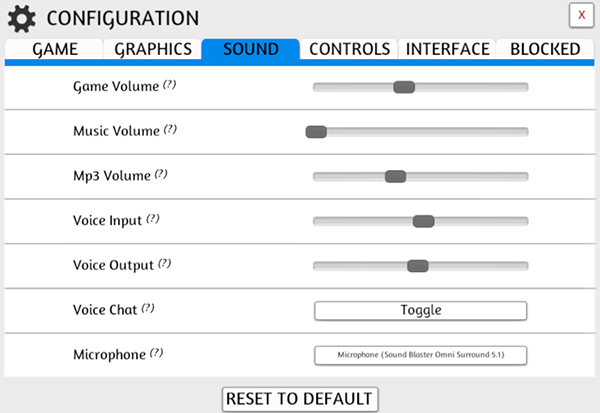
Updated Configuration menu to add in a Sound tab.
You can now adjust various volumes and choose your microphone from this menu.
The Game tab has been updated with some additional options like Look Speed, Invert, Field of View and Movement Speed.
The Pointers have been moved to the Interface tab.
Updated all sliders and scrollbars.
Scripting Improvements
Improved 3d UI Interactions.
Fixed editInput() bugs.
Fixed scripting zone bug with cameras
DLC - The Great Dinosaur Rush
http://store.steampowered.com/app/610694
New Model and image for the board to fix misprint.
New tracker cube Assetbundles.
The player mats have been moved down closer to the Hand Zone.
The hidden zones are a lot bigger now, about 2x as big, and moved above the player mats.
Bones and Notoriety Tokens are smaller so they all fit into the hexes on the board now.
"Start Game" script has been modified to adjust to board and other changes.
Fixed green hidden zone so it's no longer reversed.
3D UI Interaction Improvements
Backside of 3d UI is no longer interactable.
Can now pick up object on top of 3d UI.
Improvements
Optimized hand performance with lots of objects.
Fixes
Fixed issue with Steam Authentication Failed messages.
Stay up to date on development by following us on Twitter and Facebook!
Update v9.7.3 Brand New Voice Chat!
In the last update we ran into crashing issues using Steam’s voice chat, so we temporarily turned off voice chat while we investigated.
After working all weekend and implementing a brand new system, we think we have something even better! Crystal clear voice using the latest Opus codec, the gold standard of voice chat. This new voice chat should sound better and perform better than Steam Voice or our old system.
Currently, Team Voice Chat icons do not show for other players. Disable voice chat only disables your voice. Click on a name to mute individual players in the meantime.
Thanks for your patience during this time. Hopefully the new voice chat works well for you all. If you have any feedback, please post on our forums.
Voice Chat Commands:
/mics (will return a list of available mics with a number.)
/setmic # (to assign your new mic as default.)
This will be moved into the configuration menu in the future.
Other Additions
Scripting inputs now support BBCode.
Fixed movement/jitter with scripting 3d ui.
Fixed auto save not occurring during a table flip.
Fixed steam authentication issues when reconnecting to server.
Linux Troubleshooting
If you are having problems talking to others players make sure your GLIBCXX_3.4.20 is on this version. This might change in the future.
Update v9.7 The Great Dinosaur Rush DLC, Voice Chat Revamp & Character Sheets!
We’ve been working on a lot of stuff these past few weeks to finally use Steam networking. We’ve got a great head start by converting our old voice chat over to Steam Voice, so you’ll see a great improvement! We’re still working on the full conversion, so let us know what you think thus far.
So many of you have been asking for the ability to create character sheets since nearly the beginning and it hasn’t been easy to come up with something that was feasible, but now we have! Through scripting - createInput(), you can now create your own custom character sheets.
You and your adventuring companions are just returning to the bustling city of Greyport after your latest adventure. You are all looking forward to relaxing and spending some of your hard-earned loot at The Red Dragon Inn. The party will have to wait, though, because the city is under attack by evil monsters!
We also have an exciting update to Hands, where you can now bring any object into them! Your hands aren’t just for cards any more! And not just that, but you can now draw and deal from loot bags, infinite bags and stacks!
We also have a new tool for you in the gizmo side menu - Rotation Values! What does this mean? You can now create custom tooltips for your dice or anything else that needs a tooltip that changes depending on the rotation of the object. Names or numbers are allowed!
Only the host needs to own the DLC for everyone else to play.
To use the scripted rulebook scroll, just click the NEXT and BACK text.
You need a minimum of 2 players, but if you want to check out the scripted functions in single player, once you choose your character, change seats to choose another character and then click confirm.
Hand Improvements
Hands can now work with any object if enabled in the toggles menu.
Deal and draw works on individual objects like a singular card.
You can now deal and draw from bags, infinite bags, and stacks.
Works with arbitrary rotation and sideways cards.
Improved spacing with hands to work better and on dynamic sized objects.
Improved hands reacting to manipulation with the gizmo tools better.
Optimized performance of hands.
Improved lift height when grabbing something from a hand.
Fixed issue when dealing / drawing that the wrong hand could grab the object.
Fixed clipping issues when flipping / rotating cards in your hand.
Fixed object stacking together when they were in a hand.
Set Rotation Value on Object Tooltip
This allows you many options like custom dice tooltips or custom tiles with different tooltips depending on what side its laying on.
Number or name values are both allowed.
You can mouse over any object with rotation values and press a number to make it change to that. Or use the contextual menu and Rotation Value to the number.
It will try to add up totals on the same objects just like the built in dice do.
Scripting Improvements
Object:
Added bool use_hands
Added deal(int number, string player_color = "Seated", int index = 1)
Updated setHandTransform(Transform, int index = 1)
Three Kingdoms Redux DLC Improvements
Adjusted the initial number of dealt cards.
Fixed issue with the deck labels for the Generals.
Fixed scripting issue with cards being dealt sideways.
Khronos Hunter DLC Improvements
Three marked spaces have been added with snap-points.
An extra rescaled version of the square-marker bag has been added to each player area so level-ups can be marked on these extra cards.
The mana-coin bags in each player area have been moved to make room for these spaces.
UI Improvements
You can now use BB Code colors on black text. Ex, works in Notebook now.
Black text is more readable in chat.
Fixed being able to move a file / folder to the same location it already is at.
Improvements
First loading scene is now async and has a spinning loading wheel.
Optimized CPU usage with lots of objects by 10-20% reduction.
Uncapped FPS will no longer cap to 144 but unlimited.
Quarter now has heads or tails tooltip.
Fixes
Fixed auto raise so that you can't pick up an object over and over again to make it fly upwards.
Fixed issue with Sticky toggle not working properly on bowls.
Fixed flickering with 2D pointer when using tools.
Stay up to date on development by following us on Twitter and Facebook!
Update v9.5 New DLC Three Kingdoms Redux, Oculus Touch Support & Engine Upgrade with Better Performance!
This is a big update in that we updated our engine to a new version of Unity. This gives us better cpu multi-threading utilization for better performance in scenes with lots of objects. The game should overall be on a better foundation than ever before.
Three Kingdoms Redux is a board game that seeks to recreate the tripartite between the states of Wei, Wu and Shu. You assume the role of one of the three lords – Cao Cao leading Cao Wei, Sun Jian leading Eastern Wu or Liu Bei leading Shu Han.
And for our VR users, rejoice! Oculus Touch support is now officially here! VR performance in general should also be improved up to 30% faster. Check it out and let us know how it is. Of course, there’s still more to come as well!
And lastly, our tutorial series is currently undergoing a revamp since we’ve changed so much and added new features. Here is the first episode in the new 2017 Tutorial Series - Basic Controls.
Now available for $7.99 with a 20% launch discount!
Only the host needs to own the DLC for everyone else to play.
This game is for 3 players only.
To begin, follow the instructions on screen or open up the notebook when the on screen notes disappear.
Make sure to hover and read tool tips as some things have specific instructions that need to be followed.
High quality and detailed with a lot of scripted elements to play around with.
Unity 5.6.2 Update
Improved CPU Multi-threaded rendering (up to 50% performance increase when there are lots of objects).
Improved physics calculations at high speed.
Greatly improved camera collision code to reduce jitter and clipping. (This will also stop cheating by trying to clip under the table to look at cards)
Chat colors have changed due to the update (are a bit darker).
Custom AssetBundle project has been updated to the new Unity version as well.
TTSAssetBundleEffects adds animator support.
Assetbundles with custom shaders might be pink (Either don't use custom shaders or re-export your Assetbundles with the updated project).
VR Improvements
Added support for Oculus Touch.
VR performance improvement up to 30% faster.
Controllers now animate to match your controller in real life.
You can toggle UI mode to have a floating UI that can be dragged into position.
Alt Zoom works a lot better now on everything.
Hover tooltip text now works with description.
Fixed resizing game view breaking the UI interaction.
Scripting Improvements
Event:
onObjectTriggerEffect(Object, int index)
onObjectLoopingEffect(Object, int index)
onObjectRandomize(Object, string player_color)
Player.getSelectedObjects()
Player.getHoldingObjects()
Physics.cast():
Added bool debug to cast() to visualize the cast
Fixed size parameter in cast() being double in size than it should all script must be updated
Increased the number of hits from 100 possible to 1000
Lighting Improvements
LUTs (look-up textures) have been added to the lighting menu.
This gives you a wider variety of lighting and color choices from one extreme to the other.
You can choose from over 100 different LUTs or import your own (256x16).
Added “Upload all loaded files” button on the Cloud menu.
This takes all the files in the mod and uploads them directly to your Steam Cloud.
This is useful when a mod has a broken file and there’s no other way to fix it.
This is also great for transferring your local files automatically to the Cloud when you’re ready to play your game in multiplayer.
Custom files must be cached to your disk in order to work, so make sure to search any bags to force a cache.
Keep in mind that it will upload ALL files to the Cloud. There’s no way to pick and choose individual files.
UI Improvements
Tooltip text is now aligned left instead of center.
All menus in the Options folder, as well as the Workshop Upload menu have been slightly updated to match.
Updated Teams menu.
DLC Improvements
Scythe - Updated lighting for better presentation.
Warfighter - Updated lighting for better presentation.
Warfighter - Fixed issue with tokens not turned the correct way.
Updated Tiny Epic Western and In the Name of Odin DLCs so there are no longer any pink elements for Mac & Linux users.
General Improvements
Added support for 5 teams - welcome, Team Jokers!
Replaced tablet with a new one that is thinner with smaller bezels.
Fixes
Fixed assetbundle name conflict when reloading an object.
Stay up to date on development by following us on Twitter and Facebook!
Update v9.4 New DLC: Cavern Tavern, & Revamped Turns
In case you haven’t heard (ha ha), the Steam sale has arrived, and with that, Tabletop Simulator and most of our DLCs are on sale 20-60% off! Get it while it’s smokin’ hot!
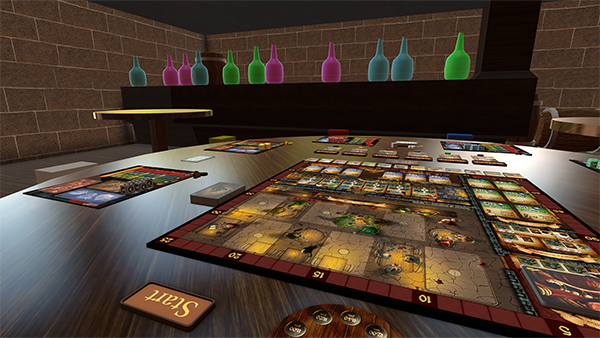
Our latest DLC is Cavern Tavern, created by Final Frontier Games, now available in Tabletop Simulator!
In a war torn land, a magical land of heroic feats and epic quests, there is a place that has never felt the wrath of the ongoing and everlasting war between the five realms. Hidden in the hills of Strongcliff, deep in the shadows of a cavern lies the best kept secret for many years.
We also made some great improvements to the Turns Menu. You can customize your turn orders, disable interactions and enable players to pass turns to another!
Only the host needs to own the DLC for everyone else to play.
Can be played solo or with up to 6 players.
If playing solo, just press the Start button for auto setup and follow the instructions on page 18 of the rulebook.
For multiplayer, each player must select a character first, then press start for the automated setup.
Turns Improvements
Updated the menu to match the rest of the UI.
You can now create custom turn orders.
You can now Disable Interactions for players when it’s not their turn.
Moved end turn button higher up, so it doesn't block broadcast messages.
Pass turns from the player names (if box is checked).
Player names are ordered the same way as turn order on the top right.
You can change the turn order by moving the color circles in the menu after choosing Custom.
Scripting Improvements
Documentation on github: https://github.com/Knils/Tabletop-Simulator-Lua-Documentation
Feel free to make pull requests to improve the documentation.
Cast now returns the table as a hit object.
Player class:
Added getSpectators()
BBCode now works on creatButton().
Fixed getBoundsNormalized() center being wrong.
UI Improvements
SAVE & EXIT removed from Grid, Lighting & Hands Menus as it will now automatically save each setting.
Updated Hands menu to match the rest of the UI.
Reset button added to Grid, Lighting & Hands menu.
Smooshed thumbnail images instead of cutting them off in the Games Menu.
Lots of miscellaneous improvements throughout.
Improvements
Improved player contextual options to match what is available.
Alt Zoom doesn’t clip super wide objects offscreen.
Fixes
Fixed issue with not being able to see Rotation Snap points when placed.
Fixed issue with custom infinite bags spawning objects with the wrong rotation.
Stay up to date on development by following us on Twitter and Facebook!
Update v9.3 New DLC: Abraca...What?, Lighting Menu, & Scripting Improvements!
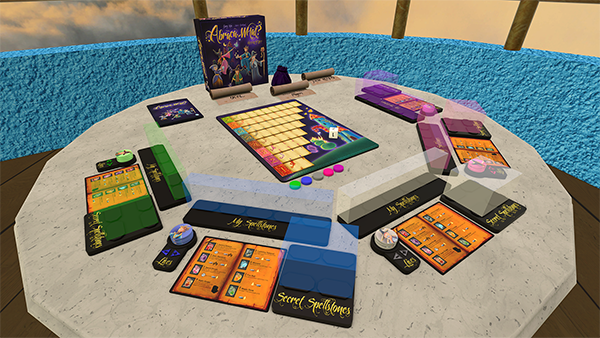
Our latest DLC is by GARYKIMGAMES and published by Korea Boardgames, Abraca...What? is a family game of deduction and spellcasting. Now available in Tabletop Simulator with a 15% launch discount!
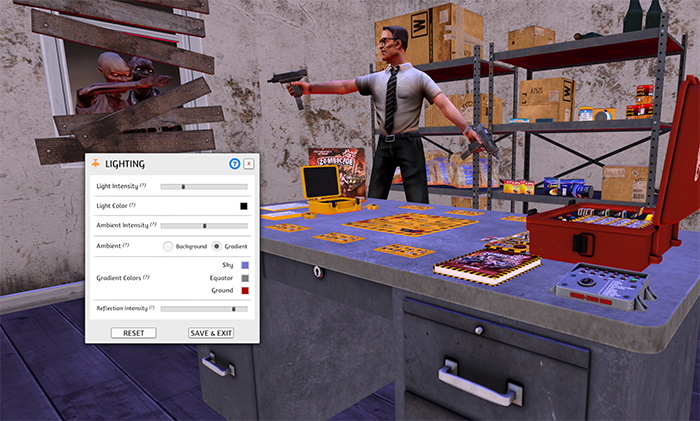
An exciting new feature that a lot of you have asked for is the ability to adjust the lighting! You no longer have to rely on the 8 different backgrounds for the only light source. You can customize your own and combining that with Assetbundles, you can create some pretty nifty things. We can’t wait to see what you come up with!
Thanks to all of your feedback, we made a lot of improvements as well as additions to scripting and we’ve added the much requested hotkeys to scripting (so keybinds had to be reset - sorry!).
Only the host needs to own the DLC for everyone else to play.
The dealing of spellstones is automated through the clicking of the relevant spell scroll, as is temporary blindfolding when taking a secret spellstone.
The health tokens can also be added/removed by buttons, and will be refilled at the start of every new round.
This is a game where you aren’t supposed to see your own pieces. To prevent pieces from getting knocked out of your hidden zones, the host should set the physics to either semi-lock or locked.
Lighting
You can now adjust the lighting by going to Options -> Lighting.
You can adjust the intensity of the light shining from above.
The color of the light shining from above can be changed with the color picker.
Choose between ambient light from the default backgrounds or gradient with 3 colors.
Choose how strong you want reflections on shiny objects to be.
You can load lighting from a save file by expanding it.
You can read all about Lighting in our Knowledge Base: http://berserk-games.com/knowledgebase/lighting
Scripting Improvements
Doocumentation:
Added type Color and Vector to documentation to cleanup all duplicate documentation.
Bounds Table:
Vector center
Vector size
Vector offset (transform offset from bounds)
New Class Lighting:
float light_intensity
Table getLightColor()
setLightColor(Color)
float ambient_intensity
int ambient_type
Color getAmbientSkyColor()
setAmbientSkyColor(Color)
Color getAmbientEquatorColor()
setAmbientEquatorColor(Color)
Color getAmbientGroundColor()
setAmbientGroundColor(Color)
float reflection_intensity
apply()
New Class Physics:
HitTable cast(Table Cast)
Vector getGravity()
setGravity(Vector)
Cast Table:
Vector origin
Vector direction
Vector size (Box and Sphere)
Vector orientation (Only Box)
float max_distance
int type (1 Ray, 2 Sphere, 3 Box)
Hit Table:
Vector point
Vector normal
float distance
Object hit_object
Fixed:
Improved erroring when trying to Json.Encode() a table with string and number keys.
Editing a button not changing its color.
Cloud Manager Improvements
Revamped cloud manager menu to match the rest of the UI.
You can now see previews of your cloud images.
To see previews of the OBJ files, click the triple dot icon and choose "preview".
Clicking on the file will copy the URL to the clipboard.
Blocked Menu Improvements
Updated the block menu to match rest of the UI.
Added ability to block people manually with a name and steam id.
You can find the Steam ID in Steam by going to View -> Players -> Recent.
UI Improvements
Scrolling the games menu with your middle mouse now properly scrolls on the background/dot icon not just on the buttons.
DPI works in non auto scaling mode.
Added help and knowledge base articles to missing menus, as well as updating old ones.
Fixed miscellaneous blurry parts of the UI.
Fixed some click colliders to be more accurate.
Fixed some UI glitches on high resolution screens.
Fixed jittering when removing blindfold.
Improvements
Moving objects around should feel much more smooth.
Chip stack alt zoom will always look down from the top.
Saved object will no longer be automatically unlocked when spawned.
Grouping cards while holding them will now hold the deck created from that grouping.
DLC - Indonesia: Set the point tokens to not be sticky for easier player movement.
Fixed table & objects disappearing when using gizmo tool & top down camera.
Fixes
Fixed AssetBundles or obj files in bags having colliders.
Fixed Rotation in bags being bugged.
Fixed AssetBundles that are loaded in hidden zones not being hidden.
Fixed issue with Hand Zone creating card copies when grouping them.
Fixed Custom Token collider issues.
Fixed issue with clients getting stuck loading when rewinding.
Stay up to date on development by following us on Twitter and Facebook!
Update v9.2 New DLC: Khronos Hunter, Updated Grid & New 2D Pointers!
Our latest DLC, Khronos Hunter is now available in Tabletop Simulator! This is our first DLC to include both English and Japanese. Enjoy!
The Empress of Time inadvertently triggers a malfunction that causes different time intervals and parallel worlds to intersect. You are an adventurer who is unwittingly sucked into this time spiral. Your objective is collecting a form of energy called mana and bringing the world back to order, allowing you to return to your own time.
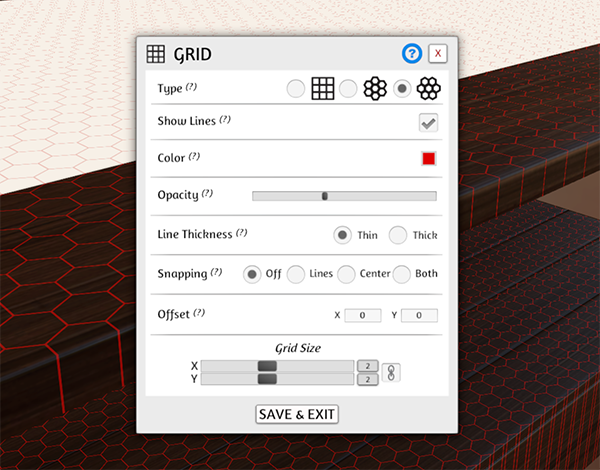
We’ve also made a huge improvement to the Grid system with a lot more options for you to choose from. Try it out and let us know what you think!
We are also investigating various networking solutions to improve the netcode. Some of the improvements would be network stability, connection issues, voice chat, bandwidth reduction, security, and server browser issues. If we find a good solution, this would be a major change to the game and will take a lot of time to develop and beta test to ensure stability.


 - This shows when you are connecting to this player.
 - This shows when you are connected to this player through Steam’s relay servers. Performance is not optimal.
 - This shows when you are disconnected from this player.