

The Last World
Update v.0.3.633
Added:
*) Solar system generation
Fixed:
*) Fixed a bug where after canceling confirmation of planet creation, unit images disappeared
*) Now when landing on a planet, only the terrain on land will be cleared
*) Fixed a bug where grass was generated on the location with grass generation disabled
*) Enabled the debug window in the game, call it with the [J] key
Update v.0.3.514 (09/26/2024)
**Fixed:**
*) Fixed a bug where when mining wood, the item icon could be placed incorrectly in the cells of the front compartment (go beyond the cells)
*) Fixed the search engine, it was impossible to enter Cyrillic
*) Fixed a bug where after loading saves, camera movement did not work at the edges of the screen
*) Fixed a bug where objects were not selected under the area with information panels
*) Fixed a bug where after loading saves, Web Towers were not available
v.0.3.491 Bug Fixes
Fixed:
*) Fixed a bug where unit slots were visible when confirming the creation of a new world
*) Fixed a bug where it was impossible to research other technologies after completing training tasks
*) Fixed the problem of missing Network Towers
Update v.0.3.486
Update v.0.3.486
Changes:
*) Now after loading saves the game will not be re-saved again, which was the case before
*) Now the dialogue panels of units will not overlap each other
*) Completely switched to a new save system (the old ones will not work)!!!
*) Now the Overground Lamp building will not have an inventory
*) In the game settings, the FPS limit has moved to the Graphics tab
*) The unit preview scene in the inventory has been slightly optimized
*) Now the mining beam of the tool will correctly hit the props when mining or resolving
*) The prop colliders have been updated, which has slightly increased the performance when working with them
*) Now when you click on the header of a window that can be moved, it will automatically move to the foreground, on top of all other windows
*) Updated the visual of the item separation window
*) The Add all fuel button has been removed if there is only one resource in the inventory
*) The Gas Storage, Marketplace, Steam Energy, Teleport, Gas Purification, Ore Purification technologies have been made more expensive
*) The inventory size of the Component Factory building has been reduced from 6x4 to 5x4
*) Now Energy cells will be highlighted when fully charged (provided that they remain in the charging slot)
*) Now the Accumulation Station building can be visually seen on the model how many charging slots are currently occupied
*) Now the icons when dragged in the inventory will be the same size as the main ones
*) Now it will be impossible to remove the inventory expansion module from the building
*) The visual of the panel with information about the module has been corrected
*) The visual of the item tooltip has been corrected
*) The size of the Sorting Window has been increased from 10x10 to 10x20
*) Optimized the creation of inventory cells, now they load a little faster
*) It will no longer be possible to enter special characters when editing the preset name
*) The number of characters in the name has been limited to 15
*) The animation of the destruction of trees and rocks has been updated
*) Now the icon of an item that is being dismantled will darken and become inactive
*) The cost has been increased and production time of some complex components
*) Now the Sawmill will consume electricity when planting vegetation
*) The detection radius of buried containers has been reduced from 25 units to 15
*) Now scanning buried containers will take some time
*) Now when starting the game, the music volume will gradually increase
*) Now when you click on the information panel "Take resources from the landing shuttle" the building will be highlighted
*) Now when units take resources from the building, they will also place them in the Forward compartment if the main one is full
*) Now when saving the world manually through the settings window, a special indicator will appear that the world is being saved. It will be clearer when saving is in progress
*) Now when disassembling modules or containers, nested items will also be taken into account
*) Now in the Disassembly window, new items will try to stack, and not multiply throughout the window
*) It will now be impossible to disassemble a container item that is in the equipped state (for example, the Rear Compartment of a unit). In order to disassemble it, you will first need to remove it
*) Now the laser beam will be synchronized with the animation of the tool movement during mining
*) Now the dialog panel that appears above the unit will have a time indicator in the form of a slider, after which this panel will close
*) Hidden unavailable technologies in the information panel in the Technology window
*) Changed the recipe for building a Crusher
*) Optimized the window with a list of changes
*) Now in Wikipedia, in the Cleaning section, recipes that can be obtained from this resource will also be shown
*) Now in the tips for building, information about energy consumption or production will be duplicated
*) Optimized the chassis animation - it will not play when the camera is at maximum zoom
*) Now the animation for building a Network Tower will play when at least one network element is connected to it
*) Now Energy Cells of tools can be charged in the Energy Storage Station
Added:
*) Added a new starting task - Resource extraction
*) Added a hint to the item tooltip that the module cannot be removed from the building
*) Added the ability to edit the unit name in the Building window, to do this, click on the name and editing will become available
*) Added Brightness and Gamma settings
*) Added drawing of the satellite orbit (necessary for the mechanics of the Space Station)
*) Added effects after the destruction of stones
*) Added effects to the construction of the Research Station
*) Added display of units in the world window
*) Added a starting scene with a trailer
*) Added an indicator of the energy consumption of the unit to the inventory
*) Added information about energy consumption or production to the Wikipedia for buildings
*) Added the content Empty on the Resource Analysis panel in the world window
*) Added the ability to move a building that has not yet been built
*) For the Scanning Station, the state - Technology is not researched in the Buildings window
*) Added display of the Energy Cell charge on the tool icon
*) Added - now buildings that have been placed but not built yet will change color when you hover over them
*) Now the energy charge of tools will be gradually spent
Fixed:
*) Fixed the problem when Wikipedia did not open in the inventory by pressing F1
*) Fixed a bug when in the settings on the Antialiasing slot it always showed Off
*) Fixed the problem when the sound was completely turned off and after turning it on there was still no sound until you click Apply
*) Fixed the problem when it was impossible to exit the unit's inventory by pressing Esc or I
*) Fixed Pause and Resume the game by pressing the Space key
*) Fixed the problem when at the start of the game, at the landing stage, the auxiliary panel with control buttons in the lower left corner of the screen was not visible
*) Fixed the overlap of the main buttons in the inventory
*) Fixed a bug when after removing a critical module from a tool in the modding window, the tool icon did not update and did not turn red
*) Fixed a bug when after completing all the starting tasks, the window with congratulations that the player has completed the training tasks did not appear
*) The animation of opening and closing windows has been fixed. Now they appear from the center of the window header, and not from the upper left corner
*) Fixed a bug where the Component Factory could take resources from the Resource Cleaning Station that it was currently using
*) Fixed a bug where it was impossible to enter Grid mode by pressing the T key during a mission
*) Fixed a bug where the Network Tower did not turn off its animation when deleting a building
*) Fixed a bug with a tooltip on units, the tooltip disappeared when moving the mouse cursor if the unit has no items in its inventory
*) Fixed a bug where when charging an Energy Cell in an Accumulation Station, the Energy Cell could have more charge than its capacity
*) Fixed a bug where the tooltip on an item could fall beyond the screen boundaries
*) Fixed a bug where you could endlessly disassemble the same item through the Disassembly Window
*) Fixed a bug where when deleting a module in the Overview Window toolbar with modules was hidden
*) Fixed a bug where special characters could be entered in any search bar
*) Fixed a bug where the text of the hovered area in the planet window was not updated after changing the planet preview layer
*) Fixed a bug where pressing Esc did not close the Item Overview window in the inventory, but instead closed the inventory itself
*) Fixed a bug where after scanning buried containers there were still unknown items in the hints
*) Fixed a bug where after canceling construction (when construction has not yet begun but resources have been loaded) resources are not returned to the container
*) Fixed a bug where after canceling the creation of a new world the panel with Extended tile information became active
*) Fixed a bug where after loading a location, the animation of the Landing button lagged
*) Fixed a bug where some buttons were not released after pressing
*) Fixed a bug where it was possible to complete a task with all buildings connected to one network while not connected to one network
*) Fixed a bug where after canceling technology research (provided that no chip grant has been spent yet) a research progress indicator appeared on the technology slot
*) Fixed a bug where after loading saves the camera was much lower than it was during saving
*) Fixed a bug where after loading saves some modules did not immediately apply effects (for example, expanding the rear compartment of a unit)
*) Fixed - now the Barrel, Side Handle of the Mjolnir tool are considered critical elements, without which it cannot work
*) Fixed a bug where it was possible to disassemble a unit module that cannot be removed without special tools (Workshop)
*) Fixed a bug where after deleting an open container, its overview window did not close
*) Fixed a bug where after deleting an item it still remained in the disassembly window
*) Fixed a bug where after activating a building it continued to work, although there was no power in the network
*) Fixed a bug where after saving the world through the Menu window the current save was not displayed in the Saves panel
*) Fixed a bug where the unit and its inventory were not saved if its Inventory was open at that moment
*) Fixed a bug where after closing the building window the item splitting window remained open
*) Fixed a bug where after disassembling a module or tool that is on a unit slot, the components were not created in the unit's inventory
*) Fixed a bug where in the building window on the production panel the quantity did not correspond to the actual value
*) Fixed a bug where it was possible to lay a network with the window open or when the cursor entered the UI area
*) Fixed a bug where in the network laying mode with the window open it was possible to exit the mode by pressing Esc
*) Fixed bug where birds were flying chaotically in a location with a large number of trees
*) Fixed a bug where the laser sound was not heard after exiting the inventory
*) Fixed a bug where the Component Creation Window did not close when the Construction Window was closed
*) Fixed a bug where the unit tool cast a shadow from the unit's flashlight
*) Fixed a bug where when quickly transferring items from a virtual container to the construction inventory, the cells in the unit's inventory were freed up, after which the new items overlapped each other
*) Fixed a bug where an item would freeze when quickly moving it to the space window
*) Fixed a bug where when transferring items to the Front Compartment, which is not on the slot
*) Fixed a bug where some modules that are attached to the unit's head could not be transferred to the head (the item was in the inventory, not on the slots)
*) Fixed a bug where in the unit's inventory it was impossible to it was necessary to enter a space in the unit name when editing
*) Fixed a bug where the Remove from queue icon was visible when dragging a technology
*) Fixed a bug where nothing could be heard when setting the sound volume to 50
*) Fixed a bug where the Pause and No Power icons overlapped after deactivating a building
*) Fixed a bug where the hint would appear in the upper right corner for a moment and then move to the cursor
*) Fixed a bug where it was impossible to select a building or unit if the cursor was over an area with task slots (while there were no tasks themselves)
*) Fixed a bug where the state of the Do not show again button in the Tutorial window was not saved. Now the windows will not open even if you start a new game. You can also find them on Wikipedia
*) Fixed a bug where the unit's lantern did not cast a shadow on the props that the cursor was hovering over
*) Fixed a bug where the unit's module tooltips displayed a message that the module could not be removed (this message applies to building modules)
*) Fixed a bug where after loading a save, buildings had no animation
*) Fixed a bug where after exiting the game to the main menu it was impossible to click the Sandbox button
*) Fixed a bug where when changing the prop selection mode to copying buildings, the tooltip panel with controls did not disappear
*) Fixed a bug where after loading fuel into the Thermal Power Plant, items overlapped each other in the unit's inventory when mining
*) Fixed a bug where when dragging an item in the Building Window, if you press Esc (try to close the window), the icon froze
*) Fixed layering panels with control tips when placing a building on the buttons of the wind, stone and water palette
*) Fixed a bug in the Item Overview Window - in the modules tab, if you remove the last one, the panel does not switch to the main tab
*) Fixed a bug when deleting a Drilling Station, the panel overlapped the resource icon
*) Fixed a bug of multiple duplication of the Resources have been added panel, which appears on the unit
Solar System in The Last World
I'll post patchnotes in the new update a little later, the update will be more technical than content-based.
In the meantime, I'm working on the Solar System, I've wanted to start working on it for a long time, but I couldn't because of these eternal improvements to the game.

All planets will be procedurally generated. I encountered a visual discrepancy, namely: in the landing site selection window we have a planet that is covered with hexagonal tiles, and here textures will be used. Different graphic styles that will need to be somehow combined.
Another good thing is the lighting, very realistic, which will please the eye.
I can't give exact characteristics about performance yet, everything is still being configured and tested, I'll tell you about it next time.
So, the Solar System, why do we need it?
The plans include adding the Space Station, I wrote about this earlier. One of the functions of which is traveling between planets and creating expeditions. At the first stages, it will be impossible to populate and develop them, there are big problems with this because we still need to somehow maintain the functionality of the base base, and this consumes PC performance. In short, too many processes occur inside the base - this is due to the inventory system (it is grid) for each building.

The Solar System was conceived as a kind of unlimited point of interest, where events will be generated. It will be possible to extract resources from the surface, being in orbit. It will be possible to explore them and get some profit.
First of all, I want to finish the core of the game so that it works stably. Beating the game, researching all the technologies and mastering the entire location is very labor-intensive for me due to lack of time and effort. And I also need to fix bugs, which also take a lot of time.
PS It's a good thing I didn't write all these shaders, it would have taken me my whole life to do them...
#games #steamgames #gamedev #wip
v.0.2.991
If everything works well for you, then you don’t need to do this!
Bug fixes v.0.2.997
Changes:
1) The functionality of the buttons in the main menu of the game has been redesigned
2) In the main menu removed the Tutorial button
Fixed:
1) An attempt to fix the error with a black screen when starting the game (if the black screen appears again, send me .log files)
2) An attempt to fix a bug where, after starting the game, it was impossible to open the Sandbox window in the main menu
3) Fixed double click sound in the settings menu (not in the main menu, but in the game)
4) Fixed a bug when while loading the world it was possible to pause the game using the Space key
Update v.0.2.991 (22.12.2023)
Happy upcoming holidays!
Update v.0.2.991
Changes:
1) The size of the Disassembly window has been adjusted
2) Now when you close the Building window, the Disassembly window will also closed
3) The dawn in the game has been slightly shifted. Now dawn will be at 6:20, previously it was at 7:10 (required for the correct operation of the unit’s flashlight functionality)
4) The appearance of the panel for resource mining and destruction of buildings has been changed. Added maximum indicator and name of the current process
5) The number of technologies displayed has been increased to 6 in the Technology inspect window (previously there were 2)
6) Increased the processing time of all ores by 50%. This change is necessary because New technologies will soon be introduced to improve these indicators
7) Optimization has been carried out with updating the item texts. Previously, the text was updated for all items after each operation of splitting, movement, etc.
8) The preset selection window in the Constructor window has been optimized. Now presets load even faster
9) The logic for processing resources has been adjusted. The minimum amount of resources that can be obtained after clearing is now 1 (previously it was possible to get 0), and the maximum will be in the range from 1 to max
10) Increased the time of spilling resources from Barrels by 2 times
11) Now, after spilling Barrels with resources, an Empty Barrel will be created in their place (provided that the resource has been completely removed from the barrel)
12) The creation of items in the inventory of the Trading floor has been optimized. When switching between traders, items will be placed in the buffer and retrieved from there as needed
13) Now, when dragging items in the inventory, containers that have free space will be highlighted
14) Now the Virtual container button will be highlighted when there are items in it
15) Changed the base storage size of the Power collector station building from 4x2 to 4x3 (since it was impossible to remove the building’s Energy Cell from the charging slots)
16) Now, when dragging building modules in the Building window, the module slots to which this module can be attached will be highlighted, provided that it is compatible with the building
17) The production time of all components has been increased by 2 times. This change is necessary because New technologies will soon be introduced to improve these indicators
Added:
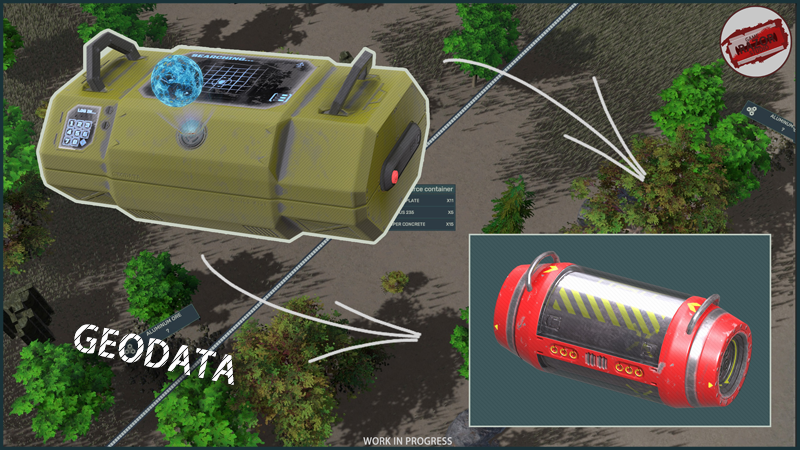
1) Added a new item - Geodata
2) Added the ability to add a unit to the queue for resource extraction, provided that the unit is currently extracting one of the resources (stone, wood).
To do this, call the context menu on the desired resource and select Add to queue. The unit must be selected!
3) For the Surface scanning station, a new panel has been added to the Building window, which displays all resource deposits that are nearby
4) A flashlight has been added to units; it will automatically turn on at night and turn off with the first rays of the Sun.
This mechanic is attached to the Device module. The power consumption of the flashlight is still the same for everyone - 5% of the base consumption (0.2 kW)
5) Now Devices (modules for units) can carry the functionality of a Flashlight, this characteristic will be generated randomly
6) You can now add an item to your favorites in the unit's inventory. To add an item to your favorites, it must belong to a unit
Selected items cannot be automatically transferred to a building or anywhere else (for example, through the Unload all to building action). The functionality will expand!
7) The Drilling section has been added to the Water converter in the Building window. Now mining can be paused
8) Now Energy Cells can be dragged and attached to charging slots in the Building window
9) The Resource Barrel item has a numeric display of its contents added
10) For the Thermal Power Plant, a tooltip about the lack of fuel in the inventory has been added
11) Now, when Buried Containers are discovered, they will be displayed on the minimap and on the global map
Corrected:
1) Fixed an issue where the tooltip on resource deposits did not appear
2) Fixed an error in sending technology for research. An error occurred when a player quickly submitted and canceled research on one technology
3) Fixed an issue where, while placing a building, it was possible to Focus on the building through the Building window
4) Now after disassembling an item, its components will spawn correctly in the building’s inventory
5) Fixed a bug when dragging the Back or Front trunk the corresponding slot in the unit’s inventory was not highlighted
6) Wikipedia - fixed a problem where when you clicked the Open wiki button in the Cleaning or Producing components section, nothing happened
7) Fixed a bug where a tooltip on vegetation could appear when the cursor was in the mini-map area
8) Fixed a bug when the tool icon remained active after deactivating the tool
9) Fixed an issue where it was impossible to enter the number of components produced through the Confirmation window, the input field did not work correctly
10) Fixed an issue where the Spilling Station did not spill the barrels, but removed them from inventory
11) Fixed a problem where, during the activity of the Research Collector task, the player could research any other available technology, while losing the opportunity to research the required technology
12) Fixed a bug when, in the Power Scanning mode, the value of Energy Consumption for buildings remained marked in red, although there was electricity in the web
13) Fixed a bug when, after moving from the slots of a unit’s module to an unopened container (for example, moving the Device to the Back trunk, which is in the unit’s inventory), it saved the state of the module attached to the unit
14) Fixed a bug when, after installing a module to expand the storage of a building, the unit’s inventory area also changed (became smaller, which made it difficult to access all items in the Back trunk)
15) Fixed a problem when in the Building window it was possible to remove some modules from a unit that required a special tool
16) Fixed a problem where in the Item Inspect Window, when scrolling through information about an item using LMB, without releasing the LMB, it was possible to rotate the item in the Preview panel
17) Fixed a bug when in the Constructor some scene objects were visible through the icons
18) An attempt was made to fix the error when a black screen appeared when the game was launched (if this problem occurs, report it to the developer, do not forget to send .log files)
19) Fixed a bug when the icon of resource deposits on the global map was displayed incorrectly (showed None)
20) Fixed a problem where components were not created when disassembling a building module
A little news - Geodata
Geodata - updated mechanics for finding buried chests. They will also be used to search for points of interest on the Global map, which is under development.
Update v.0.2.576

Changes:
1) Drones can now repair buildings. For this, the Technical Drone Station is used. Research the technology to activate it. (needs testing)
2) Reduced the size of the game save file (by an average of 40% by replacing the json format with bin (old saves will not work))
3) Localization and text, some edits
4) Game performance has been slightly increased by removing unnecessary operations to check whether the cursor enters the area of UI elements
5) The icon for sending technologies for research has been changed
6) Slightly improved elements of the Technologies window
7) Technologies Solar energy and Wind energy have been increased in price - another type of chip grant has been added
8) Now some commands in the context menu will be highlighted in colors (for example, Clear resource in the Sawmill)
9) Component Disassembly Window - now when dragging items, the icon in the Disassembly Window will be highlighted, indicating that the component can be disassembled
10) Component Disassembly Window - now after disassembly, items will be created directly in the unit’s inventory
11) Now the unit tooltip will take into account the resources located in the Front trunk
12) The logic of the Item Splitting window has been slightly changed - now when you click outside the window or separate an item, it will not close
13) Now, when you reopen the Building Window, the unit panel will load even faster
14) Now items will display a short text of their quantity (for example, 1000 => 1k)
15) Highlighted slots in a unit’s inventory have become even brighter
Added:
1) Durability indicator has been added to the Building Window
2) Component Disassembly Window - you can now drag a component into the Disassembly Window
3) Item Splitting Window - you can now drag an item into the Item Splitting Window
4) Technology slot - added display of required components on the slot itself in the form of small indicators
5) Technology tree - a new panel has been added to the technology overview panel, which duplicates technologies for opening this technology
6) Technology tree - a new research branch has been added - Technical Drone Station
7) For mining buildings in the Building Window, an indicator of the extraction time of one resource in seconds has been added
8) Trade - added a button "Remove all resources from the cargo shuttle"
9) Trade, item tooltips - an indicator of the trader’s percentage markup for this component has been added to the price
10) An indicator for transporting the Cargo Shuttle for the Trade has been added to the Building Overview Window
11) Wikipedia - new technologies added
Fixed:
1) Fixed a problem where, during a Pause of the game, the Information panels in the Inventory window were not deleted and remained active
2) Lots of minor UI fixes
3) A small optimization of the building placement grid has been carried out
4) Fixed a bug when, after laying a cable web, an indicator remained on it indicating that the web was not connected to the building
5) Fixed a bug when resources were duplicated in the Conveyor web overview window
6) Fixed the problem of incorrect positioning of the context menu on the reader
7) Fixed an issue where it was impossible to move the camera while the Item Splitting panel was active
8) Fixed a bug where the Unit Dialog Panel would jerk when appearing