

The Last World
Update v.0.1.976 (04/10/2023)
Changes:
1) Localization and text, some edits
Added:
1) Wikipedia - statistics added to drones
2) Item Inspect Window - in the production and cleaning section, an icon of the building in which the item is produced has been added
3) Trading - an indicator has been added to the sell and buy window, indicating that the player or merchant does not have enough funds to buy or sell
4) Two new switches have been added to the location map - Show unit icons and Show building icons
5) Added the weather coefficient of destruction (aging) of objects on the location, such as units, buildings, etc. Previously, only temperature affected the aging of objects.
6) A new technology has been added - Planting Vegetation. The technology is in the General section. It gives access to the vegetation planting interface on the map. Now you can restore the forest even faster.
7) Added new game mechanics - Planting Vegetation. It is available at the Sawmill buildings after researching the relevant technology. The switch is in the Building Window, Settings section. Testing required!
Fixed:
1) Wikipedia - fixed incorrect display of the building in which barrels with resources are produced (was the Component Factory, it became the Spilling Station)
2) Fixed the problem of not displaying the rock on the mini map and location map
3) Fixed a bug when after canceling the placement of a building (with the Dronatization tool turned on), the scene remained bright, even in the dark time
4) Fixed the problem when placing a building in Grid mode, the Dronetization tool was activated, then deactivated, after which the Grid mode was not restored
v.0.1.934 (03/26/2023)
Changes:
1) Localization and text, some edits
2) Wikipedia - now the price of the item will be displayed in the short version. Hovering over a price will show a tooltip with the full price.
3) Improved appearance of the modules panel in the Building Window
4) Now the Building Window will not close when you press the [Esc] key if the action confirmation panel is active. The action confirmation window will close.
5) Repair time increased by 3 times (from 0.5s to 1.5s)
6) All tools have their repair factor adjusted
7) Now, when changing the module of a unit, a sound will sometimes be played in the Modding window
8) Adjusted the draw distance of the LODs for the Center and Water Pump buildings
9) Now the icons above the buildings (for example, No power) will be synchronized with each other and play the same animation (it used to be inconsistent)
Added:
1) Added a numerical designation of the charge of the Energy Cell in the slots for recharging Energy Cells
2) In the Build Window, the time for the construction of the selected building has been added
3) Wikipedia - added display of the characteristics of Tools and Modules
4) Added a confirmation panel for deleting a Building module from slots
5) Wikipedia's tutorial section has been updated. Added - virtual container
6) A new item has been added to the context menu of resources on the Trade - Wikipedia
7) In the Control section (game settings) added a search field
8) A building repair parameter has been introduced, which characterizes the maximum allowable strength of a building after repair. Experimental game mechanics. Testing required!
9) A new switch has been added to the Drone Factory Building Window, which indicates whether the factory can automatically send drones to buildings that need drones
10) Now, if the building was disconnected from the conveyor web manually (through the Building window), the tooltips for the building will show a corresponding warning
Corrected:
1) Fixed a problem when after installing the module on the building, when the building window was opened again, the module disappeared
2) Fixed a problem when on Wikipedia the components in the cleaning section showed a different building in which they are cleaned
3) Fixed a bug when, when trying to send a unit to repair a building, it did nothing after taking the tool
4) Fixed a bug when, during the repair of a building, a unit could destroy it
5) Fixed a problem when during the acceleration of the game a tutorial window was called, after closing which the game speed was not restored to the previous one
6) Fixed a bug when, after saving a unit preset, an inscription appeared on the slot indicating that there were no critical modules
7) Fixed a bug when the Solar Panel, which was built in the night, did not follow the light source
8) Fixed a problem when in the Trade window when trying to close the Sell / Buy resources window, the Trade window was also closed
v.0.1.853 (03/17/2023)
Changes:
1) Localization and text, some edits
2) Changed the research recipe for Dronatization and Technical Drone Station technologies. Technologies has become more expensive.
3) Fixed drone production time (before the production time was 1 second)
4) Changed the recipe for creating drones. Added new components: Microprocessor and Servomotors
5) The web Reader will now display the amount of available stored energy from the web it is attached to. Previously, it showed all the collected energy.
6) Now, if the collected energy of a building is lower than available, it will be marked in red in tooltips for this building
7) Now the Short Range Power Tower will not take into account Short Range Power Towers that are under construction or destruction
8) Now it will be impossible to open the mini-map if the Global location map is open
9) Now on the Global location map, when hovering over the icon of buildings, a complete information tooltip of this type of building will be created. The same goes for the Build window.
10) Now, when the Surface Scan Station is selected, the sound of scanning the area will be played, provided that the station has already completed the scan of the area
11) The power web analysis panel of the building has been changed. Added arrows that indicate what the building is doing - receiving and (or) giving electricity to the web
12) Tech Drone Stations will no longer have access to the conveyor exit by default during construction. However, they will still be able to request resources from the web. To enable this setting, go to the build settings of the Buildings window.
Added:
1) Added priority [-1]. This priority indicates that the building will not accept drones from the Drone Factory
2) An indicator of unit operation has been added to the unit panel. The indicator shows what the unit is doing at the moment.
3) Added 12 sounds to the unit. Sounds will now play when the unit is doing work - moving, idle, mining, destroying, etc.
4) During the drop of cargo on the Trading floor, a laser beam and a sound of a laser beam, indicating the place of landing of the cargo, have been added
5) Added background sound of the Power Collector Station
6) Added a list of thanks to people who helped during the development of the game
7) The following information has been added to the save slots - the current researchable technology, time of day and current weather (available after re-saving the world)
8) Added name generator for units, drones and planets in Russian. Localization must be Russian.
Corrected:
1) Fixed a bug in the Crusher, when sometimes structural elements of the building levitated in the air
2) Fixed a bug when an empty tooltip was created on the icons of resource deposits on the Global location map
3) Fixed a bug when after closing the Global location map, the inventory was opened after a while
4) Fixed the problem when the tutorial window was not opened when calling the tutorial window via Wikipedia or in the Constructor window. This was preceded by a tick - Do not show again.
5) An attempt to fix a bug when Solar Panels could follow (turn face to face) the Sun at night. Need testing!
v.0.1.784 (07/03/2023)
Changes:
1) Now tooltips for buildings that are under building or destruction will not show informational icons (electricity consumption, etc.)
2) Now, when placing a Web Tower, the Power Grid analysis mode will automatically turn on (provided that it is available)
3) Localization and text, some edits
4) Now the tooltip text of the electricity produced by the grid reader will be marked red if it is less than the amount of electricity consumed
5) Corrected the header of the hints of web readers
Added:
1) When calling a tooltip for an item, the display of the amount of charge of the Energy Cell of the unit module in the Constructor has been added
2) Added a new module for the energy cell unit. The new crystalline core energy cell differs from the basic energy cell in that it holds more charge while weighing less.
3) Added information about the location in which it is located in the tooltips to the resources of the selected location - surface or underground
4) Added more detailed tooltip for drone slots
5) Drones section added to Wikipedia
6) Added German localization (non-professional)
v.0.1.733 (03.01.2023)

Changes:
1) Now, in order to open access to the research of the Carbonium chip-grant technology, it is necessary to research the Carbon technology
2) Web towers that are in building or destroying mode will no longer be taken into account when laying the web
3) Now the statistics of the unit in the inventory take into account the mass, temperature coefficient and module effects
4) Now in the analysis mode of the Electrocity grid, buildings under building will not create an information panel
5) Now, while the building copy tool is active, it will not be possible to open the Build window [B]
6) The initial teaching material is divided into 4 parts: Starting, Building, Production and Research
Added:
1) Added the Resource Analysis panel on the location. The panel access button is located in the drop location selection window next to the full tile information button
2) In wikipedia, in the sections of Processing and Production of components, icons of buildings have been added in which they can be produced or processed
3) In Wikipedia, mass and price indicators are added to the components
4) Added Trade technology
5) Added a new building - Trading floor
6) Added new game mechanics - Trade. Will become available after the construction of the Trading floor
7) A new button has been added to the context menu for quickly transferring a resource to a building for cleaning. To do this, the unit must be selected, then call the context menu on one of the buildings (Sawmill, Crusher or Ore Refiner Station).
The button will be available if the unit in the Rear Bay has the required resource.
8) In the Dronatization mode, a display of the current number of drones for buildings has been added
9) Added the Copy button to the context menu of buildings in Dronetization mode
Corrected:
1) Now the unit will not be able to move if it does not have wheels or a head
2) Fixed a bug when, after transferring a module or tool from a unit's slots to the unit back trunk, the unit's mass decreased
3) Fixed a bug where the tooltip did not appear on the slots in the technologies section on wiki, which indicated what this technology opens
4) Fixed a problem when, after turning on the building, some parameters did not appear in the Building window
5) Fixed a bug when two tooltips could be created at the same time both on the building and on resource deposits
6) Fixed a problem when, while the tool for copying buildings was active, the player pressed the button to open the Build window [B], the button was activated and nothing happened
7) Fixed a problem if the building of the Drone factory was completed at the time the Dronatization mode was active, the building did not have a prioritization interface
8) Fixed a problem when the prioritization interface was not created for new buildings when the Dronatization mode was active
9) Fixed a problem when, with the Dronatization mode active, the buildings that were deleted at that moment did not delete the communication line between themselves and the Drone factory
Water Power Plant - news#20
⚡ The Water power plant uses water as a resource to generate electricity.
Battery storage size of 3000 kW, maximum power of 14 kW per cycle.
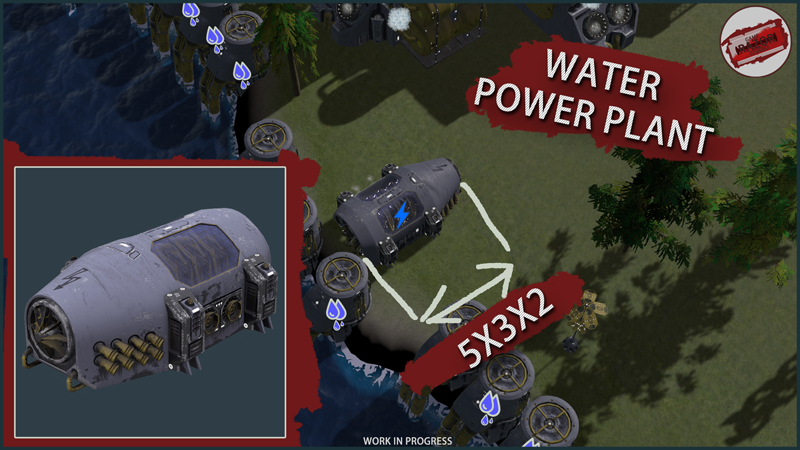
Name: Water power station
Class: Power
Dimensions: 5x3x2
Join to Discord
Kind Regards,
Erochin Semyon
v.0.1.562 (02.20.2023)
Changes:
1) Localization and text, some edits
2) Now the player will not be able to select a character for a new game if it does not have at least one necessary (critical) module
Added:
1) Added info slots to building tooltips
2) Added 5 statistics to the unit's inventory - movement speed, rotation speed, health, durability, mass
3) Added dependence of unit movement speed on its mass. The larger it is, the lower the speed and vice versa. The increase in speed cannot be more than 50% of the unit's current speed.
4) Added an indicator of the inactivity of buildings
5) Added artificial satellites that revolve around the planet
6) An indicator about the absence of critical modules has been added to the character selection slots
Corrected:
1) Fixed a bug when after saving the world through the button in the settings menu, the text with information about the last time the world was saved was incorrect
2) Fixed a bug when a unit did not start mining resources after reassigning resources to mining. The unit stopped working and stood still
3) Fixed a problem when Rocks containing iron ore did not have this resource
Update v.0.1.524 (02.14.2023)
Changes:
1) Now, when placing the buildings Hydrowell, Wind Power Plants, Drilling Station of Solid Resources, Wind, Water or Stone maps will automatically turn on, depending on the type of buildings
2) In the Grid mode, the size of the docking elements for buildings has been increased by 2 times
3) Some buildings have revised electricity consumption in a calm state
4) Changed the starting set of resources in the Launch Shuttle
5) The recipe for the Component Factory has been changed. Removed ores from the recipe and replaced them with the appropriate ingots
6) Now, when you enter the Grid mode, the functionality for placing grid elements will automatically turn on
7) Increased the brightness of the projections that show the range of some buildings
8) Localization and text, some edits
9) The energy indicator of the logs has been increased from 9.3 to 10.5 kW
10) Changed inventory size of Power Collector Station from 3x3 to 4x2
cells
11) Now the unit's statistics will be updated in the constructor depending on the modules attached to it
Added:
1) Added special text when placing some buildings, which explains where it is better to place the building. The text is located in the construction window
2) Added a battery indicator to the tooltip when hovering over a unit
3) The function to isolate the Power Collector Station from the web has been added, the switch is located in the Building Window in the settings section. Prohibit the building from giving electricity to the web. The building will still receive electricity from the grid. By default, the option is disabled.
4) In the game settings, a switch has been added to select the monitor on which the picture will be displayed. Need testing!
5) Wikipedia added statistics to resources, components and modules
6) Added a hint indicating that the object is outside the location and cannot be reached by the unit
7) A panel with hints has been added to the constructor, which indicates which critical modules the unit is missing
8) Added statistics to the tooltips of the module (Speed, Angular speed, etc.)
9) In the object Inspect window, indicators of the mass and size of the object have been added
Corrected:
1) Fixed a bug when in the Building window (when the Building Controls window is open) resources were not removed from the building inventory when auto-clearing ores in the Ore Clearing Station.
2) Fixed a bug when Wikipedia did not open after exiting the modding mode
3) Fixed a bug when the Liquid/Gas Clearing Station consumed a large amount of energy when idle
4) Fixed a bug when, after exiting to the main menu, the rain sound did not stop
Center - news#19
The Center is used as the link between the space station and the ground. It is able to transmit messages over long distances, thereby maintaining communication even in the most remote corners of the solar system. Serves as task coordinator.
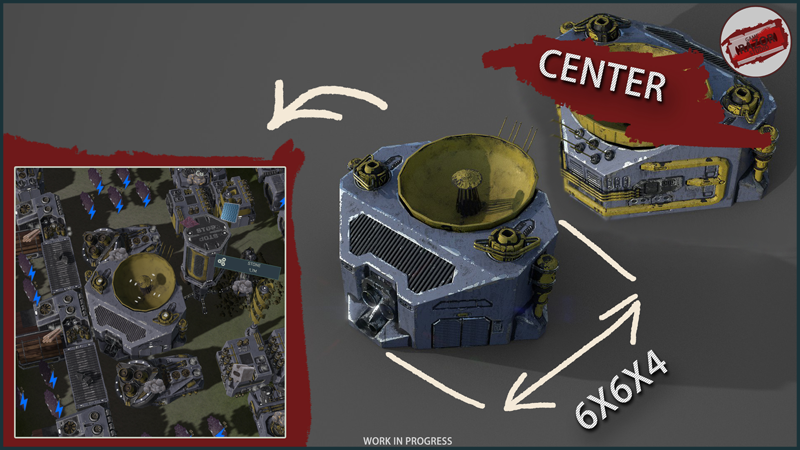
Without the Center, you will not be able to scan the surface with the Resource Scan Station to find underground resource deposits or learn more about deposits.
Also, without this building, your satellites will not be able to scan the area for buried containers.
Name: Center
Class: Control
Dimensions: 6x6x4
Join to Discord
Kind Regards,
Erochin Semyon
Update v.0.1.476 (02.07.2023) Bug fixes
Changes:
1) Localization and text, some edits
2) Now in the production section of the Building window in the production result slot, the quantity of components that are currently being created will correspond to the quantity of produced components in the building settings
3) For mining drones, the storage size has been reduced from 4x2 to 2x2 cells
Added:
1) Added display of last save time in save slots
2) Added "Technology Required" section to the Technology section of Wikipedia to unlock the required technology
3) Added the ability to disable tasks when creating a new world. The switch is in the drop-down menu in the Game section. The option is enabled by default.
4) Added a window for Congratulating the completion of tasks
Fixed:
1) Fixed an autosave bug when after changing the autosave time frequency the new value was not taken into account
2) Fixed the bug of charging the energy-cell in the Power Collector Station, when after the energy-cell was fully charged, the station would no longer charge the energy-cells. Need testing!
3) Fixed a delay in closing the window for selecting a component for production. Now the production component selection window closes with the Building window.
4) Fixed a bug when, during the pause of the game, the player accelerated time and could no longer pause the game by pressing the Space key
5) Fixed a bug when, after loading the world, the task to land on the planet remained unfulfilled and the next task did not appear
6) Fixed a bug when after a long game the World could not be saved even when pressing the F5 quick save button
7) Fixed a problem when in the constructor with the active learning window it was possible to rotate the model on the stage