After 23 Updates and 1 Year in Early Access Time Warpers is Now Complete!
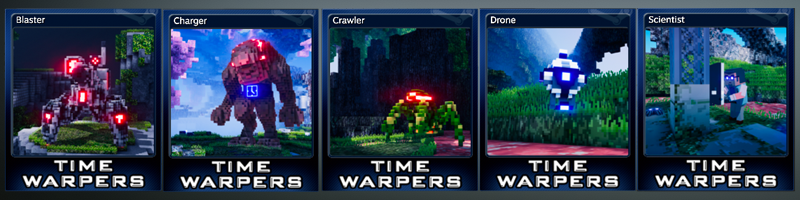
Steam Trading Cards
You can now start collecting Time Warpers Steam Trading Cards!
Trading Cards
Badges The first fives images are the standard badges. The Golden Clock is the Foil Badge.
Backgrounds The Charger, Soldier & Turret backgrounds are common drops. The Scientist background is an uncommon drop. The Weapon Cube background is a rare drop.
Emoticons The Crosshair, and 2 Hover Bike emoticons are common drops. The Butterfly icon is an uncommon drop. The King Card emoticon is a rare drop.
Convert Cubes
The Cube Converter is unlocked by completing the Collect 100 Weapon Cubes Mission.
Once unlocked, there will be a new Cube Converter button available when Time Warping.
The Cube Converter lets you convert Time Cubes to Weapon Cubes and vice versa. You can choose to convert 1, 10, 100, 1K, 10K, 100K, 1M, 10M, 100M or 1B Cubes. Clicking the arrow once will convert the selected number of Cubes. Holding down the arrow will convert multiple of that amount (just like when buying/selling Research).
Looping Timeline Cards
Collect all 52 cards in the first Timeline Cards deck to complete the Full Deck Mission and unlock Looping Cards.
When starting your second deck, the Show Deck screen will display Total Decks Collected as well as Total Cards Collected for your current deck.
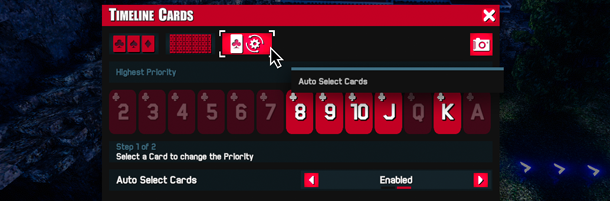
After the first deck is complete, the 2 and Ace cards will be disabled. The rest of cards will loop, letting you select from 44 cards.
Zone 10,000 Outfits
Get to Zone 10,000 to complete your gold mining contract and unlock the 10K Soldier & Hover Bike Outfits.
Overpowered Music
[previewyoutube="VD0eTsoZubs;full"] New music track added for when you're Overpowered.
Boss Music
[previewyoutube="EPgZsDerRvc;full"] New music track added for Horde & Boss fights.
Weapon Cube Save Profile
Total Weapon Cubes is now displayed on the Save Profile screen.
Time Attack extended to 10,000
The Stats screen displays Time Attack for Zones 50, 100, 200, 300, 400, 500, 1000, 5000, and 10000
Weapon Cubes Stats
Weapon Cubes have added to the Stat screen.
Other Changes
- Fixed Christmas Presents spawning outside the Christmas Event - Added ability for Mods to unstick stuck Zones - Removed Early Access branding from Settings Bar
Join our Discord to interact with the community & follow development.
UPDATE 22: Christmas Event
Starting December 1, unwrap the floating Christmas Presents to earn bonus Weapon Cubes, Time Cubes, Maximum Damage & Gold. This limited time event ends on January 5.
Presents
Presents will appear around the Turret every 5 - 10 minutes. They will float around for 30 seconds before disappearing. Collect Presents by shooting them, using the free roam camera or manually collecting them.
Blue Present = Time Cubes This present only appears after completing your very first Time Warp. Each present will give you the Time Cubes Per Zone x Multipliers / 4.
Green Present = Weapon Cubes This present only appears after you've collected your very first Weapon Cubes. Each present will give you Weapon Cubes Per Zone x Multipliers / 4.
White Present = Maximum Damage This present appears as long as you have bought at least one Active Ability on your current timeline. Each present will give you bonus Energy based on your Maximum Damage Research.
Yellow Present = Gold These presents can always appear and will give you your Gold Per Min x 5.
Outfits
Collecting Presents also unlocks permanent holiday Outfits.
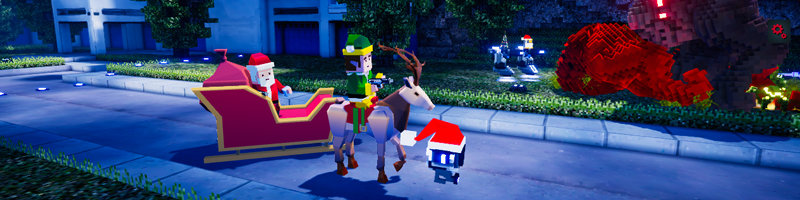
Soldier & Hover Bike Hover Bike Outfits are attached to the selected Soldier skin so....... Select the Soldier's Elf Outfit to use the Reindeer Hover Bike. Select the Soldier's Santa Outfit to switch to the Hover Bike Sleigh.
Drone
Turret
Christmas Missions
All of the Christmas Event Missions can be found in the Holiday Achievements screen.
Other Changes
- Fixed other players Total DPS & Percent of Convoy DPS showing up as 0 - Rainbow Butterflies now give Gold even if the Gold Per Hour stat is 0 - Hover Bike tooltip changes when disabled in Timeline Settings - Adjusted selector so unselected markers are not as wide - Time Cube Click Weapon Energy Research is now 100 levels instead of 99
Drop by our Discord to share your ideas, interact with the community & get some early looks as we develop new features.
UPDATE 21: Top Voted Ideas
This update was all about implementing some of the top voted ideas from our Discord Ideas Channel.
Weapon Cube Timeline Settings
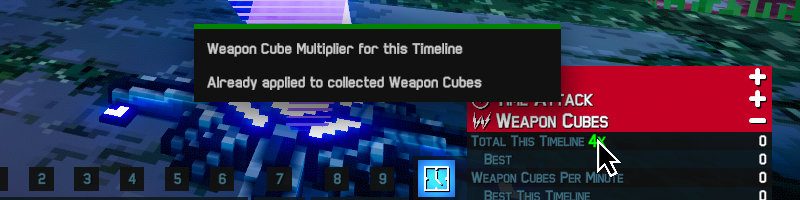
Timeline Settings now give bonus Weapon Cubes as well as bonus Time Cubes.
Once you've collected your first Weapon Cube, a message will appear in the Timeline Settings letting you know that the bonus applies to both Time Cubes & Weapon Cubes.
Link Preset to Soldier
You can now link the Drone & Turret Presets to the Soldier. When linked, it automatically switches to the same preset number the Soldier is using.
Click Weapon Energy Research
This new Time Cube & Weapon Cube Research lets you increase the Click Weapon maximum energy from 100 up to 300.
Rainbow Waves
The Zone HP bar will change to a rainbow when fighting a Rainbow Wave of enemies.
Teleport to Player
Clicking on a player in the Live Leaderboard gives you the option of teleporting to the health station near that player. So if you're on Zone 51 and click on a player in Zone 23, you'll be given the option to teleport Zone 21. You won't be able to teleport to player's that are in a Zone you haven't unlocked on your current run.
Shoot Butterflies
In addition to manually collecting or using the Free Look Camera, you can now shoot Red, Blue & Rainbow butterflies to collect them.
Gold Butterflies
The Gold Butterfly calculation has been updated to include Gold Multipliers. Previous formula: Zone Gold * 100 New formula: Zone Gold* 100 * Gold Multiplier (from Abilities, Perks, Research & Achievements)
Starting Gold Offset Boost
Starting Gold Offset Boost is now affected by Gold Multipliers (from Abilities, Research & Achievements).
Other Changes
- Weapon Cube Active Ability countdown shows Recharge Time rather than 1 Day when fully charged - Fixed Pathfinding Error - Changed Maximum Damage Research description to say Bonus Energy instead of Extra Energy
Halloween Event
One of the highlights was 96 players feeding the same pumpkin https://imgur.com/a/2qOmOGB (Gif) We spent the first half of October adding new features like Offline Candy & rebalancing based on player feedback.
The next Update will be on Sunday December 1.
UPDATE 20: Halloween Sneak Peek
Halloween Event
Starting on October 1st, Zones 1-100 will be filled with candy & pumpkins. Collect Candy, launch it at Pumpkins to upgrade & unlock permanent Halloween costumes for the Soldier, Drone & Turret. The Halloween Event will start at 12:00 am MDT, and run through October 31.
Candy Pickups
There are 9 candies per Zone. Collected candies respawn every minute. Collect candies by actively running around, using the Free Roam Camera, or idly sitting on one. Or unlock the Candy Magnet and let the candies come to you.
Candy Launcher
Once unlocked, the Candy Launcher can be used to blast candies at Pumpkins for rewards. The Candy Launcher is exclusively for the Soldier (Drone or Turret can't equip it). You'll definitely want to use your Automatic Fire & Dual Wield Abilities, but just a heads up, Perks & Critical shots are disabled on the Candy Launcher. To equip it, hover over the Soldier & select it from the Weapon Types.
Candy Launcher UI
When the Candy Launcher is equipped the Soldier info changes to show all the important Halloween event stats.
Candy Per Click Pumpkin
This pumpkin increases how many candies the Candy Launcher fires with one click. Find the Candy Per Click Pumpkin in Zones 10, 40 & 70.
Candy Per Pickup Pumpkin
This pumpkin increases how many candies you get with each piece of candy you collect. Find the Candy Per Pickup Pumpkin in Zones 20, 50 & 80.
Candy Magnet Pumpkin
This pumpkin increases how quickly candy is pulled towards you. Find the Candy Magnet Pumpkin in Zones 30, 60 & 90.
Public World Pumpkins
If there are multiple people in a Pumpkin Zone, everyone in that Zone will be credited for the candies other players feed to the Pumpkins (using your Candy Per Click stat). Other player's candy bullets are never hidden, so you'll always know when someone is launching candy at a pumpkin.
Halloween Costumes
The Soldier, Drone & Turret are getting into the Halloween spirit with unlockable permanent costumes. Complete Missions to unlock the…. Soldier's Frankenstein & Skeleton Outfits Drone's Mummy & Green Dragon Outfits Turret's Turtle & Red Dragon Outfits
Halloween Missions
All of the Halloween Missions can be found in the Holiday Achievements screen.
Butterfly Magnets
Red & Blue Butterflies now have their own magnets, which bring the butterflies to you. Complete the Red & Blue Butterfly Missions to unlock the magnets and increase their strength, letting you collect butterflies even faster.
Optimized Player Entity
The multiplayer player entity has been changed to use the Pool System. This should increase performance, especially when loading or unloading other players in the Public World.
Other Changes
Fixed lag when hovering between different weapons
Pick-up items are now collected differently, fixing the bug where some pick-ups weren't being collected
Fixed multiplayer bug where other player's Auto Fire bullets weren't visible
Arena Detail Caching changed for performance optimization
Buying Pulse Pistol unlocks Weapon Types UI (used to unlock after getting Rocket Launcher)
Removed all non-ECS bullet code - Bullets converted to ECS so code is no longer needed
Fixed Rainbow Butterfly null reference error
Fixed duplicate avatar server errors (duplicates won't affect server performance)
Added backend logic to support multiple Public World servers
Comment below, what Pumpkin are you going to feed first? A lot of the changes in this update were based on suggestions from the Discord Ideas channel. The next Friday Update will be on November 1.
Halloween Event
Halloween Event
Starting on October 1st, Zones 1-100 will be filled with candy & pumpkins. Collect Candy, launch it at Pumpkins to upgrade & unlock permanent Halloween costumes for the Soldier, Drone & Turret. The Halloween Event will start at 12:00 am MST, and run through October 31.
Candy Pickups
There are 9 candies per Zone. Collected candies respawn every minute. Collect candies by actively running around, using the Free Roam Camera, or idly sitting on one. Or unlock the Candy Magnet and let the candies come to you.
Candy Launcher
Once unlocked, the Candy Launcher can be used to blast candies at Pumpkins for rewards. The Candy Launcher is exclusively for the Soldier (Drone or Turret can't equip it). You'll definitely want to use your Automatic Fire & Dual Wield Abilities, but just a heads up, Perks & Critical shots are disabled on the Candy Launcher. To equip it, hover over the Soldier & select it from the Weapon Types.
Candy Launcher UI
When the Candy Launcher is equipped the Soldier info changes to show all the important Halloween event stats.
Candy Per Click Pumpkin
This pumpkin increases how many candies the Candy Launcher fires with one click. Find the Candy Per Click Pumpkin in Zones 10, 40 & 70.
Candy Per Pickup Pumpkin
This pumpkin increases how many candies you get with each piece of candy you collect. Find the Candy Per Pickup Pumpkin in Zones 20, 50 & 80.
Candy Magnet Pumpkin
This pumpkin increases how quickly candy is pulled towards you. Find the Candy Magnet Pumpkin in Zones 30, 60 & 90.
Public World Pumpkins
If there are multiple people in a Pumpkin Zone, everyone in that Zone will be credited for the candies other players feed to the Pumpkins (using your Candy Per Click stat). Other player's candy bullets are never hidden, so you'll always know when someone is launching candy at a pumpkin.
Halloween Costumes
The Soldier, Drone & Turret are getting into the Halloween spirit with unlockable permanent costumes. Complete Missions to unlock the…. Soldier's Frankenstein & Skeleton Outfits Drone's Mummy & Green Dragon Outfits Turret's Turtle & Red Dragon Outfits
Halloween Missions
All of the Halloween Missions can be found in the Holiday Achievements screen.
UPDATE 19: Card Automation
Auto Select Cards
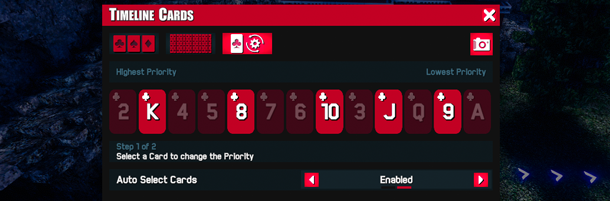
Auto Select Cards will automatically choose cards based on the priority you set.
You'll need to collect all '4 of a Kind' for each Card to unlock the ability to Auto Select that Card.
Auto Select Cards Mission
The Auto Select Cards screen is locked until the 'Collect Any 4 of a Kind' Mission is completed.
This Mission becomes active as soon as you choose your first Card.
Auto Select Cards Priority
There are two steps for setting Card priority:
Step 1: Select the Card you want to set the priority for
Step 2: Select the position you want that Card to be in
This will swap the first selected Card with the second one.
Weapon Cube Damage Research
The Weapon Cube Damage Research makes it so each Weapon Cube increases Team DPS by up to 10%, so the more Cubes you collect the more damage you'll do.
Teammate Upgrade Effects
We've limited how often the Teammate Upgrade Effects are displayed, increasing performance when Auto Buying after a Time Warp.
The Level Up effect will display every 5 seconds.
The Upgrade, Promote, Training & Spec Ops effects will display every 30 seconds.
Modifiers Number Format
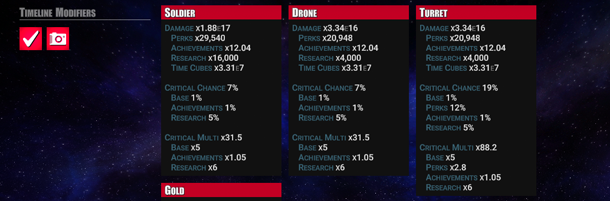
When a number gets above 1 Million it starts using your selected Number Format.
Chat
Devs & Mods names will now show up in Yellow in chat.
Ghost Mode Renderer
Now when on your Hover Bike you'll always see the character model whether you are in Ghost Mode or not.
Enemy Composition before Zone 10
To make it feel more satisfying to fight enemies after grinding the early Zones, White Crawlers now start appearing before Zone 10.
The Unlock Turret mission now requires you to defeat 275 enemies instead of 350 based on the new enemy composition.
Boss Timer
The Boss Timer has been fixed and will now count down from above 60 seconds.
Weapon Cubes
Weapon Cubes spawn further from Time Cubes making them more satisfying to collect since they're easier to see.
Air Strike
Fixed bug where Air Strike Energy was using banked energy after time warp. Now uses energy amount set in Research.
Other Changes
Fix for Server Error causing Double Avatars on the Live Leaderboard
Fixed getting Carry Capacity Warning even though Research was maxed
Fixed Time Cube Achievements have been updated to say Time Cube Drop not Time Cube Find
Fixed header on Mute Player confirmation message
A lot of the changes in this update were based on the suggestions in the Discord Ideas channel. The next Friday Update will be on September 20.
UPDATE 18: New Research
Weapon Cube Outfit
Unlock this Outfit by completing the 'Collect 1,000 Weapon Cubes' Mission.
Starting Gold Offset Research
This new Time Cube & Weapon Cube Research sets what Zone your Starting Gold is based on.
For example, your Starting Gold Offset is 100 Zones, if your Start Zone is 41 your Starting Gold will be from Zone 141.
This lets you to start a run Overpowered.
Weapon Cube Research
Spend Weapon Cubes to boost your Click Weapon, Drone & Turret Damage.
You can also boost the Gold & Rainbow Gold multipliers.
Autobuy
To avoid deactivating Perks by Promoting too early, Autobuy waits until you can afford all 4 Upgrades before Promoting.
Since Training takes longer Autobuy will enter Training as soon as you can afford 2 Upgrades.
If you've invested in Drone & Turret Autobuy Research they will now automatically start leveling up after Time Warp.
Fixed the bug where Autobuy would sometimes buy higher than Start Gold after warping.
Gold Overpowered Bars
The Gold Overpowered bars make it easier to tell if it's a good time to promote.
The bars have been separated into 2 rows, 1 above & 1 below the Perks making it easier to read.
The top row is for the current Promotion level. The dark yellow bars show which Perks you can afford to unlock, while the bright yellow bar shows if you can afford to Promote.
The bottom row shows how many Upgrades you can afford after Promoting.
Weapon Cube Widget
Click on the Time Cube or Weapon Cube icon to toggle between the Time Cube & Weapon Cube Widgets.
Weapon Cube Emoji
Type weaponcube into the in-game chat for the Weapon Cube emoji.
Orbit Mode Zone Separator
Orbit now has lines separating every 10 Zones.
Show Zone Complete Arrows
New option to show/hide the Zone complete arrows in Settings > Graphics
Invincible Enemies
Fixed the bug where enemies would occasionally spawn & be invincible.
Loading Improvements
We've improved how the planets are loaded and stored in memory which means faster loading times & better overall performance.
Other Changes
The Public World Players Online counter was changed from UDP to TCP
Changed Air Strike Waves tooltip to say Wave instead of Level.
Cleaned up the 'Spec Ops' Mission wording.
A lot of the changes in this update were based on the Discord Ideas channel, so thanks for the great suggestions. The next Friday Update will be on August 23, in the meantime follow us on Steam to get update notifications & check out our Discord
UPDATE 17: Weapon Cubes!
Weapon Cubes
Weapon Cubes will start appearing at Zone 500, with guaranteed cubes every 500 Zones.
Air Strike
Call in an Air Strike to do massive damage.
Each Air Strike instantly deals 25%-100% damage to a Wave depending on how you've invested your Weapon Cubes.
The Air Strike is perfect for when you're pushing through a deep run and need an extra burst of damage.
Increase how many waves in a row the Air Strike will hit, just defeat the current wave in order to call in the next one.
Spend Weapon Cubes to unlock this ability.
Dimension Shift
A Time Clickers favorite, the Dimension Shift Ability increases all DPS for the duration of the run.
Use this ability multiple times in a run to stack damage and push further in deep runs.
Autobuy
The Start Level Research has been replaced with the new Autobuy system.
Autobuy automatically levels up your Click Weapon, Drone & Turret based on your Gold.
As you earn more Gold it will continue to Autobuy team levels until you reach your max.
Autobuy will only Promote when you can afford all 4 Upgrades.
In case you don't want to have your teammates right away, after Time Warping you will need to click on the Drone & Turret 1 time each o buy those teammates before they will start Autobuying levels.
Starting Gold
You will now start with 1 Wave worth of Gold based on your Starting Zone.
Autobuy will use the Starting Gold to automatically level up your team after Time Warping.
Weapon Cube Research Screen
Spend Weapon Cubes to enhance Air Strike, Dimension Shift & Weapon Cube Progression.
You can also boost team Autobuy, Start Zone & Waves Per Zone Research.
Weapon Cube Missions
You'll have 5 Weapon Cube Missions to complete.
Raised Caps
Max Zone is 10,000
Max Perk Tier is Tier 11
Max Team Level is 40,000
Other Changes:
Changed last Carry Capacity Research Level to be No Limit
Weapon Cube Chat Alert Filter
Sped up buying/selling Research when holding down mouse
Extended Live Leaderboard to 10,000
Handle crediting Weapon Cubes if Research is re-balanced
The next Friday Update will be in 4 weeks on July 26. In the meantime follow us on Steam to get update notifications & check out our Discord
Preview: Experiments!
This sprint was all about brainstorming and experimenting with some new features.
We're working on an exciting idea that we'll be able to share with you soon, so be sure to follow us on Steam to get notifications for the latest updates.
The next Friday Update will be on June 28, in the meantime check out our Discord.
UPDATE 16: Networking & Server
Join A Friend
The 'Join Friend' button on the Main Menu shows all of your Steam friend's currently in a Co-Op World.
Just click on your friend's icon to quickly join their game.
Previously you couldn't do this in game, instead you had to click on your friend in the Steam's Friend List and chose Join Game from there.
Reset Research Preset
We've had a lot of requests for the ability to completely respec a Research Preset, so we've added a 'Sell All' button when Time Warping.
You'll need to confirm the respec so you can't accidentally refund all of your Time Cubes.
Devs & Mods
Devs & Mods will now show up with a yellow outline on the Live Leaderboard & in the Convoy Widget.
So you'll show up with a white outline, friends will be in green, and Devs & Mods will be yellow.
Networking
Over the past few weeks the server has been like a giant game of whack-a-mole.
We add logging to the server, find & fix a network bug, this increases the network traffic letting players further stress test the server, which uncovers a new bug, repeat.
However its been a successful game of whack-a-mole, we've:
- Fixed an inconsistent timer that was causing group disconnects
- Resolved an issue where an already connected player reconnects to the server
- Tested out a new server host, but returned to our previous host due to better performance
- Fixed a few network errors
Based on our logs, the remaining server disconnects all seem to be valid, meaning the player has not communicated with the server in over 60 seconds.
We'll continue to keep an eye on the server as the network traffic continues to increase.
Other Changes
Changed admin input field to password field
Admin passwords saved, no longer have to re-type each time
The next Friday Update will be on June 14, follow us on Steam to get update notifications & check out our Discord.