Tiny Life cover
Tiny Life screenshot
Linux PC Mac Steam
Genre: Role-playing (RPG), Simulator, Indie

Tiny Life

0.37.0: Multiple Floors and Fences Galore

Hey gang! It's been a minute since the last update with a devlog, but that's for a good reason: We've been hard at work getting this very update ready for all of you! It's a big one, so strap yourselves in.

Going Up a Level


So, let me set the scene for you: Imagine you're playing this beautiful family, and they have a cute little bungalow, but now they have a kid! Oh no! There's not enough space for the kid to live! Whatever shall they do?

Well. How 'bout they build a second floor??

Yea, you heard that right: You can now build a full second floor on your lots in Tiny Life. And better yet, you can build another floor on top of that! And then another floor on top of that! This means that you're able to build a total of five floors (two in the demo), and fill them with all your favorite furniture, and rooms, and decorations, and Tinies, of course.

Don't believe me? Well, take a look at this beautiful house built by Yellore, which you can also find on the Steam workshop.
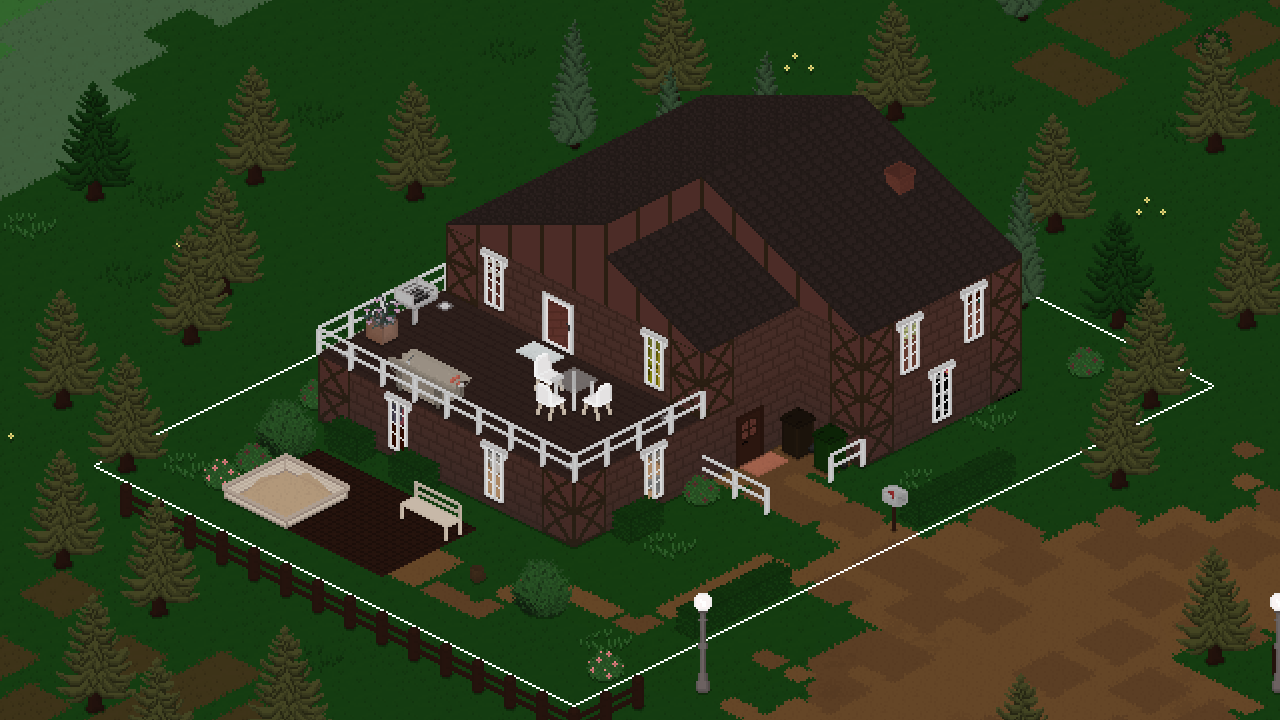


You can find all the info you need on how to create and populate additional floors in the game, but it's pretty simple all in all: You can use the buttons in the top right of the screen (or keyboard or gamepad controls as described in the controls info box in the bottom-right of the screen) to switch which floor your camera should be focused on, and you can build and interact on the currently focused floor!

While this system is already fully functional and very usable, it may still have some bugs here and there, especially when it comes to rendering. As always, please report any issues you find through the feedback form, which is also linked in-game.


Joe feels like king of the world.

Much Better Fences


As part of this update, and especially to accompany the new ability to create mezzanine levels and other types of holes in the ground, we've taken the opportunity to overhaul fences in the game.

If you don't remember, or you haven't played with them yet, fences used to be, well, a little bit of a mess. They were essentially furniture pieces that you could place down like any other objects, but they would automatically connect together. The trouble with them, though, was that they were always stuck to the center of the tiles they occupied (much like any other furniture, as well), and so using them as a sort of wall-like border between tiles was pretty much impossible. It also didn't help that placing them was a bit of a nuisance, since there was no way to drag them out or generally place multiple at once.

So, to fix this, we've taken the liberty to make them more like walls! You can now find the new Fencing tool as part of the build mode toolset, and all of the existing fences have been converted to the cool new ones. In addition to that, we've added a more modern metal-style fence that you can use in your builds as well!


In the above picture, you can see a comparison between the old-style fences (on the red tiles) and the new ones (on the yellowy green tiles). Cool, right?

What About Old Fences?


A lot of the time when new features are added to Tiny Life, older ones are updated or changed automatically to accomodate them. For example, when fridges started being able to store items a few updates ago, their type changed from a regular furniture item to one that can store items - no manual replacement of fridges necessary.

Here's the thing, though: With these new fences, it's not really possible to do that. Think about it this way: If old fences, which occupy the center of tiles, are automatically converted to new ones... which side of the tile should they now occupy? Could there even be a consistent side, or would it have to vary based on the location and context of where and how the fence was being used? And what about places where old fences can't reasonably be converted, like a build in which fences are placed in the tile space between two walls?

Because of all of these issues, and essentially to leave it up to players how they want to structure their new fence-based empire, we've deprecated the old fences instead of fully removing them. This means that, when you load your saves, the old fences will still be present in the world, but you won't be able to buy or place any new ones. Over time, you're expected to replace all of your old fences with the new ones, and eventually, maybe in a few years or so, the old fences will be removed from the game for good.

To remind players of this transition, hovering over the old fences in build mode displays a tooltip that tells them exactly this information but, you know, a little less rambly.

New Items


We also added a few new items, tiles and other fun objects since the last update. We've already gone over the new metal-style fence, which is lovely, of course, but we also added some new furniture!


As you can see, we introduced a new two-tile-wide version of the cute three-layer shelf that everyone loves. This shelf's surfaces work similarly to those of the existing dresser drawer: you can place three smaller items on it, or one large item in the center.

In addition to this, we've also added a cute new book stack item and a nice frilly rug, as well as a proper sand tile, so all of you mapmakers don't have to use a recolored version of the dirt path.

Also, and this is kind of a secret for an upcoming new map, we've added dirt roads as a non-buyable map editing tile! These are meant to be placed with dirt paths on the sides to allow Tinies to walk along the side of the road, much like you would in real life when traversing a country road.


We're not going to tell you anything about the upcoming map set, but suffice it to say, it'll be very cute!

Various Improvements


Here's another small feature for all of you mapmakers out there: by extremely popular request, you can now use certain tile types as paths that exit the borders of the map, allowing Tinies to head out of town or travel to another world without needing to get into their car. More specifically, these tiles are any concrete paths, as well as the dirt paths that people frequently used to use as sand. You may be able to guess why it was necessary to add a proper sand tile now.

As part of our journey to ever-improve existing features of the game, and as a reaction to a survey that we did absolute eons ago, we have improved upon the emotion stings in the game! Really, there were two major improvements here: Number one, most of the stings are a lot shorter now and fit the musical style of the game a lot better. Number two, the in-game music (should you have it enabled) now quiets down a bit while the stings are playing so that you're able to hear them in all their glory. Thanks so much, as always, to Leiss Hoffman and Jamal Green for their amazing work and musical collaboration for the game.

The Full Changelog


That's it for this update, everyone! As you can see, there are quite a lot of additions and changes in this one. If you want to see the full changelog, which is a lot this time around, you can find it in the bottom-right corner of the game's main menu as always, or right here!

Lastly, thanks so much again for the amazing feedback from everyone in the Tiny Life community, as well as the lovely builds, households and lots everyone has been sharing. Keep in mind that, if you want any of your custom content or other media related to Tiny Life showcased in an official capacity, you can check out the Community Showcase page on the website.

❤️ Ell

Additions
  • Added the ability to build additional floors on lots, allowing up to 5 floors in the full game, and 2 in the demo
  • Added a proper wall-like fencing system, including a new metal fence, and marked furniture-style fences as obsolete for future removal from the game
  • Added a wide three-layer shelf, a small stack of books, and a rhombus rug
  • Added a proper sand tile, which looks a lot better than the yellow dirt path color
  • Added the ability to play online games with specific other tinies
  • Added the ability to adopt babies as well
  • Added a few more hair and skin colors
  • Added Simplified Chinese translation, courtesy of Zhao Huaye. Thanks so much for your hard work!


Improvements
  • Overhauled emotion stings and lower music volume while they're playing
  • Add the exported version as a tag when uploading items to Steam workshop
  • Automatically remove outdated custom content on game startup
  • Allow chatting on the phone with multiple people at once
  • Allow inviting over multiple people at once
  • Made the AI choose from available people based on their relationship
  • Paths at the borders of the map will now also count as exit points
  • Improved auto-tile visuals, and made path colors auto-tile with each other
  • Persist object repair progress between attempts
  • Display thought bubbles when reading
  • Allow people with lot employments to visit when being asked
  • Display a person's age on their tooltip
  • Snap wall-attached furniture to appropriate walls automatically in build mode
  • Start jobs off with an active vacation day so that work doesn't start immediately
  • Allow adoptive parents to take parental leave as well
  • Allow undoing using ctrl+shift+z as well
  • Display vehicle ownership as a tooltip
  • Automatically create a save backup when game version or mods change
  • Display destroy particles for walls and tiles on higher floors
  • Display a wide new game button when there are no saves, rather than graying out the load button
  • Inverted default steam cloud behavior, causing newly created saves to be cloud synced by default
  • Use the natural placement sound for water objects
  • Use newer masters of Leiss' soundtrack, which also includes some previously missing bits
  • Changed the furniture tool's name and icon to "Objects" to accommodate the fact that it also contains plants and other decorations
  • Reduced the time it takes for new Steam subscriptions to be reflected in the game
  • Display an info that the game needs to be restarted when enabling or disabling mods
  • Remove roofs that intersect with newly created rooms


Fixes
  • Fixed two people repairing an object breaking repair progress
  • Fixed wall-related undos and redos not correctly restoring old rooms
  • Catch any validation exceptions for map objects
  • Fixed fairy lights crashing when not on a wall
  • Fixed out-of-town actions counting as visible for babies
  • Fixed the tile tool having visual issues in some camera rotations
  • Fixed an exception when an enqueued social action has no valid partner
  • Fixed collisions not updating correctly when moving some furniture
  • Fixed undoing a room deletion not restoring the room correctly
  • Fixed an exception when a person stops having a lot employment and then tries to go home
  • Fixed a crash when a lot has no free tiles around the front door
  • Fixed mods with broken localizations crashing the game on startup
  • Fixed interior walls not displaying as down straight after placement
  • Fixed people autonomously reading skill books that don't interest them
  • Fixed regular visitors being deleted from maps removed from saves
  • Fixed moving lots allowing roofs to be out of bounds
  • Fixed a crash when loading an invalid save file in the demo


API
  • Added MultiActionHandler initialize event
  • Replaced action varieties with a new system, action arguments, which allows multiple arguments to be passed at once
  • Allow adding more actions to the set of actions used by the Clean Everything action
  • Dead people are now stored in their gravestone, rather than on the map the gravestone was first on
0.36.2

Improvements
  • Display character creator and build mode tooltips immediately
  • Only display leaving notification if a person was invited in


Fixes
  • Fixed a crash when creating a new save file without saving
  • Fixed a concurrent modification issue when adding maps to a save
  • Fixed roofs not being validated properly, causing crashes when previewing lots
  • Fixed being unable to mop a puddle on natural ground indoors
  • Fixed chatting not working correctly with people on other maps

0.36.1

We're taking a development break for a few weeks! This is a little bugfix update to tide yall over, though. ❤️

Improvements
  • Avoid people bunching up when visiting a household by choosing a unique goal location


Fixes
  • Fixed being unable to select disabled build mode buttons using a gamepad
  • Fixed an exception when a social action fails due to a missing partner
  • Fixed children being unable to complete the Friend of Everyone life goal
  • Fixed people repeatedly trying to prepare food when failing

0.36.0: Retro Rarities and Stopped Starvation


Hi friends and strangers alike! I'm excited today to share with you all an update that has been in the making for quite a while: the Retro Rarities Set! Along with this set, this update features a fair share of improvements, bug fixes (especially related to multi-world saves), and more.

Let's get into it!

Retro Rarities


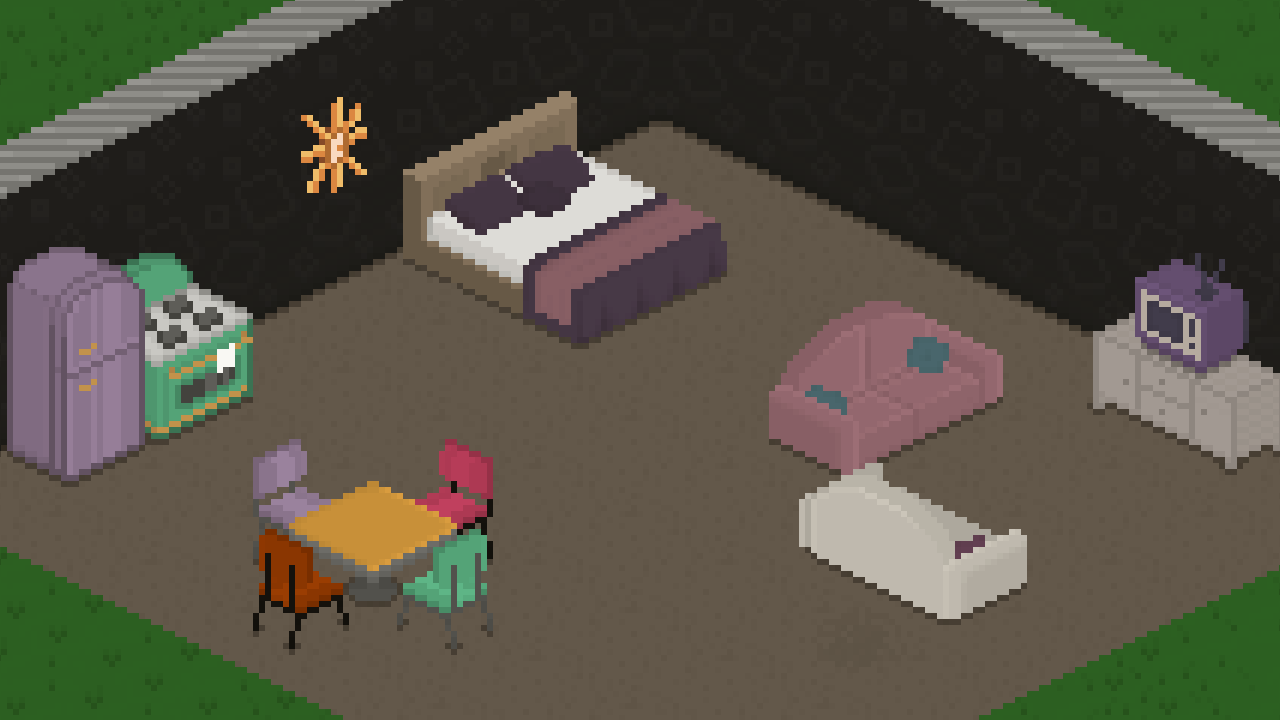
The art for the Retro Rarities Set was created by the lovely clovedove, who worked with me to create a group of content themed around the aesthetic of the 70s through 90s, and we're incredibly happy with the result.

The Set features over 10 new furniture items and over 5 new hairstyles, and all of them have a range of beautiful bright and muted pastel colors to go with them.


I asked clovedove to tell you all a bit about her process when creating this art, and she gave us some lovely insight into it.

When making the set, I drew inspiration from 1970s furniture, specifically retro kitchen appliances, simple in design but iconic with their pastel colors. The unique furniture of that period with the muted yet colorful palettes has always been an inspiration for me, reminding me of a dusty woolen blanket; cozy and nostalgic, yet dated.

My process in my work is a little different from the norm: whereas others first outline, color and shade, I block out the silhouette of the item, shade it, and finally outline with a few small adjustments to the silhouette. With my method, I can fully focus on lighting and the perspective of the object, making it look more organic. Outlines come last, as they enhance the shading, it’s my favorite part of the process, and it brings it all together!


Here's a little example to illustrate what she means:


As with all other Sets, the Retro Rarities Set is included in the game for free, but is not featured in the Tiny Life Demo. To get the Set, just download this update and you're all Set!

Other New Stuff


Along with the cool Set art by clovedove, I also added some new art of my own: two new wallpapers that fit the Retro Rarities Set, as well as a new concrete tile flooring.


The wallpapers come in a variety of colors, both vibrant and muted, and you can select similar colors for the background and the highlights, so making them look more subdued is easy as well.

As part of one of the minor updates for 0.35, we added some cute falling leaf particles to trees. The feedback on these has been very positive, and a lot of players loved how they improved the atmosphere and liveliness of the game, especially in the forested area of Maple Plains City. In this update, we added another ambient effect that shows up at night: fireflies!


These can't be interacted with (yet?), but they add a bit of subtle lighting and movement to Tiny Life's nights, and we hope you enjoy them!

Multi-World Fixes and Improvements


Throughout 0.35 and its minor updates, the multi-world saves feature was officially considered unstable, and for good reason. As we learned just a few days ago, the way that Tinies in other worlds were updated caused a lot of issues, including many a starvation situation.

We have now remedied a lot of these issues and conducted multiple long-term AI tests, and everything should work a lot less flawed...ly now!

We also fixed a nasty bug that caused regular visitors with jobs to be fired constantly because they wouldn't actually show up to work, choosing to stay at home instead. Oops.

Community Showcase


As I talk about a lot, I'm constantly overwhelmed and blown away by the support and love that the Tiny Life community gives not only the game, but also its developers. Because of this, we've decided to give back to the community in a way by more actively promoting your lovely creations.

We created the Tiny Life Community Showcase page, which is part of the Tiny Life website! This site shows off a variety of community creations, including mods, households, lots, custom worlds, media like YouTube videos and stream highlights, and even some fan art that you all have been creating!


Currently, the site is still a little barren, but the introductory section at the top explains how you can add your own entries to it - don't be shy!

In addition to this site showing off community creations, it also serves to give new players an easier introduction to finding and installing custom content. A button to open the community showcase site will now be displayed in-game when installing new custom content, and it can be used as a more officially endorsed location to get trusted custom content items.

Full Changelog


As always, I hope you enjoy this update and especially the new Retro Rarities Set by the amazing clovedove.

❤️ Ell

Lastly, here's a copy of the full changelog for your perusal, which you can also find on the game's documentation website, and in the bottom-right corner of the game's main menu.

Additions
  • Added the Retro Rarities set with art by clovedove, which includes various new furniture and clothing items in a retro style
  • Added ambient firefly particles to forested areas
  • Added two new funky wallpapers
  • Added large concrete tiles tile


Improvements
  • Display variation textures for concrete, roads and dirt paths
  • Increased default and allowed regular visitor amounts
  • Added emotions for babies following adults and cleaning up babies
  • Added emotions for babies reading story books and adults helping them
  • Display custom content info in multi-map selection options menu
  • Improved unemployment display in relationship infos
  • Link new community showcase site in custom content menus
  • Localized exported household, person and lot names
  • Improved friendship and romance string displays in relationship panel
  • Allow the espresso machine to break
  • Improved passive update timing for unplayed maps


Fixes
  • Fixed jungle gym not being obstructed by roofs
  • Fixed debug teleport action not working if the person is on the same map
  • Fixed content not being properly validated when lots are exported
  • Fixed various issues when adding additional maps to the current save
  • Fixed tile grid being hidden behind multi-layer tiles
  • Fixed depth positions of scaled particles on parents
  • Fixed people not finding out someone's job when meeting them at work
  • Fixed moving to a new lot causing the household to be added on the wrong map occasionally
  • Fixed unpaid bills info displaying for inactive households
  • Fixed skill achievements not working due to baby skills
  • Fixed being unable to go home on a different map if standing in the same location as the home lot
  • Fixed people not fully reaching their destinations on high speeds, causing subsequent actions to fail
  • Fixed regular visitors failing to appear at their jobs, causing them to get fired regularly


API
  • Made Walk and Drive actions typeless
  • Allow roofs to have multiple layers and colors
  • Allow actions to be enqueued as priority by the AI

0.35.4

This one's a little embarrassing. Sorry everyone!

Fixes
  • Fixed a crash when creating a new save.

0.35.3

Fixes
  • Fixed an exception when loading very old saves, or saves with corrupted options
  • Fixed being able to open the world switch menu using a gamepad when only one world is present
  • Fixed a crash when a Tiny dies in another world
  • Fixed a rare exception when trying to visit a lot in another world

0.35.2

Additions
  • Added ambient leaf particles that occasionally fall from trees


Improvements
  • Made furniture storage amount display easier to read, and display it even when no items are stored


Fixes
  • Fixed a crash when multiple objects are removed while updating
  • Fixed being able to enter build mode while on another map
  • Fixed border tile selection being incorrect, causing weird looking paths in Demoville

0.35.1

Improvements
  • Clarified popup that displays when the game crashed
  • Improved path cost modifiers for tiles slightly
  • Clarified map selection in new game menu for multi-maps


Fixes
  • Fixed an occasional crash when trying to import a household
  • Fixed a crash when validating lot employments on an old custom map
  • Fixed an exception when picking up a person that was deleted


API
  • Also use dictionaries for map neighborhood

0.35.0: Multiple Maps and Fabulous Phones

Hi everyone! Today, there's another super exciting update coming to you, which features a lot of improvements and two major new features, as well as some smaller stuff. So let's get right into it!

Multiple Worlds Per Save


What? Multiple worlds per save? What does that even mean? Why did you suddenly add this feature that isn't even on your public roadmap, you FOOLS!!

Before we get started, please note that this feature is still experimental and, as such, unstable. A lot of additional unexpected issues may occur when traveling between maps and having households on multiple maps, so please report all of them through the feedback form if you encounter them. Also, we advise that you avoid using this feature on a save that is really important to you without making a backup first.

Now, let's get into it! Up until now, when creating a new save file, you had to select the world you wanted to play in. While this was all well and good, it lacked a lot of flexibility. When adding new worlds down the road, we'd have to continue updating older worlds with additional lots, households and decorations, which would become incredibly messy and cumbersome at some point. Now, this feature doesn't mean that we won't ever update older worlds anymore, but it does mean that there's not as much pressure to feature new features on older worlds as well.

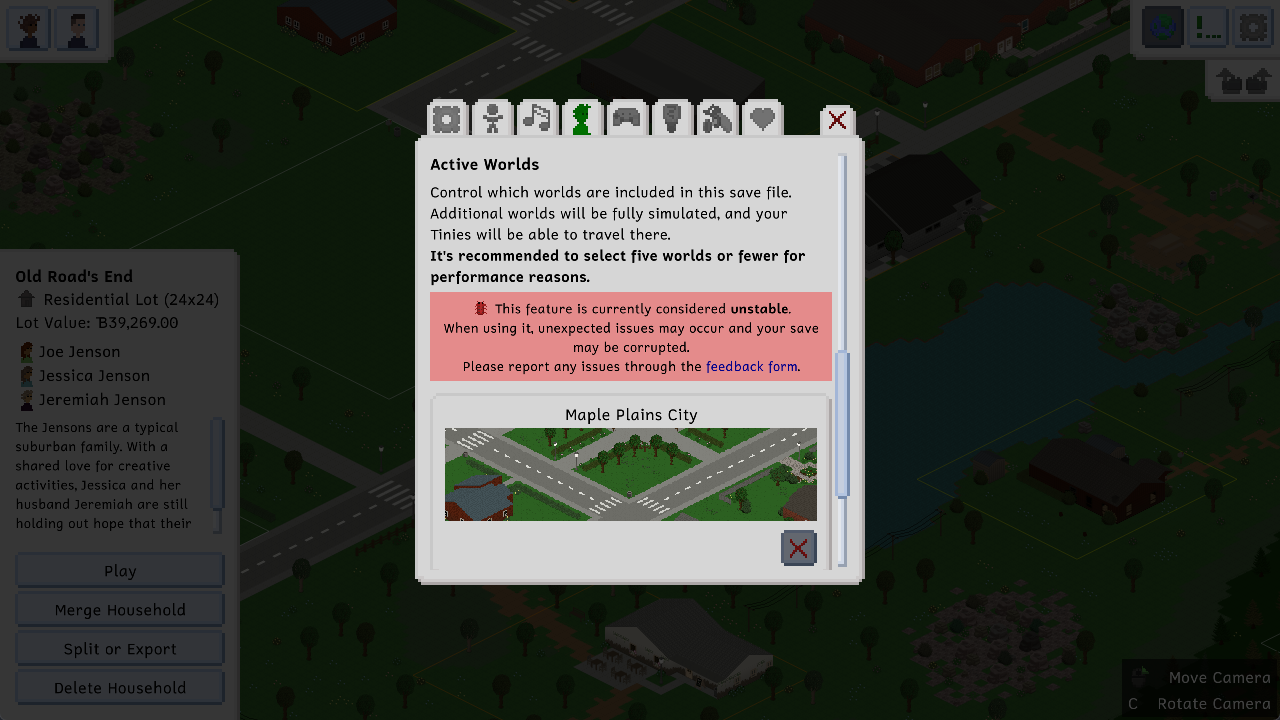
But now, you can bask in the glory of having as many worlds in your save as you want! You can select the worlds you'd like to include in your save through the gameplay section of the options menu. We recommend a maximum of three or five, based on your computer's specs, and we'll get into why a little later in this post.


Once you've done so, you'll now be able to do two major things: you can select your active Tiny and select the "Travel to World" action, which allows you to travel to any of the worlds you have in your save. Instead of doing that, you can also select the little globe button in the top right (or press the X button on your gamepad) to open the world switcher, which allows moving the camera to a different world. Once you're there, you can then select any Tiny in your active household and tell them to do things in that world, and they'll automatically travel there!


Tinies will take about 15 minutes of in-game time to travel between worlds for the sake of a bit more realism. This means that, while Tinies from other households will occasionally travel between worlds to visit other lots, they will do so a little less frequently than visiting their own neighborhood.

Phones


Phones? Phones! Tinies of all ages (other than babies) now have access to mobile phones, as well as landline phones! They will always have their mobile phone on them, and you can interact with it by selecting the current Tiny and going into the "Phone..." category.


The fun thing about phones is that each Tiny has a differently colored phone case, and you can choose which phone cases your Tinies should have through the "Change Phone Case" action. It costs 20 tiny bucks, so maybe don't go too crazy with it, but you can pick a color from the pastel or modern color schemes.


With phones, we also added the ability to invite people over! You can do so through your mobile or landline phone. Based on friendship and the person's needs and current actions, they may or may not be able to visit you. If they are, they'll travel to your household and ring the doorbell as soon as they're around. Yay, friends!

Little Life Goal


A while back, there was an issue report for the fact that children were able to have the painting-specific life goal, but weren't actually able to complete it due to the easel only being accessible for adults. While this issue was fixed in the last update, it gave us the idea to add a new creativity-focused life goal for children, so we did just that!

The life goal is called "Creative Kid", and it gives a cool reward personality that allows them to be much more creatively gifted as an adult, as well as lowering their passive entertainment need reduction. Pretty useful!


The Full Changelog


That's pretty much it for major features for this update! The full list of changes ended up being quite long, because we also fixed a lot of bugs and added a lot of little quality-of-life improvements. We're super excited about this update, and we hope that you are too!

As always, we'll round out this devlog with the full changelog for this update. You can also see the full changelog in the bottom-right corner of the game's main menu, or on the documentation site. Enjoy!

Ell ❤️

Additions
  • Added the ability for saves to have multiple worlds in them, as well as the ability to travel between them
  • Added mobile and landline phones, as well as the ability to use them to invite people over
  • Aded a bills breakdown list to the notification
  • Added Creative Kid life goal
  • Added two new achievements
  • Added thought bubbles which display in some situations, like when sleeping
  • Added the ability to use emoji in text (currently only pasting is supported, not direct input through the operating system's emoji keyboard)


Improvements
  • Stagger minor object updates for much improved overall performance in play mode and less lag spikes
  • Display a notification when meeting new people at work or school
  • Improved the mod list view in the game options
  • Allow using up and down arrow buttons to navigate the cheat history
  • Made some more baby actions emotion-dependent
  • Made Tinies wait to be invited in when they visit so that they don't go jogging randomly
  • Improved mail delivery order so that the mail deliverer doesn't wander aimlessly through the world
  • Made the notification display and history menu slightly wider
  • Display weekday separations in the notification history menu
  • Allow changing the cheats keybind in the options
  • Nerfed painting sale prices slightly again
  • Cleaned up the debug menu
  • Improved achievement names


Fixes
  • Fixed Steam icon being missing from Steam notifications
  • Fixed outdated rooms causing a crash when making a map smaller
  • Fixed counters and fences rendering ghostly when a lot preview is created
  • Fixed another genealogy issue when having children
  • Fixed flower grass connecting to paths incorrectly
  • Fixed being able to ask babies to taste child food
  • Fixed main menu warnings being displayed again when exiting to the main menu
  • Fixed doors opening visually for people who have not been invited in
  • Fixed an exception when trying to do an inappropriate action on a lot without a household
  • Fixed front door calculations taking into account trash bins as well as mailboxes
  • Fixed some strings, like family-focused, not splitting properly due to length


API
  • Due to the addition of the ability to have multiple maps, action infos now have a current map and a goal map, rather than just a single map
  • Updating objects now have three updating states: always minor, major if the map is active, and always major
  • Allow mods to interact with the game's SaveData when saving and loading through new events in SaveHandler

Steam Deck Verified!

Hi everyone! We're coming at you today with some lovely Steam-specific news.

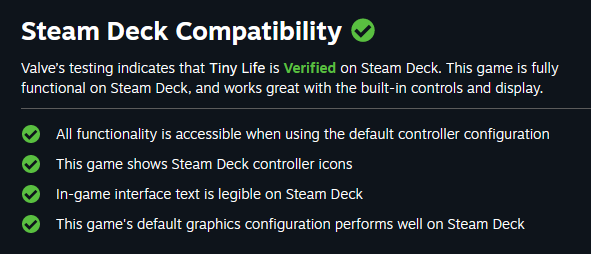
Since the last update, Tiny Life is now officially ✨ Steam Deck Verified ✨


As you can see in the image, this means that Steam thinks Tiny Life is the best game ever made! N- oh, no, it doesn't mean that at all? Bummer.

What it actually means is that Steam thinks Tiny Life works well on Steam Deck, Valve's handheld console! Tiny Life has been compatible with Steam Deck and other controller-style input for a while now, but now we have official confirmation.

The little green Verified checkmark will now prominently display on the Steam store, and Tiny Life is more likely to be recommended to players who are browsing on their Steam Decks.

Yay!

❤️ Ell