

Tranzient
Hotfix 1.00.00.81
- When opening a new synth and grabbing at the same time, the synth could get stuck to your hand.
Hotfix 1.00.00.80 - custom layouts
- Save custom layouts by using the save layout key next to the scale chooser in the synth
- You can then save and load the layout using the scale drop down
- Click delete whilst a custom layout is loaded to delete it
- Root notes still take effect separately to the layout
- Custom size and position of synth keys is saved and restored
- The popup menus are no longer transparent as this caused a clash with some popup windows
Tranzient gets a Wavetable Synth!
v1.00.00.76 - Added Wavetable synth
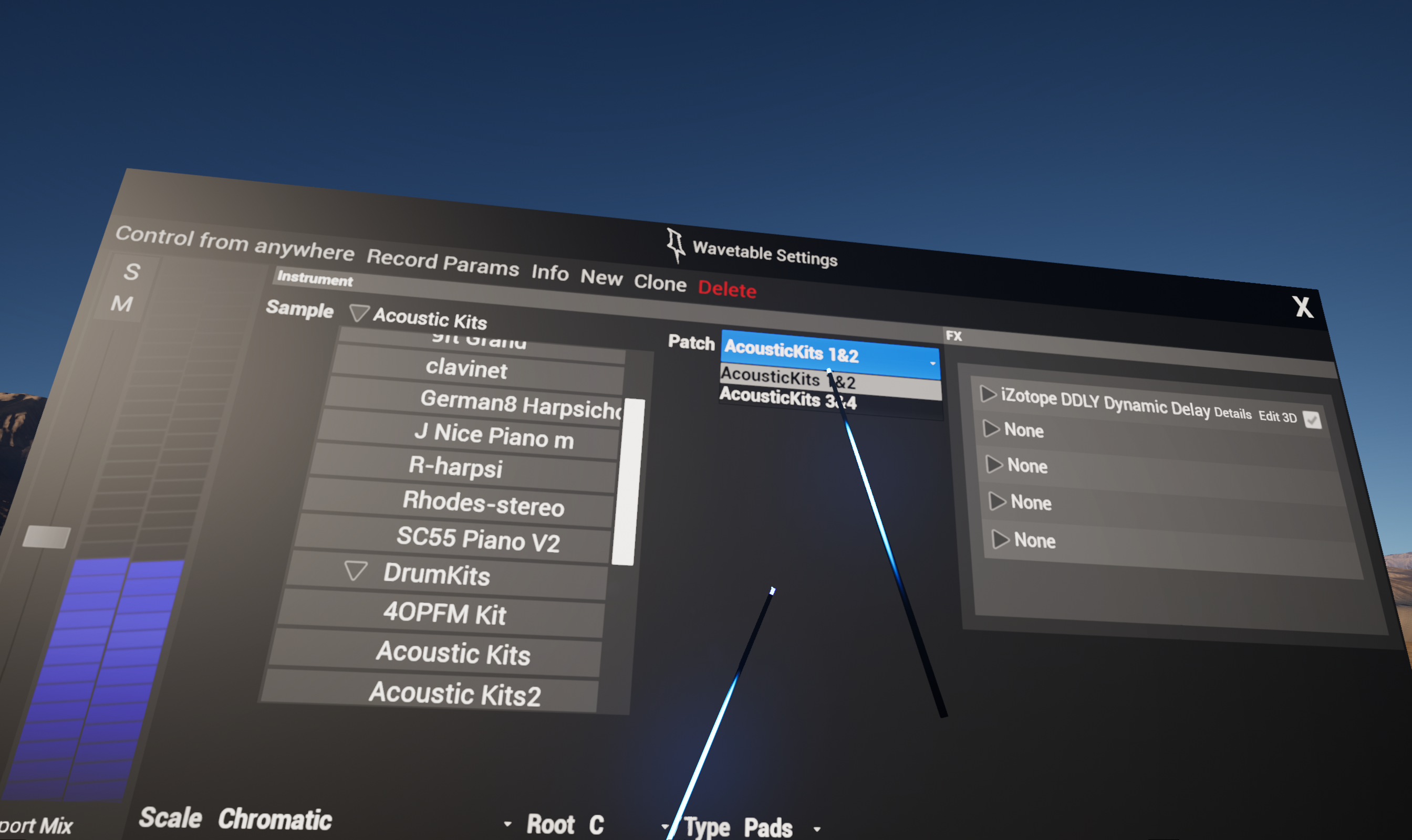
- New wavetable synth with built in library including drumkits, synths and orchestral based sounds
- When using drumkits with the wavetable synth, each drum can be edited separately in the sequencer
- Audio FX and VST FX can be added to the wavetable synth
- The left 3D control button is auto mapped to Pitch bend, the right is mapped to Modulation
- Fixed an issue where ASIO buffersizes below 256 were rounded up to 256
- Added 'x' button to sequencer items to easily clear a single sequence (e.g. delete a single snare pattern) without needing to go into the 'i' menu
Hotifix 1.00.00.70 - Multiplayer fixes
Hotfix
- Video on clients no longer obscured by additional overlay
- Help videos can now be closed on clients
- Voice/VOIP is no longer gated/no longer drops out when speaking quietly
- Intermittent crash during VOIP start and stop fixed
Hotfix 1.00.00.55
1.00.00.53 Hotfix - Spectator screen
Spectator screen no longer displays with the incorrect size
Content refresh update - more songs and kits!
v 1.00.00.46 - content refresh
Features
- Kits content refresh, most kits significantly bigger
- Songs content refresh, added new songs with more genres
- New help video viewer
- Bigger Titlebar buttons in popups, easier to click
- Video player now widescreen aspect ratio
- New translucent menu system and icons
- 3D Text replaces 2D help popups
- New round/cylindrical waveform rendering
- All drums now animate on hit and use higher performance animations
Fixes
- Improved drag and drop kit building, layouts don't change when adding new trigs
- Fixed an issue where audio FX control panels on the Synth were reloading as the synth control panel
Minor update
LIV support added
New update v1.00.00.30 - Harp synth keys, Interaction recording and playback!
Update v1.00.00.30
Features
- New harp mode for synth keys, harp strings animate/have physics when hit and follow the release time of the synth. Selectable from the synth info/settings popup
- Avatar recordings can now have interaction turned on, so you can replay a performance triggering loops, editing FX and hitting drums etc..
- Valve index and WMR controller mappings are now much better and use the new SteamVR input system. This also makes it much easier to create your own mappings from Steam.
A big thank you goes out to Virtuonaute for beta testing the Valve Index integration. Check out his twitch channel! https://www.twitch.tv/virtuonaute
Fixes
- Fixed save and load of synth control panel positions
- Synth presets now use the same browser as clips
- Smoother transitions between loops in the clip browser
- Better arms/ik for all mixamo style avatars
- Better animations for XBot and YBot
- Better avatar animations generally and avatars no longer obscure view when moving head around or walking around quickly
- Avatar walking animations are scaled by movement speed
- Fixed multiplayer 3D controls not visible in clients
- Faster enumeration of content/worlds/avatars etc.
- Displaying the avatar browser no longer causes the framerate to slow down
- Teleporting when pointing at a wall now locates the player 1m away from the wall (cannot teleport into wall)
- New locations for all popup windows
- Popup windows dim in the distance
- Better text when seen at a distance
- Fixed occasional movement glitch when going from walking around IRL to smooth locomotion
- Camera and screen re-enabled for WMR headsets
- New mappings for Valve Index controllers
- Better mappings for WMR controllers (joysticks work for smooth locomotion)
- Custom hand calibration in settings (fine tune hand position)
- Now restarts on changing user audio folder
- Option to playback interaction in avatar recorder
- Fixed count in on longer avatar recordings
- Fixed issue where synth key not triggered when other hand pointing at the key
- Additional Afghan atmos world which uses the new Unreal atmosphere system
- Multiplayer collaborative editing improved. Whoever clicked the step sequencer last owns the step sequencer input (recording and active cue)
- Fixed video display on mini display above step sequencer.
- Arm menus now only disabled when grabbing objects rather than when controller is grabbed
- World load is now much faster
Tranzient version 1.0 is here!
- Built in plugins get 3D popup editors
- Synth and VSTs gets 3D popup editors
- Popup editors are fully scalable, knobs and switches can be grabbed vertically or horizontally. All knobs and switches can be automated and mapped to motion controller movement.
- Camera screen is now double sided
- Camera output has optional Tranzient overlay
- Camera auto follow points camera model in the right direction at all times
- Avatars are scaled based on sitting or standing choice at start (Avatars are scaled to user height)
- Popups are double sided so when filming from behind you can see what the user sees in reverse
- You can go public in tutorial rooms
- Better multiplayer avatar positioning with mouse control
- Multiplayer menus now jump to each user
- Help tutorial videos added for step sequencer, synth, VST3 synth, Camera and Avatar Recorder. Click on the help icon in the info toolbar to play them (the '?')
- New tutorial is now the default.
- Avatars now have shadows.
- Fixed a bug where arm menus become visible in the camera output
- Changed crash reporting to use backtrace system