

Tranzient
Hotfix - Crash reporter
Added automatic crash reporter. If there's a crash it'll take you to a report page online.
Also fixed an intermittent crash when opening and closing lots of popup info menus.
Hotfix 0.01.01.12 - Custom hit velocities
- Improved default hit velocity response
- Added custom hit velocity popup in settings
- Fixed plugin UI flicker caused by the latest windows 10 update
- Lower memory footprint for large scenes
- Clip library has new tick icons and help video
- Long file names in clip library scroll-able and no longer overlap buttons
Hotfix 0.01.01.09
- Video help for clip library
- Support for long filenames in clip library
- Changed open icon to tick icon in clip library
- Main tutorial avatar minimized and close to the user (mini-me)
- Fixed bug where the HUD could get in the way of interaction after hidden
Minor patch
- Speeded up clip browser filtering considerably
- Fixed Crash on hiding popup info when in Steam or Virtual Desktop mode
New clip library now live
The new clip browser is now live in v0.01.00.07
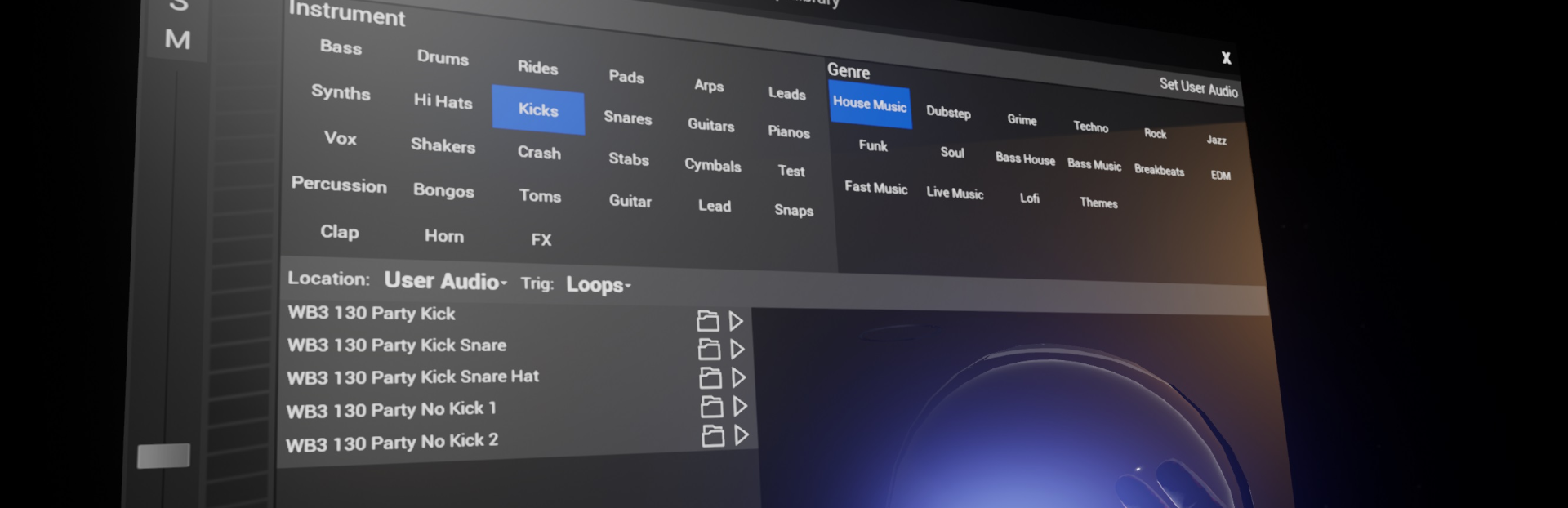
Although the old clip browser was fun, and massive! it wasn't practical finding and auditioning the clips you want.
The new clip browser adds:
- Keyword based searching (Snare/Kick/Bass Music etc..) Genre is combined with Instrument (So Snare AND Bass Music will display only clips that have both categories, Snare AND Kicks will give you both instruments)
- Type in a search term, this applies on top of the keyword based filters
- Filter by user audio and internal library
- Filter by Loops and One-Shots
- Click on the open icon to open a clip (if the browser is opened inside an existing clip, this will set the existing clip to the selected new clip)
- Click on play icon to play clip, Loops will cue on the beat, One-shots play immediately.
- Click 'Browse' in the properties to open the clip library on any existing clip. You can then preview/audition and load the sound directly into the current clip. Great for changing drum sounds already programmed up for example.

- User audio is now categorised as one shots vs loops on load
- User audio folder can be changed from the clip browser

Other fixes
- Moved advanced tutorial start buttons behind presenter
- Removed weird popup behind camera screen
- Fixed a crash when leaving world halfway through plugins enumerating
Fix for invisible popups on Vive and WMR
This is a change to the startup command line so no download required.
New features and fixes (magnifying glass on plugins, new tutorial)
v0.01.00.05 features and fixes
Features
- Set a custom VST3 path in settings
- Virtual desktop mode added in settings. This means popup menus are always visible when using Virtual Desktop or ALVR
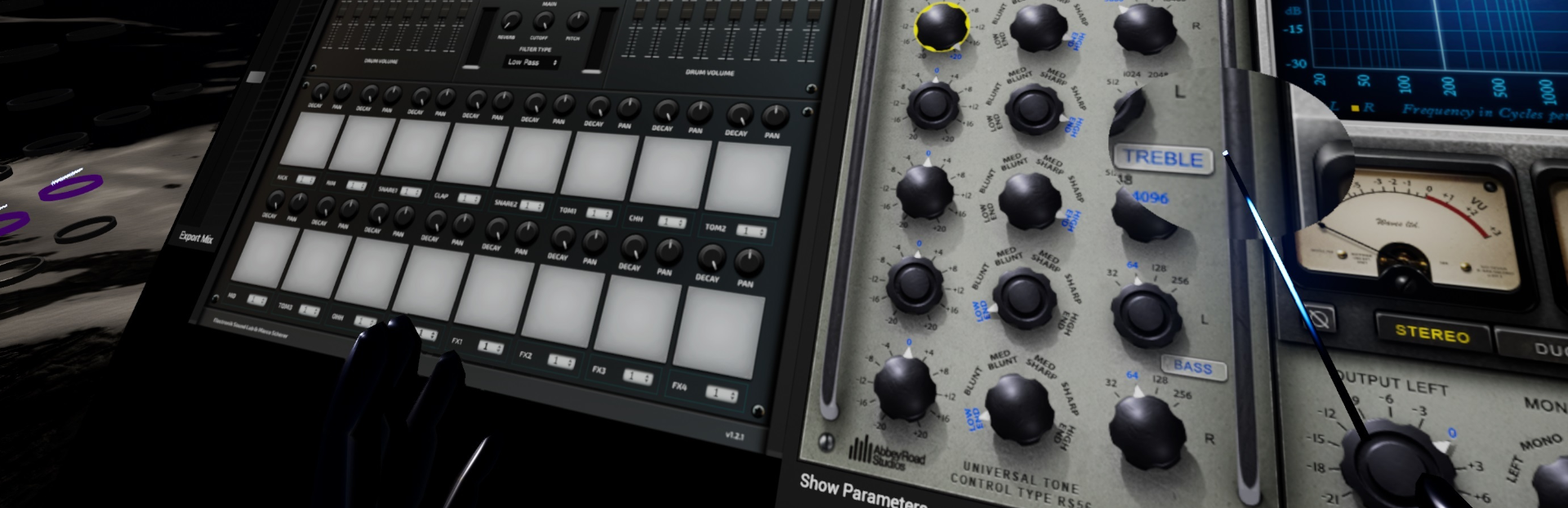
- Magnifying glass on VST3 UIs makes them easier to read, disappears on click
- Optional tool-tips on step sequencer, clips and click for play, stop and clip names
- Laser pointers now have better smoothed motion
- Moved HUD info display down below user's eye line, used to be above head height
- Added new main tutorial on rails. Accessible from the worlds menu as 'Main Tutorial'.
- New Tutorial - auto skips to next and doesn't auto repeat the same step
- New Tutorial - drums closer to user
- New Tutorial - step sequencer is no longer locked
- New Tutorial - avatar changed to speedball
- New Tutorial - labels for Vive and WMR
- New Tutorial - Removed video screens to shorten tutorial and as these were hard to click
- New Avatar with Tranzient logo on the chest
Fixes
- Mix output now stops on close
- User rotation with the joystick is harder to accidentally trigger
- WMR mode in steam fixes menus not visible (run in 'Windows Mixed Reality' mode from the steam play menu
- Cleaner screen shots for worlds
Mix export added
To access mix export choose 'Export Mix' below any fader in clip/item properties.
A mix export control will appear. Click start to start recording the stereo master output to disk, turn on and off any loops etc you want to export. then click stop to end recording the mix output.
Click on 'Show in exporer' to jump to the folder where the mixes are stored.
Hotfix release 0.01.01.02
- Camera brightness added to camera settings
- Menu system restyled in flat style more consistent with VR apps
- Avatar recorder highlight no longer full height
- Camera screen hit test size made shallower
- Click the joystick to go faster on Oculus, click both sticks will go doubly fast
- Fixed Wraith Avatar thumbs and fingers
- Secondary trig now works with electronic kits
- Fixed some VFX items not pulsing on trigger (they would play continuously when triggered)
VST3 Plugin Support is here!
VST3 Support is now active
What does this mean?
VST3 support means you can use any VST3 compatible plugin in Tranzient. This is for both audio effects and virtual instruments/synths.
The UI for the plugin is mirrored and can be controlled directly from VR. In addition, plugin parameters can be loop recorded and mapped directly to 3D motion controls for expressive performance.
In multiplayer, any users that have the same plugins installed will also see them in the session.
See https://www.kvraudio.com/plugins/windows/vst3-plugins/instruments/effects/free/most-popular for a list of free VST plugins.
Additional features and fixes
- Settings popups are now pinnable
- Arm controls are hidden in the camera output
- Avatar animations are restricted for the user's view only, but still visible in the camera and to other users in multiplayer. This means fewer obstructions to the user's view when moving around.
- Synth notes are now directly programmable into the step sequencer
- Camera can optionally run on rails with user-configurable speed, scale and position
- Audio FX bypass state is now saved and loaded with the session
- Mixer/plugin clock is now paused when HMD is taken off
- The Desktop window mirror can now be controlled from VR
- Clip browser smaller/easier to read
- Discord button in settings added to link directly to the Tranzient Discord invite.
- Fixed 3D control from motion controllers not mapping to scene audio FX parameters
- WASAPI exclusive mode audio driver support added - Works at 240 samples for Oculus (5ms), 256 samples with the Vive for low latency performance.
- VST3 audio FX available on internal synth
- Optionally physically modelled cables can be turned on so routing between the step sequencer and instruments easier to understand.
- Save/Load session now saves and loads global key and scale
- Choosing a user audio folder no longer pauses the game rendering