

Tunguska: The Visitation
Quick Bug Fix
Update 1.83-6 Patch Notes
Please let me know if you notice any problems with loading the game, since the format change required quite a lot of change to the code.
- Added in-game options to adjust grass render distance and density. You can lower these settings for slightly higher frame rates.
- Added a cheat code to generate a custom NPC into the game for your entertainment. You can actually write your own dialogue file with simple quest scripting. Later I will write a guide on Steam community to explain how to use it:
https://steamcommunity.com/sharedfiles/filedetails/?id=3255383110
Update 1.83-5 Patch Notes
Graphics Upgrade Is Here!
I'm proud to introduce to you the first batch of facelift for Tunguska! In this update, I added the following eye candies:
- Volumetric sunlight. Now you can enjoy beautiful sunrise and sunset, as well as some haze after the rain! This can be disabled in the options.
- Cloud shadows during overcast weather. Gone are the boring, washed out overcast environments; you will now see realist, moving cloud shadows that spices up the map! This can be disabled in the options.
- Increased moonlight and mist at night
- Rain mist and water splashes when you run during rainy weather
- Blood spatters! When you injure any NPC, there will be blood flying out and landing on the ground and the wall behind (if the gun is capable of exit wounds)
- During toxic fog in Lake Cheko, you will no longer see the boring, hazy static fog. Instead there will be yellow-green mist.
- When you kick anything, not just door/crates, you'll hear the thud and see dust coming out. Also added camera shake for kicking. Feels much better now!
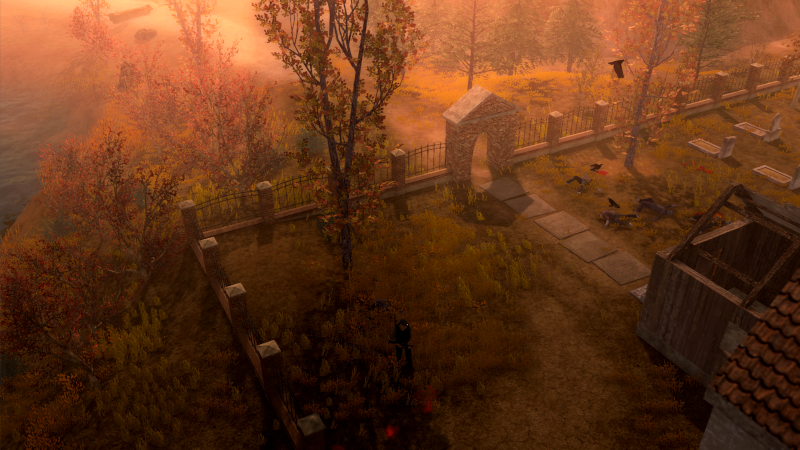

And there are a lot more updates and fixes in this patch:
- Fixed a bug with some assault rifles with PSO scope not able to aim at the head
- When you use mouse wheel to zoom in, you can also raise the camera angle to see further
- When you climb the silo in Ravenwood valleys, you will hear a different set of environmental sounds
- Fixed the problem with trees not being affected by fog from afar
- Fixed a problem with throwing mines/grenades and it lands right under player's foot
- You can now cancel the grenade aiming (holding RMB) by clicking LMB
- F1 grenade will properly cook when you are holding it in your hand and using G to aim
- The throwing bar indicator for F1 grenade and throwing knife will now say "Fuse" and "Rotation" to be more clear
- Fixed a issue with crossbow firing above the aim point
- Fixed a bug with NPCs not fading properly
- Fixed a bug with the Kraikretten house key disappearing if you drop it on the ground
- If you are trying to deliver a food order, and for some reason the customer is no longer there, the game will try to respawn him if there's an appropriate faction in the vicinity.
- Fixed a bug where if you refuse to help Jacob, you'll still get the journal entry to talk to him after marking all the anomalies
- Fixed a bug where your visibility while sneaking doesn't change by your movement
Respinning 1.83-3
Also in the upgrade, fog levels are increased slightly during rainy weather, and ambient light color / shadow intensity at night are adjusted.
Update 1.83-3 Patch Notes
- For Auto-Aim and Gamepad control schemes, when aiming down sight at an enemy, you'll see two arrows indicating whether the aim height adjustment is at the top end or bottom end. Use mouse wheel or Combo+Right Stick to adjust aim height.
- Fixed a bug with NPCs not able to throw grenades due to a null pointer error
Update 1.83-2 Patch Notes
- Fixed the HR1 recipe for Spanish
- Fixed a bug with journal page flipping when you type on the notes
- Added an audio distortion filter on each gun to make the gunshots more bright and punchy
- Now if you have unsuitable attachment installed (looking faded), the character no longer keeps on pulling out the weapon when you close the inventory
- Fixed a bug with Spanish language show displayed correctly for campfire dialogues
- Fixed a null pointer exception when mutants get hurt by anomalies
Update 1.83-1 Patch Notes
- Also, when repairing with wood and metal, it'll also have a minimum of 5 points of repair value.
- Fixed a bug where the rock of rejuvenation disappears
- Fixed a bug where if the secondary sidearm is showing up and you want to repair it with the kit, it tries to repair the primary sidearm instead.
Weapon Handling Improvements, Lots of QoL
Thank you for your patience! I have been working on a huge list of improvements and upgraded the engine to Unity 2019.1. Please let me know if you notice any problem after this update, since I added a lot of changes. Thank you!
- Fixed a bug with unread tutorials not showing up if there's already a tutorial being displayed. You will now see an icon flashing if there are unread tutorials.
- Added a "Auto Aim Threshold" option in the game if you want more challenge with auto-aim modes.
- Added new mutant animations reacting to injuries
- Improved the blood spatter of shotguns
- Ravens and bullet holes will no longer be lit by your red laser
- Reduced jitter on the arrow when using melee weapon with controller
- The visual recoil (camera shake) is now dependent of weapon types. Shotguns should feel more "punchy" now
- When you are reloading, you can jump to cancel it.
- Sniper rifles will more likely to knock the enemy back
- Weapons now have different critical hit chance
- Fixed a bug where if you hit a mutant, he might still hit you back even though their attack was interrupted by your hit
- When you transfer items to containers and stashes, they will stack when the container is filled up
- The whirlwind anomaly will emit a few flying leaves every once in a while to help you see them
- Added a sound effect when you are hurt by the whirlwind anomaly
- You can now use A/D left/right or mouse wheel to flip pages in the journal, orders, and discovery page
- When using the motorcycle, it will now list you destinations one map away, so you can at most skip two maps at once.
- When you injure a standing human/mutant when he's not aware, he will stumble
- Revamped the animations for throwing grenades with the quick throw key (G) to make them faster, and fixed a bug with character being stuck when trying to quick throw while holding melee weapon
- Fixed a bug with crouch-thrown grenades flying out from the wrong spot
- When using the controller, you have to hold Combo key to adjust the aim height (which now plays a clicking sound) so that you don't accidentally fix the aim to the head and miss a lot of shots.
- When using controller to craft, you can now put the cursor around the temperature slider and use DPAD left/right to adjust temperature
- When opening the serum lab, if you don't have the recipe clipbook yet and just have some recipe papers in your backpack, it'll automatically open one of them and you can use the arrow to cycle through them
- You can now use DPAD to cycle through tutorials when you open the tutorials page
Quick Bug FIx
I'm currently working on upgrading engine to Unity 2019, and then work on some improvements of combat feel.