

Tunguska: The Visitation
Massive Optimization Update!
It's been a while! I was working tirelessly on optimizing the game because I realized that it will only run on Xbox One at 25 frames per second lol. So I went back and reviewed pretty much all of my code and found many opportunities for improvement: duplicate function calls, inefficient data structure, workload not spread out over multiple frames, etc.
After this optimization pass, my own frame rate increased about 25%. I'd like to hear about your experience after installing 1.89 update :)
My goal is to make sure the game can run on a laptop. In the past I always thought that laptops couldn't run it smoothly due to lack of good video card, but this optimization pass told me that the bottleneck is on the CPU and not GPU (basically, my code sucked lol). So if you have a laptop you normally play games on, please let me know if Tunguska can run more smoothly now. Also, I'd love to hear if you saw improvements on Steam Deck :)
Finally, a few other changes included in the patch:
- Increased the amount of fish you get from grenade-fishing
- Planting your own garlic, potato, and barley will generate even more products
- Fixed several bugs caused by German translation
- New gunshot sound for AS Val and VSS Strelok! (they are essentially the same gun with different furniture)
P.S. In the last several days for some reason, Steam suddenly throttled the traffic to Tunguska, so I wasn't making much sales... It worries me a lot since my bread and butter depend on it. If you love the game, I'd super appreciate if you don't mind telling your friends about it, and I sure hope the optimization patch can make the game more accessible :) Thank you so much!
Update 1.88-4 Patch Notes
- Fixed a bug with respawned trees have 0 health and cannot be harvested
- Fixed a bug with 556 ammo not producing casings
Quick Story Scripting Update
Free New Weapon! And Save Game Size Reduction
Thank you all for your continued support! As a token of my gratitude, I added a new weapon to the game:
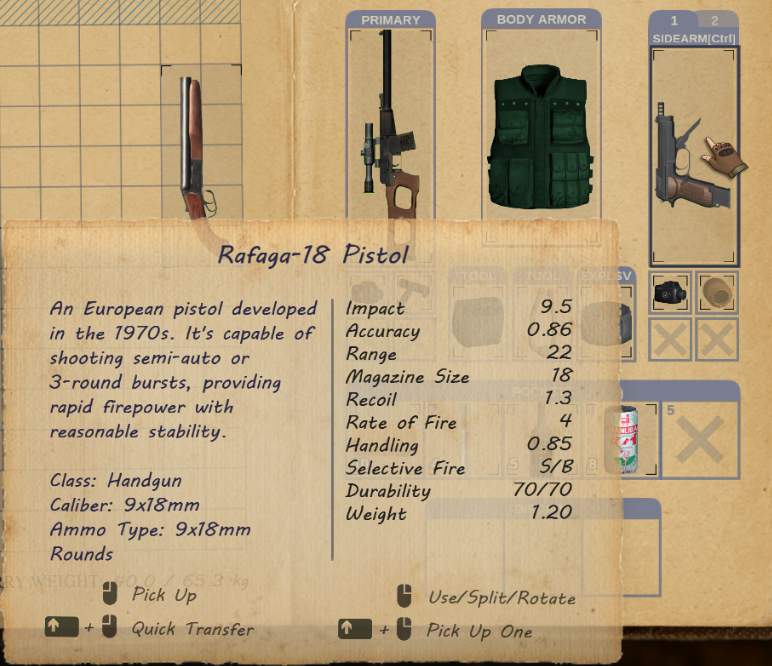
It's a Tier 3 weapon, which means you can find it on enemies at Lake Cheko and beyond, and also at times sold by Grigori in Lake Cheko.
In addition, to make pistols more useful, I have made the Wooden Shield available to use along side a pistol, just like the Iron Mike from Nightmare mode. So you can equip it on your primary/secondary slot while having a pistol on the other. However, the wooden shield has less bullet blocking capability than the Iron Mike. You can see that it now shows an Armor rating of 17. It can block most shotgun pellets and pistol bullets, but rifle bullets will go right through, although the damage to player will be reduced.
If you haven't used the Iron Mike before, the shield can only block bullets if you hold a pistol with it while aiming down sight and facing the attacker. However, you don't have to aim down sight to reduce damage from an explosive in front of the player.
Also, in this build I improved the json serialization which will reduce save game file sizes by over 60%!
Other fixes in 1.88-3:
- Fixed a bug introduced in 1.88-2 where the game will break when spawning baba yagas in NG+
- Fixed a bug where a newly spawned character will show its highlight through walls even when player doesn't have visibility to this character
- Fixed a bug where high quality fish and caviar will show double quality prefix
- Quality prefixes will now show up on the name tag of items on the ground
Improvements on Save Game Files
Save Game Atomization
When I wrote the save game system, I was actually pretty new to game dev and whatever I came up with was pretty rudimentary. It worked, but not in a resilient way. It's time to pay back the technical debts :)
The game allows player to save up to 10 "sleep slots". Each of these saves are contained in the OldSaves.json as a monolithic save file. It's not resilient to crashes and file corruption. For example, if the game crashes while saving to this file, the entire 10 past saves become unusable. It also makes game saving slow due to having to write 10 saves to disk every time.
In this update, it automatically breaks up the OldSaves.json into 10 individual saves under /OldSaves/ folder. This way, each time you save by sleeping, the game only needs to create the latest save game file and delete the oldest one. It also makes loading a bit faster by not having to load all 10 of them at once. This is particularly apparent when you have progressed further and your saves become larger.
In the upcoming updates I'll also attempt to reduce the size of each save game json file, but I have to make sure the atomization step works well first.
Other Improvements in 1.88-2
- More fixes for German translation (courtesy of sharzul!)
- Grigori in lake Cheko will list the three ammo types that he can convert, to avoid confusion
- Fixed a bug with throwing rocks/grenades/especially the landmine. When you use Hybrid control scheme and try to aim at a place behind you, the explosive will land a bit closer than you want it to be due to the misposition of "origin" the item flies out of your hand.
- There's a rock near the trailer house that allows NPCs to walk through. I moved it to somewhere else.
- You can now buy the radio for "Sound of Music" DLC in Slaughterhouse, if you wanna listen to your own blood-pumping battle music while slaughtering
Quick Bug Fix
I hope this update fixes this issue for folks in Europe! Unfortunately I cannot test it with my own system (even if I change the windows region to Europe), so please let me know if it fixes it for you! There can be multiple symptoms, such as item stats not displaying correctly, guns shooting ultrafast, NPCs only shooting semi-auto etc.
Thank you for your patience and support!
Weapon Firing Modes!
I know I have said previously that the last feature I wanted to add was the X-ray effect, but later I realized that someone made a mod on moddb to add a weapon firing mode feature :) But the mod had some issues with burst fire so I decided to just add the feature officially.
How Weapon FIring Mode Works
It's very simple and doesn't involve any additional key/button binding. Simply take your gun out, aim down sight, and then press Interact key (F key or A button by default). The current firing mode is displayed next to the weapon icon in the HUD:
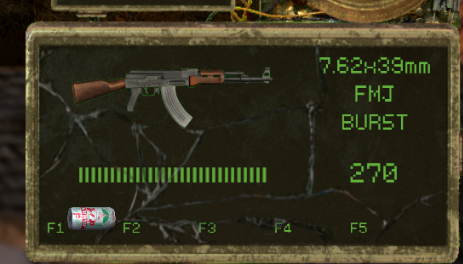
Also you will see in the weapon item's description which firing modes it supports, in this case the VSS supports S (semi auto) and F (full auto):

Now with this overhaul, the following guns have additional firing modes:
AKM: S/F/B
AK-74: S/F/B
M16: S/F/B
AN94: S/F/B
Free Weapon for 1000 Reviews!
Thank you all for writing the reviews and helping me get to the prestigious 1000 :) We are now at 887, and I want to make it fun - as soon as we hit 1000 review, I will release a free weapon in the base game (normal mode) :) Let's go!
Other Fixes Included in 1.88
- More fixes and improvements for German translation
- To make sure the important tutorial entries aren't missed, these entries will pop up a window requiring the player to confirm it, such as the warning for landmines.
- Added an improvement to faction job assignment: when player kills a NPC standing on guard, and then save/load, the game will not try to immediately fill this guard position with another NPC, because it makes the player confused: I thought I just killed that guy! Instead, the guard position will stay vacant until there's a guard-changing/relieving event, and then someone sitting by the fire will take up the post. Or, it'll get filled when the faction replenishes the dead NPCs.
- Added a ladder outside Station 11 train hangar to shorten the traveling distance going between Luxury House level and Ashinaka level
Update 1.87-9 Patch Notes
- In main menu, pressing Dpad will unlock controller cursor
- Fixed the misalignment of button/key mapping for German UI
- Improved the feel of controlling the quantity slider when splitting item stack using Dpad and right analog stick
- Fixed a bug with motorcycle travelling
- Disabled the motorcycle destination for Ashinaka Forest due to it can be exploited to skip the scripted explosion event
- You can now use A/D to cycle through destinations with motorcycle
Update 1.87-8 Patch Notes
- Fixed a bug where mutant AI still runs while player is outside the AI active range (which causes the wolves to kill all of the NPCs in zernaskaya when player is spending a long time in the cellar)
- Fixed an exploit that allows ingredients to be duplicated
Update 1.87-7 Patch Notes
- Yet another attempt to fix the bug where dead mutants might play the attack animation
- Fixed a bug where toxic fog shows up when player is in underground