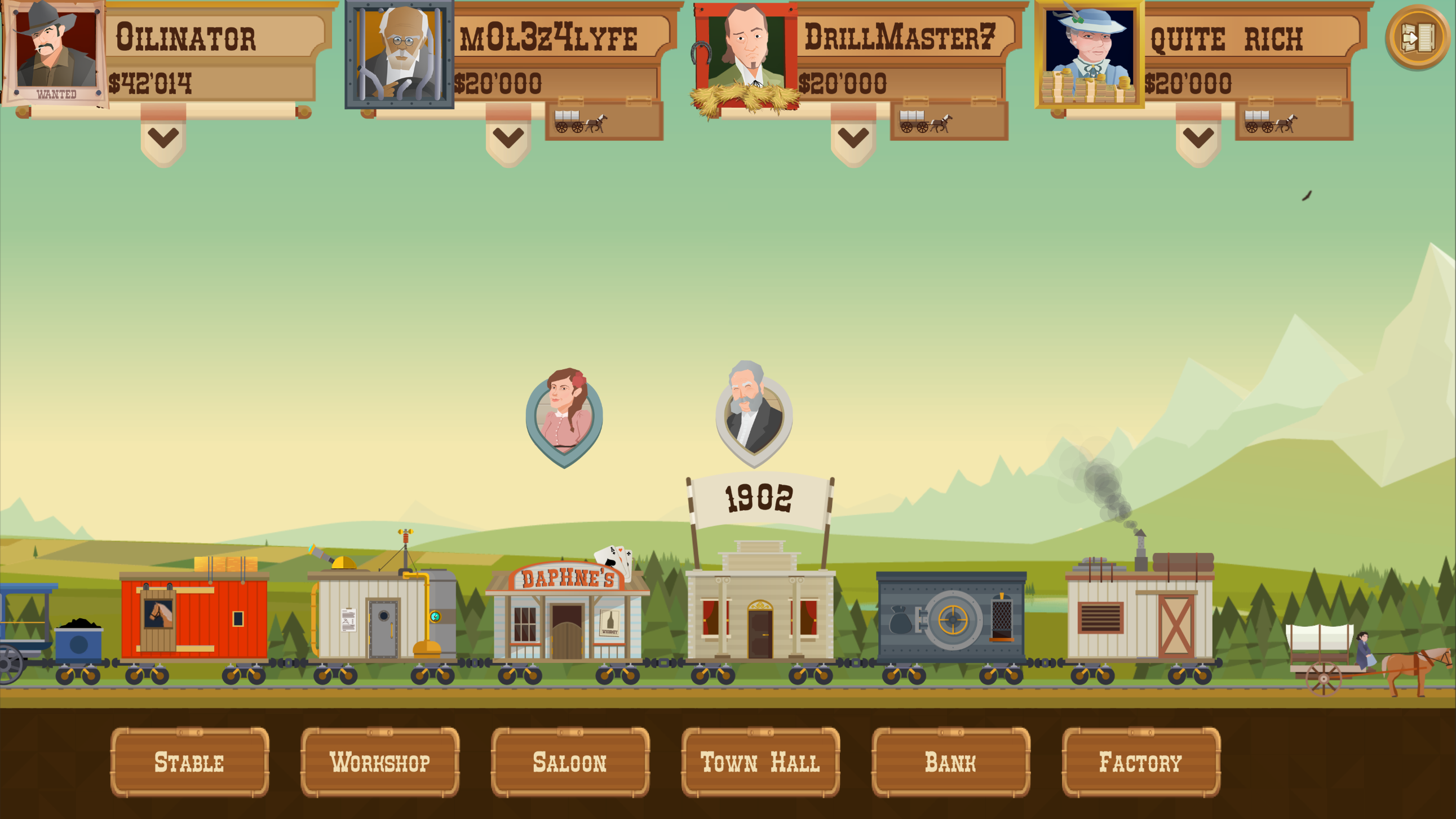
Today's update brings some long needed bug fixes and tweaks. Many thanks to everyone who reported bugs on the Turmoil Steam Community boards. Please know that even if we do not respond to every post, we do read them and your feedback is much appreciated!
Features
Campaigns, single levels, challenge levels and player progress are now backed up before saving a new one. The backup is loaded in case the original is corrupted or no longer exists.
Added Steam Rich Presence which displays your ingame status in the Steam friends list while you are playing. The status indicates when you are playing a campaign and in what year, whether you are in a level, and so on.
You can now view your bought saloon offers instead of them disappearing from the list. This means you can now review the saloon offers that will be active for the next level.
Big bug fixes
The bonus island in the Turmoil and Heat Is On campaigns no longer always has the same layout.
The bonus island in The Heat Is On now actually contains magma.
Fixed issue where you could not resume level progress for bonus islands.
Playing the bonus island after the end of the game in The Heat Is On no longer crashes the end of the level.
In level: Fixed an issue where you could sometimes not close dialog boxes when the spillage message was displayed behind them. This includes upgrade introduction messages and the Left/Right inc. deal popup.
Fixed an issue where a corrupted level in progress would make it impossible to load an existing campaign.
The “you have not played the tutorial” popup when starting a challenge level is now shown only once instead of every time.
Small changes
Exit game button now shows a single confirmation popup instead of two in a row
Highscore menu: always show "Top scores" as default tab (since its cached)
Elbow now shows different localization tag for toggle tooltip when ctrl+click is enabled.
The silo tutorial now displays a message when you cant place a silo instead of softlocking.
The super silo upgrade button hover text is now properly localized.
Costs are refunded after being forced to buy a mole or scanner in the tutorial.
Made the saloon offer price red and ok button disabled when you dont have enough money
Miscellaneous changes and fixes
Updated localization files.
You can now close the text in the land auction by clicking on the map.
Time in the cloud conflict popup is now displayed in the correct local timezone.
Time and date in the challenge highscore menu is now display in the correct local timezone.
Town: fixed an issue where the factory tutorial could block all input while the bankruptcy popup was displayed at the same time.
Town: can now click the player/rival upgrade scroll to close it, instead of only the arrow button.
Fixed several issues causing the loading screen to get stuck when an error occurs.
The loading icon for online communication has been changed from the Gamious logo to a set of rig wheels.
Fixed a display issue with the candle in the Underground.
The supersilo upgrade price tooltip color now updates from red to white after gaining enough money to buy it.
Fixed issue in the Underground building where the shutter would not open to the correct height after the game is finished.
Completion of the tutorial is now properly stored in the player’s progress savefile.
Fixed bug: if you open the town hall after the game has ended in The Heat Is On, you can no longer click on the other buildings.
Fixed an issue where playing Higher Lower after the bonus island does not reset the Higher Lower game.
Multiplayer beta signups are now open!
Dear oil entrepreneurs,
It's finally upon us: Turmoil Multiplayer has reached the playtesting phase! If all goes well, you'll all be able to play Turmoil campaigns online with friends and adversaries in the near future. But of course we want to make sure everything is in good order before we release this goodness onto our beloved players.
And we could use your help with this! Once the playtest build is live, a button will appear on the store page, which you can use to sign up as a tester for Turmoil Multiplayer. There will be a limited number of volunteer playtester spots available, and if you sign up via the button, you will receive an invite. If you decide to join the playtest, start playing and share your feedback via our questionnaire!
The major things we want to test are:
Setting up a new game
Customising your character and frame
Playing the Multiplayer campaign (of course)
Multiplayer Land Auction
Multiplayer Stock Auction
Recaps showing the outcome of the previous round and auctions
Watching replays from your adversaries' turns
The time it takes to complete a turn
And hopefully any final issues you may run into :)
Once we've been able to assess your feedback from the playtest, we will iron out the final kinks, do another quick round of playtesting if we need to, and hopefully share Turmoil Multiplayer with you soon! And remember: it will be a free add-on to the classic campaign, so it will be there for all Turmoil players to enjoy.
For now: thanks for your patience so far, and for helping out to make the game even better! We hope you will be invited to join the playtest soon!
In the meantime, if you want to know more about the design for Multiplayer, please check our in-depth blog posts here:
Welcome to the final pre-release development blog of the multiplayer update. We’re really thankful for the positive interest so far. In today’s post, we are going to answer some questions that appeared in the comments on previous blog posts. After that, all that’s left is actually releasing the gamemode!
Multiplayer part 5: questions & answers ← You are here An overview of all the questions so far and our answers.
When is it expected to come out?
We’re planning on doing a Steam Playtest in Q1 of 2022. The release date is not known yet, it depends on how much has to be improved after the playtest. The playtest will be announced on the Steam blog.
Will the game support local multiplayer?
There are no plans for supporting local multiplayer or Steam Remote Play Together.
Will there be options for friends-only 2-3 player games with AI bots filling the other slots?
You can create private matches with friends. A solution to fill the other slots with bots or for playing with less players is in the works.
Can we get more than 4 players in a match?
The campaign is currently made for a maximum of 4 players.
Will there be more maps to play? / Will there be a full campaign mode to play with friends?
It’s possible we will release a map selection option for private games, including the full unabridged campaign and The Heat Is On. But don’t expect it for the initial release. We also have a few concepts for new types of multiplayer maps already.
Can we get minigames in the town screen for when we’re waiting?
You can play a single game from the menu while waiting, or close the game and Steam will send a notification when your game is ready again.
Won’t the expert characters be unbalanced in multiplayer?
Character selection in multiplayer is purely visual, you don’t get any special abilities.
Does the stock auction require all players to be present? If so, what if someone leaves? Will the game not be able to progress until all players are present?
Everyone bids on stocks and land in their own time. The game progresses as soon as the last player makes their bid. You get a recap of the auctions when you open the game again. More about this in the part 2 blog post: https://steamcommunity.com/games/361280/announcements/detail/3126057181561744166
Will the game support cross platform multiplayer with GoG?
All the desktop versions of the game are planned to connect with the same servers. As soon as we have a solution for managing player accounts in GoG and other platforms they can play with everyone else.
Is there a Discord server for the game?
There’s a Gamious Discord community. You are all very much welcome to join it here: https://discord.com/invite/ZQcQ7bQYTW
Hopefully this answers all your most pressing questions. Thanks for reading!
Multiplayer part 4: customization and matchmaking
Hello and welcome to the last multiplayer blog post. The topics of the day are player portrait customization and matchmaking!
Multiplayer part 4: customization and matchmaking ← You are here Cosmetic player customization and details about how you actually join a match.
Multiplayer part 5: questions & answers An overview of community questions that were answered previously. Make sure to put your questions in the comments!
Player customization
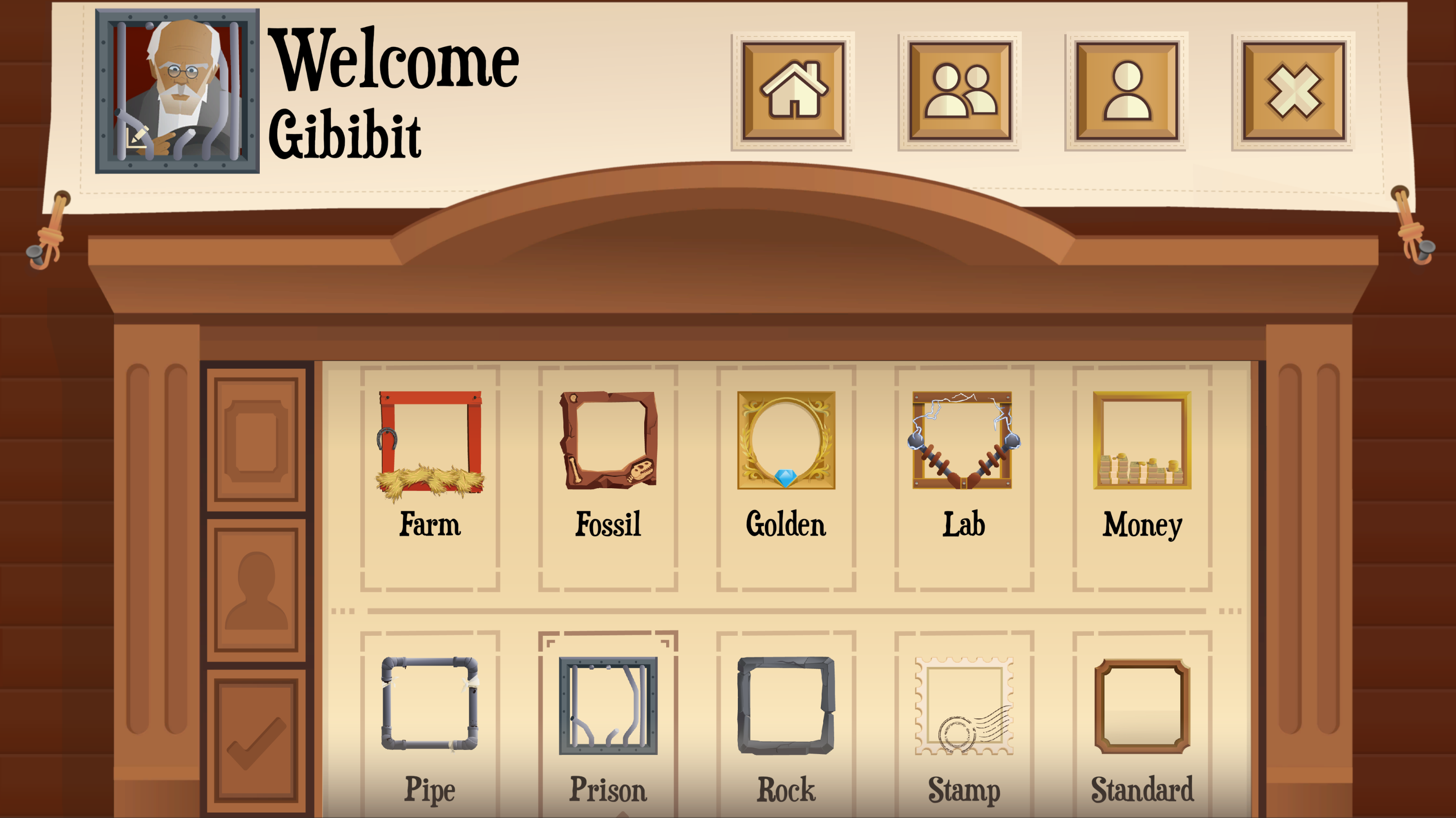
In order to distinguish the players in a multiplayer game, we needed to make sure that you don’t look the same. We firstsimply assigned a random character to each player (Blanche, Joshua, Daisy or Ricardo). But this was pretty boring, and you would be playing as a different character in each match. Instead of this, you can now pick your own portrait, and we added a bunch of unique portrait borders as well.
Henry busting out of prison very politely with hat in hand is my favorite portrait so far.
You might notice the character customization menu is located in a completely new multiplayer menu. I hope you like it, because you’ll be seeing a lot more of it!
At the moment there are 12 characters and 11 portrait borders to choose from. The characters include all the classic, expert and Heat Is On playable characters and 3 completely new characters. We’ll certainly aim to add more in the future!
All the portraits are available from the start without any additional unlock conditions (or payment, no loot boxes to be seen here). We initially played with the idea of unlocking certain portrait borders by completing multiplayer matches or getting other achievements. In the end we decided against this.
We might reconsider unlock conditions for portraits added in the future. There is a certain prestige to using a cosmetic that no one else has access to, but we don’t want to turn picking your portrait into a negative experience either. Let us know how you feel about this in the comments.
Matchmaking: joining a multiplayer match
Let’s talk a bit about matchmaking. How do you actually play a match and who will be your opponents?
Starting a new match is as easy as pressing the “Play now!” button. You will join a match instantly.
In the current system you can join a random online match, or play with a selected group. After pressing the “Play now!” button, you don’t have to wait in queue or anything like that. You join a match, get land from the mayor, and play your first level and auctions. Even if all the player slots aren’t filled yet.
Of course you can’t progress further than one level until all the player slots are filled and other people have played their first level as well. Just close the game and you will get a Steam notification when it’s your turn again. This might take a few minutes, or a day. So don’t plan your day around playing online Turmoil unless you’re playing with friends.
Joining multiple matches
Playing just one match of Turmoil at a time might be fun, but what if every turn is taking 1-2 days and that just doesn’t scratch your oil drilling itch enough? The solution is simple, you can join multiple matches and play them all at the same time.
The lobby is the first screen of the multiplayer menu and shows you an overview of all the matches that you participate in, in order of importance.
When playing multiple matches, don’t forget to check which upgrades you purchased and what your opponents are up to. You can always refresh your memory by taking a look at the history.
Skipping a turn
While it’s not a large obligation, sometimes life gets the better of you and you simply don’t have the time to attend to your multiplayer match in time. There two things you have to keep in mind when skipping a turn:
1: If you take longer than 2 days to take your turn, you automatically get $0 profit, a random plot for $2’000, and will bid only $1 at the stock auction.
This allows the game to continue and prevents endless stalling. There is no punishment for stalling and skipping a turn. However…
2: After not playing for 3 turns in a row, you will get kicked from the match and it continues without you. This counts towards your player statistics as if you conceded the game.
This brings us to the topic of conceding (leaving a match).
Conceding the game and repeated concede punishment
When deciding to join a multiplayer match in any long-form game, you are expected to play until the end. Conceding in a Turmoil match is always an option, and will not be punished when used sparingly. However, abuse of the concede game option will be noted.
After conceding too many matches compared to finishing them, you will be put in a separate queue with other players who share the same fate.
This is to prevent the main pool of players from deteriorating into meta-strategies where you leave as soon as you feel like you can’t get first place anymore. It’s also required in order to keep griefers/trolls from polluting the pool.
Playing the game is not just about winning. When you’re at the bottom, adopt a different playstyle and try to aim for third or second place. Aside from doing that, you can still influence the game by saving up money and pressuring your opponents into bidding more on the stock auction.
In short: Don’t be a sour-puss! Keep some perspective and don’t turn the game into a grind of trying to get a 50% win rate or some other arbitrary statistic. You can’t win 'em all!.
Playing with friends
For those who don’t want to deal with the shenanigans of playing with random people online, there is also a “Custom game” option where you can invite your friends.
Creating a custom game. You can invite players by name or use your in-game friends list.
You can only start a custom game when you have a full group of 4 players. We’re still considering how to handle less than 4 players.
Closing words
As always, let us know if you have any suggestions, we’ll be posting our answers in the Q&A post next week. And if you’re not sure how you feel about any of this, you can sign up for the Steam playtest once it goes live and give feedback based on your actual game experience.
Multiplayer part 3: game history and end-of-game
Hello all and welcome to part 3 of the multiplayer development log. We will be showcasing the match statistics available during a multiplayer campaign. Today’s screenshots are all from a real multiplayer match, played internally.
Multiplayer part 3: game history and end-of-game ← You are here A look at in-game player statistics and the History page.
Multiplayer part 4: customization and matchmaking
Multiplayer part 5: questions & answers An overview of community questions that were answered previously. Make sure to put your questions in the comments!
During a match it is helpful sometimes to take a look at what has happened so far. Maybe you are playing multiple matches at the same time and need a refresher. Maybe you want to estimate your opponents’ next move. Or you just like to reminisce about the match events.
The history page
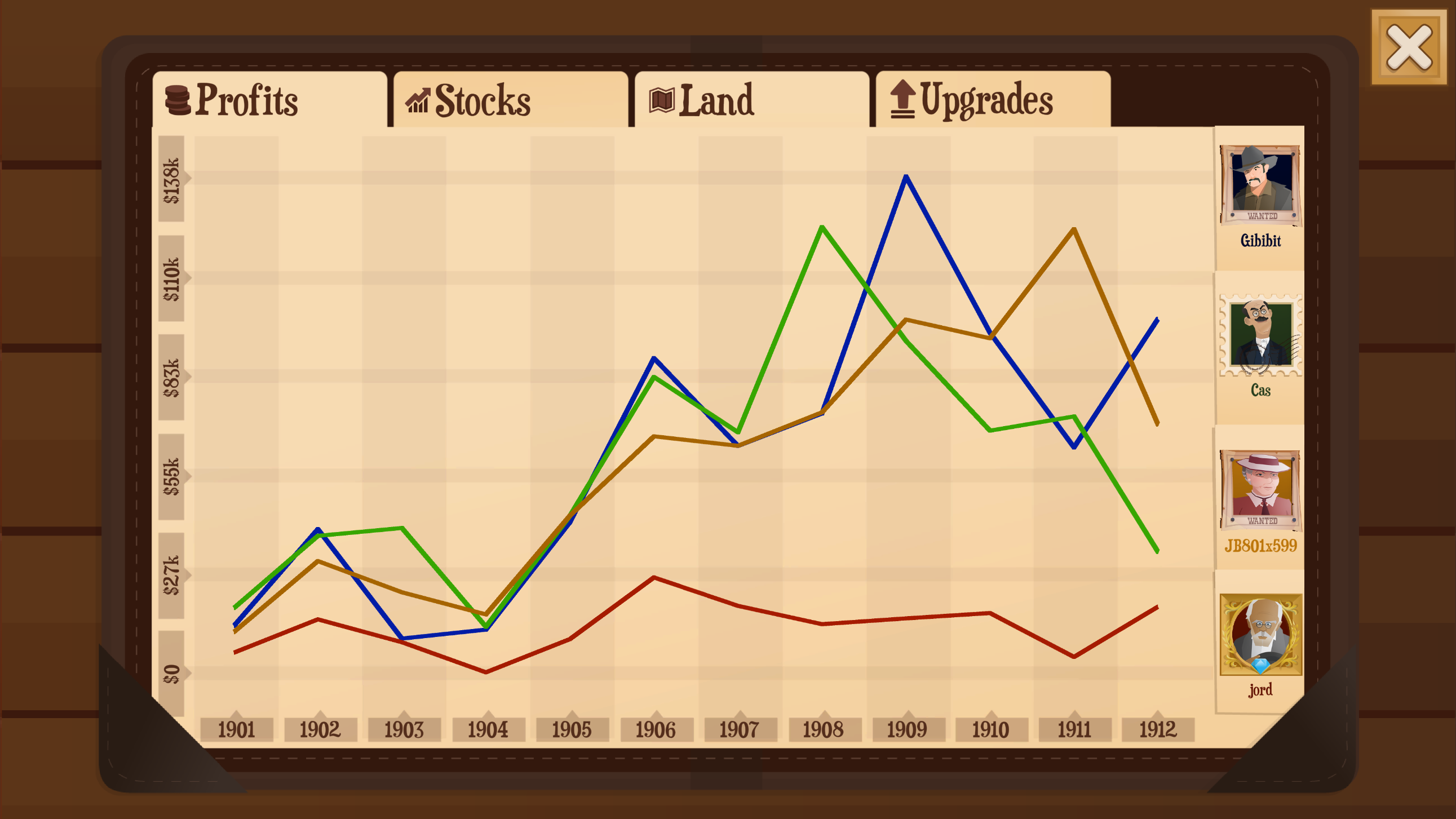
Introducing the history page. The match history will be accessible from the townhall, showcasing the statistics of the match so far. The four history categories are Profits, Stocks, Land and Upgrades.
First off, the Profits history gives a nice overview of how much money has been earned by everyone each round. Not doing too great on stocks so far? There’s no shame in gloating about that one round where you beat everyone out on profits either way. If you’re the strategical type, you can glean information about your opponents off this page by cross-referencing it with the other pages.
Next up is the Stocks history page. The line chart represents the number of stocks owned by each player, and the money stacks the offer made to win the auction.
This screenshot taken from one of our internal test matches showcases a dangerous and bothersome phenomenon. Inflation! Since human players earn more money than the rivals in the average single player campaign, the stock prices skyrocket rather quickly. Beware of this, and don’t be afraid to shell out some extra cash to win an early auction. It might save you later on! Be wary though, in doing so you will yourself become an accessory to inflation.
The Land Auction history. It shows you how juicy the oil plots that everyone digged have been. And of course what they were willing to pay for it. Don’t make the mistake of directly correlating the oil supply values and auction bids though! The players didn’t know the exact oil values when making their bid. The bids are quite useful for determining how high players are willing to go though.
As you can see, in our test match no-one was willing to bid that high for land. But being picky can make a big difference in the amount of oil you get! The potential profit difference between a plot of land with 45,000 or 55,000 barrels of oil is much more than $2,000. So don’t be afraid to follow the inflation when bidding on land. Getting the best plot counts double. More oil for you, less for them. You can have your milkshake, and drink it up too!
Finally, the upgrades history allows you to see what upgrades have been bought in each year by a player. It’s not necessarily useful to the match at hand, but you can at least use it to copy someone else’s starting upgrades for your next match if you're not happy with how your initial level plays out. As usual, you can still view the total upgrades purchased by clicking the scroll in the town.
The end of the game
After the final auction concludes and the winner is declared, you get to relax for a moment. Sit back and watch the end-of-game cinematic, where your stats scroll by one final time and your achievements get celebrated.
With the dust settled, your match stats get added to your profile. Don’t mope if you didn’t win. After all, what counts is that you had a good time.
Thanks for reading! Remember that there are 5 blog posts planned in total. The last one will be a Q&A where we answer as many questions as possible, so make sure to ask away in the comments. The multiplayer Steam playtest is still planned to be held in Q1 of 2022. Until the next one!
Turmoil for Android and iOS out now!
Dear oil entrepreneurs,
It’s finally here! Leiting Games and Gamious proudly present Turmoil for Android and iOS. Turmoil for mobile contains the full experience you know and love, adjusted for touch screens with zoom, tap, and swipe inputs specifically designed for phone screens. Additional features include:
Android tablet and iPad support
Classic and expert campaign
The Heat Is On expansion pack, with normal and expert campaign
Single game mode
Daily Challenge mode with leaderboards. You read that right, daily!
Save & Continue functionality. Automatically saves when minimized.
COMING SOON: Multiplayer gamemode, play a campaign against your friends!
The game is available as a free demo with an in-app purchase for the campaign and for the DLC. Pay once, play forever.
Download for Android: https://play.google.com/store/apps/details?id=com.ltgames.android.oil Download for iOS: https://apps.apple.com/app/turmoil/id1485507408
Experienced desktop players might want to start with playing the first few campaign tutorials, in order to learn the mobile controls.
Happy drilling!
Multiplayer part 2: a match in action
Hello and welcome to part 2 of the series where we reveal the contents of the soon-to-be released multiplayer gamemode.
Multiplayer part 2: a match in action ← You are here
Multiplayer part 3: game history and end-of-game
Multiplayer part 4: customization and matchmaking
Multiplayer part 5: questions & answers An overview of community questions that were answered previously. Make sure to put your questions in the comments!
Keeping tabs on the competition
Last time you saw what it will be like to play a round of the multiplayer campaign. While playing your own levels is fine and dandy, you also need to know what your opponents are up to. How else are you going to decide how much to bid on the auctions?
Enter the round recap, which happens once each turn. The round recap contains three phases, showing you how much money they earned in their previous level, the distribution of land, and the winner of the stock auction.
The level recap
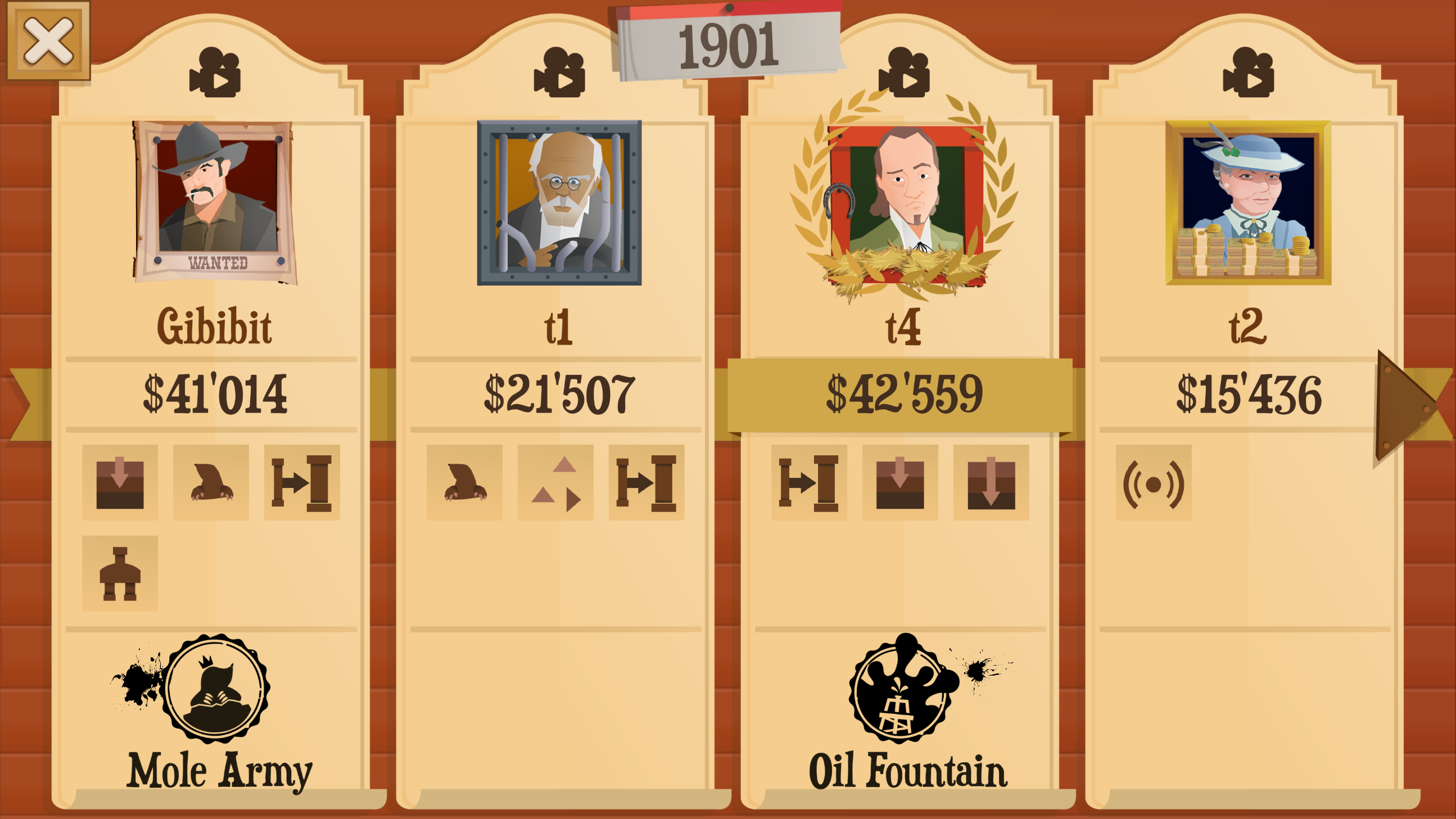
Example of a level recap - well done t4!
The first thing you get to see is the level recap. It reveals important information about your opponents, like the amount of money they earned and which upgrades they purchased. You can also view a replay of their level if you’re curious. Watching three replays every round is a bit much, so there are stamps to help highlight all kinds of interesting events that might transpire in a level.
Note that this is a real screenshot of an internal version of the game. We could record a GIF showing the animations but we don’t want to spoil everything!
The land auction recap
Example of a land auction recap after it has ended
Continuing to the next phase we arrive at the land auction recap. Just like in single-player mode, the player with the lowest money balance at the start of the round gets to make the first bid. The players will keep bidding automatically according to their previously assigned priorities, until everyone has a plot of land.
A notable observation here is that the first area has only one plot of land for each player. These first area plots are free of charge and will always contain the same amount of oil in a given game. Similar to single-player, the amount of oil per plot is based on the plots close to it. A juicy plot indicates that anything close will likely also be good, even if the plots are separated by an area border!
These two recaps are both for the same in-game turn, but they have a different year indicated at the top. What gives? Each turn, you play a level on the plot that you bought in the previous turn. This means that the level recap is for the previous year, and you’re viewing the land auction for the plot of land that you get to play in the current year. Don’t worry if this confuses you, it’s not that important to understand the exact chronology when playing.
The stock auction recap
An animation of the stock auction recap
Now for the final phase, the stock auction. There’s not much to say here! This recap reveals everyone’s offer, like someone offering $50,000 too much for what could have been a cheap share. The winner takes all, and all other players get a refund. In multiplayer, the stock auctions start right away after having played the first level. You might only have enough money for either upgrades or stocks, so choose wisely.
After getting up to speed with the competition, the game is on. Everyone gets to dig into their new plot of land, and the bidding starts anew. Don’t forget to buy upgrades!
Closing words
As usual, discuss below, we love to read your reactions. Would you like to know more? You can catch up on part 1 here, or come back for a new post in a week’s time. See you then!
Multiplayer part 1: an introduction
Hello everyone, this is Herman A.K.A. 1000 Gibibit, lead programmer on Turmoil.
We've announced multiplayer for Turmoil a while ago, and now that we're close to finishing, we'd love to tell you a bit more about it. So, welcome to a new series discussing the contents of the upcoming multiplayer update. In the coming weeks we will be going over several facets of multiplayer explaining the gameplay and design choices of the new game mode. This is a more lengthy format than your regular patch notes post, so feel free to skim the post if you’re not into that.
First off, a roadmap of the posts that are coming up:
Multiplayer part 1: an introduction ← You are here A look at what the multiplayer campaign is and what a turn of playing looks like.
Multiplayer part 2: a match in action
Multiplayer part 3: game history and end-of-game
Multiplayer part 4: customization and matchmaking
Multiplayer part 5: questions & answers An overview of community questions that were answered previously. Make sure to put your questions in the comments!
The conceiving of multiplayer
Several players have requested multiplayer in the past, by asking about it on the forums. Some of those posts go back as far as 2015! The answer was always the same, we did not have the resources to start an ambitious project like this. So how did we end up where we are now?
You may remember that multiplayer was first announced back in September 2018. And before that, we already started working on the “remake” of the game in May 2018. That remake is in fact the 3.0 version of the game that is live on Steam. Around this time we were in a better position to take risks, partly thanks to the publisher for the mobile version of Turmoil, Leiting Games, allowing us to get started on designing the new online gamemode. More news about Turmoil on mobile soon!
In the initial brainstorms we came up with some crazy ideas, like a giant map where you would be able to drill on plots uncovered by the whole community, and invest as a group into rails to reach new areas. While this sounded really cool, we did not feel like this type of gameplay would be very well connected to the existing game. There were some other ideas as well, but in the end we compromised and simplified, two disappointing words for what is in fact a very exciting result!
The multiplayer campaign
The gamemode we settled on can be best summarized as follows:
An online version of the 4-player campaign, shortened to 12 levels instead of the regular 40
The normal campaign, but multiplayer! Meaning each of the AIs is replaced with a real player. All the players have to compete for land and shares in auctions, and the land you buy will be drilled for oil as usual. Whoever gets more than half the shares first, wins!
Because you are now playing against other people, the game is turn-based. Every turn you start by playing a level, and afterwards you bid on the land and stock auctions. This repeats for a maximum of twelve turns, until a winner is declared. You perform your turn in your own time, which means the other players might not be at their computer while you are offering on stocks, and vice versa.
The multiplayer town - the background is the same as in the classic campaign for now
You can see some tid-bits here that are unique to the multiplayer campaign. The player status below the names (in this case a wagon) indicates what your opponents have to do to finish their turn. Of course, there is a brand new map to drill just for the occasion.
The new map - you start at the top left next to the train
The multiplayer map contains 12 plots for every player, so a total of 48 plots. A free starting plot in the fertile lands, three plots in the rock-filled desert, four plots of gas-boosting action in the plains, and finally a nail biting finale in the harsh snow area. Because the map is much smaller than usual, all upgrades are reduced to about half-price. Your starting balance is still the usual $20,000.
Now that you have to bid against other players, the land auction does not happen in real-time anymore. Each player sets up their offers, and only after everyone has made an offer on four pieces of land, ordered by priority, the auction takes place. Placing an offer looks a little like this.
Offering on land
Instead of overbidding other players as the auction happens, you have to decide your maximum bid on each plot. When the actual auction begins, you will automatically make an offer on your top priority, starting at $2,000. Anyone else that has the same plot as top priority, will keep outbidding you until one of you has reached their maximum bid and continues with the second best plot.
Like in the singleplayer campaign, the stock percentage determines who wins the game. Stock auctions start right away after playing your first level, so you can’t just cruise along and buy every upgrade you want! Some strategy is involved, and we’re sure you will figure it out once the game is out there.
Offering on stocks
Similar to the land auction, you have to make a blind offer. Contrary to the land auction, the amount you enter is always what you pay if you win, so you can’t just bid your entire balance. Blind bidding may seem dull, but it was actually quite intense in our playtests. It introduces poker-like situations where you can sometimes get stocks for cheap, and other times force your opponents to bid unreasonably high just by having a lot of money in the bank. Note that you do not know the exact amount of money that your opponents have in the bank. This is only revealed after each turn has completed. More on this in the next blog post.
Turn-based versus real-time addendum
One issue we’d like to address but which did not fit in anywhere else is the choice of a turn-based game versus a real-time game. Some of you might not have a problem with the online mode being turn-based. Let’s be clear, you don’t play completely in order. Everyone can play their level for that turn simultaneously, and offer on the stocks and land simultaneously as well. This makes it an asynchronous turn-based game.
But why not full real-time? Just give everyone a limited timer of 15-20 minutes to take their turn and you can play the entire campaign in one sitting! This is simply not feasible. With the multiplayer campaign reduced to 12 levels, a full campaign takes about 3 hours to play. Turmoil is still a casual and relaxing game at heart, and having to play 3 hours in a row does not fit in with this vision. So we stuck with turn-based, which honestly is a perfect fit and just as exciting to play. Only with a bit of patience required.
To close
We’d like to leave you with a small teaser to go. The public Steam playtest for the multiplayer playtest is planned to be released Q1 of 2022. Just like the 3.0 playtest, that means you will be able to sign up for it on the Steam store page and have a random chance to be selected to play.
That’s all for now folks. This post mostly explained how multiplayer worked from the current player’s perspective. Next time we’ll explain how you get information about what your opponents are up to!
PS: if you're reading this in your browser, you can view any of the screenshots above at a higher resolution by using right-click -> open in new tab.
3.0.39 - Getting your campaign saves unstuck
Dear oil magnates,
Today we bring a small update that prevents your campaign from getting stuck due to bugs. Of course we always try to solve bugs before they reach you, but when one manages to slip through it is better to have a fail-safe.
Corrupted levels workaround
The game will now delete your level progress if it detects an error while loading the existing level. This prevents your campaign from getting stuck on a corrupted level save, instead of reloading the corrupted save every time you try to continue the campaign. Your campaign save will stay intact when this happens and you can retry the level.
3.0.38a - AI hotfix and a shortcut key for purchasing town upgrades
A small hotfix to yesterday’s update to fix some minor bugs.
Changelog
The campaign AI will now purchase upgrades in a logical order again, which may slightly impact difficulty. Shout-out to Stuff+ for pointing this out. Yes, the AI does need to purchase upgrades in order to improve their profits.
Town upgrade scroll tooltip now appears on the correct position for resolutions other than 1920x1080
You can now use the enter key to purchase upgrades in town when selected.